


 비디오 컨버터 궁극
 스크린 레코더
 비디오 수리
 안전한 다운로드
궁극적으로 Renderforest에서 내보낸 비디오에서 워터마크를 제거하는 방법
Renderforest는 인트로, 아웃트로, 제목, 광고 등을 위한 우수한 애니메이션 템플릿의 완전한 팩트입니다. 처음부터 시작하거나 여기에서 사용 가능한 템플릿을 사용할 수 있습니다. 비디오 편집의 전문가가 아니더라도 이 웹 플랫폼을 사용하면 여전히 이를 극복할 수 있습니다. 사용 및 최적의 이점으로 인해 많은 사용자가 구독을 사용할 경우 고품질의 효율적이고 호환 가능하며 안정적인 디자인을 만들기 위해 이 플랫폼을 선택했습니다.
따라서 여기에서 동영상을 편집한 뒤 회원 가입만 하면 무료로 내려받을 수 있지만, 워터마크가 포함됩니다. 이 워터마크 때문에 이미 이곳에서 영상을 내보낸 사용자나, 이 도구의 구독료를 지불하기 어려운 많은 사람에게 문제가 됩니다. 아래에서는 조사 과정에서 모은 가장 유용한 도구들을 활용해 Renderforest 워터마크를 제거하는 방법 튜토리얼을 정리했습니다. 이 글의 다음 부분을 계속 읽으시면 그 방법을 모두 공유해 드리겠습니다.

1부. Renderforest 비디오에서 워터마크를 제거하는 효과적인 방법 3가지
FVC 비디오 컨버터 궁극
FVC Video Converter Ultimate는 Renderforest 워터마크 제거 방법을 단계별로 안내해 줄 수 있는 뛰어난 동영상 워터마크 제거 프로그램입니다. 이 도구를 사용하면 번거로움 없이 영상 속 워터마크를 제거할 수 있습니다. 다른 도구들과 비교했을 때, 이 궁극의 도구는 AI 기술을 기반으로 동영상의 워터마크를 제거할 수 있는 강력한 기능을 갖추고 있습니다. 또한 어떤 형식의 동영상을 업로드하더라도 워터마크를 제거하는 데 있어 가장 뛰어난 도구입니다. 이 도구의 장점은 무엇일까요? 복잡한 기술 지식이 전혀 필요 없다는 점입니다. 아래의 간단한 사용 가이드와 단계만 따르면 Renderforest가 영상에 삽입한 워터마크를 손쉽게 제거할 수 있습니다.
1단계. 먼저 데스크톱에서 알맞은 다운로드 버튼을 클릭해 소프트웨어를 내려받으세요. 다운로드한 파일을 클릭해 설치한 뒤, Start Now를 눌러 프로그램을 바로 실행합니다.
Free DownloadFor Windows 7 or laterSecure Download
Free DownloadFor MacOS 10.7 or laterSecure Download
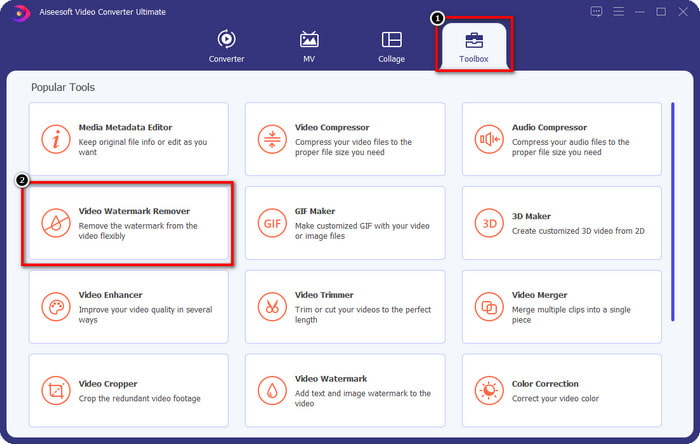
2단계. 프로그램을 실행한 뒤 Toolbox를 열고, 그 안에 있는 Video Watermark Remover를 클릭합니다.
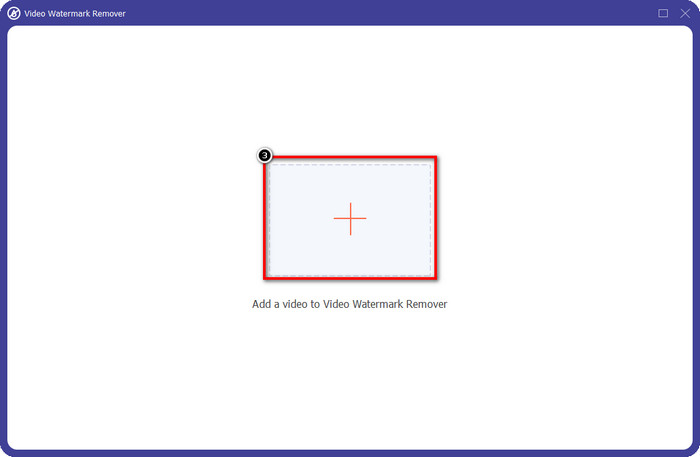
3단계. 화면의 + 아이콘을 클릭해 Renderforest에서 워터마크가 포함된 채로 내보낸 동영상을 업로드합니다.
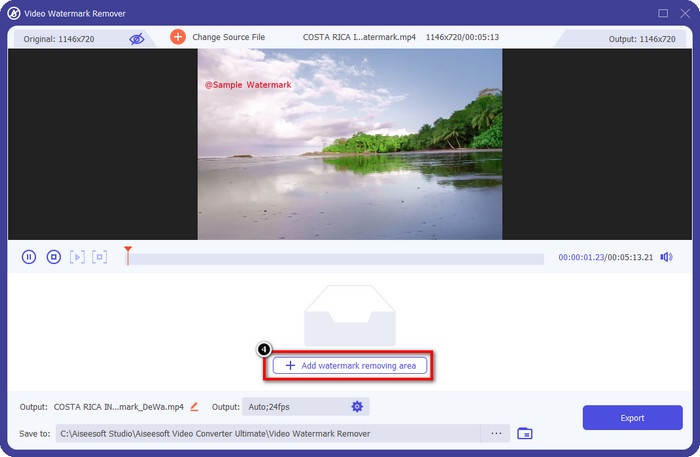
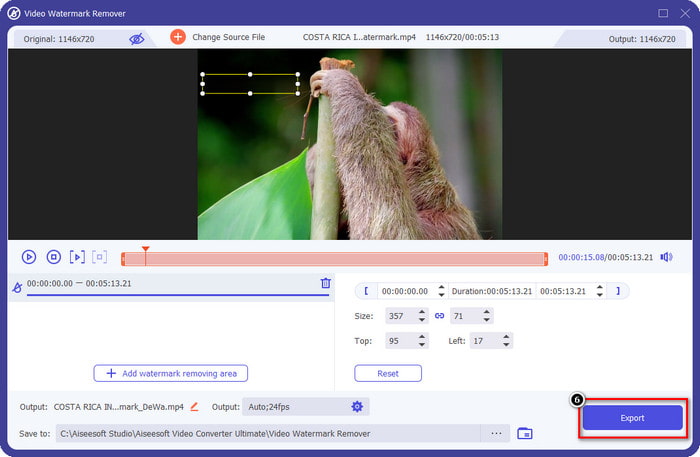
4단계. Add Removing Watermark Area를 눌러 Renderforest 워터마크 제거를 시작합니다.
5단계. 새로 나타난 창에서 선택 상자(selection box)를 드래그해 워터마크에 꼭 맞게 위치시키세요. 필요하다면 선택 상자의 크기와 위치를 자유롭게 조절할 수 있습니다.
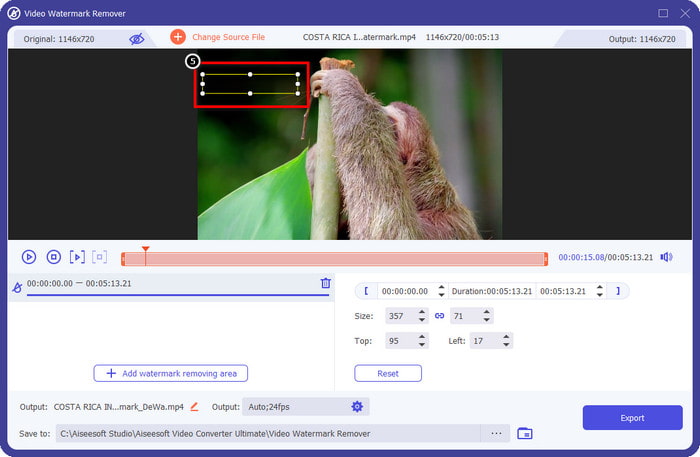
6단계. 선택 상자가 영상 속 워터마크를 정확히 인식했다면, Export를 클릭해 워터마크를 제거하고 워터마크 없는 영상을 저장합니다. 처리 속도는 매우 빠르며, 곧바로 워터마크 없이 영상을 활용할 수 있습니다.
관련 항목:
지금 로고 제거
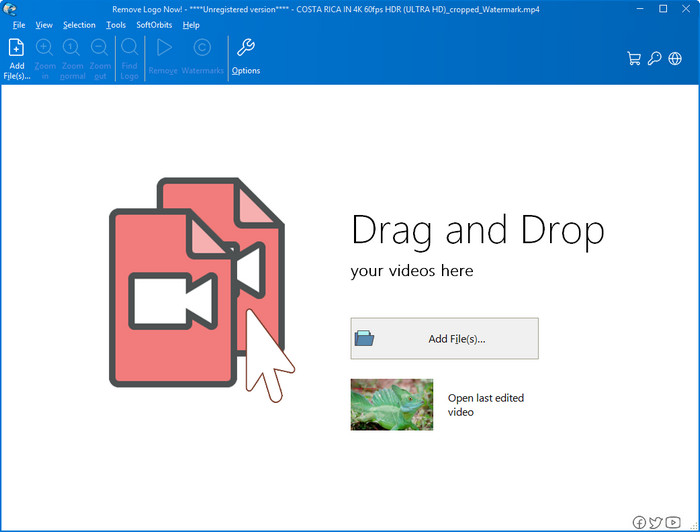
다음으로 소개할 Remove Logo Now는 Windows에서 겹쳐진 워터마크를 제거하는 데 탁월한 평판을 얻은 프로그램입니다. 이 도구를 사용하면, 전문 지식이 없어도 PC에서 Renderforest 워터마크 제거 방법을 쉽게 익힐 수 있습니다. 워터마크를 제거한 후 자세히 들여다보면 워터마크가 있던 부분에 약간의 흔적이 남아 있을 수 있습니다. 하지만 유심히 보지 않는 이상, 내보낸 영상에서 워터마크나 그 자국은 거의 눈에 띄지 않습니다. 아래 튜토리얼을 따라 Windows 기기에서 동영상 워터마크를 제거하는 방법을 배워 보세요.
1단계. 데스크톱에 Remove Logo Now를 다운로드해 설치하고, 안내되는 설치 과정을 따라 진행합니다.
2단계. 프로그램을 실행한 뒤 Add Files를 클릭해 동영상을 업로드합니다. 보다 빠른 업로드를 원한다면 동영상을 이 창으로 드래그 앤 드롭해도 됩니다.
3단계. 워터마크를 표시할 때 사용할 도구를 선택하세요. 도구를 선택한 후 워터마크 부분을 지정한 다음 Remove를 클릭합니다.
4단계. Start를 눌러 이 도구가 제공하는 워터마크 제거 과정을 시작합니다.
비디오 워터마크 제거 온라인

데스크톱에 프로그램을 설치하는 것이 부담스럽지만 여전히 Renderforest 워터마크 제거 방법이 궁금하다면, Video Watermark Remover Online을 사용해 보세요. 이 완전 자동 워터마크 제거기는 PC에 설치할 필요 없이, 온라인에서 무료로 동영상의 워터마크를 없앨 수 있습니다. 앞서 소개한 도구들처럼, 동영상 편집이나 워터마크 제거가 처음인 초보자라도 몇 분만 사용해 보면 금방 익숙해질 수 있습니다. 아래 튜토리얼을 참고해 사용하는 법을 알아보세요.
1단계. 즐겨 사용하는 웹 브라우저에서 온라인 워터마크 제거기를 검색해 접속합니다.
2단계. 메인 페이지에 있는 업로드(구름 모양) 아이콘을 클릭해 Renderforest에서 내보낸 동영상을 불러옵니다.
3단계. 업로드가 완료될 때까지 잠시 기다리면, 사이트가 자동으로 동영상의 워터마크를 제거합니다. 이후 Download를 클릭해 워터마크가 제거된 영상을 내려받습니다.
2부. Renderforst 워터마크를 제거하는 방법에 대한 FAQ
Renderforest의 구독료는 얼마입니까?
Renderforest는 사용할 수 있는 세 가지 유형의 가격 책정을 지원합니다. Lite는 $ 14.99, Pro는 $24.99, Business는 $29.99입니다. 이 가격 책정은 서로 다른 목적을 가지고 있습니다. 주요 웹 사이트로 이동하여 사용하려는 구독에서 사용할 수 있는 항목을 확인할 수 있습니다.
도구 없이 Renderforest Video에서 워터마크를 제거할 수 있습니까?
예, 도구를 사용하지 않고 Renderforest에서 워터마크를 제거할 수 있습니다. 그 방법은 소프트웨어에서 월별 또는 연간 요금을 구매하는 것입니다. 따라서 비디오 파일을 내보낼 때 워터마크가 추가되지 않습니다.
Renderforest를 위한 최상의 계획은 무엇입니까? 월간 또는 연간?
도구를 몇 번 사용하려는 경우 월간 구독이 좋은 선택이지만 소프트웨어를 장기간 사용하기로 결정한 경우 갱신보다 비용이 적게 들기 때문에 연간 요금제를 사용하는 것이 좋습니다. 매 달. 그러나 사용하기 전에 여기에서 계정을 로그인하여 Renderforest를 무료로 사용할 수 있습니다. 그런 다음 무료로 제공되는 다른 템플릿을 사용해 보십시오.
결론
실제로 이 기사는 사용할 수 있는 세 가지 가장 유용한 워터마크 제거기를 사용하여 Renderforest 워터마크를 무료로 제거하는 강력한 증거를 제공합니다. Windows 사용자이고 바탕 화면에서 워터마크를 제거하려면 지금 로고 제거를 사용해야 합니다. 그러나 소프트웨어 다운로드가 마음에 들지 않으면 이 도구를 사용하여 워터마크를 효과적으로 제거할 수 있으므로 Video Watermark Remover Online을 사용해 보십시오.
그러나 효과적인 워터마크 제거제를 원하는 Windows 또는 Mac 사용자라면 의심할 여지 없이 사용할 수 있는 최고의 워터마크 제거제는 FVC Video Converter Ultimate입니다. Renderforest 비디오를 효율적이고 전문적으로 괴롭히는 워터마크를 제거하는 데 사용할 수 있는 최고의 워터마크 제거 도구입니다.
-
 Windows 및 Mac에서 VSDC 워터마크를 빠르게 제거하는 2가지 방법
 비디오에서 VSDC 워터마크를 제거하는 방법을 찾고 있습니까? 이 기사에서는 워터마크를 제거하는 데 사용할 수 있는 도구를 제공합니다.
-
 비디오에서 Animoto 워터마크를 쉽고 효과적으로 제거
 비디오에서 Animoto 워터마크를 제거하는 방법은 무엇입니까? 방법에 대한 완전한 자습서를 제공하므로 이 기사를 계속 읽으십시오.
-
 Final Cut Pro를 사용하여 비디오에서 워터마크를 제거하는 방법 [전체 가이드]
 비디오의 워터마크에 문제가 있습니까? 더 이상 말하지 마세요. Final Cut Pro를 사용하여 비디오에서 워터마크를 제거하는 방법에 대한 자습서를 제공했기 때문입니다.
