


 비디오 컨버터 궁극
 스크린 레코더
 비디오 수리
 안전한 다운로드
전문가처럼 편집된 비디오에서 WeVideo 워터마크를 제거하는 방법
예산이 충분하지 않아 데스크탑에서 월간 비디오 편집기를 다운로드하거나 사용하고 싶지 않습니까? WeVideo는 돈을 뜯어내지 않는 무료 비디오 편집기를 원하는 경우 반드시 시도해야 하는 도구입니다. 이 웹 도구를 사용하면 몇 가지 간단한 단계를 수행하여 도달 범위 내에서 더 아름다운 방식으로 놀라운 비디오 출력을 만들 수 있습니다. 인기로 인해 이 도구는 웹에서 액세스할 수 있는 가장 많이 방문한 비디오 편집기 중 하나가 되었습니다.
From this day forward, the chances of users visiting the website for its video editor will go more. But users have some queries about this video editor online, and more often, users ask does WeVideo have a watermark applied on the video edited? To answer the question, you must read the whole article to find out if it does leave a watermark on the video you edited here.

1부. WeVideo에 워터마크가 있습니까?
예, 여기에서 편집한 비디오를 내보내면 WeVideo 워터마크가 추가됩니다. WeVideo 워터마크를 제거하는 방법에는 여러 가지가 있지만 시중에서 볼 수 있는 모든 워터마크 제거제가 다른 워터마크 제거제만큼 효과적인 것은 아닙니다. 워터마크 제거에 대한 최상의 결과를 제공하는 엄선된 워터마크 제거제를 제공하므로 어떤 도구가 귀하에게 적합한지 확인하기 위해 모든 도구를 시도하는 대신 여기에서 가장 좋은 것을 고려합니다. 전문가 여부에 관계없이 이 워터마크 제거기를 사용하여 비디오의 워터마크를 쉽게 제거할 수 있습니다.
2 부분. WeVideo 워터 마크를 제거하는 방법
FVC 비디오 컨버터 궁극
FVC Video Converter Ultimate provides the best video output for starters and professionals. With its power to remove the watermark on the video, it became popular with many users, and it became their first choice for removing the watermark in their video. It is compatible with Windows and macOS, so it supports multiple platforms from the oldest up to the latest version. Even though the tool is not free to use, you will still achieve the best output once you use this software on your end, for the users who want to use this and those who have already tried it but want to know how to get rid of WeVideo watermark. The step-by-step below will lead you on a path to where you can remove the watermark that is in your video effectively.
Step 1. You can download this software by clicking the download button presented below, choosing which operating system you are currently using, and ensuring to click the right button. After that, install the software promptly, follow the guide on setting it up, then open it.
Free DownloadFor Windows 7 or laterSecure Download
Free DownloadFor MacOS 10.7 or laterSecure Download
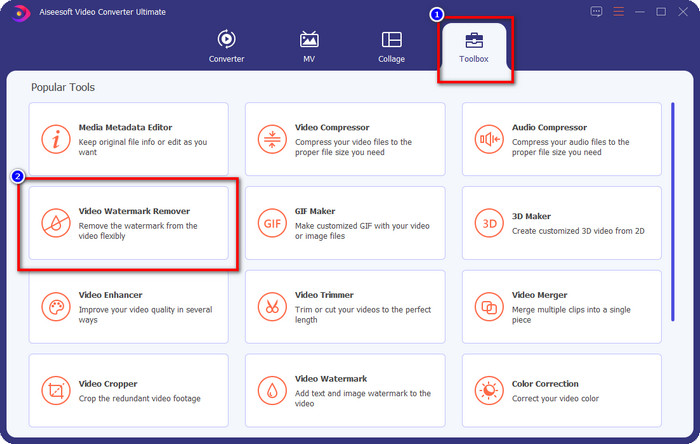
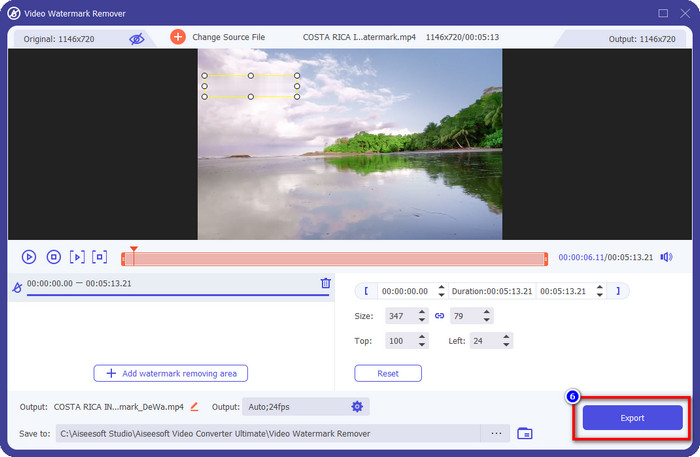
Step 2. On the Toolbox, locate the Video Watermark Remover this tool has, and click it to proceed.
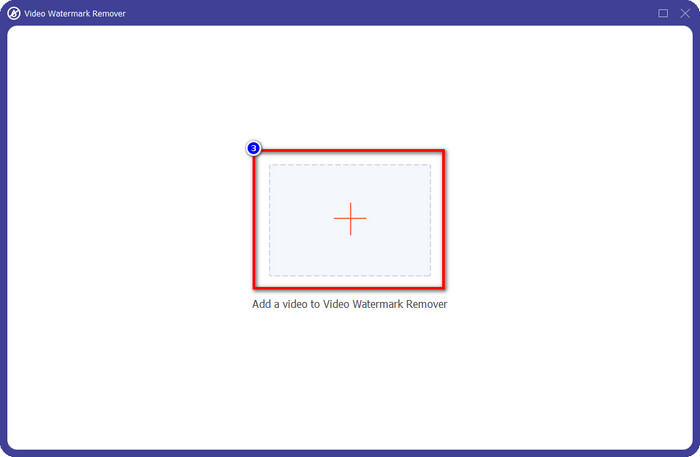
Step 3. By clicking the + icon, you upload the video containing a watermark. Search it over the folder that will show on your screen, click the file once, then press Open to upload it.
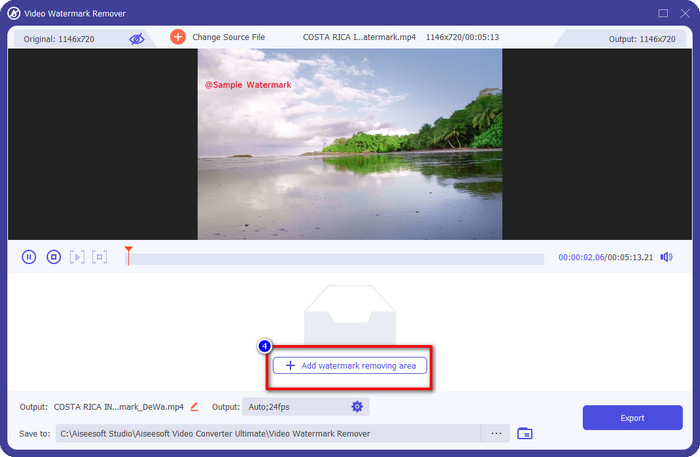
Step 4. After uploading the video with a watermark, press Add Watermark Removing Area and wait for the short loading process.
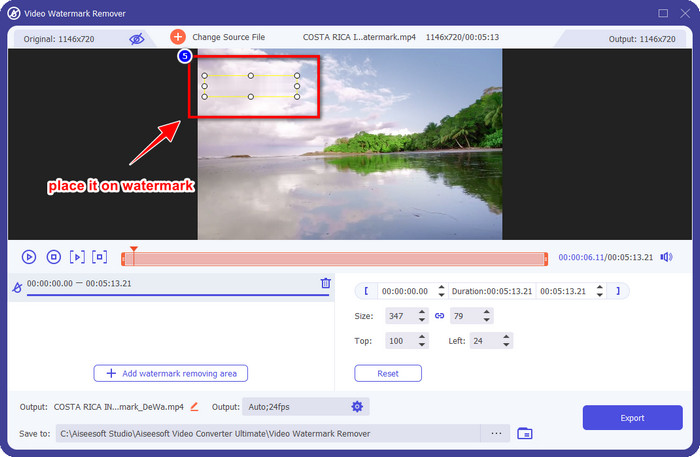
Step 5. Place the selection box to the WeVideo watermark and cover it all up so that when you export the video, you wouldn't see any traces of the watermark at the end of the video.
Step 6. You can save the video now; you remove the watermark here by clicking the Export button. The saving process wouldn't take much time because it supports ultra-fast processes and hardware acceleration.
아이마이폰 마크고
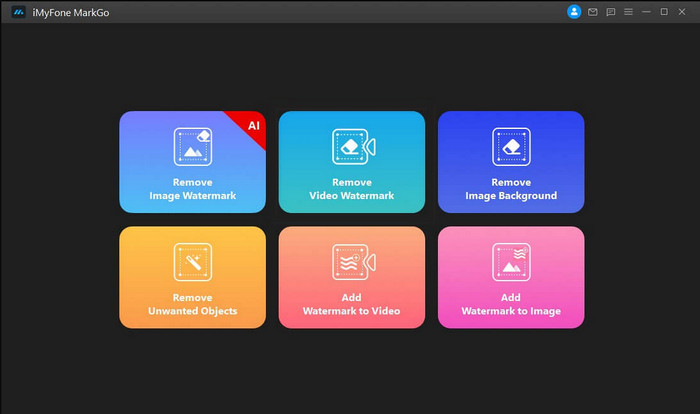
iMyFone Mark Go is another watermark remover you can download on your Windows and Mac to help you how to remove the WeVideo watermark. This tool effectively removes the watermark in your video, like what the ultimate tool can give you. Like any other offline software you can download on your desktop, you will need to avail the tool to remove the watermark and make good use of the premium version to remove the watermark on your video. Though it would cost you, it is not that expensive compared to other watermark removers you can download. So, if you want to remove the watermark on your video easily and effectively, you can follow the indicated steps below as we teach you how to do it step by step.
Step 1. Download the software on your desktop by going to its official website.
Step 2. After you've launched the software, click the Remove Video Watermark.
Step 3. Add the video file by clicking the Add the Video. Choose the video file that has a watermark.
Step 4. Move the rectangular shape that will show and place it to the watermark to cover it up. Even though there are three other options for removing the watermark, you can't access them because these options are for premium users.
Step 5. Click the Export button to save the video you removed the watermark on it.
온라인 비디오 커터 – 비디오에서 로고 제거
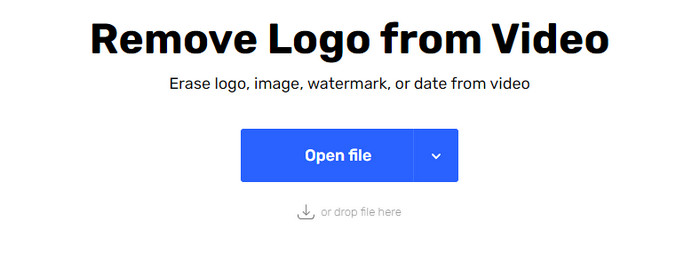
How to remove the WeVideo watermark for free? Use the Online Video Cutter – Remove Logo From Video. This software is a free web tool that you can use to remove the watermark in your video on the web without downloading any or paying any. This tool is effective as the other watermark remover on the market if we are about to compare, but not as good as the ultimate software. It can cover up the watermark in your video to make the video visual better. However, if you don't have an internet connection, this tool wouldn't be the best choice for removing the watermark in your video. But if you do have, then you can follow the steps below to start using this tool to remove the watermark on your video.
Step 1. Open a new tab and search the tool's name to start removing the watermark from the video.
Step 2. Click Open File to upload the WeVideo video here and for it to generate the preview of the video you uploaded.
Step 3. Click on the watermark to apply the removing area this tool has. Once you click any part of the video, there will be a selection box.
Step 4. Press Save to have the video without the watermark on it.
관련 항목:
How to Remove Movavi Watermark
How to Remove the Weibo Watermark
3부. WeVideo 워터마크 제거에 대한 FAQ
WeVideo 워터마크를 제거하는 가장 좋은 도구는 무엇입니까?
두 번째 의심의 여지 없이 FVC Video Converter Ultimate입니다. 이 도구는 비디오에서 워터마크를 제거할 때 최상의 결과를 제공합니다. 선택한 워터마크 리무버 중 궁극의 툴이 다른 워터마크 리무버보다 월등하다는 것은 부정할 수 없습니다.
WeVideo 워터마크를 잘라낼 수 있습니까?
예, WeVideo가 비디오에 남기는 워터마크를 잘라낼 수 있습니다. 단, 영상의 크기가 줄어들고 화면비를 잘라서 화질이 떨어질 수 있습니다.
WeVideo를 웹에서 최고의 비디오 편집기로 만드는 이유는 무엇입니까?
완전한 기본 비디오 편집 기능을 통해 익숙해질 수 있고 도구 사용이 얼마나 쉬운지 알 수 있습니다. 이것들은 WeVideo를 웹에서 사용할 수 있는 최고의 비디오 편집기 중 하나로 만드는 가장 일반적인 지식입니다. 하지만 다른 영상편집기인 Adobe Premiere Pro, Final Cut Pro 등만큼은 좋지 않습니다.
결론
마침내 위에서 제공한 방법으로 WeVideo 워터마크를 제거하는 방법에 대한 아이디어를 얻었습니다. 그러나 우리가 참여하는 도구에 대해 어떻게 생각하십니까? 여전히 무엇을 사용해야 할지 모르겠다면 FVC Video Converter Ultimate를 테스트해야 합니다. 워터마크 제거에 있어 최고 중 최고를 제공하며 사용하기도 쉽습니다. 그래서, 당신은 무엇을 기다리고 있습니까? 다운로드 버튼을 클릭하시면 워터마크 리무버가 설치되어 바로 사용하실 수 있습니다.
-
 123rf 워터마크 제거제 – 궁극적인 도구에 대한 철저한 검토
 가장 뛰어난 123rf 워터마크 제거제가 무엇인지 알고 싶다면 이 기사를 자세히 읽으십시오. 이 문서에서는 도구에 대한 심층적인 검토를 제공합니다.
-
 Windows 및 Mac에서 DeviantArt 워터마크를 제거하는 방법
 이미지에서 DeviantArt 워터마크를 제거하는 방법을 배우고 싶으십니까? 가장 뛰어난 DeviantArt 워터마크 제거기를 사용하면 성가신 워터마크를 쉽게 제거할 수 있습니다.
-
 내보낸 비디오에서 비디오 도우미 워터마크를 제거하는 궁극적인 소프트웨어 [2022]
 비디오 도우미에서 다운로드한 비디오의 워터마크를 제거하는 방법을 알고 싶습니까? 그렇다면 이 기사를 읽고 알아보세요.
