


 Video Converter Ultimate
 Perakam Skrin
 Pembaikan Video
 Muat Turun Selamat
WTV ke MP4 Converter: Cara Menukar WTV ke MP4
WTV, sebagai penerus format DVR-MS, dikembangkan oleh Microsoft untuk menyimpan kandungan TV yang dirakam oleh Windows Media Center. Dikodkan dengan standard MPEG-2 dan MPEG-4 dan MPEG-1 Layer II atau Dolby Digital AC-3, WTV disokong oleh beberapa perisian seperti FFMPEG, Windows Media Center, CyberLink PowerDVD 12, Nero 12, HandBrake, CCextractor, dll.

Jika anda ingin menonton atau berkongsi fail WTV dengan lebih mudah, adalah lebih baik anda menukar WTV kepada MP4, format yang paling popular untuk hampir semua peranti.
Kami telah melayari Internet untuk mencari penukar WTV ke MP4 dan menemui 2 penukar WTV ke MP4 percuma terbaik untuk menukar WTV kepada MP4.
Bahagian 1. Penukar Video Percuma - Tukar WTV ke MP4 Dalam Talian
Sebenarnya sangat mudah untuk menukar WTV kepada MP4. Cara paling mudah untuk menukar WTV kepada MP4 ialah menyiapkannya secara dalam talian. Free Online Video Converter ialah perisian percuma untuk menukar WTV kepada MP4 dan format video serta audio arus perdana yang lain. Alat dalam talian percuma ini serasi dengan Windows 10/8/7 dan Mac OS X 10.7 ke atas, dan anda boleh menukar WTV kepada MP4 dengan mudah dalam beberapa langkah.
Untuk menyelaraskan proses, anda boleh mengikuti panduan:
1. Klik butang Add Files to Convert untuk memuat naik fail WTV dari PC.
2. Pilih MP4 daripada kotak pilihan.
3. Klik Convert untuk menukar dan memuat turun fail WTV secara automatik.
Sekarang, kami di sini untuk membimbing anda bagaimana cara menukar WTV ke MP4 secara terperinci.
Langkah 1. Tambah fail WTV
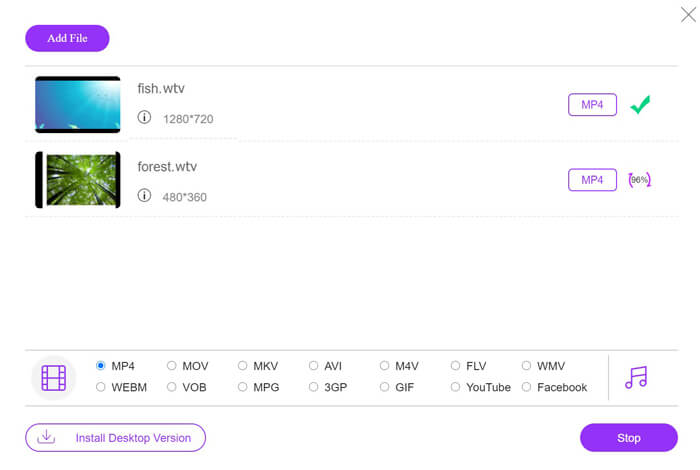
Buka penukar WTV ke MP4 dalam talian percuma ini melalui pelayar anda. Klik butang Add Files to Convert, dan satu tetingkap timbul akan muncul meminta anda memuat turun dan memasang pelancar. Hanya muat turun dan pasang, kemudian tetingkap sumber terbuka akan muncul selepas pemasangan berjaya. Selepas itu anda boleh memilih rakaman WTV pada komputer anda untuk dimuat naik. Perisian percuma ini menyokong penukaran kelompok dan anda boleh menambah lebih daripada satu fail WTV secara dalam talian.

Langkah 2. Pilih MP4
Tandakan kotak pilihan MP4 di bahagian bawah, di mana anda boleh menemui pelbagai pilihan output seperti MKV, AVI, M4V, FLV, VOB, GIF, YouTube, Facebook, MP3, AAC, WMA, WAV, FLAC dan lain-lain.
Selain itu, anda boleh klik ikon Settings di sebelah panel output MP4 untuk melaraskan pengekod, kadar bingkai, resolusi, kadar bit dan parameter lain.

Langkah 3. Tukar WTV kepada MP4
Selepas semuanya selesai, klik butang Convert dan satu tetingkap akan muncul yang meminta anda memilih destinasi untuk menyimpan fail MP4 yang telah ditukar. Pilih destinasi tersebut dan kembali ke penukar dalam talian percuma ini, klik Convert sekali lagi untuk mula menukar dan memuat turun fail MP4 secara automatik. Anda boleh melihat peratusan kemajuan penukaran secara langsung.
Bahagian 2. HandBrake - Tukar WTV ke MP4 pada PC / Mac
Cara percuma lain untuk menukar WTV ke MP4 adalah menggunakan HandBrake. HandBrake adalah beberapa perisian yang dapat membaca fail WTV. Selain itu, ia juga dapat mentranskode WTV ke MP4 / MKV pada komputer Windows dan Mac anda.
HandBrake adalah perisian desktop sumber terbuka, jadi anda harus memuat turun penukar percuma ini terlebih dahulu di komputer anda.
Sekali lagi, langkah mudah menukar WTV ke MP4 di HandBrake adalah seperti berikut:
1. Tambahkan fail WTF atau keseluruhan folder ke HandBrake.
2. Profil MP4 tersuai di HandBrake.
2. Pratonton dan ubah WTV ke MP4.
Berikut adalah panduan komprehensif untuk menukar WTV ke MP4 di HandBrake.
Langkah 1. Tambah fail WTV ke dalam HandBrake
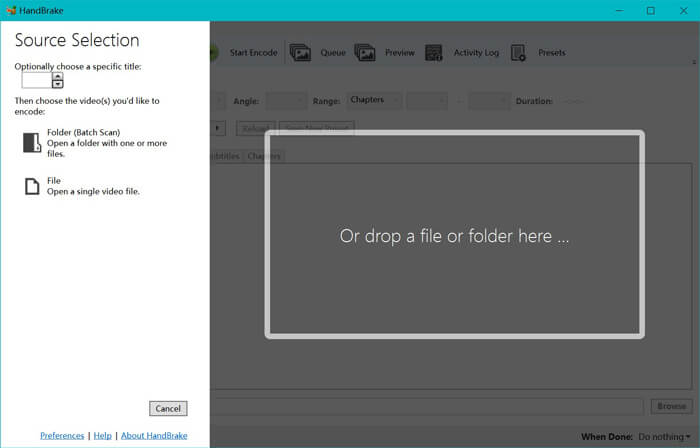
Sebaik sahaja anda memasang HandBrake pada komputer anda, HandBrake akan memaparkan dialog sumber terbuka secara lalai. Di sini anda boleh klik Folder atau File untuk memilih fail atau folder WTV ke dalam tetingkap utama. Sebagai alternatif, anda juga boleh seret dan lepas fail WTV ke dalam perisian ini.
Langkah 2. Pilih format MP4
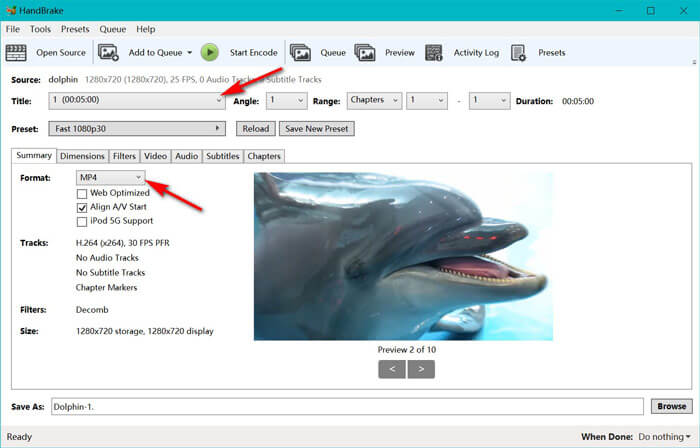
Selepas anda memuatkan fail WTV, anda boleh memilih fail WTV yang tepat daripada pilihan jatuh bawah Title. Kemudian pilih MP4 dalam tab Summary sebagai output untuk fail WTV yang dipilih. Selain itu, HandBrake membenarkan anda melaraskan dimensi, penapis, codec/kualiti video, trek audio dan sebagainya. Bukan sahaja MP4, ia juga boleh menukar format lain seperti AVI, MOV, M2TS dan lain-lain kepada MKV.
Langkah 3. Prapapar dan tukar WTV kepada MP4
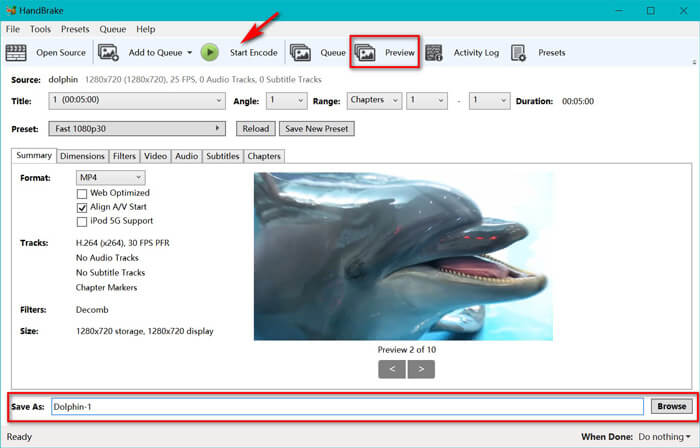
Fungsi Preview pada bar alat HandBrake membolehkan anda melihat rupa video MP4 baharu anda sebelum pengekodan. Selepas semua tetapan anda tepat, berikan nama kepada fail MP4 yang ditukar dan pilih lokasi video baharu anda dengan mengklik butang Browse di bahagian bawah. Akhir sekali, hanya klik butang Start Encode pada bar alat untuk menukar WTV kepada MP4.
Bahagian 3. Soalan Lazim WTV hingga MP4
Mengapa HandBrake menyimpan MP4 sebagai M4V?
Untuk fail MP4, HandBrake akan memfailkan fail MP4 secara automatik menggunakan ekstensi M4V, apabila anda memilih subtitle audio dan SRT AC3 atau mempunyai penanda bab untuk menyesuaikan fail MP4. Tetapi anda boleh menukar lanjutan .m4v menjadi .mp4 secara langsung.
Bolehkah pemain VLC memainkan fail WTV?
VLC tidak dapat memainkan fail WTV secara langsung. Anda harus memasang K-Lite Code Pack untuk memasang pek kod WTV dan kemudian memainkan fail WTV di VLC.
Bolehkah saya menukar fail WTV yang dilindungi?
Ya awak boleh. Walau bagaimanapun, hanya MCEBuddy yang menyokong penyuntingan dan penukaran fail WTF komersial yang dilindungi. Anda harus menggunakan perisian ini untuk menyalin dan menukar fail WTV yang dilindungi.
Kesimpulannya
Untuk menggunakan Window Media Center yang dirakam fail WTV dengan mudah, anda harus menukar WTV ke MP4 terlebih dahulu. Posting ini berkongsi 2 cara percuma menukar WTV ke MP4 dalam talian melalui Free Online Video Converter dan HandBrake. Penukar Video Dalam Talian Percuma membolehkan anda menukar WTV ke MP4 dan format popular lain, sementara HandBrake memberi anda lebih banyak kawalan penyuntingan dengan pilihan format output terhad.
Dengan cara mana yang menjadi pilihan anda?
Atau mungkin anda mempunyai penukar WTV ke MP4 yang lebih baik?
Walau apa pun, saya ingin mendengar daripada anda. Jadi, teruskan dan tinggalkan komen di bawah.
-
 Cara Menukar MXF ke MP4 melalui Free Converter
 Catatan ini adalah panduan terperinci untuk menukar MXF ke MP4 di komputer. Anda boleh mendapatkan 4 penukar MXF ke MP4 percuma ke kamkoder transkod MXF ke MP4 dengan langkah mudah.
-
 3 Kaedah Teratas untuk Menukar MP4 ke MOV Percuma
 Bagaimana cara menukar MP4 ke MOV pada Mac? Adakah cara percuma untuk menukar MP4 ke MOV tanpa kehilangan kualiti? Catatan ini berkongsi 3 cara mudah untuk membantu anda membuat penukaran video dari MP4 ke MOV di Mac, PC Windows dan dalam talian.
-
 Cara Menukar M2TS ke WMV pada Windows / Mac / Online (Benar-benar Bebas Digunakan)
 Berikut adalah 3 cara mudah untuk menukar video M2TS ke WMV. Anda boleh menukar format video dari M2TS ke WMV secara percuma di Windows, Mac dan dalam talian dengan cepat. Penukaran kumpulan disokong.
