


 Video Converter Ultimate
 Perakam Skrin
 Pembaikan Video
Cara Paling Mudah tentang Cara Menukar MP3 kepada M4R untuk Peranti Apple
Pernah terfikir untuk menukar muzik kegemaran anda menjadi nada dering pada iPhone? Adakah itu mungkin? Sudah tentu boleh. Anda hanya perlu menukar format failnya. Mengapa kita perlu menukarnya terlebih dahulu? Supaya kita boleh menjadikannya sebagai nada dering? Terutamanya kerana untuk menetapkan sesuatu fail sebagai nada dering lagu, fail tersebut mesti dalam format M4R. Jadi, anda perlu mencari penukar MP3 ke M4R iTunes yang terbaik untuk anda. Artikel ini menyediakan pelbagai kaedah tentang cara menukar fail MP3 anda, termasuk cara melakukan penukaran kelompok untuk menukar MP3 ke M4R dengan membaca kandungan di bawah.

Bahagian 1. Cara Paling Boleh untuk Menukar MP3 kepada M4R
Video Converter Ultimate ialah alat yang paling meyakinkan yang boleh anda gunakan untuk menukar MP3 kepada M4R. Bukan hanya satu fail tetapi ia juga boleh melakukan penukaran kumpulan dari MP3 ke MP4 Ia adalah penukar yang boleh menghasilkan video HD dan audio tanpa kehilangan. Malah, ia sesuai dan disyorkan untuk menukar fail tanpa kehilangan kualiti asalnya. Kelajuan adalah 30x lebih pantas daripada penukar biasa di luar sana. Selain itu, jika anda menukar senarai main untuk disimpan pada telefon anda pasti alat ini boleh melakukan kerja untuk anda. Tidak berdaya dan tidak berpeluh. Sementara itu, berikut adalah beberapa ciri lain yang juga boleh anda nikmati selain daripada menukar audio. Selain itu, panduan langkah demi langkah telah ditulis di bawah untuk rujukan anda jika anda memutuskan untuk menggunakannya.
◆ Edit metadata.
◆ Pecutan GPU Berkelajuan Tinggi.
◆ Sokongan teknikal masa nyata.
◆ Memampatkan video disokong.
Langkah 1. Untuk menggunakannya, dapatkan aplikasi dengan mengklik butang muat turun di bawah. Setelah aplikasi dimuat turun pada Windows atau Mac anda, lancarkannya.
Muat Turun PercumaUntuk Windows 7 atau lebih baharuMuat Turun Selamat
Muat Turun PercumaUntuk MacOS 10.7 atau lebih baharuMuat Turun Selamat
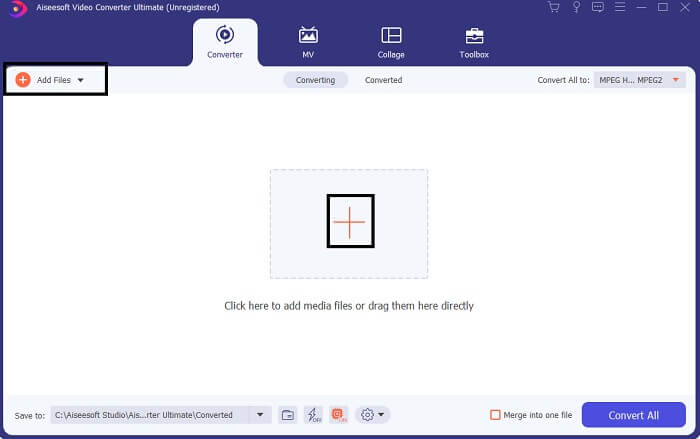
Langkah 2. Dari antara muka utama alat ini, anda akan melihat dua pilihan untuk memuat naik fail. Sama ada anda klik ikon Tanda Tambah di bahagian tengah atau klik butang Tambah Fail di bahagian kiri atas. Pilih fail sasaran dan muat naik.
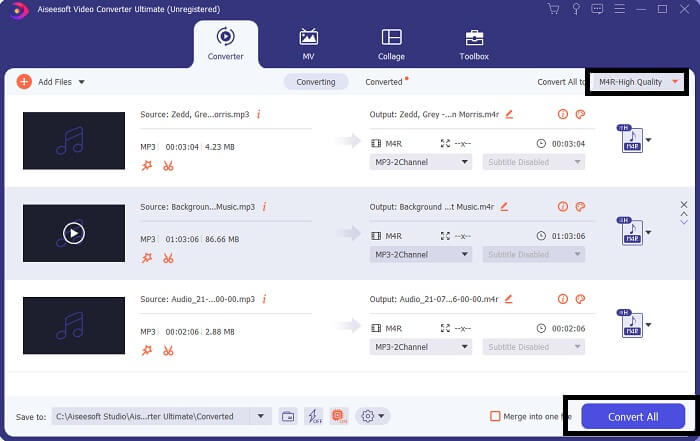
Langkah 3. Untuk mendapatkan hasil keluaran yang anda inginkan, tukar format dengan mengklik menu lungsur turun yang terletak di bahagian kanan atas antara muka.
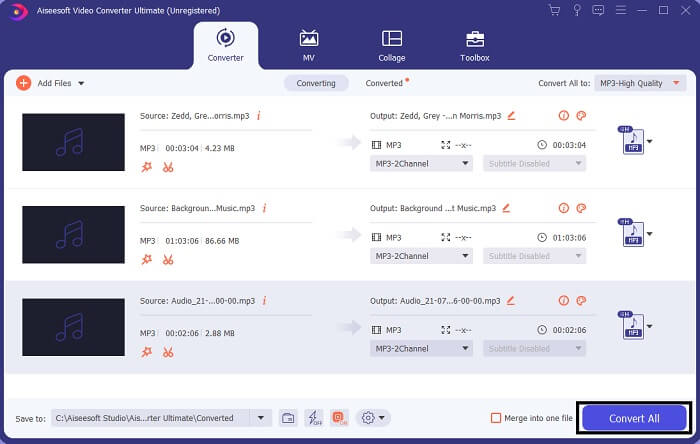
Langkah 4. Akhir sekali, klik butang Tukar Semua di bahagian kanan bawah antara muka utama. Kemudian tunggu sehingga fail siap ditukar.
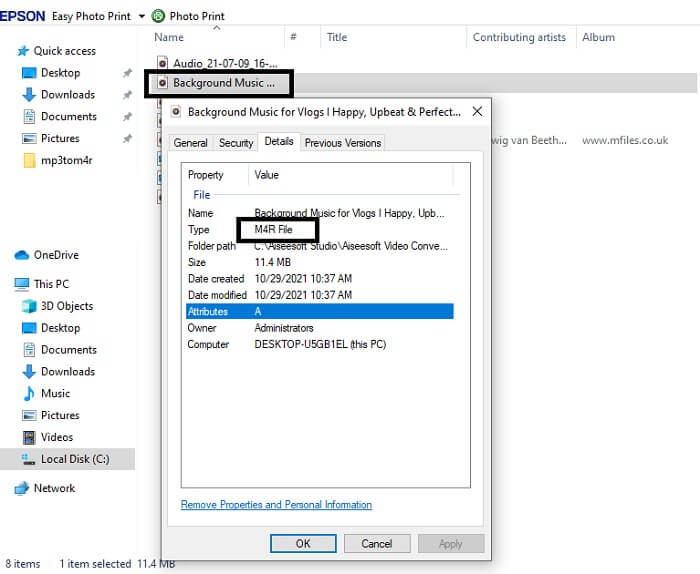
Langkah 5. Akhir sekali, buka folder tempat audio keluaran disimpan dan pindahkannya ke iPhone anda. Anda boleh menggunakan alat atau aplikasi pemindahan untuk melakukannya. Anda boleh mencari cadangan di internet. Anda hanya perlu membuat carian dan ikut langkah untuk menjadikannya nada dering iPhone anda.
Bahagian 2. Beberapa Alat Terbaik untuk Menukar MP3 kepada M4R Dalam Talian
Penukar Audio Dalam Talian Percuma FVC
Alat premium untuk penukaran memang bagus tetapi tiada yang lebih baik daripada alat yang praktikal. Mengambil kira keperluan anda, FVC telah menghasilkan versi percuma alat ini. FVC Free Audio Converter ialah alat capaian percuma anda pada bila-bila masa dan di mana sahaja. Anda hanya memerlukan internet yang berfungsi dan pelayar yang disokong. Penukar MP3 ke M4R nada dering iPhone ini mampu menghasilkan audio berkualiti tinggi tanpa kehilangan kualiti. Hasilnya memuaskan tanpa perlu mengeluarkan wang. Bukan itu sahaja, tahukah anda alat ini juga boleh melakukan penukaran secara kelompok? Ya, boleh! Berikut juga beberapa ciri penting lain yang akan anda peroleh jika menggunakannya. Selain itu, panduan turut disediakan untuk memudahkan anda.
◆ Fail yang ditukar mempunyai kualiti yang serupa dengan yang asal.
◆ 100% percuma dan selamat digunakan.
◆ Tiada had saiz semasa penukaran.
◆ Penukaran kelompok disokong.
Langkah 1. Untuk mengakses alat ini, layari laman rasmi FVC Free Audio Converter.
Langkah 2. Dari situ, klik pada Tambah Fail untuk Tukar. Bagi pengguna pertama kali, anda perlu membenarkan capaian dengan mengklik Buka FVC Launcher. Kemudian satu tetingkap akan muncul pada skrin anda untuk membolehkan anda mencari fail yang ingin ditukar.
Muat turun Versi Desktop untuk menukar fail secara kelompok.
Langkah 3. Selepas memuat naik fail, satu lagi tetingkap akan muncul. Di bahagian bawah, tukar format fail bagi fail keluaran dengan menanda M4R.
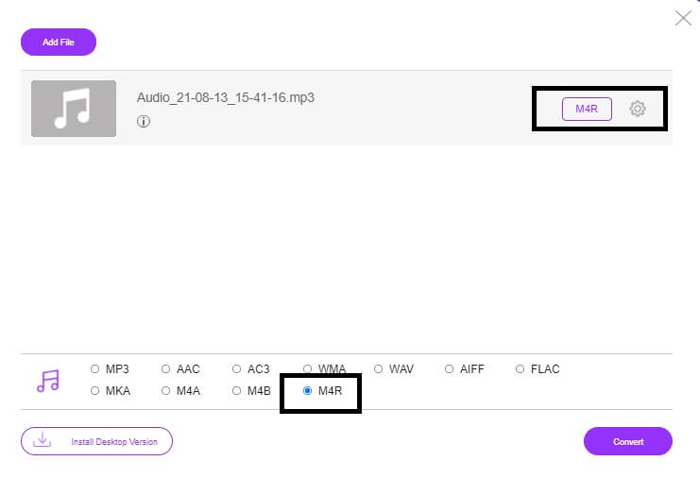
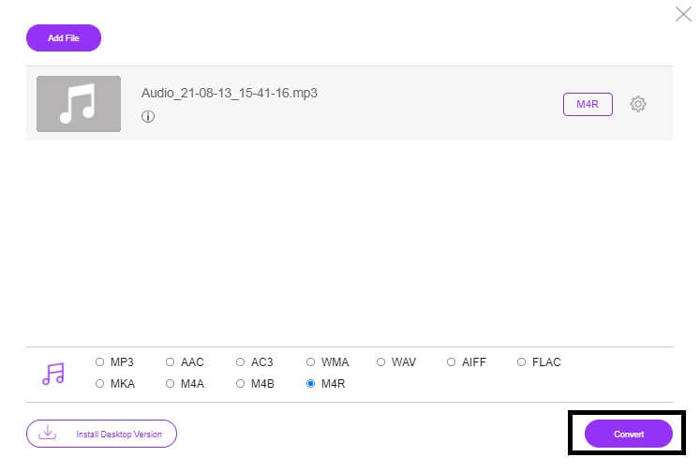
Langkah 4. Kemudian klik butang Tukar untuk memulakan proses penukaran.
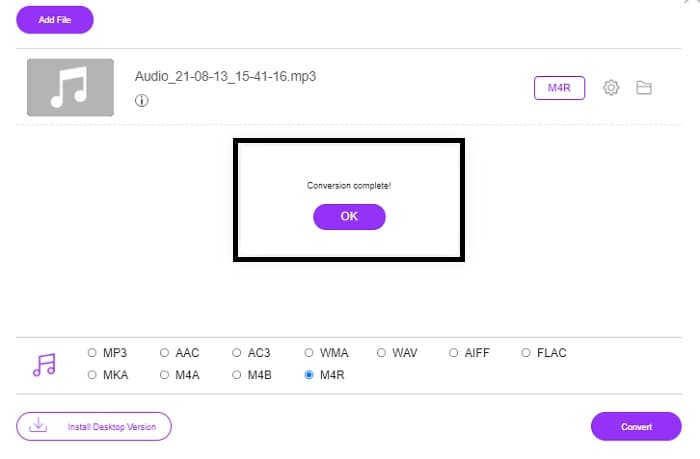
Langkah 5. Akhir sekali, pilih folder untuk menyimpan fail, dan fail akan disimpan secara automatik. Kemudian pindahkan fail itu ke iPhone anda. Ketahui bahawa anda boleh melakukan penukaran kelompok, jadi jangan hadkan diri anda.
Berkaitan:
M4ROnline oleh Penukar Fail
Ringkas namun boleh diharap, begitulah pengguna menggambarkan alat dalam talian ini. Secara lalai, alat ini dibuat khusus untuk menukar Mp3 ke M4R. Seperti yang tertera pada namanya, itulah fungsi utama alat ini. Ia berfungsi pada pelbagai pelayar web jadi anda tidak perlu memuat turun atau membelinya. Jika anda melawat laman webnya, anda akan perasan betapa ringkasnya antara muka alat ini. Ia sangat terus terang di mana anda hanya perlu klik butang Browse untuk memulakan proses memuat naik dan menukar. Jika anda ingin mencubanya, disyorkan untuk melawat laman rasminya dan mengalaminya sendiri. Jadi, alat ini merupakan alternatif yang baik. Anda juga boleh lihat langkah demi langkah di bawah untuk mengetahui proses menggunakan alat ini.
Langkah 1. Perkara pertama yang perlu anda lakukan ialah pergi ke halaman rasmi M4R Online kemudian klik pada Browse.
Langkah 2. Pilih fail daripada folder anda dan klik butang Upload File.
Langkah 3. Setelah anda melihat mesej selesai, klik fail tersebut untuk memuat turunnya.
Online-convert.com
Ini ialah alat yang telah menyediakan perkhidmatan sejak sekian lama. Boleh dikatakan ramai yang mendapati alat dalam talian ini sangat membantu untuk keperluan penukaran mereka. Jika tidak, ia tidak akan terus wujud sehingga sekarang jika tidak terbukti berguna. Apabila melawat halaman utama laman ini, anda akan melihat semua alat yang tersedia untuk digunakan. Daripada penukar audio, penukar video, penukar imej, penukar dokumen, penukar eBuku semuanya dikumpulkan di halaman utama. Menghimpunkannya memudahkan pengguna mencari alat yang diperlukan. Justeru, ia wajar dimasukkan dalam senarai penukar MP3 ke M4R iTunes ini. Sementara itu, berikut cara anda boleh menggunakan alat ini untuk rujukan anda.
Langkah 1. Lawati laman rasmi alat ini dan pilih Penukar Audio.
Langkah 2. Klik Drop down dan pilih format keluaran kemudian klik GO.
Langkah 3. Satu tetingkap baharu akan muncul. Dari situ klik butang Pilih Fail dan muat naik fail. Untuk memulakan proses penukaran klik Mulakan Penukaran. Setelah fail siap, fail akan dimuat turun secara automatik ke PC anda.
MP3 lwn M4R
Format MP3 dikeluarkan pada tahun 1993 oleh Moving Picture Experts Group (MPEG). Ia adalah standard untuk menyimpan muzik kerana ia boleh memampatkan audio kepada saiz yang jauh lebih kecil daripada format lain yang tidak dimampatkan. Ia masih digunakan secara meluas pada masa kini, terutamanya untuk pengedaran audio dalam talian.
Fail M4R digunakan untuk menyimpan nada dering iPhone tersuai yang dibuat dengan Apple iTunes. Biasanya, anda boleh melihat format ini apabila memindahkan sekeping nada dering dari komputer ke peranti iOS. Fail M4R yang dibuat dengan iTunes biasanya termasuk perlindungan hak cipta.
Bahagian 3. Soalan Lazim tentang Menukar MP3 kepada M4R
Apa itu M4R?
Ia adalah sambungan fail yang dicipta khusus oleh Apple dan digunakan secara ketat sebagai nada dering untuk iPhone dan peranti Apple yang lain. Ini adalah sebaik M4A dan MP4 apabila ia berkaitan dengan kualiti.
Adakah terdapat penukar MP3 ke M4R selain daripada iTunes?
Pasti ada. Anda boleh memilih daripada alatan di atas atau pertimbangkan untuk menggunakan Windows Media Player dengan merobek. Jika anda tidak mahu melalui semua proses, anda boleh menggunakan alat percuma yang tersedia dalam talian. Mereka secara langsung menukar audio kepada format yang anda inginkan dan bukannya melalui proses merobek yang panjang.
Mengapa saya perlu menukar fail saya daripada MP3 kepada M4R untuk menggunakannya sebagai nada dering?
Ia adalah satu kemestian. Untuk dianggap sebagai fail sebagai nada dering, fail tersebut mestilah secara lalai dalam format M4R untuk dimainkan sebagai nada dering anda.
Kesimpulannya
Dengan semua itu, pasti anda boleh bergantung pada alat yang disenaraikan di atas. Anda hanya perlu mengakses alat yang boleh membantu anda bergantung pada keperluan anda. Jika anda seorang pelajar dan warganegara biasa yang ingin menukar dan ingin menukar MP3 kepada M4R pada Mac secara percuma atau apa sahaja peranti yang anda gunakan, anda boleh merujuk kepada alatan percuma. Untuk kegunaan profesional, disyorkan untuk menggunakan Video Converter Ultimate. Anda sentiasa boleh kembali ke halaman ini jika anda ingin mengetahui lebih lanjut tentang lebih banyak alat untuk ditukar.
-
 [Percuma & Dalam Talian] 3 Kaedah untuk Menukar MP3 kepada MP4 dengan Imej
 Bagaimana cara menukar MP3 ke MP4 berkualiti tinggi? Catatan ini menunjukkan 3 kaedah yang cekap dan percuma untuk menukar MP3 ke MP4 dengan gambar pada Windows dan Mac.
-
 Ketahui mengenai Cara Menukar MP3 ke Format WAV
 Adakah anda ingin tahu bagaimana untuk menukar MP3 ke WAV? Tentukan alat mana yang menghasilkan penukaran kualiti terbaik yang boleh anda perolehi.
-
 Garis Panduan tentang Cara Menukar M4A kepada WAV [PC dan Mac]
 Ketahui lebih lanjut tentang cara menukar M4A kepada WAV dengan langkah terperinci dan alatan berbeza yang boleh anda pilih.

