


 Video Converter Ultimate
 Perakam Skrin
 Pembaikan Video
Kaedah Berfaedah untuk Menukar DV kepada FLV Dengan Mudah
Fail DV ialah fail yang mengandungi video digital. Analisis kami terhadap fail DV telah mendedahkan bahawa Digital Video adalah salah satu kegunaan format ini. Kami belum menerangkan sepenuhnya apakah kandungan fail-fail ini atau bagaimana pengguna menggunakannya, tetapi pasukan kami mengendalikan beribu-ribu jenis fail. Jika anda mempunyai maklumat tentang format ini, kami amat berbesar hati untuk menerimanya. Namun begitu, sambungan fail .flv menandakan fail FLV (Flash Video). Pengguna boleh menggunakan Adobe Flash Player atau Adobe Air untuk menstrim kandungan audio dan video melalui internet menggunakan FLV. Fail FLV mengekod data mereka dengan cara yang sama seperti fail SWF. Dalam menyelesaikan masalah format video DV, pengguna lebih cenderung untuk menukarnya kepada format FLV, yang serasi dengan pelbagai pemain media. Jadi, jika anda sedang mencari alat yang boleh menukar DV kepada FLV, teruskan membaca artikel ini.

Bahagian 1. Cara Terbaik untuk Menukar DV kepada FLV Luar Talian
Video Converter Ultimate ialah salah satu perisian yang cemerlang yang boleh membantu anda menukar format video DV kepada FLV. Dengan sistem rangsangan kelajuan ultra, anda boleh menukar DV kepada FLV dalam masa sesaat yang tidak dapat ditandingi oleh alat lain. Terima kasih kepada perisian ini, anda tidak perlu risau tentang menukar DV kepada format lain kerana perisian ini menyokong pelbagai format yang anda sendiri tidak sangka, seperti MP4, MOV, 3GP, FLV, WMV, WEBM, MPEG dan lain-lain. Selain menukar fail, perisian ini mempunyai alat lain yang diketengahkan, iaitu boleh memotong (trim), menambah baik, menggabung, mempercepatkan, dan pelbagai alat berguna lain yang boleh meningkatkan video anda ke tahap yang lebih baik.

Video Converter Ultimate
6,357,200+ Muat Turun- Ia menyokong lebih 1000 format video dan audio yang berbeza.
- Tukar 30x lebih cepat daripada penukar lain.
- Boleh menukar video sehingga kualiti 4K HD.
- Ia menawarkan banyak alat lain yang ditampilkan yang membantu dalam meningkatkan video anda.
- Ia tidak memerlukan perkakasan penyelenggaraan yang berat untuk beroperasi.
Muat Turun PercumaUntuk Windows 7 atau lebih baharuMuat Turun Selamat
Muat Turun PercumaUntuk MacOS 10.7 atau lebih baharuMuat Turun Selamat
Langkah 1: Muat turun perisian dengan mengklik butang Free Download yang terletak di atas. Selepas itu, anda perlu memasang perisian pada komputer anda dan jalankannya dengan mengklik Start Now selepas selesai pemasangan.
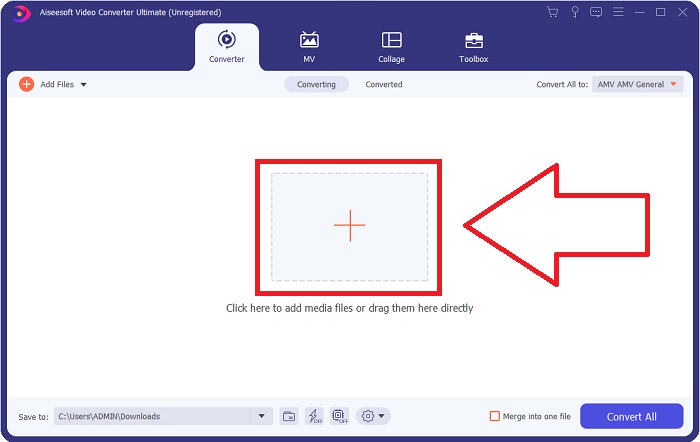
Langkah 2: Kemudian, anda akan melihat satu tetingkap muncul pada skrin anda. Perisian akan memaparkan fungsi Converter. Untuk mengimport fail dari komputer anda, klik butang + di bahagian tengah, atau anda boleh seret sahaja sebarang fail video format DV ke bahagian tengah.
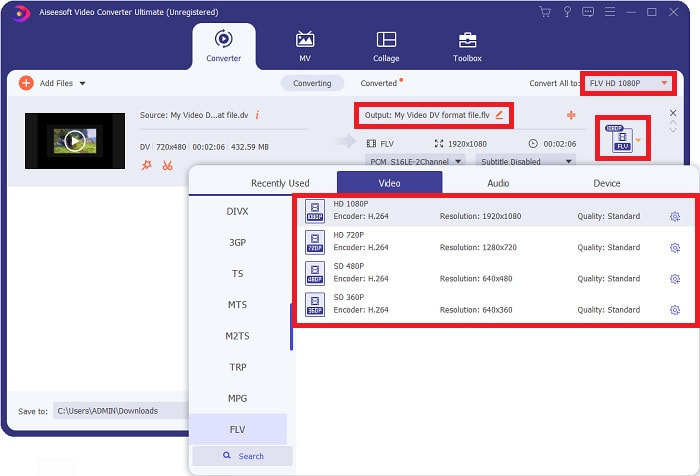
Langkah 3: Anda sudah berada di pertengahan proses. Klik ikon pilihan format betul-betul di sebelah output video anda dan pilih format video FLV. Selepas itu, anda juga boleh memilih kualiti video yang berbeza yang ditawarkan oleh perisian.
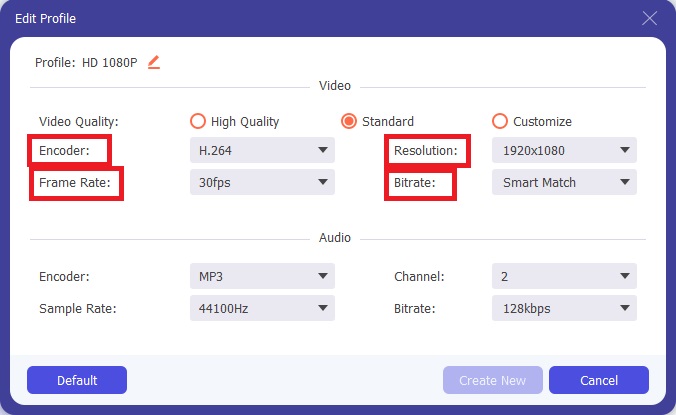
Langkah 4: Sedikit usaha untuk disiapkan. Jika semua kualiti video yang tersedia masih tidak memenuhi keperluan anda, anda boleh menyesuaikan kualiti video output dengan mengklik ikon gear di sebelah pilihan kualiti video.
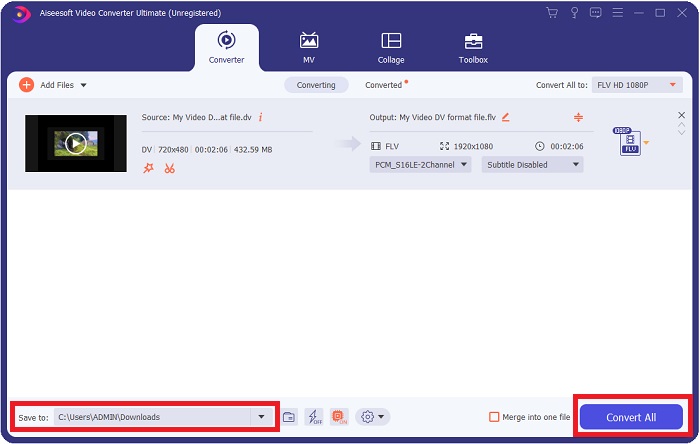
Langkah 5: Kini anda hampir selesai. Pergi ke medan Save to di sudut lain untuk memilih lokasi menyimpan fail yang telah ditukar. Anda kini boleh menukar fail anda dengan mengklik butang Convert All yang terletak di sudut kanan bawah skrin.
Bahagian 2. Bagaimana untuk Menukar DV kepada FLV Dalam Talian
Internet menghasilkan dan memperkenalkan pelbagai alat dalam talian yang boleh membantu anda menukar DV kepada FLV. Tetapi alat dalam talian yang dipanggil Free Video Converter Online ini berbeza daripada alat lain dalam proses penukaran yang pantas kerana ia boleh menukar fail dalam masa sesaat. Ia juga menyokong format seperti MP4, FLV, MOV, M4A, TS, WMV, ASF, VOB, AAC, WMA dan banyak lagi. Ia juga menukar video kepada video HD tanpa kehilangan kualiti. Alat penukar video percuma ini terkenal untuk penukaran, membolehkan pengguna memperhalus hasil video mereka tanpa kesulitan. Mari kita teliti semua langkah yang akan membantu anda menggunakan penukar dalam talian ini.
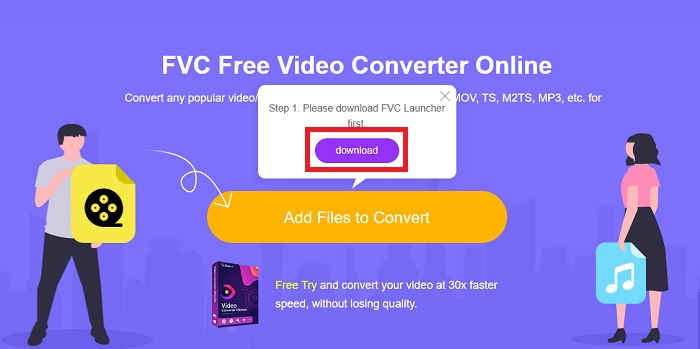
Langkah 1: Untuk mengakses laman utama alat dalam talian ini, klik pautan ini dan teruskan. Klik butang Add Files to Convert pada skrin utama komputer anda untuk memuat turun pelancar yang akan membolehkan anda menggunakan alat dalam talian ini. Selepas itu, klik sekali lagi untuk meneruskan memuat naik fail.
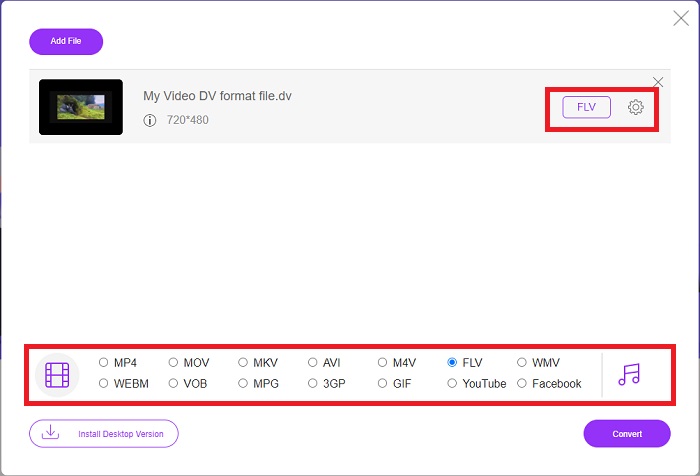
Langkah 2: Setelah anda mempunyai fail yang ingin anda tukar, anda mesti memilih format video FLV daripada pilihan format video di bahagian bawah skrin anda. Anda juga boleh melaraskan beberapa spesifikasi video dengan menukar beberapa tetapan video seperti resolusi, kadar bingkai dan sebagainya dengan mengklik ikon gear.
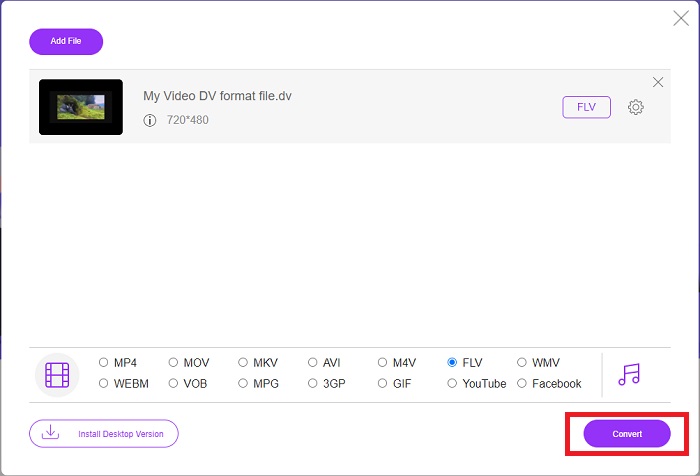
Langkah 3: Selepas itu, anda kini boleh menukar fail dengan mengklik butang Convert yang terletak di bahagian bawah kiri tetingkap.
Bahagian 3. Carta Perbandingan: DV Vs. FLV
Fail Video Digital (DV) dicipta oleh kamera digital dan disimpan dalam format mentah yang selalu digunakan oleh pengguna. Fail Video Digital (DV) terdiri daripada Blok Antara Muka Digital (DIF), setiap satu mengandungi 80 bait. Audio, video dan metadata semuanya boleh disertakan dalam blok DIF. Blok DIF boleh disimpan sebagai fail komputer dalam bentuk mentahnya atau sebagai format fail yang dililitkannya—memultiplekskan blok ke dalam urutan 150 blok. Bingkai video boleh mengandungi sehingga sepuluh atau dua belas urutan.
Namun begitu, perkhidmatan penstriman video seperti YouTube, Hulu dan Vevo menggunakan Format Flash Video keluaran Adobe Systems untuk video dalam talian mereka. Adobe Flash Player (termasuk pemalam pelayar) dan perisian pihak ketiga boleh membaca dan memainkan fail FLV pada hampir setiap sistem pengendalian (kecuali iOS). iPhone dan Android boleh memainkan fail FLV menggunakan perisian sumber terbuka dan pelayar tertentu. Flash masih menjadi masalah untuk iOS. Fail FLV hanya boleh dilihat dalam perisian pemain FLV, dan pengguna boleh menggunakan perisian tangkap skrin dan rakaman untuk merakam video FLV.
| Sambungan fail | DV (.dv) | FLV (.flv) |
| Nama fail | Video Digital | Fail Video Flash |
| Dibangunkan oleh | Berbilang Pengeluar Kamera Video | Adobe System Incorporated |
| Kelebihan | ◆ Mini DV standard memegang 19.5 GB, yang berfungsi sehingga kira-kira.25 sen setiap GB storan. ◆ Penukaran HD-ke-standard intuitif ◆ Pita mudah dilabel dan sesuai untuk penyimpanan jangka panjang. | Apabila ia datang untuk mencipta halaman web yang dinamik dan interaktif, Adobe Flash boleh menjadi aset yang besar. Prosesnya mudah, tetapi hasilnya mungkin ketara. Pada zaman kegemilangannya, Flash juga digunakan secara meluas untuk permainan video mudah. |
| Keburukan | ◆ Sambungan firewire diperlukan (kebanyakan PC stok tidak mempunyai ini). ◆ Kualiti rakaman menurun dengan setiap hantaran berikutnya. ◆ Ia hanya merekodkan selama 60 hingga 90 minit pada satu masa. | Ia adalah satu kelemahan bahawa FLV telah merosot dalam populariti selama bertahun-tahun. Mencipta kandungan FLV mungkin mengambil masa yang lama dan menelan belanja yang banyak. Selain itu, pengguna tidak boleh melihat kandungan Flash pada peranti iOS, mengehadkan keupayaannya untuk menarik pengikut baharu. |
| Program yang menyokong fail | ◆ Pemain Media VLC | ◆ RealPlayer ◆ Apple QuickTime Player ◆ Pemain Media VLC ◆ MPlayer |
Bahagian 4. Soalan Lazim tentang Penukaran DV ke FLV
Apakah resolusi DV?
Dengan DV, resolusi standard merekodkan 720 piksel mendatar dan 480 baris berjalin di negara yang menggunakan arus elektrik 60Hz dan 576 baris dengan arus elektrik 50Hz. Versi definisi tinggi video digital (HDV) ialah standard HDV rasmi, dan DVCPRO HD Panasonic ialah contoh format sedemikian (lihat HDV dan DVCPRO).
Adakah video DV berjalin?
Sentiasa terdapat banyak rakaman DV di bahagian bawah dahulu. Rakaman lain mungkin muncul dahulu. Tafsirkan klip yang diimport sekali lagi dengan pemisahan medan dihidupkan, rendahkan dahulu (fail > tafsirkan rakaman > tengah) untuk melihat sama ada ia berjalin. Kemudian, dalam tetingkap projek, gunakan pintasan Alt-double-click untuk mengaksesnya. Gunakan kekunci atas halaman/Dn untuk menavigasi melalui video. Jalinan berlaku jika video berubah setiap kali anda menekan butang main. Pergerakan menyentak menunjukkan bahawa susunan medan tidak betul, dan rakaman harus ditafsir semula menggunakan susunan medan yang lain.
Adakah FLV format video yang sesuai?
Adobe Flash Player menyimpan fail video dalam format FLV. Semua platform video dan penyemak imbas menerimanya sebagai salah satu format video yang disokong mereka. Platform penstriman video dalam talian seperti YouTube mendapat manfaat daripada menggunakan format FLV. Hasil daripada saiz failnya yang kecil, ia cepat dan mudah untuk dimuat turun.
Kesimpulannya
Untuk merumuskan semua topik yang diberikan, anda akan perasan bahawa penukar terbaik yang disyorkan artikel ini untuk anda gunakan ialah perisian Video Converter Ultimate dan alat dalam talian Free Video Converter Online. Oleh kerana kedua-dua penukar ini boleh mengatasi penukar lain, ia mempunyai pelbagai alat profesional lain dan antara muka yang mesra pengguna.
-
 Strategi Terbaik tentang Cara Menukar Fail DV kepada Format AVI dengan Langkah Terperinci
 Adakah anda ingin menukar fail DV anda kepada AVI? Kemudian baca artikel ini untuk mengetahui alat unik yang boleh anda gunakan untuk menukar dan pemain media untuk memainkan DV anda pada PC atau Mac anda.
-
 2 Cara Teratas tentang Cara Menukar Fail DV kepada MOV secara Percuma dalam Desktop & Dalam Talian
 Ada masalah menukar fail DV anda kepada MOV pada Mac anda? Jika itu masalah anda, maka kita boleh menyelesaikannya bersama-sama jika kita membaca artikel ini.
-
 MP4 hingga FLV | 3 Penukar Percuma Teratas (Dalam Talian / Mac / Windows)
 Catatan ini adalah panduan terperinci untuk penukaran MP4 ke FLV. Anda boleh menggunakan 3 penukar percuma untuk menukar MP4 ke FLV dalam talian, pada komputer Windows atau Mac dengan mudah.
