


 Video Converter Ultimate
 Perakam Skrin
 Pembaikan Video
Tukar AVI kepada MKV Dengan Mudah Menggunakan 3 Alat Penukaran Terbaik.
Menukar AVI kepada MKV mungkin kedengaran rumit, terutamanya jika anda baru dalam menukar format fail. Sukar untuk mencari alat yang boleh membantu anda menukar fail anda. Namun, jangan risau lagi! Artikel ini menyediakan cara untuk menukar fail AVI anda kepada fail MKV dengan mudah menggunakan tiga alat.

Bahagian 1. Fail AVI VS. Fail MKV
AVI atau Audio Video Interleave ialah format bekas fail yang dibangunkan oleh Microsoft. Fail AVI mengandungi data audio dan video yang membenarkan audio dengan main balik video. Fail jenis ini ialah format video standard untuk Windows, tidak hairanlah ia adalah salah satu format fail yang paling biasa. Sebaliknya, MKV atau Matroska ialah format bekas multimedia. Jenis fail ini menyimpan audio, video dan trek sari kata, ke dalam satu fail. Di samping itu, ia adalah kalis masa hadapan, jadi anda tidak perlu risau bahawa fail ini sudah lapuk. Tetapi mengapa kita menukar fail AVI kepada format MKV? Semata-mata kerana format MKV boleh mengendalikan berbilang aliran sari kata dan trek audio dalam pelbagai bahasa.
Bahagian 2. Penukar AVI ke MKV Terbaik Anda Mesti Cuba
Jika anda sedang mencari penukar AVI ke MKV luar talian yang mempunyai ciri-ciri hebat untuk digunakan, FVC Video Converter Ultimate ialah alat yang sesuai untuk anda. Penukar ini mempunyai ciri khas yang tidak terdapat pada penukar lain. Sebagai contoh, anda boleh menyunting fail video, mampatkan fail, dan juga menukar secara kelompok berbilang fail sekali gus. Ia juga menyokong penukaran ultra-pantas, secepat kilat. Selain itu, ia menyokong pelbagai format fail untuk ditukar, termasuk AVI ke MKV, WMV, MOV, MP4, WebM dan banyak lagi.

FVC Video Converter Ultimate:
5,689,200+ Muat Turun- Anda boleh menambah atau alih keluar tera air pada video anda.
- Ia mempunyai proses penukaran ultra-pantas terbina dalam dan pecutan perkakasan.
- Ia mempunyai GUI yang mesra pengguna.
- Anda boleh melakukan penukaran kelompok untuk menukar berbilang fail menjadi satu.
- Tersedia pada semua platform seperti Windows dan Mac.
Muat Turun PercumaUntuk Windows 7 atau lebih baharuMuat Turun Selamat
Muat Turun PercumaUntuk MacOS 10.7 atau lebih baharuMuat Turun Selamat
Jadi jika anda berminat untuk menggunakan penukar ini, ikuti langkah mudah di bawah.
Langkah 1. Mula-mula, muat turun perisian dengan menanda butang Muat Turun di bawah untuk Windows/Mac. Ikuti proses pemasangan, kemudian jalankan aplikasi.
Muat Turun PercumaUntuk Windows 7 atau lebih baharuMuat Turun Selamat
Muat Turun PercumaUntuk MacOS 10.7 atau lebih baharuMuat Turun Selamat
Langkah 2. Selepas membuka aplikasi, anda akan melihat antara muka pertama penukar tersebut. Berikut ialah antara muka pertama alat ini.
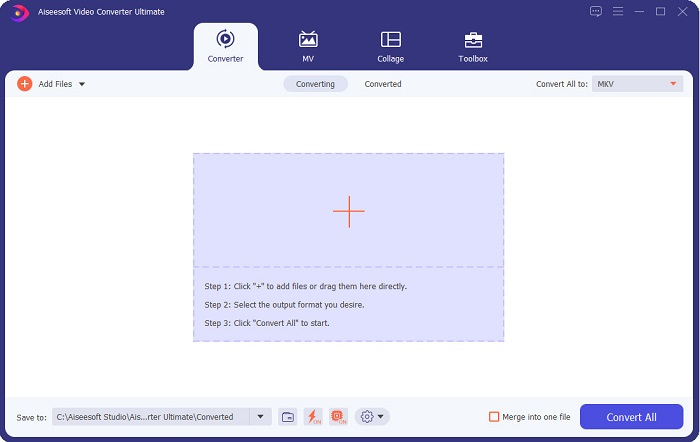
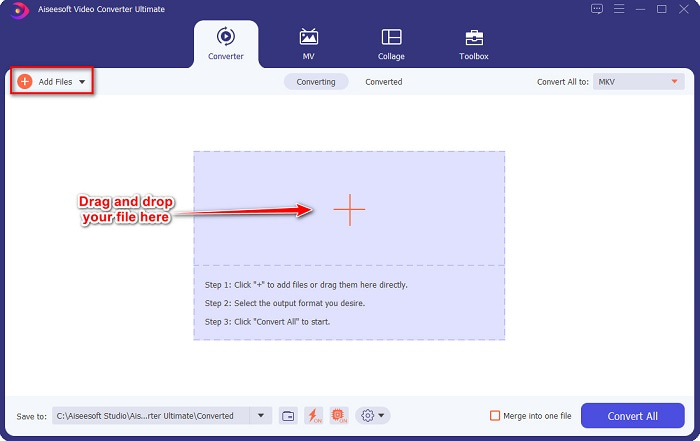
Langkah 3. Klik butang Tambah Fail atau seret dan lepas fail ke butang tanda + untuk memuat naik fail AVI anda.
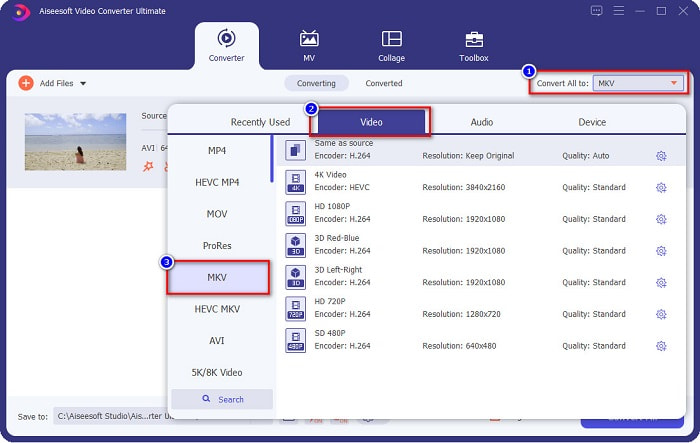
Langkah 4. Selepas memuat naik fail AVI anda, klik butang Tukar Semua kepada untuk memilih MKV sebagai format output anda.
Langkah 5. Akhir sekali, klik butang Tukar Semua untuk menukar fail AVI anda kepada format fail MKV. Kemudian tunggu beberapa saat. Dan siap! Fail AVI anda kini telah ditukar kepada MKV.
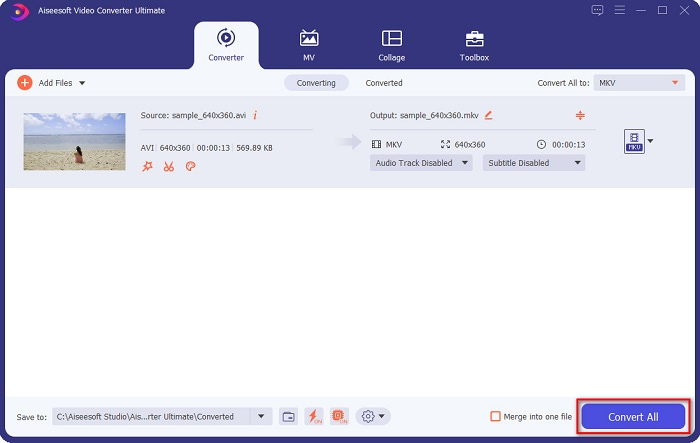
Dengan mengikuti langkah mudah di atas, anda boleh menukar AVI kepada MKV dengan mudah.
Bahagian 3. Cara Terbaik untuk Menukar Fail AVI kepada Fail MKV Dalam Talian
FVC Free Online Video Converter ialah salah satu penukar dalam talian terbaik yang tersedia di web. Penukar ini membolehkan anda menukar banyak format fail seperti AVI ke MKV, WMA, MOV, TS, MP4 dan lain-lain. Penukar ini juga mudah digunakan, menjadikannya mesra pengguna baharu. Selain itu, anda boleh menyunting resolusi, kadar bit video dan kadar bingkai fail anda. Namun begitu, penukar ini bergantung kepada internet; oleh itu, anda mungkin mengalami penukaran yang perlahan.
Berikut ialah langkah bagaimana anda boleh menukar AVI kepada MKV Percuma Dalam Talian:
Langkah 1. Klik pautan ini untuk terus ke laman web FVC Free Online Video Converter.
Langkah 2. Kemudian, klik butang Tambah Fail untuk Ditukar, kemudian lancarkan aplikasi.
Muat turun Versi Desktop untuk menukar fail secara kelompok.
Langkah 3. Selepas melancarkan aplikasi, anda akan dibawa ke fail komputer anda. Kemudian pilih fail AVI anda, dan klik Buka.
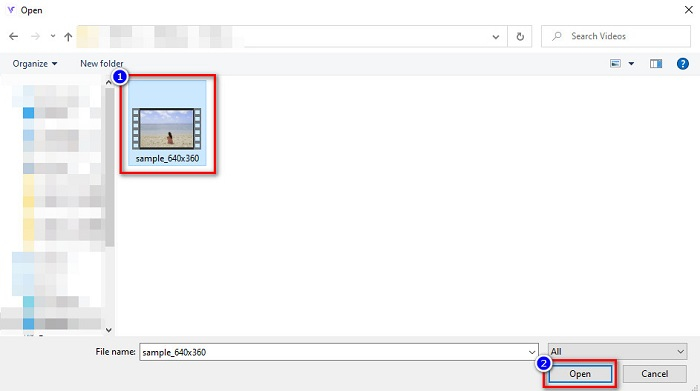
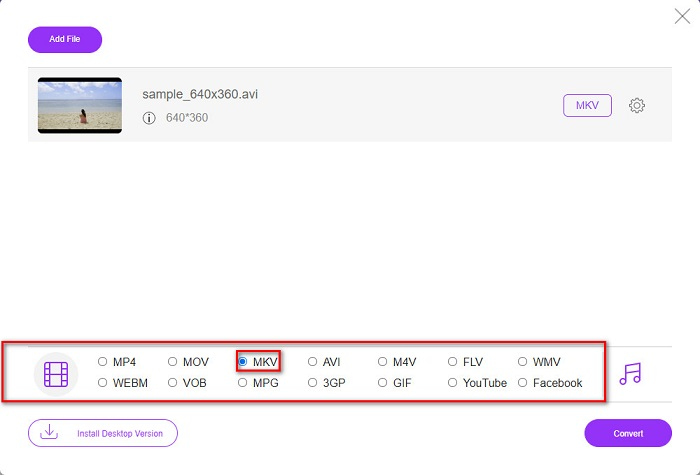
Langkah 4. Di bahagian bawah antara muka perisian, anda akan melihat senarai format fail. Pilih MKV sebagai output fail anda. Kemudian teruskan ke langkah terakhir.
Langkah 5. Klik butang Tukar untuk memulakan penukaran fail AVI anda kepada MKV bagi langkah terakhir.
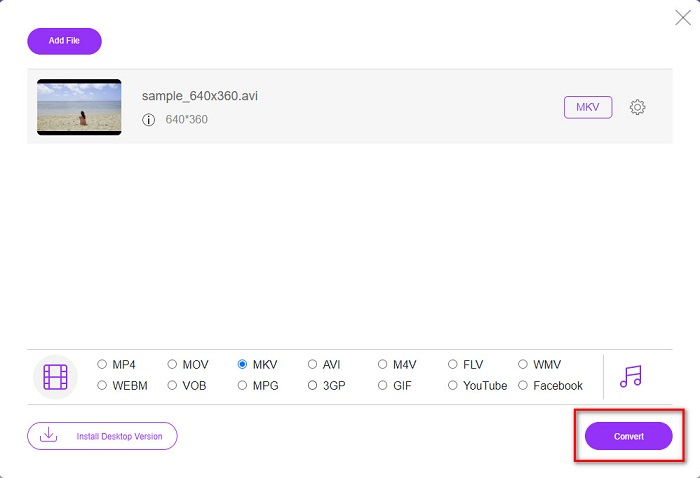
Begitulah mudahnya anda boleh menukar fail AVI anda kepada MKV dengan menggunakan penukar dalam talian.
Bahagian 4. Tukar AVI kepada MKV Menggunakan Penukar Perisian Percuma
Kelebihan menggunakan perisian percuma sebagai penukar ialah anda boleh memuat turunnya tanpa sebarang bayaran. Salah satu alat perisian percuma terbaik yang tersedia ialah VSDC Free Video Converter. Penukar ini pantas, berkuasa dan mempunyai GUI yang mudah. Ia menyokong format fail piawai seperti menukar AVI ke MKV, MPEG, WMV, FLV, MP4 dan banyak lagi. Namun begitu, ia mempunyai ciri yang terhad apabila melibatkan penukaran fail.
Panduan ringkas tentang cara menggunakan VSDC Free Video Converter
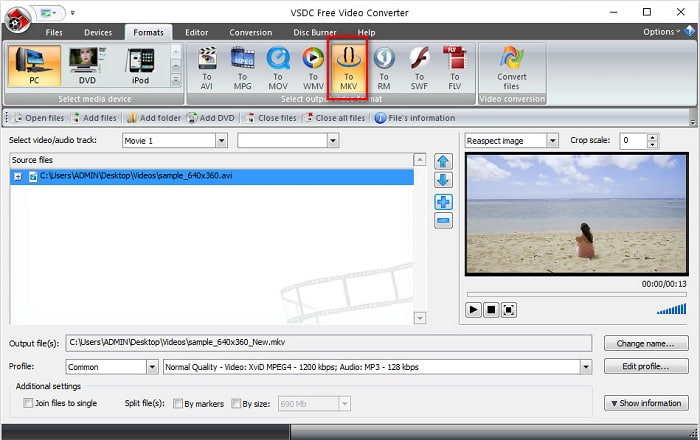
Langkah 1. Muat turun penukar percuma ini dengan mencari VSDC Free Video Converter pada pelayar anda. Ikuti proses pemasangan, dan buka aplikasi. Selepas menjalankan aplikasi, klik butang tanda + untuk memuat naik fail AVI anda ke antara muka perisian.
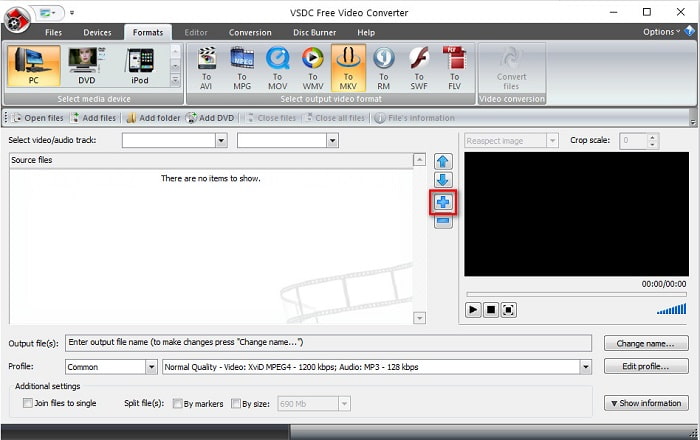
Langkah 2. Seterusnya, pilih format output yang anda inginkan daripada format fail di bahagian atas antara muka perisian. Dalam situasi anda, klik pada MKV.
Langkah 3. Untuk langkah terakhir, klik butang Tukar Fail. Kemudian fail AVI anda ke fail MKV akan mula ditukar.
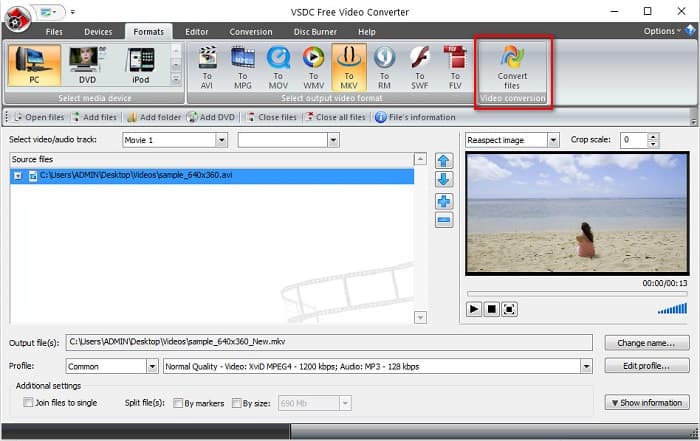
Dengan mengikuti panduan ringkas ini, anda boleh menukar fail AVI anda kepada fail MKV dengan mudah menggunakan penukar perisian percuma.
AVI lwn MKV
Berdasarkan Format Fail Pertukaran Sumber (RIFF), format AVI telah diperkenalkan oleh Microsoft pada tahun 1992. Ia boleh menyimpan video/audio berkualiti tinggi kerana ia menggunakan kurang pemampatan. Tetapi itu juga menyebabkan saiz fail besar fail AVI, yang mungkin menjadi masalah apabila terdapat ruang yang terhad.
Format kontena multimedia Matroska, dikeluarkan pada tahun 2002, ialah format sumber terbuka yang boleh merangkumi beberapa lagu video, audio, imej dan sari kata. Jadi, anda boleh menggunakannya untuk menyimpan klip video pendek, rancangan TV dan filem dengan mudah. Ia agak popular untuk subbing peminat anime.
Bahagian 5. Soalan Lazim tentang Menukar AVI kepada MKV
Apakah kelemahan menukar AVI kepada MKV?
Memandangkan AVI ialah format yang lebih biasa digunakan daripada MKV, jika anda menukar fail AVI anda kepada MKV, anda tidak boleh memainkan fail anda dalam pemain video lain yang tidak menyokong fail MKV.
Manakah yang mempunyai saiz fail yang lebih besar, AVI atau MKV?
MKV mempunyai saiz fail yang besar berbanding AVI kerana MKV menyimpan banyak video, audio dan trek sari kata. Ia juga menyimpan keseluruhan filem dengan sari kata.
Bagaimanakah saya boleh memainkan fail AVI pada Mac?
Komputer Mac tidak dapat memainkan video AVI secara asli. Namun begitu, masih terdapat cara tertentu untuk memainkan fail anda pada Mac. Salah satunya ialah dengan menukar fail AVI anda kepada fail yang boleh dimainkan oleh Mac, iaitu MP4. Untuk mengetahui lebih lanjut tentang menukar AVI kepada MP4, klik pautan ini.
Kesimpulannya
Secara keseluruhannya, penukar yang dibentangkan di atas boleh menukar fail AVI kepada MKV dengan mudah. Mereka semua mempunyai GUI yang mudah difahami, yang tidak akan menyukarkan anda menggunakannya. Mereka juga mempunyai ciri unik yang tidak dimiliki oleh penukar lain. Tetapi jika anda mahukan penukar yang mengeluarkan yang terbaik dalam fail anda, di mana ia mempunyai ciri yang boleh mengedit dan boleh menukar sangat pantas, anda mungkin ingin menggunakan FVC Video Converter Ultimate sebagai baris pilihan pertama. Muat turun sekarang dan rasai ciri uniknya untuk anda gunakan.
-
 Tentukan Perisian Penukar AVI kepada MP3 Yang Ideal [PC & Mac]
 Adakah anda ingin tahu cara menukar AVI kepada format audio MP3? Dalam senarai di bawah anda akan menemui alatan dan langkah yang berbeza juga yang sesuai dengan keperluan anda.
-
 Cara Menukar AVI ke MOV dengan Langkah dan Alat Mudah
 Adakah anda ingin tahu cara menukar AVI kepada MOV yang boleh dimainkan? Anda mesti mengikuti artikel ini untuk mengetahui cara melakukannya dan petua untuk memperoleh penukaran yang berjaya.
-
 Import dan Tukar AVI kepada Format Disokong iMovie [2021]
 Menghadapi masalah kerana anda tidak boleh mengimport fail AVI anda pada iMovie? Jika anda membaca artikel ini maka anda telah memilih ubat yang tepat untuk masalah ini.

