


 Video Converter Ultimate
 Perakam Skrin
 Pembaikan Video
Cara Mengalih Keluar Metadata daripada Fail melalui Windows, Mac, Dalam Talian dan Telefon
Setiap fail media mempunyai metadata yang berkaitan dengan fail tersebut, sama ada video, imej, audio dan sebagainya. Katakan anda memuat naik fail media dalam talian; melalui siaran itu, seseorang boleh mendapatkan maklumat tentang koordinat lokasi anda, masa, tarikh, pengeluar, model peranti dan banyak lagi, yang dikenali sebagai data EXIF. Tidakkah menakutkan jika memikirkan seseorang boleh mendapatkan maklumat melalui siaran anda hanya dengan metadata? Mujurlah, artikel ini akan mengajar anda cara mengalih keluar metadata pada sebarang fail media di Windows, Mac, Dalam Talian, dan juga pada telefon anda sebelum menyiarkannya di internet.

Bahagian 1. Cara Terbaik untuk Mengalih Keluar Metadata pada Mana-mana Fail dalam Windows
Cara yang kami akan bentangkan dalam artikel ini ialah pengalih keluar data terbina dalam yang boleh anda gunakan pada Windows dan alat pihak ketiga yang boleh anda gunakan untuk memadamkan metadata dengan mudah. Jadi, untuk mendapatkan lebih banyak idea tentang cara memadam metadata pada fail anda, anda boleh membaca butiran di bawah dan ikuti langkah untuk melakukannya dengan jayanya.
Gunakan Properties pada Windows
Pada Windows, anda boleh mengalih keluar metadata daripada video dengan mudah jika anda mahu. Dengan mengikuti langkah di bawah, anda boleh mengalih keluar maklumat tentang fail anda sebelum anda menyiarkannya dalam talian.
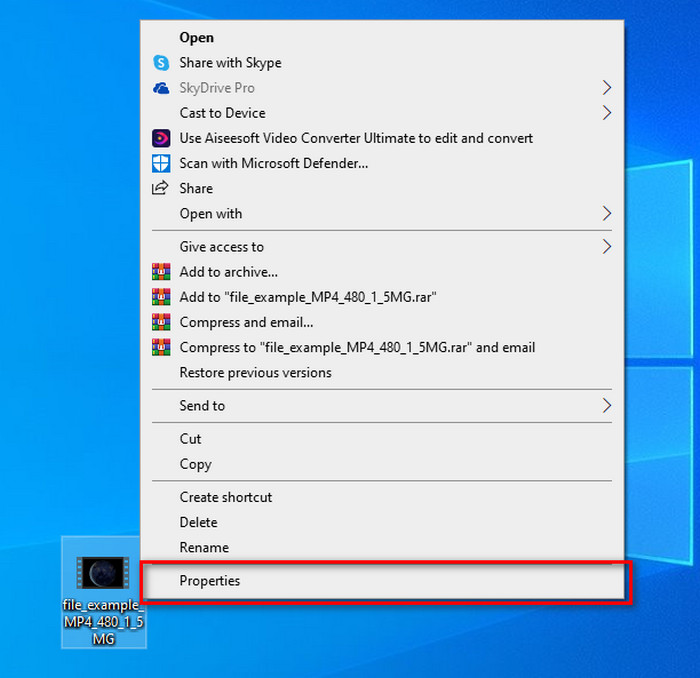
Langkah 1. Cari fail pada desktop anda dan klik kanan pada tetikus; di bawahnya, anda akan nampak Properties, kemudian klik padanya.
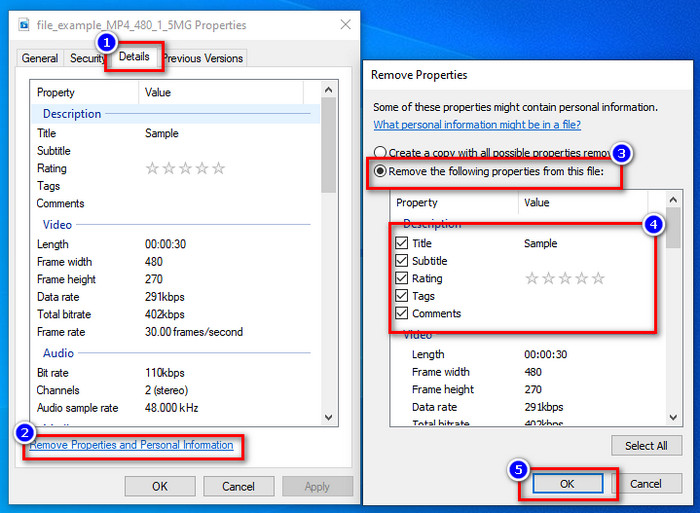
Langkah 2. Pergi ke Details, dan kemudian di bawahnya, klik Remove Properties and Personal Information.
Langkah 3. Sila tandakan kotak metadata yang anda tidak mahu sertakan pada fail media anda sebelum menyiarkannya. Jika anda sudah selesai, tekan OK; ia akan mencipta satu salinan fail tanpa metadata.
Gunakan Alat Pembuangan Metadata Terbaik pada Windows & macOS
Jika anda mahukan alat buang metadata yang terbaik, maka FVC Video Converter Ultimate ialah alat yang anda cari. Ia ialah alat pakar untuk mengalih keluar metadata pada fail media anda sebelum pengguna memuat naik fail tersebut dalam talian. Walaupun ia merupakan pilihan alat pakar, sesiapa sahaja boleh menggunakannya dengan mudah tanpa perlu berusaha keras untuk membuang data pada fail anda. Selain itu, ini ialah pilihan pihak ketiga untuk anda jika teknik yang kami ajarkan tidak dapat membuang metadata pada fail anda sepenuhnya. Langkah-langkah berikut akan membantu anda memadam data yang anda mahu buang pada fail anda, jadi ikutinya dengan betul.
Langkah 1. Sebelum membuang metadata, anda mesti terlebih dahulu memuat turun alat ini dengan mengklik butang muat turun di bawah. Klik sistem pengendalian yang sepadan yang anda gunakan, sama ada Windows atau Mac, kemudian pasangnya serta-merta. Selepas itu, buka alat ini dengan menekan Start Now.
Muat Turun PercumaUntuk Windows 7 atau lebih baharuMuat Turun Selamat
Muat Turun PercumaUntuk MacOS 10.7 atau lebih baharuMuat Turun Selamat
Untuk proses pelayaran yang lancar, anda mesti membiasakan diri dengan UI alatan sebelum meneruskan ke langkah seterusnya.
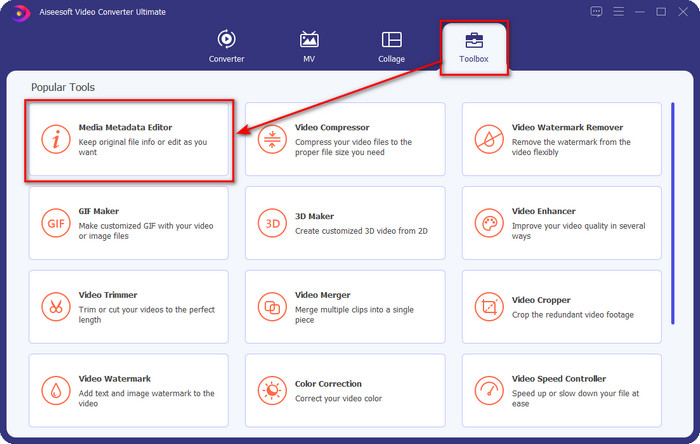
Langkah 2. Setelah anda membuka bahagian Toolbox, tekan Media Metadata Editor di bawahnya.
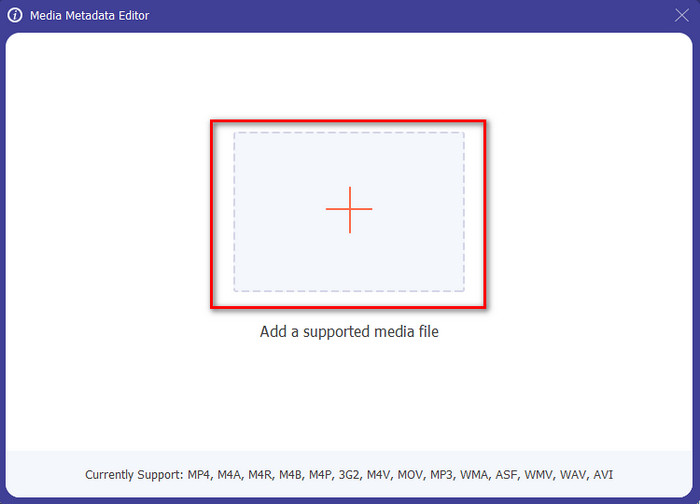
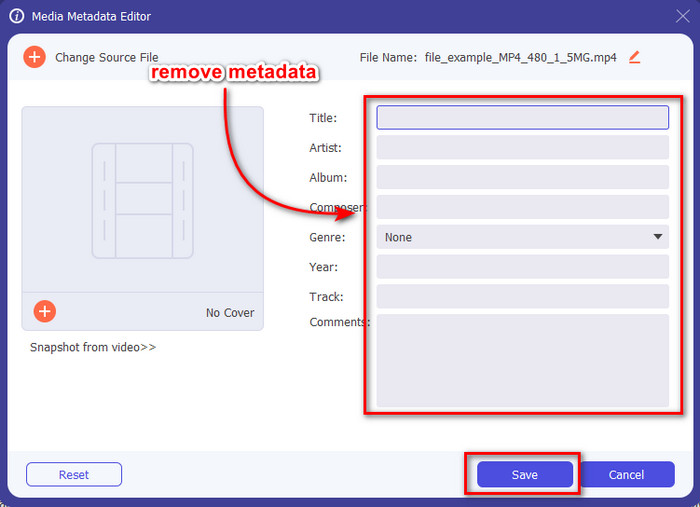
Langkah 3. Satu tetingkap baharu akan muncul pada skrin anda; dengan menekan butang +, anda boleh menambah fail media yang anda mahu buang metadatanya, kemudian tekan Open untuk memuat naiknya.
Langkah 4. Klik ruang teks bagi setiap metadata yang anda mahu buang, kemudian tekan Delete Key pada papan kekunci anda. Untuk menyimpan fail, anda boleh klik Save, dan ia tidak akan mencipta salinan tanpa metadata. Mudah, bukan? Ia menjimatkan ruang pada desktop anda kerana ia tidak mencipta salinan fail yang anda buang metadatanya.
Bahagian 2. Cara Terbaik untuk Memadam Metadata daripada Fail pada Mac
Pada Mac, anda boleh mengalih keluar maklumat tentang foto anda dengan mudah; walau bagaimanapun, anda hanya boleh mengalih keluar data lokasi. Jadi, jika anda ingin belajar mengalih keluar metadata daripada fail pada Mac lebih daripada lokasi, anda mesti menggunakan alat yang kami sediakan di atas.
Langkah 1. Pergi ke Preview dan buka fail tersebut.
Langkah 2. Klik Tools, kemudian Show Inspector dan klik i untuk melihat data lokasi.
Langkah 3. Pada tab GPS, klik Remove Location info, dan ia akan membuang maklumat tentang fail media anda secara automatik.
Bahagian 3. Cara Membuang Metadata pada Peranti Android dan iOS
Gunakan Exiftool – lihat, edit metadata foto dan video (Android)
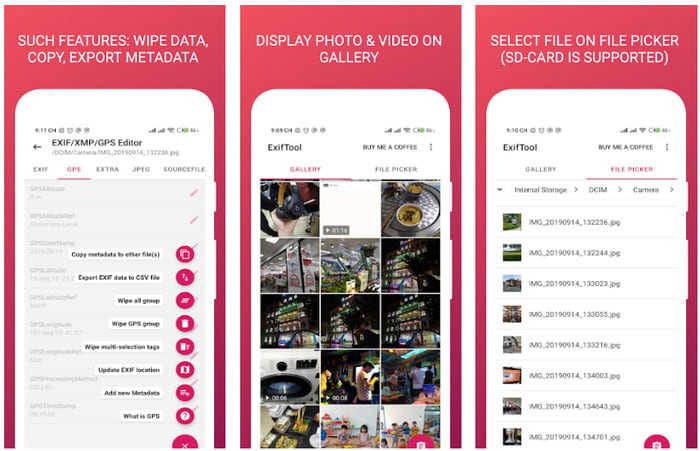
Exiftool – view, edit metadata of photo and video boleh membantu anda membuang metadata video pada Android dengan memuat turun alat ini. Dengan alat ini, anda boleh menambah, membuang dan mengemas kini data EXIF bagi video dan foto secara percuma. Jadi, jika anda mahu menggunakan aplikasi ini, ikuti langkah di bawah.
Langkah 1. Muat turun aplikasi di Playstore dan klik Install.
Langkah 2. Buka aplikasi dan pilih fail yang anda mahu buang metadatanya.
Langkah 3. Tekan option dan klik Wipe Quicktime Group untuk membuang metadata secara automatik.
Gunakan Pembuang Metadata Foto & Video (iOS)
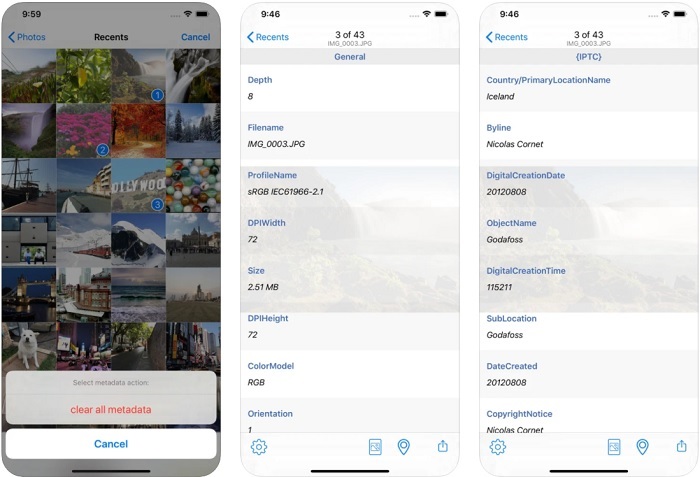
Jika anda pengguna iOS, anda boleh menggunakan Pembuang Metadata Foto & Video dan belajar cara mengosongkan metadata pada peranti iOS anda. Apl ini menyokong semua format media asli pada peranti Apple, dan ia betul-betul menjalankan tugasnya sebagai pengalih keluar metadata. Jika anda mempunyai peranti iOS, anda boleh menyalin langkah di bawah.
Langkah 1. Untuk memuat turun aplikasi, anda mesti pergi ke App Store, cari aplikasi tersebut, kemudian pasang.
Langkah 2. Buka alat ini dan benarkan aplikasi mengakses Photos anda, pilih video atau foto yang anda mahu buang metadatanya.
Langkah 3. Ketik ikon gear, kemudian klik clear all metadata, dan ia akan mencipta salinan fail tanpa metadata.
Bahagian 4. Cara Membuang Metadata Menggunakan Alat Web Secara Percuma
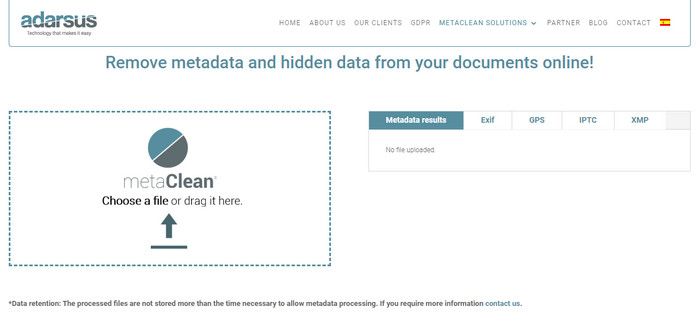
Adarsus – Remove Metadata boleh membantu anda membuang metadata secara dalam talian, dan ia adalah percuma. Tidak seperti penukar lain di atas, anda tidak perlu memuat turun alat ini ke desktop untuk menggunakannya kerana ia ialah alat berasaskan web; untuk mengaksesnya, anda memerlukan sambungan internet. Jika anda mahu mengalami sendiri proses membuang metadata secara percuma, ikuti langkah di bawah.
Langkah 1. Buka pelayar web anda, dan cari alat tersebut.
Langkah 2. Pada laman web alat itu, klik butang upload dan pilih fail yang hendak dibuang metadatanya.
Langkah 3. Klik Get my File Clean, dan ia akan mencipta salinan tanpa metadata.
Bahagian 5. Carta Perbandingan tentang Pembuang Metadata pada Windows, Mac, Dalam Talian, Android dan iOS
| ciri-ciri | FVC Video Converter Ultimate | Properties pada Windows | Pratonton pada Mac | Exiftool – lihat, edit metadata foto dan video (Android) | Pembuang Metadata Foto & Video | Adarsus – Alih keluar Metadata |
| Selamat Digunakan |  | | | | | |
| Mesra pengguna | | | | | | |
| Kosongkan Keseluruhan Metadata | | |  | | | |
| Edit Metadata | | | | | | |
| Salin fail | | | | | | |
| Had/s | Ia tidak tersedia pada peranti mudah alih dan dalam talian | Kadangkala data tidak dipadamkan sepenuhnya. | Ia tidak mengalih keluar metadata lain selain lokasi. | Tidak berkesan seperti alat muktamad. | Selalunya, ia gagal mengalih keluar metadata | Terdapat had pada saiz fail, iaitu 5MB. |
Bahagian 6. Soalan Lazim tentang Mengalih Keluar Metadata
Adakah mengalih keluar metadata mengurangkan saiz fail?
Ya, ia akan berlaku kerana metadata menambah saiz pada fail media dengan maklumatnya. Anda boleh menjimatkan lebih sedikit ruang dengan mengalih keluarnya, dan ia akan menjadi lebih kecil daripada sebelumnya. Walau bagaimanapun, maklumat yang terdapat pada fail anda dialih keluar.
Selepas mengalih keluar metadata, adakah kualiti akan menjejaskannya?
Tidak, ia tidak akan; kualiti tidak akan terjejas walaupun anda menukar atau mengalih keluar metadata fail media anda. Jadi, jangan risau kerana anda masih akan mempunyai kualiti yang sama walaupun tanpa atau dengan metadata padanya.
Adakah semua format fail mempunyai metadata?
Kebanyakan format media mempunyai struktur metadata yang berbeza, tetapi tidak semua format media mempunyai metadata. Dalam beberapa kes, sesetengah format tidak boleh mengandungi metadata kerana binaan, reka bentuk dan banyak faktor lain.
Kesimpulannya
Kita kini telah mempelajari cara membuang metadata pada fail untuk melindungi privasi anda dengan begitu mudah. Dengan alat yang dikemukakan dalam artikel ini, menjadi mungkin untuk membuangnya sebelum menyiarkannya di web. Walaupun kami menawarkan lima alat untuk memadam metadata, tiada keraguan tentang keupayaan FVC Video Converter Ultimate kerana alat ini boleh membuang keseluruhan data atau bahagian tertentu secepat 1-2-3. Jika anda meragui ulasan kami, anda boleh semak sendiri alat ini dengan memuat turunnya ke pemacu komputer anda dan mengujinya sama ada ia benar-benar hebat!
-
 4 Cara untuk Menukar WMV kepada MKV pada Mac, Windows & Dalam Talian Tanpa Kehilangan
 Ingin menukar WMV kepada MKV pada Mac dan Windows? Artikel ini membentangkan cara terbaik untuk menukar WMV kepada MKV dengan cepat.
-
 4 daripada Pemapar Metadata Terbaik Dalam Talian & Luar Talian [Dikemas kini 2022]
 Bolehkah saya menyemak metadata fail saya? Ya, anda boleh, dengan bantuan siaran ini kami akan memperkenalkan kepada anda penonton metadata berbeza yang boleh anda gunakan.
-
 Penukar WebM ke MKV Terbaik yang Anda Mesti Gunakan untuk Menukar dengan Pantas
 Adakah anda sedang mencari cara untuk menukar fail WebM kepada MKV? Artikel ini membentangkan penukar WebM ke MKV terbaik untuk anda cuba.
