


 Video Converter Ultimate
 Perakam Skrin
 Pembaikan Video
[Semakan Lengkap] Apakah Editor Metadata Video Terbaik pada Desktop
Metadata video boleh membantu anda dalam pelbagai cara; contoh yang sangat baik ialah menyusun fail anda mengikut masa dan tarikh, pengarang, saiz fail, dan banyak lagi; ringkasnya, untuk menguruskan fail. Walaupun metadata terdapat pada setiap fail media, kita perlu menyuntingnya atas sebab‑sebab tertentu. Namun, memilih yang mana patut anda gunakan mungkin tugas yang sukar kerana terdapat banyak penyunting metadata di pasaran. Jadi, untuk mengurangkan beban ini, biar kami bantu anda mengulas pelbagai penyunting untuk data anda yang terdapat di pasaran yang hanya menawarkan prestasi terbaik. Semua butiran dan alat telah disemak dengan teliti untuk memberikan ulasan yang jujur tentang setiap perisian. Mari kita terokai lebih banyak maklumat tentang lima penyunting metadata video teratas yang boleh anda harapkan.

Bahagian 1. 5 Editor Metadata Video Terbaik Tersedia pada Desktop Luar Talian
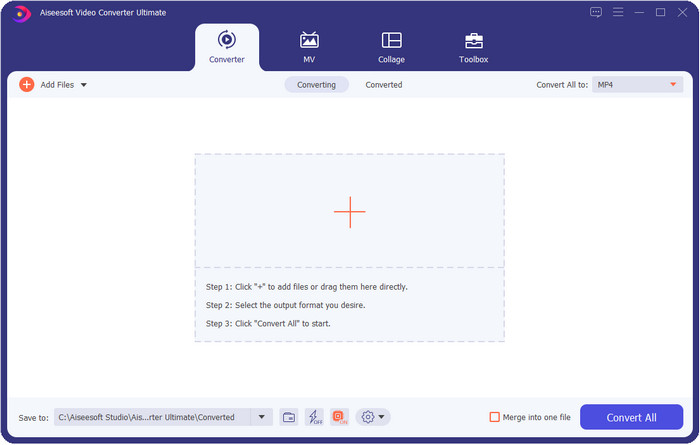
Video Converter Ultimate [Sangat Dicadangkan]
Muat Turun PercumaUntuk Windows 7 atau lebih baharuMuat Turun Selamat
Muat Turun PercumaUntuk MacOS 10.7 atau lebih baharuMuat Turun Selamat
OS Serasi: Windows, Mac dan Linux
Video Converter Ultimate ialah penyunting metadata video terbaik untuk melihat, membuang dan menyunting metadata pada fail anda. Penyunting metadata ini bukanlah penyunting biasa yang anda boleh gunakan kerana ia satu pakej penuh ciri yang boleh anda kuasai dengan cepat dalam masa yang singkat. Dengan alat ini, anda boleh menambah banyak perkara menarik pada metadata anda, seperti ulasan, imej kulit, tahun, genre jika ia muzik, dan banyak lagi dalam masa kurang daripada sesaat. Adakah anda ingin tahu apa yang menakjubkan kami tentang alat ini? Tidak seperti perisian lain, mereka mencipta salinan fail yang telah anda sunting, yang tidak mesra ruang. Tetapi jika anda menggunakan alat ini, fail yang anda muat naik ke alat ultimate tidak akan mencipta salinan dan metadata yang anda tambah akan digunakan pada fail yang sama; ia mesra ruang. Selain itu, jika anda memerlukan alat serba lengkap, ini ialah pilihan yang sempurna untuk semua pengguna yang memerlukan penonton metadata pada Mac dan Windows.
Kelebihan
- Ia menyokong berbilang format yang anda boleh muat naik, seperti MP4, MKV, AVI, FLV, MP3 dan 1000+ format media lain untuk menukar atau mengalih keluar metadata dengan mudah.
- Ia membolehkan mana-mana pengguna mempunyai pengalaman yang mudah dalam mengedit metadata.
- Ia adalah pilihan terbaik untuk pengguna Windows dan Mac untuk memuat turun editor metadata ini pada pemacu mereka.
- Alih keluar metadata berbilang fail dengan mudah dengan beberapa klik.
Keburukan
- Membeli alat dan memuat turunnya adalah penting, tetapi ia akan bernilai setiap sen dan pemacu komputer.
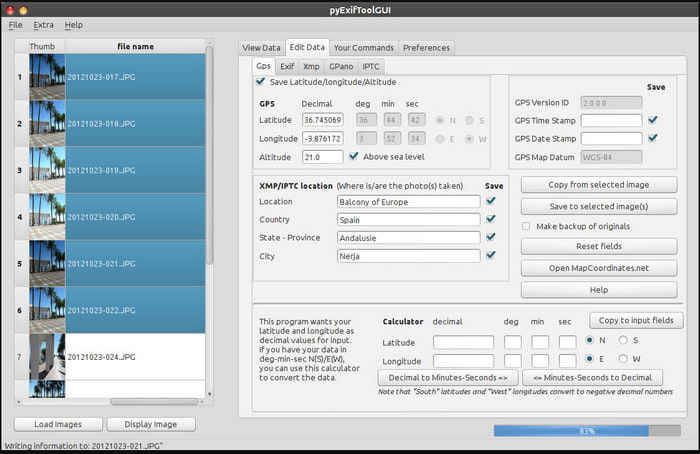
ExifTool
OS Serasi: Windows, Mac & Unix
ExifTool ialah penyunting metadata video yang terkenal pada Windows, Mac dan Unix yang boleh anda akses dengan mudah secara percuma. Ia menyokong beberapa format video dan imej untuk mengubah atau membuang metadata. Selain itu, alat ini membolehkan anda menyunting berbilang metadata pada fail yang berbeza secara serentak. Tidak seperti penyunting lain dalam senarai ini, kita dapat lihat banyak perkara sedang berlaku pada alat ini; jadi jika anda baru dalam menyunting metadata, anda memerlukan masa untuk memahami cara penggunaannya.
Kelebihan
- Percuma untuk dimuat turun.
- Ia boleh mengedit dan melihat metadata dengan mudah.
Keburukan
- Antara muka dan pilihan mengelirukan untuk digunakan.
Metadata++
OS Serasi: Windows
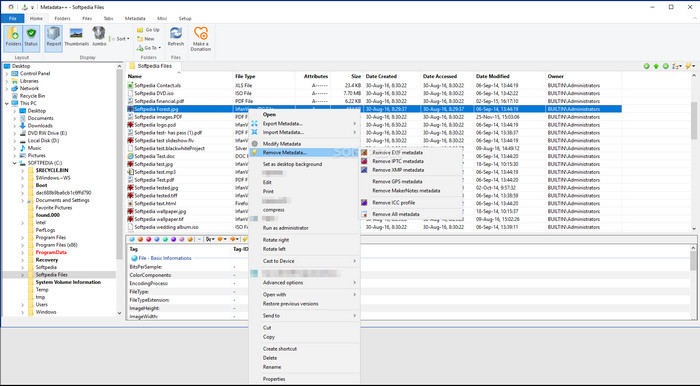
Jika anda mahu bergantung kepada penyunting metadata video sumber terbuka pada Windows, anda mungkin boleh gunakan Metadata++. Alat ini membantu anda menambah atau membuang metadata pada fail dengan cepat menggunakan kekunci pintas, bagi mengurangkan penggunaan tetikus. Walau bagaimanapun, penyunting ini tidak seberkesan yang lain dalam senarai ini, tetapi anda masih boleh bergantung pada alat ini jika anda mahu menggunakannya.
Kelebihan
- Kekunci pintas tersedia untuk proses cepat mengedit metadata.
- Tambahkan metadata dengan mudah pada fail yang belum.
- Percuma untuk dimuat turun pada Windows.
Keburukan
- GUI sudah lapuk.
- Terlalu banyak fungsi perlu difahami sebelum anda menggunakannya.
MyMeta
OS Serasi: Windows
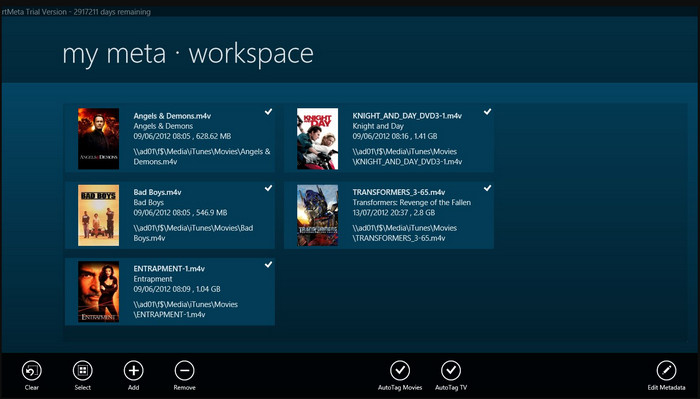
MyMeta ialah penyunting metadata video yang boleh anda gunakan serta‑merta untuk menyunting MP4, M4V dan MOV. Alat ini mempunyai ciri untuk menjana metadata dan kulit secara automatik berdasarkan hasil di internet. Selain itu, anda boleh gunakan alat ini untuk menanda fail mengikut maklumat yang ada. Walaupun alat ini bagus, format yang disokong oleh alat ini hanyalah MP4, M4V dan MOV sahaja.
Kelebihan
- Mudah untuk digunakan.
- Teg auto membolehkan anda menyalin metadata fail tertentu dalam beberapa klik.
- GUI yang kemas.
Keburukan
- Ia hanya menyokong MP4, M4V dan MOV. Jadi jika anda cuba memuat naik format lain di sini, ia tidak disokong.
- Sesetengah ciri tidak sesuai dengan keperluan pengguna.
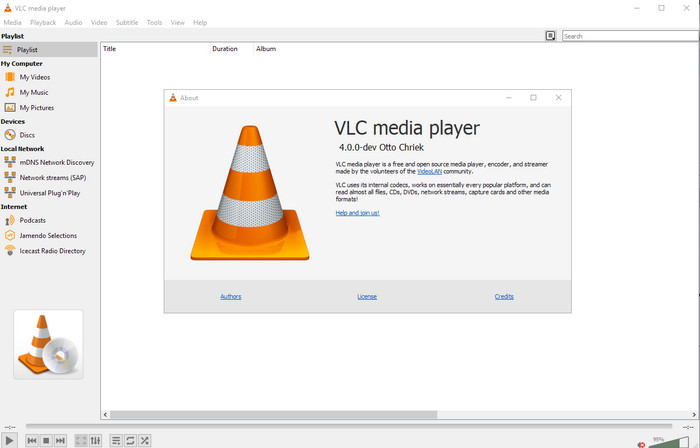
Pemain Media VLC
OS Serasi: Windows, Mac, Linux
VLC Media Player dibuat untuk memainkan fail media, tetapi anda juga boleh menggunakan penyunting metadata video sumber terbuka ini untuk menyunting metadata fail. Seperti yang kami katakan, ia boleh memainkan pelbagai variasi format dengan mudah dengan codec berbeza pada setiap platform yang anda boleh bayangkan kerana ia adalah pemain video bertaraf tinggi. Walaupun ia boleh memainkan pelbagai format fail, fail yang disokong untuk penyuntingan metadata adalah terhad dan tidak seluas alat lain yang disebutkan.
Kelebihan
- Editor metadata sumber terbuka untuk dimuat turun.
- Mesra pengguna.
- Tersedia dalam semua sistem pengendalian.
Keburukan
- Ia menyokong format purata untuk dimuat naik.
- GUI alat itu sudah lapuk.
Bahagian 2. Carta Perbandingan tentang Editor Metadata Video
| ciri-ciri | Video Converter Ultimate [Sangat Dicadangkan] | ExifTool | Metadata++ | MyMeta | Pemain Media VLC |
| Tambah dan Alih Keluar Metadata |  | | | | |
| Mesra pengguna | | | | | |
| Menyokong Format Julat Luas | |  | | | |
| Pilihan Terbaik untuk Pemula | | | | | |
| Edit Metadata Kelompok | | | | | |
Bahagian 3. Cara Menambah, Mengalih Keluar dan Mengedit Metadata Menggunakan Editor Metadata Yang Sangat Dicadangkan
Jika anda telah memilih untuk menggunakan Video Converter Ultimate sebagai penyunting metadata video anda, kami cadangkan anda mengikuti langkah‑langkah yang dinyatakan di bawah. Tanpa melengahkan masa, mari teruskan dan mula menggunakan alat ultimate ini untuk tugasan ultimate ini.
Langkah 1. Muat turun alat ini dengan mengklik butang muat turun yang disediakan di bawah; pilih sama ada anda menggunakan Windows atau Mac. Selepas proses muat turun selesai, anda mesti klik fail tersebut untuk memasangnya serta‑merta, kemudian lancarkannya apabila semuanya selesai.
Muat Turun PercumaUntuk Windows 7 atau lebih baharuMuat Turun Selamat
Muat Turun PercumaUntuk MacOS 10.7 atau lebih baharuMuat Turun Selamat
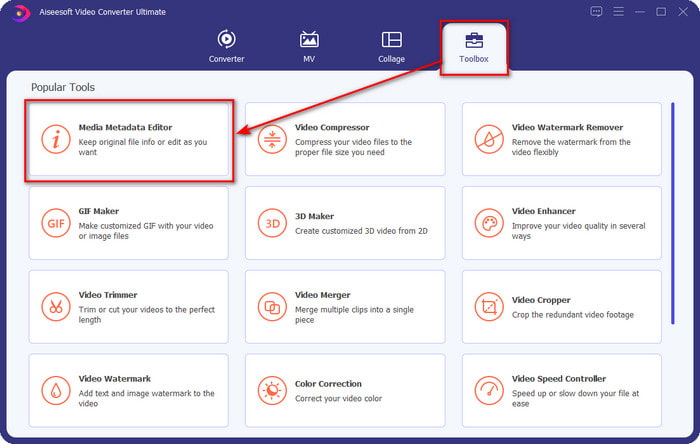
Langkah 2. Selepas anda melancarkan alat itu, klik bahagian Toolbox, dan di bawahnya, cari Media Metadata Editor; klik ia sebelum meneruskan ke langkah seterusnya.
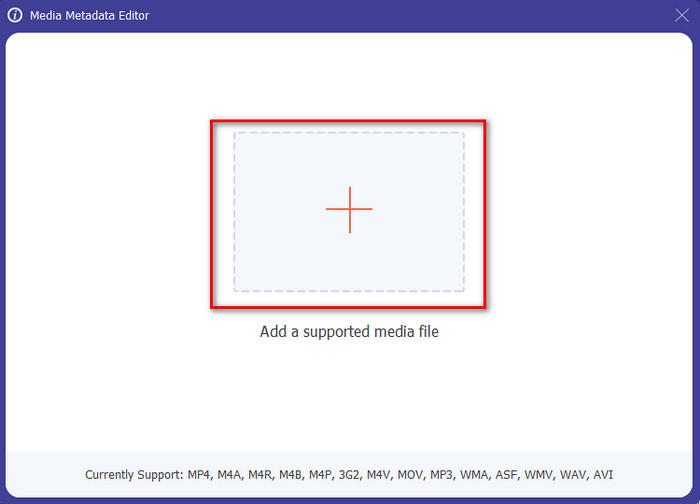
Langkah 3. Masukkan fail dengan mengklik ikon +, dan satu folder akan terpapar pada skrin anda, pilih fail media yang anda mahu sunting metadatanya, dan tekan Open.
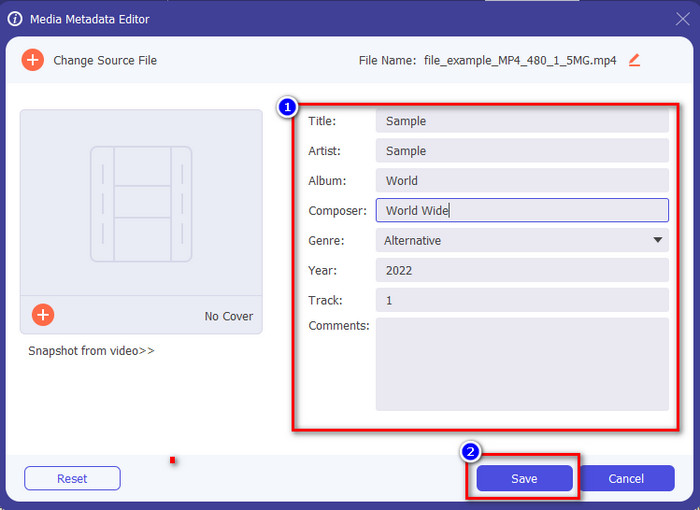
Langkah 4. Pada tetingkap baharu yang akan terpapar pada skrin anda, kini anda boleh menyunting, membuang dan menambah metadata pada kotak teks yang disediakan. Jika anda sudah berpuas hati dengan metadata tersebut, klik Save untuk menggunakan metadata pada fail. Mudah sahaja, bukan? Itulah yang boleh dilakukan oleh alat ultimate ini.
Bahagian 4. Soalan Lazim tentang Editor Metadata Video
Bolehkah saya melihat metadata dalam talian?
Ya, anda boleh menggunakan FVC Free Video Converter Online untuk melihat metadata pada video secara dalam talian; ikut langkah di bawah untuk mengetahui cara melihatnya. Mula‑mula, klik pautan tersebut untuk membuka tab baharu pada pelayar anda; pautan ini akan terus pergi ke laman web rasmi penukar FVC dalam talian. Seterusnya, klik Add Files to Convert; jika ini kali pertama anda menggunakannya, anda perlu memuat turun pelancar dan klik fail itu untuk memasangnya. Klik sekali lagi, dan kali ini satu folder komputer akan muncul, pilih fail yang anda mahu lihat metadatanya, dan tekan Open untuk meneruskan. Satu tetingkap baharu akan terpapar pada skrin; klik ikon i dan kini anda boleh melihat metadata pada video.
Apakah bahagian metadata?
Metadata merangkumi pelbagai jenis maklumat tentang fail media: nama pengarang, gubahan, lokasi, tetapan, peranti yang digunakan, tarikh, masa, genre jika ia muzik, imej, dan banyak lagi. Tetapi kebanyakan masa, metadata bergantung pada jenis fail tersebut; jika fail itu buku audio, ia berbeza daripada fail video.
Adakah ID3 sampel metadata?
ID3 ialah bekas metadata yang dilihat pada fail media MP3; pada asasnya, pada fail audio.
Kesimpulannya
Perisian yang kami bentangkan dalam artikel ini boleh membantu anda melihat, menyunting, menambah atau membuang metadata video, walaupun anda tidak mempunyai banyak pengetahuan tentang metadata. Kini setelah anda mempunyai 5 penyunting terbaik di pasaran, tibalah masanya untuk memilih alat yang patut anda harapkan bagi tugasan ini. Jika anda rasa masih belum pasti, kami mengesyorkan anda menggunakan Video Converter Ultimate atas banyak sebab. Tidak seperti alat lain, perisian ini boleh menyelesaikan tugasan ini dalam beberapa saat sahaja. Jika anda masih tidak percaya apa yang kami katakan, anda mesti memuat turun alat ini untuk mencubanya sendiri dan melihat perkara lain yang ditawarkannya.
-
 4 daripada Pemapar Metadata Terbaik Dalam Talian & Luar Talian [Dikemas kini 2025]
 Bolehkah saya menyemak metadata fail saya? Ya, anda boleh, dengan bantuan siaran ini kami akan memperkenalkan kepada anda penonton metadata berbeza yang boleh anda gunakan.
-
 5 Pengekstrak Metadata Teratas Tersedia Dalam Talian & Luar Talian [2025]
 Anda boleh menemui berbilang pengekstrak metadata di pasaran, tetapi hari ini, kami hanya memilih lima pengekstrak teg yang paling banyak dipilih mengikut khalayak.
-
 7 Editor Tag Muzik Popular pada Windows, Mac dan Peranti Mudah Alih
 Teg muzik popular untuk digunakan untuk susunan muzik dalam pustaka anda mengikut data di dalamnya. Bagaimana jika anda ingin mengubahnya? Baca butiran di bawah untuk mengetahui lebih lanjut.
