


 Video Converter Ultimate
 Perakam Skrin
 Pembaikan Video
Editor Metadata MKV Terbaik untuk Tambah/Tukar/Alih Keluar Metadata pada MKV
Tidak banyak pilihan penyunting metadata MKV di pasaran kerana MKV tidak begitu banyak disokong. Namun ini tidak bermaksud kita tidak boleh menyunting tag pada fail MKV kita, jadi jangan muram. Untuk mengetahui apakah penyunting metadata terbaik yang menyokong MKV, anda boleh membaca keseluruhan artikel ini sementara kami mengulas pelbagai alat. Apa yang anda tunggu lagi? Teruskan membaca kerana tidak akan mengambil lebih daripada 7 minit untuk mendapatkan penyunting tag yang sesuai.

Bahagian 1. Editor Tag MKV Terbaik Disyorkan untuk Windows & Mac: FVC Video Converter Ultimate
FVC Video Converter Ultimate ialah penyunting metadata MKV paling popular pada Windows dan Mac. Alat ini menepati nama dan jangkaannya, jadi memuat turun perisian ini untuk menyunting metadata adalah pilihan terbaik yang akan anda buat. Ciri dan fungsinya yang berkuasa akan mengendalikan tugas dengan mudah seolah-olah ia sangat mudah. Selain itu, alat ini menyokong format lain untuk dimuat naik, seperti MP4, AVI, MOV, FLV, WMV dan lebih 1000 format media tanpa mengekod semula fail untuk pengalaman yang lebih mudah.
Apa lagi? Katakan anda memuat turun alat itu. Anda akan mempunyai alat terpantas untuk menambah metadata pada MKV dan GUI paling cantik bagi editor metadata yang tidak boleh ditawarkan oleh alat lain. Jika anda berminat untuk menggunakan editor, teruskan membaca bahagian 2 sambil kami menerangkan cara mengedit data fail MKV.
Bahagian 2. Bagaimana untuk Mengedit Metadata MKV dengan Editor Metadata MKV yang Disyorkan
Ikuti langkah-langkah yang sewajarnya, bermula dari memuat turun alat dan sebagainya. Jadi mari kita mula menggunakan editor metadata MKV terbaik yang boleh anda muat turun pada Windows atau macOS anda.
Langkah 1. Klik butang muat turun yang kami sediakan di bawah; pilih sistem operasi yang anda sedang gunakan. Pasang sebaik sahaja anda memuat turun fail tersebut, ikuti proses pemasangan, dan kami pastikan anda tidak akan tersalah langkah, kemudian buka perisian untuk meneruskan. Sebelum kita bermula, anda perlu membiasakan diri dengan alat ini supaya proses menggunakan penyunting tag MKV menjadi lebih lancar.
Muat Turun PercumaUntuk Windows 7 atau lebih baharuMuat Turun Selamat
Muat Turun PercumaUntuk MacOS 10.7 atau lebih baharuMuat Turun Selamat
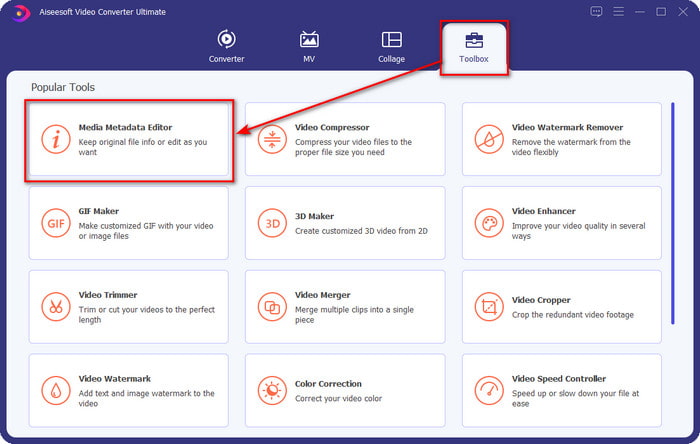
Langkah 2. Buka Toolbox, cari Media Metadata Editor, dan ketik untuk membukanya.
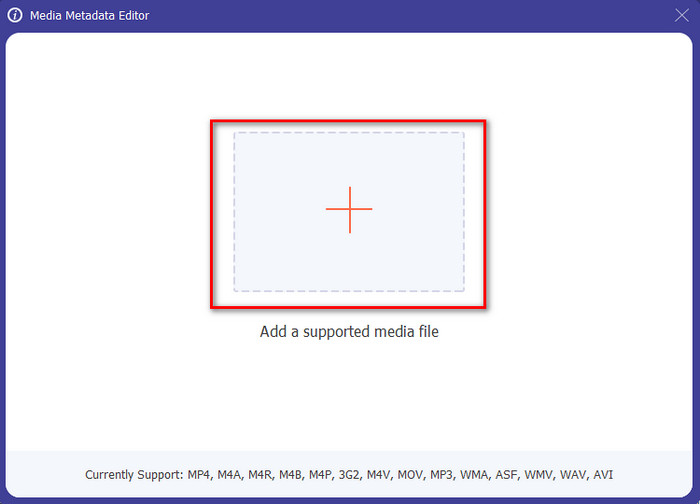
Langkah 3. Muat naik fail MKV anda dengan mengklik ikon +, dan satu folder fail akan dipaparkan; pilih fail MKV tersebut dan tekan Open.
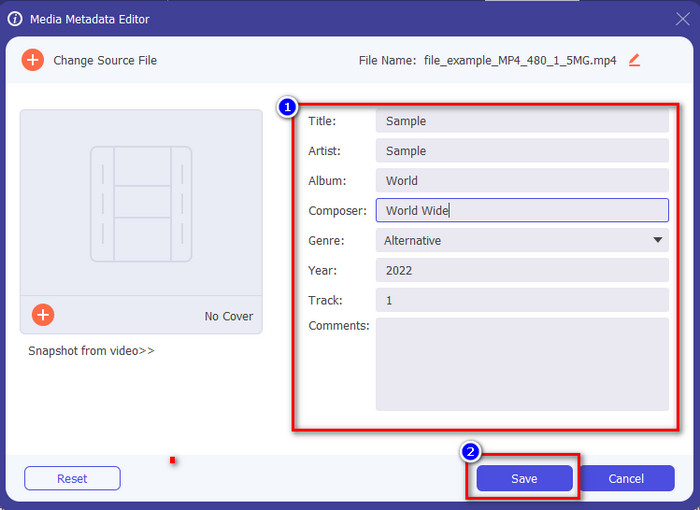
Langkah 4. Sunting metadata pada kotak teks; anda boleh mengisinya atau mengosongkannya, lakukan sahaja apa yang anda mahu terhadap metadata tersebut. Selepas semua itu, klik Save untuk menggunakan perubahan yang telah anda buat tadi. Dengan itu, anda kini telah menyunting tag MKV tersebut.
Bahagian 3. 3 Editor Tag MKV Percuma yang Perlu Anda Ketahui Tersedia pada Windows, Mac dan Dalam Talian
GROUPDOCS.Metadata [Percuma di Web]
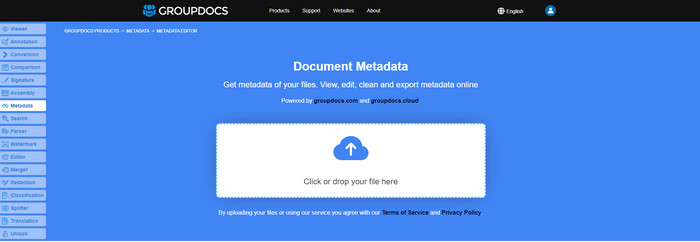
Jika anda mahu menggunakan penyunting metadata MKV percuma di web, kami sangat mengesyorkan anda mencuba GROUPDOCS.Metadata. Ia ialah pilihan terbaik untuk melihat dan menyunting metadata pada MKV anda kerana ia berfungsi pada semua platform, yang bermaksud ia fleksibel dan mudah disesuaikan dalam apa jua keadaan. Selain itu, ia boleh memanipulasi carian dan pengemaskinian tag dengan mudah mengikut sifat yang anda perlukan, dan jika perlu dibuang, ia akan melakukannya secara automatik. Walau bagaimanapun, alat ini boleh menjadi mencabar untuk dikendalikan bagi tugasan tertentu, seperti mengemas kini tag fail. Jadi, untuk benar-benar mahir menggunakan alat berasaskan web ini, anda perlu kerap menggunakannya untuk menambah pengetahuan tentang fungsi laman tersebut dan memudahkan pengendaliannya.
Properties pada Windows [Editor Terbina dalam pada Windows]
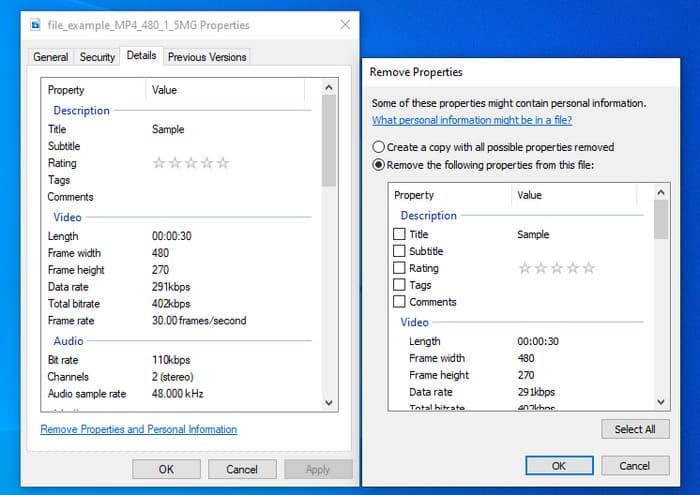
Tidak mahu memuat turun alat untuk menukar metadata MKV dan ingin menggunakan fungsi terbina dalam pada Windows untuk mengedit metadata? Maka lebih baik jika anda menggunakan Properties pada Windows. Fungsi ini tersedia pada semua PC Windows dan anda tidak perlu memuat turun sebarang alat atau internet untuk menggunakannya. Anda boleh melihat metadata dengan cepat dan berjaya mengeditnya dengan ciri percuma ini. Walau bagaimanapun, terdapat beberapa laporan tentang teg yang hilang selepas mereka mencuba menggunakan ciri ini. Mengikut pengguna, ia boleh mengalih keluar teg pada fail anda secara automatik. Daripada menggunakan ciri ini, mereka berhasrat untuk memuat turun alat yang betul untuk membuang usaha pada tag yang mereka sertakan pada MKV atau fail media mereka. Tetapi jika anda ingin melihat di mana ciri ini, hanya tekan klik kanan pada fail, terutamanya di bahagian bawah.
iFlicks [Untuk Mac]
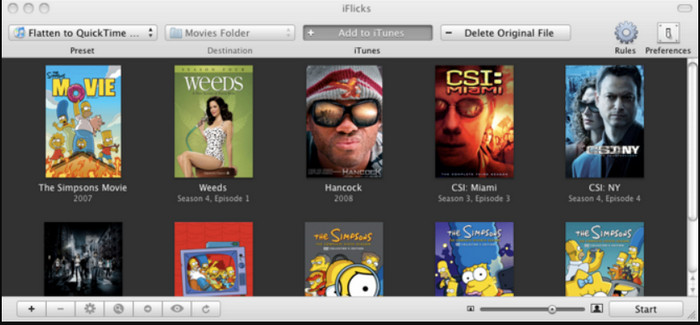
iFlicks boleh membantu anda menukar MKV kepada format yang boleh dimainkan atau mengajar anda cara mengedit metadata MKV pada Mac. Alat ini berinteraksi dengan baik dengan iTunes kerana ia menyediakan metadata terperinci pada setiap fail media. Dengan perisian ini, anda boleh menambah maklumat yang berbeza tentang fail anda, seperti slogan, genre, tarikh. penilaian, resolusi dan lain-lain diambil pada pangkalan data dalam talian. Tambahan pula, perisian ini menyusun metadata di mana anda boleh memuat turunnya dan menggunakannya secara automatik pada fail. Walau bagaimanapun, percubaan percuma hanya boleh bertahan selama tujuh hari, jadi jika anda ingin menggunakan alat itu semula, anda perlu membayar yuran langganannya.
Bahagian 4. Soalan Lazim tentang MKV Metadata Editor
Adakah MKV boleh dimainkan pada Mac?
Fail MKV boleh dimainkan pada Mac jika anda menggunakan alat pihak ketiga, seperti Blu-ray Player. Tetapi jika anda sengaja memainkan video tersebut pada QuickTime, ia tidak akan berfungsi kerana tidak disokong. Jadi, jika anda mahu menonton fail MKV anda pada Mac, kami amat mengesyorkan anda menggunakan Blu-ray Player pihak ketiga, atau anda boleh menukar format MKV kepada MOV dengan bantuan FVC Video Converter Ultimate.
Adakah saya perlu menukar MKV sebelum mengedit metadata?
Jika alat yang anda ingin gunakan tidak menyokong muat naik format MKV, kami menasihati anda untuk menukar format terlebih dahulu kepada format yang serasi. Tetapi dengan tol yang kami nyatakan di atas, anda tidak perlu menukar fail ke dalam format yang disokong. Walau bagaimanapun, tidak terdapat banyak pilihan atau alatan untuk mengedit teg MKV kerana formatnya tidak diketahui. Walaupun sukar untuk dicari, kami melakukan yang terbaik untuk mencari semua editor yang boleh anda gunakan untuk mengemas kini atau menukar metadata yang menyokong format MKV.
Mengapa saiz fail MKV terlalu besar?
Sebab utama saiz fail MKV besar ialah ia boleh mengandungi pelbagai kandungan video, audio dan sari kata dengan codec dan elemen yang berbeza. Jika anda menambah metadata pada fail tersebut, saiz fail akan menjadi lebih besar. Jadi, cara terbaik untuk menjimatkan ruang sambil mengekalkan fail MKV pada pemacu anda ialah dengan memampatkannya tanpa merosakkan kualiti atau kehilangan maklumat pada fail. Klik pautan ini untuk ketahui lebih lanjut tentang pemampatan fail video.
Kesimpulannya
Walaupun penyunting metadata MKV di pasaran terhad, masih ada alat berkuasa yang anda boleh harapkan pada pelbagai platform. Setelah kami mengulas pelbagai perisian yang boleh anda gunakan, pilihan tetap di tangan anda; yang manakah anda lebih suka gunakan untuk menukar metadata fail MKV anda. Memang sukar untuk membuat keputusan kerana semua alat itu sangat baik digunakan. Jika anda masih belum membuat pilihan, kami mencadangkan anda menggunakan FVC Video Converter Ultimate kerana ia perisian yang paling fleksibel dan mempunyai lebih banyak ciri lanjutan yang boleh digunakan sesiapa sahaja. Dengan menekan butang muat turun, anda akan memperoleh penyunting tag terbaik yang anda boleh miliki pada Windows dan Mac!
-
 5 Cara Paling Mudah untuk Mengalih Keluar Metadata dalam Mana-mana Fail Media
 Bagaimana untuk mengalih keluar metadata? Adakah sukar untuk melakukannya? Adakah saya perlu membeli atau menggunakan alat percuma untuk mengalih keluar tag? Semua soalan ini mempunyai jawapan dalam artikel ini.
-
 5 Editor Metadata MP4 Tertinggi [Dikemas kini 2022]
 Bagaimanakah saya boleh menukar metadata MP4 saya? Cara terbaik untuk menukar metadata MP4 anda ialah menggunakan editor teg yang menyokong format MP4 seperti contoh yang kami senaraikan di bawah.
-
 5 Editor Teg Video AVI Pilihan Pengguna Terbaik untuk 2022
 Apakah editor teg AVI terbaik yang boleh saya gunakan? Pasaran editor tag untuk fail AVI terlalu luas. Jadi hari ini kami akan membentangkan lima editor yang paling banyak dipilih pada tahun 2022.
