


 Video Converter Ultimate
 Perakam Skrin
 Pembaikan Video
 Muat Turun Selamat
Cara Menarik tentang Cara Mengalih Keluar Tera Air daripada Foto
Adakah anda ingin belajar cara membuang tera air daripada foto? Tetapi ada kalanya gambar yang anda ingin simpan mempunyai tera air, yang mencacatkan pandangan dan anda tidak dapat melihat keseluruhan keindahan imej tersebut. Nasib baik, anda boleh menggunakan perisian untuk membuang tera air yang tidak diperlukan itu pada komputer, iPhone dan Android anda. Dengan cara ini, anda sudah boleh menyimpan foto yang anda mahukan dengan menggunakan aplikasi penghapus tera air tersebut. Membaca artikel ini ialah pilihan terbaik untuk mengetahui lebih lanjut tentang kaedah mudah membuang tera air.

Bahagian 1. Cara Membuang Tera Air daripada Foto pada Komputer Anda
1. Penghilang Tera Air Percuma FVC
Jika anda mahu membuang tera air daripada foto secara percuma dalam talian, anda boleh menggunakan FVC Free Watermark Remover. Aplikasi ini boleh membantu membuang sebarang tera air daripada gambar anda, seperti logo, teks, imej dan banyak lagi. Selain itu, ia menyokong pelbagai format imej, seperti JPG, PNG, JPEG, BMP dan lain-lain. Tambahan pula, perisian ini mudah digunakan dan difahami kerana ia mempunyai antara muka yang ringkas, panduan terperinci dan butang yang mudah. Dari segi fungsi membuang tera air, FVC Free Watermark Remover membolehkan anda menggunakan tetikus untuk melukis garisan poligon atau lasso pada imej bagi memilih tera air yang ingin anda buang. Berus juga merupakan satu lagi pilihan untuk menghapuskan tera air pada gambar anda. Jika anda ingin membuang tera air daripada foto secara percuma, ikuti langkah mudah di bawah.
Langkah 1: Pergi ke laman web FVC Free Watermark Remover dan klik Upload Image. Kemudian tambahkan imej dengan tera air yang anda mahu buang.

Langkah 2: Selepas anda membuka imej yang mempunyai tera air, anda boleh menggunakan pilihan penghapus tera air seperti Polygonal tool, Lasso dan alat Brush untuk membuang tera air tersebut.
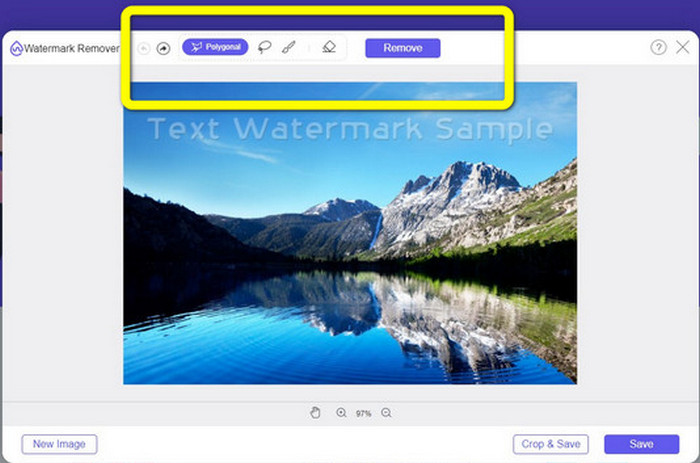
Langkah 3: Dengan menggunakan alat Brush, Lasso atau alat Brush, sorot (highlight) tera air pada foto anda.
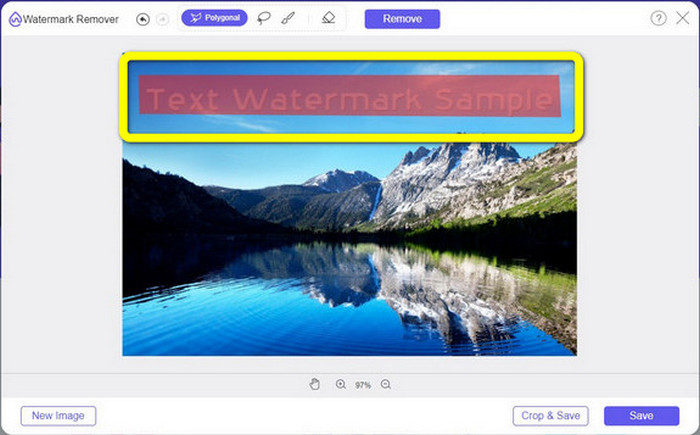
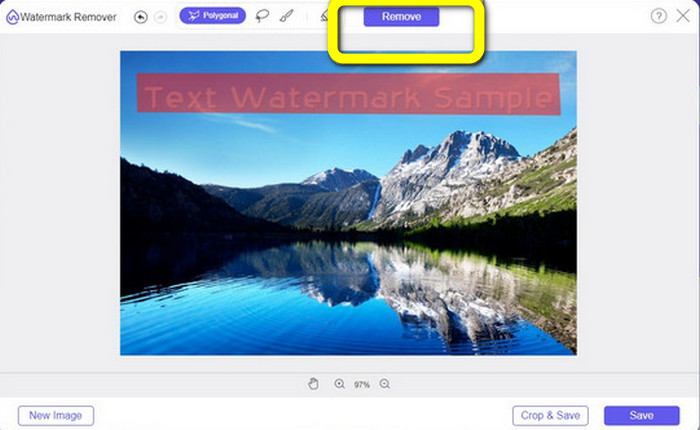
Langkah 4: Jika anda sudah selesai menyerlahkan tera air pada foto anda, klik butang Remove.
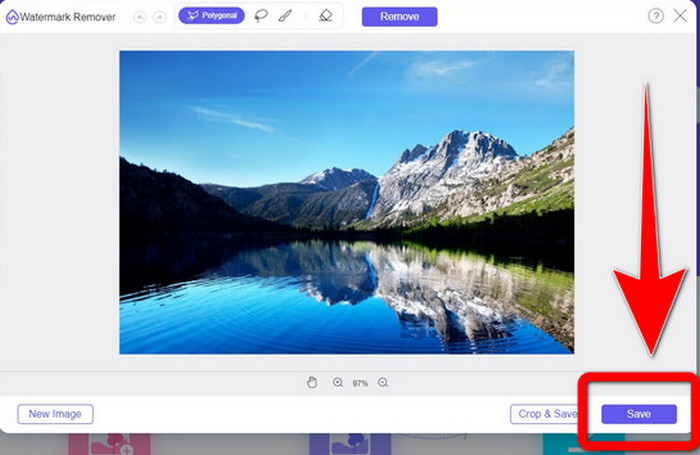
Langkah 5: Jika tera air telah dibuang daripada foto anda, klik butang Save untuk memuat turun imej anda, dan anda kini boleh menikmati melihat gambar tanpa rasa terganggu dengan tera air.
2. Photoshop
Jika anda juga sedang mencari aplikasi cemerlang dan boleh dipercayai untuk dimuat turun pada komputer anda, Adobe Photoshop ialah salah satu aplikasi yang boleh anda gunakan. Bahagian ini akan menunjukkan kepada anda cara Photoshop membuang tera air daripada foto. Aplikasi ini sesuai untuk jurugambar, pereka web, pereka grafik, pembuat meme dan sebagainya. Namun, anda perlu membeli Adobe Photoshop kerana ia hanya menyediakan percubaan percuma selama 7 hari. Selain itu, Photoshop tidak sesuai untuk kerja kelompok foto dan mempunyai keluk pembelajaran yang rumit. Jika anda mahu mengetahui cara paling mudah untuk membuang tera air pada imej anda, ikuti langkah ringkas di bawah.
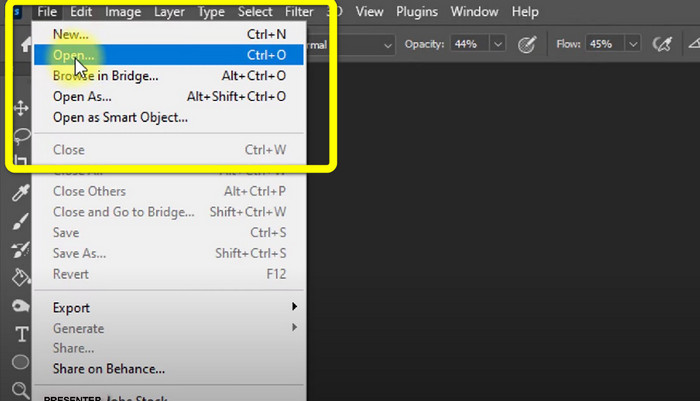
Langkah 1: Buka Adobe Photoshop anda. Pilih File > Open dan tambahkan foto anda yang mempunyai tera air.
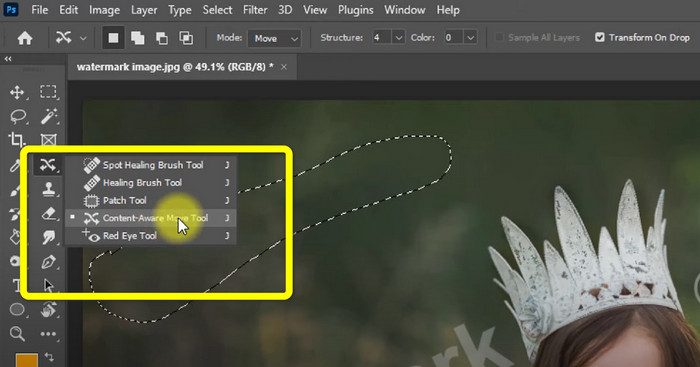
Langkah 2: Klik Content-Aware Move Tool pada alat penyuntingan.
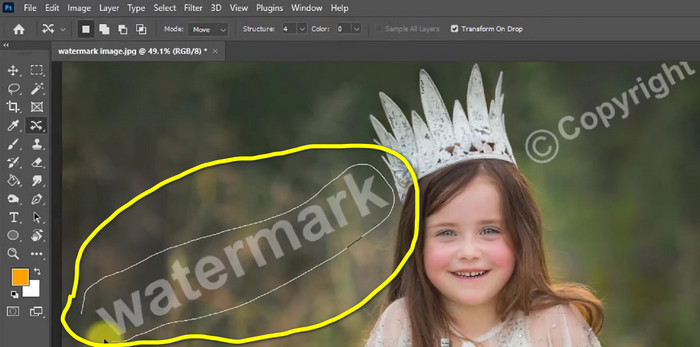
Langkah 3: Selepas klik Content-Aware Move Tool, pilih kawasan tera air pada foto anda dan tekan Delete pada papan kekunci.
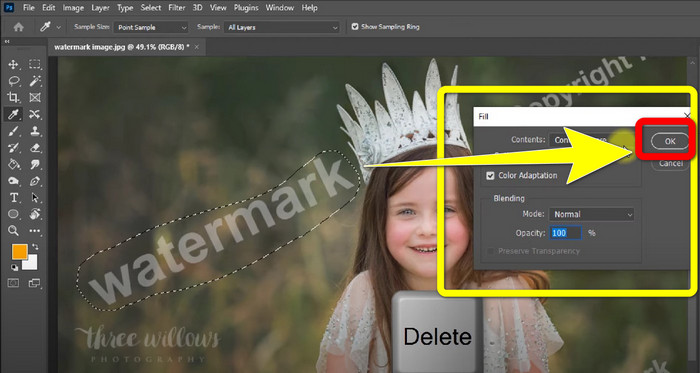
Langkah 4: Apabila anda sudah menekan Delete, satu antara muka mini lain akan muncul, kemudian klik OK.
3. GIMP
Satu lagi aplikasi yang sesuai untuk membuang tera air pada foto anda ialah GIMP. Ia merupakan penyunting grafik raster sumber terbuka yang digunakan untuk memanipulasi dan menyunting imej, menjadikannya alat yang berguna untuk penyuntingan imej. Selain itu, ia menyokong banyak format fail seperti JPG, PNG, TIFF, GIF dan banyak lagi. Namun, ada kalanya ia tiba-tiba terhenti (crash), dan susunan lapisan (layers) juga sukar diatur. Jika anda ingin tahu cara membuang tera air pada foto menggunakan GIMP, ikuti langkah mudah di bawah.
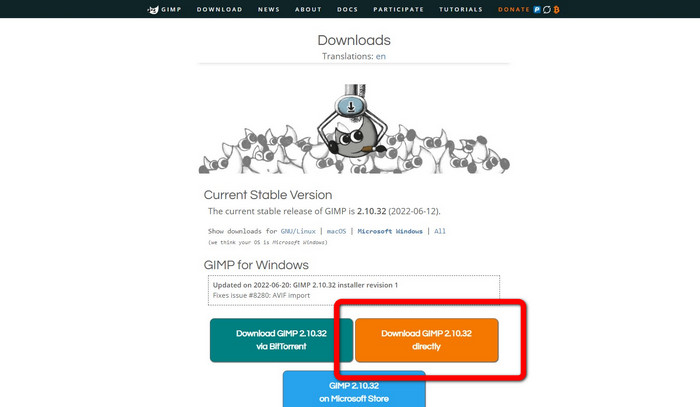
Langkah 1: Jika anda berada di laman web GIMP, klik Download Directly untuk memuat turun aplikasi dan ikut proses pemasangan.
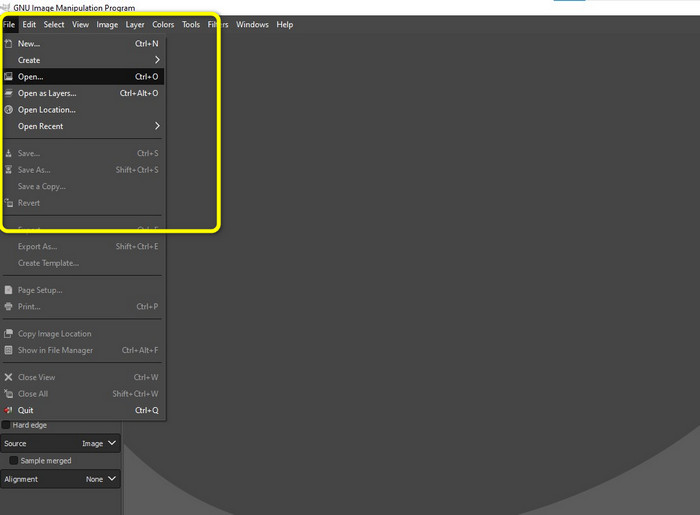
Langkah 2: Buka aplikasi dan klik File > Open untuk menambah foto anda yang mempunyai tera air.
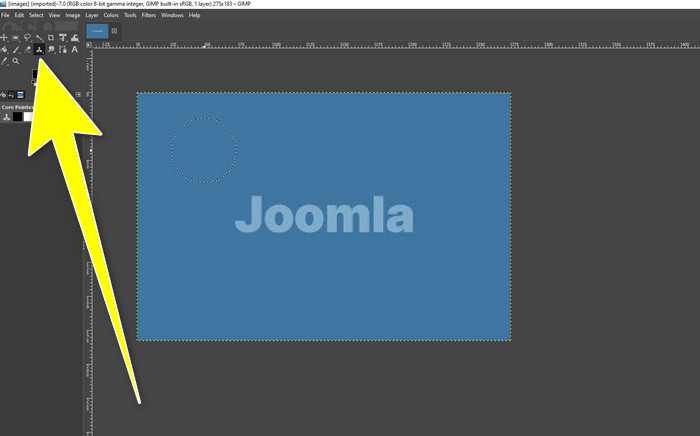
Langkah 3: Klik alat Clone dan letakkan kursor pada kawasan kosong. Tekan Ctrl dan klik kawasan kosong itu.
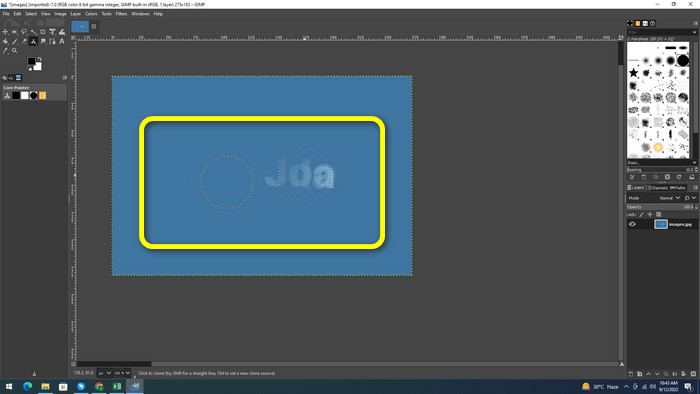
Langkah 4: Seret kursor anda pada tera air untuk membuangnya. Tera air anda sudah hilang. Anda kini boleh menyimpan foto anda.
4. Pembuang Tera Air Percuma Aiseesoft Dalam Talian
Jika anda mahukan penghapus tera air foto dalam talian yang terbaik, Aiseesoft Free Watermark Remover Online sesuai untuk anda. Aplikasi ini boleh membantu membuang pelbagai tera air, teks, cap tarikh, logo dan banyak lagi pada foto anda. Selain itu, ia mudah digunakan dan sangat sesuai untuk pemula. Ia juga menyokong pelbagai format imej seperti PNG, JPEG, BMP, JPG dan lain-lain. Walau bagaimanapun, aplikasi ini tidak 100% percuma; anda perlu membeli lesen untuk menikmati ciri lanjutan. Jika anda ingin membuang tera air pada imej anda, ikuti langkah ini.
Langkah 1: Pergi ke laman web Aiseesoft Free Watermark Remover Online. Kemudian klik Upload Image untuk menambah foto anda yang mempunyai tera air.
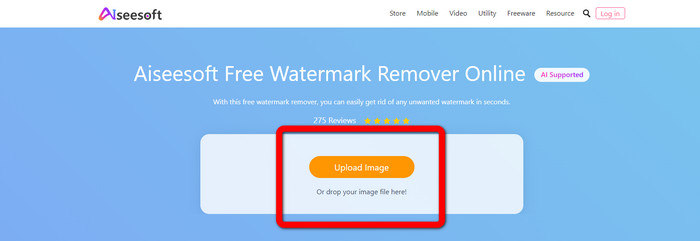
Langkah 2: Jika anda sudah melampirkan foto anda, teruskan ke watermark remover tool. Kemudian anda boleh melihat alat penghapus seperti alat Brush, Polygonal dan Lasso.
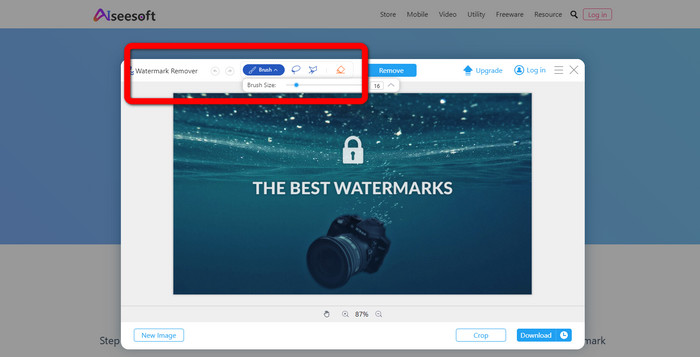
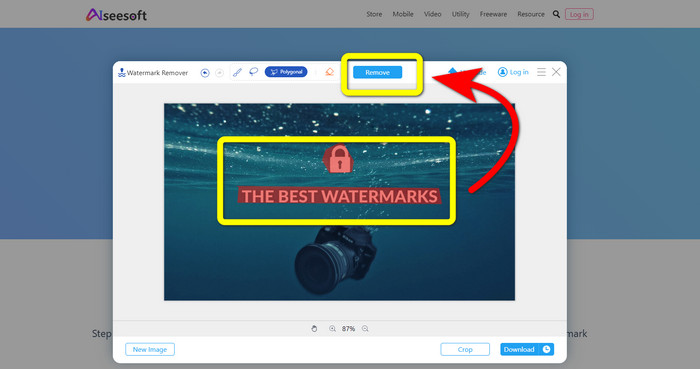
Langkah 3: Gunakan alat ini dan serlahkan tera air pada foto anda dan klik Remove.
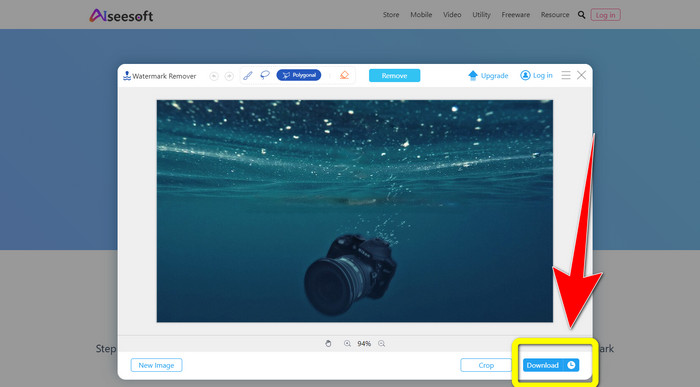
Langkah 4: Jika anda sudah berpuas hati dengan hasilnya, klik Download untuk menyimpan foto anda.
5. Pixlr
Pixlr ialah satu lagi alat dalam talian yang boleh anda gunakan untuk membuang tera air pada foto anda. Ia mudah digunakan dan sesuai untuk pemula. Ia menyokong pelbagai format imej seperti PSD, PNG, JPEG, WEBP dan PXZ. Selain itu, anda boleh menggunakan aplikasi ini pada peranti anda seperti iPhone, Android, Desktop dan Komputer Riba. Namun, ia tidak mempunyai banyak pilihan seperti aplikasi lain dan kesan yang disediakan adalah terhad. Jika anda ingin belajar cara memadam tera air pada gambar, ikuti langkah di bawah.
Langkah 1: Pergi ke laman web Pixlr. Klik Open Image untuk menambah imej yang mempunyai tera air.

Langkah 2: Selepas anda menambah foto, pergi ke alat retouch > heal.
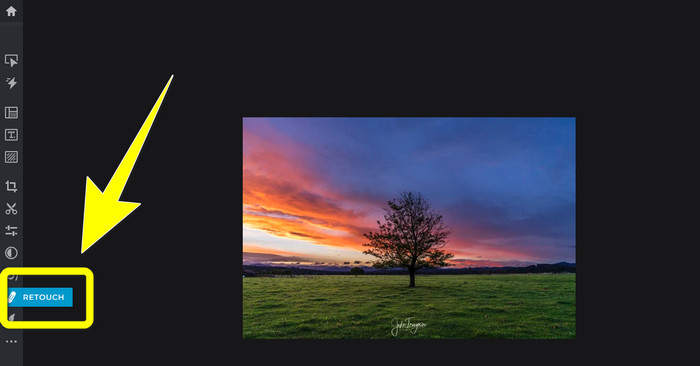
Langkah 3: Selepas anda klik alat retouch > heal, klik pada tera air pada imej anda.
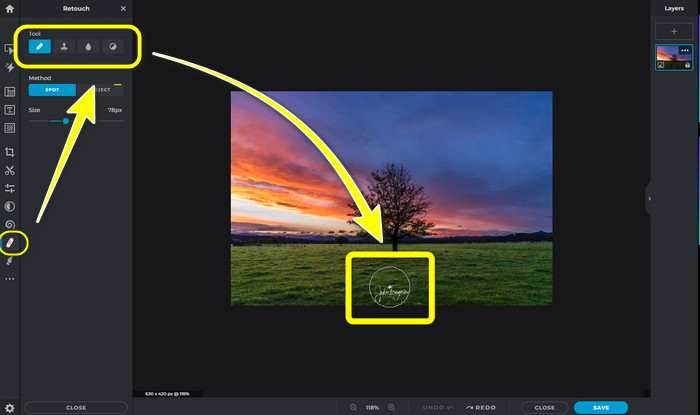
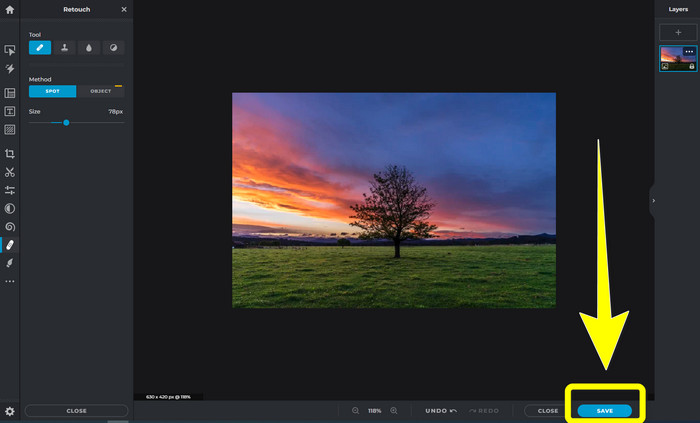
Langkah 4: Jika tera air telah hilang, klik butang Save.
6. Mengecat
Inpaint ialah satu lagi aplikasi dalam talian yang boleh anda gunakan jika anda mahu membuang tera air pada imej anda. Bukan sahaja tera air, malah logo dan teks juga boleh dibuang. Ia turut menyokong format imej seperti JPG, PNG dan WEBP. Walau bagaimanapun, jika anda ingin mendapatkan imej berkualiti tinggi, anda perlu membeli aplikasi ini. Jika anda mahu membuang tera air pada foto anda, ikuti langkah mudah di bawah.
Langkah 1: Pergi ke laman web Inpaint. Klik Upload Image dan muat naik imej anda yang mempunyai tera air.
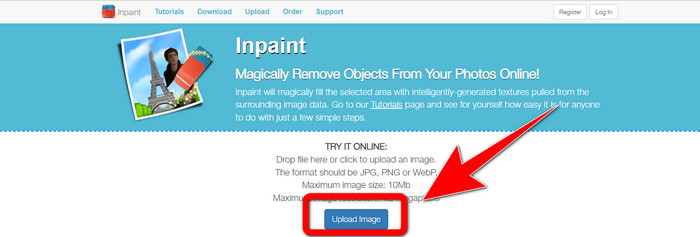
Langkah 2: Apabila anda memuat naik imej, pilih watermark remover tools seperti Marker, Polygonal, Lasso dan Eraser tool lalu serlahkan tera air pada foto anda.
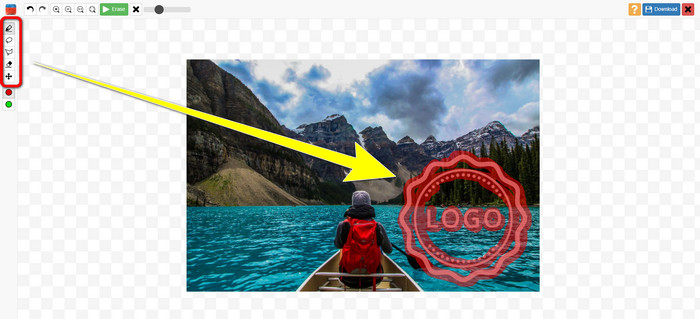
Langkah 3: Jika anda sudah selesai menyerlahkan tera air, klik Erase.
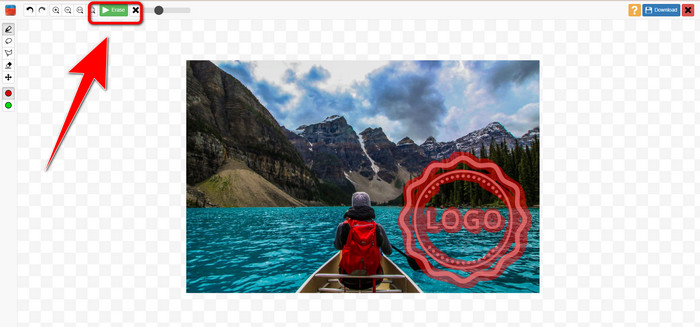
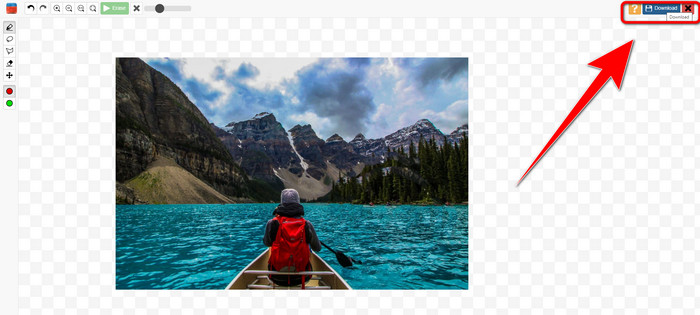
Langkah 4: Jika tera air telah hilang, klik butang Download untuk menyimpan imej anda.
7. Pembuang Setem Foto
Pembuang Setem Foto ialah aplikasi yang boleh anda gunakan dengan komputer anda. Anda boleh memuat turunnya secara percuma. Aplikasi ini boleh mengalih keluar objek yang tidak perlu pada imej anda dengan cepat, seperti logo, teks, tera air dan tarikh. Tetapi, ia tidak berfungsi dengan baik pada gambar dengan latar belakang yang rumit. Lebih-lebih lagi, perisian ini boleh memulihkan warna dan tekstur foto asal untuk menutup tera air supaya ia kelihatan sahih. Ikuti langkah ini untuk mengalih keluar tera air pada imej anda.
Langkah 1: Klik butang Download untuk memuat turun Photo Stamp Remover pada Windows anda dan ikut proses pemasangan.
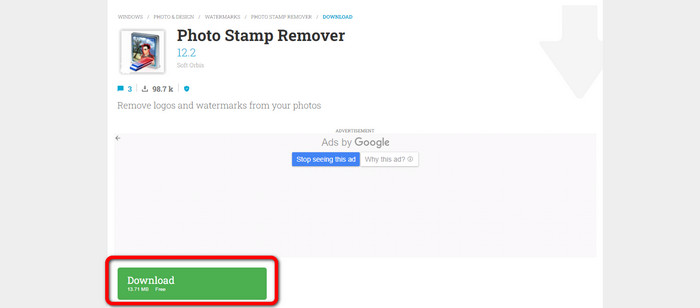
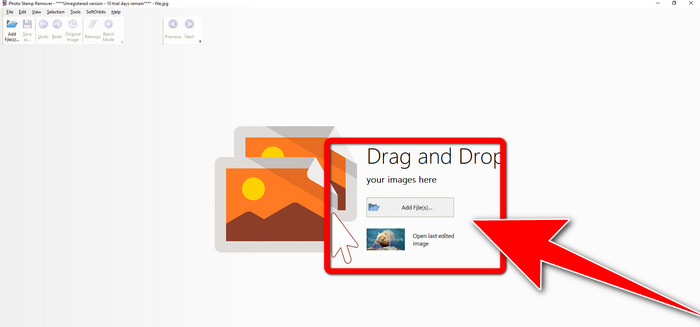
Langkah 2: Lancarkan aplikasi dan klik Add File untuk menambah foto anda yang mempunyai tera air.
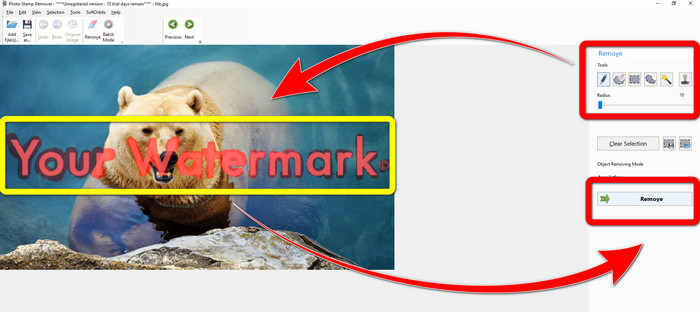
Langkah 3: Pergi ke Remover tools dan klik Selection Marker. Sorot tera air dan klik Remove.
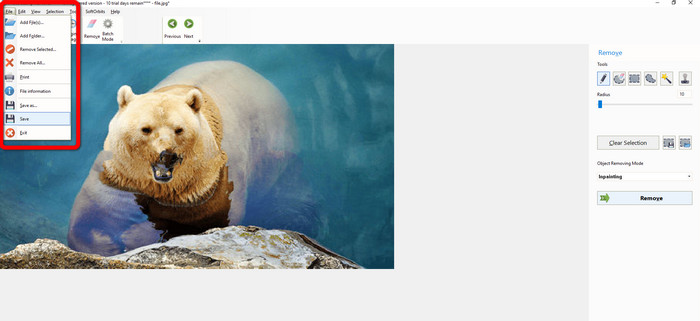
Langkah 4: Jika anda telah membuang tera air pada imej anda, klik File > Save. Kemudian anda telah selesai membuang tera air pada imej anda.
Bahagian 2. Bagaimana Buang Tera Air daripada Foto pada iPhone dan Android
1. Pemadam Video
Jika anda ingin tahu aplikasi apa yang boleh membantu anda belajar cara membuang tera air daripada foto menggunakan Android, Video Eraser sesuai untuk anda. Aplikasi ini boleh membuang objek yang tidak diperlukan pada foto anda, seperti teks, tera air dan sebagainya. Selain itu, dengan aplikasi ini, anda juga boleh membuang tera air pada video anda. Namun, kawasan pada gambar di mana tera air dipadam akan kelihatan berbintik-bintik (blotchy). Jika anda ingin belajar cara menggunakan Video Eraser, ikuti langkah di bawah.
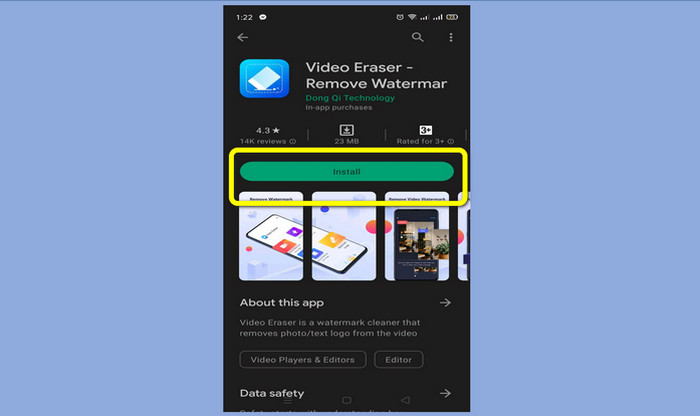
Langkah 1: Pasang Video Eraser pada Android anda. Buka aplikasi apabila pemasangan selesai.
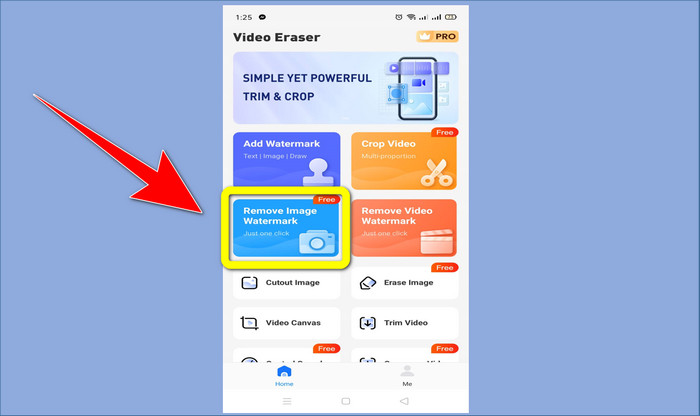
Langkah 2: Klik Remove Image Watermark untuk menambah foto anda yang mempunyai tera air.
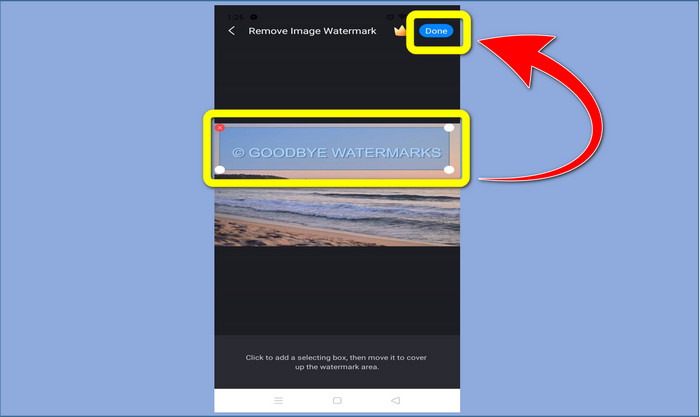
Langkah 3: Sorot tera air pada foto anda dan klik Done.
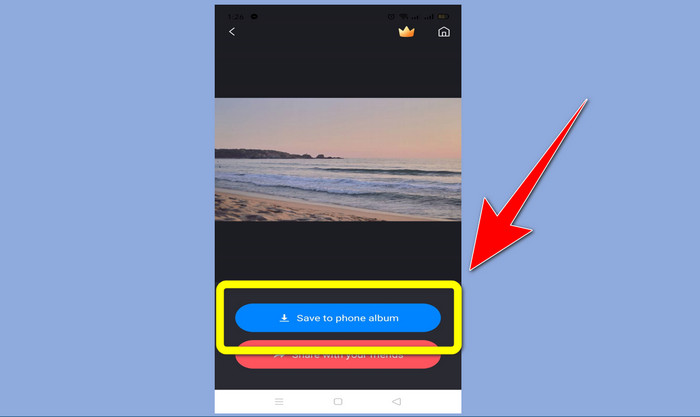
Langkah 4: Selepas klik Done, tera air akan hilang. Klik Save to Photo Album untuk menyimpan foto anda.
2. Snapseed
Snapseed ialah penyunting hebat yang boleh anda gunakan, terutamanya jika anda ingin belajar cara membuang tera air daripada foto pada iPhone. Aplikasi ini bagus jika anda mahu menghapuskan tera air pada imej anda. Selain itu, ia mempunyai pelbagai alat penyuntingan yang boleh anda gunakan, seperti pangkas (crop), putar (rotate) dan banyak lagi. Aplikasi ini juga tidak begitu sesuai untuk pemula, terutama dari segi penyuntingan lanjutan, dan walaupun ia mesra pengguna, ia tetap mempunyai sedikit proses pembelajaran. Ikuti langkah di bawah untuk membuang tera air pada foto anda menggunakan aplikasi ini.
Langkah 1: Pasang Snapseed pada iPhone anda. Apabila pemasangan selesai, buka perisian.
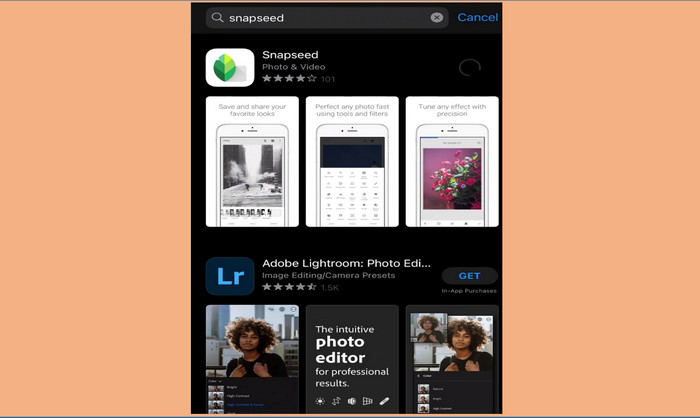
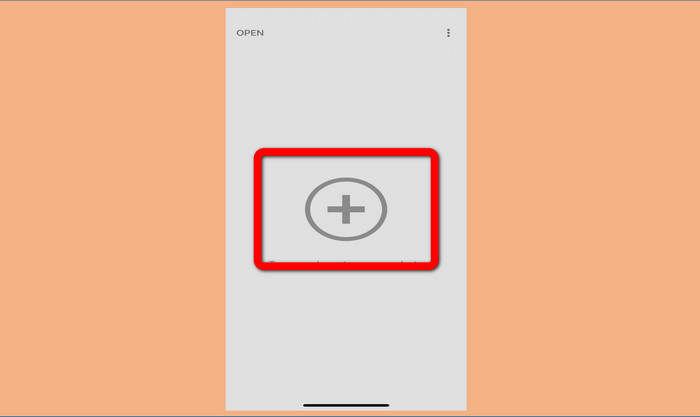
Langkah 2: Klik butang Plus sign untuk menambah foto anda yang mempunyai tera air.
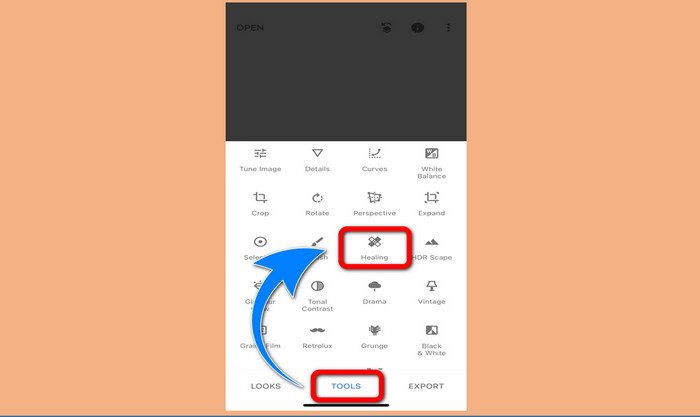
Langkah 3: Apabila anda sudah menambah foto, pilih Tools > Healing dan serlahkan tera air pada imej anda. Selepas anda menyerlahkan tera air, ia akan hilang secara automatik.
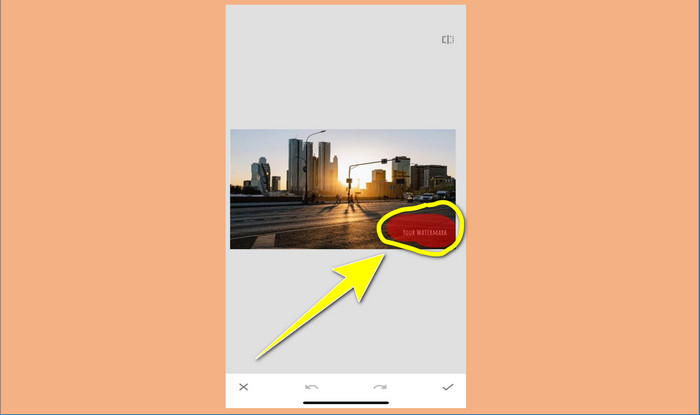
Langkah 4: Selepas anda menyerlahkan tera air, ia akan hilang secara automatik.
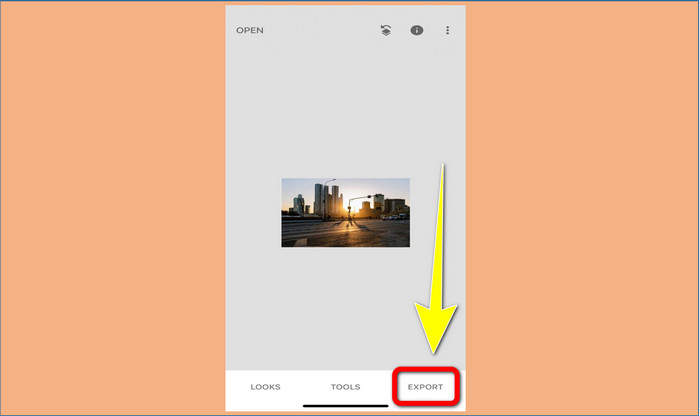
Langkah 5: Apabila anda selesai membuang tera air pada foto, klik tanda Check dan Export untuk menyimpan gambar anda pada iPhone.
Berkaitan dengan:
Helah Paling Pantas untuk Membuang Tera Air Adobe Stock daripada Video [ Tutorial ]
5 Cara untuk Membuang Tera Air daripada Video secara Profesional
Bahagian 3. Soalan Lazim tentang Mengalih Keluar Tera Air daripada Foto
Adakah terdapat penanggal tera air yang boleh saya gunakan secara percuma, terutamanya untuk Mac?
Ya, ada! Anda boleh menggunakan banyak penghapus tera air pada Mac anda, seperti FVC Free Watermark Remover. Ia adalah aplikasi dalam talian untuk membuang tera air pada Mac anda.
Adakah terdapat cara untuk mengalih keluar tera air daripada video?
Pasti! Ia adalah satu perkara yang mudah untuk dilakukan. Beberapa aplikasi penanggal tera air yang anda boleh gunakan sekarang boleh mengalih keluar tera air pada foto dan video. Apa yang anda perlu lakukan ialah mencari penghilang tera air pada kotak carian dan lihat halaman hasil.
Adakah mudah untuk membuang tera air?
Ya sudah tentu! Jika anda sudah mempunyai aplikasi yang akan anda gunakan, anda perlu mencari alat penyingkiran, seperti berus, penanda, laso dan alat poligon. Kemudian, serlahkan tera air dan selesai.
Kesimpulannya
Seperti yang ditunjukkan di atas, artikel ini menyediakan cara yang hebat untuk mengalih keluar tera air daripada foto. Tetapi jika anda mahukan alat yang cemerlang untuk mengalih keluar tera air, FVC Free Watermark Remover adalah yang terbaik untuk anda.
-
 Cara Menghilangkan Tera Air Pengarah Kuasa secara Percuma [ Lengkap ]
 Bagaimana untuk menghilangkan tera air Pengarah Kuasa secara percuma? Alat terbaik untuk menghapuskan tera air ada di sini, jadi pelajarinya dengan membaca ini.
-
 Teknik Terbaik untuk Mengalih Keluar Tera Air Versi Percubaan Canvasjs yang Mesti Anda Ketahui
 Cara terbaik untuk mengalih keluar tera air Canvasjs anda perlu menggunakan alat. Jika anda belum memilih alat maka anda boleh memilihnya dalam artikel ini.
-
 Cara Mengeluarkan Tera Air Animaker Tanpa Kos [ Cara Terbukti ]
 Bagaimana untuk membuang tera air Animaker? Dengan alat terbaik yang kami daftarkan dalam blog ini, anda boleh menggunakannya untuk menghilangkan tera air.
