


 Video Converter Ultimate
 Perakam Skrin
 Pembaikan Video
 Muat Turun Selamat
4 Kaedah Paling Mudah untuk Mengalih Keluar Tera Air iFunny
iFunny ialah salah satu aplikasi paling popular jika anda ingin membaca mesej lucu bersama gambar (meme). Namun, sebahagian daripada gambar ini mempunyai tera air iFunny, yang agak menjengkelkan. Jika anda ingin mengetahui kaedah paling berkesan untuk membuang tera air ini, anda berada pada halaman yang betul. Kami akan memperkenalkan kepada anda pelbagai aplikasi yang boleh digunakan untuk menyingkirkan unsur yang mengganggu daripada foto anda. Alat-alat ini telah diuji dan terbukti, jadi anda tidak perlu ragu sama ada ia sah atau tidak. Adakah anda sudah bersedia untuk mempelajari kaedah terbaik untuk menghapuskan tera air iFunny? Maka bacalah artikel ini dari awal hingga akhir.

Bahagian 1: Mengalih Keluar Tera Air iFunny Menggunakan Alat Pemotong
Salah satu cara terbaik untuk mengalih keluar tera air iFunny ialah menggunakan alat pemangkasan. Kaedah ini boleh digunakan jika tera air diletakkan di tepi atau sudut gambar anda. Anda boleh memotong gambar anda sebelah ke sisi dan atas ke bawah. Jika anda ingin memangkas tera air iFunny daripada imej anda, ikut langkah mudah di bawah.
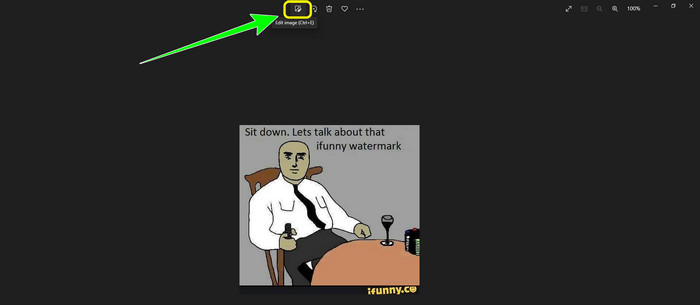
Langkah 1: Buka foto anda yang mempunyai tera air iFunny. Pilih pilihan Edit Image untuk menggunakan alat Pangkas (Cropping). Anda juga boleh menekan ctrl+E.
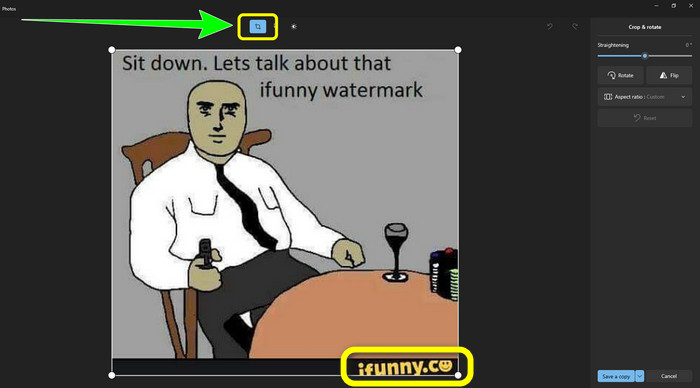
Langkah 2: Selepas itu, klik alat Cropping. Kemudian, anda sudah boleh memangkas foto anda untuk membuang tera air iFunny daripada gambar anda.
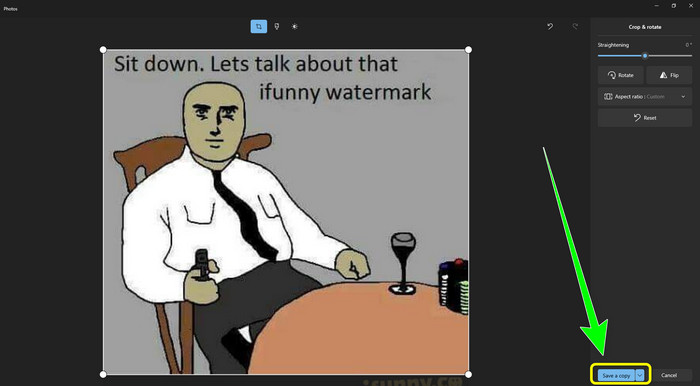
Langkah 3: Apabila anda selesai memangkas foto, klik butang Save a copy. Tunggu proses penyimpanan dan letakkan foto akhir anda di lokasi yang anda inginkan.
Ini ialah kaedah paling mudah untuk mengalih keluar tera air iFunny menggunakan alat Cropping.
Bahagian 2: Cara Terbaik untuk Mengalih Keluar Tera Air iFunny Tanpa Pangkas
Menggunakan FVC Free Watermark Remover
Jika anda sedang mencari penanggal tera air iFunny, anda boleh menggunakan FVC Free Watermark Remover. Anda boleh membuang sebarang tera air daripada imej dengan mudah dan segera menggunakan aplikasi ini. Selain itu, anda boleh bergantung kepada penanggal tera air ini jika anda mempunyai berbilang tera air pada foto anda. Di samping itu, hampir semua format fail imej disokong oleh alat dalam talian ini, termasuk JPG, PNG, BMP, TIFF dan banyak lagi. Untuk membuang objek dan tera air yang tidak diperlukan daripada imej, penanggal tera air ini menawarkan tiga alat berbeza: Lasso, Brush dan Polygonal. Dengan bantuan alat-alat ini, anda boleh dengan mudah membuang apa sahaja yang anda tidak mahu daripada gambar anda. Selain itu, FVC Free Watermark Remover mempunyai antara muka yang mudah difahami dan boleh diakses oleh semua pengguna, sama ada mereka pemula atau profesional. Tambahan pula, fail anda selamat di sini kerana penanggal tera air ini menjamin privasi anda, yang bermakna hanya anda sahaja yang boleh menyunting foto anda. Akhir sekali, ini ialah perisian percuma, jadi anda boleh menggunakannya pada bila-bila masa dan memuat naik fail tanpa had yang anda ingin pertingkatkan.
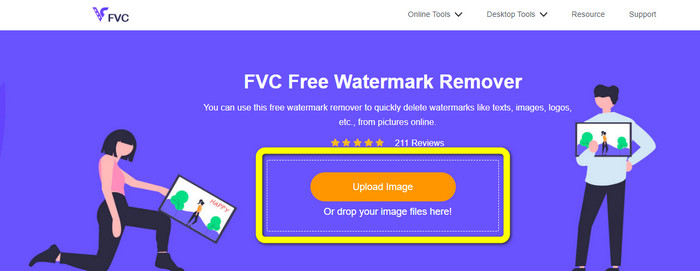
Langkah 1: Buka FVC Free Watermark Remover pada pelayar anda. Kemudian, klik butang Upload Image untuk melampirkan foto anda yang mempunyai tera air iFunny.
Langkah 2: Apabila anda sudah melampirkan foto anda, serlahkan tera air iFunny menggunakan alat penanggal tera air.
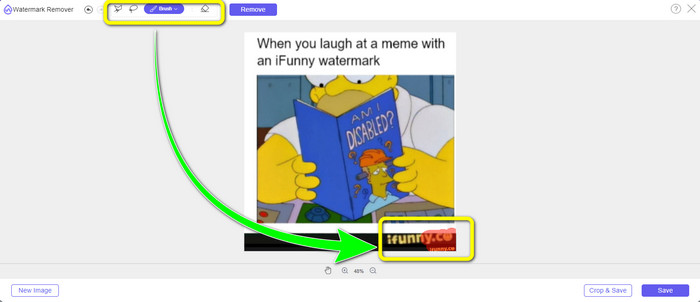
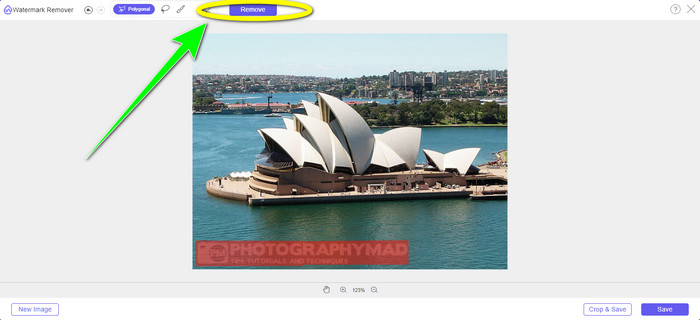
Langkah 3: Seterusnya, klik butang Remove untuk memadam tera air iFunny daripada foto anda.
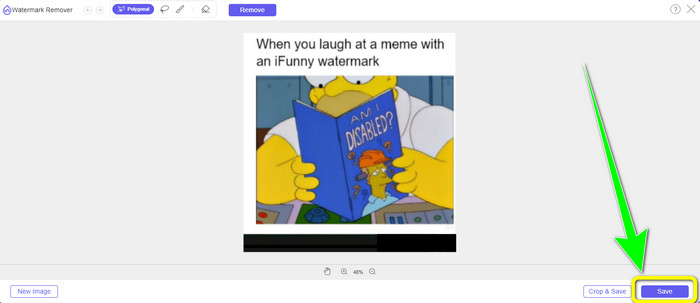
Langkah 4: Selepas proses penyingkiran, langkah terakhir anda ialah klik butang Save untuk memuat turun foto anda tanpa tera air iFunny ke peranti anda.
Menggunakan WatermarkRemover.io
Gunakan WatermarkRemover.io jika anda ingin menggunakan aplikasi web yang berbeza untuk menyingkirkan tera air iFunny daripada foto anda. Alat percuma ini boleh membuang sebarang unsur berlebihan daripada imej anda, termasuk logo, kapsyen, setem dan banyak lagi. Di samping itu, anda boleh membuang beberapa tera air daripada gambar anda. Ia juga menawarkan antara muka yang mudah digunakan yang bagus untuk pemula. Pelbagai format imej, termasuk PNG, JPG, WEBP dan JPEG, disokong oleh alat web ini. Namun begitu, apabila menggunakan versi percuma, terdapat had. Hanya 50 foto boleh dimuat naik pada satu-satu masa, dan ruang storan hanyalah 25GB. Jika anda ingin memuat naik lebih banyak foto dan mendapatkan lebih banyak storan, anda mesti membayar langganan, yang agak mahal. Ikuti langkah di bawah untuk menggunakan penanggal tera air iFunny yang hebat ini.
Langkah 1: Buka pelayar anda dan lawati WatermarkRemover.io. Klik butang Upload Image untuk memuat naik foto anda yang mempunyai tera air iFunny. Anda juga boleh seret fail anda ke dalam kotak.
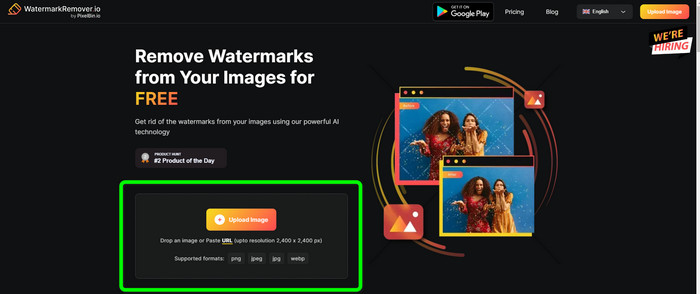
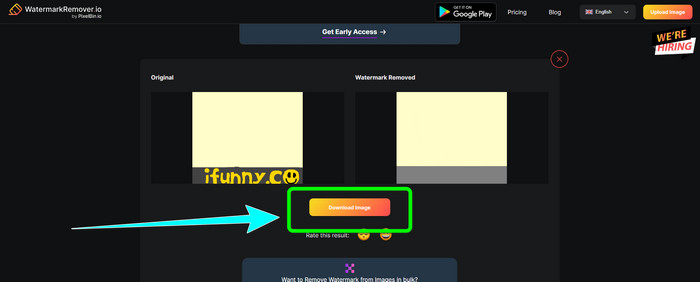
Langkah 2: Selepas memuat naik foto, ia akan mengalih keluar tera air iFunny secara automatik. Apabila foto sudah dipaparkan tanpa tera air, klik butang Download.
Menggunakan Apowersoft Watermark Remover Dalam Talian
Untuk menghapuskan tera air iFunny daripada foto anda dengan segera, Apowersoft Watermark Remover Online juga merupakan aplikasi dalam talian yang baik untuk anda. Ia boleh memadam unsur yang tidak diingini daripada foto anda, termasuk tandatangan, teks, logo dan banyak lagi. Selain itu, ia menyokong pelbagai format fail imej, seperti JPEG, JPG, PNG, TIFF dan lain-lain. Pemula boleh menggunakan alat ini walaupun mereka tidak mempunyai banyak kemahiran kerana Apowersoft Watermark Remover Online mempunyai kaedah yang ringkas dan antara muka yang mudah difahami. Fail juga akan dipadamkan secara automatik selepas anda mengalih keluar dan memuat turun foto anda, yang bermakna tiada sesiapa boleh melihat hasil kerja anda. Selain daripada membuang tera air daripada foto, alat ini juga boleh membuang tera air daripada video, yang memudahkan pengguna. Ia menyokong pelbagai format video, seperti MOV, WMV, MP4, 3GP, AVI dan sebagainya. Walau bagaimanapun, penanggal tera air dalam talian ini mempunyai proses penyingkiran yang perlahan, yang tidak bagus untuk pengguna. Ia juga tidak akan berfungsi tanpa sambungan internet. Jika anda ingin menggunakan alat ini, ikut langkah asas di bawah.
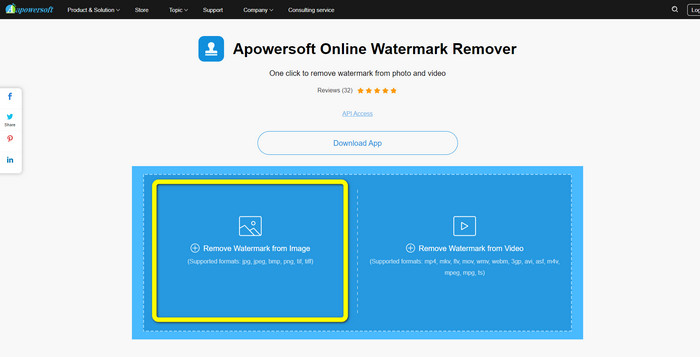
Langkah 1: Cari Apowersoft Online Watermark Remover. Kemudian, klik butang Remove Watermark from Image untuk melampirkan foto anda yang mempunyai tera air iFunny.
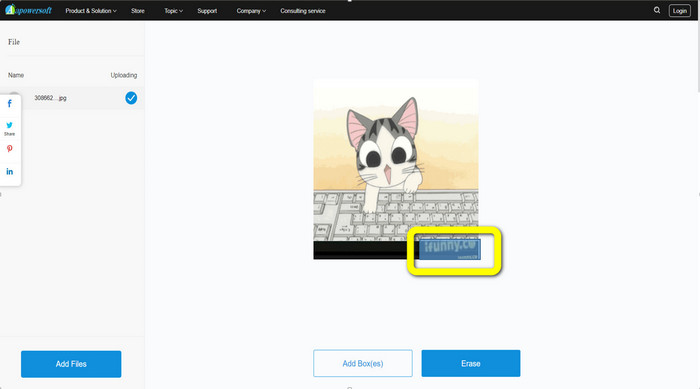
Langkah 2: Selepas melampirkan fail anda, anda boleh menggunakan kotak biru untuk menutupi tera air iFunny pada foto anda.
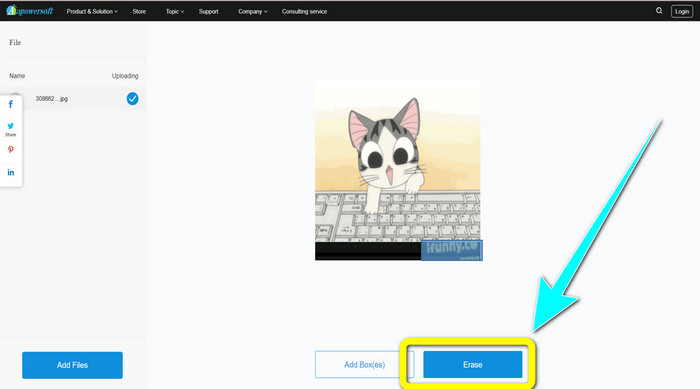
Langkah 3: Kemudian klik butang Erase. Tunggu proses penyingkiran dan muat turun fail akhir.
Berkaitan dengan:
Ulasan Jujur tentang Inpaint Watermark Remover dan Alternatif
Cara Mudah Menghapuskan Tera Air daripada JPG Secara Dalam Talian
Bahagian 3: Soalan Lazim tentang Mengalih Keluar Tera Air iFunny
Apakah aplikasi terbaik untuk mengalih keluar tera air iFunny?
Aplikasi terbaik yang boleh anda gunakan ialah FVC Free Watermark Remover. Alat ini boleh dengan mudah menghapuskan tera air iFunny daripada imej anda. Selain itu, ia mempunyai proses penyingkiran yang pantas dan menawarkan kaedah paling mudah, yang menjadikannya penanggal tera air terbaik.
Bolehkah saya juga mengalih keluar tera air daripada video saya?
Sudah tentu, Ya. Anda boleh menggunakan banyak aplikasi dalam talian dan luar talian untuk membuang tera air daripada video anda. Berikut ialah alat terbaik yang boleh anda cuba.
1. Video Converter Ultimate.
2. Media.io
3. HitPaw
4. Online Video Cutter
5. Apowersoft Online Watermark Remover.
Adakah terdapat alat pemangkasan yang boleh saya gunakan dalam FVC Free Watermark Remover?
ya. FVC Free Watermark Remover mempunyai dua cara untuk mengalih keluar tera air daripada foto. Yang pertama ialah menggunakan alat penghilang tera air yang berbeza, seperti Lasso, Berus dan Poligon. Yang kedua menggunakan alat Cropping.
Kesimpulannya
Seperti yang ditunjukkan dalam maklumat di atas, anda boleh menggunakan banyak kaedah mudah untuk menghapuskan tera air iFunny, seperti menggunakan alat dan ciri pangkasan. Namun, jika anda ingin membuang elemen yang mengganggu daripada imej dengan cara yang ringkas, gunakan FVC Free Watermark Remover sekarang.
-
 Cara Cemerlang tentang Cara Mengalih Keluar Pelekat daripada Foto dan Video
 Adakah anda mahu mengalih keluar pelekat daripada video dan foto dengan mudah? Berikut ialah cara yang berkesan, termasuk kaedah yang paling boleh dipercayai dan paling mudah yang boleh anda cuba.
-
 Cara Cara Mudah Mengalih Keluar Tera Air Reddit daripada Imej
 Jika anda berada di sini, anda mungkin sedang mencari penanggal tera air Reddit yang sangat baik. Dalam kes itu, kami akan menunjukkan kepada anda kaedah paling mudah untuk mengalih keluar tera air Reddit.
-
 Cara Mengalih Keluar Tera Air dalam Mudah Alih Lightroom [Diselesaikan]
 Adakah anda ingin belajar cara mengalih keluar tera air daripada foto dalam lightroom? Berikut ialah kaedah paling mudah yang boleh anda cuba menggunakan telefon bimbit dan komputer anda.
