


 Video Converter Ultimate
 Perakam Skrin
 Pembaikan Video
 Muat Turun Selamat
Penukar MP4 Terbaik untuk Meningkatkan Kandungan - Alat untuk Penukaran Lancar
Menukar fail video kepada format MP4 telah menjadi penting bagi sesiapa sahaja yang ingin menikmati main balik yang lancar merentas peranti. Walaupun banyak alat tersedia untuk menukar video kepada MP4, tidak semuanya memberikan kualiti dan prestasi yang sama.
That is the reason why we have taken the time to review and compare the best MP4 converters on the market, so you can make an informed decision and streamline your video workflow. Whether you're a professional videographer, a content creator, or just looking to convert some videos for personal use, our comprehensive review of the top-rated MP4 converters will help you find the perfect tool for your needs.

Bahagian 1. Perbandingan Program
Jika anda ingin mengetahui program terbaik untuk keperluan anda sepintas lalu, anda boleh melihat jadual membandingkan program yang dinyatakan dalam siaran ini. Semua program ini menjamin untuk membantu anda menukar kepada MP4.
| Program | Penukaran Kumpulan | Pecutan GPU | Ciri-ciri tambahan |
| Penukar Video Percuma Dalam Talian | Ya | Tidak | Penyesuaian format output, penukaran kelompok |
| Online-Convert.com | Ya | Tidak | Penukaran pelbagai jenis fail |
| CloudConvert | Ya | Tidak | Penyepaduan dengan perkhidmatan storan awan |
| Convertio | Ya | Tidak | Integrasi dengan perkhidmatan storan awan, penukaran pelbagai jenis fail |
| FVC Video Converter Ultimate | Ya | Ya | Penyuntingan video, pembuat GIF, pembuat 3D |
| Pemain Media VLC | Tidak | Tidak | Pemain media, penstriman video, penukaran audio |
| Brek Tangan | Ya | Tidak | Penyuntingan video, pengimbasan kelompok |
Bahagian 2. 4 Penukar MP4 Terbaik Dalam Talian
Dengan penukar fail dalam talian, anda boleh menukar fail anda dengan mudah daripada sebarang peranti tanpa perlu memuat turun sebarang perisian tambahan. Penukar fail dalam talian juga biasanya sangat pantas, percuma untuk digunakan dan selamat, memastikan data anda dilindungi daripada akses yang tidak dibenarkan. Oleh itu, jika anda ingin menukar kepada MP4 atau menukar daripada MP4, anda boleh menyemak program dalam talian ini.
1. Penukar MP4 Percuma Dalam Talian
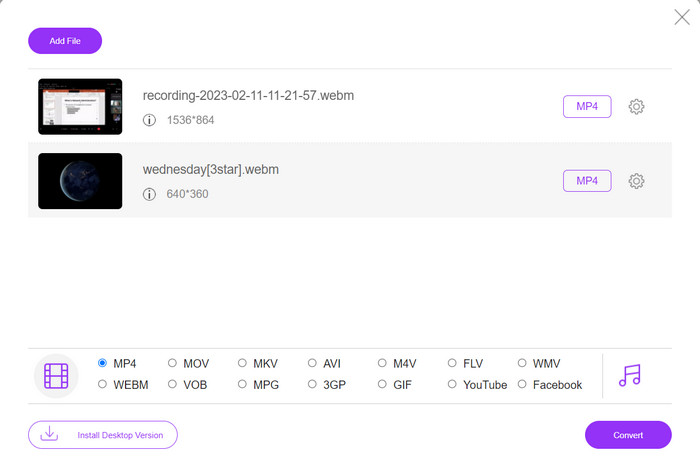
Converting files online is very convenient as you can do it from any device with an internet connection without needing to download any additional software. That is what Free MP4 Converter Online is made for. That means you do not have to install anything on your device to convert files to MP4. One of its outstanding features is its customization option. Users are able to edit the video resolution, bit rate, frame rate, etc. Besides, the process is simple and straightforward.
Ciri Utama:
◆ Tukar video kepada banyak format output dengan cepat.
◆ Ia tidak mengehadkan saiz fail yang boleh dimuat turun oleh pengguna.
◆ Boleh diakses dari mana-mana pelayar dan peranti dengan akses internet.
Step 1. You can use this MP4 video converter by visiting its official website. Simply open any browser on your computer and instantly visit its website.
Step 2. Immediately install the bit-sized launcher and upload the video(s) you wish to convert to MP4. From the format selection below, choose MP4 by ticking on its radio button.
Step 3. Finally, hit the Convert button to initialize the process of converting files.
2. Online-Convert.com
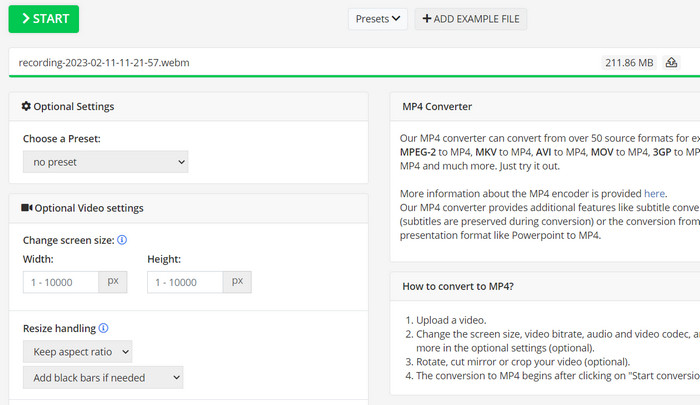
Online-Convert ialah penukar MP4 dalam talian yang mesra pengguna dan serba boleh yang menyokong pelbagai format input dan output, termasuk penyesuaian tetapan output seperti resolusi, kadar bit dan kadar bingkai. Alat ini pantas dan boleh dipercayai, dengan penyepaduan storan awan dan ciri keselamatan seperti penyulitan SSL untuk melindungi fail anda semasa proses muat naik dan penukaran. Selain itu, ia adalah percuma sepenuhnya untuk digunakan tanpa kos tersembunyi, menjadikannya pilihan yang boleh diakses untuk sesiapa sahaja yang memerlukan untuk menukar fail video mengikut bajet.
Ciri Utama:
◆ Ia datang dengan pelbagai format video.
◆ Antara muka mesra pengguna.
◆ Penukaran yang pantas dan boleh dipercayai.
Step 1. Go to Online-Convert.com and choose Video Converter from the list of tools.
Step 2. Click Choose Files to add the video file you want to convert. You may also drag the file and drop it into the box.
Step 3. You can also change the resolution, bitrate, and frame rate of the result if you want to. The settings will be available underneath the conversion area.
Step 4. To start the conversion process, click the Start button. A progress bar will show how far along the conversion is on the page.
3. CloudConvert
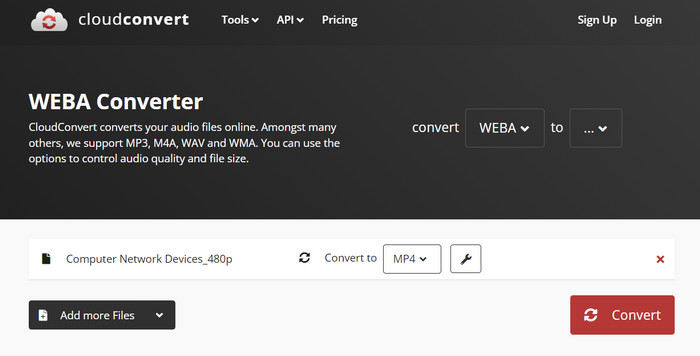
CloudConvert ialah penukar MP4 dalam talian yang menawarkan rangkaian lengkap ciri kepada penggunanya, termasuk sokongan format komprehensif, tetapan output boleh disesuaikan, antara muka mesra pengguna, penyepaduan storan awan, keselamatan dan privasi, penyepaduan API, dan kedua-dua pilihan percuma dan berbayar. Selain itu, penukar video-ke-MP4 ini ialah alat yang boleh dipercayai dan serba boleh untuk menukar fail video kepada format MP4. Tetapan outputnya yang boleh disesuaikan menjadikannya pilihan yang bagus untuk pengguna yang perlu memperhalusi kualiti dan saiz video mereka agar sesuai dengan keperluan khusus mereka.
Ciri Utama:
◆ CloudConvert menawarkan penyepaduan API untuk menyepadukan aliran kerja.
◆ Ia menggunakan penyulitan SSL untuk melindungi fail pengguna.
◆ Ia menyokong penyepaduan storan awan.
Step 1. Go to the CloudConvert website and make a free account if you haven't already.
Step 2. Click on Select Files to add the video file you want to convert. You can also just drag and drop the file into the upload box. Choose MP4 from the drop-down menu for the output file.
Step 3. Change the output choices, such as resolution, bitrate, and frame rate, if you want.
Step 4. Click the Convert button to begin the conversion process.
4. Convertio
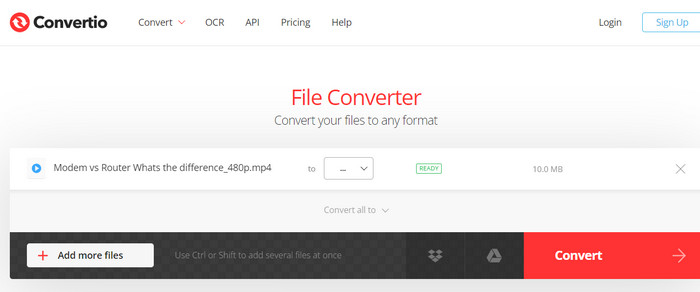
Convertio ialah pilihan yang bagus jika anda mahukan cara cepat untuk mengubah fail video anda kepada format MP4. Dengan antara muka yang mudah digunakan dan masa penukaran yang cepat, mudah untuk menukar filem anda supaya ia boleh ditonton pada pelbagai peranti dan platform. Convertio ialah alat serba boleh yang boleh mengendalikan semua keperluan penukaran video anda. Ia berfungsi dengan storan awan dan membolehkan anda menggunakan pelbagai jenis fail input dan output. Ketahui cara penukar MP4 percuma ini berfungsi.
Ciri Utama:
◆ Penukaran kelompok untuk berbilang fail.
◆ Penyepaduan dengan perkhidmatan seperti Google Drive, Dropbox, dsb.
◆ Ciri lanjutan seperti OCR untuk menukar dokumen yang diimbas.
Step 1. Click Choose Files on the Convertio website (https://convertio.co/) to add the video file you want to convert. You may choose to drag the file and drop it into the upload area.
Step 2. From the drop-down box, choose MP4 as the format to use. You can also change the resolution, bitrate, and frame rate of the result if you want to.
Step 3. To start the conversion process, click the Convert button. A progress bar will show how far along the conversion is on the page.
Step 4. Once the process is done, you can click Download to save the MP4 file to your computer.
Bahagian 3. 3 Penukar MP4 Terbaik Luar Talian
Sekarang, jika, untuk beberapa keadaan, anda mendapati diri anda tidak mempunyai akses kepada internet, anda boleh memilih program luar talian dalam kes ini. Jadi, berikut ialah alat yang boleh anda harapkan.
1. FVC Video Converter Ultimate
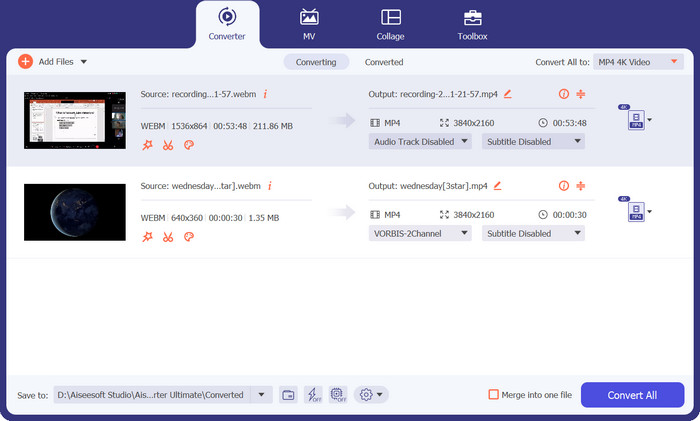
FVC Video Converter Ultimate is a powerful software that provides a comprehensive solution for converting video files to MP4 format. It supports a wide range of input and output formats, including support for HD and 4K video, and offers customizable output settings to ensure high-quality output. Additionally, this MP4 converter offers batch conversion for multiple files at once and includes editing tools for trimming, cropping, adding watermarks, and more. With its fast conversion times and high-quality output, FVC Video Converter Ultimate is a reliable and versatile tool for all your MP4 conversion needs.
Ciri Utama:
◆ Ia termasuk sokongan untuk video HD dan 4K untuk mengekalkan video berkualiti tinggi.
◆ Sokongan pecutan perkakasan untuk GPU NVIDIA dan AMD.
◆ Ia menyokong pelbagai peranti output.
Step 1. The first thing you need to do to use this converter is to get its installer. Then, install it on your device. You may get the app using the Free Download buttons below.
Muat Turun PercumaUntuk Windows 7 atau lebih baharuMuat Turun Selamat
Muat Turun PercumaUntuk MacOS 10.7 atau lebih baharuMuat Turun Selamat
Step 2. Then, launch the tool and load any video by ticking the Plus sign button from the main interface of the program.
Step 3. Next, go to the Profile menu and select MP4 from the Video tab. Finally, hit the Convert All button and get all your videos transformed to MP4 files.
2. Pemain Media VLC
VLC Media Player ialah pemain multimedia percuma yang telah diiktiraf secara meluas kerana keupayaannya memainkan hampir semua format fail audio atau video. Apa yang ramai orang mungkin tidak tahu ialah VLC Media Player juga merupakan penukar video yang berkuasa yang boleh menukar video anda kepada format MP4 dengan mudah. Di bawah ialah beberapa ciri utamanya untuk mengetahui lebih lanjut tentang program ini.
Ciri Utama:
◆ Ia boleh mengedit video dan codec audio, resolusi dan kadar bit.
◆ It has the ability to add subtitles to videos.
◆ Ia dapat melihat pratonton video sebelum menukar.
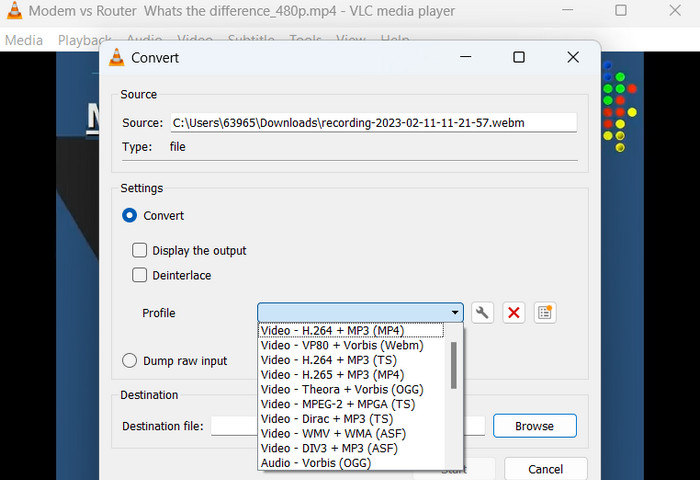
Step 1. Open VLC Media Player on your computer. Click on Media in the top menu bar and select Convert/Save from the drop-down menu.
Step 2. Click on the Add button to select the video file you want to convert. Once you have added the file, click on the Convert/Save button.
Step 3. In the Profile section, select Video - H.264 + MP3 (MP4) as the output format. Click on the Start button to begin the conversion process and wait for the conversion to complete.
3. Brek Tangan
HandBrake ialah transkoder video sumber terbuka yang membolehkan anda menukar fail video anda kepada pelbagai format, termasuk MP4. Ia adalah alat yang popular di kalangan peminat video untuk kemudahan penggunaan dan ciri yang berkuasa. Begitu juga, penukar video MP4 ini juga menawarkan pemprosesan kelompok, jadi anda boleh menukar berbilang fail sekaligus, dan ia mempunyai pelbagai pratetap yang memudahkan untuk mengoptimumkan video anda untuk peranti dan platform yang berbeza.
Ciri Utama:
◆ Perisian percuma dan sumber terbuka.
◆ Ia menyokong sari kata dan pembuat bab.
◆ Pratetap untuk mengoptimumkan output video.
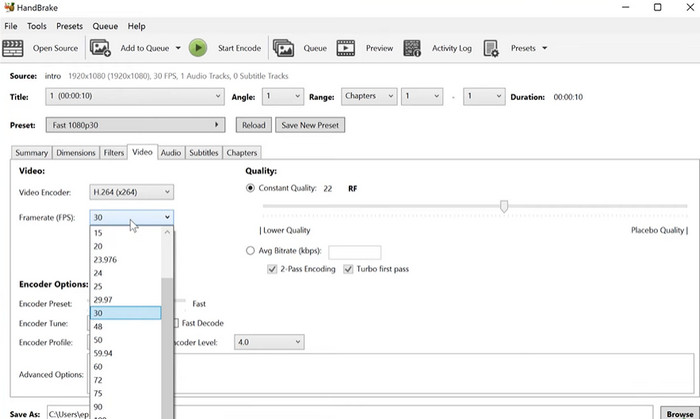
Step 1. Download and install HandBrake from the official website. Open HandBrake and select the video file you want to convert by clicking the Open Source button in the top left corner of the window.
Step 2. Choose a preset for your output file by selecting one of the options from the Presets menu in the top row of the window. If you're unsure which preset to use, you can choose Fast 1080p30 for a good balance between speed and quality.
Step 3. Click the Start Encode button in the top menu to begin the conversion process.
Bahagian 4. Soalan Lazim tentang MP4 Converters
Bolehkah saya memainkan fail MP4 pada iPhone saya?
Yes. MP4 is already a supported format on iPhone devices. MP4 is a universal video format that is compatible with most devices, including iPhones. Therefore, you will not have to use an MP4-to-iPhone converter. You can simply use the pre-installed player of iPhone or find a 3rd-party video player for iPhone.
Bolehkah saya memuat naik fail MP4 ke TikTok?
ya. Anda tidak perlu mencari penukar MP4 ke TikTok untuk memuat naik kerana TikTok menerima fail video MP4 sebagai salah satu format yang disokong untuk memuat naik video ke platform.
Bolehkah saya menukar fail MP4 kepada format yang serasi dengan iTunes?
ya. Anda tidak perlu mencari penukar MP4 ke iTunes. Anda boleh menggunakan penukar, seperti HandBrake, untuk membantu anda dengan ini.
Kesimpulannya
MP4 converters are essential tools for anyone looking to watch or share their videos across different devices or platforms, and they provide a convenient and reliable way to ensure compatibility and high-quality video playback. Therefore, we have compiled and compared the best programs available to help you choose the right-fit app.
-
 Editor MP4 Terbaik untuk Windows dan Mac pada tahun 2023
 Sama ada anda menggunakan komputer untuk mengedit video MP4 atau hanya menggunakan telefon anda, anda akan dapat mencari beberapa pilihan hebat di sini, termasuk editor MP4 terbaik untuk Windows dan Mac.
-
 Cara Memampatkan Video MP4 ke Saiz Lebih Kecil
 Video MP4 terlalu besar untuk dimuat naik? Ingin mengurangkan saiz video? Berikut adalah 3 kaedah yang cekap untuk memampatkan fail MP4 ke saiz yang lebih kecil tanpa had.
-
 5 Editor Metadata MP4 Teratas [Dikemas kini 2023]
 Bagaimanakah saya boleh menukar metadata MP4 saya? Cara terbaik untuk menukar metadata MP4 anda ialah menggunakan editor teg yang menyokong format MP4 seperti contoh yang kami senaraikan di bawah.
