


 Video Converter Ultimate
 Perakam Skrin
 Pembaikan Video
Pilih Penukar GIF ke AVI Terhebat Tersedia pada PC dan Mac
Menukar GIF anda kepada format fail AVI menjadi mungkin dengan bantuan alat yang luar biasa ini. Tanpa kehilangan kualiti dan dalam entah bagaimana untuk menjadikannya lebih baik. Tetapi sesetengah penukar yang mungkin anda gunakan tidak dapat memberikan anda kualiti terbaik yang ingin anda gunakan. Jadi, anda tidak perlu risau jika anda ingin menggantikan GIF anda dengan format AVI. Tukar video anda kepada format AVI tanpa kehilangan kualiti dengan mengikuti langkah yang disediakan di bawah dan pilih penukar terbaik yang perlu anda gunakan.

Bahagian 1. Percuma dan Profesional untuk Menukar GIF kepada AVI dengan Langkah Terperinci
1. Cara Percuma - Video Percuma FVC ke Pembuat GIF
FVC Free Video to GIF Maker ialah penukar GIF ke AVI percuma terbaik yang dibawakan oleh FVC. Selain itu, anda boleh menukar sebarang video atau audio secara percuma ke format baharu dengan bantuan alat ini. Alat ini secara khusus menyediakan penukar terbaik yang percuma. Walaupun kebanyakan ciri utama versi premiumnya tidak disediakan secara percuma, ia masih sangat baik untuk penukaran. Untuk mengetahui cara menggunakan alat percuma ini anda mesti ikut langkah di bawah untuk mengetahui cara menukar GIF anda.
Langkah 1. Pasang alat ini pada desktop anda.
Muat Turun PercumaUntuk Windows 7 atau lebih baharuMuat Turun Selamat
Muat Turun PercumaUntuk MacOS 10.7 atau lebih baharuMuat Turun Selamat
Langkah 2. Ini ialah contoh antara muka yang akan anda lihat jika anda sudah memuat turun alat tersebut.
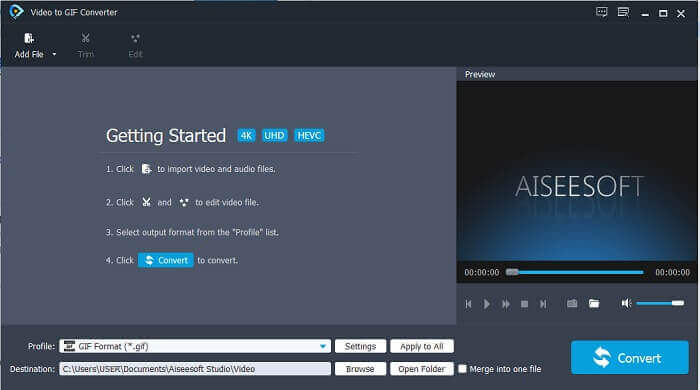
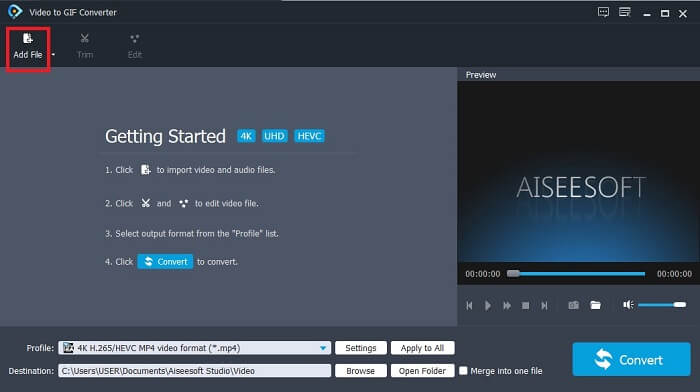
Langkah 3. Klik Add File dan pilih fail GIF yang anda mahu tukar. Jika fail sudah dipilih klik Open untuk memasukkannya ke dalam antara muka.
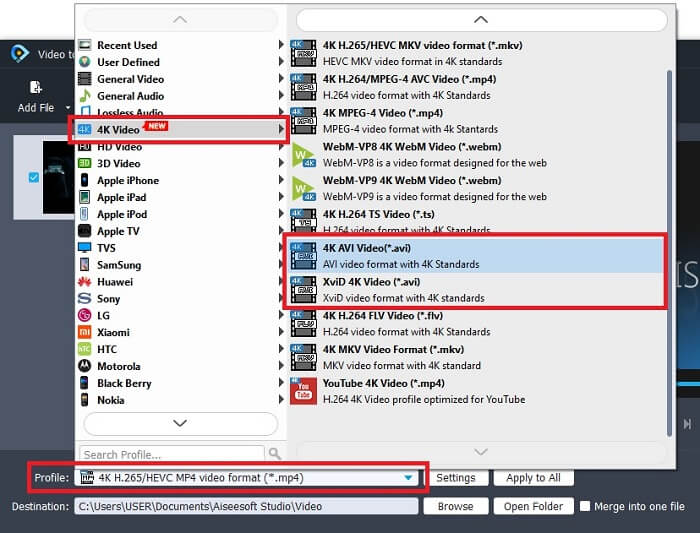
Langkah 4. Tukar format kepada AVI pada bahagian Profile. Di bawah 4K Video klik format AVI. Jika semuanya telah sedia, klik Convert untuk memulakan penukaran.
Langkah 5. Penukaran GIF tidak akan mengambil masa yang lama. Dan anda kini boleh menikmati hasil akhir anda.
2. Cara Profesional - Video Converter Ultimate
Mungkin anda tertanya-tanya bagaimana untuk menukar GIF kepada AVI atau sebaliknya. Dan tertanya-tanya sama ada ada alat khas yang menjadikan penukaran anda lebih hebat. Alat itu mestilah Video Converter Ultimate kerana ia menyokong lebih banyak format daripada alat percuma dan penukar premium yang lain. Selain itu, ia menyediakan lebih banyak ciri yang boleh anda gunakan untuk menambah baik video atau audio anda menjadi lebih berkualiti. Hanya dengan menggunakan penukar ultimate ini anda boleh menghidupkan GIF anda. Ketahui cara menukar format GIF anda kepada AVI tanpa kehilangan kualiti dan menambah baik video jika ia menjadi sedikit kabur. Ikuti langkah di bawah untuk mengetahui cara yang betul menukar fail GIF kegemaran anda.
Langkah 1. Klik butang muat turun mengikut Sistem Pengendalian anda. Pasang pada pemacu desktop anda dan ubah keutamaan sebelum melancarkan alat ini.
Muat Turun PercumaUntuk Windows 7 atau lebih baharuMuat Turun Selamat
Muat Turun PercumaUntuk MacOS 10.7 atau lebih baharuMuat Turun Selamat
Langkah 2. Jika alat ini sudah berjalan dalam program anda, anda akan melihat antara muka mini ultimate ini pada paparan anda yang bermaksud ia sudah dilancarkan.
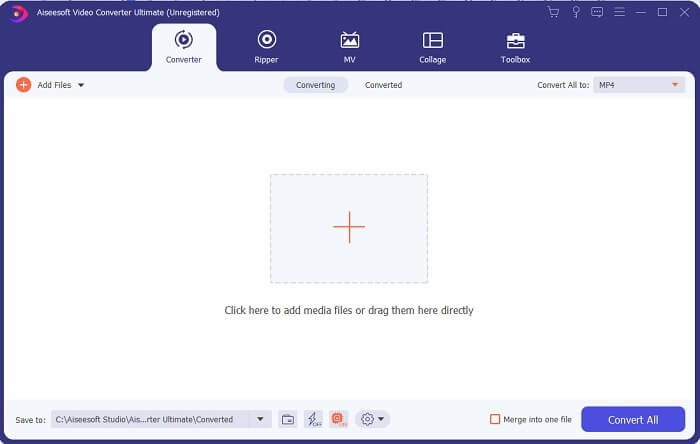
Langkah 3. Klik butang tanda plus untuk menambah fail atau anda juga boleh seret fail ke situ.
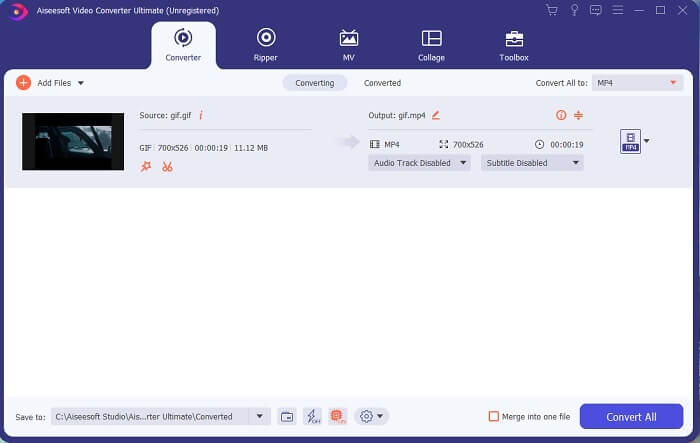
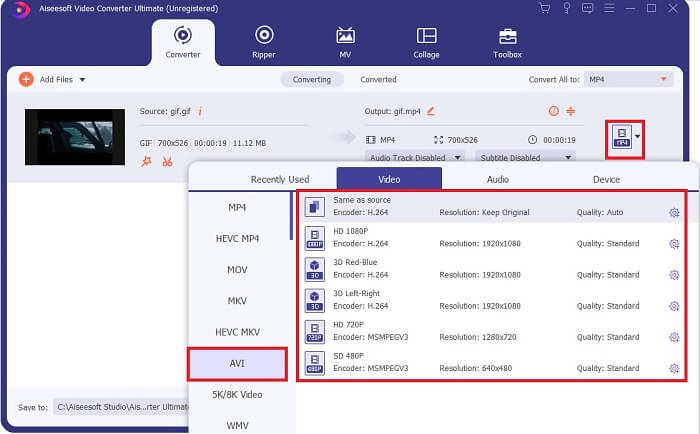
Langkah 4. Klik butang drop-down untuk menukar format dan jadikannya AVI. Anda juga boleh memilih encoder, resolusi dan kualiti output. Jika semuanya sudah siap klik Convert All untuk memulakan proses penukaran.
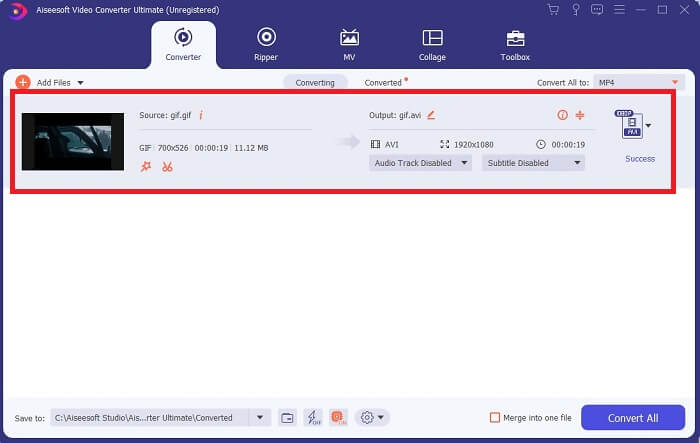
Langkah 5. Alat ini menyediakan penukaran 30x lebih pantas daripada alat percuma dan 100x lebih baik daripada alat satu lagi jadi anda tidak perlu menunggu terlalu lama. Selepas penukaran selesai, pengurus fail akan terbuka secara automatik pada antara muka anda.
Alat bonus dan langkah untuk meningkatkan video
Tidak semua penukar premium menyediakan ciri seperti ini. Dalam sesetengah kes, jika anda menukar GIF kepada AVI, ia akan menjadi agak kabur kerana kadar fps yang disediakan oleh GIF adalah lebih rendah daripada AVI. Tetapi ada cara untuk menambah baik video supaya hasilnya lebih baik. Ikuti langkah ini untuk menambah baik video yang telah anda tukar.
Langkah 1. Dalam Toolbox perisian, klik Video Enhancer.
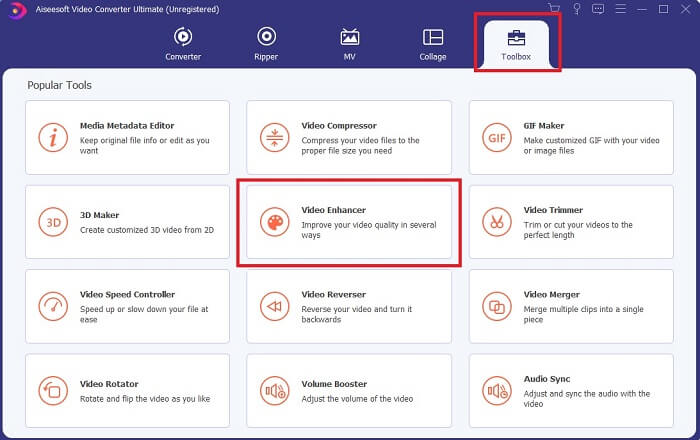
Langkah 2. Klik butang plus dan pilih video yang anda mahu tingkatkan. Klik Upscale Resolution untuk menambah baik kualiti video; anda boleh tanda pilihan lain untuk menaik taraf kualiti video. Kemudian klik Enhance untuk memulakan proses.
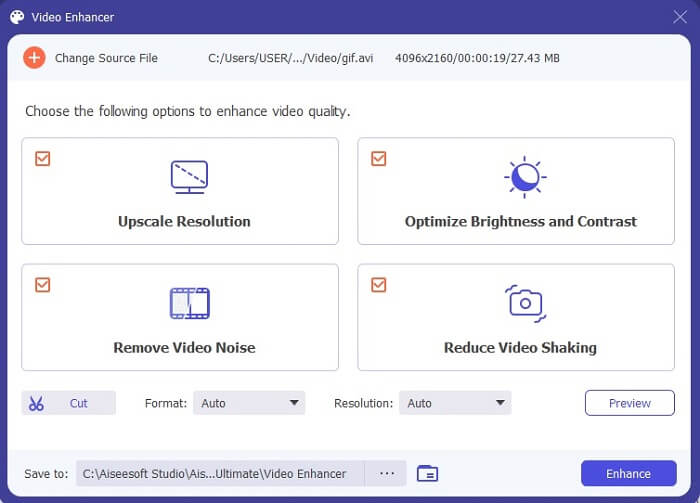
Langkah 3. Proses menambah baik video akan siap dengan segera. Selepas penambahbaikan, pengurus fail akan terbuka secara automatik dan klik video tersebut untuk menonton video yang jauh lebih baik.
Bahagian 2. Top 3: Penukar Dalam Talian Terbaik Tersedia di Web.
1. CloudConvert
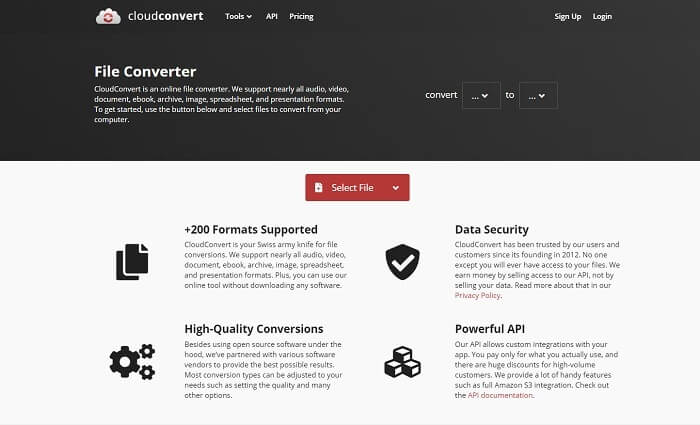
Penukar GIF ke AVI dalam talian terbaik ialah Cloud Convert. Alat ini hampir menyokong pelbagai format untuk video, audio, dokumen, eBook, hamparan, format pembentangan dan juga imej. Anda boleh menggunakan alat ini tanpa memasangnya kerana ia ialah alat dalam talian, yang bermaksud jika sambungan internet tidak tersedia anda tidak boleh menggunakan alat ini seperti dua alat di bawah. Antara muka web ini jauh lebih informatif berbanding AnyConv. Selain itu, ia mempunyai antara muka yang lebih baik dan sangat interaktif untuk digunakan.
2. AnyConv
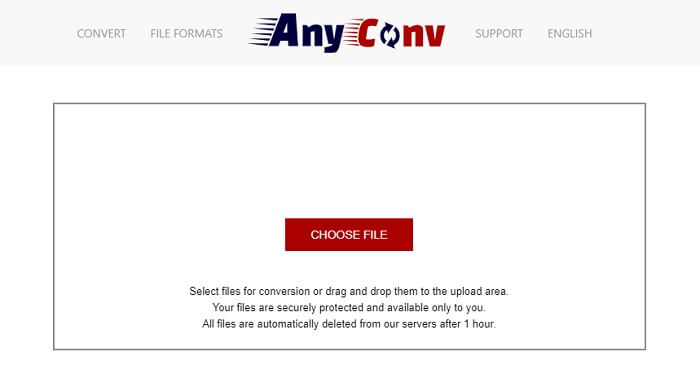
Cara paling selamat untuk menukar video anda ialah dengan menggunakan AnyConv. Anda boleh mencipta format GIF animasi ke AVI dengan mudah. Ia dikenali sebagai penukar paling selamat kerana hanya anda yang boleh mengakses fail yang telah ditukar. Dan semua fail yang telah ditukar dalam alat dalam talian ini akan dipadamkan secara automatik selepas penukaran. Laman web alat ini agak kurang informatif jadi menggunakannya mungkin menyebabkan anda keliru kerana kekurangan maklumat.
3. online-convert.com
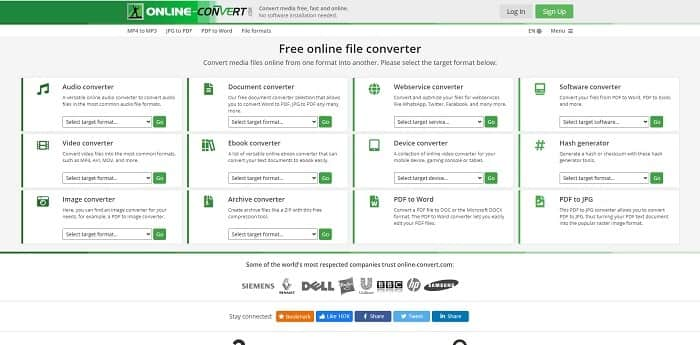
Satu lagi alat yang boleh anda gunakan sebagai penukar anda ialah online-convert.com. Alat ini membenarkan pengguna atau pelanggan seperti anda menukar sebarang video, audio, imej dan banyak lagi. Ia juga boleh digunakan untuk menukar perkhidmatan web, peranti dan perisian dengan alat ini. Anda juga boleh menggunakannya untuk menukar AVI kepada GIF animasi atau sebaliknya. Halaman web alat ini adalah informatif; ia memaparkan penerangan ringkas setiap alat tentang cara menggunakannya dengan betul. Tetapi antara mukanya agak kurang menarik kerana tona warna hijau yang dibawanya kepada pengguna.
Bahagian 3. Soalan Lazim tentang GIF ke AVI
Apakah pemangkas GIF terbaik yang tersedia dalam semua perisian? dan bagaimana untuk melakukannya?
Pemangkas GIF memberi anda kelonggaran untuk memangkas GIF anda kepada butiran yang lebih khusus. Klik pautan ini untuk mengetahui lebih banyak butiran.
Adakah format AVI dimampatkan atau tidak dimampatkan?
Sudah diketahui bahawa AVI menghasilkan format video berkualiti tinggi berbanding MPEG atau MOV. Tetapi format ini tidak dimampatkan jadi jangkakan saiz fail yang besar. Walaupun video hanya berdurasi seminit, ia boleh mengambil lebih daripada 1.5 GB atau lebih ruang storan anda. Mahu memampatkan fail AVI anda yang besar, klik di sini untuk mengetahui lebih lanjut.
Siapa yang membangunkan AVI?
Pembangun format AVI ialah Microsoft; keluaran awalnya ialah November 1992.
Kesimpulannya
Untuk menyimpulkan butiran, diketahui bahawa memilih alat yang sesuai untuk pekerjaan yang betul adalah satu kemestian terutamanya dalam menukar. Kerana menukar fail kepada format baharu adalah agak sensitif yang bermaksud jika anda menggunakan penukar yang salah mengharapkan kehilangan beberapa data. Tetapi jika anda menggunakan Ultimate Converter, anda boleh menukar mana-mana fail walaupun tanpa sambungan internet dan kehilangan data juga. Alat ini adalah pilihan yang tepat untuk anda gunakan kerana ia bukan sahaja hebat dalam melakukan satu kerja malah ia adalah yang terbaik di antara yang lain.
-
 5 Pilihan Terbaik untuk Merakam Format GIF dengan Perakam GIF untuk PC & Mac
 Apakah perakam GIF terbaik yang harus anda gunakan untuk merakam GIF? Senarai di bawah memberikan bukti yang mana yang terbaik adalah perakam skrin terbaik.
-
 Cara Menukar MPG ke Format GIF [Dalam Talian & Luar Talian]
 Ingin menyatakan emosi yang jauh lebih baik? Oleh itu, anda mesti menggunakan GIF. Tulisan ini akan mengajar anda cara menukar fail MPG ke GIF untuk menyatakan perasaan anda dengan lebih baik.
-
 [2021 Dikemas kini] 9 Editor GIF Terbaik untuk PC, Mac, iOS dan Android
 Perlu menambahkan sentuhan peribadi pada GIF anda supaya dapat menjadi lebih ekspresif? Teruskan membaca artikel ini untuk mengetahui cara mengedit dan alat terbaik untuk pekerjaan itu.
