


 Video Converter Ultimate
 Perakam Skrin
 Pembaikan Video
 Muat Turun Selamat
Bolehkah Anda Membuat Nada Dering Daripada Video & Cara Menggunakannya
Menetapkan nada dering kegemaran sentiasa menjadi satu operasi yang popular bagi ramai pengguna telefon pintar. Setiap kali anda mendengar muzik kegemaran, berhubung dengan telefon menjadi lebih menyeronokkan. Dengan perkembangan teknologi, julat nada dering yang boleh dipilih orang telah menjadi jauh lebih luas. Kini, kita bukan sahaja boleh merakam audio sendiri dan memuat turun lagu kegemaran, malah kita juga boleh mengekstrak audio daripada video sebagai nada dering panggilan masuk. Operasi ini mudah, dan terdapat banyak alat yang boleh membantu. Bagaimana kita memilih antara semua ini? Seterusnya, kami akan memberikan panduan terperinci tentang cara menjadikan video sebagai nada dering. Sama ada anda pengguna Android atau Apple, anda akan dapat mencari apa yang anda perlukan.

Bahagian 1. Bolehkah Anda Tetapkan Video Sebagai Nada Dering
Sebelum kita bermula, mari kita pertimbangkan dahulu kebolehlaksanaan menetapkan video sebagai nada dering. Jawapannya, sudah tentu, ya. Secara umumnya, anda perlu mengekstrak audio daripada video dan menukarnya kepada format nada dering yang disokong oleh telefon anda untuk bermula. Anda juga boleh menganggap intipati akta ini sebagai menukar fail daripada format video kepada format audio. Perisian penyuntingan audio dan video profesional dan penukar format dapat membantu anda menukar video kepada nada dering secara percuma. Adalah penting untuk ambil perhatian bahawa telefon bimbit yang menjalankan sistem yang berbeza menyokong format nada dering yang berbeza, dan anda perlu memastikan bahawa anda telah mencari maklumat tentang format audio yang disokong oleh peranti anda sebelum anda memulakan operasi.
Bahagian 2. Buat Nada Dering Daripada Video
Selepas mengetahui bahawa kita boleh menjadikan video sebagai nada dering, kita perlu memilih alat yang sesuai. Kami amat mengesyorkan anda mencuba FVC-picked Video Converter Ultimate. Ia ialah penukar audio dan video yang hebat yang membolehkan anda mengedit audio dalam video secara berasingan dan melaraskan volum muzik, kesan bunyi, trek audio dan sebagainya. Anda juga boleh menggunakannya untuk menukar audio jika terdapat kelewatan. Pada masa ini, ia menyokong lebih daripada seratus format, yang bermaksud ia boleh menukar video anda kepada format yang serasi dengan mana-mana telefon pintar, dan anda tidak akan menghadapi masalah keserasian. Dengan teknologi pemecutan perkakasan, ia mampu menukar sebarang fail pada kelajuan 30X lebih pantas. Semasa pemprosesan, tiada kehilangan kualiti bunyi pada fail anda, dan privasi anda tidak akan terjejas.
Muat Turun PercumaUntuk Windows 7 atau lebih baharuMuat Turun Selamat
Muat Turun PercumaUntuk MacOS 10.7 atau lebih baharuMuat Turun Selamat
Selepas mendapat idea umum tentang FVC Video Converter Ultimate, kita perlu memahami cara menggunakannya untuk menukar video menjadi nada dering. Seterusnya, kami akan membedah langkah terperinci untuk anda dari perspektif kedua-dua telefon iPhone dan Android.
Jadikan Video Sebagai Nada Dering untuk iPhone
Mula-mula, mari bincangkan cara membuat nada dering untuk iPhone anda. Perkara pertama yang perlu kita tahu ialah iPhone pada masa ini menyokong nada dering dalam format M4R. Kemudian, barulah kita boleh mulakan operasinya.
Langkah 1. Muat turun video yang ingin anda tukar ke komputer anda. Selain itu, anda perlu mendapatkan FVC Video Converter Ultimate pada peranti tersebut.
Langkah 2. Tukarkan video kepada format M4R. Untuk melaksanakan operasi ini, klik Add Files untuk memuat naik video anda terlebih dahulu.
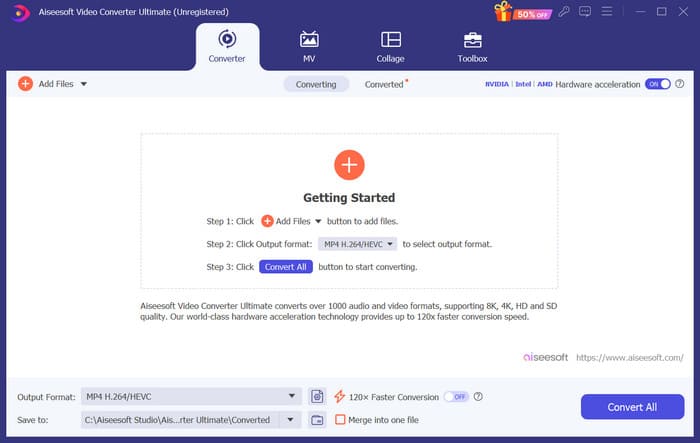
Langkah 3. Kembangkan menu di sebelah Output Format. Di sini, anda boleh mencari format yang anda perlukan.
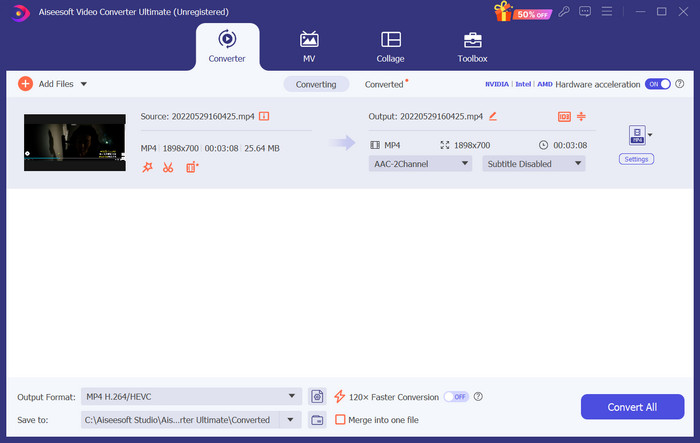
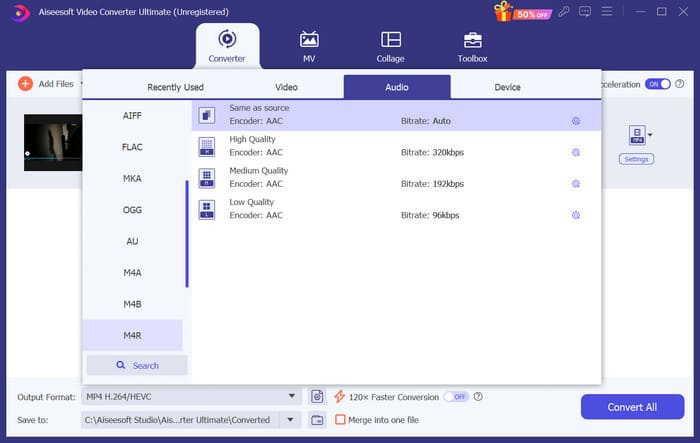
Langkah 4. Klik Audio, dan pilih M4R antara semua pilihan.
Langkah 5. Kemudian, klik Convert All untuk mengeksport audio M4R.
Langkah 6. Seterusnya, muat naik video yang telah ditukar ke dalam program. Jika anda ingin memotong fail audio, klik Cut pada antara muka. Jika anda ingin melaraskan trek audio atau volum, klik Edit.
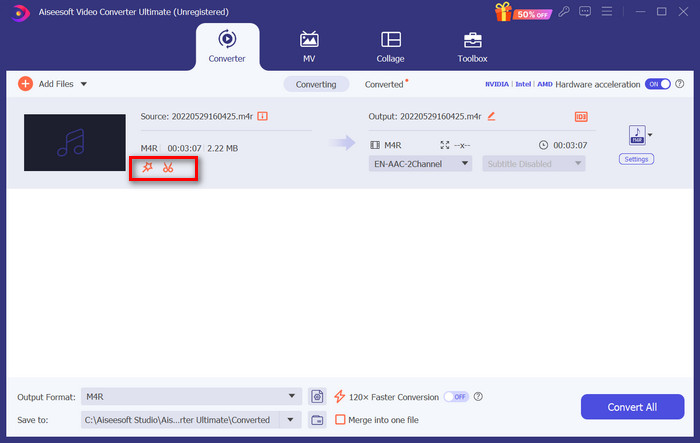
Langkah 7. Akhir sekali, klik Convert All sekali lagi untuk mendapatkan nada dering M4R yang telah anda sunting.
Jadikan Video Sebagai Nada Dering untuk Android
Jika anda ingin menukar video menjadi nada dering telefon bimbit Android, pertimbangkan untuk menukar fail video anda kepada MP3, M4A, WAV atau OGG.
Berikut ialah perkara yang perlu anda lakukan untuk menukar video kepada nada dering.
Langkah 1. Muat turun dan pasang FVC Converter Ultimate pada komputer anda. Sediakan video anda untuk penukaran.
Langkah 2. Klik Add Files untuk memuat naik video sasaran anda ke platform.
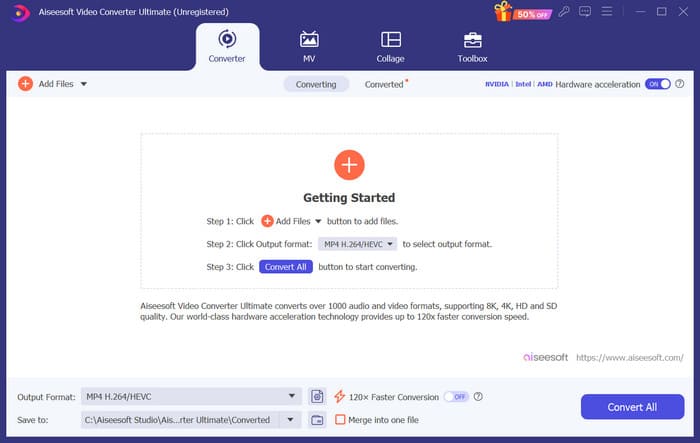
Langkah 3. Kembangkan senarai format di sebelah Output Format.
Langkah 4. Klik Audio. Mengikut keperluan anda, anda boleh menukar video kepada MP3, M4A, WAV atau OGG.
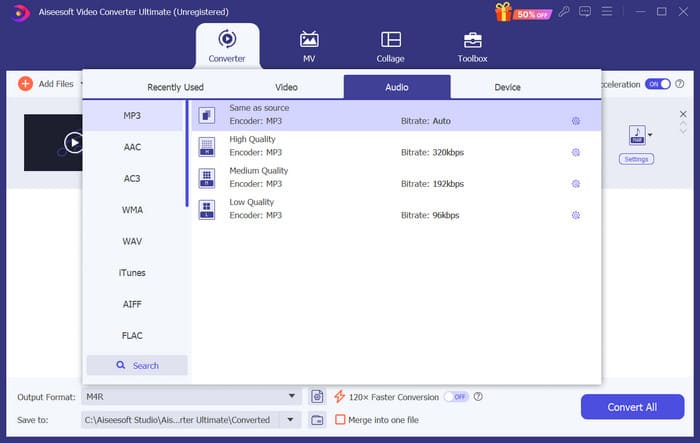
Langkah 5. Pilih Convert All untuk memuat turun audio yang telah ditukar terlebih dahulu.
Langkah 6. Tambahkan audio anda ke dalam perisian sekali lagi. Kemudian, klik Cut untuk memilih bahagian yang ingin anda gunakan sebagai nada dering. Fungsi di bawah Edit juga boleh membantu anda mengubah suai beberapa elemen dalam fail anda.
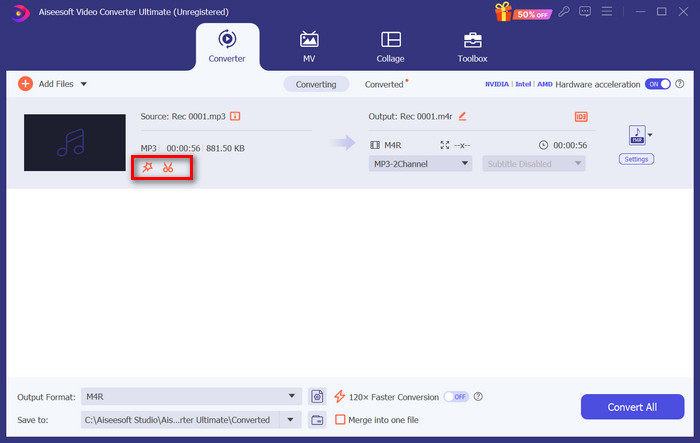
Langkah 7. Selepas selesai menyunting, klik Convert All.
Bahagian 3. Tetapkan Audio yang Ditukar Sebagai Nada Dering
Memandangkan kami telah mengedit fail audio, kami perlu pergi lebih jauh ke dalam tetapan telefon kami untuk menetapkan video yang ditukar ini sebagai nada dering.
Tetapkan Nada Dering pada iPhone
Jika anda menggunakan iPhone, anda mungkin memerlukan beberapa alat untuk menetapkan audio M4R pilihan anda sebagai nada dering. GarageBand ialah satu pilihan yang baik.
Di sini, kami akan mengajar anda cara membuat nada dering dengan GarageBand menggunakan audio daripada video.
Langkah 1. Pastikan anda sudah mempunyai fail audio yang telah disunting pada iPhone anda. Kemudian, buka GarageBand.
Langkah 2. Selepas melancarkan GarageBand, pergi ke Loop dan pilih Files. Kemudian, ketik Browse items from the Files app untuk mencari audio yang ingin anda gunakan.
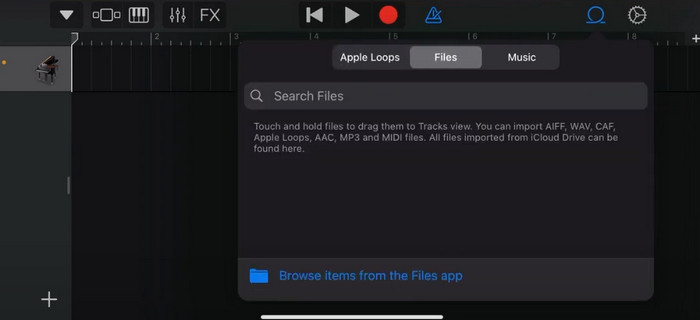
Langkah 3. Letakkan fail audio M4R pilihan anda pada garis masa GarageBand.
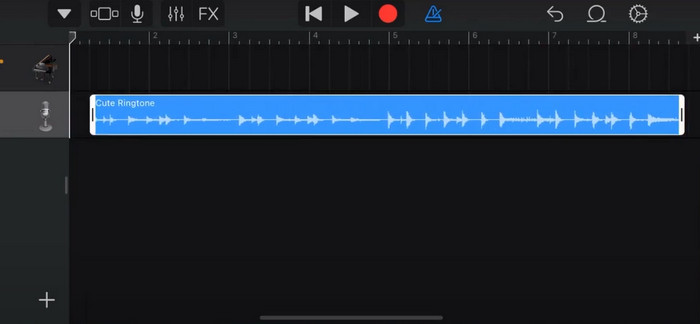
Langkah 4. Ketik Metronome untuk mematikannya. Ketik ikon anak panah ke bawah > My Songs.
Langkah 5. Tekan lama pada klip bunyi dan pilih Share.
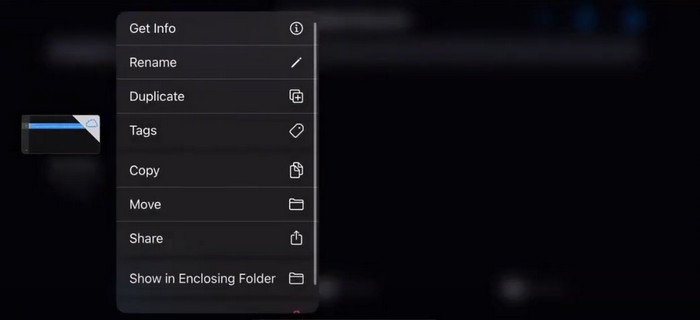
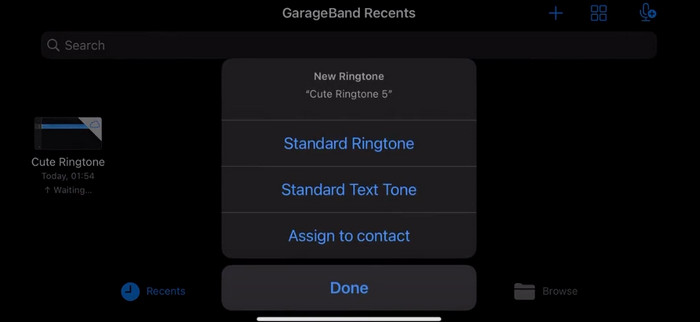
Langkah 6. Pilih Ringtone > Export. Apabila tetingkap Use sound as muncul, ketik Standard Ringtone.
Tetapkan Nada Dering pada Android
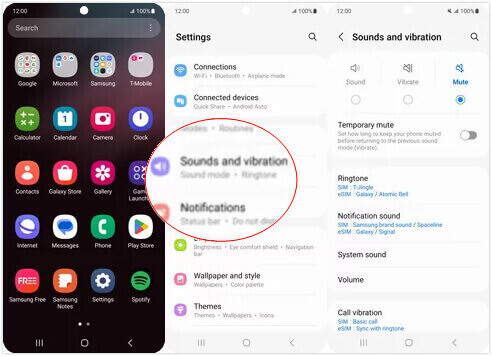
Jika anda ingin menjadikan audio anda diekstrak daripada video sebagai nada dering pada peranti Android anda, lakukan terus dalam apl Tetapan. Langkah yang tepat adalah lebih mudah.
Kami akan mengambil telefon Samsung sebagai contoh dan memberitahu anda cara menggunakannya secara terperinci.
Langkah 1. Pergi ke Settings pada peranti Android anda, dan ketik Sounds and vibration.
Langkah 2. Pilih Sound di bawah bahagian Sound mode. Seterusnya, ketik pada bunyi Notification.
Langkah 3. Pilih fail audio yang telah anda tukar dan sunting. Tetapan ini akan digunakan apabila anda kembali ke halaman sebelumnya.
Bahagian 4. Soalan Lazim Membuat Video Sebagai Nada Dering
Bagaimanakah cara menambah nada dering pada telefon Android saya?
Pada telefon Android anda, pergi ke Tetapan dan cari pilihan Bunyi atau Bunyi & Getaran. Pilih Nada dering telefon atau Nada dering untuk memilih nada dering tersuai. Nada dering tersuai anda kini sepatutnya muncul dalam senarai nada dering yang tersedia. Pilihnya untuk menetapkannya sebagai nada dering anda.
Bolehkah saya memuat turun nada dering iPhone untuk Android?
Ya, anda boleh memuat turun nada dering iPhone dan menggunakannya pada peranti Android. Walau bagaimanapun, nada dering iPhone biasanya dalam format M4R, yang tidak serasi secara langsung dengan sistem Android. Anda perlu menukar nada dering iPhone kepada format yang disokong Android, seperti MP3 atau AAC. Sebagai contoh, penukar yang dipilih oleh FVC boleh membantu anda menukar M4R kepada MP3.
Mengapa telefon saya tidak berdering semasa panggilan masuk?
Jika telefon anda tidak berdering semasa panggilan masuk, mungkin terdapat beberapa sebab untuk isu ini. Pastikan kelantangan pada telefon anda dinaikkan dan tidak diredamkan. Juga, semak sama ada telefon anda berada dalam mod Jangan Ganggu. Mod ini menyenyapkan semua panggilan dan pemberitahuan. Jika masalah masih belum selesai, cuba mulakan semula telefon anda untuk menyegarkan semula sistem.
Kesimpulannya
Ini ialah panduan lengkap untuk menjadikan video sebagai nada dering anda. Kami mengesyorkan salah satu alat terbaik, FVC Video Converter Ultimate, untuk membantu anda melaraskan fail video agar kelihatan seperti yang anda mahukan. Alat ini tersedia untuk kedua-dua telefon iPhone dan Android, jadi tidak kira sistem apa yang digunakan oleh peranti anda, anda boleh menghasilkan nada dering kegemaran dengan bantuannya.
-
 3 Penyelesaian Teratas untuk Memampatkan Fail WAV kepada Saiz yang Lebih Kecil
 Jika anda juga sedang mencari cara untuk memampatkan saiz fail audio WAV, baca kandungan kami. Kami akan memperkenalkan anda kepada alat yang berbeza dari tiga aspek.
-
 Tutorial Pemampatan Audio Mendalam pada 2024 (Langkah demi Langkah)
 Adakah anda perlu memampatkan audio tetapi memerlukan bantuan untuk mengetahui di mana untuk bermula? Dalam siaran ini, kami akan membentangkan pilihan terbaik untuk mengurangkan saiz fail trek anda.
-
 Pemampat Audio Berkesan untuk Pengguna Luar Talian dan Dalam Talian
 Ada masalah dengan fail audio yang besar? Terdapat banyak pemampat fail audio yang tersedia untuk pengguna luar talian dan dalam talian. Semak mereka di sini.
