


 Video Converter Ultimate
 Perakam Skrin
 Pembaikan Video
 Muat Turun Selamat
Panduan Komprehensif untuk Membuat Nada Dering Daripada Memo Suara
Namun, banyak pembangun telah mencipta perisian pembuat nada dering. Ini bermakna anda bebas mengambil petikan pendek lagu kegemaran anda atau merakam suara anda sebagai nada dering. Dalam artikel ini, kami akan menerangkan cara menjadikan memo suara sebagai nada dering. Kami berharap anda akan mendapat jawapan yang anda cari.

Bahagian 1. Cara Terbaik untuk Menjadikan Memo Suara Sebagai Nada Dering
Jika anda juga sedang mencari pembuat nada dering yang serba lengkap, pilih Video Converter Ultimate pilihan FVC, peneraju walaupun dalam pasaran perisian penyuntingan multimedia yang sangat kompetitif. Model telefon pintar yang berbeza mungkin menyokong format nada dering yang berbeza, tetapi ini bukan masalah dengan Video Converter Ultimate. Seperti yang anda boleh jangka daripada namanya, fungsi terasnya ialah menukar format fail. Jadi, tidak kira dalam format apa anda merakam atau memuat turun memo suara, anda boleh menukarnya agar sepadan dengan format telefon anda. Anda juga boleh menggunakannya untuk mengekstrak audio terus daripada video, yang membuka pelbagai kemungkinan nada dering. Anda juga boleh menukar volum, trek, panjang dan sebagainya bagi audio sasaran. Dengan Video Converter Ultimate, menjadikan memo suara sebagai nada dering sesuka hati bukan lagi satu impian.
Muat Turun PercumaUntuk Windows 7 atau lebih baharuMuat Turun Selamat
Muat Turun PercumaUntuk MacOS 10.7 atau lebih baharuMuat Turun Selamat
Di sini, kami akan memberitahu anda cara mengedit memo suara yang dirakam atau dimuat turun supaya anda boleh menggunakannya sebagai nada dering anda.
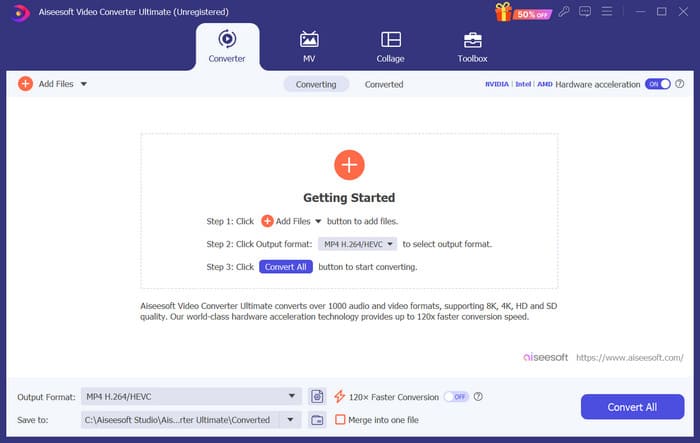
Langkah 1. Muat turun dan pasang Video Converter Ultimate pada komputer anda. Selepas itu, lancarkannya pada desktop anda.
Langkah 2. Klik Add Files untuk memuat naik audio yang anda ingin sunting.
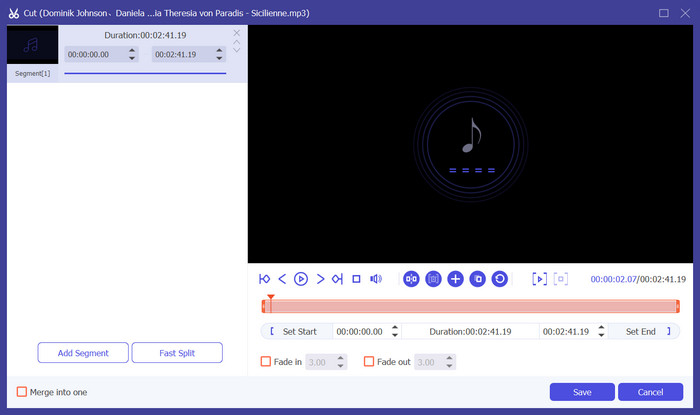
Langkah 3. Untuk memotong audio, klik Cut. Anda boleh melaraskan panjang fail. Setelah selesai memotong, klik Save.
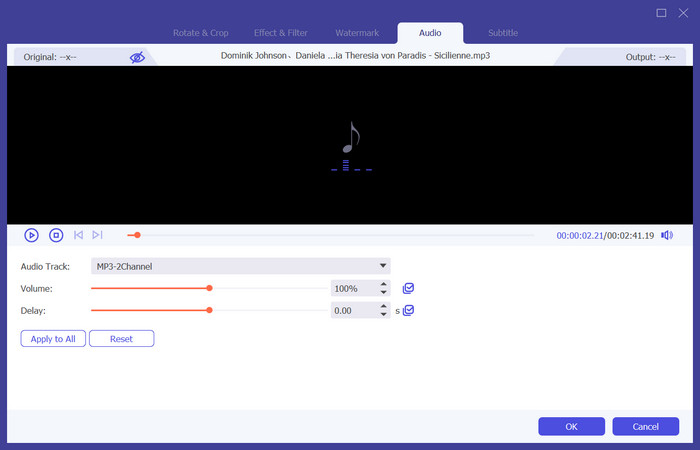
Langkah 4. Untuk menyunting volum dan trek audio memo suara anda, klik Edit. Dalam tetingkap timbul, anda boleh membuat pelarasan yang anda inginkan. Setelah selesai menyunting, klik OK.
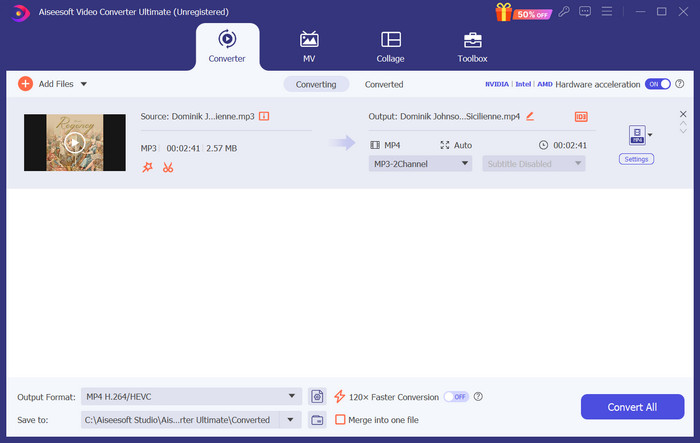
Langkah 5. Jika anda perlu menukar format fail anda, tarik turun menu di sebelah Output Format. Di sini, anda boleh memilih format output untuk audio anda.
Langkah 6. Apabila anda mahu mengeksport nada dering yang telah disunting, klik Convert All.
Bahagian 2. Bagaimana Menjadikan Memo Suara Nada Dering pada iPhone
Kami mengesyorkan GarageBand jika anda ingin membuat nada dering memo suara pada iPhone anda. Ini adalah aplikasi yang dibangunkan oleh Apple. Pengguna boleh menggunakannya untuk mencipta muzik pada peranti iOS mereka. Ia mempunyai banyak alat untuk pengeluaran muzik, rakaman, penyuntingan dan pencampuran. GarageBand juga boleh berintegrasi dengan perisian Apple yang lain. Ini bermakna kami boleh memindahkan projek dengan mudah antara GarageBand dan perisian lain untuk penyuntingan selanjutnya. Apl ini popular di kalangan pengguna profesional dan pemula kerana antara muka mesra pengguna, ciri yang luas dan kebolehaksesannya. Semua tetapan boleh dilakukan pada telefon tanpa bantuan mana-mana peranti lain.
Berikut ialah perkara yang anda perlu lakukan untuk menukar memo suara menjadi nada dering.
Langkah 1. Sebelum menetapkan nada dering anda, anda perlu pergi ke aplikasi Voice Memo pada iPhone anda untuk memilih satu memo suara.
Langkah 2. Selepas memilih memo suara sasaran anda, tekan ikon tiga titik. Pilih Save to Files, dan ketik Save sekali lagi untuk mengesahkan tindakan anda.
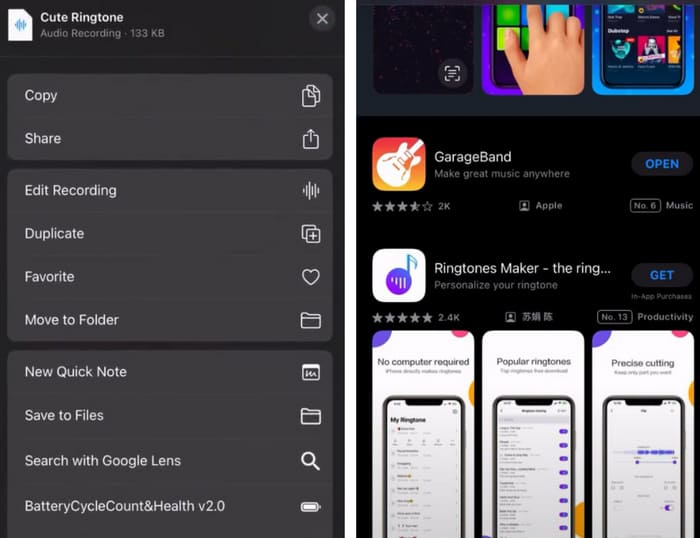
Langkah 3. Buka GarageBand pada iPhone anda, dan ketik Project.
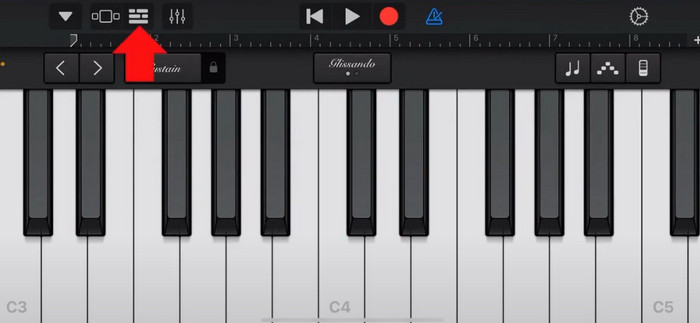
Langkah 4. Pilih Loop > Files. Selepas itu, ketik Browse items from the Files app untuk memilih memo suara sasaran anda.
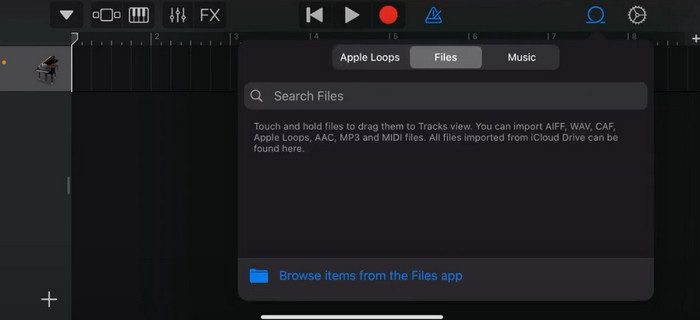
Langkah 5. Seret dan lepaskan fail tersebut pada garis masa (timeline).
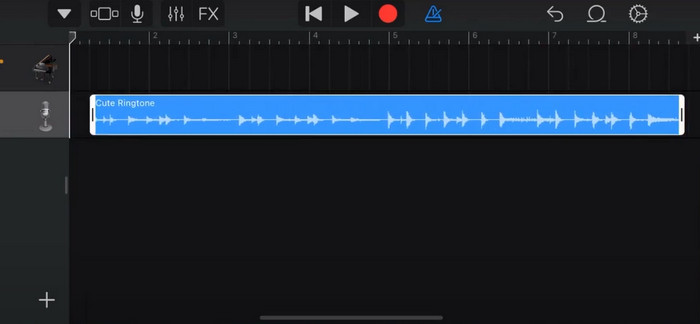
Langkah 6. Lumpuhkan Metronome, dan ketik ikon anak panah ke bawah > My Songs.
Langkah 7. Ketik dan tahan klip tersebut, kemudian pilih Share.
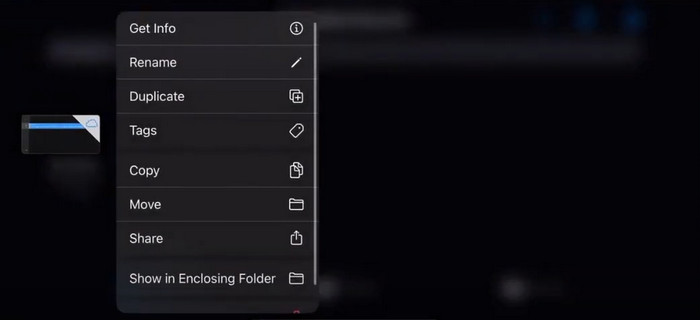
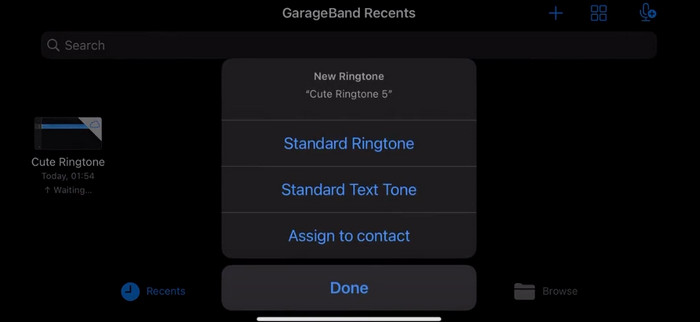
Langkah 8. Pilih Ringtone daripada semua pilihan, dan tekan Export. Akhir sekali, ketik Use sound as > Standard Ringtone. Dengan itu, anda telah berjaya menghasilkan nada dering daripada memo suara.
Bahagian 3. Cara Membuat Rakaman Suara Nada Dering pada Android
Jika anda menggunakan telefon Android dan ingin menukar muzik yang dirakam menjadi nada dering, anda boleh melakukannya terus dalam apl Tetapan telefon anda. Prosedurnya sangat mudah, dan tidak perlu memuat turun sebarang perisian untuk proses ini. Walau bagaimanapun, jika anda ingin mengubah suai audio yang dirakam anda, anda boleh memilih perisian penyuntingan audio dan video profesional seperti Video Converter Ultimate yang dipilih oleh FVC.
Seterusnya, kami akan mengajar anda cara membuat nada dering rakaman suara pada Android. Dalam bahagian ini, kami akan menggunakan telefon pintar Samsung sebagai contoh. Sebelum anda bermula, pastikan anda telah menyimpan fail rakaman dalam aplikasi voice recorder.
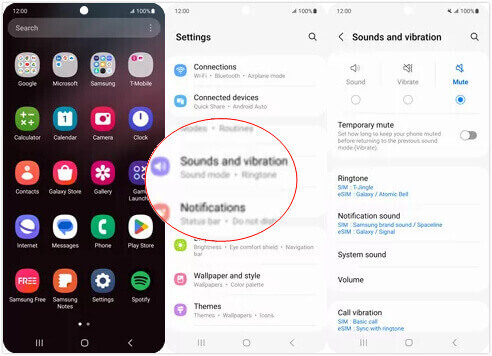
Langkah 1. Buka Settings pada telefon anda, dan pilih Sounds and vibration.
Langkah 2. Pastikan Sound dipilih di bawah Sound mode. Kemudian, pilih Notification sound.
Langkah 3. Pilih fail muzik yang telah anda rakam. Akhir sekali, kembali ke skrin Utama untuk mengaplikasikan tetapan.
Bahagian 4. Soalan Lazim untuk Menjadikan Memo Suara Sebagai Nada Dering
Apakah format nada dering untuk Android?
Nada dering untuk peranti Android boleh datang dalam pelbagai format fail audio, tetapi format yang paling biasa disokong ialah MP3, AAC, M4A, OGG dan WAV.
Bagaimanakah cara saya menyimpan memo suara sebagai lagu pada iPhone saya?
Buka apl Memo Suara pada iPhone anda dan cari memo suara yang ingin anda simpan sebagai lagu. Sila ketik pada memo suara untuk membukanya, kemudian tekan ikon kongsi untuk melihat pilihan perkongsian yang tersedia. Anda boleh memilih untuk menyimpan memo suara ke apl Fail. Selepas itu, anda boleh membuka aplikasi muzik pada iPhone anda yang menyokong pengimportan fail audio. Apl seperti GarageBand atau Music Memo adalah sesuai.
Bagaimana untuk merakam audio pada Android Samsung?
Untuk merakam audio pada peranti Android Samsung, gunakan Voice Recorder terbina dalam. Bukanya dan ketik Record untuk mula merakam. Setelah selesai merakam, anda boleh menyimpan fail audio tersebut dan memberinya nama untuk memudahkan capaian.
Kesimpulannya
Dalam artikel ini, kami menjawab persoalan bagaimana untuk menjadikan memo suara sebagai nada dering. Kami menawarkan kepada anda salah satu alat penyuntingan nada dering terbaik, FVC Video Converter Ultimate. Kaedah untuk menukarkan memo suara menjadi nada dering pada telefon iPhone dan Android disenaraikan. Kami juga menyediakan panduan langkah demi langkah yang lengkap bagi setiap bahagian sekiranya anda menghadapi sebarang masalah.
-
 3 Penyelesaian Teratas untuk Memampatkan Fail WAV kepada Saiz yang Lebih Kecil
 Jika anda juga sedang mencari cara untuk memampatkan saiz fail audio WAV, baca kandungan kami. Kami akan memperkenalkan anda kepada alat yang berbeza dari tiga aspek.
-
 Tutorial Pemampatan Audio Mendalam pada 2024 (Langkah demi Langkah)
 Adakah anda perlu memampatkan audio tetapi memerlukan bantuan untuk mengetahui di mana untuk bermula? Dalam siaran ini, kami akan membentangkan pilihan terbaik untuk mengurangkan saiz fail trek anda.
-
 Pemampat Audio Berkesan untuk Pengguna Luar Talian dan Dalam Talian
 Ada masalah dengan fail audio yang besar? Terdapat banyak pemampat fail audio yang tersedia untuk pengguna luar talian dan dalam talian. Semak mereka di sini.
