


 Video Converter Ultimate
 Perakam Skrin
 Pembaikan Video
Fahami Perisian Penukar yang Anda Boleh Gunakan untuk Menukar MPEG kepada FLV
MPEG ialah format piawai untuk pemindahan data melalui internet atau dalam pengedaran DVD. Ia menjadi piawai kerana format ini sudah wujud sejak tahun 1988. Tetapi adakah anda tahu bahawa fail ini ialah satu sistem tak simetri? Ini kerana masa yang diambil untuk memampatkan video adalah lebih lama berbanding menyahmampatkannya. Selain itu, semasa pemampatan fail, beberapa bingkai akan dibuang. Jadi kualiti format ini lebih rendah berbanding format lain seperti FLV. Mahu tahu cara menukar MPEG kepada FLV dan memampatkan data tanpa kehilangan bingkai berkualiti dalam video anda? Baca artikel ini untuk mengetahui apakah penukar MPEG yang boleh anda gunakan.

Bahagian 1. Tukar MPEG kepada MOV pada Mac dan Windows Menggunakan FVC Video Converter Ultimate
FVC Video Converter Ultimate lebih berkemampuan untuk menangani masalah penukaran ini. Ia lebih daripada sekadar penukar MPEG ke FLV kerana alat ini boleh mengendalikan penukaran lebih 200 format secara serta-merta dengan sendiri. Bukankah itu menakjubkan? Selain itu, jika anda mahu memasukkan banyak fail dan menukarnya kepada format berbeza di sini, anda boleh melakukannya dengan mudah melalui penukaran kelompok yang sangat berkesan. Mahu tahu apa lagi yang ada dalam alat ini? Baca ciri utamanya di bawah.

FVC Video Converter Ultimate
5,689,200+ Muat Turun- Ia menyokong semua format dan pengekod dalam MP4, MOV, MPEG, FLV, AVI dan banyak lagi.
- Ia dikenali sebagai penukar terpantas dan paling selamat yang boleh anda muat turun pada desktop anda.
- Penukaran kelompok dengan Pecutan Perkakasan dan Penukaran Pantas.
- Penukar ini menyokong ciri meluas utama, seperti penambah video, pemampat video, dsb.
- Menyokong kedua-dua OS dengan fungsi yang sama pada Windows & Mac.
Muat Turun PercumaUntuk Windows 7 atau lebih baharuMuat Turun Selamat
Muat Turun PercumaUntuk MacOS 10.7 atau lebih baharuMuat Turun Selamat
Jadi sekarang setelah anda mempunyai idea tentang fungsi alat, tiba masanya untuk mengetahui cara menukar MPEG kepada FLV dengan langkah terperinci di bawah.
Langkah 1. Untuk mengakses alat ini, anda mesti memuat turunnya dahulu pada PC atau Mac anda. Kemudian pasang dan lakukan persediaan ringkas; alat ini akan dilancarkan secara automatik selepas semuanya selesai.
Muat Turun PercumaUntuk Windows 7 atau lebih baharuMuat Turun Selamat
Muat Turun PercumaUntuk MacOS 10.7 atau lebih baharuMuat Turun Selamat
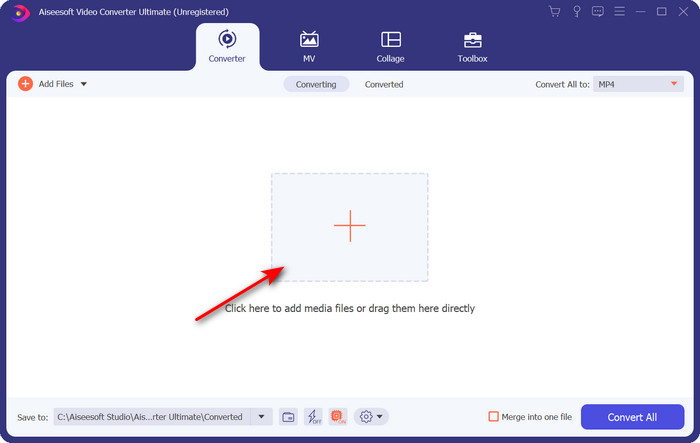
Langkah 2. Mari masukkan fail .mpeg anda di sini dengan mengklik tanda + di bahagian tengah antara muka. Selepas mengkliknya, satu folder pada desktop anda akan muncul, pilih fail tersebut dan klik Open.
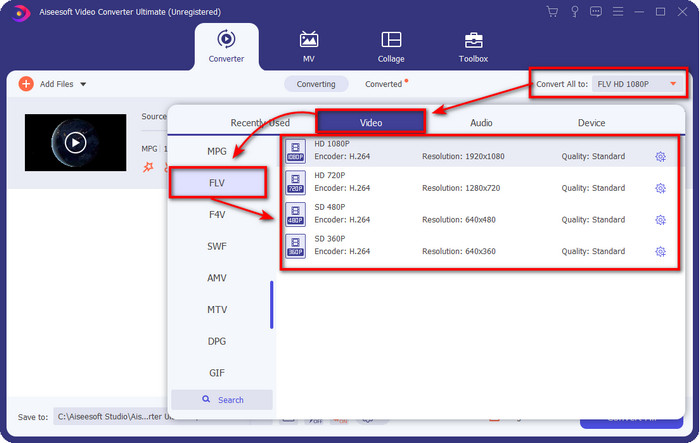
Langkah 3. Tukar format kepada FLV dengan mengklik dan mengembangkan menu Convert All to di bahagian kanan atas antara muka penukar.
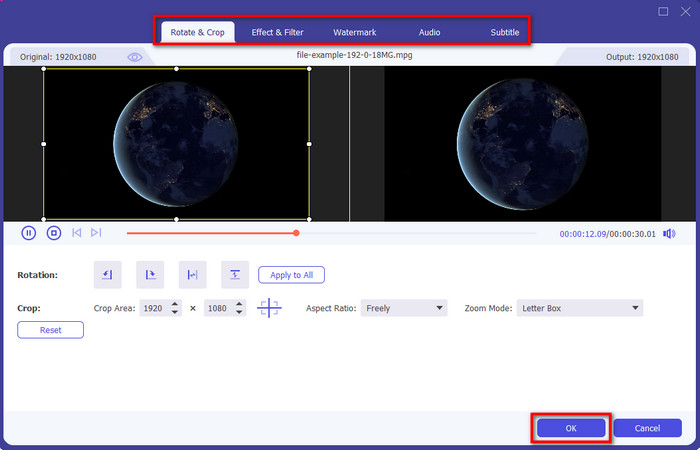
Langkah 4. Sebelum kita menukar fail anda, anda boleh menyunting video di sini dahulu dengan mengklik butang want. Di bawah fungsi penyuntingan ini, anda boleh memusing & memotong video, menambah kesan & penapis, menerapkan tanda air, melaras audio, dan menambah sarikata. Setelah selesai menyunting dan bersedia untuk menyimpan, klik OK.
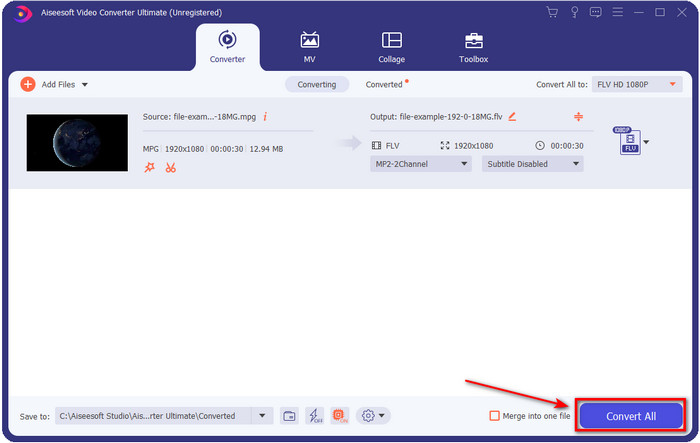
Langkah 5. Tekan Convert All untuk mula menukar MPEG kepada FLV. Proses ini akan mengambil masa kurang daripada satu minit kerana Capaian Perkakasan (Hardware Acceleration) dan Penukaran Pantas diaktifkan. Selepas penukaran, folder hasil akan dipaparkan pada skrin anda.
Bahagian 2. Tukar MPG kepada MOV menggunakan FFmpeg
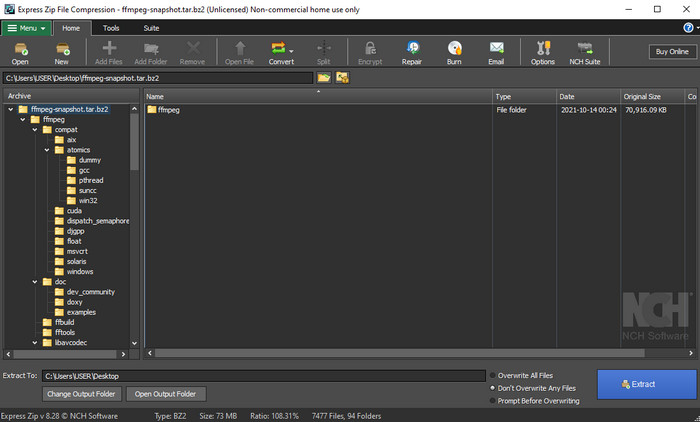
Salah satu penyunting terkenal yang mungkin sudah anda temui ialah FFmpeg. Jika penukar ini kedengaran baharu bagi anda, mari kita lihat pengenalan ringkas tentang perisian ini. Penukar ini dikenali sebagai salah satu penukar yang paling rumit untuk digunakan. Ini kerana sebelum anda melakukan penukaran di sini, anda perlu berkomunikasi melalui teks dalam CMD. Walaupun alat ini kompleks, prestasinya sangat hebat terutamanya dalam penukaran. Daripada mencari di internet cara menggunakan FFmpeg MPEG ke FLV, langkah-langkah di bawah akan membantu anda menggunakan alat ini.
Langkah 1. Muat turun FFmpeg pada desktop anda.
Langkah 2. Buka CMD pada desktop anda untuk membuka command prompt.
Langkah 3. Cari lokasi fail .mpeg anda dengan menggunakan CMD. Kemudian masukkan arahan ini pada command prompt ffmpeg -i input.mpeg -vn -ar 44100 -ac 2 -b:a 192k output.flv, tekan kekunci Enter pada papan kekunci anda untuk memulakan proses.
Kelebihan
- Ia dimuat turun secara percuma.
- Berprestasi baik dalam menukar format kepada versi baharu.
- Tersedia dalam Windows dan Mac.
Keburukan
- Ia tidak mesra pengguna.
- Bukan penukar biasa anda.
Bahagian 3. Tukar MPG ke MOV Menggunakan MPEG Online Percuma ke MOV Converter
Jika anda mahu menukar MPEG kepada FLV secara percuma, gunakan FVC Free Video Converter Online. Alat dalam talian ini tersedia pada semua enjin carian untuk membantu anda menyelesaikan masalah penukaran. Walaupun penukar dalam talian ini percuma, fungsi dan cirinya tidak seluas FVC Video Converter Ultimate. Tetapi anda boleh melakukan penukaran fail .mpeg atau .mpg di sini dengan lebih mudah dan lebih baik berbanding FFmpeg. Satu lagi kelebihan alat web ini ialah anda tidak perlu memuat turunnya ke desktop anda. Anda dapat menjimatkan ruang storan jika menggunakan alat ini. Mahu tahu cara menggunakan alat ini? Jika ya, mari teruskan dengan langkah-langkahnya.
Langkah 1. Untuk membuka penukar MPEG ke FLV dalam talian, anda mesti klik pautan ini.
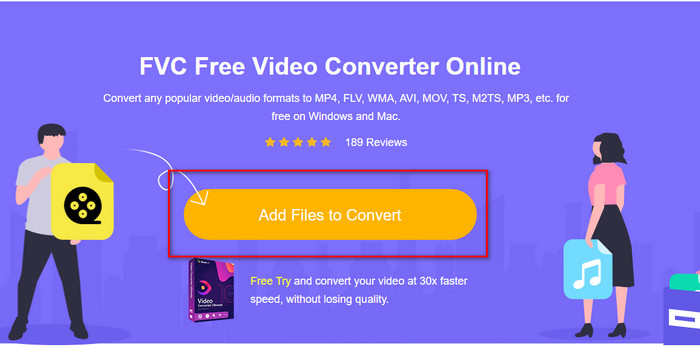
Langkah 2. Setelah laman web dibuka, klik Add Files to Convert untuk membuka alat web. Satu folder akan muncul pada skrin anda; di bawahnya, anda boleh cari fail .mpeg yang ingin anda tukar, kemudian tekan Open.
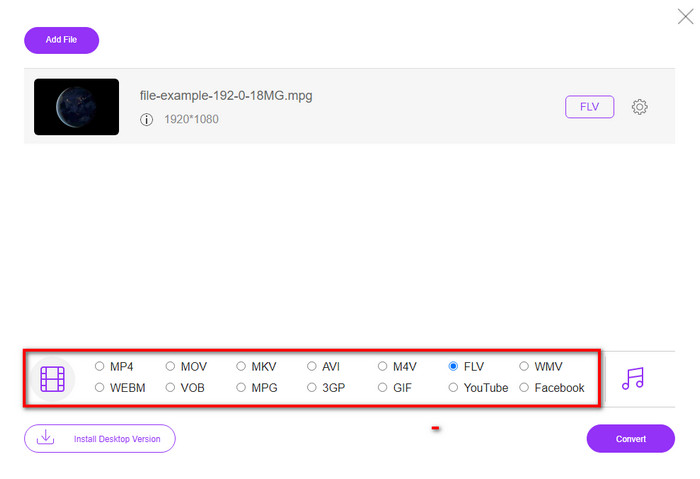
Langkah 3. Satu antara muka baharu akan muncul; pilih format FLV di bahagian bawah.
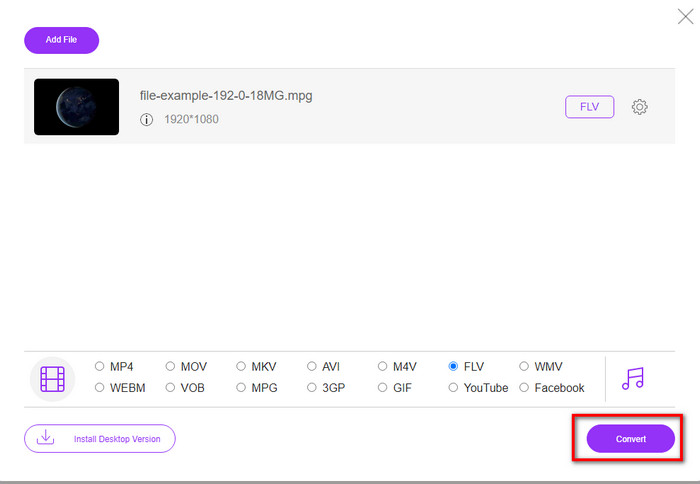
Langkah 4. Setelah selesai memilih format, klik Convert untuk memulakan proses.
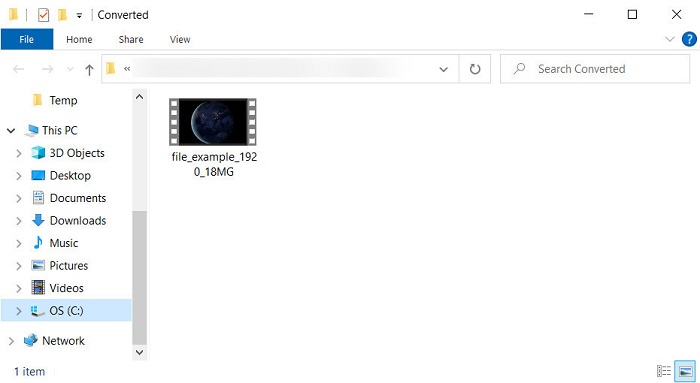
Langkah 5. Folder fail akan dipaparkan selepas penukaran.
Bahagian 4. Pengetahuan Lanjutan tentang MPEG dan MOV
Moving Pictures Experts Group atau MPEG ialah salah satu format standard yang muncul pada akhir 1988. Format ini memampatkan fail dengan ketara ke dalam MPEG-1 atau MPEG-2 kemudian mengedarkannya di internet atau DVD. Walaupun MPEG menggunakan pemampatan tertentu, sambungan format ini masih boleh menjadi .mpg atau .mpeg asal, tetapi fail dan kualiti yang disimpan tidak akan terjejas. Walaupun kualiti tidak akan terjejas, ia masih tidak dapat menyimpan video dan metadata definisi tinggi.
Disebutkan di atas, Flash Video atau FLV adalah seperti MPEG tetapi dari perspektif yang berbeza. Kedua-dua format ini adalah yang terbaik untuk memindahkan fail video melalui internet. Walau bagaimanapun, fail FLV lebih dimampatkan, dan ia mempunyai kualiti yang lebih baik berbanding dengan MPEG. Ia kini format video standard dalam kandungan HTML 5 di World Wide Web untuk penstriman.
Memandangkan format MPEG mempunyai kualiti yang lebih rendah dan pemampatan yang lebih rendah, anda mesti mempertimbangkan semula untuk menukar fail kepada format FLV jika anda mahukan kualiti dan pemampatan yang lebih baik. Jadi, memilih MPEG ke FLV penukar dalam talian atau luar talian yang betul adalah satu kemestian untuk mencapai versi FLV yang lebih baik.
Bahagian 5. Soalan Lazim tentang Penukaran MPEG ke FLV
Bagaimana untuk menggabungkan berbilang fail MPEG menjadi satu?
Menggabungkan dua atau lebih fail menjadi satu adalah mudah jika anda menggunakan alat yang betul. Tiada idea alat apa yang hendak digunakan untuk menggabungkan fail video menjadi satu? Atau bagaimana untuk menyambungkan fail-fail itu? Jika begitu, baca artikel ini untuk mengetahui apa dan cara menggabungkan fail MPEG menjadi satu.
Di manakah saya boleh memainkan fail MPEG?
Walaupun format MPEG ialah format yang paling dikenali untuk filem dan sokongan yang diterima format ini sangat besar, namun sesetengah pemain media tidak memainkan video dengan lancar jika sambungan failnya .mpeg. Jika anda sedang mencari pemain media yang berkesan, klik pautan ini segera dan baca maklumat terperinci tentang pemain MPEG.
Bolehkah saya memampatkan fail MPEG?
Ya, anda boleh memampatkan fail MPEG anda jika saiznya terlalu besar untuk dimuatkan. Malah, anda boleh membaca artikel ini dan mengetahui cara memampatkan fail MPEG kepada saiz yang lebih kecil tanpa merosakkan kualiti video.
Kesimpulannya
Akhirnya, kita kini mempunyai pengetahuan kukuh tentang cara menukar MPEG kepada FLV dengan alat berguna di atas. Jika anda mahu menukar MPEG secara percuma, gunakan FVC Free Video Converter Online. Tetapi jika anda sudah mempunyai dan mahu menggunakan FFmpeg, baca perincian di atas. Sama ada yang mana satu, prestasi penukar yang paling hebat ialah FVC Video Converter Ultimate. Jadi sekarang, pilih alat terbaik yang anda rasa paling sesuai dengan keperluan penukaran fail anda dan dapatkan penukaran yang berkesan.
-
 [2021] Alat Terbaik dan Cara Mudah tentang Cara Menukar MPEG kepada MP3
 Artikel ini terutamanya bercakap tentang cara anda boleh menukar video MPEG anda pada MP3 dengan menggunakan alat yang paling boleh dipercayai dalam senarai.
-
 5 Pilihan Terbaik untuk Menukar MPEG kepada Format AVI [Dalam Talian & Luar Talian]
 Adakah anda mempunyai masa yang sukar untuk mencari penukar untuk MPEG? Kemudian cuba baca artikel ini sambil kami belajar cara menukar MPEG kepada format AVI dengan langkah terperinci.
-
 3 Kaedah Cekap dalam Menukar MPEG kepada MOV [Luar Talian & Dalam Talian]
 Adakah anda bosan mencari pemain media untuk memainkan format video MPEG anda? Cuba tukarkannya kepada format lain yang mungkin dimainkan, terutamanya pada Mac, contohnya, format video MOV. Baca artikel ini untuk mengetahui lebih lanjut.
