


 Video Converter Ultimate
 Perakam Skrin
 Pembaikan Video
 Muat Turun Selamat
Prosedur Paling Mudah Menggunakan Pixlr untuk Mengalih Keluar Tera Air
Jika anda berada di sini untuk belajar bagaimana untuk menggunakan Pixlr untuk membuang tera air daripada foto anda, maka anda berada pada artikel yang betul. Secara peribadi, agak menjengkelkan apabila mendapat gambar yang mempunyai tera air, jadi adalah lebih baik untuk membuangnya. Dari awal hingga akhir artikel ini, anda akan mempelajari banyak perkara, bukan sahaja cara menggunakan aplikasi Pixlr tetapi juga cara menggunakan alternatif lain yang hebat untuk menghapuskan tera air daripada foto anda. Jadi jika anda berada di sini untuk menyelesaikan masalah anda, teruskan membaca artikel ini dan pelajari beberapa tutorial untuk membuang tera air yang mengganggu daripada imej anda.

Bahagian 1: Alih Keluar Tera Air daripada Foto Menggunakan Pixlr
Pixlr ialah alat penyuntingan yang boleh anda gunakan untuk menambah baik gambar anda. Ia juga menawarkan pelbagai templat untuk menjadikan foto anda lebih cantik dan unik. Selain fungsi‑fungsi ini, tahukah anda bahawa Pixlr boleh membuang tera air daripada imej anda? Ya! Betul apa yang anda dengar! Pixlr boleh serta‑merta menghapuskan sebarang objek yang mengganggu yang anda tidak mahu dalam foto anda, termasuk tera air, pelekat, emoji, teks dan banyak lagi. Di samping itu, perisian dalam talian ini adalah percuma, jadi anda tidak perlu memikirkan bayaran atau langganan. Namun begitu, menggunakan Pixlr tidaklah begitu mudah. Ia mempunyai banyak pilihan yang mungkin mengelirukan dan prosedur yang rumit, menjadikannya kurang sesuai untuk pengguna bukan profesional. Untuk menggunakan aplikasi ini, anda perlu menonton tutorial atau mendapatkan bimbingan daripada pengguna mahir. Selain itu, ia ialah perisian berasaskan web, jadi adalah perlu mempunyai sambungan internet yang pantas; jika tidak, ia tidak akan berfungsi dengan baik. Ikuti tutorial ringkas di bawah untuk membuang tera air menggunakan Pixlr.
Langkah 1: Untuk menggunakan Pixlr, pertama sekali anda perlu melawati laman web Pixlr. Kemudian, klik butang Open Image untuk memuat naik foto yang mempunyai tera air yang ingin anda buang. Anda juga boleh memasukkan imej melalui URL.

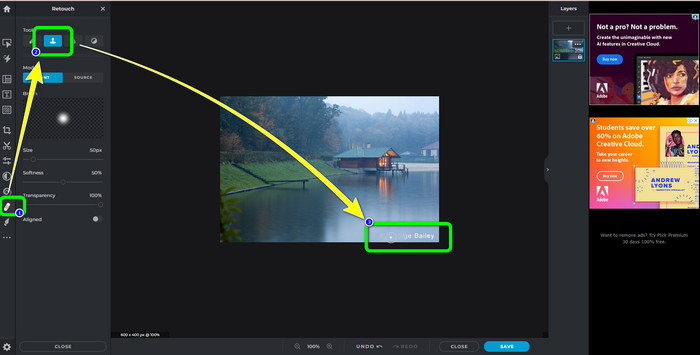
Langkah 2: Selepas memuat naik imej yang anda mahukan, pilih butang Retouch di bahagian kiri antara muka. Kemudian, alat‑alat akan dipaparkan. Pilih Clone Stamp tool. Selepas memilihnya, anda sudah boleh mengklik kawasan tera air dengan tetikus anda untuk memadam tera air.
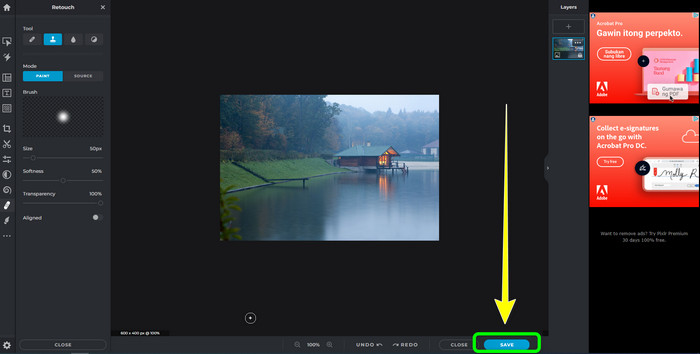
Langkah 3: Jika anda sudah membuang semua tera air yang ingin anda hapuskan, klik butang Save. Kemudian simpan ke lokasi yang anda inginkan.
Bahagian 2: Alternatif Pixlr Cemerlang untuk Memadam Tera Air daripada Foto
Penghapus Tera Air Percuma FVC
Seperti yang anda lihat, menggunakan Pixlr adalah sukar, terutamanya untuk pemula. Jika anda mahukan penanggal tera air yang lebih mudah, alternatif terbaik yang boleh kami cadangkan ialah FVC Free Watermark Remover. Perisian dalam talian ini mempunyai kaedah dan antara muka yang ringkas, yang sangat sesuai untuk pemula. Aplikasi ini boleh dengan mudah memadam semua objek yang tidak diingini daripada foto anda, seperti tera air, logo, cap tarikh dan sebagainya. Ia juga benar‑benar percuma, dan anda boleh membuang berbilang tera air daripada foto anda.
Tetapi tunggu, ada lagi. FVC Free Watermark Remover menawarkan anda dua cara untuk mengalih keluar tera air. Cara pertama ialah dengan menggunakan Watermark Remover Tools. Alat ini ialah Berus, Lasso, dan Poligon. Anda boleh menggunakan alatan ini untuk menyerlahkan dan mengalih keluar tera air daripada foto anda. Cara kedua ialah dengan menggunakan Cropping Tool. Jika kawasan tera air berada di tepi foto anda, anda hanya perlu memangkasnya menggunakan tetikus. Jika anda mahukan contoh mengalih keluar tera air menggunakan kedua-dua kaedah ini, ikut langkah di bawah.
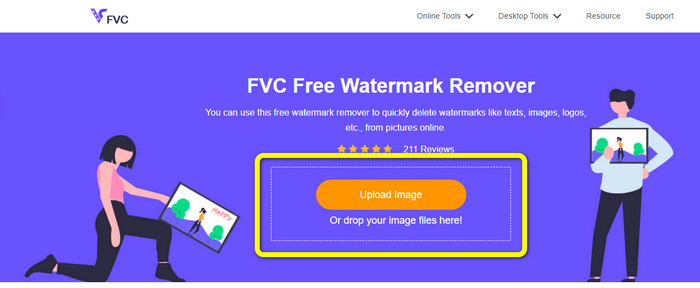
Langkah 1: Buka pelayar anda dan lawati laman web FVC Free Watermark Remover. Selepas itu, pilih butang Upload Image dan muat naik foto yang anda inginkan yang mempunyai tera air.
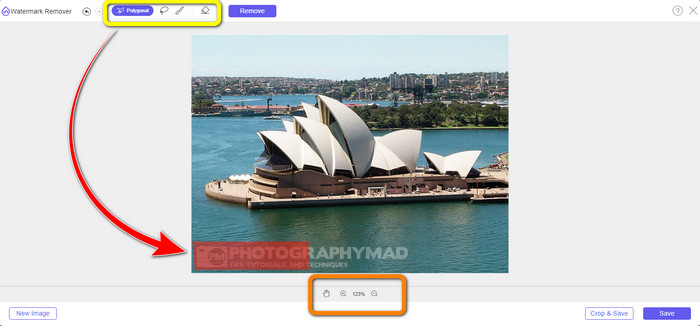
Langkah 2: Selepas itu, anda boleh menggunakan alat penanggal tera air seperti Polygonal, Lasso dan Brush. Selain itu, anda boleh menggunakan alat Eraser untuk memadam bahagian sorotan yang berlebihan. Anda juga boleh menggunakan alat zum di bawah foto anda untuk membesarkan atau mengecilkan paparan bagi melihat tera air yang kecil.
Langkah 3: Pada bahagian ini, apabila anda selesai menyorot semua tera air pada foto anda, anda sudah boleh membuangnya dengan mengklik butang Remove. Kemudian, tunggu proses penyingkiran.
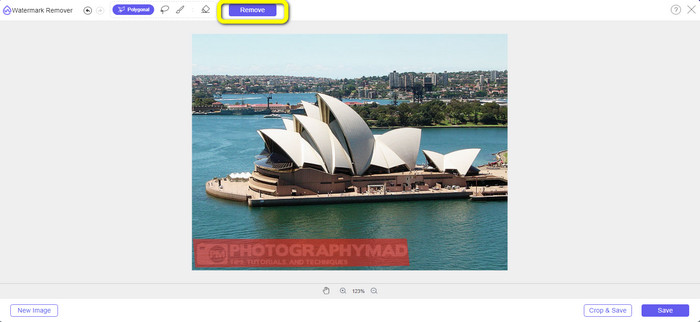
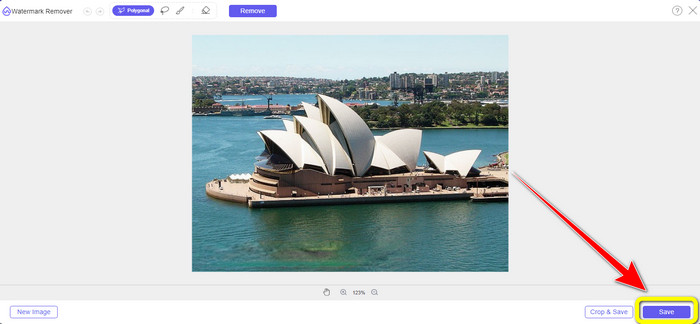
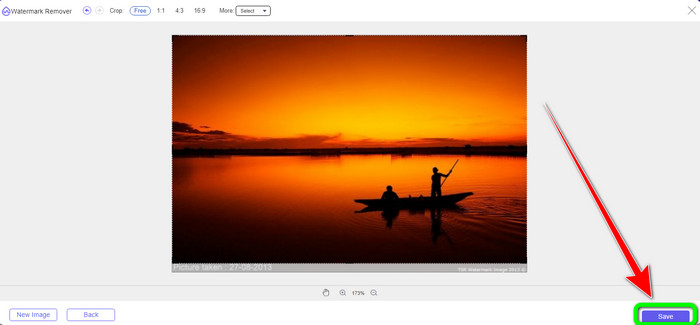
Langkah 4: Kini, kita boleh teruskan ke langkah terakhir. Selepas membersihkan semua tera air daripada foto anda, klik butang Save untuk memuat turun hasil akhir anda.
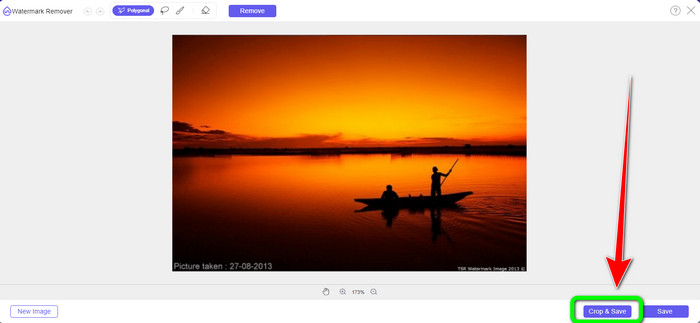
Langkah 5: Cara lain untuk membuang tera air ialah dengan menggunakan alat pangkas. Pilih butang Crop & Save selepas memasukkan fail imej.
Langkah 6: Dalam langkah ini, anda sudah boleh memangkas foto anda untuk menghapuskan tera air dengan menggerakkan tetikus sambil mengklik tepi foto. Seperti yang anda lihat dalam kotak kuning, anda boleh mencari banyak pilihan tentang cara anda mahu memangkas foto anda. Dalam kotak merah, anda boleh membesarkan atau mengecilkan skala foto.
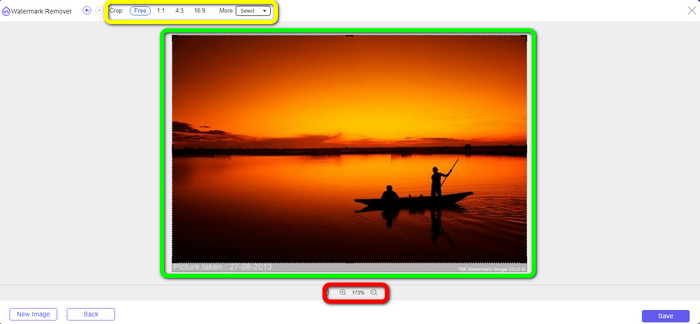
Langkah 7: Untuk langkah terakhir, apabila anda selesai memotong foto, klik butang Save untuk menyimpan fail tersebut. Kemudian anda boleh membukanya untuk melihat foto tanpa tera air.
Watermark Remover.io
Cara lain yang lebih mudah untuk membuang tera air daripada foto ialah menggunakan Watermark Remover.io. Aplikasi dalam talian ini jauh lebih ringkas daripada Pixlr. Ia mempunyai antara muka yang jelas dan langkah‑langkah asas, malah pengguna baharu juga boleh mengendalikannya dengan mudah. Ia juga boleh membuang berbilang tera air sekali gus. Perkara terbaik di sini ialah ia menyokong pelbagai warna, yang bermaksud walaupun tera air mempunyai warna yang berbeza, ia masih boleh membuangnya dengan serta‑merta.
Tetapi malangnya, Watermark Remover.io mempunyai ciri yang terhad. Dalam satu bulan, maksimum imej yang boleh anda muat naik ialah 50 imej sahaja. Selain itu, ia hanya boleh menawarkan storan 25 GB, yang tidak mencukupi. Selain itu, jika anda mahu aplikasi ini berfungsi dengan baik, anda mesti mempunyai sambungan internet yang pantas.
Ikut langkah di bawah untuk memadam tera air daripada foto anda.
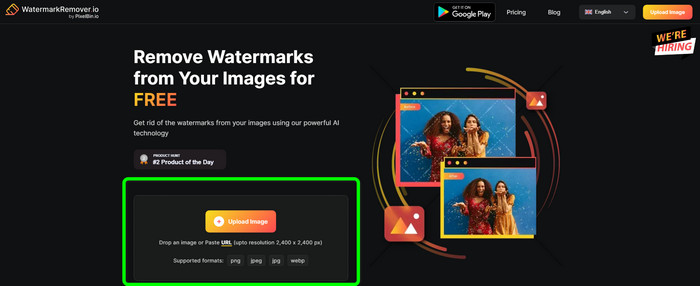
Langkah 1: Lawati laman web Watermark Remover.io menggunakan pelayar anda. Kemudian, klik butang Upload Image. Ia akan secara automatik membuang tera air daripada foto anda, jadi tunggu prosesnya.
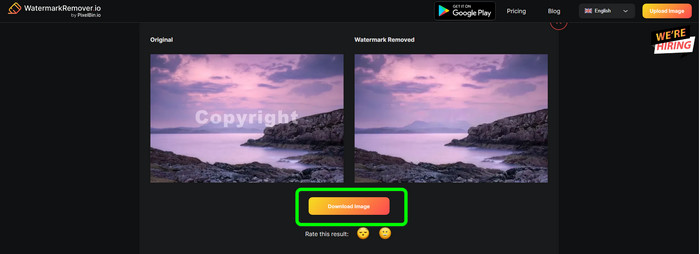
Langkah 2: Jika tera air pada foto anda sudah hilang, klik butang Download Image untuk menyimpannya pada komputer anda. Anda boleh menggunakan alat ini untuk membuang tera air Alamy daripada foto.
Bahagian 3: Soalan Lazim tentang Mengalih Keluar Tera Air Menggunakan Pixlr
1. Apakah penghilang tera air percuma yang terbaik?
Penanggal tera air terbaik yang boleh anda gunakan secara percuma ialah FVC Free Watermark Remover. Aplikasi ini boleh menghapuskan semua objek yang menjengkelkan daripada foto anda tanpa membayar walau satu sen.
2. Bagaimanakah cara saya menambah tera air dalam Pixlr?
Anda perlu log masuk ke akaun Pixlr anda. Kemudian pergi ke "Editor Pixlr" dan lancarkannya. Selepas itu, klik "Buat Imej Baharu." Kemudian anda sudah boleh membuat tera air pada foto anda dan menetapkan ketinggian dan lebar foto anda.
3. Adakah Pixlr alat yang sah?
Sememangnya Ya! Pixlr adalah aplikasi yang sah. Semua cirinya dibenarkan dan dibenarkan untuk digunakan. Jadi anda boleh mengendalikan aplikasi dalam talian ini tanpa perlu risau.
Kesimpulannya
Memang sangat memuaskan melihat foto tanpa tera air, betul? Inilah sebab utama artikel ini menunjukkan kepada anda cara untuk menggunakan Pixlr untuk membuang tera air. Kami juga memperkenalkan alat dalam talian lain yang boleh anda gunakan yang mempunyai cara yang lebih mudah. Tetapi jika anda mahukan perisian yang berguna dan praktikal, anda boleh menggunakan FVC Free Watermark Remover.
-
 3 Cara Terbaik tentang Cara Mengalih Keluar Tera Air daripada Imej PNG
 Temui tiga kaedah terbaik ini untuk mengalih keluar tera air daripada PNG dalam talian. Baca siaran ini dan jadikan imej anda kemas dan lebih menyenangkan mata penonton anda.
-
 Cara Mudah untuk Mengalih Keluar Tera Air daripada JPG Dalam Talian
 Mari temui taktik terbaik tentang cara mengalih keluar tera air daripada JPG dalam talian menggunakan aplikasi yang berkesan. Ikuti artikel ini untuk mengetahui prosedurnya.
-
 Panduan Lengkap untuk Mengalih Keluar Tera Air iFunny dengan Mudah
 Temui penghilang tera air iFunny yang paling luar biasa untuk anda. Selain itu, pelajari kaedah mudah ini untuk mengalih keluar tera air iFunny daripada foto anda
