


 Video Converter Ultimate
 Perakam Skrin
 Pembaikan Video
 Muat Turun Selamat
Cara Terbaik untuk Mengeluarkan Tera Air Pond5 [Langkah Mudah]
Pond5 ialah platform dalam talian yang mengandungi pelbagai klip video, runut bunyi, kesan bunyi, model 3D, dll. Pond5 ialah sebuah syarikat yang berpangkalan di New York, dan ia merupakan tapak web terkenal yang menyediakan fail video dan audio berkualiti tinggi. Selain itu, ia adalah perkhidmatan rakaman stok di mana pencipta kandungan boleh memuat naik video, muzik dan ilustrasi mereka dan menjualnya dalam talian. Jadi, jika anda sedang mencari rakaman stok berkualiti dalam talian, maka Pond5 adalah yang anda cari. Walau bagaimanapun, ramai pengguna pemula platform ini bermula dengan menggunakan versi pratonton percuma.
Pratonton percuma mengandungi tera air yang disematkan pada video, audio atau imej anda, yang mungkin merosakkan rupa produk. Siaran ini akan mengajar anda cara mengalih keluar tera air Pond5 pada imej anda.

Bahagian 1. Mengapa Pond5 Meletakkan Tera Air pada Imej
Tera air ialah logo, teks atau imej yang diletakkan dalam video, audio atau imej anda. Tera air ditumpangkan untuk menjadikannya sukar untuk menyebabkan pelanggaran dan menghalang output daripada disalin. Banyak syarikat yang menawarkan media berbayar kepada pengguna mereka membenarkan mereka mempunyai pratonton percuma tetapi membenamkannya dengan tera air. Pond5 adalah syarikat sedemikian. Ia adalah taktik Pond5 untuk memimpin pengguna membeli versi produk mereka tanpa tera air.
Selain itu, Pond5 meletakkan tera air pada produk mereka untuk menghalang pengguna lain yang tidak memanfaatkan tawaran mereka daripada memuat turunnya dan menganggap produk itu sebagai milik mereka. Tetapi jika anda mempunyai imej Pond5 dan ingin membuang tera air yang menjengkelkan pada imej anda, teruskan membaca siaran ini.
Bahagian 2. Cara Membuang Tera Air Pond5 Dalam Talian daripada Imej
Ramai yang mencari cara untuk mengalih keluar tera air Pond5 daripada imej mereka. Tetapi yang orang lain tidak tahu ialah klip bunyi atau kesan bunyi dari Pond5 juga mengandungi tera air (watermark bunyi). Jadi, kami akan mengajar anda terlebih dahulu cara membuang tera air bunyi Pond5.
Beberapa aplikasi perisian menawarkan untuk mengalih keluar tera air bunyi daripada audio anda atau kesan bunyi yang dimuat turun. Ramai orang menggunakan Adobe Audition untuk mengalih keluar tera air bunyi Pond5. Untuk mengalih keluar tera air bunyi, anda perlu mengimport fail MP3 ke dalam projek anda.
Berikut ialah langkah untuk mengalih keluar tera air bunyi menggunakan Adobe Audition:
Langkah 1. Pilih fail audio dengan menekan Ctrl+A pada papan kekunci anda.
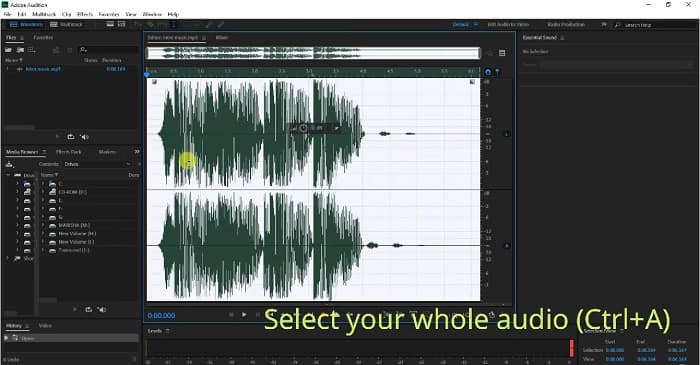
Langkah 2. Kemudian, klik butang Effects, dan pergi ke Stereo Imagery>Center Channel Extractor.
Langkah 3. Satu tab baharu akan muncul di mana anda boleh melihat pilihan Presets.
Langkah 4. Seterusnya, pilih pilihan Vocal Remover untuk mengalih keluar tera air suara.
Langkah 5. Sebelum mengklik Apply option, anda boleh mendengar bunyi audio dan pastikan tera air audio telah dibuang.
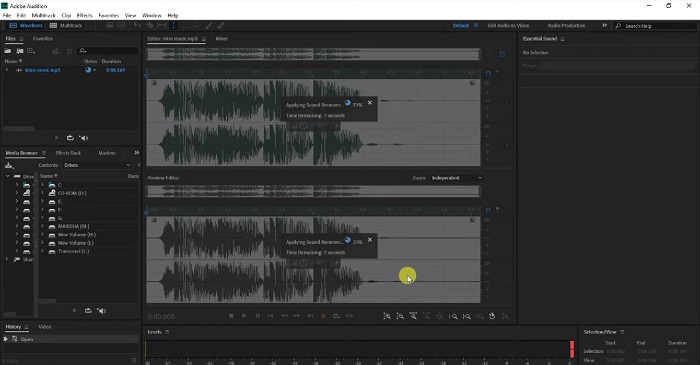
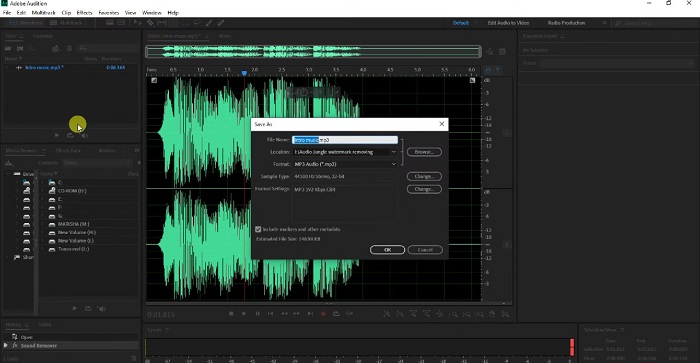
Langkah 6. Akhir sekali, simpan fail anda dengan pergi ke File>Save as, kemudian taip nama File dan pilih lokasi fail anda.
Bahagian 3. 3 Cara untuk Mengeluarkan Tera Air Pond5 Dalam Talian daripada Imej
Dalam bahagian ini, anda akan mengetahui proses penyingkiran tera air Pond5 menggunakan alat dalam talian yang terbaik untuk mengalih keluar tera air Pond5 pada imej anda.
Penghapus Tera Air Percuma FVC
FVC Free Watermark Remover ialah salah satu penanggal tera air atas talian yang terbaik dan paling terkenal yang membolehkan anda mengalih keluar sebarang tera air (logo, imej atau teks) pada imej anda dengan mudah. Selain itu, ia menyokong format imej yang paling biasa, seperti PNG, JPEG, JPG, BMP dan banyak lagi. Ia juga mesra pemula kerana mempunyai antara muka pengguna yang ringkas. Anda juga boleh memilih pelbagai alat pemilihan untuk membuang tera air pada imej anda. Tambahan pula, ia mempunyai alat pemilihan yang boleh anda gunakan untuk menghapuskan tera air, seperti alatan Polygonal, Lasso dan Brush. Jadi, jika anda berminat menggunakan alat ini, ikut panduan ringkas di bawah.
Langkah-langkah bagaimana untuk mengalih keluar tera air Pond5 pada imej anda:
Langkah 1. Pada pelayar anda, cari FVC Free Watermark Remover, atau anda boleh klik pautan ini untuk pergi terus ke laman web mereka.
Langkah 2. Pada antara muka utama perisian, klik butang Upload Image untuk memuat naik imej Pond5 yang anda mahu alih keluar teranya.
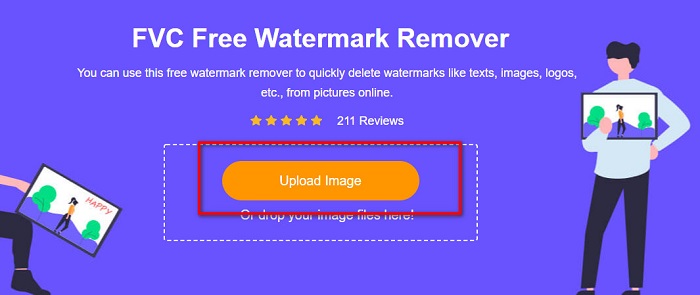
Langkah 3. Selepas memuat naik imej anda, pilih alat pemilihan yang anda ingin gunakan. Kali ini, kami akan menggunakan Polygonal Tool.
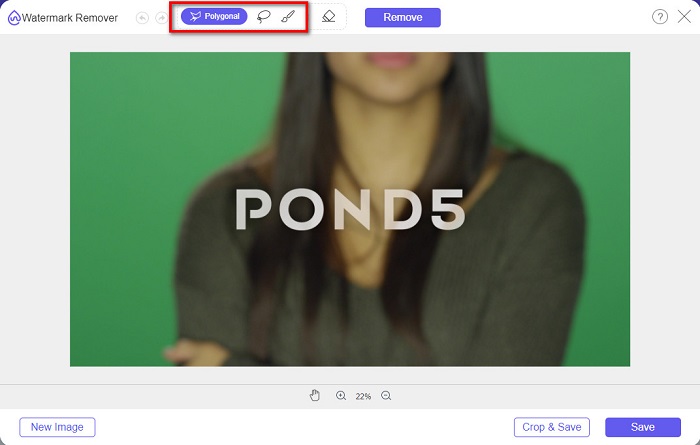
Langkah 4. Kemudian, jejak tera air pada imej anda. Selepas itu, klik butang Remove untuk memadamkan tera air.
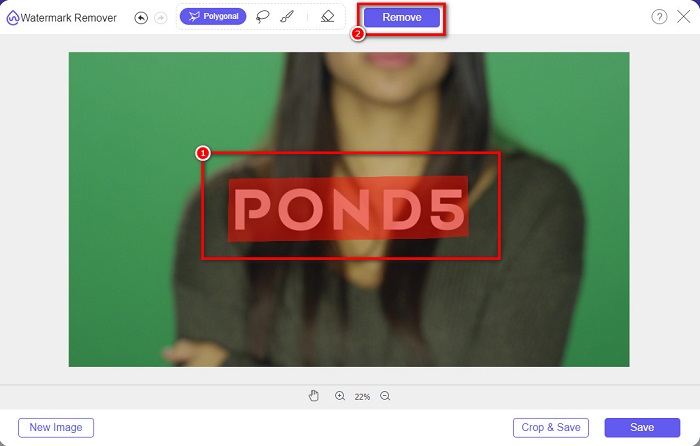
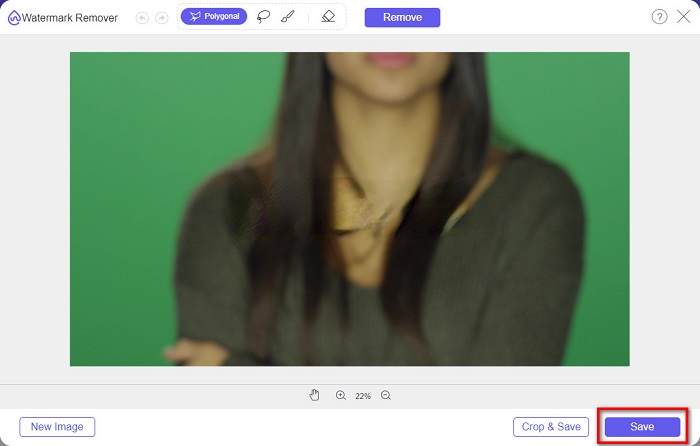
Langkah 5. Akhir sekali, klik butang Save untuk menyimpan imej anda pada peranti anda. Selain itu, anda juga boleh menggunakan alat dalam talian ini untuk mengalih keluar tera air Deviantart dengan mudah.
Watermark Remover.io
Watermark Remover.io ialah penanggal tera air atas talian yang membolehkan anda mengalih keluar sebarang tera air daripada imej anda. Jika anda mempunyai tera air teks seperti Pond5 pada imej anda, maka alat ini akan membantu anda menghapuskan tera air yang menjengkelkan itu. Ia mempunyai antara muka pengguna yang ringkas, dan menyokong format imej yang paling standard, seperti PNG, JEPG, JPG, WEBP dan sebagainya. Namun begitu, ia bergantung pada sambungan internet, jadi anda mungkin menghadapi masalah ketika memuat naik atau menyimpan imej anda.
Langkah 1. Buka pelayar anda, dan cari Watermark Remover.io pada kotak carian anda. Pada antara muka utama perisian, klik butang Upload Image untuk memuat naik imej Pond5 anda.
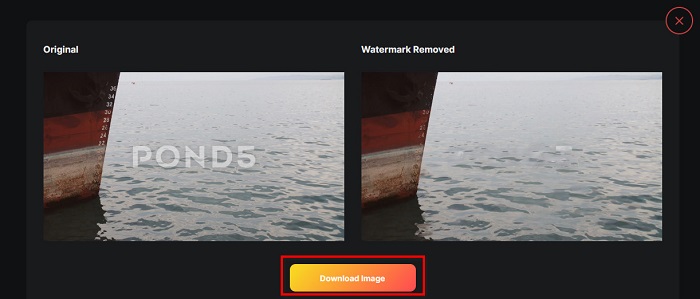
Langkah 2. Kemudian, selepas memuat naik imej anda, Watermark Remover.io akan secara automatik mengalih keluar tera air Pond5 pada imej anda.
Langkah 3. Klik butang Download Image untuk menyimpan imej anda pada peranti anda.
imgkits
imgkits juga merupakan aplikasi atas talian yang membolehkan anda membuang tera air teks daripada imej Pond5 anda. Apa yang menarik tentang penanggal tera air ini ialah anda boleh memilih alat pemilihan yang ingin digunakan untuk menghilangkan tera air pada imej anda. Selain itu, ia merupakan alat yang mesra pengguna kerana mempunyai antara muka perisian yang mudah digunakan. Kekurangan alat ini ialah ia meninggalkan kesan kabur pada kawasan tera air yang anda buang.
Bagaimana untuk membuang tera air Pond5 menggunakan imgkits:
Langkah 1. Cari imgkits pada pelayar anda, kemudian pergi ke laman web mereka. Seterusnya, klik Upload Image pada antara muka utama pengguna untuk memuat naik imej anda.
Langkah 2. Kemudian, pilih selection tool yang anda mahu gunakan di bahagian kiri antara muka, dan jejak tera air Pond5 pada imej anda.
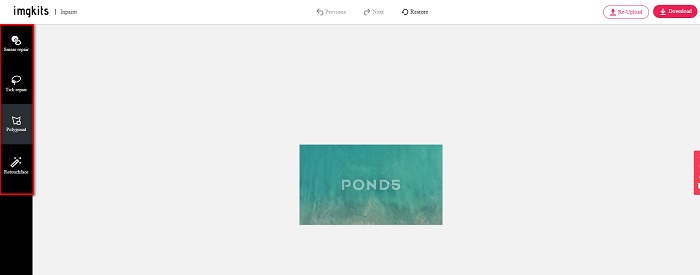
Langkah 3. Akhir sekali, klik butang Download untuk menyimpan imej anda. Klik di sini untuk belajar cara mengalih keluar tera air Lomotif.
Bahagian 4. Soalan Lazim tentang Buang Tera Air Envato Pond5
Adakah mengalih keluar tera air meninggalkan kabur pada kawasan tera air?
Tidak semua alat meninggalkan kesan kabur pada tera air yang anda buang. Jika anda mahu memastikan tiada kesan kabur pada tera air yang anda padam, gunakan FVC Free Watermark Remover.
Bolehkah anda mengalih keluar tera air pada After Effects?
Ya. Adobe After Effects ialah aplikasi penyuntingan yang paling popular yang membolehkan anda mengalih keluar sebarang tera air daripada imej atau video anda. Jejak tera air yang anda mahu buang. Letakkan tanda penjejakan pada tera air tersebut. Pergi ke panel Layer dan cipta Null objects. Kemudian, klik Save Frame as. Import imej yang telah disunting dan laraskan Opacity. Gunakan Pick-up whip untuk menyelesaikan prosesnya.
Adakah mengalih keluar tera air menjejaskan saiz fail video anda?
Menghapuskan tera air pada video anda tidak semestinya menjejaskan saiz fail video anda. Namun, sesetengah penanggal tera air menjejaskan kualiti video anda. Jadi, gunakan FVC Video Converter Ultimate untuk mengalih keluar tera air pada video anda tanpa menjejaskan kualitinya.
Kesimpulannya
Dengan menggunakan alat yang betul, tidak sukar untuk mengalih keluar tera air Pond5 daripada imej anda. Semua alat dalam talian yang dipersembahkan di atas akan membantu anda menghapuskan tera air Pond5 pada imej anda dengan cepat. Namun, jika anda lebih suka menggunakan alat atas talian yang mudah dan selamat digunakan, cubalah FVC Free Watermark Remover.
-
 Cara Mengalih Keluar Pelancong daripada Foto Menggunakan Penanggal Tera Air
 Bagaimana untuk mengalih keluar pelancong daripada foto? Jika anda ingin mengetahui cara mengalih keluar perkara yang tidak diingini daripada foto anda, alatan ini akan membantu anda. Baca artikel ini untuk mengetahui lebih lanjut.
-
 Pembuang Tera Air 123rf – Semakan Teliti Alat Terbaik
 Jika anda ingin mengetahui apakah penanggal tera air 123rf yang paling cemerlang, baca artikel ini dengan teliti. Artikel ini menyediakan ulasan mendalam tentang alatan.
-
 Cara Mudah Buang Tera Air Dari Gambar Graduasi
 Ingin tahu cara terbaik untuk membuang tera air daripada gambar tamat pengajian? Dengan membaca artikel ini, anda akan dapat mengetahui cara membuang tera air pada gambar grad dengan mudah.
