


 Video Converter Ultimate
 Perakam Skrin
 Pembaikan Video
 Muat Turun Selamat
Cara Mengalih Keluar Tera Air Slider WOW secara Percuma
WOW Slider ialah salah satu pembuat paparan slaid yang paling popular yang boleh anda gunakan untuk mencipta paparan slaid imej yang menakjubkan. Aplikasi ini percuma untuk dimuat turun dan tidak menggunakan banyak ruang storan pada peranti anda. Selain itu, ia mempunyai antara muka pengguna yang intuitif, menjadikannya mudah untuk anda membuat paparan slaid. Tidak seperti platform imej lain, WOW Slider tidak menggunakan Flash dan tidak memerlukan sebarang pemalam. Namun begitu, WOW Slider meletakkan tanda air pada paparan slaid yang anda cipta. Jadi, ramai pengguna sedang mencari kaedah untuk mengalih keluar tanda air WOW Slider secara percuma. Teruskan membaca untuk mengetahui cara mengalih keluar tanda air WOW Slider secara percuma.

Bahagian 1. Cara Menghilangkan Tera Air Slider WOW Tanpa Membeli
Anda boleh mengalih keluar tera air menggunakan aplikasi jika anda membeli Slider WOW. Tetapi jika tidak, anda boleh menggunakan alat untuk mengalih keluar tera air Slider WOW pada tayangan slaid anda. Oleh itu, baca bahagian ini secara menyeluruh untuk mengetahui cara mengalih keluar Slider WOW tanpa membeli.
Penghapus Tera Air Percuma FVC
FVC Free Watermark Remover ialah antara pengalih keluar tanda air dalam talian yang paling popular yang boleh diakses pada semua pelayar web, seperti Google, Firefox dan Safari. Alat dalam talian ini selamat, percuma dan tidak memerlukan langganan. Selain itu, ia merupakan aplikasi mesra pemula kerana mempunyai antara muka pengguna yang intuitif. Ia juga menyokong banyak format imej, termasuk PNG, JPG, JPEG, BMP dan lain-lain. Yang mengagumkan tentang alat ini ialah anda boleh memilih daripada pelbagai alat pemilihan untuk mengalih keluar tanda air pada imej anda. Jadi, jika anda ingin menggunakan pengalih keluar tanda air percuma ini, ikut langkah di bawah.
Bagaimana untuk membuang tera air WOW Slider menggunakan FVC Free Watermark Remover:
Langkah 1. Mula‑mula, buka pelayar anda dan cari FVC Free Watermark Remover. Untuk akses pantas, klik pautan yang disediakan.
Langkah 2. Seterusnya, klik butang Upload Image untuk memuat naik imej WOW Slider yang anda mahu alih keluar tanda airnya.
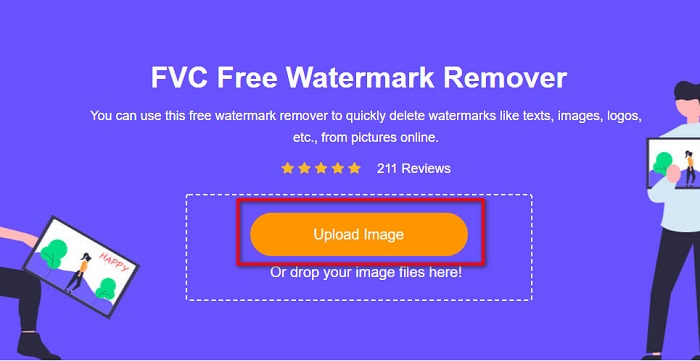
Langkah 3. Selepas memuat naik imej anda, pilih alat pemilihan yang anda ingin gunakan untuk mengalih keluar tanda air. Anda boleh memilih antara Lasso, Polygonal atau Brush.
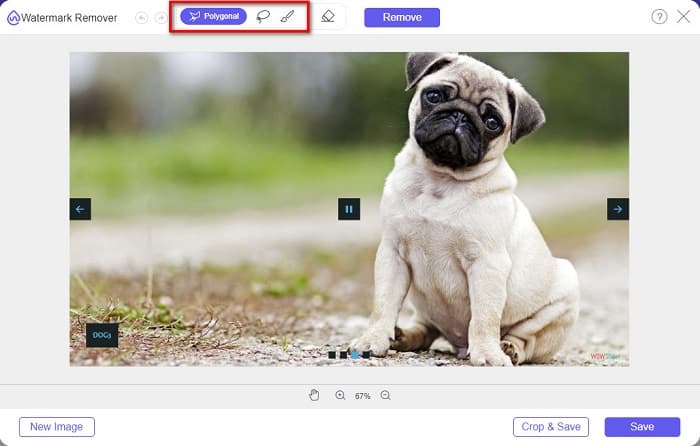
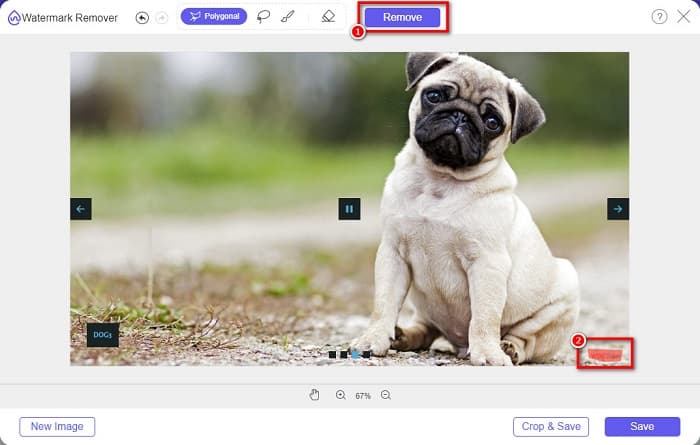
Langkah 4. Kemudian, jejak kawasan tempat tanda air WOW Slider berada. Seterusnya, klik Remove untuk memadam tanda air pada imej anda.
Langkah 5. Akhir sekali, klik butang Save untuk menyimpan imej anda pada komputer.
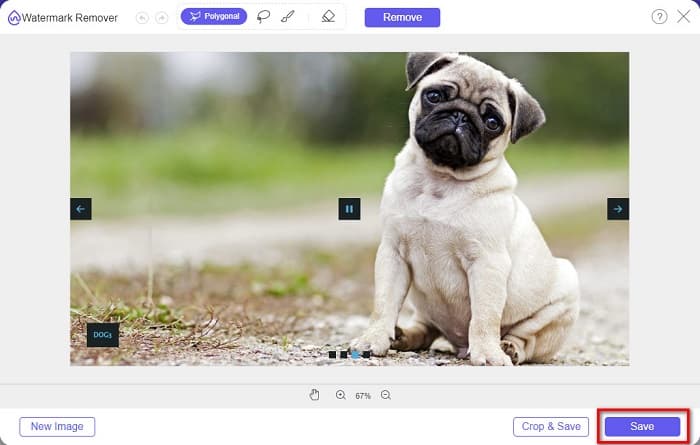
Dan itu sahaja! Anda kini boleh melihat imej WOW Slider anda tanpa tera air WOW Slider.
Pakar Tera Air Bitwar
Bitwar Watermark Expert ialah pengalih keluar tanda air yang boleh mengalih keluar tanda air WOW Slider pada paparan slaid anda. Pengalih keluar tanda air luar talian ini mempunyai antara muka pengguna yang ringkas, menjadikannya alat mesra pemula. Selain itu, ia membolehkan anda membuang atau menambah tanda air pada imej atau video anda. Dan dalam versi VIP‑nya, anda boleh memproses berkelompok video yang anda mahu alih keluarkan tanda air. Anda boleh memuat turun perisian ini pada komputer Windows anda. Namun, anda perlu membeli aplikasi ini sebelum mengakses ciri‑ciri lain. Walau bagaimanapun, Bitwar Watermark Expert ialah alat yang sangat baik untuk mengalih keluar tanda air pada paparan slaid WOW Slider anda.
Padamkan tera air Slider WOW pada tayangan slaid anda menggunakan Pakar Tera Air Bitwar:
Langkah 1. Muat turun Bitwar Watermark Expert pada peranti anda, kemudian buka selepas muat turun selesai.
Langkah 2. Pada antara muka utama perisian, anda akan melihat empat pilihan. Klik Photo Watermark Remover.
Langkah 3. Kemudian, klik butang tanda + di tengah skrin anda untuk memuat naik imej WOW Slider.
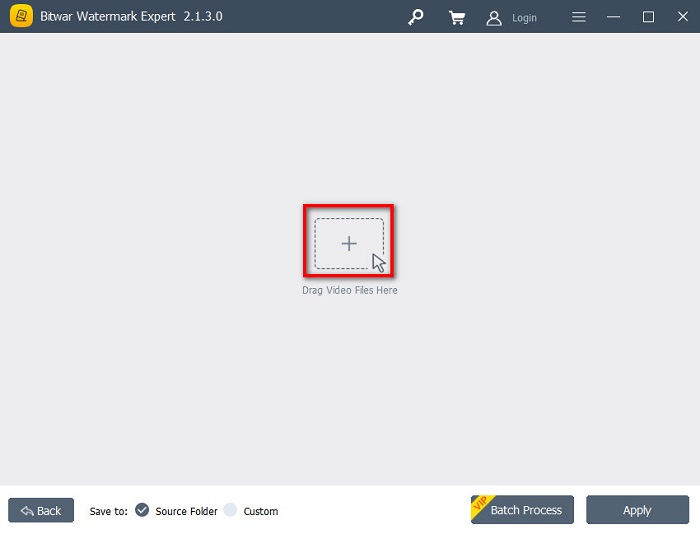
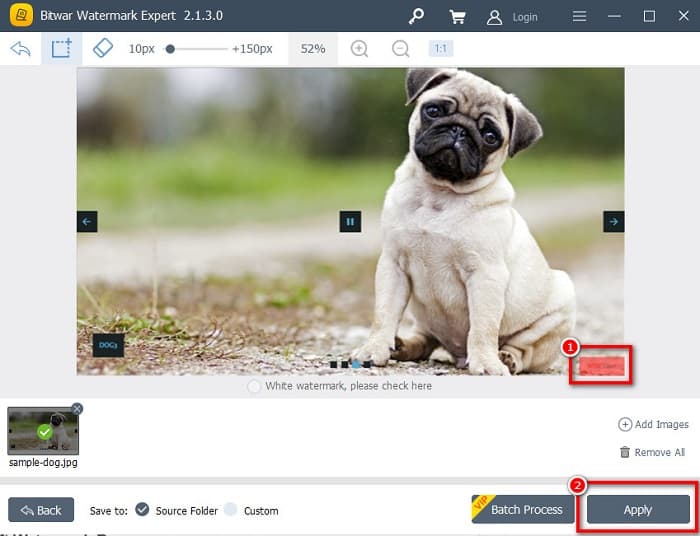
Langkah 4. Seterusnya, pilih alat pemilihan yang anda mahu gunakan untuk mengalih keluar tanda air pada imej anda. Kemudian, pilih kawasan tanda air pada imej anda.
Langkah 5. Akhir sekali, klik butang Apply untuk mengalih keluar tanda air daripada paparan slaid WOW Slider anda. Dengan langkah‑langkah ini, anda boleh mengalih keluar tanda air daripada Placeit.
Apowersoft Watermark Remover
Satu lagi pengalih keluar tanda air luar talian yang boleh anda gunakan ialah Apowersoft Watermark Remover. Pengalih keluar tanda air ini membolehkan penyingkiran tanda air (logo, teks, imej) pada video anda dengan mudah. Anda juga boleh memuat turunnya pada hampir semua platform media, termasuk Windows dan Mac. Selain itu, ia mempunyai ciri di mana anda boleh mengalih keluar dan menambah tanda air pada imej anda. Ia juga mempunyai tiga alat pemilihan tanda air untuk mengalih keluar tanda air WOW Slider pada paparan slaid anda. Tambahan pula, ia merupakan alat yang mesra pengguna dengan antara muka perisian yang mudah digunakan. Kekurangan alat ini ialah ia hanya mempunyai sedikit fungsi penyuntingan.
Bagaimana untuk mengalih keluar logo tera air WOW Slider menggunakan Apowersoft Watermark Remover:
Langkah 1. Pada peranti anda, muat turun Apowersoft Watermark Remover. Ikuti proses pemasangan, kemudian buka aplikasi.
Langkah 2. Kemudian, klik pilihan Remove watermark from the image. Selepas itu, seret dan lepas foto yang anda mahu alih keluarkan tanda airnya.
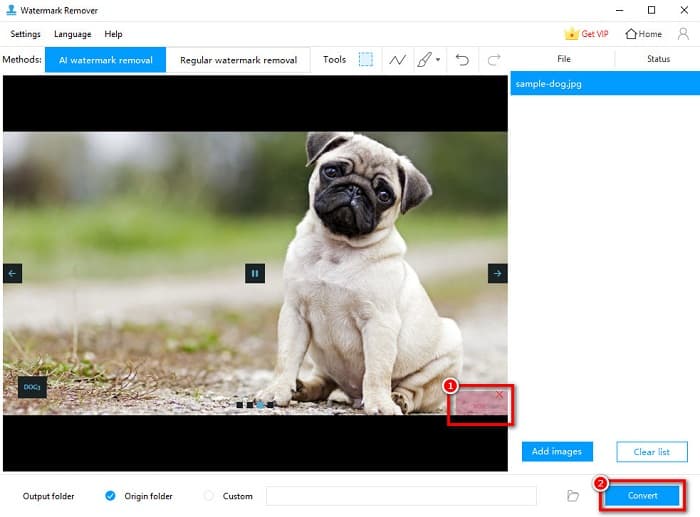
Langkah 3. Anda akan melihat alat penghapus tanda air pada panel Tools. Kemudian klik alat pemilihan yang anda ingin gunakan. Selepas itu, jejaki atau pilih tanda air pada imej anda.
Langkah 4. Jika anda sudah selesai, klik butang Convert untuk menyimpan hasil anda.
Bahagian 2. Cara Membuang Tera Air daripada WOW Slider dengan Membeli
Anda mungkin mahu membaca bahagian ini jika anda sedang mencari cara untuk mengalih keluar tera air daripada WOW Slider.
Menggunakan WOW Slider, anda boleh mencipta tayangan slaid yang menakjubkan dengan kualiti yang menakjubkan. Dengan antara muka perisian yang mudah digunakan, anda boleh menghasilkan tayangan slaid berkualiti tinggi yang boleh anda kongsi dengan rakan anda. Tambahan pula, jika anda ingin mencipta kenang-kenangan untuk rakan baik anda, mencipta tayangan slaid menggunakan WOW Slider adalah idea yang baik.
Bahagian yang kurang menyenangkan tentang membuat paparan slaid menggunakan WOW Slider ialah ia meletakkan tanda air pada hasil anda. Tetapi jika anda membeli aplikasi WOW Slider, anda tidak lagi perlu mengalih keluar sebarang tanda air kerana hasil anda tidak akan mempunyai tanda air WOW Slider. Jadi, kami akan mengajar anda cara untuk mengalih keluar tanda air dengan membelinya.
Langkah 1. Muat turun WOW Slider pada peranti anda, dan sejurus selepas memuat turunnya, pastikan anda membuat bayaran dan masukkan kod lesen anda untuk mendaftar.
Langkah 2. Selepas pendaftaran, matikan tanda air pada Menu panel > Slider > Properties.
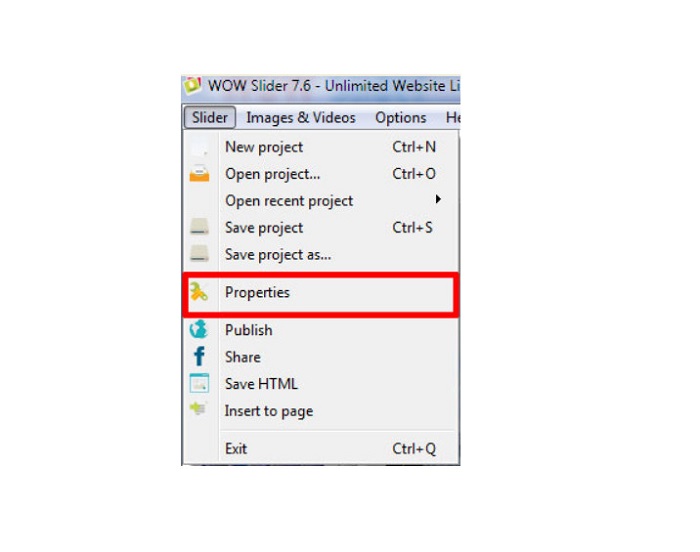
Langkah 3. Satu tetingkap Properties akan muncul, kemudian klik Design pilihan.
Langkah 4. Pada tab Design, anda akan melihat kotak pilihan yang tertulis Watermark. Nyahpilih kotak tersebut untuk menyahaktifkan tanda air pada paparan slaid anda.
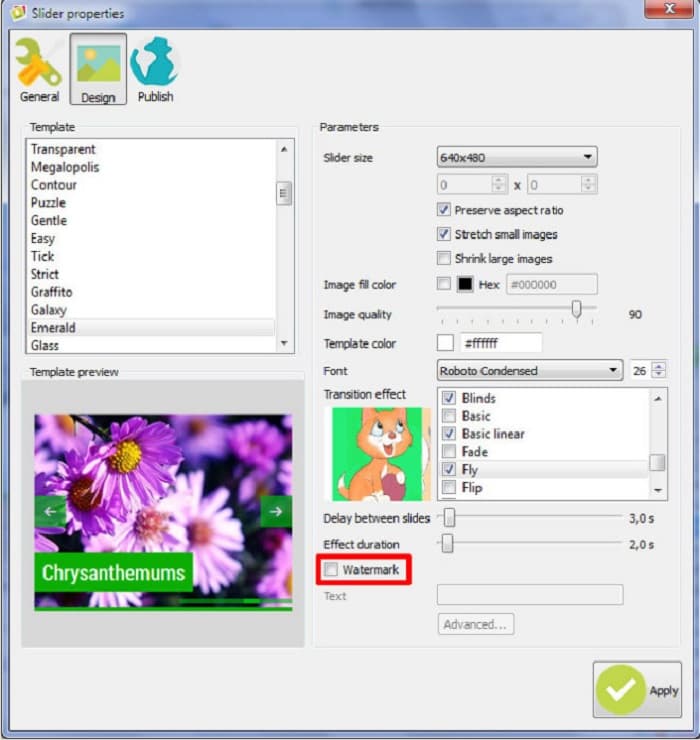
Langkah 5. Anda boleh menerbitkan paparan slaid anda di laman web anda tanpa tanda air WOW Slider.
Bahagian 3. Soalan Lazim tentang Mengalih Keluar Tera Air Slider WOW
Mengapa WOW Slider meletakkan tera air pada tayangan slaid yang dihasilkan?
WOW Slider membenamkan tera air pada output tayangan slaid mereka supaya pengguna akan digalakkan menggunakan versi tanpa tera air. Apl tidak akan meninggalkan tera air pada output anda jika anda membeli apl itu.
Bolehkah anda mengalih keluar berbilang tera air daripada video anda?
ya. Pembuang tera air membolehkan anda mengalih keluar dua atau lebih tera air pada video anda. Jika anda ingin mengalih keluar berbilang tera air pada video anda, gunakan FVC Video Converter Ultimate.
Apakah penanggal tera air dalam talian yang terbaik untuk digunakan?
Terdapat banyak pengalih keluar tanda air dalam talian yang boleh anda cari di internet. Namun ramai orang mengesyorkan FVC Free Watermark Remover kerana ia selamat dan percuma.
Kesimpulannya
Kini masalah anda tentang cara mengalih keluar tanda air WOW Slider telah selesai! Dengan menggunakan pengalih keluar tanda air yang disebutkan di atas, anda boleh mengalih keluar tanda air WOW Slider pada paparan slaid anda dengan mudah. Tetapi jika anda mahukan aplikasi dalam talian yang percuma dan selamat digunakan, gunakan FVC Free Watermark Remover.
-
 Cara Percuma untuk Mengalih Keluar Tera Air VideoShop pada Video [Dengan Mudah]
 Untuk mengalih keluar tera air VideoShop, peranti anda memerlukan penanggal tera air. Untuk mengetahui apakah ini, baca artikel ini.
-
 3 Pendekatan untuk Mengalih Keluar Tera Air Video Viva pada Video [Cara Pantas]
 Anda memerlukan pengalih keluar tera air khusus untuk mengalih keluar tera air Viva Video pada video. Baca artikel ini untuk mengetahui lebih lanjut mengenainya!
-
 Alat Terbaik untuk Mengalih Keluar Tera Air daripada Video yang Dieksport Renderforest
 Untuk mengalih keluar tera air daripada Renderforest, anda memerlukan pengalih keluar tera air pada peranti anda, semua alatan yang boleh anda gunakan ada di sini.
