


 Video Converter Ultimate
 Perakam Skrin
 Pembaikan Video
 Muat Turun Selamat
Buang Tera Air Kalis Pucuk secara Profesional dengan Alat Hebat ini
Shootproof ialah galeri foto klien dan laman web portfolio. Jika anda mencari imej-imej yang menakjubkan dalam talian, Shootproof mungkin dapat membantu anda. Laman web ini menawarkan pelbagai imej cantik yang dihasilkan oleh para penjual. Shootproof ialah perniagaan perkongsian galeri yang terkenal dalam kalangan jurugambar. Selain itu, ia membenarkan jurugambar mencipta kedai dalam talian untuk foto mereka. Namun, ramai penjual menambah tera air pada imej mereka supaya orang lain tidak mudah memiliki imej tersebut. Jadi, jika anda salah seorang pengguna yang mencari cara untuk membuang tera air Shootproof, teruskan membaca hantaran ini.

Bahagian 1. 2 Kaedah Cara Menghilangkan Tera Air Kalis Pucuk Dengan Mudah
Mengalih keluar tera air kalis pucuk tidak sukar jika anda mempunyai penanggal tera air yang sesuai. Dan untuk membantu anda memilih pengalih keluar tera air yang terbaik, kami mencari pengalih keluar tera air percuma yang paling banyak digunakan dalam talian. Untuk mengetahui alat ini, baca bahagian ini secara menyeluruh.
Penghapus Tera Air Percuma FVC
FVC Free Watermark Remover merupakan salah satu penanggal tera air dalam talian yang terkenal. Aplikasi dalam talian ini percuma dan selamat digunakan. Selain itu, ia boleh diakses pada semua pelayar web, seperti Google, Firefox, dan Safari. Ia menyokong format imej standard, termasuk PNG, JPEG, JPG, BMP, dan banyak lagi. Dalam fungsi penanggal tera airnya, anda boleh memilih daripada pelbagai alat pemilihan untuk membuang tera air pada imej anda.
Lebih-lebih lagi, ramai pemula boleh menggunakan penanggal tanda air ini kerana ia mudah digunakan. Selain itu, apabila anda mengeksport imej anda, ia akan mempunyai format fail asal. Alat ini juga tidak memerlukan anda untuk log masuk atau mendaftar.
Bagaimana untuk membuang tera air kalis tembak menggunakan FVC Free Watermark Remover:
Langkah 1. Mula-mula, buka pelayar anda dan cari FVC Free Watermark Remover pada kotak carian.
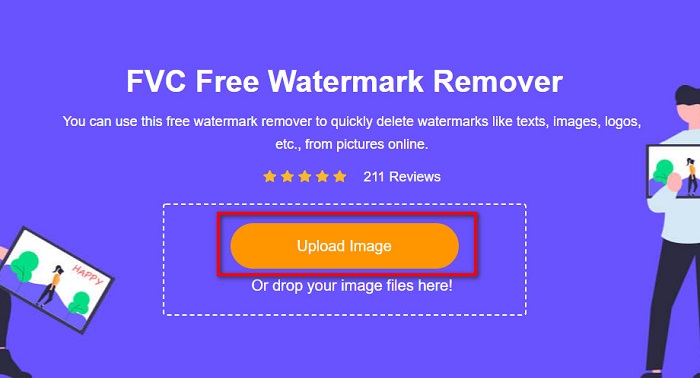
Langkah 2. Kemudian, klik butang Upload Image pada antara muka utama untuk memuat naik imej yang anda mahu buang tera airnya.
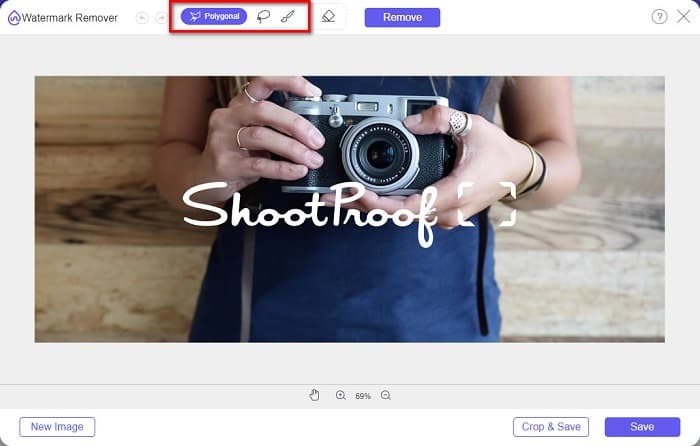
Langkah 3. Seterusnya, pilih alat pemilihan yang anda mahu gunakan untuk membuang tera air pada imej anda. Anda boleh memilih antara Polygonal, Lasso, dan Brush.
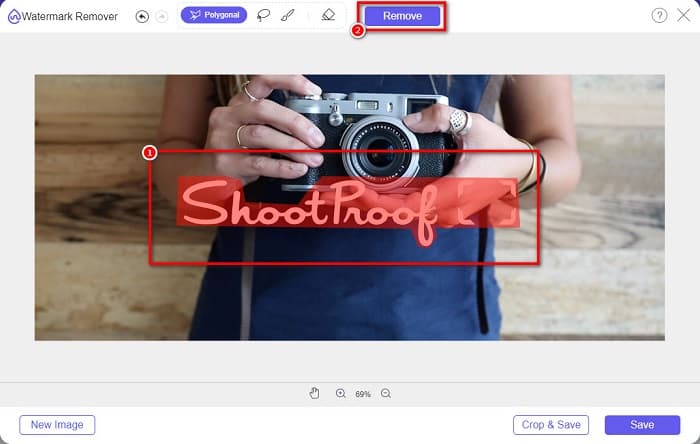
Langkah 4. Kemudian, jejak kawasan tera air pada imej anda. Seterusnya, klik butang Remove apabila ia telah dipilih. Anda akan lihat tera air tersebut kini hilang.
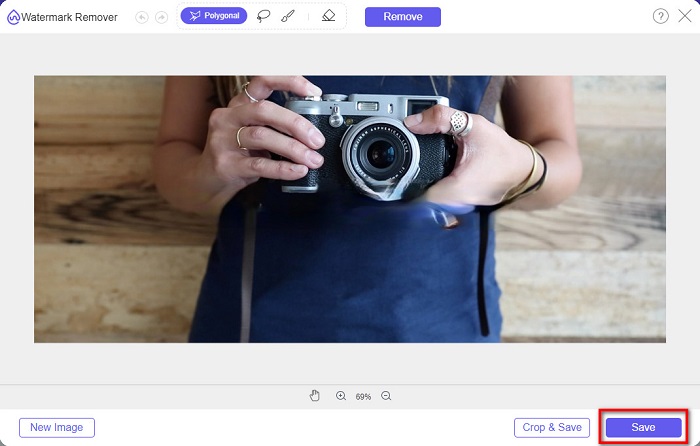
Langkah 5. Akhir sekali, klik butang Save untuk menyimpan hasil pada peranti anda. Itu sahaja! Dengan langkah-langkah mudah ini, anda boleh mendapatkan imej Shootproof tanpa tera air.
Apowersoft Online Watermark Remover
Apowersoft Online Watermark Remover ialah aplikasi dalam talian terkenal untuk membuang sebarang tera air pada imej anda. Ia ialah aplikasi dalam talian yang mesra pengguna kerana mempunyai antara muka yang intuitif. Selain itu, ia menyokong kebanyakan format imej standard, seperti PNG dan JPG. Anda juga tidak perlu bimbang tentang keselamatan fail anda kerana alat dalam talian ini selamat digunakan. Ia juga mempunyai fungsi untuk membuang tera air pada video. Namun, jika sambungan internet anda perlahan, proses memuat naik dan mengeksport mungkin menjadi perlahan.
Bagaimana untuk membuang tera air kalis tembak menggunakan Apowersoft Online Watermark Remover:
Langkah 1. Cari Apowersoft Online Watermark Remover pada pelayar anda, kemudian pergi ke halaman utama mereka. Pada antara muka utama, klik pilihan Remove Watermark From Image.
Langkah 2. Kemudian, pada antara muka seterusnya, anda akan melihat kotak penanggal tera air dan letakkan ia pada kawasan tera air.
Langkah 3. Untuk membuang tera air pada imej anda, klik butang Erase.
Bahagian 2. Petua tentang Menggunakan Ciri Tera Air Kalis Pucuk
Menggunakan ciri tera air Kalis Pucuk, anda boleh menambah dan mengalih keluar tera air pada imej anda. Jika anda ingin mengelak pengguna lain daripada memiliki foto anda, anda boleh menambah teks pada imej anda yang berfungsi sebagai tera air.
Cara menambah tera air pada Shootproof:
Langkah 1. Pergi ke Photos, kemudian klik pilihan Watermarks.
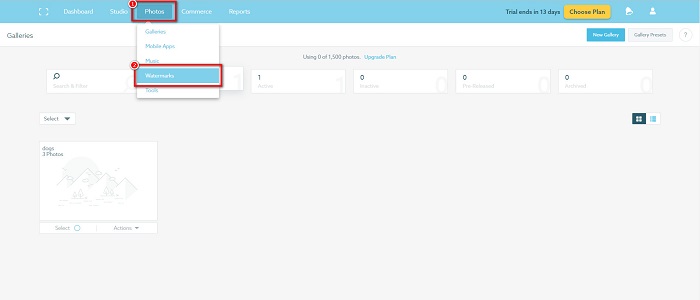
Langkah 2. Seterusnya, pilih antara tera air text or image.
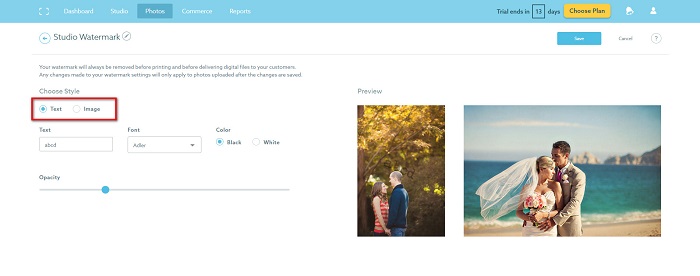
Jika anda ingin menggunakan tera air imej, anda disyorkan supaya memuat naik fail PNG resolusi tinggi dengan latar belakang lutsinar. Anda juga boleh menggunakan fail JPG.
Langkah 3. Kemudian, laraskan Watermark Settings. Dalam Watermark Settings, anda boleh memilih kedudukan tera air pada foto anda. Anda juga boleh melaraskan saiz dan kelegapan (opacity) tera air anda.
Langkah 4. Akhirnya, klik butang Save untuk menukar tetapan yang telah anda buat.
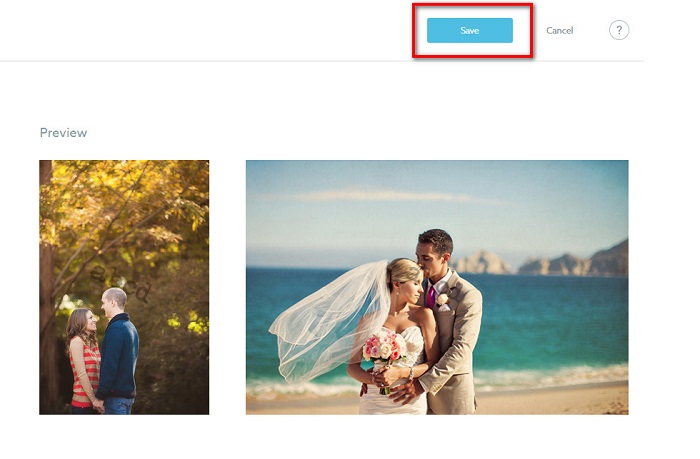
Gunakan tera air pada imej yang anda muat naik.
Pada halaman Tera Air, anda boleh memilih Tera Air Lalai. Anda juga boleh menghidupkan tera air untuk semua muat naik anda pada masa hadapan. Anda boleh menukar ini sebelum memuat naik imej baharu.
Dan apabila anda memuat naik foto baharu ke galeri anda melalui pemuat naik berasaskan web atau Pemuat naik Desktop, anda boleh memilih tera air yang anda mahu gunakan pada skrin muat naik.
Cara Mengeluarkan tera air dalam Shootproof
Sentiasa ingat bahawa mengedit atau menambah tera air sedia ada hanya akan menjejaskan muat naik anda pada masa hadapan. Perubahan yang anda buat tidak akan menjejaskan imej yang sudah ada dalam galeri anda. Tetapi jika anda ingin menukar tera air atau mengalih keluar tera air Kalis Pucuk, anda boleh memuat semula tera air untuk mengemas kininya dalam galeri anda. Berikut ialah cara anda boleh mengalih keluar atau menukar tera air Kalis Pucuk.
Langkah 1. Pergi ke Photos > Galleries, kemudian klik galeri anda.
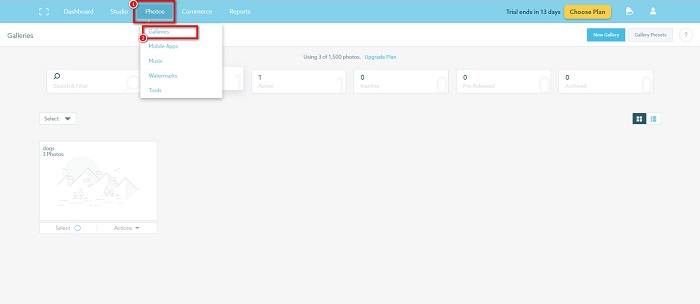
Langkah 2. Dalam galeri, klik butang More Actions di penjuru kanan atas antara muka.
Langkah 3. Kemudian, pilih Refresh Watermark untuk membuang tera air pada setiap imej yang anda muat naik.
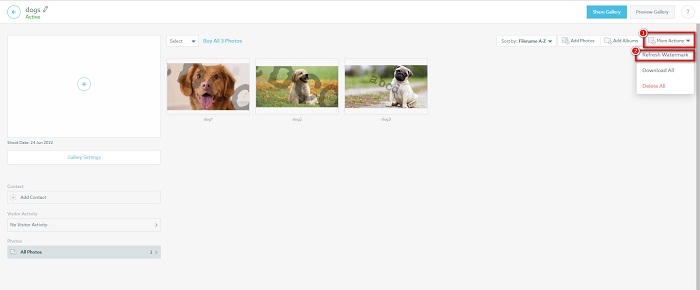
Langkah 4. Untuk membuang tera air, matikan palang gelangsar. Dan jika anda hanya mahu menukar tera air, pilih New Watermark.
Langkah 5. Akhirnya, klik Apply Change untuk menyimpan perubahan yang telah anda buat.
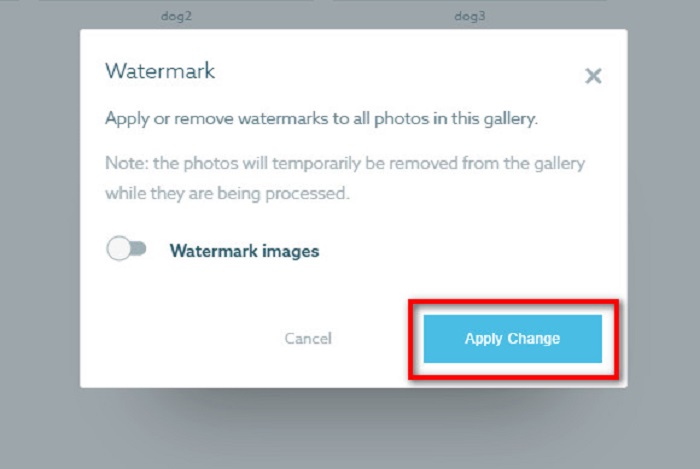
Anda akan melihat bahawa foto akan dipaparkan secara automatik sebagai pemprosesan. Apabila perubahan digunakan, anda akan melihat bahawa imej akan kembali ke galeri anda.
Berkaitan dengan:
Penanggal Tera Air Arnold Maya yang Hebat yang Anda Tidak Patut Lepaskan
Penanggal Tera Air 123rf – Ulasan Menyeluruh tentang Alat Terunggul
Bahagian 3. Soalan Lazim tentang Shootproof Remove Watermark
Bolehkah anda mengalih keluar tera air digital?
Sukar untuk mengalih keluar tera air digital yang tidak kelihatan. Sebagai contoh, yang dibenamkan oleh pemalam Digimarc Photoshop sukar untuk dialih keluar. Memangkas, mengubah saiz, menambah hingar dan pengaburan sederhana mungkin tidak berfungsi dengan tera air digital.
Bolehkah anda mengalih keluar tera air logo daripada video?
ya. Anda boleh mengalih keluar tera air logo pada video anda. Banyak pengalih keluar tera air membolehkan anda mengalih keluar logo pada video anda. Jika anda ingin mengalih keluar logo pada video anda, gunakan Video Converter Ultimate.
Adakah Kalis Pucuk ditunjukkan jika anda mengambil tangkapan skrin?
Kalis pucuk mengambil beberapa langkah untuk melindungi foto penjual. Walau bagaimanapun, Shootproof tidak boleh menghalang orang daripada mengambil tangkapan skrin imej anda dalam galeri anda.
Kesimpulannya
Dan itu sahaja! Dengan mengikuti kaedah yang dinyatakan di atas, anda kini boleh membuang tera air Shootproof daripada imej anda. Walaupun adalah percuma untuk membuang tera air pada Shootproof, prosesnya mungkin agak sukar. Jadi, jika anda mahu membuang tera air Shootproof pada imej anda dengan mudah, gunakan FVC Free Watermark Remover.
-
 Penghilang Tera Air Photobucket Cemerlang Dalam Talian dan Luar Talian
 Ketahui cara mengalih keluar tera air Photobucket daripada foto anda menggunakan pengalih keluar tera air Photobucket yang menakjubkan ini. Baca artikel ini untuk mengetahui caranya.
-
 Alih Keluar Tera Air daripada PDF Dengan Langkah Mudah
 Buang Tera Air daripada PDF dengan mengikuti langkah mudah ini. Ketahui cara mengalih keluar tera air daripada fail PDF anda dengan mudah menggunakan alat yang menakjubkan ini.
-
 Cara Mudah Buang Tera Air Dari Gambar Graduasi
 Ingin tahu cara terbaik untuk membuang tera air daripada gambar tamat pengajian? Dengan membaca artikel ini, anda akan dapat mengetahui cara membuang tera air pada gambar grad dengan mudah.
