


 Video Converter Ultimate
 Perakam Skrin
 Pembaikan Video
Penukar Terhebat untuk Menukar AIFF kepada MP3 dengan Panduan Langkah demi langkah
Fail AIFF menyimpan bentuk tertinggi fail audio yang pernah anda dengar. Walaupun format ini boleh disimpan dalam program desktop kerana ia tidak dimampatkan, ia tidak sesuai untuk disimpan atau dimuat turun ke telefon anda. Jadi, ada cara untuk anda menyimpan fail AIFF pada telefon malah pada desktop anda dengan penggunaan storan yang lebih sedikit. Cara terbaik untuk membantu masalah ini ialah dengan menukar AIFF kepada MP3. Walaupun begitu, proses penukaran boleh memberi kesan sampingan kepada fail audio anda. Oleh itu, kami mengumpulkan pelbagai alat yang boleh anda pilih untuk menukar AIFF tanpa kehilangan kualiti fail. Mari kita teruskan meneliti alat di bawah dan mulakan dengan pengenalan serta langkah‑langkahnya.

Bahagian 1. Bagaimana untuk Menukar AIFF ke MP3 pada Windows & Mac
1. Video Converter Ultimate
Menukar format boleh menjadi sangat berkesan melalui Video Converter Ultimate. Jika anda tidak mendapat fungsi istimewa pada penukar anda sekarang, cubalah alat ini. Kerana penukar “ultimate” ini menyediakan banyak ciri lanjutan yang tidak dimiliki penukar lain untuk AIFF ke MP3 pada Windows atau Mac. Selain itu, alat ini bukan terhad kepada program Windows sahaja, anda juga boleh memuat turunnya pada Mac anda. Jadi, jika anda mahu merasai penukaran yang benar‑benar menyeluruh, anda mesti ikut langkah‑langkah ini untuk mendapatkan penukaran AIFF yang berjaya.
Langkah 1. Untuk menggunakan penukar ini, anda perlu memuat turunnya terlebih dahulu ke pemacu PC atau Mac anda. Kemudian pasang, ubah suai tetapan, dan klik ‘finish’ untuk melancarkan alat tersebut selepas selesai.
Muat Turun PercumaUntuk Windows 7 atau lebih baharuMuat Turun Selamat
Muat Turun PercumaUntuk MacOS 10.7 atau lebih baharuMuat Turun Selamat
Langkah 2. Selepas pemasangan penukar, klik Add Files untuk menambah fail AIFF yang ingin anda tukar. Jika terlalu banyak fail untuk dipilih daripada folder, anda boleh seret dan lepas ke antara muka.
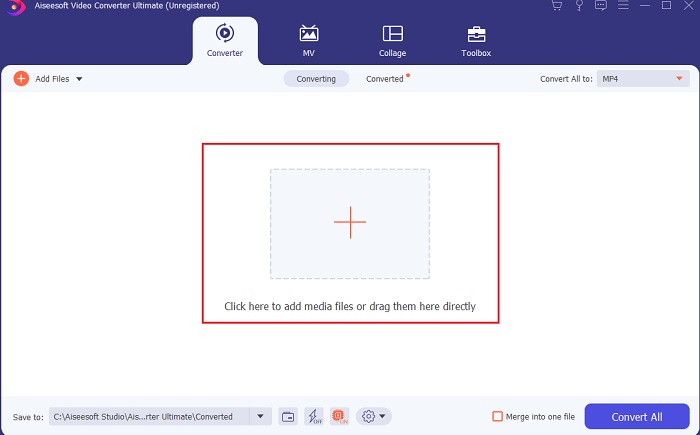
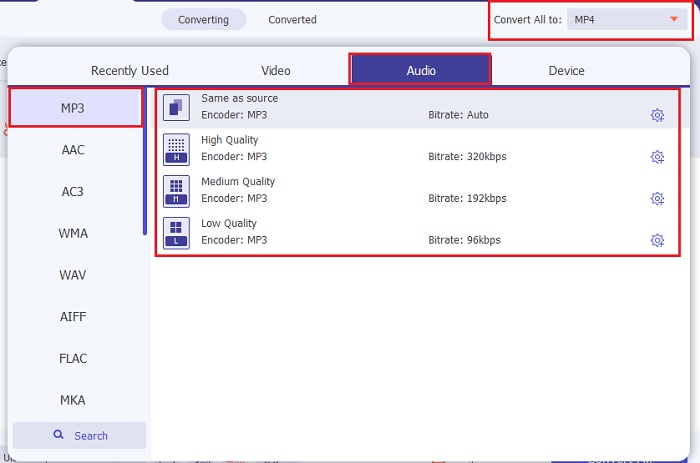
Langkah 3. Teruskan ke langkah seterusnya dengan mengklik pilihan Convert All to. Kemudian pilih format audio yang anda mahu. Contohnya, anda boleh memilih MP3 sebagai output akhir.
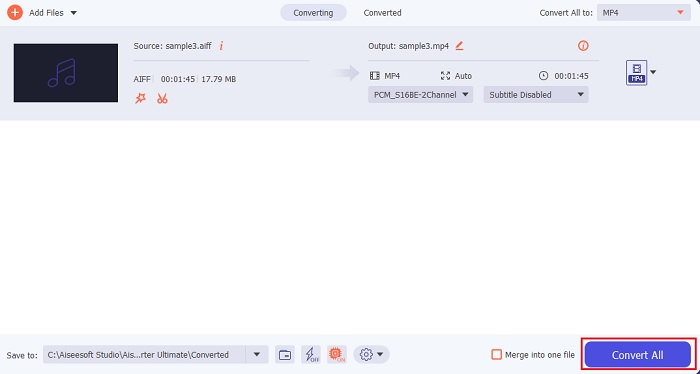
Langkah 4. Klik butang Convert All untuk memulakan penukaran fail AIFF.
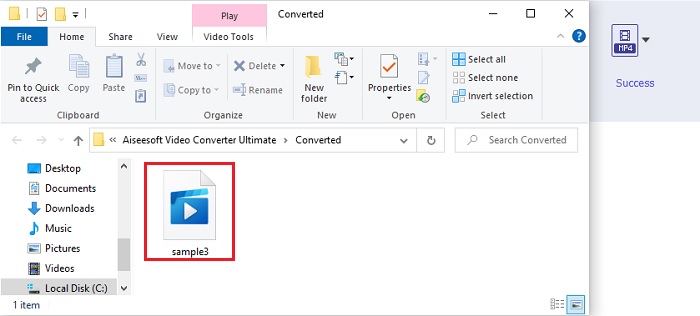
Langkah 5. Tunggu beberapa saat untuk proses penukaran, kemudian satu folder fail akan dipaparkan pada skrin anda. Klik fail MP3 yang baru ditukar dan dengar bunyi terbaik yang pernah anda dengari.
2. iTunes
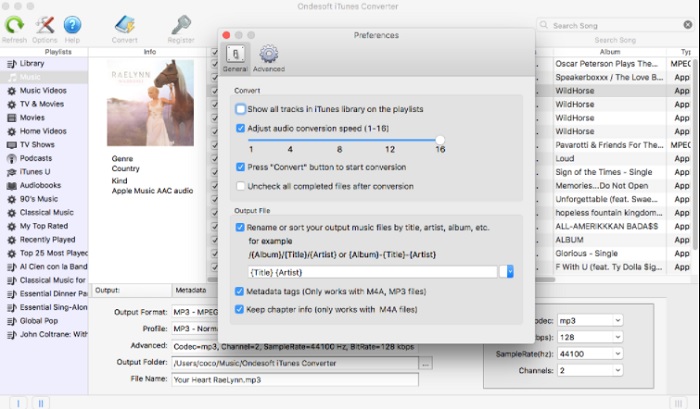
Pemain media asli ini juga boleh menukar fail AIFF kepada MP3 pada Mac, iaitu iTunes. Pemain media ini dibangunkan oleh Apple sebagai perpustakaan muzik dan pemain lalai untuk semua program iOS dan Mac. Salah satu cirinya yang boleh anda gunakan ialah penukar format. Walaupun ia mempunyai fungsi penukaran, ia menyokong kurang format berbanding alat atas talian. Namun, ia tetap berkesan dan selamat digunakan untuk menukar fail ke format baharu supaya boleh dimainkan. Pemain media asli ini juga tidak boleh diakses pada produk bukan Apple seperti Android atau Windows. Jadi, ikuti langkah‑langkah di bawah untuk mengetahui lebih lanjut tentang fungsi penukaran iTunes.
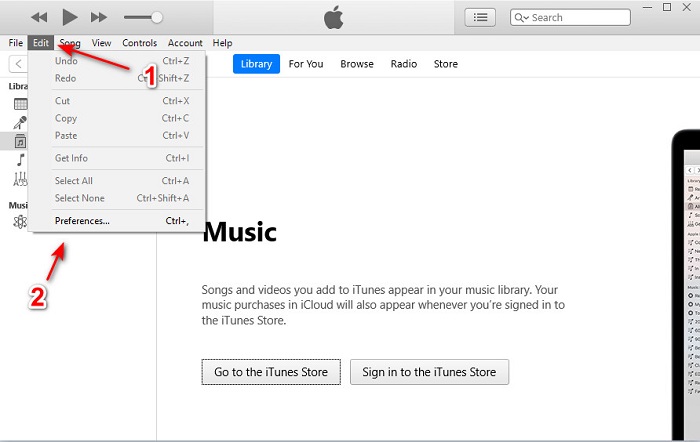
Langkah 1. Buka iTunes pada desktop anda, kemudian klik Edit dan Preferences.
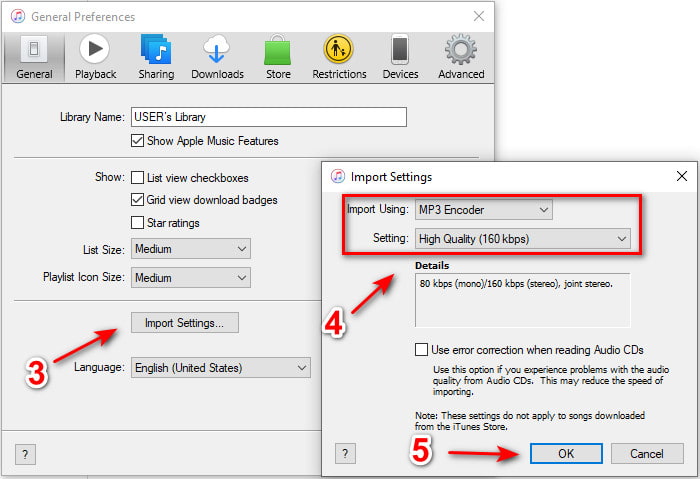
Langkah 2. Pada tab General klik Import Settings. Satu menu kecil akan muncul, ubah format dan quality di sini kemudian klik OK untuk menyimpan.
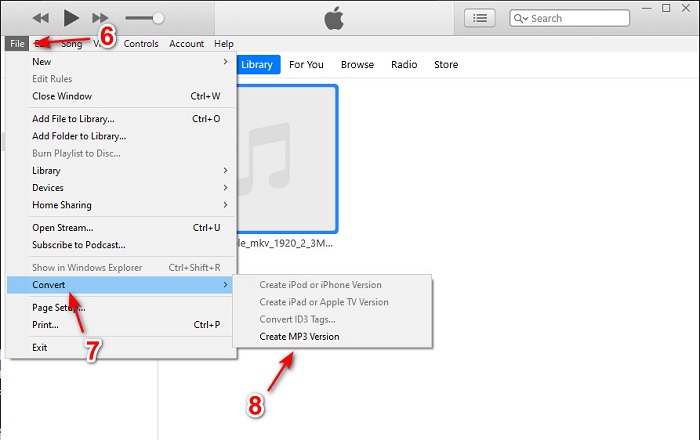
Langkah 3. Seret fail ke antara muka dan klik padanya. Pergi ke File, Convert dan klik Create MP3 Version untuk memulakan penukaran.
Bahagian 2. Top 2 Penukar Dalam Talian Percuma untuk Menukar AIFF kepada MP3
1. Penukar Audio Percuma FVC
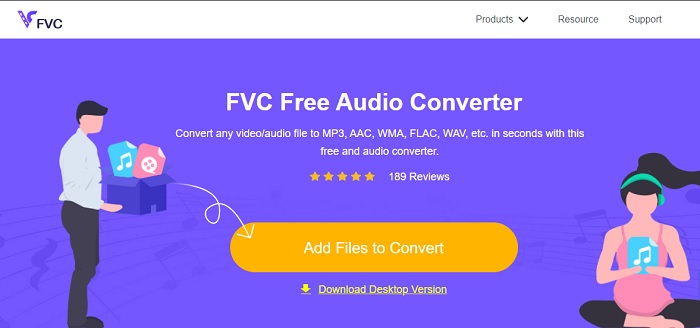
Jika anda menukar AIFF kepada MP3, anda akan mendapat saiz fail kurang daripada 320 kbps jika anda menggunakan penukar web ini, iaitu FVC Free Audio Converters. Penyelesaian ini telah digunakan oleh berjuta‑juta pengguna di web untuk menukar format fail. Walaupun alat ini tidak mempunyai ciri utama seperti versi premium FVC Video Converter Ultimate kerana ia percuma, anda masih boleh merasai tahap penukaran yang agak baik jika anda mencubanya. Selain itu, ia menyokong lebih banyak format audio berbanding iTunes. Ikuti langkah‑langkah di bawah tentang cara menggunakan alat web ini.
Langkah 1. Untuk pergi ke laman utama penukar audio, klik pautan ini.
Langkah 2. Kemudian klik butang Add Files to Convert dan benarkan alat tersebut untuk memulakan pelancar. Maklumat tambahan, jika ini kali pertama anda menggunakan alat web ini, anda perlu memuat turun dan memasang pelancar terlebih dahulu.
Muat turun Versi Desktop untuk menukar fail secara kelompok.
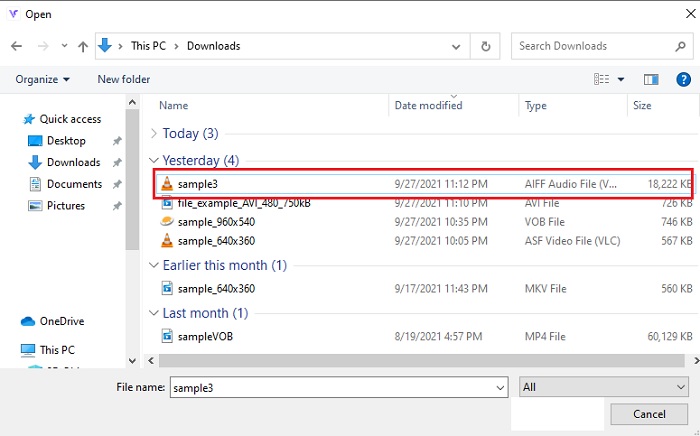
Langkah 3. Selepas anda melancarkan alat web, pilih fail AIFF dan klik open untuk dibawa ke antara muka utama alat web tersebut.
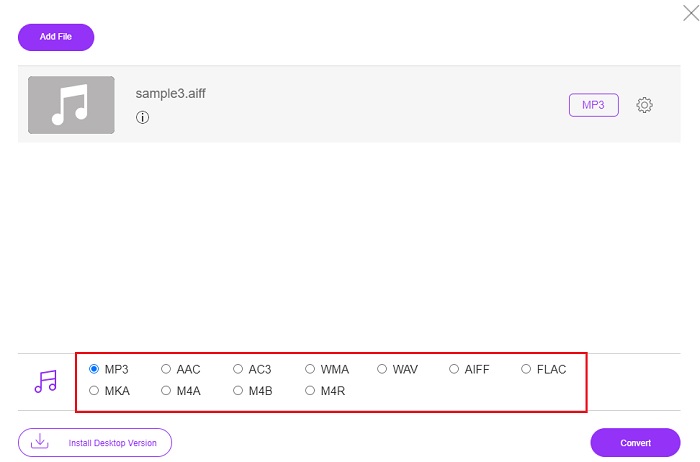
Langkah 4. Pilih format audio yang anda mahu di bahagian bawah. Kemudian klik butang Convert dan pilih destinasi fail untuk memulakan proses penukaran.
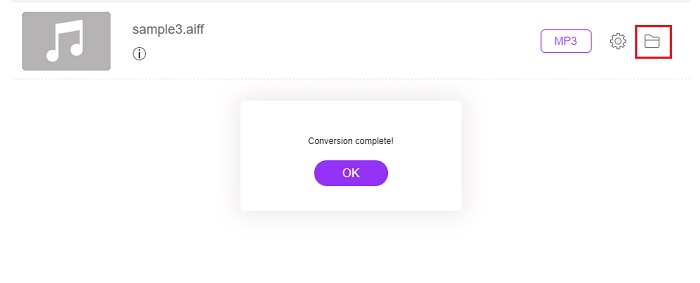
Langkah 5. Untuk mencari fail yang telah ditukar selepas penukaran selesai, klik ikon folder. Tetingkap peneroka fail akan dipaparkan pada skrin anda, klik fail yang telah ditukar dan dengarkannya.
2. Zamzar
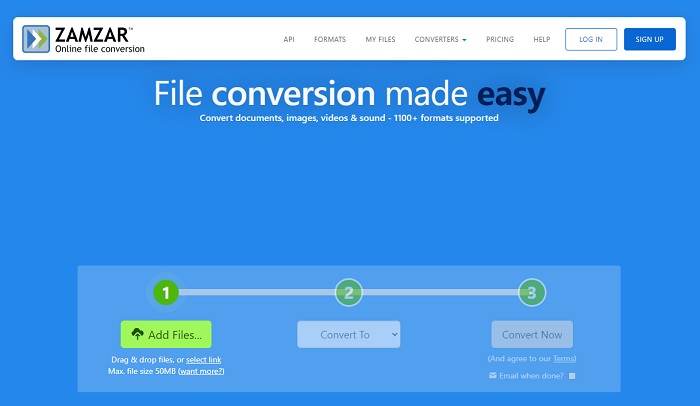
Menukar menggunakan Zamzar mungkin pilihan terbaik yang anda buat untuk menukar fail. Alat ini sangat mudah difahami kerana ia hanya memaparkan tiga langkah asas untuk penukaran. Namun alat ini mempunyai had saiz fail dan bilangan fail untuk ditukar. Selain itu, proses penukaran di sini agak teruk. Ia akan mengambil banyak masa anda dan jika penukaran telah bermula anda tidak boleh membatalkannya. Jadi, sebelum anda boleh melakukan penukaran lain, anda perlu tunggu sehingga ia selesai kemudian tambah fail sekali lagi. Baca langkah‑langkah di bawah dan ikuti untuk menukar.
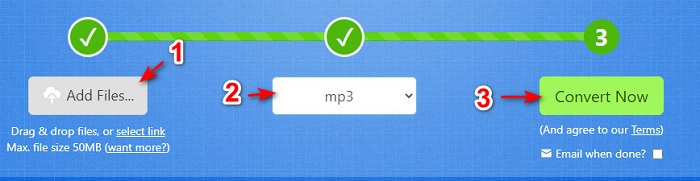
Langkah 1. Cari laman utama Zamzar pada pelayar anda.
Langkah 2. Kemudian klik Add File untuk memilih fail audio yang ingin ditukar. Pilih format dengan mengklik Convert to.
Langkah 3. Jika anda sudah bersedia untuk memulakan penukaran, klik Convert Now untuk memulakan proses.
Bacaan Lanjut
AIFF lwn MP3
AIFF, Format Fail Pertukaran Audio, dibangunkan oleh Apple. Dan ia adalah varian daripada format IFF. Fail AIFF tidak dimampatkan, jadi ia mempunyai kualiti audio yang lebih tinggi daripada fail MP3 yang serupa. Itu juga boleh membawa pengguna kepada isu ruang cakera yang tidak mencukupi.
Format MP3 dikeluarkan pada tahun 1993 oleh Moving Picture Experts Group (MPEG). Ia adalah standard untuk menyimpan muzik kerana ia boleh memampatkan audio kepada saiz yang jauh lebih kecil daripada format lain yang tidak dimampatkan. Ia masih digunakan secara meluas pada masa kini, terutamanya untuk pengedaran audio dalam talian.
Bahagian 3. Soalan Lazim tentang AIFF ke MP3
Mana satu lebih baik: AIFF atau MP3?
Walaupun format yang sama menyimpan fail audio yang berkualiti, mari kita bandingkan setiap format. Untuk menjadikannya pendek MP3 menghasilkan kualiti yang baik dengan ruang yang kurang tetapi AIFF menghasilkan fail audio berkualiti tinggi dengan ruang yang lebih tinggi.
Apakah kegunaan terbaik fail AIFF?
Memandangkan fail AIFF menyimpan fail audio asli dan berkualiti, saiz fail dalam format ini adalah besar kerana ia tidak dimampatkan. Tetapi format AIFF ini adalah ideal untuk digunakan pada pengeditan dan menambah kesan untuk menjadikan bunyi audio lebih baik.
Apakah perbezaan antara AIF, AIFF dan AIFC?
Fail AIF paling biasa digunakan untuk menyimpan fail audio pada fail CD, DVD, Blu-ray dan AIFF yang digunakan untuk menyimpan data peribadi dan bunyi yang bermaksud saiz failnya besar. Tetapi AIFC ialah versi termampat AIFF, format ini paling biasa digunakan oleh pemain media untuk memainkan format .aiff berkualiti tinggi.
Kesimpulannya
Sebagai penutup perbincangan, kini lebih mudah untuk kita memahami apa itu fail AIFF. Namun format ini sangat besar dari segi saiz, dan cara untuk mengatasinya ialah menukarnya ke format audio sejagat, iaitu MP3. Mencari alat yang sesuai agak menyusahkan kerana ada yang boleh merosakkan fail AIFF anda. Walaupun kami membentangkan pelbagai penyelesaian, masih ada satu alat yang benar‑benar menonjol dalam kerja penukaran. FVC Video Converter Ultimate boleh menjadi bantuan anda untuk menyelesaikan masalah mudah ini. Jadi, apa yang anda tunggu lagi? Anda harus memuat turun alat ini sekarang dan rasai pengalaman penukaran yang luar biasa.
-
 4 Kaedah Teratas untuk Menukar OGG ke MP3 tanpa Kehilangan Kualiti
 Bagaimana cara menukar fail OGG anda ke dalam format MP3 untuk didengarkan di komputer atau peranti mudah alih? Di sini kami kongsikan 5 cara termudah untuk melakukannya di desktop atau dalam talian.
-
 Cara Menukar M4A ke MP3 dengan 4 Penukar Audio Percuma
 Tidak boleh memainkan M4A dan perlu menukarnya kepada MP3? Adakah terdapat cara percuma untuk menukar M4A kepada MP3 dalam talian? Siaran ini berkongsi 4 cara percuma untuk membantu anda menukar M4A kepada MP3 dengan iTunes, penukar audio dalam talian dan profesional.
-
 Cara Menukar WMA ke MP3 di Mac / Windows / Online
 Adakah mungkin untuk menukar WMA ke MP3 dengan Windows Media Player? Bagaimana menukar WMA ke MP3 percuma? Catatan ini berkongsi 4 kaedah mudah untuk membantu anda membuat penukaran audio dari WMA ke MP3 di Mac, PC Windows dan dalam talian.

