


 Video Converter Ultimate
 Perakam Skrin
 Pembaikan Video
Kuasai Seni Menambah Tera Air pada iMovie dengan Langkah Terperinci
Salah satu penyunting terbaik yang boleh anda gunakan pada Mac ialah iMovie. Alat ini menyediakan antara muka yang sangat intuitif untuk digunakan oleh pengguna Mac. Walaupun alat ini hebat dan mudah diurus, sesetengah pengguna masih mencari panduan tentang cara menggunakannya. Jadi, jika anda pengguna Mac dan ingin belajar cara menambah tera air pada video dalam iMovie, anda boleh mengikuti panduan yang kami sediakan di bawah untuk memaksimumkan penggunaan alat ini.

Bahagian 1. Tutorial tentang Cara Menambah Tera Air pada Video dalam iMovie pada macOS
Kami telah pun memperkenalkan iMovie, jadi butiran seterusnya akan mengajar anda cara meletakkan tera air pada video dalam iMovie. Untuk mengetahui cara menambah, anda boleh mengikuti panduan terperinci di bawah, dan sila baca dengan teliti untuk memahami keseluruhan idea.
Langkah 1. Lancarkan iMovie pada Mac anda, dan jika anda tidak dapat menemuinya, anda boleh pergi ke Finder dan mencarinya dengan cepat.
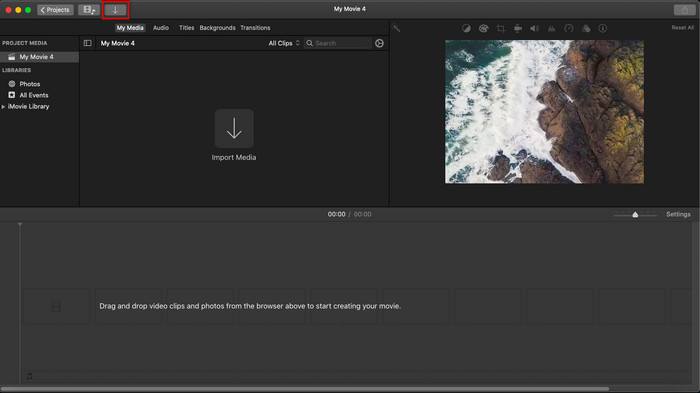
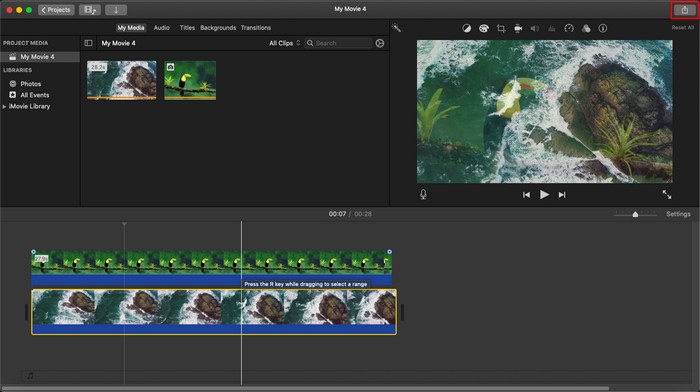
Langkah 2. Klik butang Import untuk memuat naik video dan imej yang anda mahu gunakan sebagai tera air. Seret fail video dan imej ke Timeline di bahagian bawah, sama seperti imej lain. Pastikan video berada di bahagian atas garis masa video. Lakukan beberapa pelarasan pada imej dengan menyeret, mengubah saiz, dan sebagainya.
Langkah 3. Jika anda sudah berpuas hati dengan pelarasan tersebut, klik Export di bahagian kanan atas alat, kemudian pilih Export File.
Kelebihan
- Ia percuma untuk digunakan dalam mana-mana peranti Apple seperti peranti macOS dan iOS.
- Lakukan pengeditan pantas pada video mentah untuk menjadikannya kelihatan bagus.
- Fungsi penyuntingan yang penting sehingga purata tersedia.
Keburukan
- Ia menyokong kurang format, jadi jika anda ingin mengedit video di sini, anda mesti menukarnya kepada MOV atau mana-mana format yang serasi dengan peranti Apple.
- Kurang sokongan untuk penyuntingan profesional.
Bahagian 2. Alat Terbaik untuk Menggunakan dan Meletakkan Tera Air pada Video pada Komputer Mac dengan Cara Yang Kurang Menyusahkan
Jika anda merasakan menambah tera air dalam iMovie itu sukar, anda boleh menggunakan alternatif terbaik, iaitu Video Converter Ultimate. Alat ini menyediakan cara yang jauh lebih mudah untuk menambah tera air pada video anda. Bayangkan begini: jika iMovie sudah mudah digunakan, alat “ultimate” ini adalah lebih mudah diakses. Walaupun mudah digunakan, hasil akhir yang diberikannya adalah bertaraf tinggi, dan salah satu kelebihannya berbanding iMovie ialah ia menyokong lebih banyak format imej yang boleh anda gunakan untuk dimuat naik. Mahu tahu lebih lanjut? Anda boleh membaca ciri-ciri yang kami bentangkan di bawah untuk anda.

FVC Video Converter Ultimate
5,689,200+ Muat Turun- Menyediakan ciri pengeditan habis-habisan yang boleh anda gunakan untuk menjadikan video anda lebih cemerlang daripada yang lain.
- Ia menyokong proses ultra pantas dan pecutan perkakasan untuk mengimport dan mengeksport video dengan pantas.
- Ia menyokong format video seperti MOV, MKV, AVI, MP4, FLV, RMVB dan banyak lagi.
- Ia mempunyai antara muka yang sangat interaktif untuk mendapatkan pengalaman terbaik.
- Tersedia pada semua platform desktop seperti Windows dan Mac.
Muat Turun PercumaUntuk Windows 7 atau lebih baharuMuat Turun Selamat
Muat Turun PercumaUntuk MacOS 10.7 atau lebih baharuMuat Turun Selamat
Bukankah menakjubkan untuk mempunyai semua ciri ini pada satu alat? Jika kita berada di halaman yang sama, mari kita gali butiran tentang cara menanda air video dalam iMovie tetapi dengan cara yang lebih mudah dengan alat muktamad.
Langkah-langkah Cara Memasukkan Tera Air pada Video dengan Alat Terbaik
Langkah 1. Muat turun perisian ke Mac anda, ikut prosedur pemasangan, dan tekan Start Now untuk melancarkan alat tersebut.
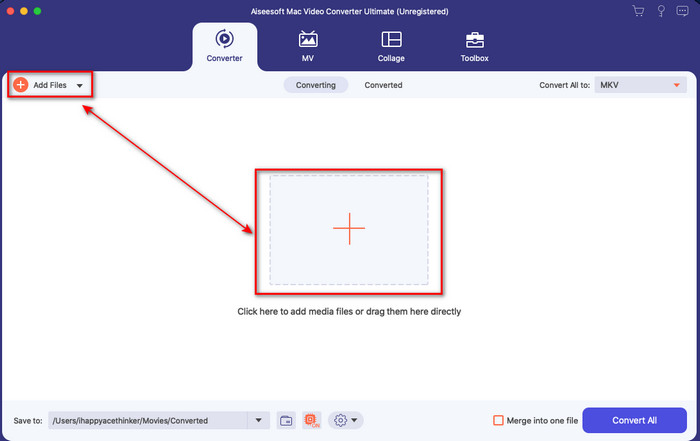
Langkah 2. Muat naik fail video yang anda inginkan dengan mengklik butang + atau Add Files. Cari video dalam folder yang akan dipaparkan pada skrin anda, dan tekan Open untuk memuat naiknya.
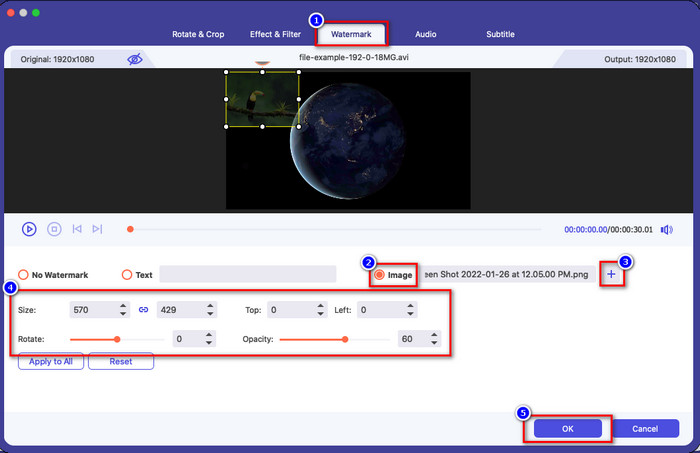
Langkah 3. Klik butang wand untuk membuka tetingkap penyuntingan pada antara muka alat. Kemudian klik bahagian Watermark, tandakan Image, tekan butang + untuk menambah imej yang anda inginkan. Selepas itu, laraskan opacity atau rotate imej tersebut dan klik OK untuk menyimpan perubahan yang telah anda lakukan.
Pilihan. Jika anda mahu menukar format, klik Convert All to, pilih format yang tersedia dalam senarai dan klik padanya. Jika anda tidak mahu menukar format, anda boleh terus ke langkah terakhir.
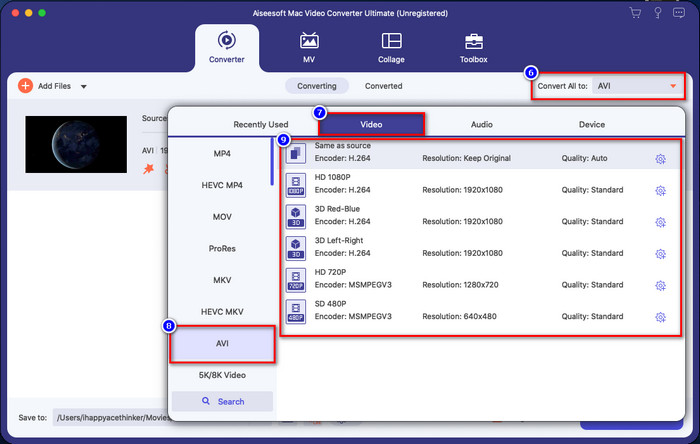
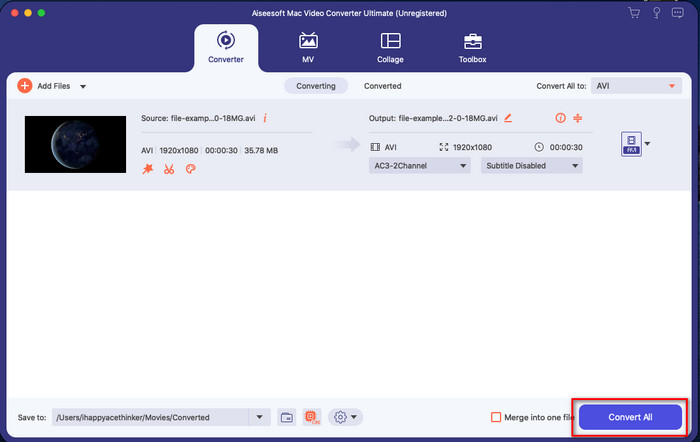
Langkah 4. Untuk mengeksport video dengan tera air, klik Convert All. Anda tidak perlu menunggu terlalu lama kerana proses penukaran ultra-pantas yang disediakannya. Dengan itu, anda telah pun menambah tera air imej pada video anda dalam masa kurang daripada seminit.
Kelebihan
- Ia adalah pilihan terbaik untuk mana-mana pengguna yang mempunyai sedikit atau tidak tahu cara mengedit.
- Ia menyokong lebih banyak format video yang boleh anda muat naik untuk menjimatkan masa dan mengelak daripada menukarnya.
- Tersedia pada semua platform seperti Windows atau Mac untuk dimuat turun.
Keburukan
- Ia tidak percuma untuk dimuat turun, tetapi ia tidak terlalu mahal.
- Memuat turunnya pada pemacu anda diperlukan.
Bahagian 3. Soalan Lazim tentang Menambah Tera Air pada iMovie
Adakah iMovie percuma untuk digunakan?
Ya, iMovie boleh digunakan secara percuma jika anda pengguna produk Apple, tetapi anda tidak boleh memuat turunnya jika anda menggunakan Android atau Windows. Ambil perhatian bahawa tiada iMovie yang tersedia pada platform lain. Jadi jika anda memuat turun iMovie pada desktop atau telefon yang bukan Apple, jangkakan ia tidak akan berfungsi sebaik iMovie, atau lebih teruk, ia mempunyai virus. Untuk mengelakkan perkara ini, anda boleh klik dan baca artikel ini untuk mengetahui alternatif kepada iMovie.
Adakah iMovie editor terbaik pada Mac?
Kita boleh katakan bahawa ia adalah salah satu yang terbaik, tetapi bukan yang terbaik, kerana editor yang berbeza menyediakan berbilang ciri penyuntingan yang anda tidak dapat temui di iMovie. Walaupun ia kekurangan dalam beberapa cara, ia masih merupakan editor terkemuka yang boleh anda gunakan pada Mac anda secara percuma untuk membuat penyuntingan video untuk vlogging, perniagaan, promosi dan banyak lagi.
Selepas mengeksport video pada iMovie, adakah ia mempunyai tera air?
Sehingga hari ini, tera air video itu tiada dalam video yang dieksport. Jadi, anda boleh menikmati video yang dimuat turun yang anda edit pada iMovie secara bebas tanpa tera air yang menjengkelkan.
Bolehkah saya menggunakan video .avi pada iMovie?
iMovie tidak menyokong julat format yang luas, tetapi anda boleh klik dan baca artikel ini dan pelajari apa yang boleh anda lakukan untuk menjadikan fail AVI anda serasi dengan iMovie.
Kesimpulannya
Artikel ini telah membuktikan bahawa anda boleh menggunakan penyunting terbina dalam yang disediakan Apple dan menambah tera air pada video dengan langkah-langkah yang kami sediakan dan mudah diikuti. Walaupun anda boleh menggunakan iMovie secara percuma, kami masih percaya bahawa Video Converter Ultimate ialah alat terbaik untuk tugas ini pada bila-bila masa. Jadi, jika anda mahukan bantuan, anda boleh memuat turunnya pada Mac atau Windows anda dengan menekan butang muat turun yang disediakan di atas.
-
 3 Kaedah untuk Menukar MPEG kepada WMV tanpa Kehilangan Kualiti
 Adakah anda mahu menonton video anda pada pemain pilihan anda, tetapi ia tidak menyokong format video tersebut? Baca artikel ini kerana kami menyediakan anda cara paling berkesan untuk menukar MPEG kepada WMV.
-
 2 daripada Pilihan Penukar Kegemaran untuk Menukar F4V kepada WMV [2022]
 Adakah anda salah seorang pengguna yang mencari cara terbaik untuk menukar F4V kepada WMV? Jika ya, cuba baca penulisan ini untuk mengetahui dengan lebih baik cara melakukannya dan apakah alat yang tersedia.
-
 Penukar MXF kepada WMV Terbaik untuk Menukar MXF kepada WMV secara Percuma
 Ingin tahu cara paling mudah untuk menukar fail MXF anda kepada format WMV? Jika anda sudah bersedia untuk meneroka cara melakukannya, anda mesti membaca artikel ini dengan teliti.
