


 Video Converter Ultimate
 Perakam Skrin
 Pembaikan Video
 Muat Turun Selamat
Memampatkan Fail Video TS - Cara Memampatkan Fail TS ke dalam Ukuran Lebih Kecil
Apabila anda mempunyai beberapa fail video_ts dari DVD, failnya bersaiz besar dan memakan ruang cakera keras. Sekiranya anda perlu menyimpan fail TS ke NAS atau perpustakaan media, perlu memampatkan video TS. Sudah tentu, pemampat video TS dalam talian semestinya menjadi pilihan awal. Tetapi kebanyakan perkhidmatan dalam talian mempunyai batasan untuk ukuran video. Anda boleh melihat pemampat TS dalam talian percuma dan alat profesional dari artikel.

Bahagian 1: Cara Memampatkan Fail TS Secara Percuma
Adakah mungkin untuk memampatkan fail video TS secara dalam talian? Oleh sebab saiz fail TS adalah besar, agak sukar untuk mencari pemampat TS dalam talian tanpa had saiz. Free Video Compressor ialah pemampat TS dalam talian serba boleh yang menyokong fail TS bersaiz besar tanpa sebarang had. Ia hanya mengurangkan saiz video bagi video TS, tetapi mengekalkan kualiti video asal.
- 1. Kompres video TS dalam resolusi 4K dengan kualiti yang menakjubkan.
- 2. Tambahkan tanda air ke fail video TS yang dimampatkan.
- 3. Batch compress TS file pada kelajuan 30x lebih pantas daripada alat lain.
- 4. Sediakan fungsi keselamatan privasi untuk melindungi maklumat anda.
Langkah 1: Pergi ke pemampat video dalam talian dengan mana-mana pelayar web, anda boleh klik butang Add Files to Compress untuk memuat turun pemasang. Klik butang itu sekali lagi untuk mengimport fail TS ke dalam pemampat video dalam talian tanpa had saiz.

Langkah 2: Setelah anda memuat naik fail TS dalam talian, anda boleh laraskan pelbagai parameter, seperti Size, Format, Resolution, dan Bitrate mengikut saiz video yang diingini. Selepas itu, anda boleh klik butang Compress untuk memampatkan video TS anda secara percuma.

Bahagian 2: Cara Memampatkan Fail TS tanpa Kehilangan Kualiti
Apabila anda perlu menggabungkan klip-klip filem berbeza daripada fail TS yang berbeza, memampatkan fail TS untuk telefon Android, atau malah menukar TS kepada MP4 atau fail MKV, Video Converter Ultimate ialah pemampat TS berbilang fungsi yang mengecilkan saiz video dengan algoritma lanjutan. Ia juga membolehkan anda membuang bahagian yang tidak diingini dan menggabungkan klip-klip video menjadi satu filem.
Muat Turun PercumaUntuk Windows 7 atau lebih baharuMuat Turun Selamat
Muat Turun PercumaUntuk MacOS 10.7 atau lebih baharuMuat Turun Selamat
Langkah 1: Muat turun dan pasang Video Converter Ultimate pada komputer anda, kemudian lancarkan program tersebut pada komputer anda. Klik menu Converter dan pilih butang Add Files untuk mengimport fail TS.
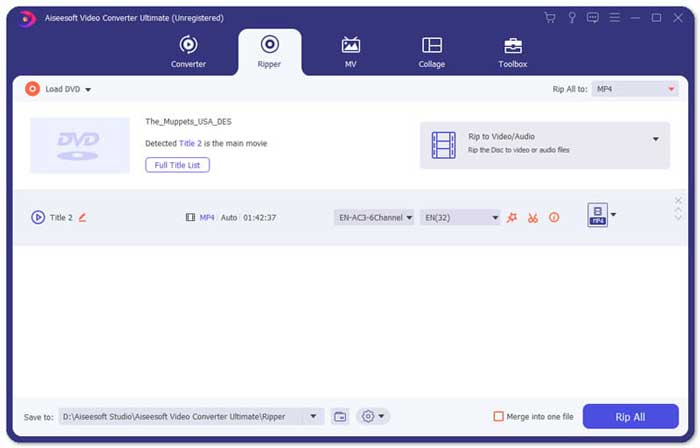
Langkah 2: Setelah anda mengimport fail TS, anda boleh pergi ke menu Tool dan klik pilihan Video Compressor. Hanya ubah saiz, nama, format, resolusi dan bitrate bagi fail sasaran. Apabila anda mendapat saiz video yang diingini, anda boleh klik butang Compress untuk memampatkan fail TS.

Langkah 3: Anda juga boleh memilih MKV atau MP4 sebagai format keluaran. Ia akan memampatkan TS kepada MKV atau MP4 dengan saiz yang agak kecil. Klik ikon Scissors untuk memotong bahagian TS yang dikehendaki. Anda juga boleh menggabungkan klip TS yang berbeza menjadi satu dengan pilihan Merge into one.
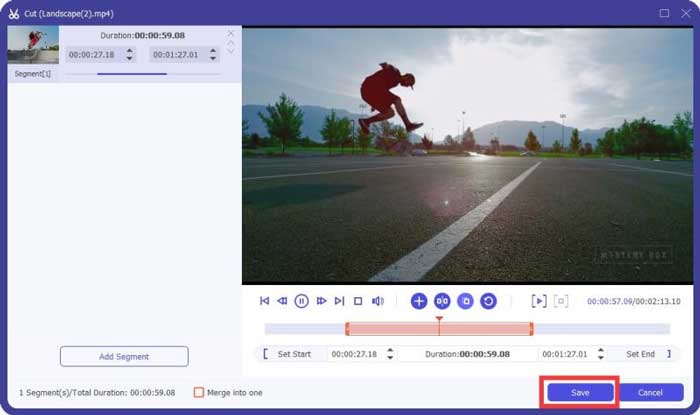
Langkah 4: Apabila anda berpuas hati dengan video yang telah dimampatkan, anda boleh memilih folder destinasi untuk video TS yang dimampatkan. Kemudian klik butang Convert All untuk mula memampatkan fail TS daripada DVD anda tanpa kehilangan kualiti asal.

Bahagian 3: Soalan Lazim mengenai Cara Memampatkan Fail Video TS
1. Apakah Format Fail TS?
TS, pendek dari Transport Stream yang merupakan format pakej. Nama penuh TS adalah MPEG2-TS, yang merupakan format wadah data standard untuk menghantar dan menyimpan audio, video, program, dll. Ia digunakan terutamanya dalam sistem penyiaran digital, seperti DVB, ATSC, dan IPTV.
2. Sekiranya saya Memampatkan TS ke MP4 atau MKV?
Ya. Apabila anda perlu mengekalkan kualiti video yang asli, anda hanya boleh memampatkan TS ke MKV dengan codec video yang asli. Tetapi jika anda ingin memampatkan TS untuk telefon Android atau iPhone, MP4 harus menjadi salah satu pilihan terbaik.
3. Berapa lamakah masa untuk memampatkan fail .TS dengan menggunakan H.264?
Itu bergantung pada ukuran fail fail .TS anda. Adapun H.264 dengan 15 MBPS mampatan Bitrate, yang memerlukan hanya kurang dari 2 minit untuk memampatkan. Ia akan membuat fail yang dimampatkan 484 MB. Sekiranya anda perlu memampatkan TS dari DVD 9GB, mungkin memakan masa sekitar satu jam.
Kesimpulannya
Artikel ini berkongsi 2 cara yang boleh digunakan untuk memampatkan fail video TS anda. Anda boleh menggunakan Pemampat Video Percuma untuk memampatkan fail TS besar tanpa batasan. Apabila anda perlu memampatkan fail TS anda tanpa kehilangan kualiti, maka Video Converter Ultimate harus selalu menjadi pilihan terbaik.
-
 Cara Menukar TS ke AVI / MKV / MOV / WMV Dalam Talian & Percuma di Win / Mac
 Ingin menukar fail TS ke AVI / MKV / MOV / WMV dengan cepat? Artikel ini menunjukkan penukar video dalam talian dan luar talian dengan panduan lengkap. Mungkin anda boleh mendapatkan penukar TS percuma terbaik di sini.
-
 MTS VS M2TS - Perbezaan Antara MTS dan M2TS
 Apakah fail MTS atau M2TS? Apakah perbezaan antara M2TS dan MTS? Bagaimana saya dapat menonton fail MTS atau M2TS yang dirakam camcorder? Cari semua jawapan dalam catatan ini.
-
 10 Cara Percuma untuk Menukar Fail TS ke MP3, AIFF, ALAC, FLAC dan Banyak Lagi
 Bagaimana cara menukar fail TS ke MP3 secara percuma? Dalam panduan ini, anda akan menemui 11 cara mudah untuk mengekstrak audio dari fail TS dengan TS ke perisian freeware audio dan alat penukar dalam talian.
