


 Video Converter Ultimate
 Perakam Skrin
 Pembaikan Video
4 Kaedah untuk Mengedit atau Membetulkan Metadata MP3 pada Windows & Mac
Semua orang adalah Musicphile, yang bermaksud kami suka muzik kerana ia membantu kami merasai emosi penyanyi dan penulis walaupun kami tidak melihatnya secara visual. Melalui muzik, semua orang boleh kekal berhubung, dan ia boleh membantu kami menghilangkan tekanan, meningkatkan IQ kami dan menjadi produktif setiap hari. Kebanyakan muzik adalah dalam format MP3 kerana ia adalah bekas audio standard untuknya. Walaupun anda boleh memainkan MP3 pada peranti anda, anda tidak akan memainkan susunan yang betul dengan betul jika metadata salah. Anda tidak boleh menetapkan mood yang betul jika pustaka muzik anda berada dalam keadaan huru-hara, maka apakah yang perlu anda lakukan? Mengapa anda tidak cuba membetulkan teg untuk menyusunnya dengan betul? Jika anda ingin mengetahui cara mengedit metadata MP3 pada Windows dan Mac, ini adalah artikel yang sesuai untuk anda, kerana kami mempamerkan empat kaedah berbeza yang boleh anda gunakan.

Bahagian 1. Kaedah Terbaik untuk Membetulkan atau Mengedit Metadata MP3 pada Windows dan macOS [Disyorkan]
FVC Video Converter Ultimate telah melangkah setapak ke hadapan untuk menjadi salah satu program terbaik bagi membaiki tag MP3 pada Windows dan Mac anda. Alat ini menyokong pemuatan format audio MP3, WAV, WMA, AAC dan banyak lagi untuk membetulkan masalah yang sama berkaitan metadata. Anda juga boleh membuang metadata tersembunyi yang tidak dapat diakses dengan penyunting tag yang lain.
Bukan itu sahaja, ia boleh menukar MP3 kepada format audio lain jika anda mahu, dan ia juga menawarkan banyak fungsi dan ciri yang terdapat di dalam Kotak Alat; anda boleh menyemaknya jika anda memuat turunnya. Dalam beberapa minit, anda boleh meminta program ini menyelesaikan masalah secepat mungkin. Tidak begitu pasti sama ada ia benar? Nasib baik, tutorial bertulis di bawah akan mengajar cara mengedit metadata MP3 untuk membuktikan bahawa anda boleh melakukannya dengan cepat, seperti yang kami katakan.
Langkah 1. Klik butang muat turun di bawah, pilih salah satu daripada dua sistem pengendalian yang anda gunakan sekarang. Pasangkannya dengan cepat selepas dimuat turun, buka alat tersebut dan teruskan ke langkah seterusnya.
Muat Turun PercumaUntuk Windows 7 atau lebih baharuMuat Turun Selamat
Muat Turun PercumaUntuk MacOS 10.7 atau lebih baharuMuat Turun Selamat
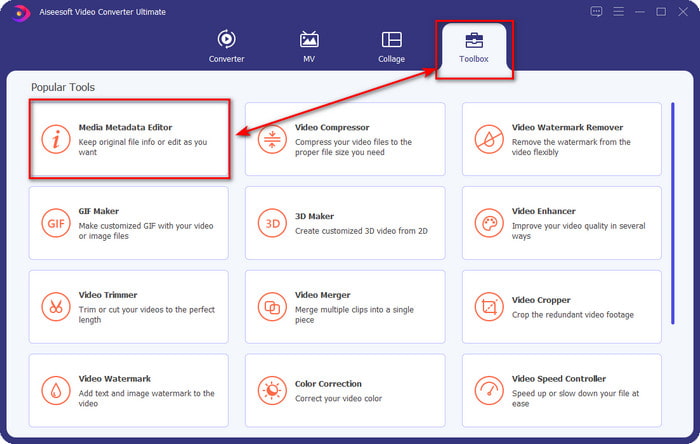
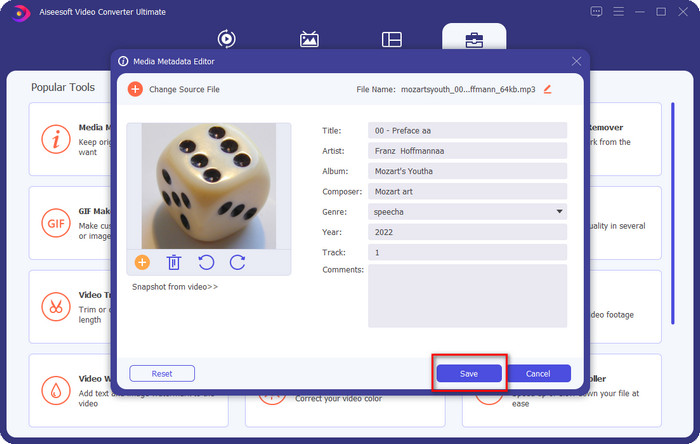
Langkah 2. Pilih Toolbox dan di bawahnya klik Media Metadata Editor. Seperti yang kami sebutkan dalam pengenalan, terdapat pelbagai fungsi yang boleh anda gunakan di dalam Toolbox yang tidak disediakan oleh penyunting lain.
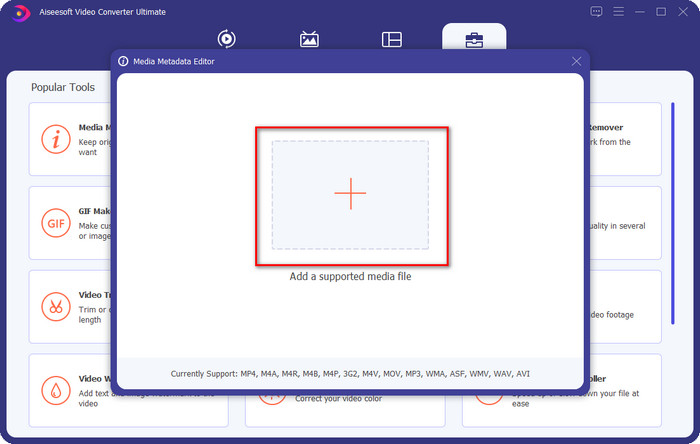
Langkah 3. Tetingkap mini akan muncul pada skrin anda; klik ikon +. Cari fail audio atau MP3 dalam folder yang dipaparkan pada skrin anda, klik fail tersebut, dan tekan Open untuk memuat naiknya.
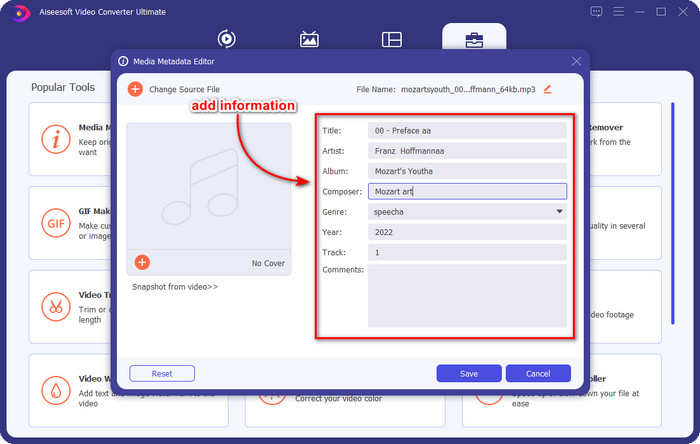
Langkah 4. Edit dan baiki metadata mengikut keperluan anda; klik setiap text box untuk menambah maklumat.
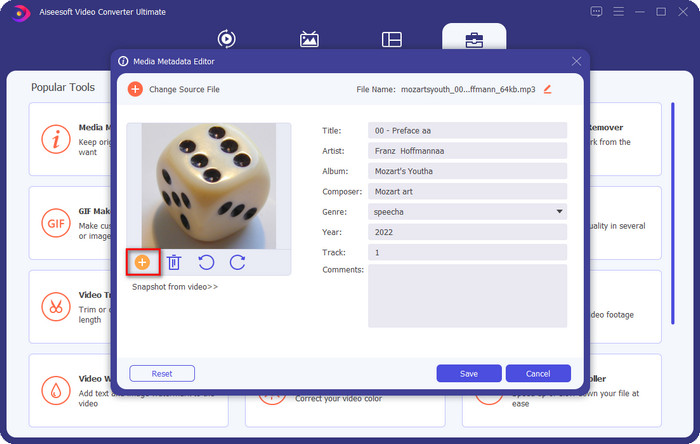
Opsyenal. Dengan alat ini, anda juga boleh menambah atau membetulkan metadata seni kulit album MP3 pada fail MP3 anda dengan mengklik ikon +; pilih imej yang anda ingin gunakan sebagai kulit pada folder, dan klik Open untuk meneruskannya.
Langkah 5. Jika anda telah siap menambah dan membetulkan metadata fail MP3 anda, tekan butang Save untuk menyimpan perubahan yang telah anda lakukan pada fail audio anda. Selesai, dengan itu anda kini telah membaiki tag audio dengan mudah dengan bantuan alat yang terbaik ini.
Bahagian 2. 3 Kaedah Percuma untuk Menukar Tag MP3 pada Desktop
iTunes
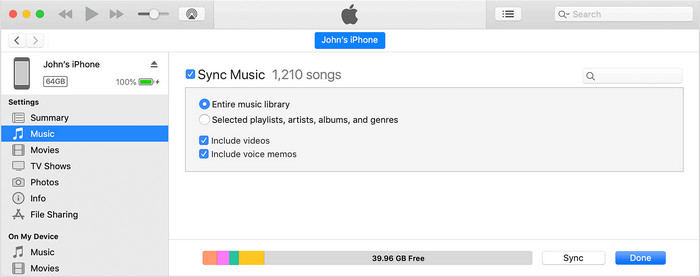
iTunes ialah program terbina dalam yang boleh membantu anda mengedit tag mp3 pada macOS X. Fungsinya sama seperti Groove Music dalam mengedit metadata fail audio anda. Namun dengan alat ini, anda boleh membeli muzik dan memainkannya di sini dengan pantas. Selain itu, muzik yang datang daripada aplikasi ini sudah pun mempunyai tag, dan jika muzik yang anda muat turun tiada tag, anda boleh menggunakannya untuk menambah tag. Ikuti langkah di bawah untuk mengetahui cara melakukannya.
Langkah 1. Buka iTunes pada Mac anda.
Langkah 2. Klik fail audio dan pilih Get Info.
Langkah 3. Betulkan tag dan klik OK untuk menyimpan perubahan.
MP3Tag
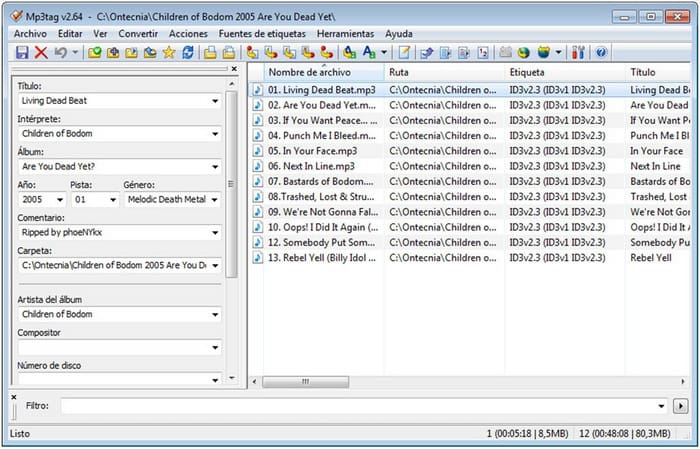
MP3 Tag ialah pembaiki tag MP3 khusus dan terbaik yang boleh anda muat turun pada Windows anda. Dengan alat ini, anda boleh mengakses pangkalan data muzik secara automatik untuk mendapatkan metadata yang betul. Walaupun alat ini tidak sama seperti perisian terbina dalam yang lain, kita masih boleh melihat bahawa adalah mungkin untuk melaras metadata dengan bantuan alat ini dengan format sokongan purata. Jika anda ingin memuat turun dan menggunakan alat ini, ikuti langkah di bawah.
Langkah 1. Muat turun perisian ke komputer anda dan buka ia.
Langkah 2. Seret dan lepaskan fail MP3 ke bahagian tengah, klik fail audio tersebut, dan di bahagian kiri, anda boleh mengedit tag.
Langkah 3. Untuk menyimpan suntingan yang telah anda buat, klik ikon save.
Muzik Groove
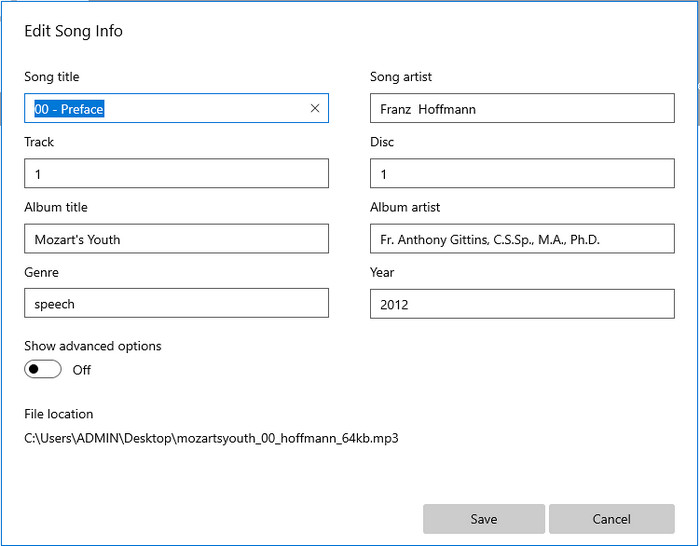
Jika anda tidak mempunyai ruang yang mencukupi pada pemacu anda, adakah mungkin untuk belajar cara mengedit tag MP3 pada Windows 10? Maka Groove Music sedia membantu pengguna Windows menukar tag pada fail audio mereka. Dengan alat ini, anda boleh memainkan hampir semua fail audio yang disimpan pada pemacu anda dengan mudah. Jika anda ingin tahu cara menggunakan aplikasi terbina dalam ini, ikuti langkah di bawah.
Langkah 1. Klik ikon windows pada skrin dan taip Groove Music untuk membukanya. Selepas mengkliknya, alat tersebut akan menyediakan dirinya secara automatik.
Langkah 2. Tekan klik kanan pada fail audio dan pergi ke Edit Info.
Langkah 3. Tukar metadata Edit Song Info dan klik Save apabila anda telah selesai semuanya.
Bahagian 3. Soalan Lazim tentang Mengedit Metadata pada MP3
Adakah selamat untuk mengedit metadata MP3 dalam talian?
Ya, anda boleh mengedit metadata pada MP3 anda dalam talian jika anda mahu. Tetapi ingat bahawa terdapat tapak web dengan rangkaian tidak terjamin, jadi log masuk adalah keputusan yang tidak baik yang akan anda buat. Jadi, untuk mengelakkan ini, anda mesti menggunakan alat yang kami bentangkan di atas untuk membetulkan metadata mp3 anda dengan selamat.
Adakah metadata penting?
Memang betul begitu. Metadata memainkan peranan yang penting dalam setiap fail media yang kita ada. Dengannya, anda boleh dengan mudah menentukan apa yang ada di dalam sesuatu fail, seperti lokasi, masa, tarikh, maklumat dan banyak lagi. Selain itu, maklumat yang kami tambah di sini hanyalah idea ringkas tentang metadata, dan jika anda ingin mengetahui lebih lanjut tentang metadata, anda perlu klik pautan ini dan baca apa itu metadata.
Bolehkah saya melihat metadata pada MP3 saya?
Sudah tentu, ya, anda boleh, dan jika anda tidak tahu cara melihat metadata, anda boleh membaca artikel ini dan ikut langkah yang dinyatakan tentang cara melihatnya dengan betul.
Kesimpulannya
Memang, keempat-empat pembaiki tag .mp3 terbaik kini berada dalam jangkauan anda, yang bermaksud anda kini boleh memilih alat mengikut kehendak anda. Dengan maklumat fakta yang kami sediakan dalam artikel ini, kita boleh dengan mudah mengedit atau membaiki tag pada fail MP3 kita. Walaupun kaedah yang kami sediakan adalah yang terbaik, kami masih memilih FVC Video Converter Ultimate berbanding alat terbina dalam yang lain atau aplikasi pihak ketiga. Ini kerana alat ini menawarkan penyuntingan tag yang paling canggih dan berkuasa yang anda perlukan tanpa memerlukan terlalu banyak usaha. Jadi, jika anda ingin mendapatkan alat ini, anda boleh klik butang muat turun dan ikut langkah yang telah kami tulis di atas.
-
 5 Editor Metadata MP4 Tertinggi [Dikemas kini 2022]
 Bagaimanakah saya boleh menukar metadata MP4 saya? Cara terbaik untuk menukar metadata MP4 anda ialah menggunakan editor teg yang menyokong format MP4 seperti contoh yang kami senaraikan di bawah.
-
 5 Editor Teg Video AVI Pilihan Pengguna Terbaik untuk 2022
 Apakah editor teg AVI terbaik yang boleh saya gunakan? Pasaran editor tag untuk fail AVI terlalu luas. Jadi hari ini kami akan membentangkan lima editor yang paling banyak dipilih pada tahun 2022.
-
 4 Editor Metadata MKV Berkesan untuk Windows & macOS
 Saya tidak menemui editor metadata MKV di pasaran. Apa yang perlu saya gunakan? Mengalami masalah yang sama? Jika ya, teruskan membaca blog ini untuk mengetahui alat untuk digunakan.
