


 Video Converter Ultimate
 Perakam Skrin
 Pembaikan Video
Ketahui Cara Mengedit Metadata OGG dengan Mudah dengan Langkah Terperinci
Dengan teg pada fail OGG anda, peranti yang anda sedang gunakan boleh memahami kandungan dalam fail tersebut. Setelah metadata dilampirkan, ia boleh membantu anda menyusunnya dengan betul dengan menentukan teg untuk mencarinya dengan cepat. Jadi, jika fail OGG anda tidak mempunyai metadata, anda mesti menambahnya. Walaupun mencari editor tag untuk OGG adalah mudah, kami tidak pasti sama ada ia betul-betul selamat untuk digunakan. Daripada mencubanya dan gagal, kami akan melakukan penyelesaian masalah setiap alat untuk anda. Jadi, teruskan membaca siaran ini untuk mengetahui cara mengedit metadata OGG secara manual dengan jaminan kejayaan 100%.

Bahagian 1. Edit Metadata OGG tanpa Memuat turun Program Luaran pada Windows
On Windows, you can easily edit OGG metadata without downloading a tool using Properties. However, it is not as effective as the ultimate devoted tool below, but the task can be done with its help. So, if you want to know how to use this metadata editor, you can follow the steps below.
Kelebihan Menggunakan Properties pada Windows:
◆ Memuat turunnya tidak penting untuk menggunakannya pada bila-bila masa, malah anda tidak mempunyai akses internet.
◆ Mudah digunakan dan boleh digunakan oleh mana-mana pengguna yang ingin mengedit metadata.
◆ Ia menyokong pelbagai format OGG, MP3, WAV, WMA dan banyak lagi.
Cara Mengedit Tag OGG dengan Mudah dengan Properties pada Windows:
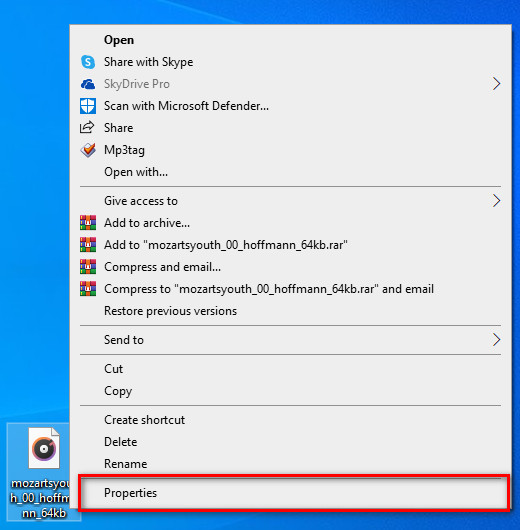
Step 1. Find the OGG file on your desktop, and right-click the file; under it, hit Properties.
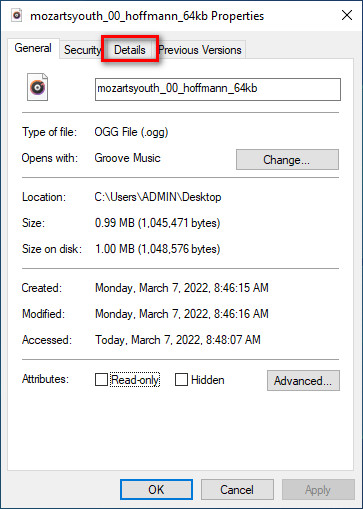
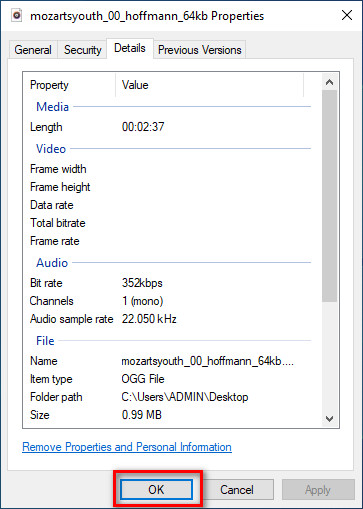
Step 2. After you've clicked the Properties, a panel will show on your screen. Go to the Details, tap every tag and fill it.
Step 3. Press OK to save the changes you've made with Properties.
Petua: Fungsi ini kadangkala tidak menyimpan metadata yang telah anda tambahkan pada fail OGG. Jadi, jika ini berlaku, anda perlu buat semula dan mulakan dari awal lagi.
Bahagian 2. Editor Tag OGG Paling Disyorkan untuk Mengedit Metadata OGG pada Windows & Mac [Secara Profesional]
The best way to edit OGG is to use a powerful yet simplistic tag editor on Windows and Mac, the FVC Video Converter Ultimate. With this tool, you can manually override the metadata of OGG within a few clicks away. Unlike Properties, you won't encounter any problem regarding editing or fixing the tags of your media file. However, you will need to download and purchase the tool to fully access its great features that no other tool can give you.
Selain keupayaan menyunting pada metadata, alat ini membolehkan anda menukar fail OGG anda kepada format audio baharu sambil mengekalkan audio berkualiti tinggi yang disimpan pada fail OGG anda. Anda juga boleh melakukan pengeditan asas pada video dan audio anda jika anda mahu, seperti memotong, memangkas, menggabungkan, memangkas dan banyak lagi, tetapi ia juga boleh melakukan penyuntingan lanjutan; anda boleh menyemak pengeditan lanjutan pada Kotak Alat. Mungkin anda fikir apa perkara muktamad tentang alat ini; Nah, ia memenuhi jangkaan semua orang, dan nama muktamad bukan sekadar nama, tetapi ia juga kebolehan alat itu. Jadi, jika anda ingin menggunakan alat untuk mengedit metadata OGG, anda boleh menyalin langkah di bawah untuk berjaya di hujung jari anda.
Kelebihan Menggunakan FVC Video Converter Ultimate [Disyorkan]:
◆ Ia ialah editor tag profesional yang boleh memanipulasi metadata fail audio anda dengan mudah walaupun anda bukan profesional.
◆ Ia menyokong pelbagai format untuk dimuat naik seperti OGG, MP3, WAV, WMA, AIFF dan 1000+ lagi, termasuk format video.
◆ Ia adalah pilihan terbaik untuk permulaan dalam mengedit metadata, resolusi, kualiti, pemotongan, dll.
◆ Dapat memuat turun perisian pada kedua-dua sistem Windows dan Mac jika anda boleh.
◆ Fungsi dan ciri tambahan tersedia pada Kotak Alat untuk membantu anda dengan tugasan berbeza yang berkaitan dengan video dan audio.
Cara Mengedit Tag OGG Seperti Pro dengan FVC Video Converter Ultimate:
Step 1. Press the download button below, choose the correct operating system you're using. If downloading is finished, click the software file you've downloaded to install it next to your drive. Set it up according to your preferences; lastly, click Start Now to launch the tool.
Muat Turun PercumaUntuk Windows 7 atau lebih baharuMuat Turun Selamat
Muat Turun PercumaUntuk MacOS 10.7 atau lebih baharuMuat Turun Selamat
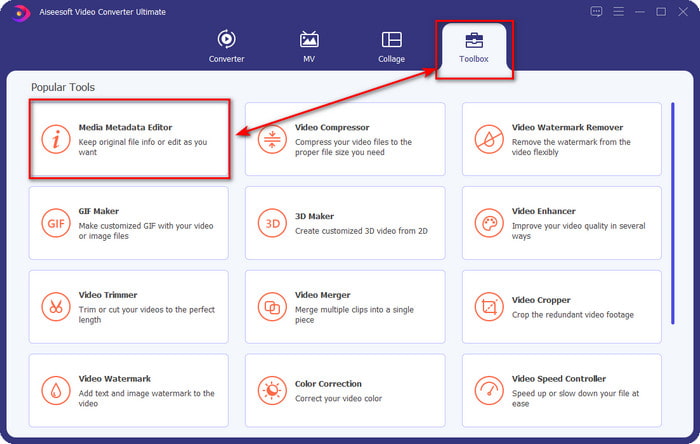
Step 2. After you've opened the software on your desktop, go to the Toolbox section and find the Media Metadata Editor; hit the feature to proceed.
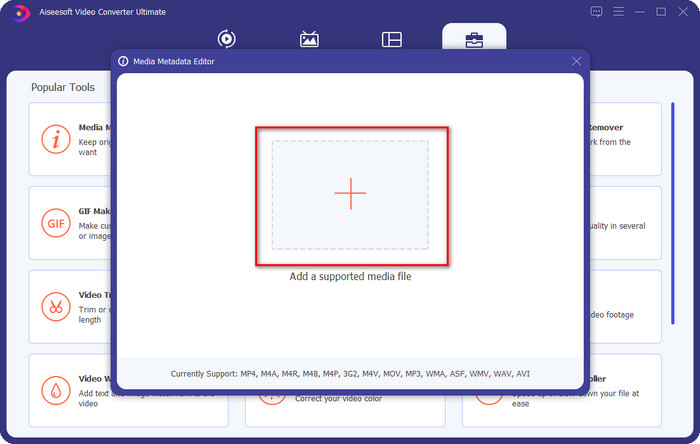
Step 3. Click the + icon to locate the OGG file saved on your desktop drive. Select the .ogg filename and click Open to upload the file to the tool.
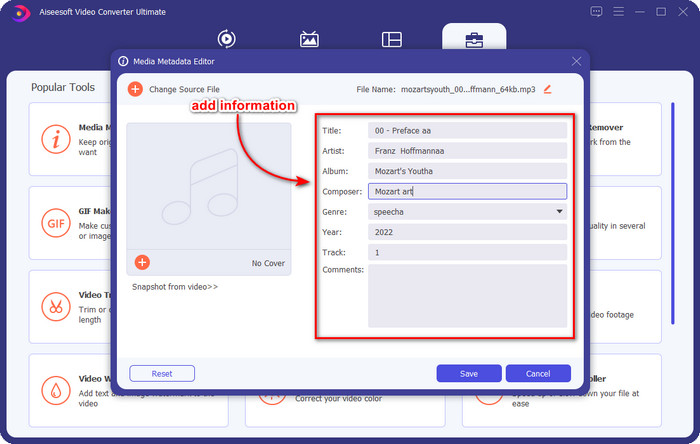
Step 4. Edit or remove the metadata on the mini window that will show on your screen, click every textbox and add the information you want to apply on the OGG. You can also add an image on the OGG audio file if you've desired, but make sure that the image is saved on your desktop.
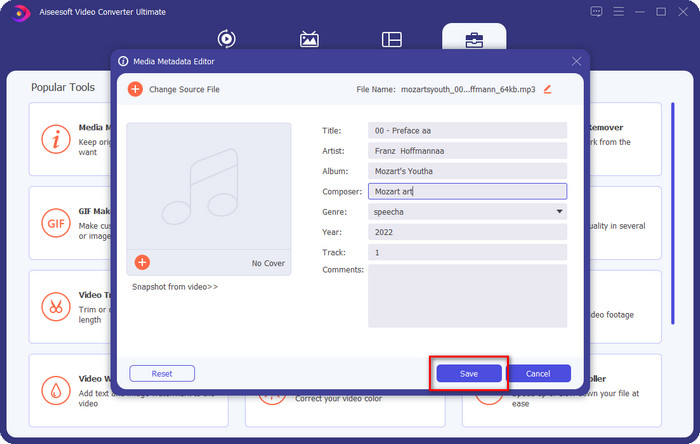
Step 5. If you've done adding the needed information on your OGG file, you can click Save to proceed to save the file with metadata on it. With that, you have now added the edited OGG metadata on your desktop with the assistance of the best OGG metadata editor you can use on both operating systems safely and quickly.
Bahagian 3. Soalan Lazim tentang Mengedit Metadata OGG
Bolehkah saya menggunakan fail OGG pada Mac?
OGG files aren't supported on any Apple devices, but you can use a third-party app to play the unplayable OGG file on Mac. Want to know how? If so, click this link as we gathered the facts about OGG and how to play the OGG files on Mac easily.
Adakah OGG lebih popular daripada MP3?
Dari segi populariti, MP3 jauh lebih disokong daripada OGG kerana ia lebih fleksibel jika kita membandingkannya. Kedua-duanya adalah bekas audio yang bagus, dan ia mempunyai kekuatan audio yang berbeza. Tetapi dari segi kualiti, OGG jauh lebih baik daripada MP3 tetapi kurang disokong.
Bolehkah saya merakam OGG berkualiti tinggi?
Absolutely, yes, you can record OGG. But which tool supports the OGG format? If there is any, is it the best OGG recorder I can use? Well, all of these questions do have an answer if you've clicked this link and proceeded on reading it.
Kesimpulannya
Amazing right? It is, with what can you do to edit OGG metadata with the solutions listed above. If you need one, these are the known solutions to solve your OGG file tags. If you don't believe in the information we have written here, you must try them both, and we can assure you success in editing the tags on your OGG. But if you want a pro tool to edit tags on your OGG, you must use the ultimate tool to finish the task. FVC Video Converter Ultimate is undoubtedly the best choice for editing any tags on any media type that you have. If you think that this is the right tool for you, we suggest that you read the steps we provided above to edit the tags easily.
-
 7 Editor Tag Muzik Popular pada Windows, Mac dan Peranti Mudah Alih
 Teg muzik popular untuk digunakan untuk susunan muzik dalam pustaka anda mengikut data di dalamnya. Bagaimana jika anda ingin mengubahnya? Baca butiran di bawah untuk mengetahui lebih lanjut.
-
 4 Editor Metadata Buku Audio yang Dicadangkan pada 2022
 Jika anda tidak mempunyai sebarang idea tentang editor tag Audiobook maka artikel ini akan membantu anda. Ketahui lebih baik dengan membaca setiap butiran di bawah dan alat untuk digunakan.
-
 5 Editor Tag MP3 Percuma Teratas Tersedia Dalam Talian & Luar Talian
 Adakah anda ingin tahu cara mengedit tag MP3? Dalam kes itu, teruskan membaca. Untuk hari ini, kami memberi anda 5 editor tag MP3 terbaik yang boleh anda gunakan.
