


 Video Converter Ultimate
 Perakam Skrin
 Pembaikan Video
 Muat Turun Selamat
3 daripada Editor Metadata FLAC Terbaik Yang Anda Perlu Tahu Ini 2025
Kita telah maklum bahawa FLAC ialah format fail muzik tanpa kehilangan (lossless) yang terbaik, dan ia merupakan format yang ideal untuk mengekstrak audio pada CD kerana ia tidak kehilangan audio mentah jika ini format yang anda pilih. Dalam kalangan format audio lossless, ini ialah pilihan terbaik kerana ia serasi dengan hampir semua peranti. Ia menghasilkan nisbah pemampatan kira-kira 30 hingga 50 peratus tanpa menjejaskan kualiti asal. Dengan format audio ini, anda boleh mempunyai metadata, kulit album, dan fungsi capaian pantas sekaligus. Namun, sesekali mungkin berlaku masalah seperti tag yang salah pada fail FLAC kerana format ini juga tidak sempurna, sama seperti format lain. Dalam masa kurang lima minit, anda akan mengetahui pelbagai penyunting metadata FLAC pada Mac dan Windows yang boleh anda gunakan untuk membetulkan masalah tersebut.

Bahagian 1. Editor Metadata FLAC Terbaik untuk Mac dan Windows – FVC Video Converter Ultimate
FVC Video Converter Ultimate ialah perisian paling berkesan yang mesti anda ada untuk menyelesaikan masalah penyuntingan metadata ini. Alat ini menyediakan antara muka (GUI) yang profesional tetapi mudah difahami bagi membantu mana-mana pengguna melalui proses menukar atau membetulkan metadata dengan lancar. Selain itu, anda boleh menambah pelbagai maklumat atau tag pada FLAC anda, seperti tajuk, nama pengarang, tarikh, kulit album, dan banyak lagi. Pesaingnya dalam penyuntingan metadata biasanya hanya menumpukan pada penukaran metadata bagi beberapa format audio dan video sahaja. Tetapi dengan perisian ini, anda boleh memuat naik sebarang fail FLAC, MP3, WMA, WMV, dan lebih 1000 format lain dan menyunting metadata fail tersebut secepat 1-2-3.
Selain itu, Alat ini bukan sahaja mampu menukar, membetulkan atau memadam metadata; ia juga boleh digunakan sebagai penyelesaian kepada sebarang masalah berkaitan audio video. Dan dengan itu, kami boleh memberi jaminan kepada anda bahawa sebaik sahaja anda menggunakan alat tersebut, anda tidak perlu risau tentang menghadapi semula masalah yang sama kerana anda mendapat penyelesaian terbaik. Adakah anda mahu menggunakan editor metadata FLAC yang terkemuka pada Mac dan Windows? Jika ya, teruskan membaca langkah di bawah sambil kami memberi anda tutorial yang mudah diikuti dan menyelesaikan tugas dengan cekap.
Langkah 1. Anda boleh memasang perisian ultimate ini pada desktop anda; klik OS yang bersesuaian untuk memuat turun alat yang betul. Teruskan proses pemasangan dengan membuka fail yang telah anda muat turun, dan tekan Start Now untuk meneruskan.
Muat Turun PercumaUntuk Windows 7 atau lebih baharuMuat Turun Selamat
Muat Turun PercumaUntuk MacOS 10.7 atau lebih baharuMuat Turun Selamat
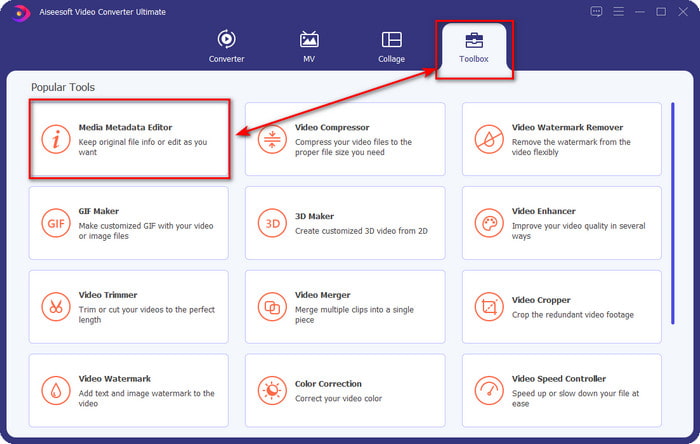
Langkah 2. Klik Media Metadata Editor untuk membuka fungsi penyunting tag di bahagian Toolbox.
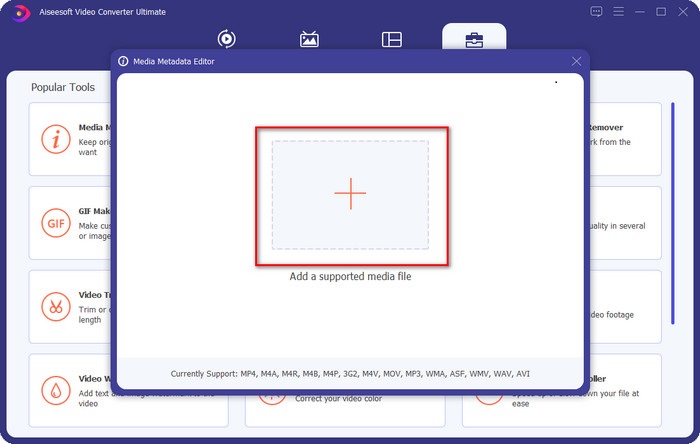
Langkah 3. Anda perlu klik butang + untuk menambah fail, cari fail tersebut dalam folder yang dipaparkan, dan klik Open untuk menambah fail FLAC dengan berjaya.
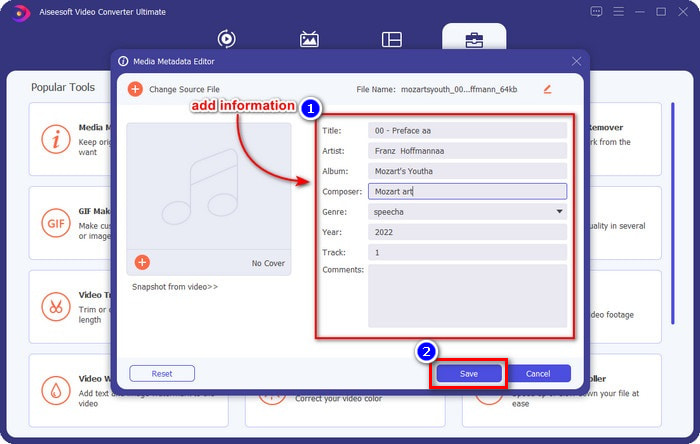
Langkah 4. Pada paparan ini, anda kini boleh menukar metadata FLAC anda pada setiap textbox. Kemudian klik Save untuk menyimpan kemas kini yang telah anda buat dengan perisian tersebut. Semudah itu, anda telah menambah dan membetulkan tag pada fail FLAC anda dengan berkesan dengan bantuan alat ultimate ini.
Kelebihan
- Ia ialah pilihan terbaik untuk mengedit metadata pada FLAC, MP4, WMA, WAV, TTA, OGG dan 1000+ lagi format.
- Ia menyokong berbilang ciri penyuntingan yang boleh anda gunakan di bawah bahagian Kotak Alat.
- Antara muka pengguna grafik yang intuitif, dan ia mudah digunakan.
- Boleh dimuat turun pada sistem pengendalian Windows dan Mac.
Keburukan
- Membeli alat adalah satu kemestian untuk memanfaatkan ciri yang luar biasa pada kos yang rendah.
Bahagian 2. Lain 2 Editor Metadata FLAC Percuma Terbaik untuk Windows
Frigat3
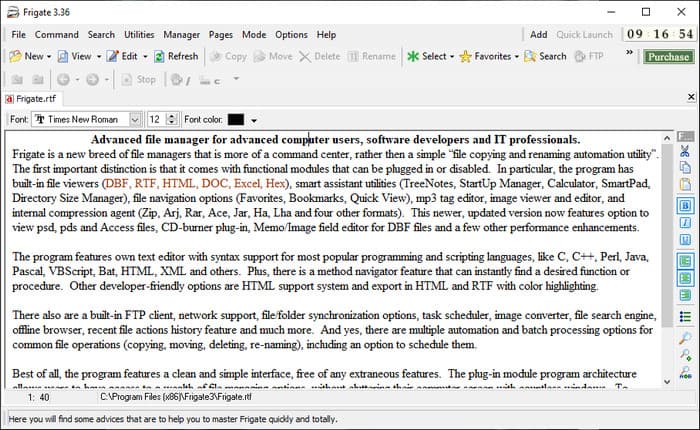
Frigate3 ialah penyunting metadata FLAC yang anda pasti suka gunakan pada Windows anda. Dengan alat ini, anda boleh melaras tag pada desktop anda dengan mudah. Namun sebelum memuat turun alat ini, anda perlu meneliti dua pilihan yang disediakan, iaitu versi standard dan versi pro. Versi standard hanya menyertakan fungsi asas yang akan anda gunakan. Jika anda memuat turun versi standard, saiz failnya lebih kecil berbanding versi pro.
Sebaliknya, jika anda telah memuat turun versi pro, anda akan mempunyai semua ciri yang disediakan oleh perisian ini yang bukan pada standard, tetapi saiz fail jauh lebih besar daripada standard. Walaupun merupakan perisian Windows percuma, kami masih dapat melihat bahawa alat itu agak sukar untuk difahami, dan GUInya tidak begitu bagus seperti perisian lain di pasaran. Walaupun ini adalah masalah, ia masih dianggap sebagai alat yang berkesan untuk mengendalikan tugas ini.
Kelebihan
- Percuma untuk dimuat turun pada Windows.
- Ia menyokong versi standard dan pro alat tersebut.
- Mampu menambah pemalam.
Keburukan
- GUI tidak bagus seperti editor metadata yang lain.
- Kadangkala alat itu sukar untuk dilancarkan.
- Rangkaian tidak terjamin apabila anda mengakses tapak web rasmi alat tersebut.
MusicBrainz PiCard
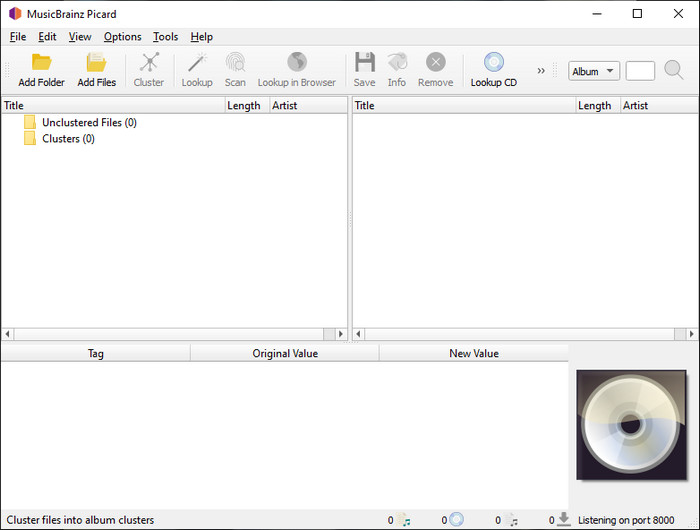
MusicBrainz PiCard ialah penyunting metadata FLAC berasaskan Windows yang boleh anda muat turun secara percuma pada desktop untuk melengkapkan penambahan metadata. Jika fail audio mempunyai rekod dalam pangkalan data, anda boleh mendapatkan semula tag atau mengemas kininya dengan bantuan alat ini. Tidak seperti alat lain, perisian ini boleh menambah pelbagai maklumat terperinci seperti para pemuzik dan instrumen yang digunakan dalam muzik tersebut. Namun ingat bahawa tag dalam MusicBrainz dihimpunkan oleh para sukarelawan.
Tambahan pula, perisian ini ialah editor tag audio khusus, yang bermaksud ia hanya menyokong kebanyakan format audio, sama ada ia lossy, lossless, atau kedua-duanya. Walaupun ia adalah ensiklopedia tag muzik yang komprehensif dan menjadikannya boleh digunakan kepada orang ramai, beberapa teg yang disediakannya tidak boleh dipercayai, jadi anda perlu menambahkannya secara manual. Walau bagaimanapun, alat ini mesra pengguna dan lebih baik daripada Frigate3, tetapi ia tidak sebaik alat muktamad.
Kelebihan
- Ia mempunyai pangkalan data terbina dalam untuk tag audio.
- Antara muka pengguna yang sederhana.
- Mempelajari cara menggunakannya adalah mudah.
Keburukan
- Kadangkala metadata yang dikumpulkan pada pangkalan data tidak boleh dipercayai.
- Ia terhad kepada fail audio sahaja.
Bahagian 3. Soalan Lazim tentang Editor Metadata FLAC
Bolehkah saya merakam FLAC berkualiti tinggi?
Ya, sudah tentu anda boleh merakam audio dalam format ini, tetapi perlu diingat tidak semua perakam audio menyokong format ini, dan tidak semuanya boleh merakam audio dengan kualiti tinggi. Jadi, jika anda tidak tahu cara merakam audio FLAC lossless berkualiti tinggi, anda mesti klik pautan ini untuk mengetahui lebih lanjut tentang topik tersebut.
Apakah perisian terbaik untuk menukar FLAC?
Tanpa sebarang keraguan, FVC Video Converter ialah penukar FLAC terbaik yang boleh anda gunakan untuk menjadikan FLAC serasi dengan peranti lain tanpa kehilangan kualiti asal. Dengan alat ini, anda boleh menukar berbilang FLAC secara serentak, tetapi ingat, jika anda mahukan lebih daripada muat turun penukar, alat muktamad adalah satu kemestian.
Adakah memo suara menyokong FLAC sebagai output audio?
Aplikasi Voice Memo menggunakan format M4A dan bukannya FLAC untuk menyimpan rakaman audio. Jika anda ingin mengetahui lebih lanjut tentang Voice Memo, anda boleh membaca kupasan terperinci yang kami sediakan mengenai aplikasi terbina dalam tersebut; bacalah dengan teliti untuk mengetahui sama ada ia perakam audio terbaik pada peranti iOS dengan mengklik pautan ini.
Kesimpulannya
FLAC bukan sekadar satu format audio, malah ia adalah antara format audio terbaik yang anda patut gunakan untuk menyimpan audio berkualiti tinggi pada peranti anda. Jadi, jika anda mahu menyusun fail .flac dalam pustaka anda, bantuan alat yang kami ulas boleh membantu anda mengurus tugas itu dengan cekap. Jika anda pengguna Windows, kami cadangkan anda membaca tentang perisian yang kami temui untuk menambah metadata pada Windows dalam bahagian 2. Tetapi jika anda mahukan alat yang lebih boleh dipercayai dan bertaraf profesional untuk menambah metadata pada FLAC, kami menyarankan anda menggunakan FVC Video Converter Ultimate. Dengan alat seperti ini, anda boleh melakukan penyuntingan tag pada tahap pro yang tidak dapat ditawarkan oleh alat Windows lain yang kami kemukakan. Jadi, jika anda ingin mengetahui dengan lebih lanjut tentang penyunting metadata FLAC terbaik pada Mac dan Windows, anda mesti memuat turunnya untuk meneroka fungsi-fungsi lain yang disediakan.
-
 5 Editor Metadata Video Teratas untuk 2025 [Ulasan Tanpa Berat Badan]
 Adakah anda mahu melihat metadata video anda? Jika ya, baca butiran di bawah untuk memahami topik sepenuhnya dan mengetahui alat yang paling sesuai untuk anda.
-
 7 Editor Tag Muzik Popular pada Windows, Mac dan Peranti Mudah Alih
 Teg muzik popular untuk digunakan untuk susunan muzik dalam pustaka anda mengikut data di dalamnya. Bagaimana jika anda ingin mengubahnya? Baca butiran di bawah untuk mengetahui lebih lanjut.
-
 5 Editor Metadata MP4 Teratas [Dikemas kini 2025]
 Bagaimanakah saya boleh menukar metadata MP4 saya? Cara terbaik untuk menukar metadata MP4 anda ialah menggunakan editor teg yang menyokong format MP4 seperti contoh yang kami senaraikan di bawah.
