


 Video Converter Ultimate
 Perakam Skrin
 Pembaikan Video
5 Pengekstrak Metadata Terkini untuk Mengekstrak Data pada Fail [Terbukti]
Metadata is composed of data that you can't see on the media file; basically, these are hidden contents. Every file has different metadata sets, and most of the time, you will need to extract the metadata on the file because it indicates crucial contents. To do this, you'll need a tool that can extract metadata from your file. Without further ado, determine which metadata extractor presents a straightforward yet effective way of removing metadata on your file.

Bahagian 1. Pengekstrak/Editor Metadata Atas Talian pada Windows & Mac Luar Talian
FVC Video Converter Ultimate is the best metadata extractor example you can use on your desktop even without an internet connection. This tool can help you extract the whole metadata on your file without exerting too much effort on doing it. Unlike the other extractor, this tool can help you remove, edit, or even create new metadata on your files. In addition to this, you can do many different things once you've downloaded the converter; want to check the key features? Check out the list below.

FVC Video Converter Ultimate
5,689,200+ Muat Turun- Mampu mengekstrak, mengedit dan menambah metadata dengan cepat pada mana-mana fail video dan audio walaupun anda bukan pakar.
- Ia menyokong pelbagai format yang boleh anda muat naik pada alat, termasuk MP4, MOV, AVI, MKV, FLV dan banyak lagi.
- Antara muka pengguna grafik adalah sangat baik berbanding dengan pengekstrak data lain yang boleh anda temui di pasaran.
- Tiada tera air digunakan selepas anda mengeksport fail media di sini.
- Ia berfungsi paling baik walaupun anda tidak mempunyai unit Windows atau Mac mewah.
Muat Turun PercumaUntuk Windows 7 atau lebih baharuMuat Turun Selamat
Muat Turun PercumaUntuk MacOS 10.7 atau lebih baharuMuat Turun Selamat
Anda boleh memiliki semua ini jika anda menggunakan alat muktamad, dan untuk mengajar anda cara mengekstrak maklumat pada fail anda dengan menggunakan alat tersebut, ikuti tutorial yang kami sediakan di bawah.
Step 1. Download the software on your desktop by clicking the suitable operating system you are currently using, Windows or Mac. Then, click the file to install it on your desktop rapidly and launch it to begin the process of extracting the metadata.
Muat Turun PercumaUntuk Windows 7 atau lebih baharuMuat Turun Selamat
Muat Turun PercumaUntuk MacOS 10.7 atau lebih baharuMuat Turun Selamat
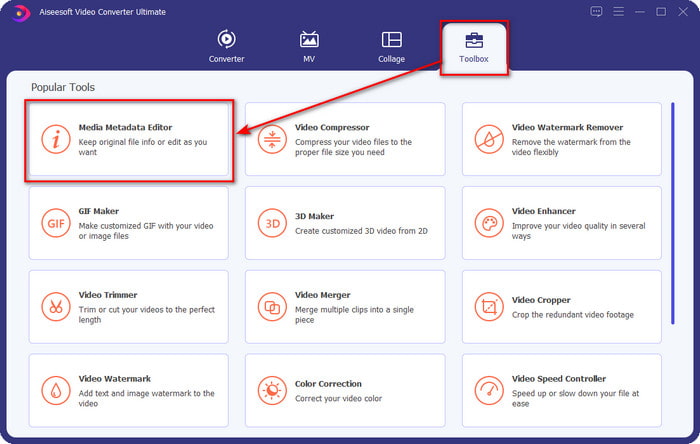
Step 2. Once you've opened the tool, you must go to the Toolbox section, look for the Media Metadata Editor, and hit it.
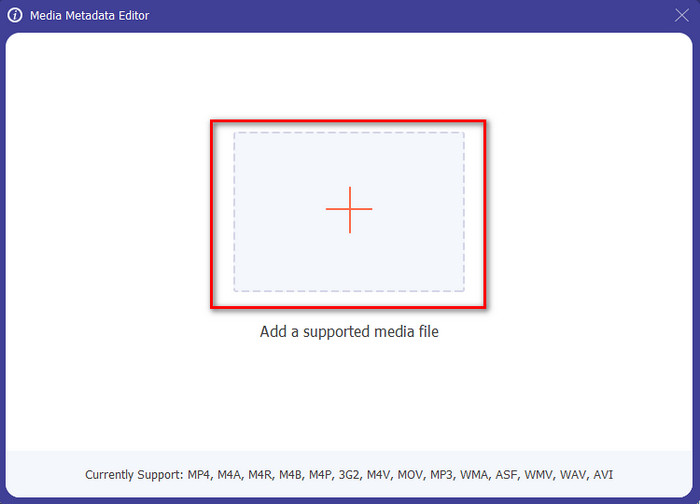
Step 3. After you click it, a new window will show, then click the + icon to upload the media file you want. Find the media file on the folder that will show, click the file, and press Open to insert it.
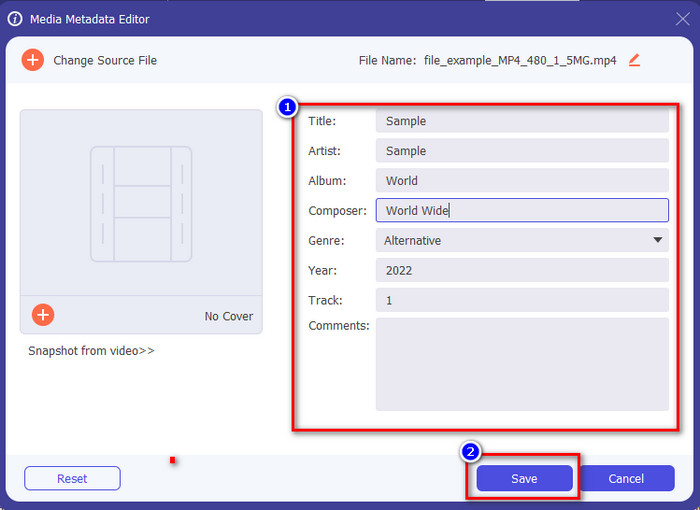
Step 4. This time you can now extract or remove the metadata you don't want to include on your file, but you can also change the metadata by filling out the text box. After doing all of this, click Save to apply the adjustment you've made on the file's metadata. Isn't it easy? Well, we already knew that this tool is easy to use, so try it out!
Bahagian 2. 4 Alat Pengekstrak Metadata Teratas Tersedia di Web
Sebelum kami memperkenalkan alternatif untuk mengekstrak metadata pada fail anda, anda mesti tahu bahawa semua pengekstrak yang seterusnya memerlukan sambungan Internet untuk digunakan atau diakses. Jadi, jika anda mempunyai sambungan yang tidak stabil, alat ini mungkin bukan yang terbaik untuk mengekstrak metadata. Tetapi jika anda ingin mengetahui empat penyingkiran metadata teratas, anda boleh membaca butiran berikut di bawah.
Teratas 1. Folder Jenama – Pengekstrak Metadata
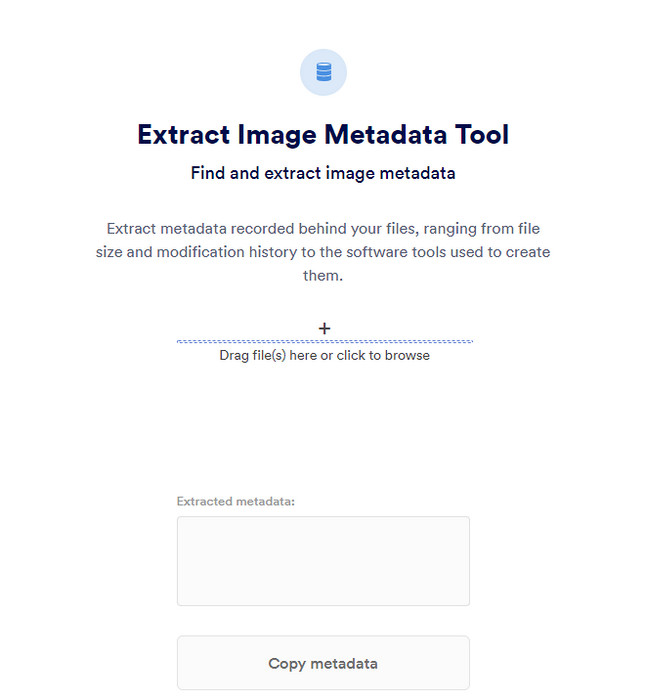
Suppose you want to use a metadata extractor that is free online, then Brand Folder – Metadata Extractor can offer this for you. This extractor online is the best choice for free, removing the data in your image or PDF, and after you extract it, you can copy it to your clipboard. Also, the web tool offers several functions you will need regarding your file. Although it is free to access, there is a drawback to using this tool; first, you can only extract a photo or PDF data 5 times a day; after that, you can't use it again.
Kelebihan
- Alat akses percuma di web.
- Mudah digunakan walaupun anda bukan pakar dalam mengekstrak data.
- Ia secara automatik mengekstrak data pada imej dan fail dengan mudah.
Keburukan
- Anda hanya boleh menggunakannya lima kali sehari.
- Ia tidak boleh mengekstrak metadata video kerana ia tidak disokong.
- Kadangkala anda tidak boleh menggunakan alat tersebut kerana sambungan internet yang lemah.
2 Teratas. EXIF-Viewer
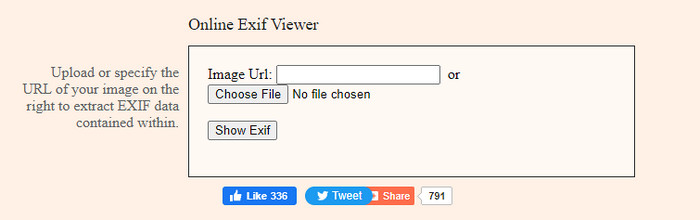
Another powerful metadata extractor online is the EXIF-Viewer. This tool allows you to view, remove, and edit your metadata on your media file for free. Although the GUI looks terrible, the tool's efficiency is great compared to the first tool on the list. However, if you access the tool, your connection isn't secured, and some might steal your information if you use this tool, so beware of the file you upload here.
Kelebihan
- Ia menyokong pelbagai jenis format fail media.
- Ia mempunyai GUI yang mudah.
- Akses alat secara percuma di web anda.
Keburukan
- Sambungan tidak terjamin sebaik sahaja anda mengaksesnya.
- Alat web mengambil lebih banyak masa untuk memuatkan metadata.
- Iklan ada di laman web.
Top 3. EXIFMeta
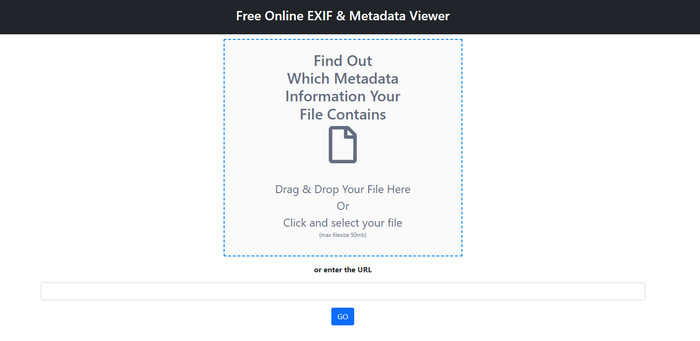
EXIFMeta is another metadata extractor example on the web you can use to show the hidden data on your files. The webtool also supports different media files you can upload, such as images, video, audio, and documents. Suppose you use this tool; you can see the basic information on your media file. Even though the webtool does offer you many things you can do on your metadata, the performance of this tool isn't as efficient as the other. In addition to that, you must make sure that your media file is less than 50MB to upload the file on the tool.
Kelebihan
- Anda boleh memuat naik fail media yang berbeza dengan mudah di sini.
- Ia mempunyai GUI yang lebih baik daripada alat web yang lain.
- Lihat metadata terbenam pada fail media anda dengan bantuan alat ini.
Keburukan
- Anda terhad untuk memuat naik fail video yang berukuran di bawah 50MB.
- Kadangkala ia tidak berfungsi dengan baik jika anda ingin mengekstrak metadata.
4 Teratas. Alat pengekodan – Metadata EXIF
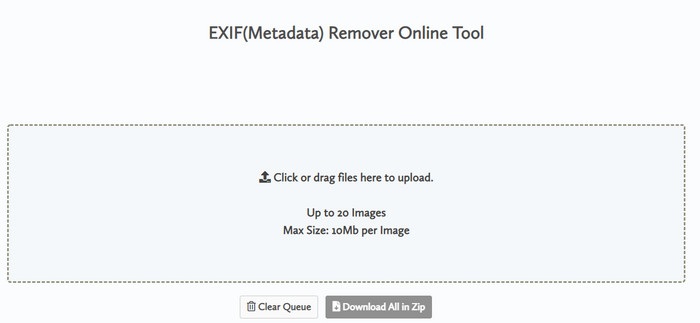
With Coding tools – EXIF Metadata, you can quickly remove the metadata on your images. This metadata extractor is free to use on the web, which means you can use the tool as long as you have an internet connection, like the other extractor above. Unlike the other web tool, this tool lets you insert multiple files and remove the metadata simultaneously. Although the web tool offers you the best extracting features, uploading the file will take time if its size is large and your network is slow.
Kelebihan
- Ia selamat untuk diakses pada penyemak imbas kegemaran anda.
- GUI yang ringkas dan mudah difahami.
- Tiada iklan pada antara muka web.
Keburukan
- Ia menyimpan fail imej anda selama 1 jam sebelum memadamkannya.
- Selalunya, apabila memuat naik, ia gagal.
- Terdapat had pada saiz fail yang anda boleh muat naik.
Bahagian 3. Soalan Lazim tentang Pengekstrak Metadata
Bolehkah saya menambah metadata pada fail saya?
Anda boleh membaca langkah yang kami sediakan pada alat muktamad untuk menambah metadata pada mana-mana fail dengan jayanya.
Bolehkah seseorang melihat metadata saya?
It is sad to say, but yes, if you post the media file on the internet, someone can see the metadata on your file. With the metadata, someone can know information about the images and other personal information such as location, time, data, a device used, and many more.
Mengapa saya perlu mengekstrak metadata?
Banyak yang mungkin berlaku, tetapi kami mengekstrak metadata pada fail kerana kami tidak mahu seseorang menceroboh privasi kami. Walaupun metadata mempunyai sisi yang baik, ingat bahawa ia juga mempunyai kelemahan. Jadi, berhati-hati bahawa metadata boleh membantu anda mengetahui maklumat tentang fail, tetapi ia juga boleh digunakan untuk mengekstrak maklumat tentang fail oleh seseorang.
Kesimpulannya
The metadata extractor we present in this article performs a great job extracting the metadata on the media file you have. Although you remove or edit the metadata, you can still view the media file without corrupting it. As we researched more about the tool's differences, we found out that the FVC Video Converter Ultimate is the ultimate aid on this task. Whether you are a pro or not, you can easily wipe out or change the metadata a few clicks away. So, if you don't have the tool to use, we strongly recommend using the ultimate tool to take this job and finish it flawlessly.
-
 4 daripada Pemapar Metadata Terbaik Dalam Talian & Luar Talian [Dikemas kini 2025]
 Bolehkah saya menyemak metadata fail saya? Ya, anda boleh, dengan bantuan siaran ini kami akan memperkenalkan kepada anda penonton metadata berbeza yang boleh anda gunakan.
-
 5 Editor Metadata Video Teratas untuk 2025 [Ulasan Tanpa Berat Badan]
 Adakah anda mahu melihat metadata video anda? Jika ya, baca butiran di bawah untuk memahami topik sepenuhnya dan mengetahui alat yang paling sesuai untuk anda.
-
 7 Editor Tag Muzik Popular pada Windows, Mac dan Peranti Mudah Alih
 Teg muzik popular untuk digunakan untuk susunan muzik dalam pustaka anda mengikut data di dalamnya. Bagaimana jika anda ingin mengubahnya? Baca butiran di bawah untuk mengetahui lebih lanjut.
