


 Video Converter Ultimate
 Perakam Skrin
 Pembaikan Video
 Muat Turun Selamat
Penggabungan Video Teratas Alternatif Dalam Talian dan Luar Talian untuk Menggabungkan Video
Dengan kemunculan alat penggabung video dalam talian, proses menggabungkan video telah menjadi lebih mudah dan boleh diakses berbanding sebelum ini. Alat-alat ini menawarkan pelbagai ciri, daripada antara muka seret dan lepas yang ringkas hinggalah ke keupayaan penyuntingan yang lebih maju. Dalam artikel ini, kami akan membincangkan beberapa alat penggabung video dalam talian terbaik yang tersedia untuk menggabungkan video dalam talian secara percuma dan menyediakan panduan langkah demi langkah tentang cara menggunakannya. Sama ada anda seorang pemula atau penyunting video berpengalaman, anda akan dapat menghasilkan video yang lancar dan kelihatan profesional dalam masa yang singkat!

Bahagian 1. 5 Penggabungan Video Teratas Dalam Talian
1. WeVideo
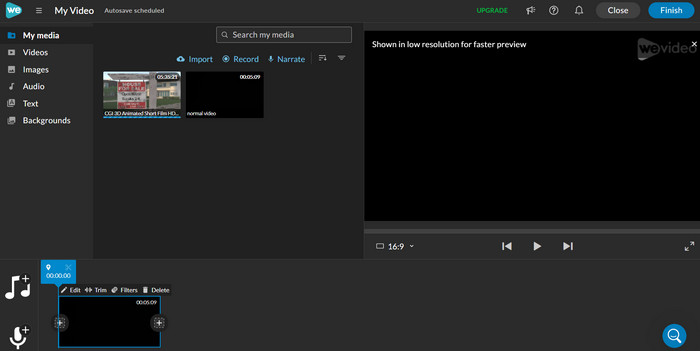
WeVideo ialah platform penyuntingan video dalam talian yang popular yang menawarkan pelbagai ciri untuk membantu anda mencipta video yang kelihatan profesional. Salah satu keupayaan utamanya ialah keupayaannya untuk menggabungkan berbilang fail video ke dalam satu video. Ciri ini membolehkan anda mencipta video yang lebih panjang dan lebih padat yang menceritakan kisah yang lengkap.
Terdapat beberapa kelebihan untuk menggunakan keupayaan penggabungan video WeVideo. Untuk satu, ia memudahkan untuk menggabungkan berbilang video ke dalam satu fail, menjimatkan masa dan usaha anda. Selain itu, alat penyuntingan program membolehkan anda menambah peralihan dan kesan antara klip video anda, memberikan video gabungan anda rupa yang digilap dan profesional.
Kelebihan
- Akses berasaskan awan kepada fail WeVideo
- Ciri kerjasama untuk berbilang pengguna
- Peralihan dan kesan
Keburukan
- Versi percuma terhad
- Keupayaan penyuntingan terhad
Ikuti panduan ringkas ini untuk mengetahui cara menggabungkan video dalam talian dengan WeVideo:
Langkah 1. Pergi ke laman web WeVideo dan daftar sebuah akaun. Setelah anda mendaftar, klik butang Create New Project pada halaman utama untuk mula.
Langkah 2. Untuk menambah video yang ingin anda gabungkan, klik butang Media, kemudian klik butang Upload untuk memilih video yang ingin anda gabungkan. Anda juga boleh menyeret dan melepaskan video anda terus ke dalam pustaka media.
Langkah 3. Klik dan seret setiap video dari pustaka media ke garis masa di bahagian bawah skrin.
Langkah 4. Susun video mengikut turutan yang anda mahu ia muncul dalam video gabungan.
2. FlexClip
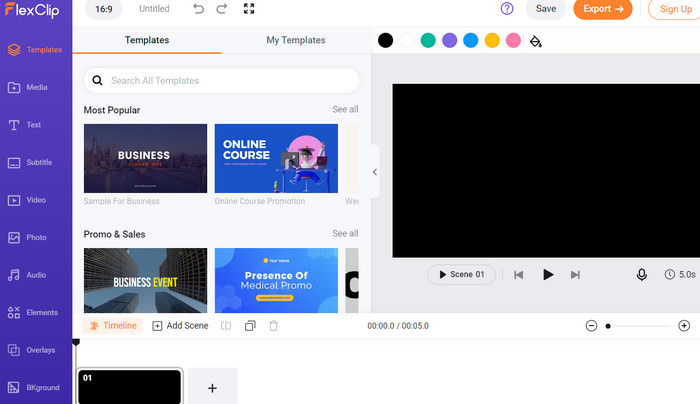
Satu lagi penggabung video dalam talian ialah FlexClip. Dengan antara muka mesra pengguna FlexClip dan rangkaian alat penyuntingan, anda boleh menggabungkan video dan mencipta video yang digilap dan kelihatan profesional dalam beberapa langkah mudah sahaja. Ciri penggabungannya menjadikannya bebas kerumitan untuk menggabungkan berbilang klip video ke dalam satu fail tunggal, menjimatkan masa dan usaha. Mungkin anda ingin mengeksport fail gabungan anda dalam pelbagai format dan resolusi. Itu juga boleh dilakukan dengan program ini.
Kelebihan
- Sokong apl mudah alih.
- Kelajuan rendering yang pantas.
- Sokongan pengguna.
Keburukan
- Pilihan penyesuaian terhad.
- Saiz fail adalah terhad.
Ketahui cara menggabungkan video dalam talian secara percuma tanpa tera air menggunakan FlexClip.
Langkah 1. Pergi ke laman web FlexClip dan daftar akaun percuma. Klik butang Create New pada papan pemuka dan pilih pilihan Storyboard.
Langkah 2. Klik butang Plus untuk menambah video pertama yang ingin anda gabungkan. Anda boleh memilih untuk memuat naik video dari komputer anda atau memilih video daripada pustaka media FlexClip.
Langkah 3. Setelah anda menambah video pertama, seret ia ke garis masa papan cerita (storyboard).
Langkah 4. Klik butang Plus sekali lagi untuk menambah video kedua yang ingin anda gabungkan. Sekali lagi, anda boleh memilih untuk memuat naik video atau memilih satu daripada pustaka media FlexClip. Seret video kedua ke garis masa, letakkannya selepas video pertama.
Langkah 5. Untuk menggabungkan video, klik butang Export di bahagian kanan atas skrin.
3. Clideo
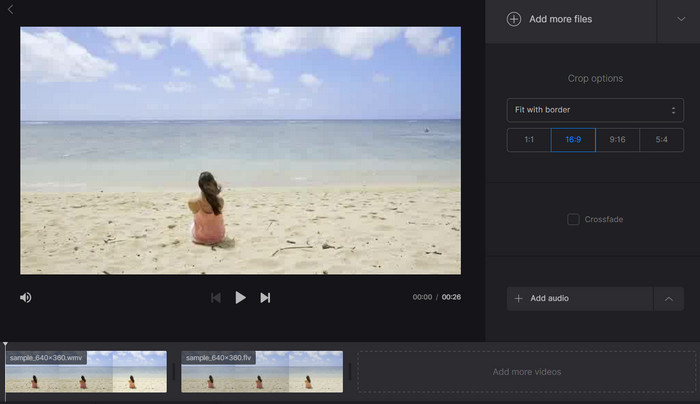
Dengan Clideo, anda boleh menambah trek audio, kesan khas dan banyak lagi untuk menghasilkan video yang kemas dan kelihatan profesional. Selain itu, Clideo menyokong pelbagai format fail video popular, memastikan video gabungan anda serasi dengan pelbagai peranti dan platform. Bukan itu sahaja! Clideo juga ialah platform berasaskan awan, yang bermakna anda boleh mengakses video gabungan anda dari mana-mana sahaja selagi ada sambungan internet.
Kelebihan
- Antara muka mesra pengguna.
- Serasi dengan pelbagai format video.
Keburukan
- Membenarkan untuk menyimpan video yang digabungkan untuk masa yang terhad.
- Fungsi video eksport adalah terhad apabila menggunakan versi percuma.
Ketahui lebih lanjut tentang program ini dengan mengikuti langkah-langkah di bawah:
Langkah 1. Pergi ke laman web Clideo dan klik pilihan Merge Video pada halaman utama.
Langkah 2. Klik butang Choose files dan pilih video yang ingin anda gabungkan dari komputer atau peranti anda. Sebagai alternatif, anda boleh menyeret dan melepaskan video ke kawasan muat naik.
Langkah 3. Susun turutan video: Anda boleh menukar susunan video dengan menyeret dan melepaskan video mengikut urutan yang dikehendaki. Klik butang Merge untuk memulakan proses.
Langkah 4. Tunggu sehingga video digabungkan. Ini mungkin mengambil masa beberapa minit, bergantung pada tempoh video dan kelajuan internet.
4. Kapwing
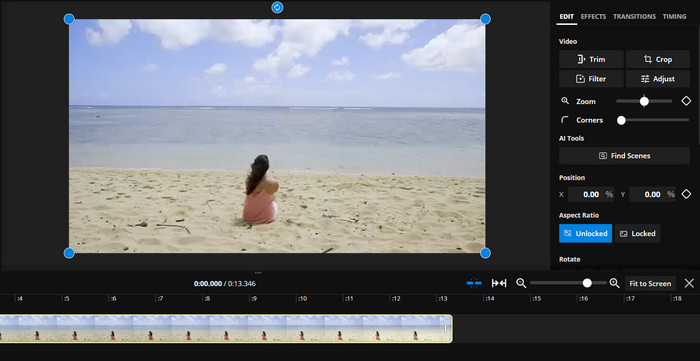
Kapwing ialah alat penyuntingan video dalam talian yang semakin popular kerana antara mukanya yang ringkas dan mesra pengguna. Anda boleh memuat naik video anda dengan mudah, menyusunnya mengikut urutan yang dikehendaki, dan menambah peralihan antara setiap klip untuk menghasilkan produk akhir yang lancar dan kemas. Anda juga boleh menambah teks atas (text overlay), muzik dan elemen kreatif lain pada video gabungan anda untuk menjadikannya lebih menarik dan menghiburkan.
Kelebihan
- Ciri penyuntingan serba boleh.
- Masa rendering yang cepat.
Keburukan
- Kawalan terhad ke atas kualiti video.
- Tiada ciri lanjutan.
Lihatlah cara jahitan video dalam talian percuma ini berfungsi melalui panduannya di bawah:
Langkah 1. Pergi ke laman web Kapwing dan klik Start Editing.
Langkah 2. Di studio Kapwing, klik Upload untuk memuat naik video yang ingin anda gabungkan.
Langkah 3. Setelah video anda dimuat naik, seret dan lepaskan video ke atas kanvas mengikut urutan yang dikehendaki.
Langkah 4. Gunakan alat Trim untuk memotong mana-mana bahagian video yang tidak diingini.
Langkah 5. Klik Timeline untuk menambah peralihan antara video. Pilih kesan peralihan daripada pilihan yang disediakan dan laraskan tempohnya jika perlu.
Langkah 6. Setelah anda berpuas hati dengan video gabungan anda, klik Export untuk memproses dan memuat turun video tersebut.
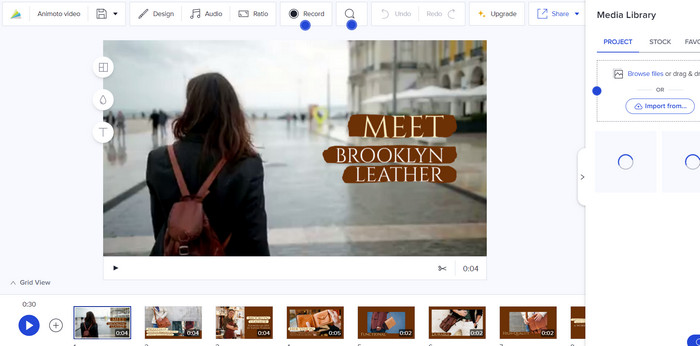
5. Animoto
Animoto ialah program penciptaan video berasaskan awan yang memudahkan pengguna mencipta video berkualiti tinggi dengan usaha yang minimum. Animoto juga menawarkan pelbagai templat dan tema untuk dipilih, menjadikannya mudah untuk membuat video yang sepadan dengan jenama atau gaya anda. Anda juga boleh menyesuaikan video anda dengan teks, muzik dan elemen kreatif lain untuk menyerlahkannya.
Kelebihan
- Ia menawarkan tema dan templat.
- Penyepaduan media sosial.
Keburukan
- Panjang video terhad.
- Kawalan ke atas peralihan video adalah terhad.
Berikut ialah langkah-langkah untuk menggabungkan 2 video dalam talian dengan Animoto:
Langkah 1. Log masuk ke akaun Animoto anda dan klik Create untuk memulakan projek baharu. Pilih templat atau mulakan dengan kanvas kosong.
Langkah 2. Muat naik video anda ke dalam projek. Seret dan lepaskan video anda ke garis masa mengikut turutan yang anda mahu ia dipaparkan.
Langkah 3. Potong (trim) video jika perlu untuk memenuhi panjang yang dikehendaki. Tambah teks, muzik dan elemen kreatif lain untuk memperkayakan montaj.
Langkah 4. Pratonton video dan buat sebarang pelarasan yang perlu. Setelah anda berpuas hati dengan video tersebut, klik Produce untuk memproses video akhir.
Bahagian 2. Penggabungan Video Terbaik Luar Talian
Fungsi penggabungan dalam FVC Video Converter Ultimate sangat intuitif dan mesra pengguna. Anda boleh dengan mudah menyeret dan melepaskan video yang ingin anda gabungkan ke dalam perisian, menyusunnya mengikut urutan yang dikehendaki, kemudian menggabungkannya menjadi satu fail video. Anda juga boleh menyesuaikan tetapan output video gabungan, seperti format video, resolusi dan bitrate.
Muat Turun PercumaUntuk Windows 7 atau lebih baharuMuat Turun Selamat
Muat Turun PercumaUntuk MacOS 10.7 atau lebih baharuMuat Turun Selamat
Langkah 1. Lancarkan FVC Video Converter
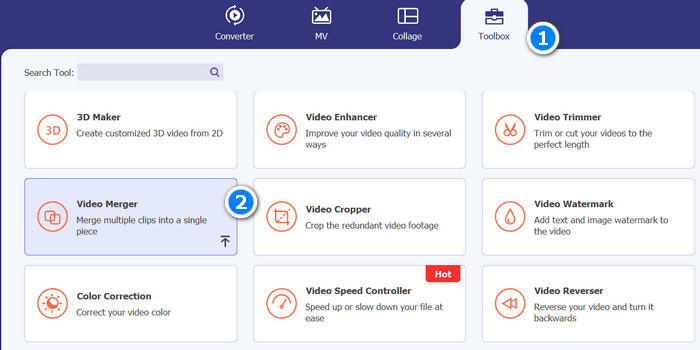
Mula-mula, buka kotak alat FVC Video Converter pada komputer anda, kemudian klik tab Toolbox untuk mengakses fungsi penggabungan video. Seterusnya, pilih Video Merger daripada menu.
Langkah 2. Tambah video untuk digabungkan
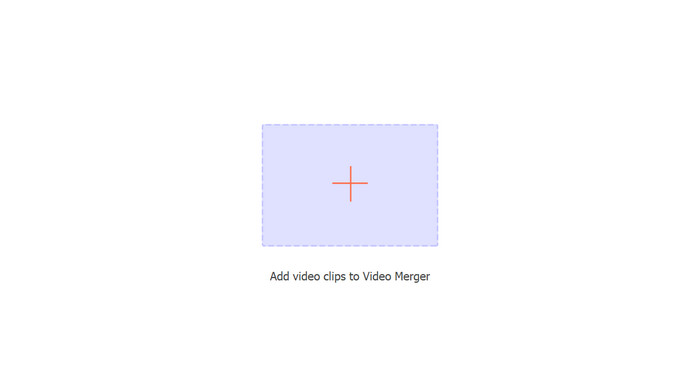
Seterusnya, klik butang Add untuk memilih video yang ingin anda gabungkan dari komputer anda atau seret dan lepaskan video ke antara muka alat tersebut.
Langkah 3. Susun urutan video
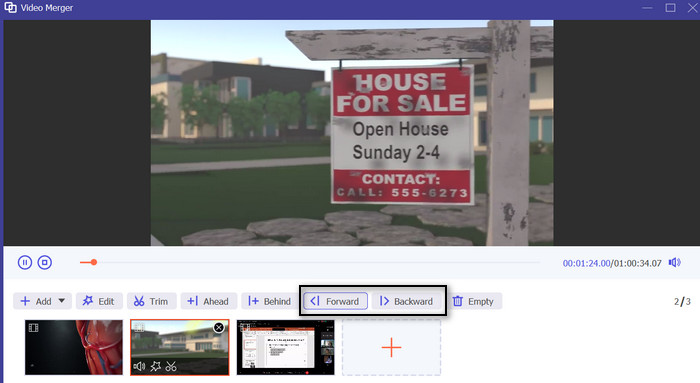
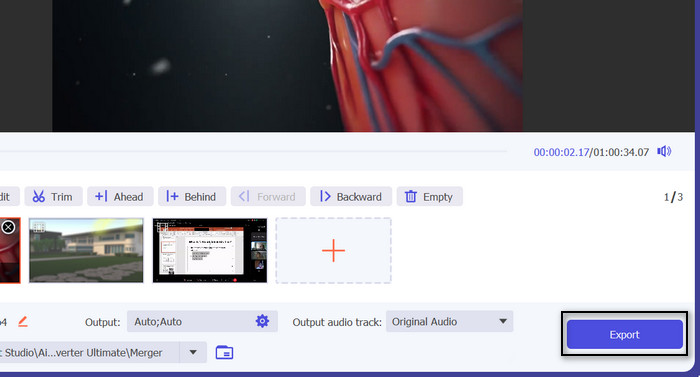
Selepas anda menambah video, anda boleh menyusunnya mengikut urutan yang anda mahu ia muncul dalam fail gabungan. Anda boleh menggunakan butang Forward dan Backward atau menyeret dan melepaskan video untuk menukar turutan.
Langkah 4. Mula menggabungkan video dan simpan output
Sekarang, klik butang Export untuk memulakan proses penggabungan. Alat tersebut akan menggabungkan video yang dipilih menjadi satu fail secara automatik, dan proses ini akan selesai dalam beberapa minit, bergantung pada saiz video.
Bahagian 3. Soalan Lazim tentang Penggabungan Video Dalam Talian
Mengapa saya perlu menggabungkan video?
Menggabungkan video boleh berguna untuk pelbagai sebab, seperti menggabungkan berbilang klip ke dalam satu video, mencipta montaj video atau membuat kompilasi video.
Adakah terdapat had kepada berapa banyak video yang boleh saya gabungkan dalam talian?
Kebanyakan alat penggabungan video dalam talian mempunyai had pada bilangan video yang boleh anda cantumkan sekaligus, serta jumlah saiz fail video yang digabungkan. Anda harus menyemak spesifikasi alat untuk melihat hadnya dan sama ada ia memenuhi keperluan anda.
Bolehkah saya menggabungkan video dengan format fail yang berbeza?
Ya, kebanyakan alat penggabungan video dalam talian menyokong pelbagai format fail, jadi anda boleh menggabungkan video pelbagai jenis. Walau bagaimanapun, adalah idea yang baik untuk menyemak format fail yang disokong sebelum anda memulakan proses penggabungan.
Kesimpulannya
Terdapat pelbagai alat penggabung video dalam talian yang tersedia, masing-masing dengan set ciri dan keupayaannya tersendiri. WeVideo, FlexClip, Clideo, Kapwing dan Animoto hanyalah beberapa alat popular yang ada, dan setiap alat menawarkan antara muka yang mudah digunakan serta panduan langkah demi langkah untuk memandu anda melalui proses penggabungan. Namun, jika anda ingin melakukannya secara luar talian, anda sentiasa boleh bergantung pada FVC Video Converter Ultimate.
-
 Cara Cemerlang tentang Cara Memotong Video Dalam Talian Dengan Mudah
 Memotong video ialah cara terbaik untuk membuat sorotan video. Jadi, siaran ini akan memberi anda kaedah untuk memangkas video dalam talian dengan mudah. Baca untuk mengetahui lebih lanjut.
-
 Semakan Pemutar Video Dalam Talian Terbaik dan Alternatif Luar Talian
 Sama ada anda perlu memutar video atas sebab peribadi atau profesional, pemutar video dalam talian ialah penyelesaian yang mudah dan boleh diakses. Semak mereka di sini untuk mengetahui lebih lanjut.
-
 8 Pembuang Tera Air Video Cemerlang Dalam Talian dan Luar Talian
 Jika anda sedang mencari perisian penghilang tera air video percuma terbaik yang boleh anda gunakan pada telefon Windows, Mac, iPhone dan Android anda, artikel ini adalah untuk anda.
