


 Video Converter Ultimate
 Perakam Skrin
 Pembaikan Video
6 Pengawal Kelajuan Video Terbaik untuk Windows/Mac/Android/iOS
Mempercepat atau memperlahankan video boleh mewujudkan ilusi yang menakjubkan jika anda sudah bosan menggunakan kesan khas biasa. Teknik penyuntingan video ini mudah tetapi berkesan. Apabila anda mencari di internet, terdapat banyak pilihan pengawal kelajuan yang berbeza di pasaran, dan kami tahu adalah sukar untuk membuat pilihan. Namun jika anda membaca artikel ini, kami akan mengulas aplikasi pengawal kelajuan yang boleh anda gunakan untuk menukar kelajuan main balik. Adakah anda berminat dengan aplikasi pengawal kelajuan yang terbaik? Jika begitu, teruskan membaca untuk mengetahui lebih lanjut tentang pengawal kelajuan video yang tersedia pada platform anda.

Bahagian 1. 6 Pengawal Kelajuan Video Teratas untuk Windows, Mac, Chrome, iOS & Android
Teratas 1. Video Converter Ultimate (Windows & Mac)
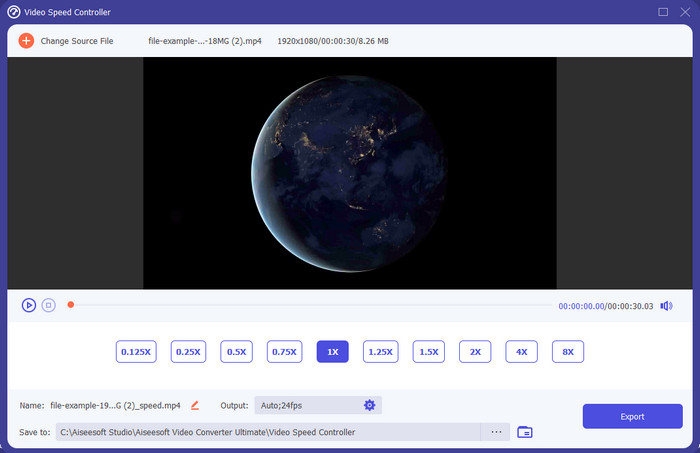
Adakah anda memerlukan pengawal kelajuan video yang sangat berkesan dan efisien untuk mempercepat dan memperlahankan video? Jika begitu, Video Converter Ultimate ialah bantuan untuk masalah seperti ini. Ia adalah alat yang paling mudah diakses yang boleh anda gunakan untuk menukar kelajuan video tanpa usaha, sama ada anda memerlukannya pada kelajuan tinggi atau dalam gerak perlahan. Walaupun anda menukar kelajuan, kualiti video asal akan kekal, tetapi pergerakan video tidak, kerana anda mengubah kelajuannya.
Selain itu, anda boleh melakukan banyak perkara seperti menukar, menggabungkan, memotong dan banyak lagi; pada asasnya, ia adalah alat semua-dalam-satu. Ingin mengetahui tawaran lain yang boleh anda miliki dengan aplikasi video mempercepatkan ini? Jika ya, baca ciri alat untuk mengetahui lebih lanjut, atau anda boleh memuat turun perisian pada desktop anda sekarang untuk mengujinya.

Video Converter Ultimate
5,689,200+ Muat Turun- Ia boleh menukar bingkai video ke atas atau ke bawah dengan tepat dalam sebarang format video, seperti MP4.
- Banyak ciri dan kesan penyuntingan video tersedia.
- Ia fleksibel pada semua platform seperti Windows atau macOS.
- Proses ultra-pantas menjadikan anda memuat turun atau mengeksport proses dilakukan dalam sekelip mata.
- Mengeksport atau memuat turun video yang anda edit tidak akan mempunyai tera air.
Muat Turun PercumaUntuk Windows 7 atau lebih baharuMuat Turun Selamat
Muat Turun PercumaUntuk MacOS 10.7 atau lebih baharuMuat Turun Selamat
Kelebihan
- Tukar bingkai setiap bingkai video walaupun anda seorang profesional atau tidak.
- Pilihan main balik video yang mudah difahami.
- Keupayaan perkongsian media sosial yang luar biasa.
- Ia percuma untuk dimuat turun, tetapi ia menawarkan pembelian dalam apl.
Keburukan
- Perlu membeli jika anda ingin mempunyai keupayaan penuh alat tersebut.
Top 2. Clipchamp (Windows)
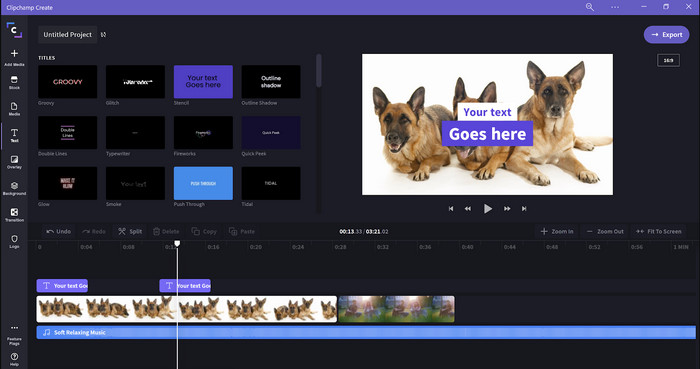
Clipchamp ialah penyunting kelajuan video yang boleh anda gunakan pada Windows. Alat ini menyediakan keluk pembelajaran yang tidak terlalu sukar, jadi anda mungkin ingin mencubanya jika anda baru dalam penyuntingan. Ia juga menyokong beberapa ciri yang mungkin anda ingin gunakan. Namun, kekurangan utama alat ini ialah kualiti output video. Anda hanya boleh mengeksport fail dalam kualiti video 480, yang agak rendah berbanding alat percuma lain. Tetapi jika anda memerlukan alat yang boleh mengeksport 720 atau 1080, anda boleh melanggannya dengan membayar yuran langganan. Selain itu, alat ini bagus, tetapi masih belum setanding dengan penyunting pertama.
Kelebihan
- GUI ringkas dan mudah digunakan.
- Ia menawarkan ciri tambahan untuk penyuntingan.
- Kawal main balik video dengan mudah.
Keburukan
- Untuk versi percuma, output akhir ialah 480.
- Kadang-kadang alat menjadi tidak fleksibel dengan tugas itu.
3 Teratas. Pengawal Kelajuan Video (Chrome)

Mahukan sambungan pengawal kelajuan video pada Chrome? Maka anda boleh menggunakan Video Speed Controller. Alat ini tersedia pada mana‑mana pelayar Chrome untuk mempercepat atau memperlahankan video yang anda tonton. Ia mudah digunakan oleh semua orang, dan juga selamat diakses kerana ia ialah sambungan untuk Chrome. Namun, jika anda mengeksport video, kelajuan main balik akan kekal sama walaupun anda mengubahnya. Ini kerana alat tersebut hanya berfungsi pada video yang sedang anda tonton dalam Chrome dan bukan di luar itu. Maklumat tambahan, sebaik sahaja anda mempercepat video dengan sambungan ini, semua video yang anda mainkan di Chrome akan berada pada kelajuan yang sama.
Kelebihan
- Pengawal kelajuan pada titik yang boleh anda gunakan pada Chrome.
- Mampu memundurkan atau menetapkan semula kelajuan main video pada Chrome dengan mudah.
- Ia menyokong arahan kekunci pendek.
Keburukan
- Panel pengawal video tidak kelihatan.
- Anda tidak boleh menukar kelajuan video di luar Chrome.
4 Teratas. Mempercepatkan untuk Safari (iOS & Mac)
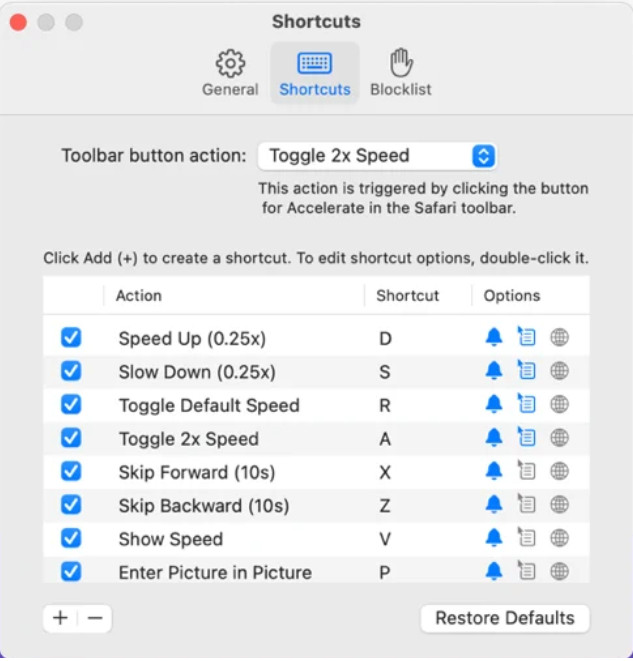
Perlu pengawal kelajuan video pada Safari? Accelerate for Safari tersedia pada setiap Safari pada peranti Apple. Alat ini boleh menukar main balik video bagi setiap video HTML 5 di Safari. Seperti sambungan Chrome di atas, ia terhad pada setiap peranti Apple. Jadi, jika anda pengguna Apple, anda mungkin ingin menggunakan sambungan pengawal kelajuan ini untuk mempercepat atau memperlahankan video. Selain itu, anda boleh menggunakan kekunci papan kekunci untuk mengawal alat ini bagi menukar main balik video.
Kelebihan
- Ia selamat digunakan dalam semua Safari.
- Ia menyokong Picture-in-Picture dan AirPlay juga.
- Kekunci pintasan tersedia untuk mengawal alat.
Keburukan
- Ia tidak menyokong pelayar web lain selain Safari.
- Terhad kepada video HTML 5.
5 Teratas. Perlahan Cepat Perlahan - Kawal Kelajuan Video Anda (iOS)
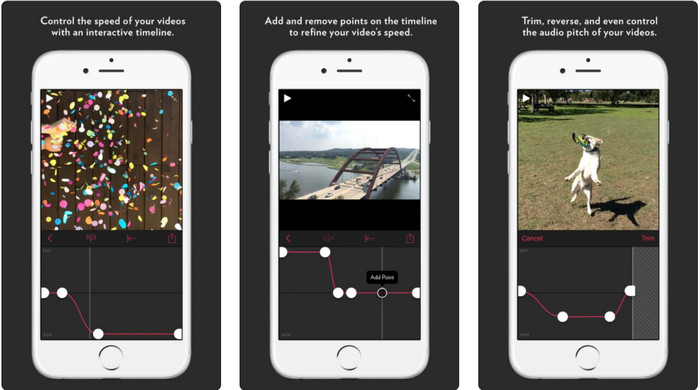
Untuk pengawal kelajuan video pada iPhone, anda boleh menggunakan Slow Fast Slow. Alat ini membantu pengguna iOS memanipulasi kelajuan main balik video dengan segera; ia berfungsi dengan sangat baik untuk gerak perlahan. Selain itu, ia mempunyai garis masa terbina dalam yang sangat interaktif untuk melaras kelajuan. Ia juga menyokong ciri lain seperti perubahan pic dan pembalikan klip. Namun, alat ini memerlukan sistem iOS 10, jadi anda tidak boleh menggunakannya jika sistem anda bukan 10.
Kelebihan
- Ia menyokong ciri lain untuk video anda.
- Mesra pengguna.
- Boleh memperlahankan video sehingga 1/16 kelajuan.
Keburukan
- Ia tidak menyokong output 4k dan memilih FPS.
- Ia tidak berfungsi pada beberapa peranti iOS baharu.
6 Teratas. Pengawal Kelajuan Video Pro (Android)
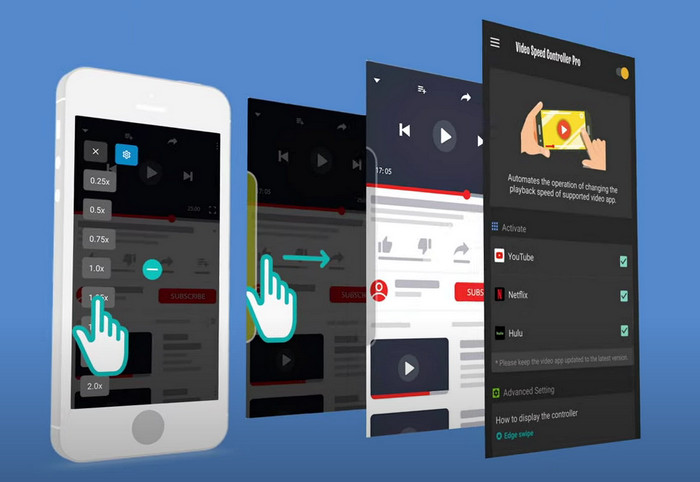
Jika anda memerlukan pengawal kelajuan video pada Android, maka teka apa? Anda boleh menggunakan Video Speed Controller Pro dengan memasangnya daripada Playstore anda. Dengan bantuan alat ini, anda boleh mempercepat mana‑mana video yang dimainkan pada Android anda dengan mudah. Selain itu, alat ini seperti sambungan pengawal kelajuan pada Android. Walaupun alat ini boleh mempercepat video anda, kelajuan maksimum yang boleh dicapai hanyalah 2x. Namun, jika anda perlu mempercepat tontonan video, anda boleh menggunakannya pada Youtube, Netflix dan platform video lain di Android.
Kelebihan
- Ia adalah mudah untuk digunakan.
- Alat itu sendiri adalah tepat.
- Bar menu tersedia untuk mendedahkan pilihan pada main balik anda.
Keburukan
- Pilihan kelajuan main balik adalah terhad.
- Kadang-kadang ia tidak berfungsi dengan baik.
Bahagian 2. Carta Perbandingan
| Ciri-ciri | Video Converter Ultimate (Windows & Mac) | Clipchamp (Windows) | Pengawal Kelajuan Video (Chrome) | Mempercepatkan untuk Safari (iOS & Mac) | Perlahan Cepat Perlahan – Kawal Kelajuan Video Anda (iOS) | Pengawal Kelajuan Video Pro (Android) |
| Kawalan Kelajuan |  | | | | | |
| Output Video Berkualiti Tinggi | |  | | | | |
| Ciri Penyuntingan | | | | | | |
| Proses Pengeksportan Sangat Pantas | | | | | | |
Bahagian 3. Soalan Lazim tentang Pengawal Kelajuan Video
Mengapa saya perlu menggunakan pengawal kelajuan?
Dalam sesetengah kes, anda perlu menonton video pada kelajuan tinggi atau perlahan. Contoh yang bagus untuk menonton video yang dipercepatkan adalah untuk menyelesaikan video yang anda tonton dengan serta-merta, atau sama. Mempercepatkan video adalah bantuan yang besar kepada pengguna ini. Walaupun slow-mo, ini biasanya digunakan pada tayangan semula segera sukan laju seperti perlumbaan, bola keranjang, bola tampar dan banyak lagi. Sama ada daripada kedua-duanya, anda memerlukan pengawal kelajuan yang berkesan untuk mengatasi kelajuan biasa kepada keperluan anda secara manual.
Bolehkah saya mempercepatkan video di Tiktok?
Ya, anda boleh merakam video dengan kelajuan tinggi di Tiktok. Namun, anda tidak boleh menonton video di Tiktok pada kelajuan tinggi. Jadi, jika anda memerlukan bantuan alat pemecut yang sesuai untuk anda, klik dan baca artikel ini untuk mengetahui cara mempercepat video di Tiktok.
Bagaimana untuk memperlahankan video?
Berbeza dengan mempercepat video, anda boleh menghasilkan gerak perlahan pada video dengan bantuan penyunting yang tersedia di pasaran. Alat manakah yang patut anda gunakan? Jangan risau, kerana kami memperkenalkan perisian video gerak perlahan terbaik yang boleh anda gunakan untuk membantu mencipta kesan gerak perlahan. Jika anda perlu tahu lebih lanjut, anda boleh klik pautan ini.
Kesimpulannya
Hari ini, anda kini penuh dengan pengetahuan tentang aplikasi berbayar dan percuma untuk mempercepat video pada pelbagai platform. Pengawal kelajuan menyediakan set keupayaan unik untuk membantu pelbagai pengguna mempercepat video. Jika kita membacanya dengan teliti, kita dapat lihat bahawa FVC Video Converter Ultimate menyediakan segala‑galanya untuk pengguna yang memerlukannya. Jadi jika anda ingin memuat turun alat utama ini pada desktop anda, anda boleh klik butang muat turun dan nikmati pengalaman menyeluruh menggunakan alat tersebut.
-
 Cara Mempercepatkan Video dengan 5 Perisian Teratas Tersedia [Windows/Mac/Linux]
 Adakah anda ingin tahu bagaimana untuk mempercepatkan video dengan mudah? Kemudian baca tulisan ini sambil kami menerangkan cara mempercepatkan dengan berkesan pada Windows, Mac dan Linux.
-
 Cara Paling Mudah tentang Cara Mempercepatkan Video pada Peranti Android Anda [2021]
 Adakah anda tahu bahawa anda boleh mempercepatkan video pada Android anda? Jadi, jika anda ingin mengetahui cara mempercepatkan video pada telefon Android anda, baca tulisan ini.
-
 Petua Cemerlang 2021: Cara Mempercepatkan Video pada iMovie
 Rakan anda mencadangkan iMovie untuk membantu anda dengan masalah anda tentang cara mempercepatkan video menggunakan sistem pengendalian iOS, tetapi anda tidak tahu apa yang perlu dilakukan? Lihat lebih lanjut mengenai perkara ini sambil anda membaca lebih lanjut melalui artikel ini.
