


 Video Converter Ultimate
 Perakam Skrin
 Pembaikan Video
Editor Metadata VLC & Alternatif Terbaiknya untuk Mengedit Metadata dengan Mudah
VLC Media Player became one of the known video players you can download on any device such as Windows, Mac, Android, and iOS. With its supported formats and codecs, playing videos here became as swiftly as it is. In addition to its ability to play multiple formats, this tool has various features and functions that you would love to use. One of them is editing metadata. Keep reading this article to know more about the VLC metadata editor and its other competitive alternatives.

Bahagian 1. Semakan Editor Metadata VLC/Kebaikan & Keburukan/ Alternatif Terbaik untuk Editor Metadata VLC
Pengenalan kepada Fungsi Pengeditan Metadata Pemain Media VLC
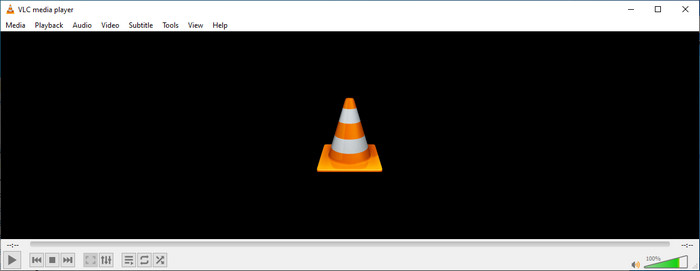
Tujuan utama editor metadata VLC bukanlah sebagai editor tetapi sebagai pemain. Alat ini memainkan format julat luas yang pemain media asli kami tidak disokong. Daripada memuat turun codec pada fail anda, alat ini menjadikan kerja itu bebas kerumitan dengan menambahkan fail dan menikmati menontonnya. Selepas keluaran awalnya pada tahun 2001, pembangunnya menambah baik fungsi dan ciri pemain media keseluruhan untuk bersaing dengan perisian lain. Walaupun banyak ciri dan fungsi ditambahkan pada alat, ia masih tidak mencukupi untuk bersaing dengan editor metadata khusus yang lain.
Kebaikan dan keburukan
Sekarang kita mempunyai idea tentang keupayaan editor metadata VLC, mari lihat sama ada ia adalah editor teg yang ideal yang perlu anda gunakan. Jika anda ingin mengetahui lebih lanjut tentang editor metadata VLC pada Android, iOS, Windows & macOS, sebaiknya teruskan membaca kebaikan dan keburukannya.
Kelebihan
- Ia adalah perisian percuma yang bermaksud anda tidak perlu membeli alat untuk memuat turunnya.
- Ia menyokong format julat luas untuk mengedit metadata anda dengan mudah.
- Ia boleh mengoptimumkan main balik untuk video dan audio peranti pilihan anda.
- Boleh dilanjutkan dengan pemalam, jika boleh.
Keburukan
- Editor metadata video VLC bukanlah yang terbaik untuk mengedit metadata fail anda.
- Alat ini tidak dibuat untuk mengedit, jadi anda tidak boleh menganggapnya sebagai editor video profesional.
- Ranap dan pembekuan kerap berlaku semasa menggunakan perisian.
- Kemas kini yang lemah pada GUInya.
Walaupun ia bukan pilihan terbaik untuk mengedit metadata, kami masih percaya bahawa ini adalah pemain media terbaik yang boleh anda muat turun secara percuma, yang boleh mengatasi pemain media terbina dalam yang lain pada peranti anda. Butiran seterusnya akan membantu anda menentukan alternatif terbaik untuk mengedit teg daripada VLC.
Bahagian 2. 3 Alternatif Kompetitif & Terbaik untuk Editor Metadata VLC
Video Converter Ultimate
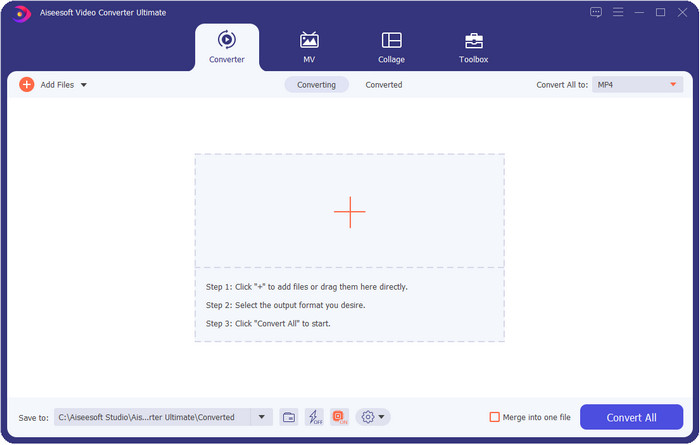
Video Converter Ultimate is the most competitive in editing the tags; it is better than what VLC metadata editor can offer. With this tool, you can easily manipulate all of the tags on your MP4, MOV, M4V, AVI, WMV on any 1000+ formats that you have. Adding the tags has never been easy for most of us, but if you use this tool, you can add the titles, artist name, album, comments, other information, and even images on the file as a part of metadata. Although you can do basic editing on tags while using VLC, it is not enough, and if you want to do more, you must choose the ultimate tool. To help you add the needed tags that the VLC or other metadata editor on the market can't provide on you effortlessly. If you want to know what you can get if you download the ultimate tool, we will write some of the features you can get with the tool.

Video Converter Ultimate
5,689,200+ Muat Turun- Ia boleh mengedit tag fail media anda seperti MP4, AVI, FLV, RMVB dan banyak lagi.
- Ia mempunyai proses penukaran ultra pantas dan pecutan perkakasan.
- Ciri dan fungsi lanjutan tambahan terdapat pada Toolbox.
- Ia menyokong penukaran kelompok untuk menyelesaikan tugas secara serentak
- Tersedia pada Windows & macOS untuk dimuat turun.
Muat Turun PercumaUntuk Windows 7 atau lebih baharuMuat Turun Selamat
Muat Turun PercumaUntuk MacOS 10.7 atau lebih baharuMuat Turun Selamat
MetaZ
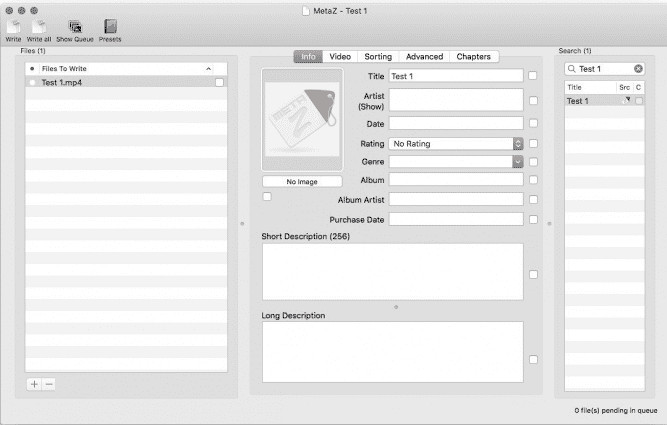
If you want to have a free VLC video metadata editor on Mac, then MetaZ is a tool you must use. This tool is a dedicated meta-tagger you can download on Mac, and its primary purpose is to add or edit tags to media files. Also, if you want to use this you can automatically search for the tags and add them if you have an internet connection. With this tool, you can also transfer the tags using the archive export feature that you can only use on MetaZ. Although the tool seems promising, the tool's compatibility with another os, such as on Windows, is a problem. In addition, it supports an average format, so before you use this, you must know that there are restrictions on adding files here. Other than that, there's nothing else problem using the tool.
Pengimbas Tag
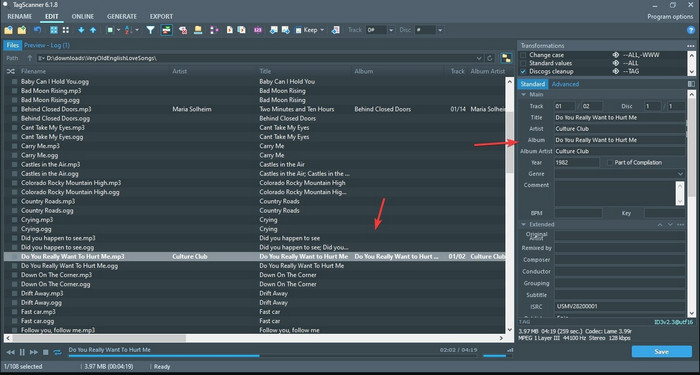
Tag Scanner is a better version of MKV metadata editor VLC. This tool can edit and organize the media file tags with ease. While using the tool, you will notice that it has a detailed GUI compared to VLC regarding editing the tags, which means you can add more details to your file's data. Like MetaZ, this tool can look for the tags you will need on your file by searching them on a different database. With the heavy interface it provides, using it is a bit different than a usual metadata editor, which means you will need to spend time to get the hang of it. Nevertheless, we can easily see that this tool is far better than VLC and other competitors, but it isn't as user-friendly as the others on the market.
Bahagian 3. Soalan Lazim tentang Editor Metadata VLC
Di manakah saya boleh memuat turun VLC?
Anda boleh memuat turun VLC rasmi di videolan.org. Pastikan anda memuat turunnya di laman web rasmi untuk mengelakkan keadaan seperti virus pada desktop anda.
Bolehkah saya mengedit video menggunakan VLC?
Well, yes, you can edit using VLC. However, it is not a professional editor that you will need for doing complicated video editing. If you are an aspirant vlogger or content creator and looking for the best video editor on Windows, click this link, but if you are a Mac user, then click this link to know the top video editor on Mac.
Bagaimana untuk membetulkan kelewatan audio pada VLC?
Click this link to showcase the best solution to fix the audio delay on VLC with detailed steps.
Kesimpulannya
VLC is a fantastic tool that you can have for free. With this tool, you can play any video and audio type or even edit their tags. But regarding editing tags on VLC, we can say that it is not as good as the other dedicated tag editor available on the market, and yet it is capable of doing it. If your task is editing or fixing the media file tags, VLC is a choice but not the best. So now, what should you do? Well, we list the best alternatives you can use to edit tags that are better than VLC, and one of them is the Video Converter Ultimate. Unlike the other alternatives and VLC metadata editor, this tool has many advanced features to offer, so download it now to have it all.
-
 Cara Mengedit & Membetulkan Metadata MP4 dengan Cara yang Sangat Bijak
 Adakah anda ingin tahu cara membetulkan metadata MP4? Dalam kes itu, baca keseluruhan kandungan artikel ini untuk mengetahui helah tentang cara membetulkan tag MP4 dengan mudah.
-
 4 Kaedah Terbaik untuk Membetulkan & Mengedit Metadata MP3 pada Windows dan Mac
 Ingin tahu rahsia mengedit metadata MP3 dengan mudah? Blog ini akan mengajar anda teknik yang berbeza dengan alatan berbeza yang anda akses dengan mudah.
-
 2 Cara Terbaik untuk Mengedit Metadata OGG yang Perlu Anda Cuba secara Percuma
 Perlu mengedit metadata OGG? Nah, anda boleh mengendalikan penyuntingan tag dengan mudah dengan menggunakan perisian yang betul. Jika anda tidak mempunyai satu membaca artikel ini adalah satu kemestian.
