


 Video Converter Ultimate
 Scherm opnemer
 Videoreparatie
Maak kennis met de 7 beste Volume Booster-apps die u op uw desktop en telefoons kunt gebruiken
Is het niet irritant als het volume van een video zo laag is dat er niets verandert, zelfs niet als je het volume op je apparaat helemaal opendraait? Er zijn verschillende redenen waarom het audiovolume laag kan zijn. In plaats van je te ergeren aan de video, kun je beter een booster gebruiken om je audio harder en helderder te maken. Vandaag is je geluksdag, want we presenteren verschillende volume-boosters waaruit je kunt kiezen. Alle tools die hier worden voorgesteld, zijn gebruikt door de auteur van dit artikel. Zo kunnen de feiten over de tools per platform dat je momenteel gebruikt duidelijk worden weergegeven. Laten we nu onze rondleiding beginnen langs de verschillende geluidsversterkers die je kunt gebruiken op Windows, Mac, iPhones en Android.

Deel 1. 4 van de beste volumeboosters voor Windows-pc, Mac en online
1.Video Converter Ultimate
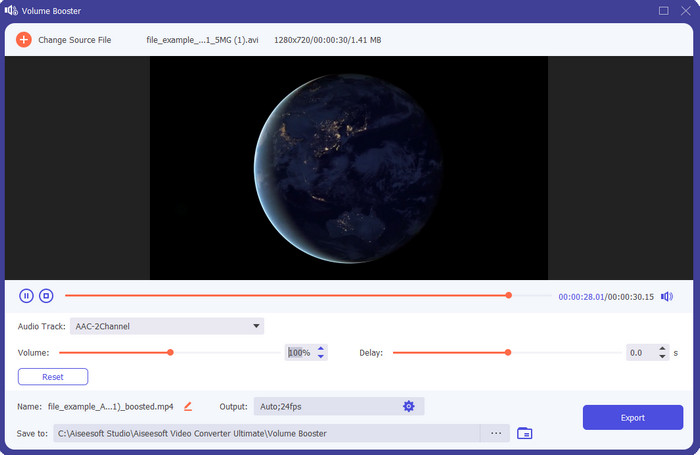
Als je op zoek bent naar de beste volume-booster app, dan is Video Converter Ultimate waarschijnlijk wat je nodig hebt. Deze tool kan de kwaliteit van je audio verbeteren zonder je luidsprekers te beschadigen. Dus als je het volume met deze tool aanpast, hoef je geen gekraak uit je speakers te verwachten. Bovendien kun je deze tool gebruiken om audio van lage kwaliteit te verbeteren. Zelfs als je geen professional bent, kun je nog steeds eenvoudig een audioboost uitvoeren met deze tool. En dat niet alleen, deze software biedt veel functies die je misschien handig vindt zodra je hem hebt gedownload. In tegenstelling tot andere audio-boosters in de lijst, biedt deze tool veel verschillende enhancers om je audio beter te laten klinken. Als je bovendien problemen hebt met audioverschuiving of vertraging, kun je deze tool daar ook voor gebruiken. Het is eerlijk gezegd de meest indrukwekkende tool in deze lijst als we alle tools met elkaar vergelijken. Dus als je een volle 8D- of 16D-audio-ervaring wilt, download deze tool dan meteen.
Gratis downloadVoor Windows 7 of nieuwerVeilige download
Gratis downloadVoor MacOS 10.7 of nieuwerVeilige download
Voordelen
- Voer automatisch de aanpassing van equalizers en voorinstellingen uit om uw werk gemakkelijker en beter te maken.
- De uiteindelijke uitvoer van de audio werd veel beter dan voorheen en zonder uw gehoor of zelfs de luidsprekers te beschadigen.
- Het is heel intuïtief dat zelfs gebruikers die geen ervaring hebben met boosten dit kunnen doen.
Nadelen
- Het is alleen beschikbaar op desktop en geen telefoonversie.
- Koop voordat je er toegang toe hebt, maar het is niet zo duur.
2.VLC-mediaspeler
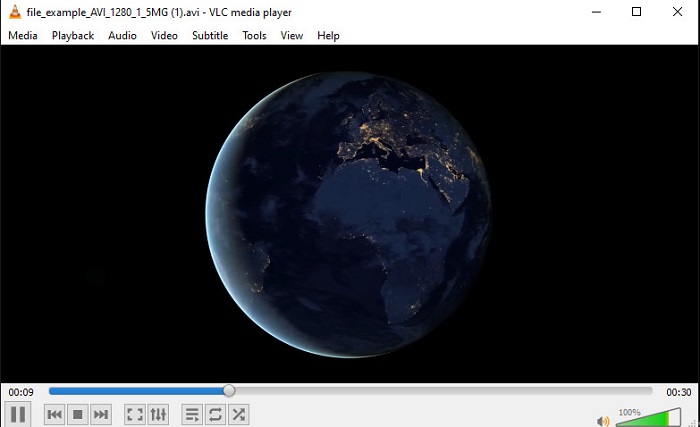
VLC Media Player is een van de beste mediaspelers die je op internet kunt downloaden. Deze tool heeft al een ingebouwde, gratis volume-booster in de interface en je kunt het volume tot 125% opvoeren als je dat wilt. Deze desktoptool houdt echter niet in de gaten hoe krachtig je luidsprekers zijn en wat ze aankunnen. Dat betekent dat als je het volume voortdurend op de maximale stand gebruikt, er op de lange duur een kans is op licht gekraak, vooral bij ingebouwde speakers. Maar deze tool is de enige app die hier wordt genoemd die zowel een booster als een speler in één is. Dus als je video’s wilt kijken en tegelijk het geluid wilt boosten, probeer dan deze tool. Hoewel hij het volume verhoogt, kan hij je geen uitstekende geluidskwaliteit garanderen, omdat je in feite alleen het volume versterkt.
Voordelen
- Ingebouwde audioversterker.
- Verhoog uw audio tot 125% om het luider te laten klinken.
- Gratis te downloaden op pc of Mac.
Nadelen
- De tool heeft geen ingebouwde equalizer om de kwaliteit van de audio te verbeteren.
- Het houdt niet bij hoe hard uw audio moet zijn.
Gerelateerd:
Hoe los je op dat VLC geen MKV-bestanden afspeelt
Hoe VLC te repareren als VLC geen dvd’s afspeelt
3. Boom 3D
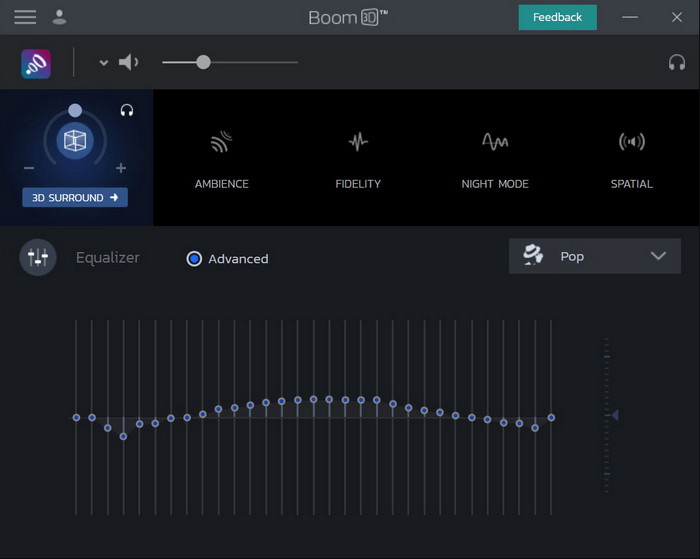
Boom 3D is de meest geavanceerde tool in de reeks audioverbetering. Deze volume-booster voor Windows 10 en Mac biedt je een groot aantal enhancers om te gebruiken. Ook kun je de equalizers en presets handmatig aanpassen; in tegenstelling tot Video Converter Ultimate regelt deze tool dat niet automatisch voor je. Hoewel de tool indrukwekkend oogt, zijn er toch nadelen als je hem gaat gebruiken. Vooral als je een beginner bent: deze tool moet worden ingesteld en is, met andere woorden, behoorlijk veel om in het begin mee om te gaan. Niettemin kost het leren gebruiken van deze tool wel tijd, maar het is de investering waard.
Voordelen
- Handmatig overschrijven van de equalizer en preset.
- Geen internet nodig om toegang te krijgen tot de tool.
- Het is geweldig om te worden gebruikt door de pro die audio van goede kwaliteit wil hebben.
Nadelen
- Het is niet de beste keuze voor beginners die geen idee hebben wat equalizers en presets zijn.
- Je hebt veel tijd nodig om te bestuderen hoe je deze tool moet gebruiken.
4. Volumebooster
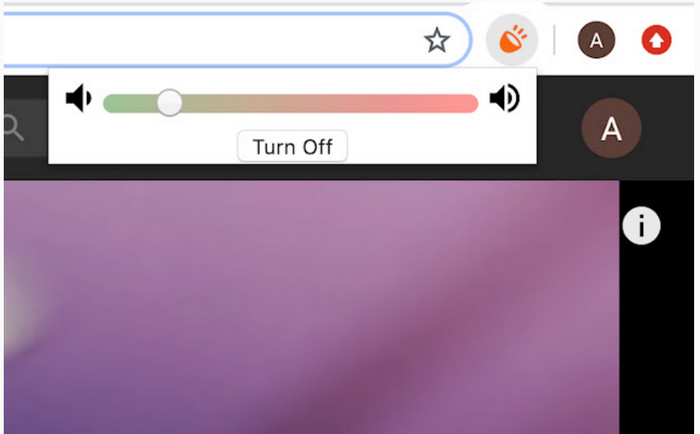
Volume Booster is een volume-booster Chrome-extensie die je eenvoudig kunt gebruiken zolang je internet hebt. Deze tool is voor iedereen gratis te gebruiken en bovendien veilig, omdat hij uit de Chrome Web Store komt. Als je deze extensie gebruikt, kun je rekenen op een flinke boost van het geluid dat je gaat beluisteren. Je kunt deze Chrome-extensie echter niet buiten Chrome gebruiken. Dus als je naar audio wilt luisteren die op je schijf is opgeslagen, kun je deze extensie niet gebruiken om je audio te verbeteren. Daarnaast hoorden we tijdens het testen bij maximaal volume wat gekraak. Om dat te vermijden, kun je het beter niet helemaal tot het uiterste opendraaien.
Voordelen
- De tool is veilig omdat het een uitbreiding is van chrome.
- Gebruikersvriendelijk.
Nadelen
- Kan niet buiten het chroom worden gebruikt.
- Er zal wat gekraak van het geluid te horen zijn als u dit op maximum zet.
- Het ondersteunt geen equalizers.
Deel 2. Top 3 Volume Booster-apps voor iPhone en Android
1. Volume Booster – Equalizer FX
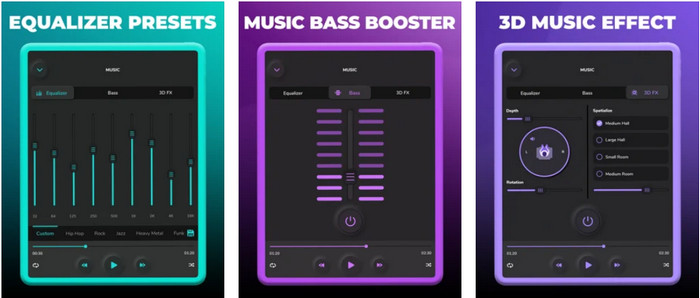
Volume Booster – Equalizer FX duwt het maximale audiolimiet van je iPhone op, zodat het geluid harder en beter wordt. Deze iPhone volume-booster is door veel iOS-gebruikers ingezet om hun audio zelf te equalizen. De app heeft al een redelijke beoordeling van 3,9 sterren gekregen. Dat is niet echt slecht, maar ook niet bijzonder goed. Deze tool kan bovendien geen audio van online streams boosten en de vele advertenties doen de app geen goed. Daarnaast treden er nog steeds crashes op, net als andere bugs en problemen. Maar als je een basversterking op je iPhone wilt, dan is dit zeker het proberen waard.
Voordelen
- Het is een goede booster voor iPhone-gebruikers.
- U kunt elementaire equalizing en audio-aanpassing uitvoeren.
Nadelen
- Meestal crasht de tool.
- Het heeft een beperking op waar u de audioversterking kunt gebruiken.
2.AmpMe - Luidspreker- en muzieksynchronisatie
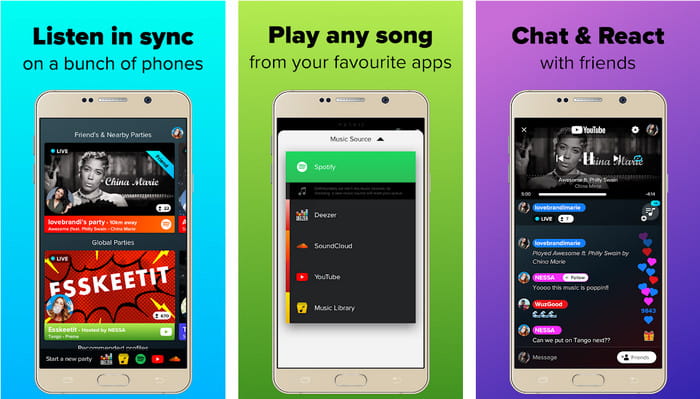
AmpMe - Speaker & Music Sync is een uitstekende downloadbare audio-volume-booster voor Android-apparaten. Dit is meer dan alleen een booster, want je kunt als host fungeren en je eigen afspeellijsten afspelen of deelnemen aan een live-feest binnen de app. Simpel gezegd: met deze app kun je met anderen omgaan terwijl je tegelijk luistert en chat. Hoewel de tool indrukwekkend is, zul je tijdens het gebruik nog steeds met enkele bugs en crashes te maken kunnen krijgen. Ook hebben sommige gebruikers moeite om muziek aan hun afspeellijsten toe te voegen, wat frustrerend kan zijn. En de tool is wat lastiger te bedienen, vooral als je de functies niet goed kent. Maar over het geheel genomen is het een geweldige optie voor Android-gebruikers.
Voordelen
- Je kunt je eigen DJ zijn met AmpMe en deze delen met de andere mensen in de buurt met dezelfde app.
- Luister en chat tegelijk.
- Het produceert audio van hoge kwaliteit.
Nadelen
- Het abonnementsgeld is te veel om voor te betalen als je goedkoper wilt gaan.
- Het is moeilijk om het abonnement op te zeggen, zelfs als je het account hebt verwijderd.
- Soms wordt de verbinding met de app automatisch verbroken wanneer u deelneemt aan een live-feest.
3.Volume Booster GOODEV
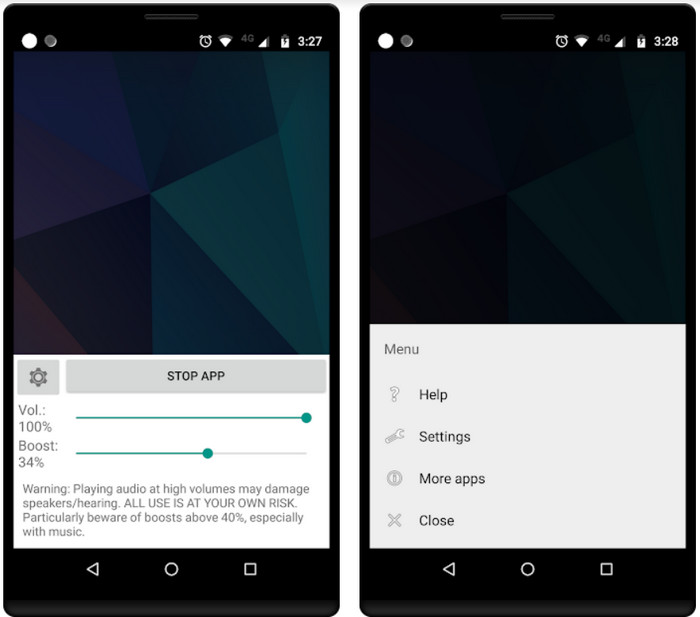
Volume Booster GOODEV heeft een eenvoudige en gebruiksvriendelijke interface. Deze volume-booster heeft van gebruikers al een uitstekende beoordeling van 4,4 sterren gekregen. Veel reviews geven aan dat deze tool de beste is in wat hij doet. Tegenwoordig treden er echter soms crashes op tijdens het gebruik en in veel gevallen boost de tool je audio helemaal niet meer, zelfs niet als je hem start. Om hem opnieuw te activeren, moet je je telefoon herstarten of de app sluiten en opnieuw openen om het probleem op te lossen.
Voordelen
- Eenvoudig te begrijpen audiobooster die eenvoudig kan worden gedownload op uw mobiele Android-telefoon.
- Gebruikersvriendelijk.
Nadelen
- Advertenties worden vanuit het niets weergegeven.
- Meestal crasht de app vanzelf zonder onbekende reden.
- De oude versie van deze app is veel beter dan de bijgewerkte versie.
Deel 3. Welke is de beste volumebooster?
Hier is een vergelijkingstabel die aan u wordt gepresenteerd om te vergelijken wat de toolfuncties zijn die u kunt gebruiken met de tool die de andere tool niet heeft.
| Gereedschapsfunctie / s | Video Converter Ultimate | VLC Media Speler | Boom 3D | Volumebooster | Volume Booster – Equalizer FX | AmpMe - Luidspreker- en muzieksynchronisatie | Volume Booster GOODEV |
| Audioversterkers |  | | | | | | |
| Audioverbeteraar | |  | | | | | |
| Functie voor audio- en videosynchronisatie | | | | | | | |
| Gebruikersvriendelijk | | | | | | | |
| Ondersteunde platforms | Desktop-gebaseerde tool | Desktop-gebaseerde tool | Desktop-gebaseerde tool | Chrome-extensietool | iOS downloadbare tool | Android downloadbare tool | Android downloadbare tool |
| Prijsbereik | 1 maand: $25.00 Levenslange licentie: $55.20 Licentie voor meerdere gebruikers Levensduur/5 pc's: $119.00 | Gratis te downloaden | $11.99 en $23.99 | Vrij | 3 tot 20 $ | $0.99 – $99,99 per stuk | Vrij |
Deel 4. Veelgestelde vragen over Volume Booster
Is het verhogen van het audiovolume schadelijk voor het gehoor?
Eigenlijk ja. Vooral als je een oortelefoon of headset gebruikt en het volume van de audio op max zet, voeg dan een volumebooster toe. Verwacht dan dat je gehoor op den duur langzaam kapot gaat. Dus om dit te voorkomen, kunt u dit doen. Het is onze suggestie dat u het moet beperken tot gemiddeld of laag en niet voor maximaal gaat.
Wat zijn de andere nadelen van audioversterking op luidsprekers?
We gebruiken een audioversterker om de audio veel beter te horen als de geluiden laag zijn. Maar u wist niet dat luidsprekers ook een Hertz-limiet hebben waartoe ze in staat zijn. Hoe hoger de hertz, hoe luider je kunt zijn, maar op sommige ingebouwde luidsprekers kunnen ze geen superhard geluid aan. De kans bestaat dus dat de speaker gaat knetteren waardoor de audio niet door de speaker kan worden verwerkt.
Wat zijn de verschillen tussen lage en hoge tonen van luidsprekers?
Deze twee zijn de meest bekende ingebouwde luidsprekers, maar ze hebben hun eigen doel waarom ze in luidsprekers zitten. Voor bas kan het een lage frequentie van audio aan en kan het geen hoge frequentie aan, en het is ook gespecialiseerd om ons de dreun van de muziek te laten voelen. Terwijl treble zich richt op hoge frequenties die bas niet aankan.
Gevolgtrekking
Tot slot: je hoeft niet langer naar audio van slechte kwaliteit te luisteren als je die boosten met behulp van volume-boosters op pc, Mac, online en mobiele apparaten. De hier gepresenteerde tools zijn ideaal voor iedereen die muziek op een nieuw niveau wil ervaren. Maar er is één tool die zijn gebruikers helpt om het boosten van audio eenvoudiger en beter te maken. In plaats van zelf te leren hoe je equalizers en presets instelt, doet Video Converter Ultimate dat al voor je. Als je wilt ontdekken hoe goed deze tool is, probeer hem dan zelf en download hem naar je apparaat.
-
 Hoe u gratis audio en muziek aan video kunt toevoegen op uw computer / telefoon
 Dit artikel toont 4 eenvoudige manieren om gratis audio aan video toe te voegen. Welke audiotrack u ook aan uw video wilt toevoegen, u kunt hier bevredigende resultaten krijgen.
-
 De onbevooroordeelde Cinch Review-audiorecorder en het beste alternatief
 Cinch Audio Recorder is de beste manier om muziek van streaming-sites te downloaden. Lees gewoon meer over de onbevooroordeelde recensie en het beste alternatief uit het artikel.
-
 Haalbare manieren om audio op te nemen met VLC Player
 Leer de beste manieren om audio op te nemen met VLC-speler en andere praktische hulpmiddelen door het artikel te lezen.
