


 Video Converter Ultimate
 Scherm opnemer
 Videoreparatie
Download de 5 beste tools die beschikbaar zijn om video 2x sneller te maken in een paar klikken
Er zijn momenten dat je een video sneller moet afspelen, bijvoorbeeld door hem op 2x video-snelheid te zetten. Soms zijn er delen die je wilt overslaan of wil je gewoon dat de video sneller wordt afgespeeld om de totale tijd te verkorten. Als je dus wilt leren hoe je je video kunt versnellen, lees dan dit artikel verder. Zo krijg je voldoende ideeën en kennis over hoe je dit doet en waarom 2x-snelheid gebruikt zou moeten worden.

Deel 1. Wat is een 2x video?
Snel kijken is het kijken naar een video die versneld wordt tot zijn natuurlijke afspeelsnelheid. Gewoon door de snelheid van de video die we bekijken aan te passen; het kan ons op verschillende manieren helpen. Dus, als je wilt weten wat de voordelen zijn van het brengen van je video met natuurlijke snelheid naar 2x videosnelheid. Lees dan de details hieronder om meer te weten.
Voordelen van het bekijken van versnelde video’s.
◆Als je een video op 2x snelheid afspeelt, kun je gemakkelijk bepalen of de video het bekijken waard is of niet. Dit kan van toepassing zijn op de video's met een lange duur en meestal verveelt het om alles op normale snelheid te bekijken.
◆Het stelt ons in staat om veel tijd te besparen dan de normale afspeelsnelheid. In dit geval, als je 2 of meer video's met een lengte van 15 minuten moet bekijken, is het beter om ze 2x sneller te bekijken. Om de details sneller te absorberen dan ernaar te kijken op normale snelheid. Dus in plaats van 1 video in 15 minuten te bekijken, kun je er 2 in die tijdspanne bekijken.
◆De meeste mensen die graag video's bekijken die snel worden afgespeeld, zijn degenen die alles graag binnen een minuut onthouden. Dit werkt het beste voor drukbezette personen of mensen die haast hebben.
◆Het zal je focus en luistervaardigheid verbeteren en trainen als je de video op 2x snelheid afspeelt in plaats van op de normale snelheid. Dus nu heb je een idee over wat de voordelen zijn van het versnellen van een video. Het is nu het juiste moment om verder te gaan met de tools die u zullen helpen om uw video sneller te maken. Het volgende deel gaat over de verschillende tools die je nodig hebt.
Deel 2. Hoe maak je een 2x video's
Als je een video 2x sneller wilt maken, probeer dan de fenomenale videobewerker, de Video Converter Ultimate. Deze tool heeft al veel gebruikers geholpen met allerlei problemen, vooral bij het converteren, het maken van GIF’s, verbeteren van kwaliteit en meer. Dus je video sneller laten afspelen kan heel eenvoudig met behulp van deze tool. Bovendien kun je, terwijl je de snelheid van de video verhoogt, onderaan een voorbeeld van de 2x-snelheid bekijken. Zo kun je bepalen of die afspeelsnelheid geschikt is voor jou. Laten we nu verdergaan met hoe je de afspeelsnelheid van je video wijzigt door de onderstaande stappen te volgen.
Stappen voor het versnellen van de video tot 2x de snelheid
Stap 1. Download de tool op je desktop en installeer hem zodra het downloaden is voltooid.
Gratis downloadVoor Windows 7 of nieuwerVeilige download
Gratis downloadVoor MacOS 10.7 of nieuwerVeilige download
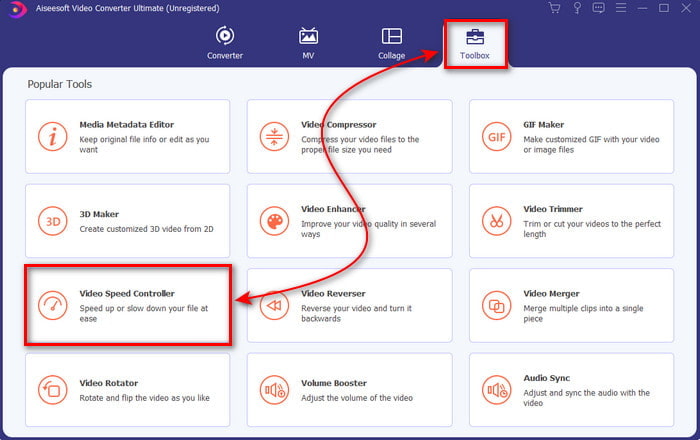
Stap 2. Ga vervolgens naar de Toolbox en zoek de Video Speed Controller.
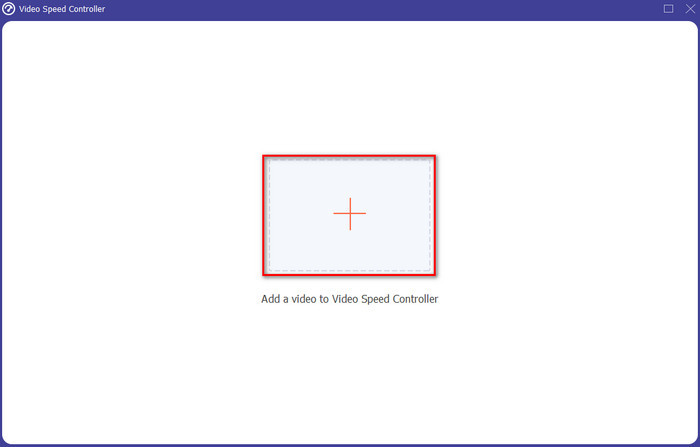
Stap 3. Klik op de +-knop om het bestand toe te voegen dat je op 2x videosnelheid wilt bekijken en klik op Open om verder te gaan.
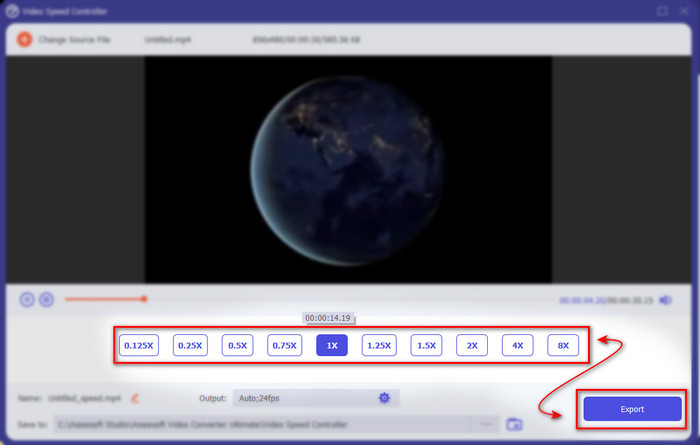
Stap 4. Kies na het toevoegen van het bestand 2x in de lijst met beschikbare videosnelheden. Klik vervolgens op de knop Export om de video met de nieuwe snelheid op te slaan.
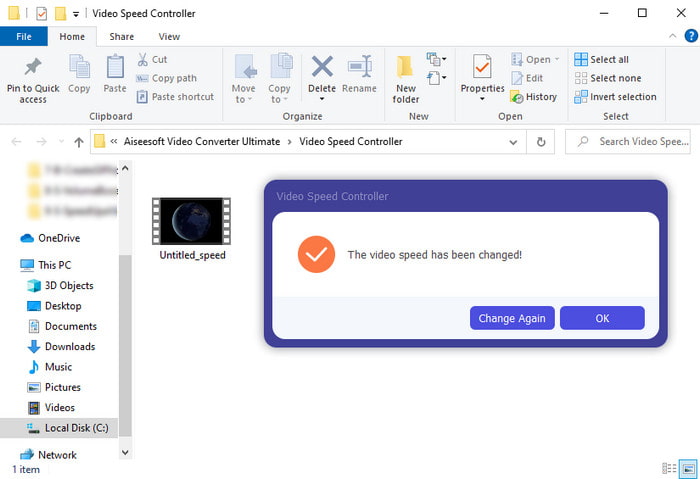
Stap 5. Nadat het bestand is geëxporteerd, verschijnt er een map op je scherm; klik op het bestand om de versnelde versie van de video te bekijken.
Deel 3. Video afspelen met 2x snelheid
1. VLC-mediaspeler
De meest bekende mediaspeler die je op een pc of Mac kunt downloaden is de VLC Media Player. Deze desktoptool wordt veel gebruikt door mensen die graag filmfragmenten kijken. Bovendien kan deze tool overweg met bijna alle bestandsindelingen die we van het web kennen. Toch kunnen sommige video’s met complexe codecs hier niet worden afgespeeld, zoals bepaalde AVI- of MKV-bestanden. Als je dus wilt weten hoe je een video op 2x-snelheid kunt afspelen met VLC Media Player, volg dan de onderstaande stappen.
Stap 1. Download VLC op je desktop en open het.
Stap 2. Sleep het bestand naar de interface en klik vervolgens op het videobestand dat je hier hebt geplaatst.
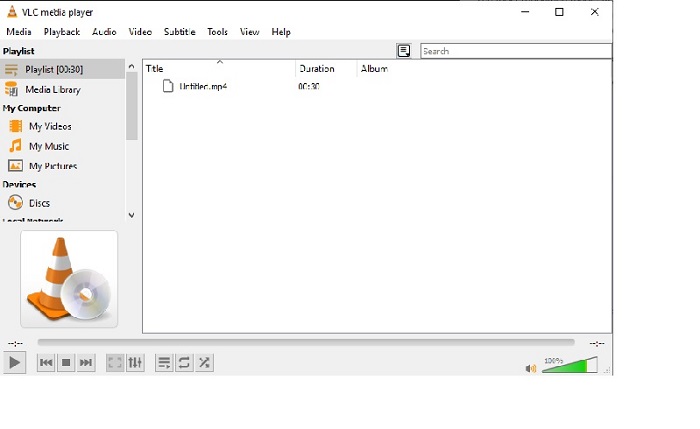
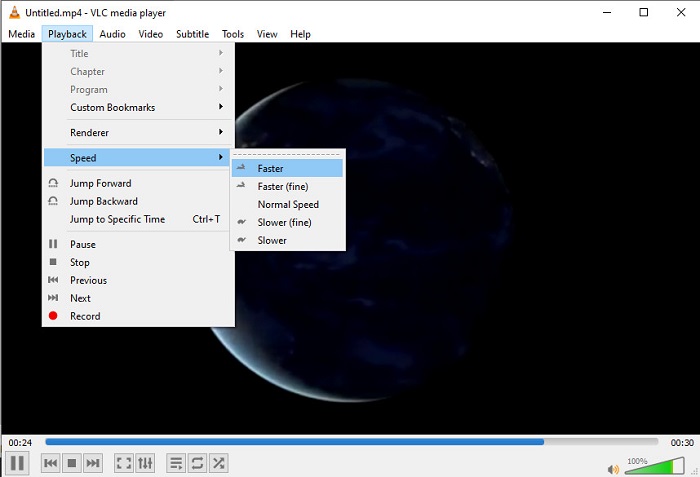
Ga daarna naar Playback en klik op Speed om de oorspronkelijke snelheid van de video te wijzigen.
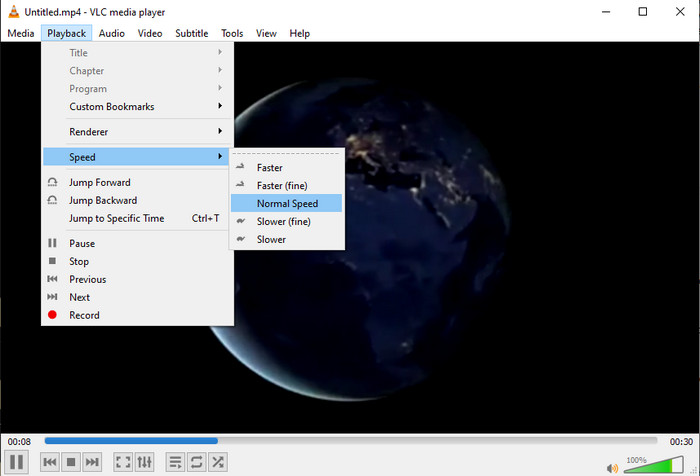
Stap 3. En als je de snelheid weer normaal wilt maken, ga je naar Playback en klik je op Speed, en kies je de normal-snelheid.
2. QuickTime-speler
De standaard mediaspeler van Mac helpt je om video’s met 2x video-afspeelsnelheid te bekijken. De QuickTime Player is de vooraf geïnstalleerde mediaspeler die je op een Mac aantreft. In tegenstelling tot VLC hoef je deze tool niet te downloaden op je desktop. Helaas kun je deze tool niet gebruiken als je een Windows-gebruiker bent, omdat hij Windows-pc’s niet ondersteunt. Hoewel de tool op de Mac beschikbaar is, zijn er nog steeds veel functies die hij niet ondersteunt, zoals bepaalde bestandsindelingen. Veel formaten die door Windows zijn ontwikkeld, kunnen hier namelijk niet worden afgespeeld. Als je echter een Mac hebt, volg dan de onderstaande stappen.
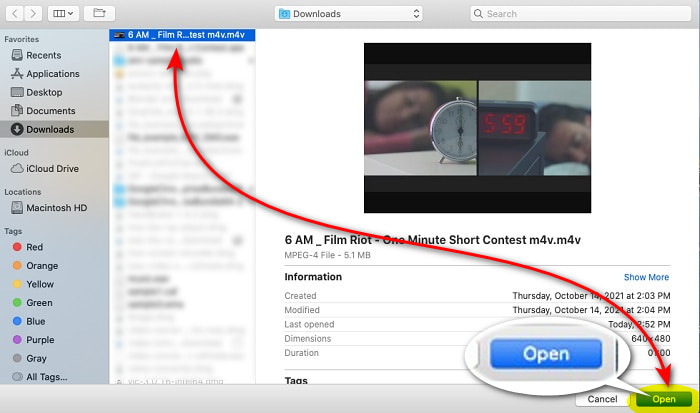
Stap 1. Zoek QuickTime in Finder en start de tool. Klik op File en Open File om de video te zoeken en te openen.
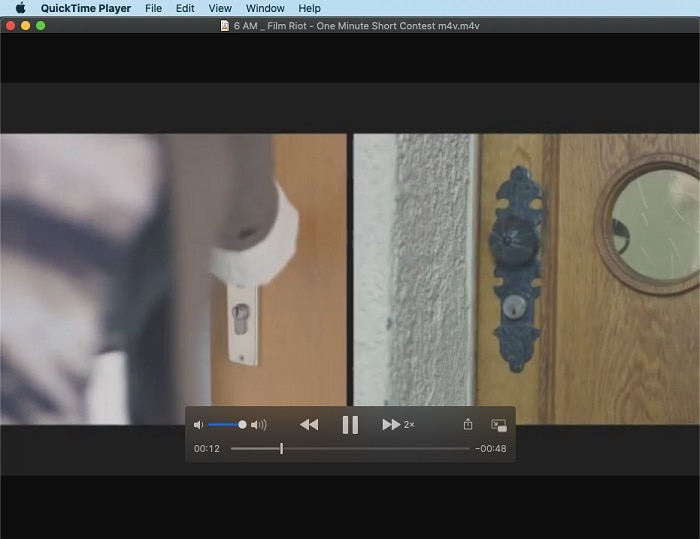
Stap 2. Terwijl de video wordt afgespeeld, klik je op de knop fast-forward om de weergave te versnellen.
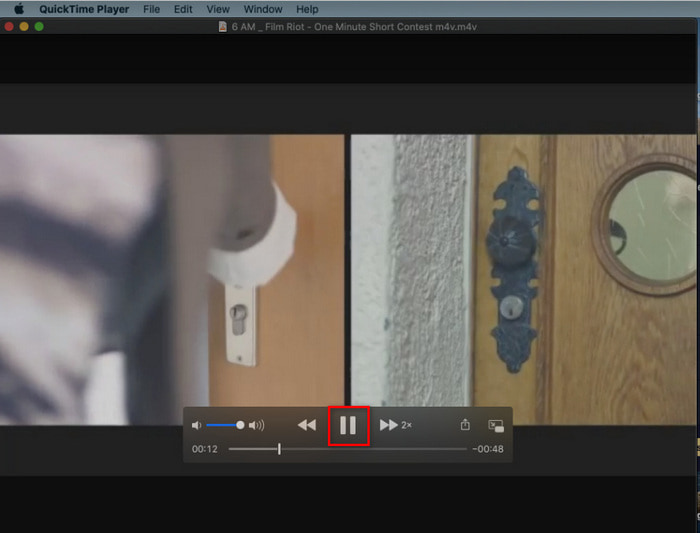
Stap 3. En als je de versnelling wilt stoppen, klik dan op de knop pause/play.
3. Windows Media Player
Als Mac zijn eigen vooraf geïnstalleerde mediaspeler heeft, dan heeft Windows zijn eigen unieke mediaspeler: de Windows Media Player. Net als QuickTime is deze tool al vooraf op Windows geïnstalleerd en klaar om te worden gebruikt om video’s 2x sneller af te spelen dan de normale snelheid. We vinden de versnelling van deze tool echter de slechtste oplossing, omdat hij beeldinformatie weglaat en van seconde naar seconde springt in plaats van echt sneller af te spelen. Maar als dat voor jou geen probleem is, volg dan de onderstaande stappen om hem te versnellen.
Stap 1. Start de tool op je Windows-desktop.
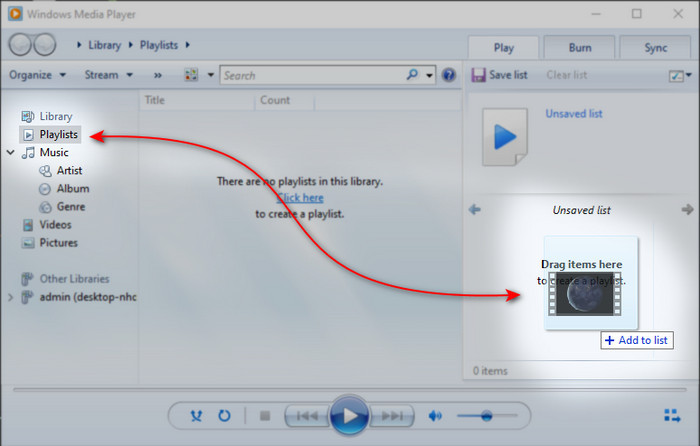
Stap 2. Klik op Playlist en sleep vervolgens het videobestand naar het kleine vak aan de rechterkant.
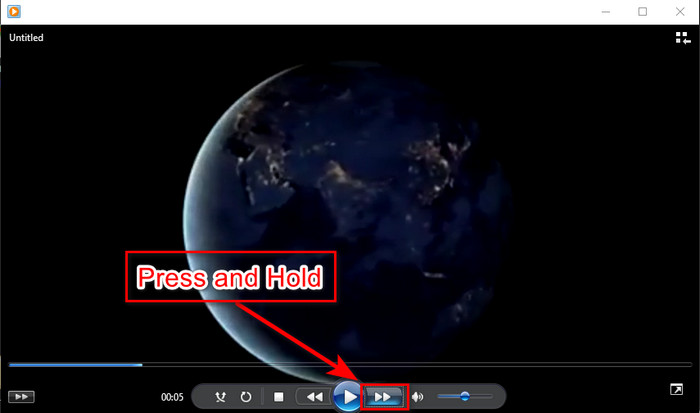
Stap 3. De video wordt automatisch afgespeeld; om te versnellen houd je de knop fast-forward ingedrukt en laat je los om te stoppen.
Deel 4. Veelgestelde vragen over 2x Video
Wat is beter: slow-motion of versnellen?
Het hangt eigenlijk af van de situatie waarin je het zogenaamd gaat gebruiken. Hoewel beide aanpassingen je zullen helpen. Dus, als je naar een tutorial kijkt of je wilt de truc van de goochelaar onthullen, gebruik dan slow motion. Als je echter haast hebt en veel videoclips moet bekijken, is het een must om deze te bekijken om het afspelen te versnellen.
Kan ik opnemen in een supersnelle bewegingsweergave?
Ja, je kunt een time-lapse gebruiken om van een video van een uur een minuut of seconde te maken. Maar in tegenstelling tot versnellen, is time-lapse veel sneller dan de gebruikelijke 2x, 4x, 8x versnelling.
Wat is het nadeel van video kijken met 2x snelheid?
Hoewel het bekijken van video's met dit soort snelheid je veel kan helpen, zijn er veel nadelen aan het spelen dat snelheid je kan overkomen. Als het afspelen van video hierin bijvoorbeeld uw gewoonte wordt, zal de normale snelheid van de video langzamer worden.
Gevolgtrekking
Nu je de verschillende tools kent waarmee je video’s op 2x-snelheid kunt bekijken, is het tijd om te kiezen welke jij verkiest. We hopen dat dit artikel je helpt om te bepalen welke optie beter bij je past. Of je nu een mediaspeler gebruikt om de snelheid aan te passen of een editor zoals Video Converter Ultimate, welke oplossing je ook kiest, ze zijn allemaal zeer geschikt voor jou als gebruiker.
-
 Top 4 beste VOB-spelers voor Android-mobiele telefoons voor verschillende toepassingen
 Wanneer je VOB-video's downloadt en ze op Android wilt bekijken, kun je de meest geschikte kiezen uit de volgende top 4 VOB-spelers in dit artikel.
-
 Top 5 beste Windows Media Player-alternatieven voor Android-mobiele telefoons
 Aangezien u de Windows Media Player voor Android niet kunt downloaden, moet u dit artikel lezen en meer te weten komen over de 5 beste alternatieven voor Windows Media Player.
-
 Top 5 beste videospelers voor iPhone die u in 2025 niet mag missen
 Om video's in alle formaten af te spelen en een betere kijkervaring op je iPhone te hebben, moet je dit artikel lezen en meer te weten komen over de 5 beste videospelers voor iPhone 12/11/X/8/7/6.
