


 Video Converter Ultimate
 Scherm opnemer
 Videoreparatie
Leer meer over de 5 beste video-editor voor pc en vergelijk
Tegenwoordig houden veel mensen ervan om video’s te maken om gedenkwaardige momenten vast te leggen en de meesten van hen gebruiken die ook om geld te verdienen. Vloggers en influencers bijvoorbeeld filmen zichzelf voortdurend bij alles wat ze doen voor hun fans. Ook om meer populariteit te krijgen dan andere influencers of vloggers. Dus als jij een beginnende vlogger of influencer bent die graag video’s van zichzelf maakt, dan is het belangrijk om de beste Windows 10‑videobewerker te hebben om je video’s te verbeteren en indrukwekkend te maken, meer likes, weergaven en abonnees te krijgen en op de lange termijn ook winst te maken. Voordat we beginnen willen we je feliciteren, want je hebt al de eerste stap gezet om een succesvolle vlogger of influencer te worden. Maar het kiezen van de juiste tool die je gaat gebruiken is een van de cruciale onderdelen waar je mee te maken krijgt. Daarom hebben we nu verschillende videobewerkers verzameld die nog altijd zeer effectief zijn, zodat jij hieronder een keuze kunt maken.

Deel 1. Top 5 Windows Video Editors online en offline
Boven 1. Video Converter Ultimate
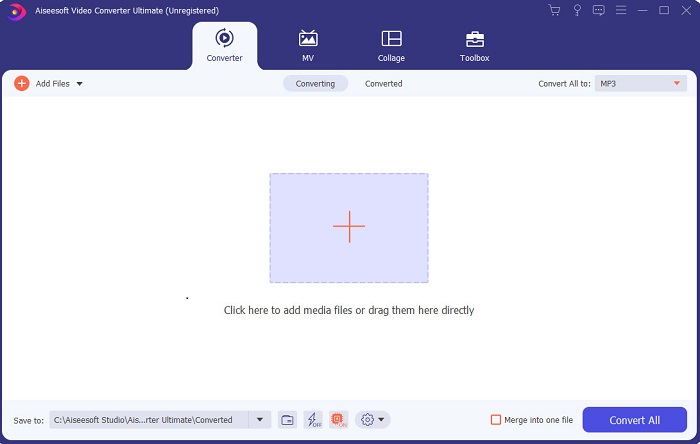
Als je de overhand wilt hebben en net zulke goede video’s wilt maken als je idolen, gebruik dan FVC Video Converter Ultimate. Deze converter en Windows‑videobewerker heeft al veel gebruikers geholpen wereldwijd populair te worden – en misschien ben jij de volgende. De meeste bekende influencers, vloggers en videomakers gebruiken dit als hun editor, enhancer, booster en meer. Dus als je een professioneel resultaat wilt zoals je idolen en er echt geld mee wilt verdienen, moet je deze software meteen downloaden om de nieuwe internetsensatie te worden én de beste versie van jezelf. We hebben ook voor- en nadelen op een rij gezet zodat je deze tool beter kunt begrijpen.
Gratis downloadVoor Windows 7 of nieuwerVeilige download
Gratis downloadVoor MacOS 10.7 of nieuwerVeilige download
Voordelen
- Voor beginners is deze tool de juiste keuze voor hen. Omdat het eenvoudige instructies biedt die u kunt volgen en gemakkelijker te begrijpen zijn. Het is in principe op zijn plaats.
- Voor professionals, anders dan alle andere video-editor voor pc deze tool heeft veel futuristische functies. Als u bijvoorbeeld uw audiokwaliteit wilt verbeteren en de video wilt verbeteren, kunt u deze tool gebruiken. Als uw audio niet is gesynchroniseerd met video, heeft deze ook een audiosynchronisatiefunctie om dit te repareren.
- Over het algemeen is dit de fenomenale converter en editor waarop u kunt vertrouwen. Zeker als je een verrassende entree wilt maken in de wereld van de vloggers en influencers.
- De editor-software kan worden gedownload en er zijn geen editor-tools die dezelfde functies als deze hebben.
Nadelen
- Deze tool is niet gratis, maar wel laag in prijs. Met andere woorden, het is goedkoop en levert een hoge kwaliteit output.
Boven 2. Windows Movie Maker
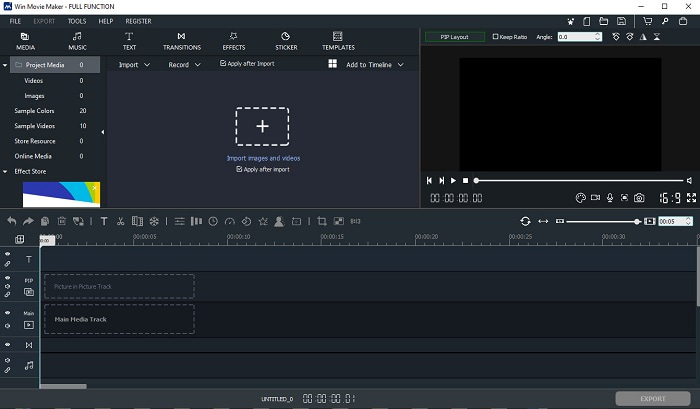
Deze videobewerker voor Windows 7, 8, 10 en XP is een van de beste voor maken en monteren. Windows Movie Maker is al door veel gebruikers gedownload om hun eigen video’s te monteren, omdat het uitgebreide bewerkingsmogelijkheden biedt. Maar de tool is nogal overweldigend voor wie nieuw is in het maken en monteren van video’s. Als je echter een professional bent, of in ieder geval ervaring hebt met videobewerking, dan moet je deze tool zeker proberen. Deze tool heeft een premiumversie die sterk lijkt op de gratis versie, maar bij het exporteren wordt er geen watermerk toegevoegd aan het eindresultaat.
Voordelen
- Voor beginners is deze tool niet ideaal, maar het is geweldig om ingewikkelde bewerkingen uit te voeren.
- Voor professionals zijn de functies die hier worden gepresenteerd uitvoerbaar als je ervaring hebt.
- Het biedt overgangen, effecten en stickers enz.
Nadelen
- De tool is een beetje storend vanwege de toolfuncties die je hier kunt doen. Het is ook overweldigend en er is geen instructie over hoe het te bedienen.
- Als je de gratis versie van deze tool gebruikt, verwacht dan een watermerk bij de video zelf nadat je deze hebt geëxporteerd.
Boven 3. OpenShot
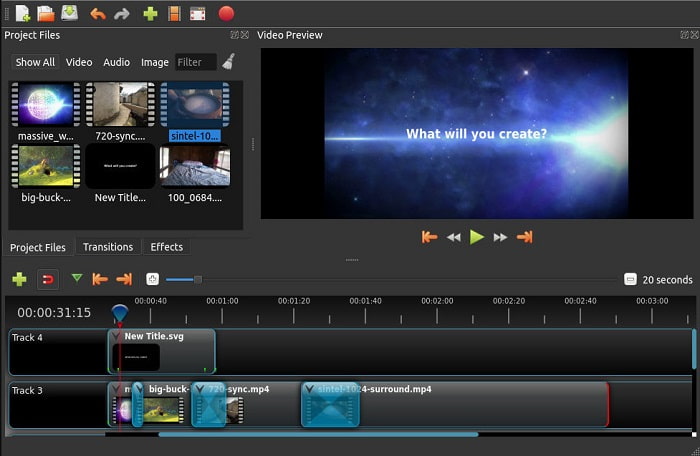
Een andere gratis videobewerkingssoftware zonder watermerk is Openshot. De functies zijn eenvoudiger te begrijpen dan die van Windows Movie Maker. Bovendien krijg je na het installeren een korte rondleiding langs de functies van de tool. Er wordt echter alleen uitleg gegeven over de basisfuncties. Deze tool biedt dan ook alleen de meest basale bewerkingsfuncties, wat betekent dat je minder creatief kunt zijn. Daarnaast oogt de tool wat saai als je hem installeert, door de monochrome kleur van de interface.
Voordelen
- Voor beginners is dit een eenvoudigere versie van Windows Movie Maker. U kunt effecten, overgangen en meer toevoegen.
- Voor professionals is het oké dat ze het gebruiken, maar het is niet het beste.
- De software is in orde als deze wordt geleverd met eenvoudige bewerking.
Nadelen
- Ik kan de saaie interface ervan niet veranderen en het is minder interactief.
- Enkele grote en kleine bugs zijn hier nog steeds aanwezig, zelfs na de update.
Top 4. Lichtwerken
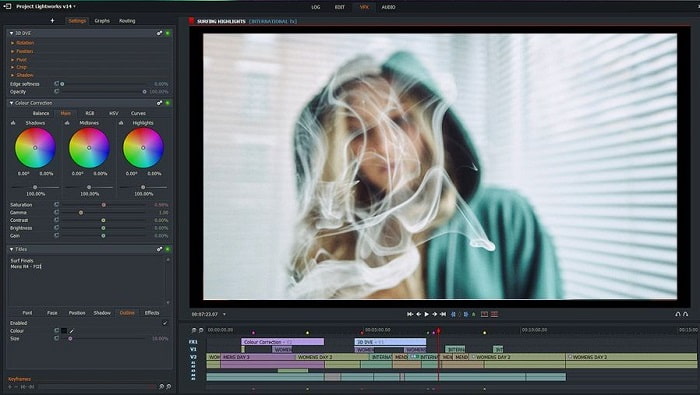
Lightworks is een gratis videobewerker voor Windows, maar er is ook een premiumversie beschikbaar. Toen wij de tool echter wilden proberen en downloaden, kregen we de melding dat het .exe‑bestand mogelijk schadelijk kon zijn voor onze computer. Daarom hebben we de tool niet geïnstalleerd en in plaats daarvan grondig onderzoek naar deze tool gedaan. Als je de tool op je schijf installeert, moet je je eerst registreren voordat je hem kunt gebruiken. De bewerkingsmogelijkheden van deze tool zijn behoorlijk uitgebreid en zwaar om te verwerken als je een beginner bent, maar zelfs voor professionals is hij vrij lastig. Toch hoef je je geen zorgen te maken, want je kunt leren hoe je hem gebruikt door ermee te oefenen.
Voordelen
- Voor beginners is de tool te ingewikkeld en kan het te veel zijn om te hanteren. Vooral als je wilt proberen en gewoon eenvoudige bewerkingen wilt doen.
- Voor professionals kunt u de realtime bewerkingsfuncties gebruiken die deze tool biedt. Hoewel sommige functies nieuw zijn en de meeste tegen betaling.
- De algehele prestaties van de tool zijn geclassificeerd als klasse A bij het bewerken en maken van video's.
Nadelen
- Als u een uitvoer van 1080px wilt, moet u de tool kopen. En zelfs voordat u het kunt gebruiken, moet u zich registreren.
- De software heeft een schadelijk .exe-bestand, dus download het op eigen risico.
Top 5. ClipChamp
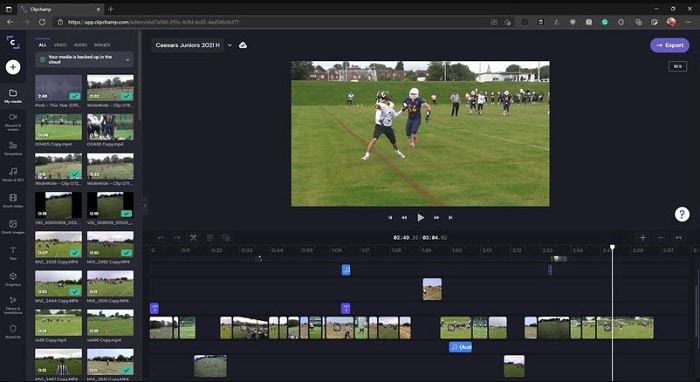
Deze online tool heeft meer mogelijkheden als je je abonnement upgrade. Het is bovendien een van de gemakkelijkst toegankelijke tools om video’s mee te bewerken zonder specifieke software te hoeven downloaden. Clipchamp is een geweldige tool om te gebruiken, maar je moet je registreren voordat je toegang krijgt. Deze online Windows 10‑videobewerker heeft vergelijkbare functies als Lightworks, maar dan online. Houd er wel rekening mee dat het importeren van videobestanden om te bewerken traag kan verlopen. Het voordeel is echter dat je de tool niet hoeft te downloaden om hem te kunnen gebruiken.
Voordelen
- Voor beginners is deze tool een must om te proberen, maar het proces van het bewerken en invoegen van video hier is iets langzamer.
- Voor professionals is het prima om met beperkte middelen eenvoudige video's te gebruiken en te bewerken.
- Over het algemeen is de tool gemakkelijker te begrijpen dan Windows Movie Maker.
Nadelen
- Internetafhankelijk, wat betekent dat als u een traag internet heeft, u een onstabiel proces verwacht.
- U hebt een registratieformulier nodig voordat u de webtool zelfs maar kunt gebruiken.
Deel 2. Vergelijkingstabel voor de 5 video-editors voor Windows
| Functies | Video Converter Ultimate | Windows film bewerker | OpenShot | Lichtwerken | ClipChamp |
| Videobewerking zoals bijsnijden, knippen, samenvoegen enzovoort. |  | | | | |
| Videoverbeteraar | |  | | | |
| Watermerk | | | | | |
| Programma ondersteund: | Desktop-gebaseerde tool | Desktop-gebaseerde tool | Desktop-gebaseerde tool | Webgebaseerde tool | Webgebaseerde tool |
| Prijsbereik | Voor 1 maand: $25.00 Voor een jaar: $31.20 | $39.95 Eenmalige betaling | Gratis maar je kunt doneren | QScan Pro QScan Pro – Maandelijkse abonnementsactiveringen $59.99 | Maker- $9/maandelijks Zakelijk - $19/ maandelijks |
| Voor levenslange licentie: $55.20 | QScan Max QScan Max – Maandelijkse abonnementsactiveringen $119.99 | Zakelijk platina – $39/ maandelijks |
Deel 3. Veelgestelde vragen over Windows Video Editor
Wat is de beste Mac Video Editor die ik kan gebruiken?
Hoewel de hier gepresenteerde tools allemaal Windows‑editors zijn, behalve Video Converter Ultimate, kun je via deze link ontdekken welke andere Mac‑videobewerkers er zijn en daaruit je keuze maken.
Waarom kunnen mijn video's niet worden afgespeeld op Android?
Er zijn veel redenen waarom video’s niet op je Android‑toestel kunnen worden afgespeeld. Om te weten wat die redenen zijn, is het belangrijk dit snel uit te zoeken en het probleem op te lossen door Hoe video’s te repareren die niet worden afgespeeld op Android‑telefoons te lezen.
Hoe kan ik mijn lange video's comprimeren en delen op YouTube?
Op dit moment kun je maximaal 256 aan bestandsgrootte uploaden, dus de beste manier om dit op te lossen is door te comprimeren. Als je je video’s op YouTube wilt delen, leer dan hoe je de bestandsgrootte verkleint en op YouTube plaatst.
Gevolgtrekking
Voordat je een van de vloggers of influencers wordt tegen wie je altijd opkijkt, moet je de vaardigheid hebben om je eigen video’s te bewerken. Vandaag is je kans om de fenomenale editor te gebruiken die Hollywood‑achtige bewerkingsfuncties en kwaliteit biedt. Zo zul je je kijkers, volgers en zelfs jezelf imponeren. Dus schitter als een diamant en laat de lichtstraal een weg naar succes banen met hulp van FVC Video Converter Ultimate.
-
 De beste MP4-editor voor Windows en Mac in 2025
 Of je nu je computer gebruikt voor MP4-videobewerking of gewoon op je telefoon werkt, je kunt hier een aantal geweldige opties vinden, waaronder de beste MP4-editor voor Windows en Mac.
-
 Hoe u gratis audio en muziek aan video kunt toevoegen op uw computer / telefoon
 Dit artikel toont 4 eenvoudige manieren om gratis audio aan video toe te voegen. Welke audiotrack u ook aan uw video wilt toevoegen, u kunt hier bevredigende resultaten krijgen.
-
 Nummers online knippen en samenvoegen - 4 beste manieren die u moet weten
 Als je online nummers wilt knippen en samenvoegen om een muziekstuk te maken, kun je meer te weten komen over de 4 beste online tools om de nummers te knippen en bestanden uit het artikel te combineren.
