


 Video Converter Ultimate
 Scherm opnemer
 Videoreparatie
Diep begrip van de 5 beschikbare slow motion video-editors
Hou je van het kijken naar snelle sporten met veel acties zoals racen, boksen, honkbal, volleybal en meer? Al deze sporten hebben een hogesnelheidscamera nodig om een bewegingsanalyse te kunnen maken. Als je werkelijk elke beweging van elke atleet wilt analyseren, lees dan verder over de beste slowmotion‑videomaker die je kunt gebruiken. Met behulp van de onderstaande tools heb je bovendien geen extra apparatuur nodig, behalve je desktop, internet of telefoon. Lees de tools aandachtig door terwijl we verdergaan en kies welke voor jou het meest geschikt is.

Deel 1. 3 Beste Slow-Motion Video Maker voor Windows PC, Mac en Online
1. Video Converter Ultimate
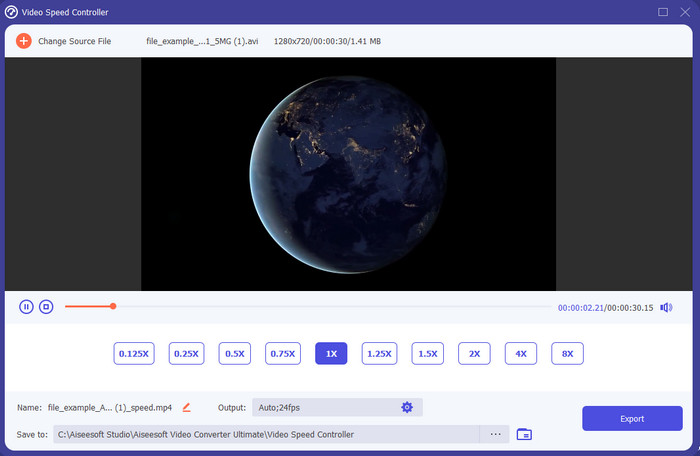
Wil je weten welke slowmotion‑videobewerkers het beste zijn om je video in slow motion af te spelen? Probeer dan Video Converter Ultimate, want deze tool is niet alleen goed, hij is fenomenaal. Deze tool beschikt al over veel geavanceerde functies die je graag zult gebruiken, zelfs als je geen professionele editor bent. En zelfs als je wel pro bent, blijft deze software de beste keuze, ongeacht je ervaringsniveau. Bovendien kun je heel eenvoudig slowmotioneffecten aan je video toevoegen zonder een handleiding te hoeven lezen of video’s te bekijken over hoe het moet. De tool biedt namelijk veel eenvoudigere instructies dan de tool hieronder. Hoewel je moet betalen voordat je er volledig toegang toe krijgt, is de prijs nog steeds niet erg hoog. Als je meer over deze tool wilt weten, lees dan de belangrijkste functies hieronder.
Belangrijkste kenmerken van de Video Converter Ultimate:
◆ Geavanceerde slowmotion‑videomaker‑app met eenvoudige instructies.
◆ Gebruiksvriendelijke tool-interface.
◆ Pas de snelheid van de video eenvoudig aan op de Video Speed Controller.
◆ Ondersteunt meer dan 200+ video- en audioformaten.
◆ Het kan worden gedownload en geopend op pc- en Mac-besturingssystemen.
Gratis downloadVoor Windows 7 of nieuwerVeilige download
Gratis downloadVoor MacOS 10.7 of nieuwerVeilige download
2. Boris continuüm tijdseenheid
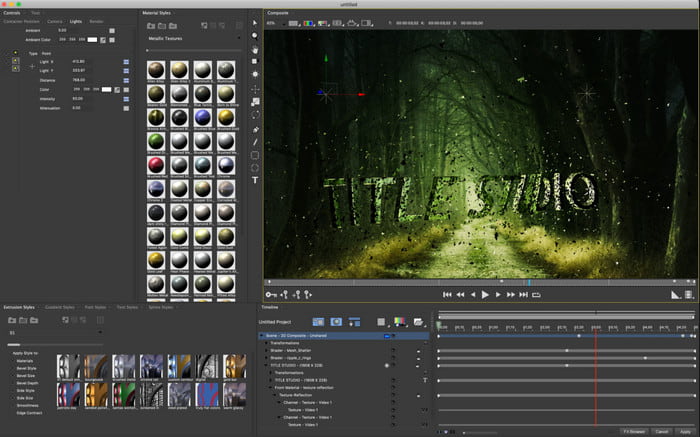
Boris Continuum Time Unit is de beste keuze als je een zware, professionele slowmotion‑videomaker‑app nodig hebt. Er is geen andere tool die hetzelfde kan leveren en zo’n professioneel resultaat geeft. Bovendien heeft deze tool de beste, zeer gedetailleerde bewerkingsfuncties die je zeker wilt uitproberen. Hoewel de tool beter is dan de andere, is hij letterlijk extreem duur. Daarnaast heb je een krachtige desktop nodig om deze tool te gebruiken, want op oudere systemen kun je hem niet draaien.
Voordelen
- Beste tool om zware bewerkingen uit te voeren.
- Het is compatibel met alle platforms.
- Interface van de tool lijkt meer op een professionele tool.
Nadelen
- Deze software is de duurste in dit artikel.
- Een hoogwaardige systeemeenheid nodig.
- Niet de beste keuze voor een beginner die geen achtergrond heeft in bewerken.
3. VEED.IO
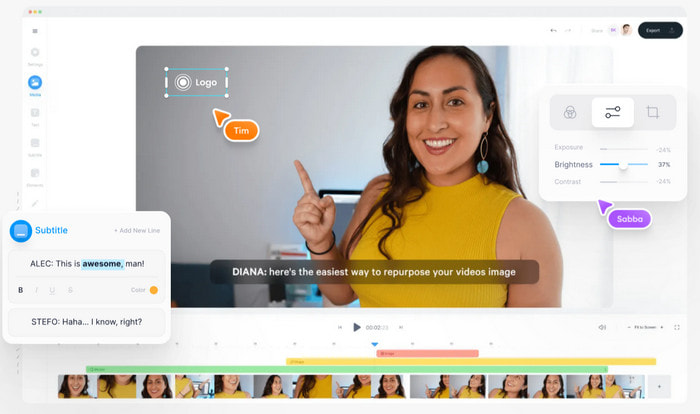
Als je geen geld wilt uitgeven en wel een internetverbinding hebt, probeer dan VEED.IO te gebruiken. Dit is de beste software om online slowmotionvideo’s te maken, omdat hij eenvoudig en makkelijk toegankelijk is. De volledige interface van de tool is erg overzichtelijk met duidelijke instructies, waardoor hij voor iedereen heel gebruiksvriendelijk is. Je kunt echter alleen bestanden uploaden die kleiner zijn dan 50 MB; als je grotere bestanden wilt toevoegen, moet je upgraden. En als je de betaalde versie niet aanschaft, zal het eindresultaat een watermerk hebben.
Voordelen
- Gemakkelijk toegankelijk voor iedereen met een internetverbinding.
- Geen vervelende advertenties op de website.
- Gemakkelijk te behandelen door de nieuwelingen op het gebied van bewerken.
Nadelen
- Toolfuncties zijn zeer beperkt in de gratis versie van de tool.
- Internetafhankelijk. Dus als je internet traag is, verwacht dan een langzaam tempo bij het uploaden, downloaden en bewerken. Je hebt ook geen toegang tot deze tool als je geen internetverbinding hebt.
Deel 2. 2 van de Beste Slow Motion Video-app op Android en iOS
1 SloPro
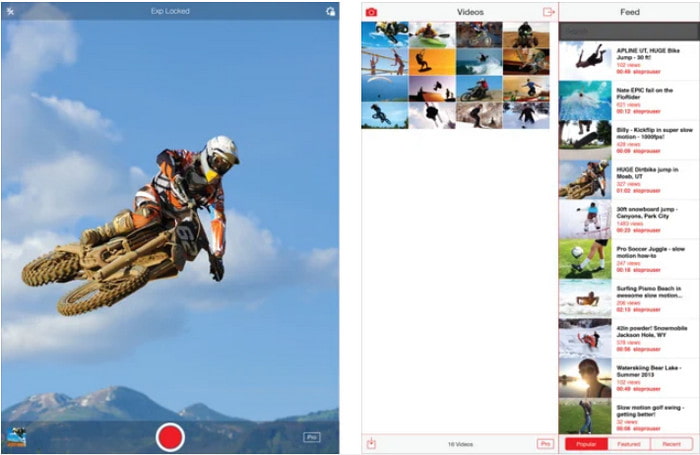
SloPro is de beste slowmotion‑video‑app die je gratis kunt downloaden op iOS. De app kan de weergave vertragen tot 500 à 1000 fps. Daarnaast kun je de video manipuleren van snel naar slow motion of andersom. Hoewel de tool een goede optie lijkt, zijn er toch meerdere nadelen. Zo wordt de video opgeslagen in de galerij van de app en niet in je filmrol. En als je 1000 fps probeert te gebruiken, wordt de video volgens gebruikers die het al getest hebben erg buggy. Toch is deze tool nog steeds de moeite waard, omdat hij gratis is en het vertragen van video’s hier heel eenvoudig gaat.
Voordelen
- Beste slow motion-weergave die u gratis op iOS kunt gebruiken.
- Het krijgt al een redelijke beoordeling en een 3,3 ster.
- Eenvoudig en gemakkelijk te gebruiken.
Nadelen
- De uiteindelijke uitvoer wordt niet direct in de galerij opgeslagen.
- Alle video's die in de SloPro-galerij zijn opgeslagen, zijn willekeurig en niet correct gecategoriseerd.
- Als je 1000 fps gebruikt, verwacht dan een video-uitvoer met fouten.
2. Slow Motion-videomaker
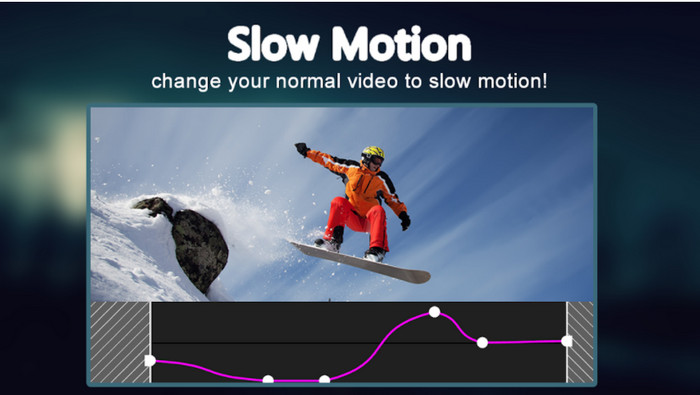
Een van de beste slowmotion‑videomakers die je gratis kunt downloaden op je Android‑telefoon is Slow Motion Video Maker. Met deze app kun je eenvoudig fast‑forward en slow‑motionweergave toepassen op je video’s. De app heeft echter veel irritante advertenties die zomaar in beeld springen. Bovendien kun je de slow‑motionweergave alleen instellen op 0,5‑voudige snelheid. Maar al met al is hij prima om een video op Android te vertragen, al doen de advertenties de app veel kwaad.
Voordelen
- De app is gratis te downloaden in de Play Store.
- Het is geweldig om te worden gebruikt om de video soepel te vertragen.
- De app is eenvoudig te beheren.
Nadelen
- Het heeft veel vervelende advertenties die uit het niets verschijnen.
- Het downloaden van de video kan veel tijd in beslag nemen omdat de verwerking niet versneld wordt.
Deel 3. Veelgestelde vragen over Slow Motion Video Maker
Wat is de rol van de FPS?
Het wordt gebruikt om de opeenvolgende reeks frames te berekenen die op uw display worden weergegeven. Dit wordt meestal gezien bij elke bewegingsopname, zoals in videogames, camera's, films, en zelfs ons oog kan 30 tot 60 fps zien.
Wat is de beste FPS-snelheid bij slow motion?
De ideale FPS die u kunt gebruiken om video in slow motion te bekijken, ligt tussen 120 of 240 fps. Dus, als je een meer gedetailleerde slow-motion weergave wilt hebben, maak dan de FPS hoger.
Hoe speel je een video af in versnelde beweging?
Als je een idee wilt krijgen hoe je een video versneld kunt afspelen, klik dan op deze link. Leer meer over de 5 beste tools om een video te versnellen.
Gevolgtrekking
Tot slot: alle tools die hier zijn voorgesteld, behoren tot de beste slowmotionmakers die je online kunt vinden. Dit artikel heeft je bovendien geholpen en je zoektocht flink vereenvoudigd. Toch is er één specifieke tool die je waarschijnlijk wilt gebruiken om je video nog beter te maken: Video Converter Ultimate. Alle geavanceerde functies die je hier kunt gebruiken zijn fenomenaal en toch eenvoudig in gebruik. Als je het nog steeds niet gelooft, download de tool dan en probeer hem zelf uit.
-
 Beste Android-applicatie om MOV-bestanden op uw mobiele telefoons af te spelen
 Heb je het moeilijk omdat je MOV-opname niet kon worden afgespeeld op je Android? Dus in dit geval ben je op zoek naar wat de beste MOV-speler voor Android is.
-
 5 krachtige AVI-spelers om AVI-bestanden te bekijken en af te spelen [Web & Desktop]
 Ontdek welke AVI-spelers u kunt gebruiken om de .avi-bestanden af te spelen en te bekijken. Lees hieronder verder en kies welke de betere mediaspeler is dan de andere.
-
 Effectieve manieren om MKV-bestanden te maken op Xbox One S 2021
 Ontdek manieren die u kunnen helpen bij het afspelen van MKV-bestanden op uw Xbox One S met behulp van enkele van de beste converters.
