


 Video Converter Ultimate
 Scherm opnemer
 Videoreparatie
Leer de 3 manieren om VOB online en offline naar AVI te converteren
VOB-bestanden worden gebruikt om privéstreams op te slaan en het maakt gebruik van lossy videocompressie zoals de MPEG-2. Ze hebben ook bijna dezelfde structuur als we de twee zouden vergelijken. VOB-bestanden hebben echter een beperking en specificatie voordat u ze zelfs maar kunt gebruiken. En daardoor speel je een VOB-bestand niet zomaar af op je lokale mediaspeler. Dus om je tijd te besparen bij het zoeken hoe je het kunt openen, raden we je aan om het te converteren door hieronder een converter te kiezen. In dat geval presenteren we u de beste converter die we kunnen bedenken en leren we hoe u VOB online of offline naar AVI kunt converteren met de tools die op de lijst staan.
Deel 1. Hoe VOB online naar AVI te converteren
Als je een krap budget hebt, raden we je aan om een gratis tool te gebruiken. Tijdens onze zoektocht op internet ontdekten we dat er een tool is die bekendstaat als de beste online converter, namelijk de FVC Free Video Converter. Daarnaast biedt deze tool eenvoud en gebruiksgemak voor elke gebruiker die hem al heeft geprobeerd, en zij zijn allemaal onder de indruk van hoe goed deze tool werkt. Dus, als jij ook onder de indruk wilt raken van hoe goed deze converter is, probeer dan je VOB-bestand naar AVI-formaat om te zetten door de onderstaande stappen te volgen.
Stap 1. Ga direct naar de website van de converter door op deze link te klikken.
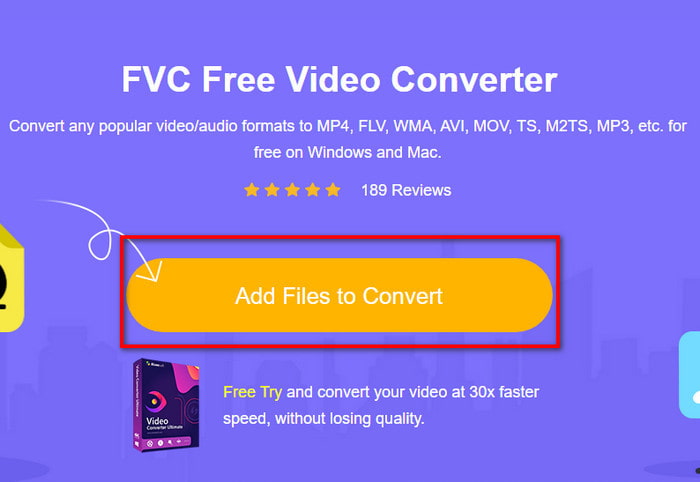
Stap 2. Klik op de website op Add Files to Convert om het installatieprogramma te downloaden. Maak je geen zorgen, het is maar een paar kb groot. Klik er daarna nogmaals op om de tool te starten en zoek het bestand op in de map. Als je het hebt gevonden, klik je op Open om verder te gaan.
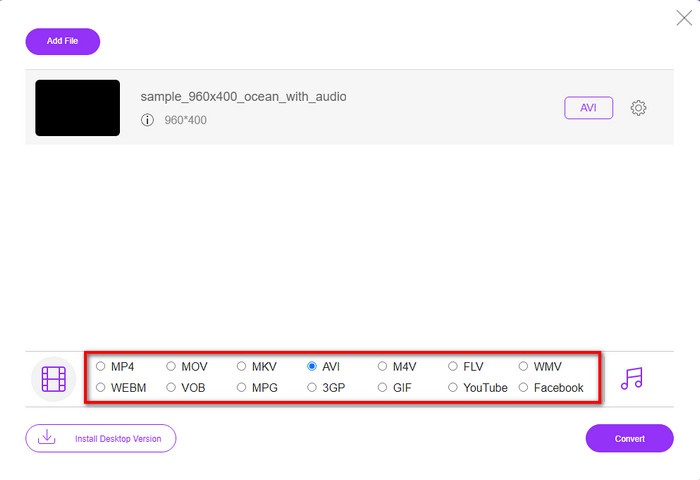
Stap 3. Er verschijnt nu een nieuwe interface van FVC op je scherm. Kies in de lijst hieronder het AVI-formaat of een ander formaat waarin je het bestand wilt omzetten.
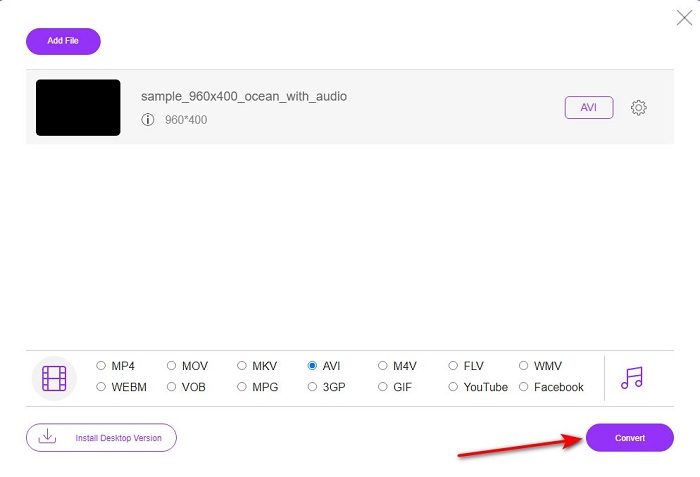
Stap 4. Als je het formaat hebt gekozen, kun je het converteren van het bestand starten door op Convert te klikken.
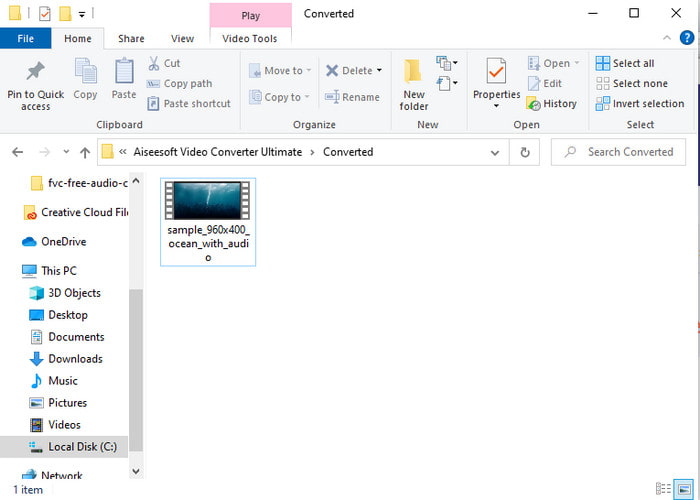
Stap 5. Dit duurt naar schatting minder dan een minuut. Wanneer het conversieproces voltooid is, wordt er een map geopend met het nieuw geconverteerde bestand.
Deel 2. Hoe VOB naar AVI te converteren op Windows en Mac
Gebruik de Fenomenale Converter: FVC Video Converter Ultimate
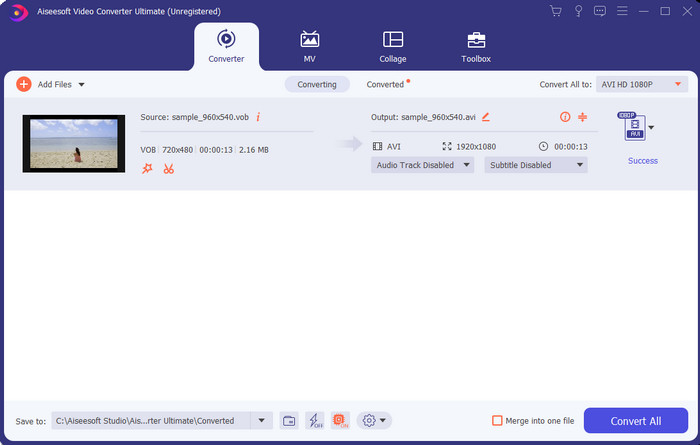
Als u VOB naar AVI-converter wilt downloaden, dan moet dit de beste keuze zijn die u graag zou willen maken. FVC Video Converter Ultimate doet zijn naam altijd eer aan als de ultieme tool die elke ultieme situatie oplost die je kunt bedenken, vooral bij het converteren. Deze software verschilt sterk van de twee tools die worden genoemd. Misschien denk je waarom, en dat is alleen omdat het perfect bij iedereen past, of je nu een pro of een beginner bent. De algehele prestaties die we ervaren wanneer we deze tool proberen, zijn al geweldig en we zijn onder de indruk van hoe snel de conversie kan worden gedaan. En nu, als je de fenomenale conversie wilt ervaren, waar we het over hebben, volg dan de aangegeven stappen hieronder.
Stap 1. Voordat je het kunt gebruiken, moet je het eerst downloaden. Installeer het daarna zodra het downloaden voltooid is, voer de installatie uit en klik op Start Now.
Gratis downloadVoor Windows 7 of nieuwerVeilige download
Gratis downloadVoor MacOS 10.7 of nieuwerVeilige download
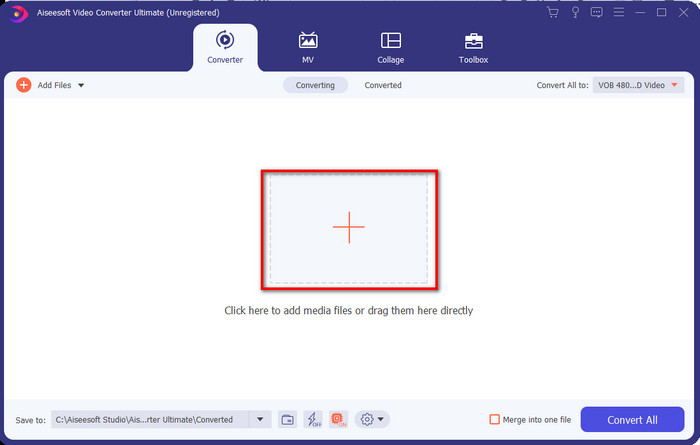
Stap 2. Zodra de installatie klaar is, open je vervolgens de software. Er verschijnt dan een interface zoals deze op je scherm. Klik in het middengedeelte van de interface op de +‑knop en er verschijnt een map op je scherm. Klik op Open om door te gaan naar de volgende stap van het proces.
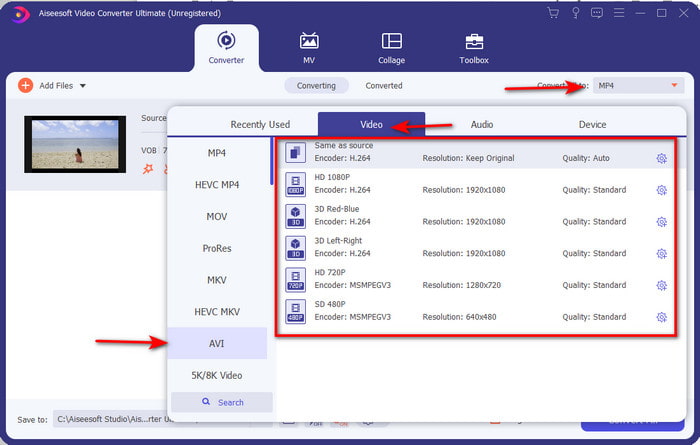
Stap 3. Klik op de knop Convert All linksboven in de interface en kies het AVI-formaat uit de lijst met videocategorieën.
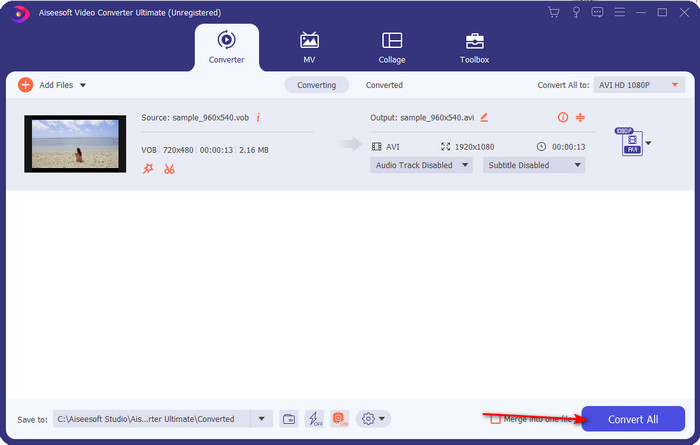
Stap 4. Als je klaar bent met het kiezen van het formaat, klik je op Convert All om de conversie te starten.
Stap 5. Je hoeft je geen zorgen te maken dat je lang moet wachten, want dit duurt slechts een paar seconden. Daarna wordt er automatisch een map op je scherm geopend met het geconverteerde mediabestand dat je zojuist hebt gemaakt. Klik erop om het te bekijken en te genieten van de nieuwe versie van je .vob-bestand.
Gebruik de gratis tool: HandBrake
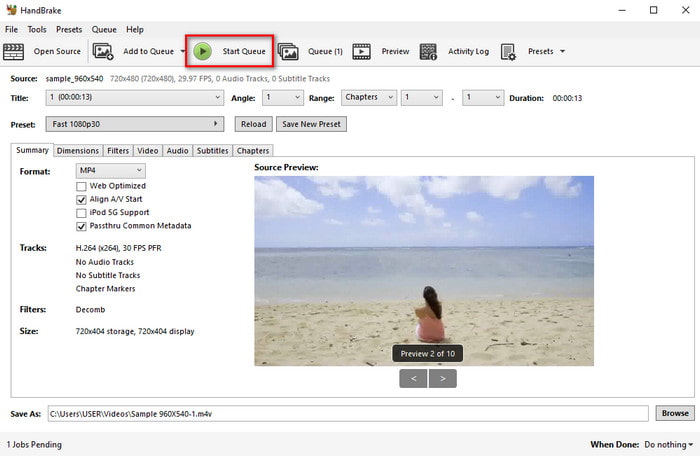
Als je op zoek bent naar een gratis tool, dan kan HandBrake je daarbij helpen, en net als de FVC Video Converter Ultimate heb je geen internetverbinding nodig om het programma te gebruiken. Het is bovendien gratis te downloaden en te gebruiken door iedereen met een desktop, thuis, op het werk of waar dan ook. Houd er echter rekening mee dat je, wanneer je de tool downloadt, ook een apart bestand met de naam .NET 5.0 moet downloaden voordat je hem überhaupt kunt gebruiken. Sommige gebruikers vinden dit een beetje irritant, omdat je na het downloaden van de tool opnieuw een extra bestand moet downloaden. Maar als je een effectieve en gratis conversie wilt uitvoeren, probeer dan HandBrake te gebruiken om VOB naar AVI te converteren en volg de onderstaande stappen.
Stap 1. Installeer de tool eerst op de harde schijf van je computer.
Stap 2. Klik op File en zoek het .vob‑bestand in je map.
Stap 3. Klik op Format en kies uit de beschikbare lijst en klik vervolgens op Start Queue.
Deel 3. Wat is de beste converter om VOB-bestanden naar AVI-indeling te converteren?
| Functies | FVC gratis video-omzetter | FVC Video Converter Ultimate | Handrem |
| Formaat converteren |  | | |
| Hardware- en conversieversnelling |  | | |
| Internetverbinding | | | |
| Videoverbetering of bewerking | | | |
| Programma ondersteund: | Webgebaseerde tool | Desktop-gebaseerde tool | Desktop-gebaseerde tool |
Deel 4. Veelgestelde vragen over VOB en AVI
Wat zijn de andere bestanden die VOB kan bevatten?
VOB is een multiplex dvd-formaat en kan daarom niet alleen video's en audio bevatten, maar ook ondertitels, navigatie-inhoud en menu's.
Waarom kan ik geen VOB-bestanden afspelen op mijn mediaspeler?
Een van de redenen waarom VOB niet afspeelbaar is op je mediaspeler, is dat dit formaat slechts door een klein aantal mediaspelers wordt ondersteund. Je kunt hier klikken om beschikbare VOB‑spelers te krijgen. Als je dit probleem nog steeds hebt, is een haalbare oplossing om het bestand te converteren met behulp van de bovenstaande converters.
Waarom zijn VOB-bestanden te groot?
De enige reden waarom dit formaat zo groot is, is dat het verschillende gegevens bevat die een dvd zou moeten hebben. Ook kunnen we de mogelijkheid van de lengte van de video niet weglaten. Of klik hier om te leren hoe u VOB-bestanden comprimeert.
Gevolgtrekking
Dus als u nu het VOB-bestand wilt converteren, dan kan dit eenvoudig worden gedaan met behulp van de hierboven beschikbare tools. Afgezien daarvan is de FVC Video Converter Ultimate de converter die echt opvalt tussen de andere genoemde online en offline tools. Omdat je VOB gemakkelijk naar AVI kunt converteren in Windows en zelfs op Mac. Als je nog steeds geen idee hebt wat je moet gebruiken, raden we je ten zeerste aan om de fenomenale tool te downloaden om een expliciete output te ervaren en versteld te staan.
-
 VOB naar MP4 - 3 manieren om VOB-bestanden gratis in bulk naar MP4 te converteren
 Dit artikel introduceert 3 gratis VOB naar MP4-converters en de bijbehorende tutorials. U kunt gratis VOB naar MP4-bestanden gratis converteren op Windows / Mac / online.
-
 De beste manieren om VOB naar FLV te converteren [gratis en online inbegrepen]
 Wilt u een VOB-bestand converteren naar een FLV-bestand? U kunt de taak eenvoudig voltooien met desktop- of online-converters. Lees deze gids en leer hoe u VOB gemakkelijk en snel naar FLV kunt transformeren.
-
 Wat is VOB-bestand en hoe VOB-bestand gratis in GIF te veranderen?
 Wil je meer weten over VOB-bestanden en hoe je deze kunt delen nadat ze zijn geript? of Waarom moet je VOB naar GIF converteren? Lees dit artikel dan goed door.
