


 Video Converter Ultimate
 Scherm opnemer
 Videoreparatie
Leer hoe u AMV naar MOV kunt converteren zonder de kwaliteit te verminderen
AMV is een propriëtair videoformaat dat wordt gebruikt om videoweergaven op S1 MP3- en MP4-mediaspelers op te slaan. Deze .amv-bestandsextensie heeft een lage resolutie en is gecomprimeerd om het bestand op deze draagbare mediaspeler te kunnen bewaren. Hoewel het formaat nog steeds bestaat, is het lastig om een mediaspeler te vinden die compatibel is met je telefoon, omdat dit formaat verouderd is. In plaats van te zoeken naar een compatibele mediaspeler, kun je de AMV-bestanden beter omzetten naar een nieuwer formaat dat veel breder wordt ondersteund, zoals MOV. Dus als je de beste manier wilt weten om AMV naar MOV te converteren, laten we dan met het onderzoek beginnen.

Deel 1. Korte introductie over AMV en MOV
Het idee van Action Media Video of AMV is om MP4 te vervangen als een universeel formaat omdat dit formaat beter en veel meer gecomprimeerd is. Dit formaat is ook de betere versie van het AVI-formaat. Maar het formaat is in dit nieuwe tijdperk genegeerd omdat het geen update ontvangt om de resolutiekwaliteit te verbeteren. En nu, als je dit formaat op onze mobiele apparaten opslaat en het speelt, verwacht dan dat je het niet kunt spelen omdat het formaat niet wordt ondersteund. Dus als u een video in dit formaat wilt afspelen, moet u een externe mediaspeler voor AMV downloaden. Hoewel MOV, krijgt dit formaat veel ondersteuning omdat het het oorspronkelijke bestandsformaat is dat QuickTime ontwikkelt.
Deel 2. Converteer AMV naar MOV met de ultieme desktopsoftware
FVC Video Converter Ultimate
Zet AMV om naar MOV met behulp van deze professionele videoconverter die een fenomenale uitvoer produceert waar niemand aan kan tippen, FVC Video Converter Ultimate. Deze converter is beschikbaar op pc en Mac, en beide bieden dezelfde geavanceerde functies die deze tool levert. Daarnaast zijn de snelle conversie en hardwareversnelling die op pc beschikbaar zijn, ook op Mac beschikbaar. Veel gebruikers hebben deze software al gekozen als hun eerste keus om hun probleem op te lossen. Voordat je deze tool kunt gebruiken, moet je hem echter aanschaffen bij FVC. Hoewel je ervoor moet betalen, zul je geen honderden dollars hoeven uit te geven, en de prijs is het zeker waard. Zonder verder oponthoud gaan we deze tool testen om te zien of we de ultieme conversie kunnen bereiken, zoals de naam belooft.
Stappen om AMV naar MOV te converteren met FVC Video Converter Ultimate:
Stap 1. Download FVC Video Converter Ultimate op je desktop door op de onderstaande knop te klikken; installeer de software nadat het downloaden is voltooid.
Gratis downloadVoor Windows 7 of nieuwerVeilige download
Gratis downloadVoor MacOS 10.7 of nieuwerVeilige download
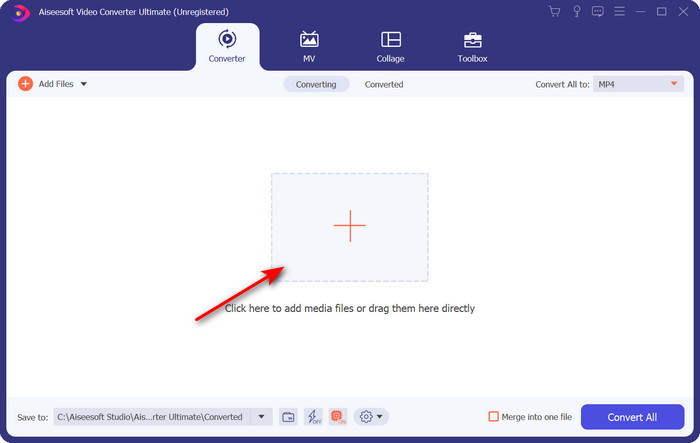
Stap 2. Open de software om deze te gebruiken en klik op het + teken om de .amv te uploaden. Zoek het bestand in de map en druk op Open om het in te voegen.
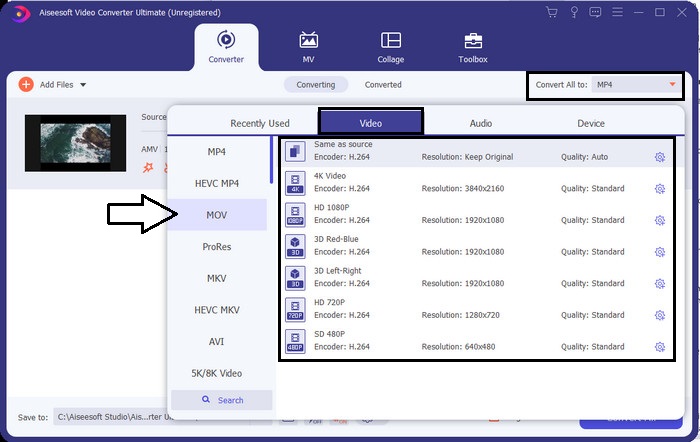
Stap 3. Om het formaat te wijzigen naar MOV, klik je op Convert All to: en kies je MOV of elk ander gewenst formaat.
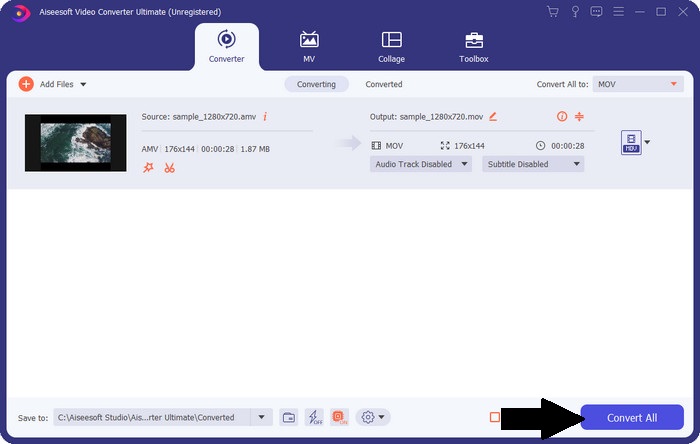
Stap 4. Om het AMV-bestand naar MOV om te zetten, klik je op Convert All om het conversieproces te starten.
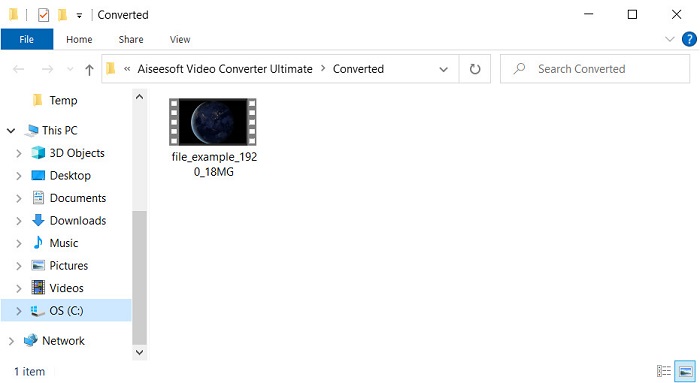
Stap 5. Het converteren van het bestand duurt slechts enkele seconden. Wacht vervolgens tot de map verschijnt met het .mov-bestand dat je zojuist hebt gemaakt; klik op het bestand om het af te spelen met je standaardmediaspeler.
Deel 3. Converteer AMV naar MOV met de 2 Online Service Converter beschikbaar
1. Bestanden converteren
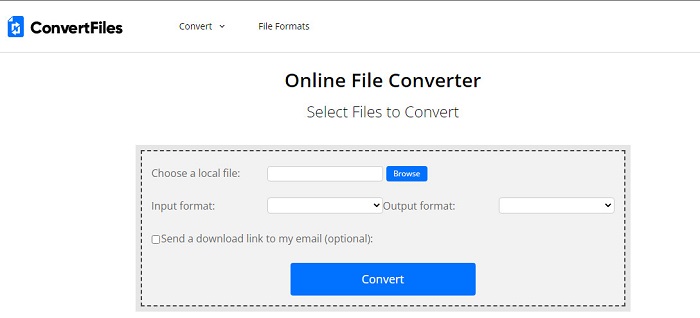
Een van de beste online converters die je in je favoriete browser kunt openen is ConvertFiles. Met deze online tool kun je je formaat zonder problemen naar een nieuw formaat converteren. Ook ondersteunt deze tool een kleine reeks formaten waar je uit kunt kiezen. Het downloaden van het geconverteerde bestand kost hier echter veel tijd, omdat er geen snelle conversie wordt aangeboden. Een ander nadeel zijn de advertenties; er staan er veel op de interface. Ondanks de problemen met het downloadproces en de advertenties, presteert deze tool goed als gratis online hulpmiddel.
Stappen om AMV naar MOV te converteren met ConvertFiles:
Stap 1. Open je favoriete browser en zoek naar ConvertFiles.
Stap 2. Zodra de website is geopend, klik je op Browse om het bestand in de map te lokaliseren; zoek bij Output Format naar MOV en klik op Convert.
Stap 3. Als het converteren is voltooid, klik je op de blauw gemarkeerde link om het bestand op je computer te downloaden.
2. MConverter
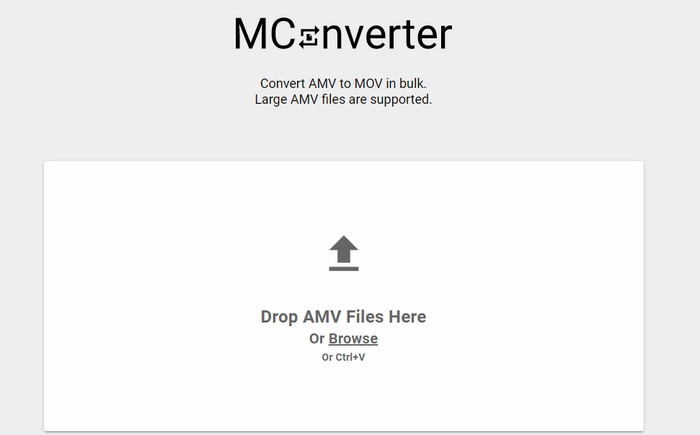
Wil je geen advertenties in de interface zodat je AMV rustig naar MOV kunt converteren? Probeer dan MConverter, beschikbaar in je browser. Deze tool ondersteunt bovendien batchconversie om je conversie net zo efficiënt te maken als met FVC Video Converter Ultimate. De keerzijde van deze online tool is echter dat je bestandsgrootte niet groter mag zijn dan 200 MB. Als je dus een lange video wilt converteren en de bestandsgrootte groter is dan de ondersteunde limiet, is dit niet de juiste keuze. Maar als je een betere conversie-ervaring wilt dan met ConvertFiles, volg dan de onderstaande stappen.
Stappen om AMV naar MOV te converteren met MConverter:
Stap 1. Zoek MConverter in je zoekmachine en open het.
Stap 2. Klik op de knop Upload om het bestand in te voegen, wacht even tot de webtool is geladen, zoek MOV en klik erop. De conversie van het bestand begint zodra je het MOV-formaat selecteert.
Stap 3. Druk op Download All om het bestand op te slaan.
Deel 4. Veelgestelde vragen over AMV en MOV
Kan ik mijn MP4 omzetten naar AMV?
Je kunt je MP4 naar AMV omzetten om het bestand snel online te kunnen overdragen. Vooral als de video een uur lang is, raden we je aan om de .mp4-bestanden naar .amv te converteren, omdat dit formaat veel kleiner is in bestandsgrootte als we de twee formaten met elkaar vergelijken.
Ondersteunt VLC AMV?
Gelukkig kun je VLC Media Player gebruiken om .amv-bestanden op deze mediaspeler af te spelen, ook al is het formaat verouderd. Maar wist je dat er mediaspelers zijn die deze speler overtreffen? Als je dus wilt weten welke mediaspelers dat zijn, klik dan op deze link om de 5 alternatieve mediaspelers voor VLC te leren kennen.
Hoe zet ik mijn AMV om naar AVI?
AMV is de betere versie van AVI; maar als we het over kwaliteit hebben, levert AVI een fenomenale prestatie in vergelijking met dit oudere bestandsformaat. Bovendien is AVI zeer compatibel met alle platformen. Dus als je je AMV in een betere versie en op alle platformen wilt bekijken, moet je leren hoe je AMV naar AVI converteert.
Gevolgtrekking
Hier moet een einde komen aan de discussie; ook al willen we een AMV-bestand op onze schijf opslaan, het compatibiliteitsprobleem is een reden waarom we het moeten converteren. Er wordt immers gezegd dat AMV eerder populair was vanwege de manier waarop deze container het bestand comprimeert. Tegenwoordig moet u echter overwegen om het naar een nieuw formaat te converteren om het nog steeds te kunnen gebruiken. Bovendien converteren de hier geboden oplossingen effectief. Toch presteert de FVC Video Converter Ultimate fenomenaal in vergelijking met de andere twee tools. Dus als u de beste tool wilt ervaren, is het een must om deze op uw computer te downloaden en de bovenstaande stappen te kopiëren.
-
 4 beste methoden om MOV gemakkelijk naar MP3 op Windows en Mac te converteren
 Als u de MP3-audiobestanden uit MOV-bestanden wilt extraheren, kunt u meer leren over de 4 meest efficiënte MOV naar MP3-converters om de gewenste bestanden uit het artikel te halen.
-
 MKV naar MOV - Hoe MKV naar MOV te converteren
 Hoe converteer ik MKV naar MOV op Mac? Kan iMovie MKV lezen? Wat betekent MOV-formaat? Dit bericht vertelt 2 eenvoudige manieren om u te helpen MKV naar MOV te converteren met gratis online en professionele videoconverters.
-
 FLV naar MOV - Hoe FLV naar MOV op Mac / pc / online gratis te converteren
 Hoe FLV naar MOV te converteren? Hoe converteer ik FLV naar MOV op Mac? Is er een gratis manier om YouTube FLV online naar MOV te converteren? Dit bericht deelt 3 FLV naar MOV-converters om FLV-bestanden naar MOV te veranderen.
