


 Video Converter Ultimate
 Scherm opnemer
 Videoreparatie
Uitgebreide gids voor het converteren van AMV naar WMV met stappen [opgelost]
Want to enjoy watching AMV video files on your Windows or use it for online streaming? If so, you must read this article to know how to convert AMV to WMV, improve the quality, and make it compatible. In this list, you will learn the software you can use to convert your AMV files. So without further ado, you must now fasten your seatbelt and learn a lot more about AMV and WMV format.

Deel 1. Converteer AMV naar WMV met FVC Video Converter Ultimate
FVC Video Converter Ultimate is our first choice for converting AMV to WMV because it allows you to transcode media and device-specific formats. And more, it is capable of converting not only one, two, or three files simultaneously but more. Furthermore, this converter is dedicated to its users to provide nothing but greatness on their conversion. Want to know why? Then read the key features below.

FVC Video Converter Ultimate
4.355.888+ downloads- Het kan u helpen met uw conversieprobleem van AMV naar WMV, AVI, FLV, SWF, MP4, AVI.
- Het ondersteunt ultrasnelle conversie om het formaat nog sneller te converteren.
- Bewerk uw AMV-video's met de unieke bewerkingsfuncties die deze tool biedt.
- Help je om binnen een paar klikken een expert te zijn.
- Het ondersteunt alle platforms zoals Windows en macOS.
Gratis downloadVoor Windows 7 of nieuwerVeilige download
Gratis downloadVoor MacOS 10.7 of nieuwerVeilige download
Sta je versteld van de mogelijkheden van de tool? Als dat zo is, laten we dan de procedure voor het converteren van AMV-bestanden lezen en de stappen kopiëren om te slagen in het converteren.
Step 1. Download the FVC Video Converter Ultimate on your computer drive by clicking the download button presented below. Proceed on clicking the installer to install and press Start Now to launch the tool.
Gratis downloadVoor Windows 7 of nieuwerVeilige download
Gratis downloadVoor MacOS 10.7 of nieuwerVeilige download
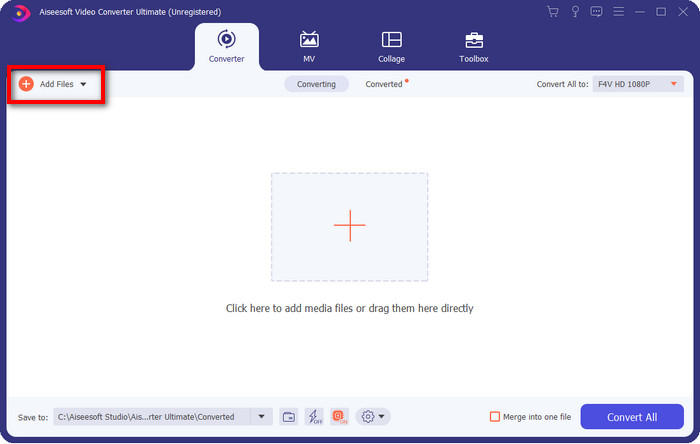
Step 2. After launching the software, you can add one or more files by clicking the Add Files option. The computer folder will show on your screen, select the AMV file, and press Open to upload it.
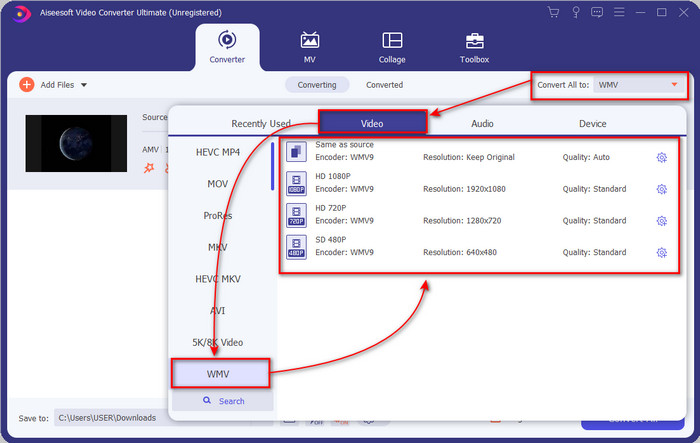
Step 3. By clicking the Convert All to option, a format list will show. Find the WMV format and choose the resolution, encoder, and quality you want to have.
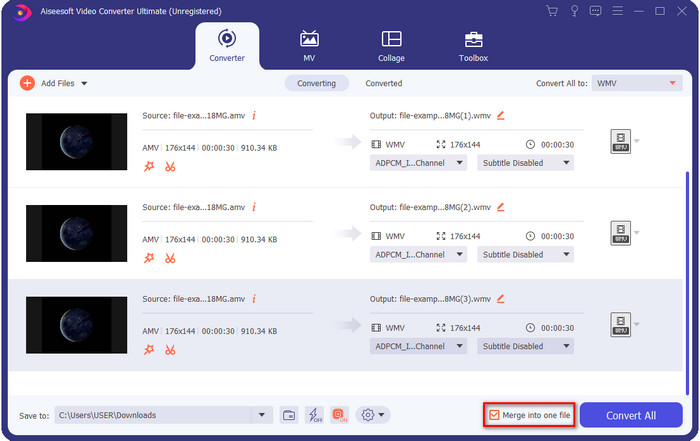
Optional. Want to make your AMV files into one WMV format? Then it would help if you ticked the box saying merge into one file.
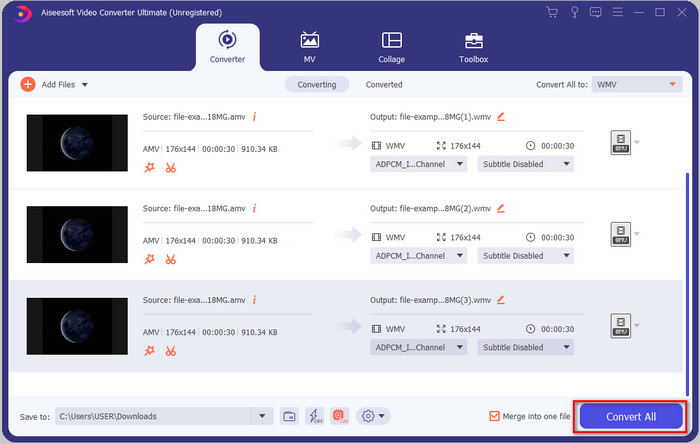
Step 4. Press the Convert All for the process of converting to start. After the process, a folder will display on your screen with the converted WMV file.
Deel 2. Converteer AMV online naar WMV
Don't you want to download an offline converter because you don't have enough storage to download one? Then use the FVC Free Online Video Converter. Because you will not need to download the full converter; instead, you will need the launcher, but it is tiny and won't affect your computer storage. Moreover, this web converter converts AMV to WMV, adjusting the resolution. However, converting the file will depend on the speed of your internet. Do you have an internet connection? Then you must try to use this and experience online conversion.
Step 1. Hit this link to open the main website of the converter.
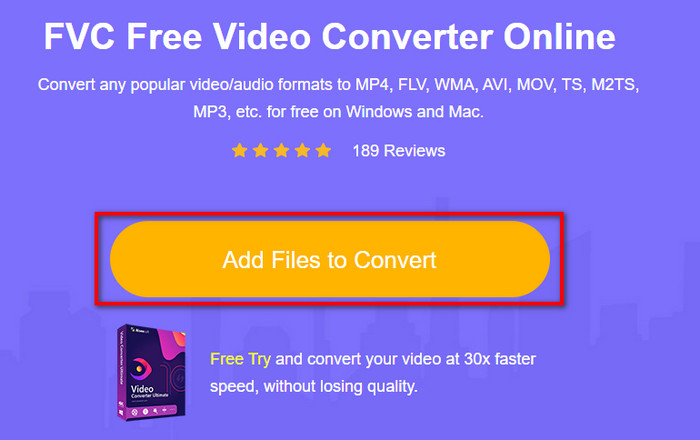
Step 2. By clicking the Add Files to Convert, a folder will show where you can find the AMV file and press Open.
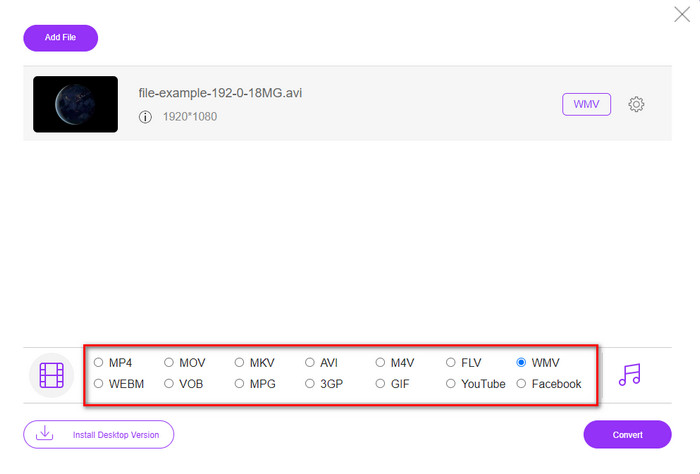
Step 3. Choose the WMV format that will display on the screen.
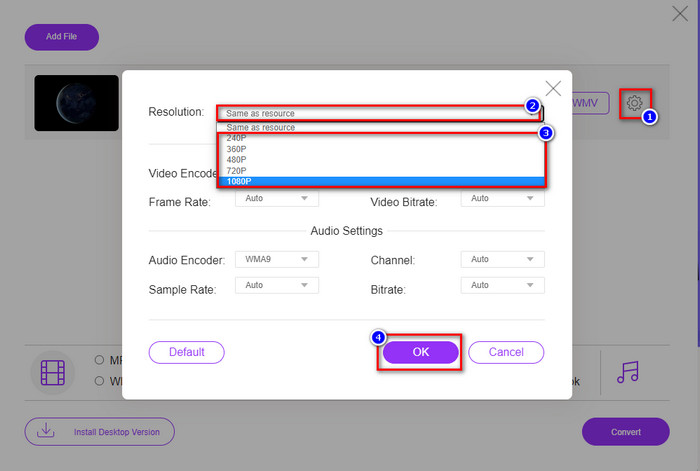
Optional. As we said earlier, you can adjust the resolution here. So now, let's modify the resolution by clicking the gear button. At the upper part, click the drop-down button, and a list of resolutions will show; choose one and press OK to proceed.
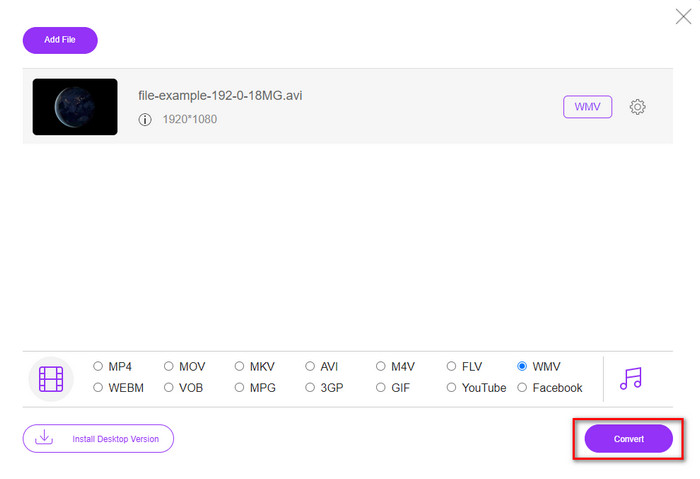
Step 4. So now, if you want to start the conversion, you can click the Convert button, and the process will begin.
Deel 3. Wat is het verschil tussen AMV en WMV?
Allereerst werden deze twee mediacontainers populair vanwege hun unieke mogelijkheden als formaat. Maar vandaag zullen we bestuderen wat de voor- en nadelen zijn van het formaat zelf. Bovendien zullen we drie aspecten specificeren door er een vraag van te maken om meer te weten over AMV en WMV.
Welk formaat heeft een betere mediaresolutie?
Tussen de twee formaten heeft de WMV ongetwijfeld een betere kwaliteit. Een WMV-bestand kan een videoresolutie tot 300.000 pixels opslaan en streamen voor een meer gedetailleerde visuele output. Maar u kunt de snelheid instellen op een schermresolutie van 528x576. En voor AMV is de kwaliteit die het kan bevatten 96x96 tot 320x240, wat vrij laag is in vergelijking met de lage resolutie van de WMV. Een van de redenen waarom AMV een kleinere resolutie heeft, is dat het op het scherm van de Chinese mediaspeler moet passen.
Welk formaat heeft een kleinere bestandsgrootte?
Deze overwinning gaat met de AMV mee omdat dit formaat super gecomprimeerd is. Hoewel WMV een compressor heeft, is de grootte van de AMV nog steeds economisch vriendelijker, vooral op uw computerschijf, dan de WMV.
Welk formaat is meer compatibel?
We can say that they have different strengths if we talk about compatibility because WMV is for Windows programs only. If you are a Mac user, you can't just use this format and play it on Quicktime or edit it on iMovie. Instead, you will need to convert WMV to MOV to make it compatible. In the case of AMV, this format uses a portable Chinese media player to play this format. But today, you can use a portable media player instead of buying an AMV media player. However, looking for an AMV media player is a pain in the ass because they are numbered players supporting this kind of format and the encoder. We can say that WMV has gained more compatibility than AMV, especially if we transfer the file to Windows.
En nu we de reden kennen, is in dit geval het converteren van het bestand naar een nieuw formaat noodzakelijk. Om die reden moet u leren hoe u AMV naar WMV kunt converteren om het mediabestand compatibel te maken met Windows-software.
Deel 4. Veelgestelde vragen over AMV- en WMV-conversie
Hoe zet ik mijn AMV om naar MOV?
There are a lot of techniques and methods we can search and try on that are available if we query it on the web. But it is hard to choose which tool is better to use to convert AMV to MOV. So, to make it short, click this link and understand how to convert AMV to MOV and make it compatible with macOS.
Kan ik een VLC-mediaspeler gebruiken om AMV te bekijken en af te spelen?
Absolutely, you can download the VLC media player on your desktop to play your AMV files without needing to download an additional codec. But if you want to know more about the VLC and its alternative, try to read this article by clicking this link.
Waarom moet ik AMV comprimeren?
We compress our media file and AMV because we need to free some space up on our hardware drive. So want to learn how to compress AMV files? Then click this link.
Gevolgtrekking
Deze twee oplossingen bieden uitmuntendheid om uw conversie van AMV naar WMV gemakkelijk en succesvol te maken. Bovendien zijn dit de beste oplossingen die we op internet kunnen vinden. Dus nu is het aan jou om te kiezen welke converter je gebruikt om je AMV-bestand naar WMV te converteren. Om succes te behalen, moet u de bovenstaande FVC-tools gebruiken.
-
 Beste methode om te gebruiken bij het converteren van AMV naar AVI [Goedgekeurd]
 Heeft u moeite om uw videobestand in AMV-formaat naar AVI te converteren? Hier zijn enkele tips die u alleen in dit artikel kunt vinden.
-
 [Bewezen] 2 manieren om AMV offline en online om te zetten naar FLV
 Heb je ooit overwogen om een converter uit te proberen om je AMV-bestanden naar FLV-bestandsformaat te converteren. Om uw probleem bij het bekijken van een AMV-video op te lossen, leest u dit artikel om te weten welke geschikte converters u moet gebruiken.
-
 Gratis | 3 beste methoden om MP4 naar WMV te converteren zonder kwaliteitsverlies
 Dit bericht laat zien hoe je MP4-video naar WMV-indeling converteert op Mac of Windows. We bieden u ook verschillende opties, waaronder zowel desktopsoftware als webgebaseerde online converters. Klaar om de beste MP4 naar WMV-conversietools te kennen?
