


 Video Converter Ultimate
 Scherm opnemer
 Videoreparatie
Hoe MOV gratis naar MKV te converteren, online en offline op Mac
Heb je moeite om MOV-bestanden af te spelen in VLC Media Player? VLC Media Player herkent MOV-bestanden nauwelijks. Daarom moet je je MOV‑bestand converteren naar een formaat dat VLC Media Player standaard kan afspelen, namelijk het MKV‑bestand. Gelukkig hebben we de beste en eenvoudigste converters gevonden om je MOV‑bestand naar het MKV‑bestandsformaat te converteren. Als je meer wilt weten over het gratis converteren van MOV naar MKV, lees dan dit artikel voor meer details.

Deel 1. MOV naar MKV converteren met FVC Video Converter Ultimate op Mac
FVC Video Converter Ultimate is een offline converter die beschikbaar is op Mac. Deze bestandsconverter is een van de toonaangevende converters die online beschikbaar zijn. Hij stelt je in staat talloze bestandsindelingen te converteren, waaronder MOV, MKV, AVI, MP4, M4V, WMV, VOB en meer dan 1000 andere. En als je een 3D‑video wilt maken, beschikt deze converter over die functie. Bovendien biedt deze tool een ultrasnelle conversie waarmee je MOV naar MKV op Mac kunt converteren met bliksemsnelle snelheid.
Hieronder staan de stappen om je MOV‑bestand naar MKV te converteren met behulp van FVC Video Converter Ultimate:
Stap 1. Download op je Mac‑apparaat FVC Video Converter Ultimate door op de Download-knop hieronder voor macOS te klikken. Open vervolgens de applicatie.
Gratis downloadVoor Windows 7 of nieuwerVeilige download
Gratis downloadVoor MacOS 10.7 of nieuwerVeilige download
Stap 2. Klik na het openen van de applicatie op de knop Add Files of op de knop met het +-teken. Vervolgens verschijnen de bestanden op je computer, waar je je MOV-bestand selecteert. Daarna wordt je bestand geüpload naar de hoofdinterface van de software.
Download de desktopversie om bestanden in batches te converteren.
Stap 3. Nadat je MOV‑bestand is geüpload, klik je op de knop Convert All to om je uitvoerformaat te selecteren. Klik vervolgens op het MKV-formaat.
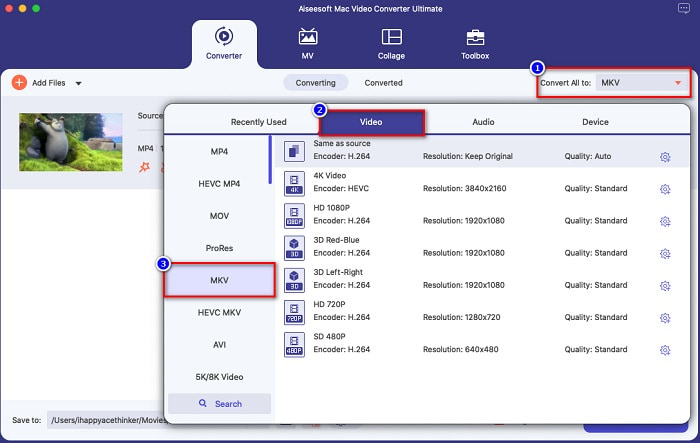
Stap 4. Klik tot slot op de knop Convert All, zodat de conversie van je MOV‑ naar MKV‑bestand wordt gestart. Wacht dan een paar seconden, en klaar!
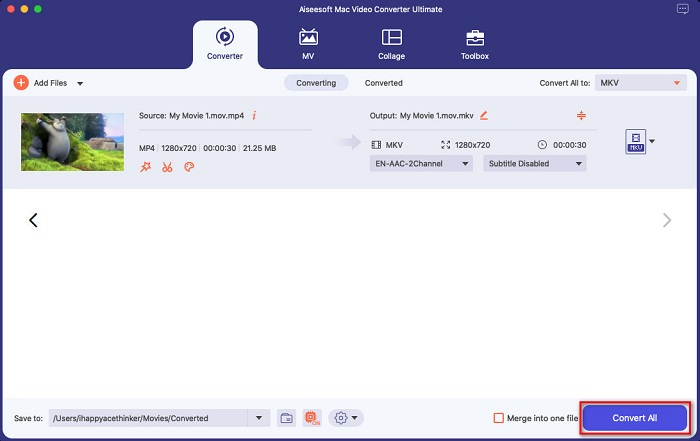
U kunt MOV moeiteloos converteren naar MKV op Mac door deze eenvoudige en gemakkelijke stappen te volgen.
Voordelen
- Kan 4K-, 1080P- en 720P-videoformaten converteren.
- Biedt batchconversie om meerdere bestanden samen te voegen tot één,
- Ondersteunt meer dan 1000+ bestandsindelingen die beschikbaar zijn op internet.
- Het heeft een functie om uw bestanden te bewerken, verbeteren en comprimeren.
Nadelen
- Om de speciale functies te gebruiken, moet u deze eerst aanschaffen.
Deel 2. MOV converteren naar MKV met behulp van online en freeware tools
Gebruik FVC Free Online Video Converter [Online]
Wanneer je in je browser zoekt naar MOV‑naar‑MKV‑converters, zie je een lijst met online converters op je resultatenpagina. Hier stellen we je de beste gratis MOV‑naar‑MKV‑converter voor, FVC Free Online Video Converter. Deze online converter kan veel gangbare bestandsindelingen converteren die op internet beschikbaar zijn. Hij is ook eenvoudig te gebruiken, zodat beginners er moeiteloos mee overweg kunnen. Omdat het echter een internetafhankelijke tool is, kun je soms een langzaam conversieproces ervaren. Desondanks is het bewezen een van de beste en meest handige online converters op het web te zijn.
Hoe gebruik je FVC Free Online Video Converter:
Stap 1. Zoek in je browser naar FVC Free Online Video Converter, of klik op deze link om direct naar de webpagina te gaan.
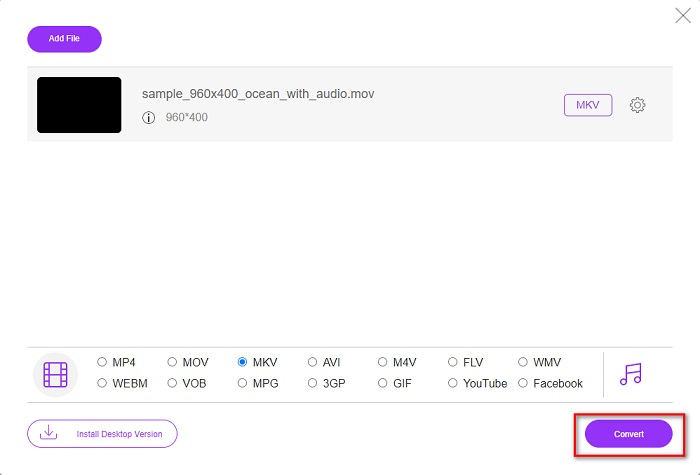
Stap 2. Start de softwareapplicatie en klik vervolgens op de knop Add Files to Convert. Daarna verschijnen je desktopmappen, waar je je MOV-bestand selecteert.
Download de desktopversie om bestanden in batches te converteren.
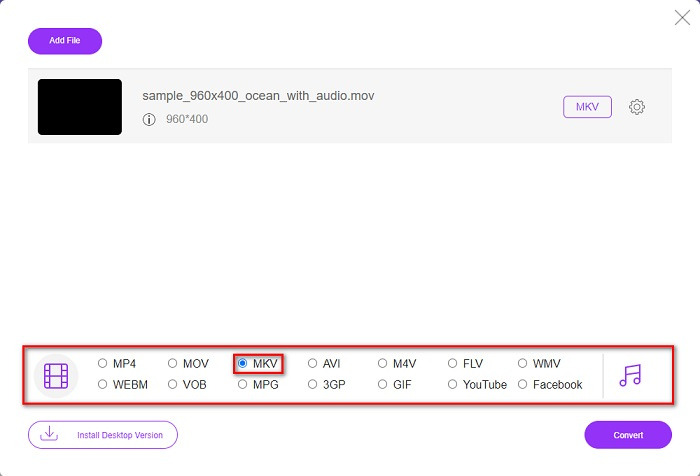
Stap 3. Nadat je bestand is geüpload, kies je je uitvoerformaat, dat zich onderaan de tweede interface van de software bevindt. Klik op het MKV-bestandsformaat.
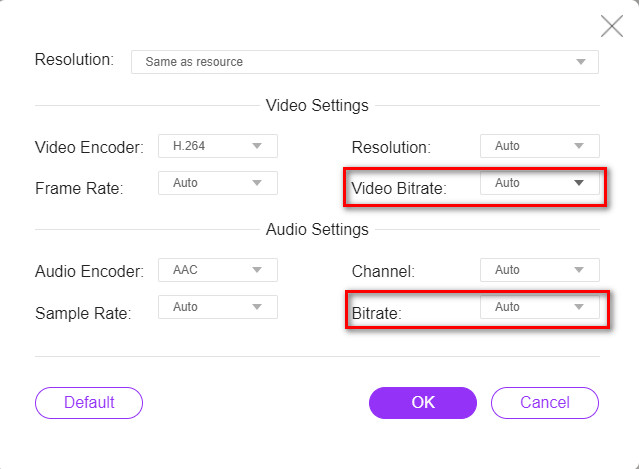
Optioneel. Als je de video‑ en audiobitrate van je bestand wilt wijzigen, klik je op de knop Setting naast het vak met het uitvoerbestandsformaat. Verander vervolgens je video‑ of audiobitrate naar wat je wilt. Klik daarna op de knop OK om de wijzigingen op te slaan.
Stap 4. Om te beginnen met het converteren van je MOV naar een MKV‑bestand, klik je op de knop Convert. Wacht vervolgens tot het conversieproces is voltooid.
Gebruik HandBrake [Freeware]
Als je MOV naar MKV wilt converteren met behulp van freeware, kan deze tool de oplossing voor je zijn. HandBrake is een freeware‑converter waarmee je bijna alle standaard bestandsindelingen kunt converteren naar MKV, MP4 en WebM. Deze converter is geweldig omdat je een batchscan van je MOV‑bestanden kunt uitvoeren. De interface is echter lastig te gebruiken, dus je moet mogelijk wat tijd besteden aan het leren kennen van de bedieningselementen en functies.
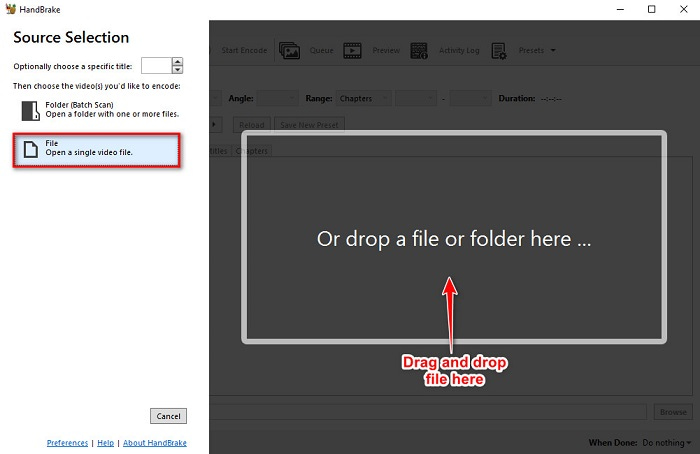
Stap 1. Download HandBrake gratis door er in je browser naar te zoeken en open vervolgens de app. Klik op de knop File om je MOV-bestand te uploaden. Of je kunt je bestand slepen en neerzetten in het rechthoekige vak.
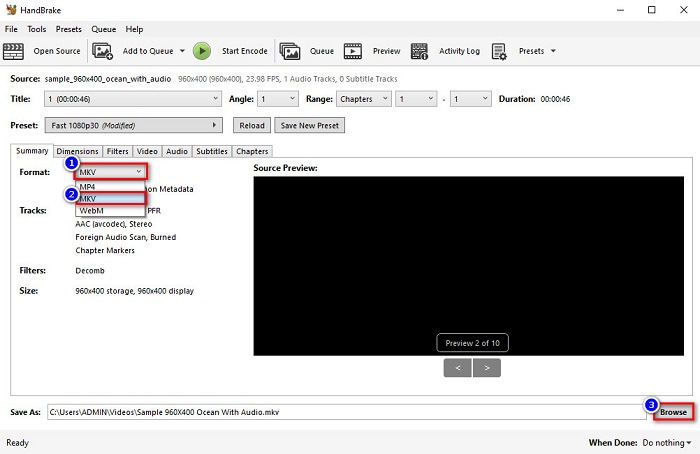
Stap 2. Selecteer vervolgens je MOV‑bestand als uitvoerformaat via de knop drop-down. Klik daarna op de knop Browse om de locatie voor je uitvoerbestand te kiezen.
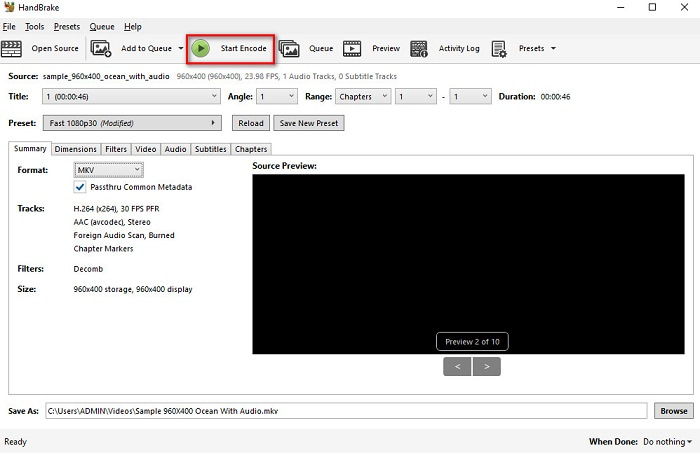
Stap 3. Klik tot slot op de knop Start Encode zodat je MOV‑bestand wordt omgezet naar MKV.
En zo kun je MOV naar MKV converteren met een online en freeware converter.
Deel 3. Verschillen tussen MOV en MKV
Een MOV‑bestand is een multimediabestandsindeling die is ontwikkeld door Apple en is een van de meest gebruikte bestandsformaten op elk Apple‑apparaat of in Apple‑software. Bovendien kan dit bestand films, korte videoclips en zelfs tv‑shows opslaan. De QuickTime‑mediaspeler ondersteunt dit type bestandsindeling in hoge mate. Verder heeft dit bestand een van de hoogste kwaliteit in verhouding tot de bestandsgrootte. Als je QuickTime Player geen MOV‑video’s kan openen, klik dan hier om oplossingen te vinden.
Aan de andere kant is een MKV-bestand of Matroska-bestand een container voor multimediabestanden waarin audio-, video- en ondertiteltrackgegevens worden opgeslagen. Dit type bestand zal niet verouderd zijn omdat het toekomstbestendig is gemaakt. Bovendien kan dit formaat meerdere ondertitelstreams en audiotracks in verschillende talen aan.
MOV versus MKV
Het MOV-formaat kan worden gebruikt voor het opslaan van een film, tv-programma, korte videoclip of homemovie. Het wordt eigenlijk opgeslagen in het QuickTime-bestandsformaat (QTFF), dat in 1991 door Apple werd geïntroduceerd. MOV-bestanden worden vaak gebruikt wanneer mensen een video met hoge kwaliteit willen opslaan.
Het Matroska multimedia containerformaat, uitgebracht in 2002, is een open-source formaat dat een aantal video-, audio-, beeld- en ondertiteltracks kan bevatten. U kunt het dus gebruiken om eenvoudig korte videoclips, tv-programma's en films op te slaan. Het is vrij populair voor het ondertitelen van anime-fans.
Deel 4. Veelgestelde vragen over het converteren van MOV naar MKV
Kun je MKV-bestanden afspelen met QuickTime Player?
Helaas kun je een MKV‑bestand niet afspelen in QuickTime‑mediaspelers, omdat QuickTime geen MKV‑bestanden ondersteunt. Maar als je een MKV‑bestand op je Mac wilt afspelen, kun je MKV naar MOV converteren. Klik op deze link om meer te weten te komen over het converteren van MKV naar MOV.
Kun je MOV verliesloos naar MKV converteren?
Zeker weten. Met FVC Video Converter Ultimate kun je je MOV‑ naar MKV‑bestand verliesvrij converteren.
Is MOV beter dan MKV?
Als u een mac-gebruiker bent, zult u merken dat MOV beter is dan MKV-bestanden, simpelweg omdat MOV een algemeen ondersteund bestand is door macOS. Als u echter een Windows-gebruiker bent, is het MKV-bestand wellicht een betere keuze voor u.
Gevolgtrekking
Dus, als je je MOV-bestand naar MKV wilt converteren, gebruik dan de hierboven beschreven manieren. Alle gratis MOV naar MKV-converters hebben verschillende kenmerken ten opzichte van elkaar. Als je bovendien op zoek bent naar een converter met veel fantastische functies die batchconversie, het bewerken van je MOV-video's en veel geweldige dingen die andere converters niet kunnen bieden, gebruik dan FVC Video Converter Ultimate. Download het nu gratis.
-
 2 eenvoudige manieren om MOV-bestanden naar FLV te converteren op Windows/Mac
 Hoe MOV gratis naar FLV te converteren? Hier zijn de beste videoconverters op desktop en online om uw MOV-bestand binnen enkele seconden naar FLV te converteren zonder een cent te betalen.
-
 MOV naar GIF - MOV converteren naar geanimeerde GIF op Mac, pc en online gratis
 Wat is een GIF? Hoe video naar GIF converteren? Hoe verander je MOV online in geanimeerde GIF? Dit bericht vertelt 3 manieren om MOV online naar GIF te converteren, op Mac/PC.
-
 4 Efficiënte manieren om MOV naar AVI te converteren op pc en Mac [2021]
 Wil je weten wat de beste MOV naar AVI-converter op internet is? En waarom de FVC Ultimate Video Converter misschien iets voor jou is.

