


 Video Converter Ultimate
 Scherm opnemer
 Videoreparatie
 Beveiligde download
Zelfstudie over het op de eenvoudigste manier bewerken van MKV-metadata op het bureaublad
MKV is een extensie die zeer populair is voor de Matroska‑multimediacontainerformaten. Waarom is MKV populairder dan andere formaten? Veel gebruikers dachten dat MKV een videocompressie is die op audio en video wordt gebruikt, wat niet zo is. Dit formaat werd populair vanwege de flexibiliteit om verschillende codecs voor audio, video en ondertiteling te gebruiken en deze in één enkel bestand op te slaan. Met deze functies werd het formaat toekomstbestendig, wat inhoudt dat het bestandsformaat nooit verouderd raakt, zelfs de metadata die hier wordt opgeslagen niet. Dus als je metadata aan je MKV‑bestand wilt toevoegen, verwijderen of bewerken, moet je dit artikel verder lezen en leren hoe je MKV‑metadata kunt bewerken op een snellere manier.

Deel 1. Hoe de metadata van het MKV-bestand te bewerken met de 3 beste software op desktop
FVC Video Converter Ultimate – De krachtigste MKV Tag Editor op Windows en Mac
FVC Video Converter Ultimate is de beste MKV‑metadata‑editor die je op beide besturingssystemen kunt downloaden om de taak als een professional af te ronden. De ultieme software kan het MKV‑bestand eenvoudig verwerken en openen om de metadata te wijzigen als je die wilt aanpassen. Met de brede ondersteuning voor video‑ en audioformaten is het uploaden van elk mediabestand, zoals MKV, nooit een lastige klus geweest. Tijdens het gebruik van de software zul je merken dat het gemakkelijk is om het hele concept van het gebruik ervan onder de knie te krijgen. Wil je de tool gebruiken maar heb je geen handleiding waarop je kunt terugvallen? Gelukkig helpt de informatie die we hieronder geven je om de taak als een professional uit te voeren; lees de onderstaande details om te weten hoe je de titel van een MKV‑bestand in minder dan een minuut kunt wijzigen.
Stap 1. Klik eerst op de downloadknop; daardoor wordt de software onmiddellijk op je desktop gedownload en kun je kiezen welke versie past bij het systeem dat je momenteel gebruikt. Installeer het vervolgens op je desktop en start het om metadata aan je MKV‑bestanden toe te voegen.
Gratis downloadVoor Windows 7 of nieuwerVeilige download
Gratis downloadVoor MacOS 10.7 of nieuwerVeilige download
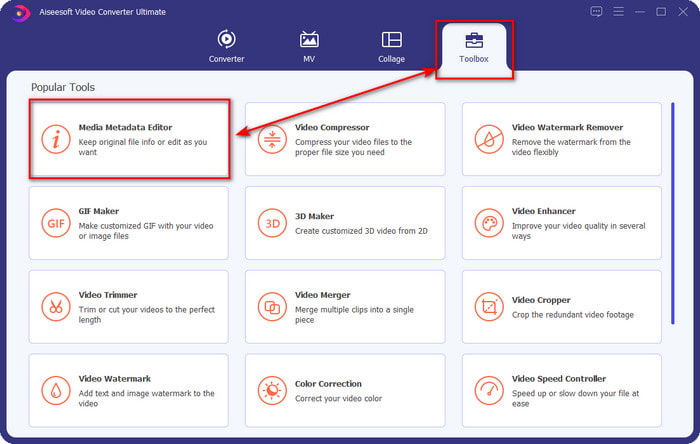
Stap 2. Nu je de tool hebt gestart, moet je naar de sectie Toolbox gaan en in de onderstaande lijst zoeken naar Media Metadata Editor.
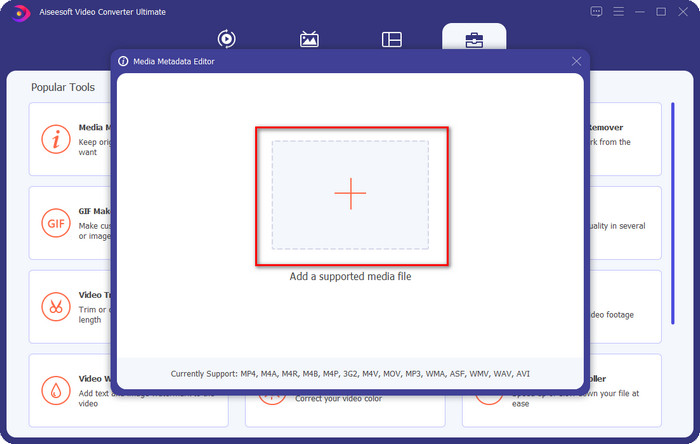
Stap 3. Om het MKV‑bestand toe te voegen, klik je op de knop + die op je scherm verschijnt, zoek je het .mkv‑bestand in de map en klik je op Openen om door te gaan naar de volgende stap.
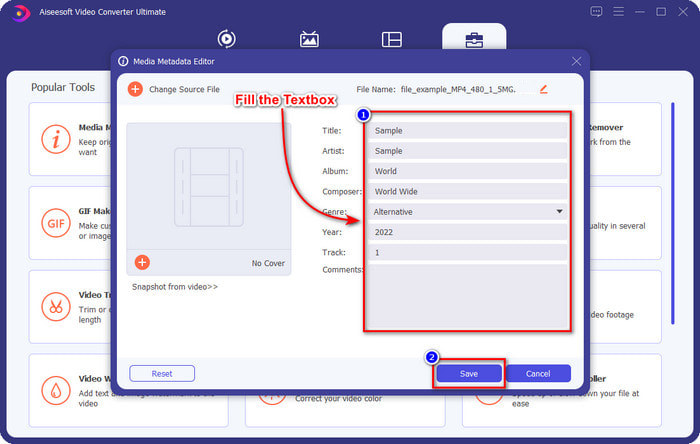
Stap 4. In dit deel kun je nu de metadata toevoegen die je nodig hebt voor je MKV; vul ze in zoals jij het wilt en klik op Opslaan als je alles hebt gedaan en klaar bent om dit toe te passen. Daarmee heb je de tags aan je MKV‑bestand toegevoegd, zodat je snel kunt bepalen wat er in het bestand zit.
VLC Media Player – Gratis MKV Metadata Editor
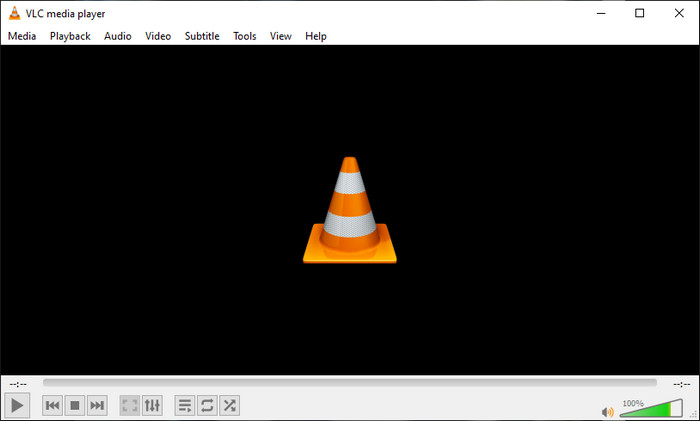
VLC Media Player kan je MKV eenvoudig afspelen en de tags bewerken. Deze tool is open‑source, dus je hoeft je geen zorgen te maken als je de software op je desktop downloadt, want je kunt het volledige potentieel van de tool gratis benutten, maar je kunt doneren als je dat wilt. Hoewel de tool niet zo goed is als de andere metadata‑editors in deze lijst, wordt hij nog steeds beschouwd als een betrouwbare tool die je op je apparaat kunt gebruiken. Bovendien kun je vrij de basisinformatie aan je MKV‑bestand toevoegen, zoals de naam van de auteur, titel, artiest, album, enzovoort. Volg de stappen en leer hoe je MKV‑metadata kunt bewerken met de mediaspeler als metadata‑editor.
Stap 1. Download en open daarna VLC op je desktop.
Stap 2. Ga naar Extra en klik op Codec-informatie (of Media‑informatie, afhankelijk van de taalinstelling). Wil je een eenvoudigere manier, dan kun je in plaats daarvan een sneltoets gebruiken door op CTRL + I te drukken. Welke manier je ook kiest, de functies zijn hetzelfde.
Stap 3. Typ de informatie die je nodig hebt en klik op Sluiten om de metadata automatisch op te slaan.
MKVToolNix GUI - Toegewijde MKV Tag Editor
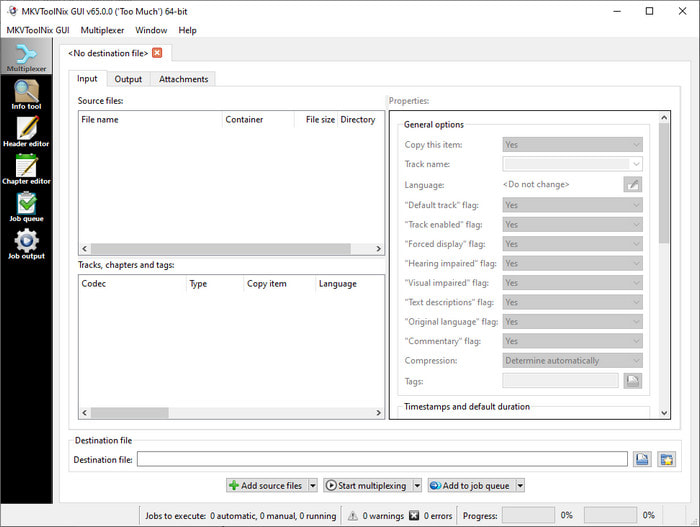
MKVToolNix GUI is een gespecialiseerde oplossing voor MKV‑bestanden; hoewel je ook andere formaten kunt uploaden, zal de software het formaat omzetten naar MKV. De tool werd bekend als een alles‑in‑één oplossing voor MKV, omdat hij een set hulpmiddelen ondersteunt, wat betekent dat je functies hebt die verder gaan dan alleen metadata‑bewerking. Met de overzichtelijke GUI is er niet veel te leren over hoe je het moet gebruiken; in feite kun je binnen enkele minuten leren hoe het werkt. Hoewel de tool eenvoudig is, vergeleken sommige gebruikers die al een zeer gebruiksvriendelijke metadata‑editor gebruiken, de GUI met andere programma’s en zeiden dat de tool voor hen niet intuïtief genoeg is. Ondanks alles wat ze zeiden, is het nog steeds onbetwist dat de tool ons kan leren hoe we de titel van een MKV‑bestand kunnen wijzigen.
Stap 1. Download de software op je desktop, open deze, klik op Add Source File en zoek het MKV‑bestand in de map.
Stap 2. Druk op Output en wijzig hier de metadata.
Stap 3. Als je dit allemaal hebt gedaan, kun je het nu opslaan door op Start Multiplexing te klikken.
Deel 2. Veelgestelde vragen over de MKV Metadata Editor
Kan ik VOB naar MKV converteren?
Je kunt VOB eenvoudig naar MKV converteren door op deze link te klikken; er wordt dan een nieuw tabblad geopend dat je direct helpt om VOB naar MKV te converteren. Als je meer informatie wilt over VOB en MKV, dan is dit het juiste artikel voor jou.
Waarom hebben mijn MKV-bestanden een grotere bestandsgrootte?
De reden waarom je MKV‑bestanden zo groot zijn, is dat het formaat niet alleen video en audio bevat. Het bevat ook meerdere elementen, zoals ondertitels, metadata, variabele bitsnelheid en nog veel meer. Wat moet je dus doen als je het MKV‑bestand wilt comprimeren om het kleiner te maken zonder de kwaliteit te verpesten? Er zijn niet veel betrouwbare videocompressors, en daarom hebben wij onderzoek gedaan om je te helpen MKV te comprimeren zonder kwaliteitsverlies, en dat op een eenvoudige manier.
Wat zijn de nadelen van het MKV-formaat?
Hoewel het bestandsformaat bekend is, kunnen sommige mediaspelers en editors het formaat nog steeds aan vanwege het codec- en elementenprobleem. Het formaat is ook enorm groot en niet alle software ondersteunt het uploaden van grote bestanden, omdat het importeren en exporteren veel tijd zou kosten. De bestandsgrootte zal ook toenemen omdat het een onderdeel is van het bestand, hetzelfde als het andere formaat dat je metadata hebt toegevoegd. Zelfs het heeft zijn zwakte, het is nog steeds concurrerend met betrekking tot het opslaan van het mediabestand en het veilig bewaren voor toekomstige doeleinden.
Gevolgtrekking
Is het niet geweldig? Wat kunnen deze drie desktopsoftware u bieden? De andere is een mediaspeler, terwijl de andere een speciale editor voor MKV is, maar welke tool moet je gebruiken? Als u het beste wilt, brengen wij u graag de ultieme tool. Leren hoe u MKV-metadata kunt bewerken met de FVC Video Converter Ultimate werd eenvoudig en effectief. Dus waar wacht je op? Houd de tool binnen handbereik en gebruik het om de metadata op uw MKV-bestanden als een professional met een paar klikken te repareren.
-
 2 beste manieren om OGG-metadata te bewerken die u gratis zou moeten proberen
 Wilt u OGG-metadata bewerken? Welnu, u kunt de tags gemakkelijk bewerken door de juiste software te gebruiken. Als je er geen hebt, is het lezen van dit artikel een must.
-
 Een absoluut overzicht over Pentaho Metadata Editor [Bijgewerkt 2022]
 Vindt u geen betrouwbaar artikel over Pentaho Metadata Editor? Gelukkig hebben we de tool zelf beoordeeld om de feiten te geven die je over de tool zult weten.
-
 Tips en trucs over de VLC-metadata-editor die u in 2022 moet kennen
 Wil je de VLC gebruiken als metadata-editor? In dit geval kunt u dit artikel lezen omdat we een onbevooroordeelde beoordeling van de VLC-metadata-editor geven.
