


 Video Converter Ultimate
 Scherm opnemer
 Videoreparatie
 Beveiligde download
Hoe maak je een video langer op iPhone - Opgelost
Kijkers zullen niet van je video genieten als deze maar drie seconden duurt en zullen hem saai vinden. De beste manier is daarom om je video langer te maken. Als jij één van de mensen bent die zoekt naar een oplossing om een video langer te maken, maak je dan geen zorgen meer, want wij hebben de beste oplossingen voor je. Het is niet makkelijk om een video te verlengen als je geen hulpmiddel gebruikt. In dit artikel leer je echter hoe je een video langer kunt maken door nieuwe clips toe te voegen, je video te vertragen en de video meerdere keren te laten herhalen (lussen). Lees dus de volledige en gedetailleerde stappen over hoe je een video langer maakt op een iPhone en andere apparaten, met gebruik van de drie beste methoden.

Methode 1. Een video langer maken door nieuwe clips toe te voegen
De eerste methode die u kunt doen, is door nieuwe clips of afbeeldingen aan uw video toe te voegen. Lees de onderstaande stappen om een video langer te maken op de iPhone door nieuwe clips of afbeeldingen toe te voegen. In dit deel krijg je een tool van derden te zien waarmee je nieuwe clips of afbeeldingen aan je video kunt toevoegen.
Stap 1. Download de app iMovie uit de App Store. Volg het installatieproces en open daarna de app. iMovie is de standaard video-editor voor iPhone en andere Apple‑apparaten; daarom kun je het gratis downloaden op elk Apple‑apparaat.
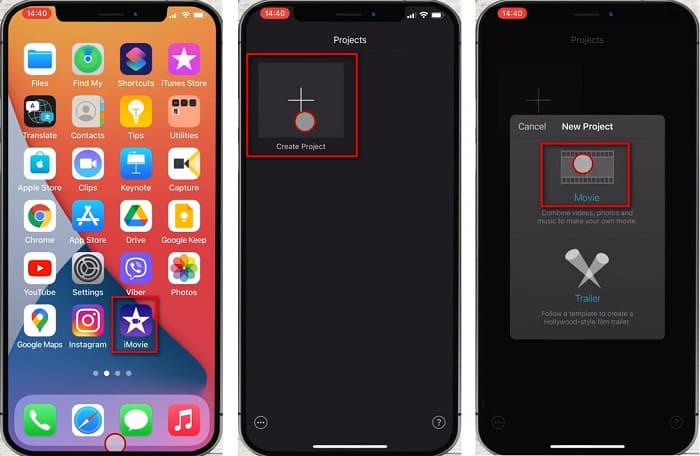
Stap 2. Tik in de hoofdinterface van de software op de plusknop (+) om een nieuw project aan te maken en tik op de optie Movie. Vervolgens verschijnt er een nieuw scherm waar je de video’s selecteert die je wilt samenvoegen. Tik daarna op de knop Create Movie.
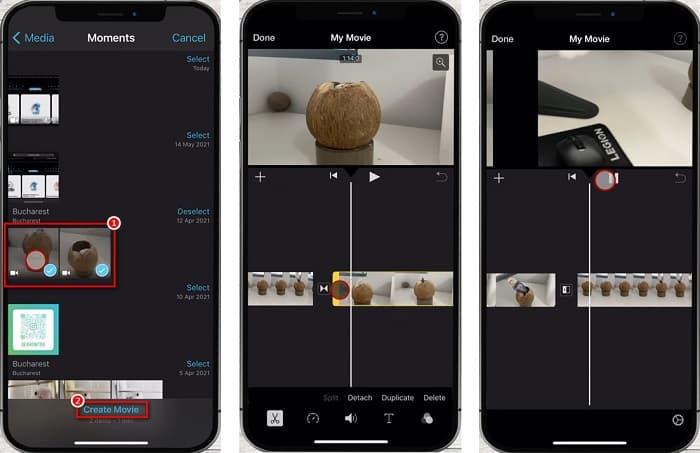
Stap 3. Tik ten slotte op de videoclips op je tijdlijn. Pak daarna de randen van elk fragment vast en sleep ze naar de gewenste lengte. En als je klaar bent met het toevoegen van videoclips, tik je op de knop Done linksboven op je scherm.
Methode 2. Een video langer maken door de video te vertragen
De eenvoudigste methode om een video langer te maken, is het gebruik van een slow-down videotool. Wanneer u uw video vertraagt, wordt de tijd langer, waardoor deze langer is dan het origineel. Dus als je deze methode gebruikt, weet je hoe je een video langer kunt maken door de beste online en offline video-snelheidswisselaar-tools te gebruiken.
FVC Video Converter Ultimate
De beste tool om de afspeelsnelheid van video’s te wijzigen die je op de markt kunt vinden, is FVC Video Converter Ultimate. Met deze offline tool kun je je video vertragen of versnellen en kiezen uit verschillende snelheids‑presets. Daarnaast bevat het veel geavanceerde bewerkingsfuncties, zoals een GIF‑maker, volumeversterker, audiosynchronisatie en nog veel meer. Je hoeft je geen zorgen te maken over de bestandsindelingen die deze tool ondersteunt, want hij ondersteunt tal van formaten, waaronder MP4, AVI, M4V, FLV, MKV, MOV, WebM en meer dan 1000 andere formaten. Bovendien gebruiken veel mensen deze toepassing omdat hij gratis te gebruiken is en een gebruiksvriendelijke interface heeft. Als je dus geïnteresseerd bent in het gebruik van deze ultieme tool om je video te vertragen, volg dan de eenvoudige stappen hieronder.
Stap 1. Om deze app te gebruiken, download je FVC Video Converter Ultimate door op de knop Download hieronder te klikken voor Windows of Mac. Volg het installatieproces en open daarna de app.
Gratis downloadVoor Windows 7 of nieuwerVeilige download
Gratis downloadVoor MacOS 10.7 of nieuwerVeilige download
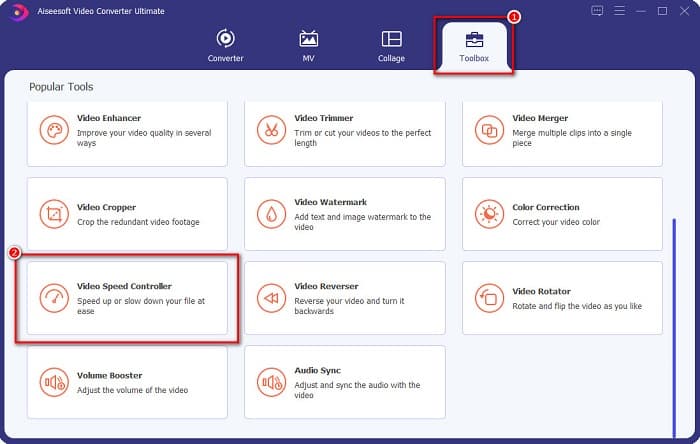
Stap 2. Selecteer daarna in de hoofdinterface van de software het tabblad Toolbox. Klik vervolgens op Video Speed Controller.
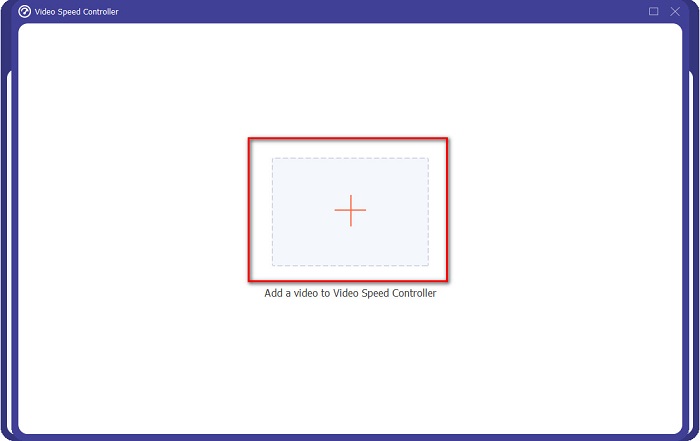
Stap 3. Klik vervolgens op de knop met het +-teken om je video te uploaden. Je computermappen worden geopend, waar je de video selecteert die je wilt vertragen en vervolgens uploadt.
Stap 4. Kies daarna de snelheids‑preset die je voor je video wilt. Als je je video wilt vertragen, kies dan een preset van 0,125x, 0,25x, 0,5x of 0,75x.
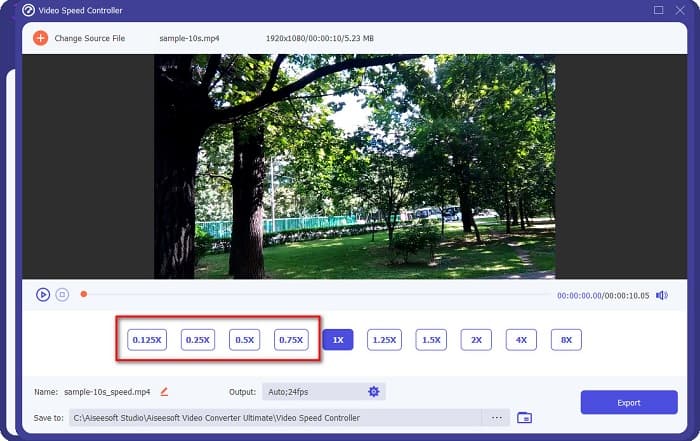
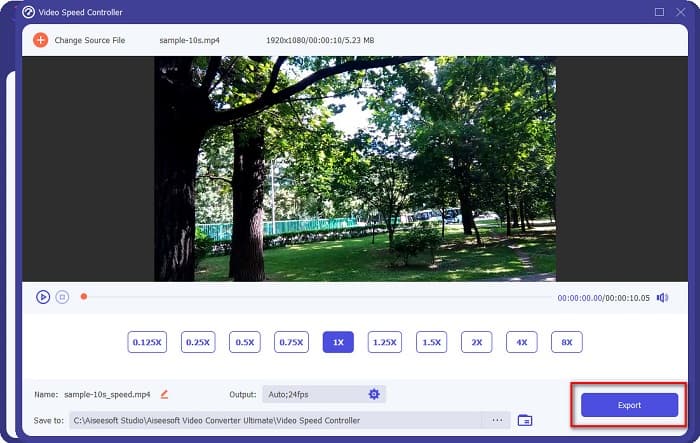
Stap 5. Klik ten slotte op de knop Export om de snelheid van je video te wijzigen. Je uitvoerbestand wordt automatisch opgeslagen in je computermappen.
Voordelen
- Het heeft een intuïtieve gebruikersinterface.
- Het kan uw video gemakkelijk vertragen of versnellen.
- Het ondersteunt vele bestandsformaten, zoals WMV, AVI, FLV, MKV, MOV, MPEG en 1000+ meer.
- Het heeft geavanceerde bewerkingsfuncties.
- Beschikbaar op alle crossmediale platforms, inclusief Windows, Mac en Linux.
Nadelen
- U moet de app kopen voordat u toegang krijgt tot de unieke functies.
Clideo
Clideo is een online tool voor het wijzigen van de videosnelheid, bekend om zijn eenvoudige gebruikersinterface. Met deze snelheidswijziging kun je de snelheid van je video aanpassen via zes veelgebruikte snelheids‑presets. Bovendien is deze tool veilig in gebruik en gratis. En als je op zoek bent naar een tool om de videosnelheid te wijzigen die ook de uitvoerindeling kan aanpassen, dan heeft deze tool die functie. Verder ondersteunt hij de meest gangbare bestandsformaten die je op internet vindt, waaronder MP4, AVI, MPG, VOB, MOV en meer.
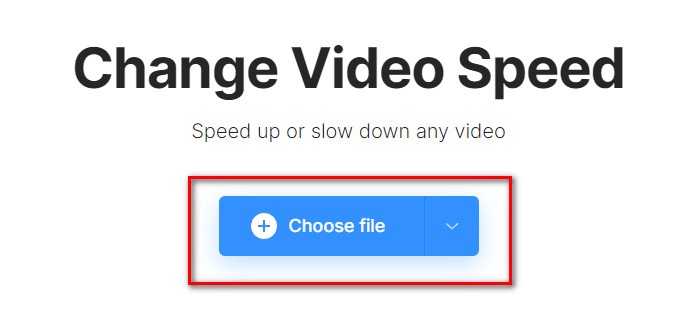
Stap 1. Zoek in de browser die je gebruikt naar Clideo en ga naar hun webpagina. Klik in de hoofdinterface op de knop Choose file. Je computermappen worden geopend, waar je je video selecteert en vervolgens uploadt.
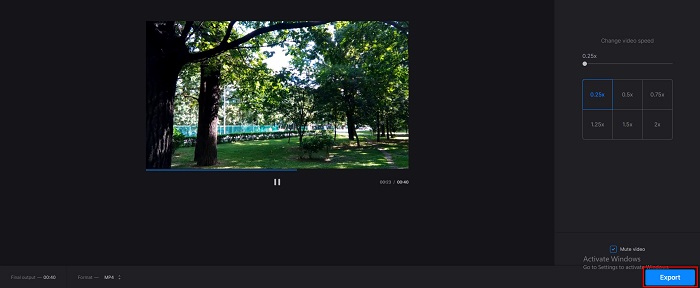
Stap 2. Kies na het uploaden van je video de snelheids‑preset die je voor je video wilt. Kies tussen 0.25x en 0.75x als je je video wilt vertragen.
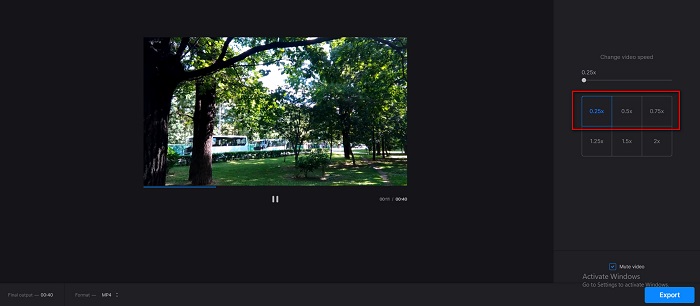
Stap 3. Klik daarna op de knop Export voor de laatste stap.
Voordelen
- Het heeft een gebruiksvriendelijke interface.
- Het ondersteunt de meest voorkomende bestandsindelingen, waaronder MP4, AVI, MPG, VOB, enz.
- Het is veilig in gebruik.
Nadelen
- Het heeft soms een langzaam laadproces.
EzGif.com
EzGIF is een ander antwoord op de vraag hoe je een video langer maakt. Met deze online tool voor videosnelheid kun je je video moeiteloos vertragen en versnellen. Bovendien is hij veilig en gratis te gebruiken. Deze online tool bevat echter advertenties die je mogelijk storend vindt. Desondanks gebruiken veel mensen deze converter nog steeds vanwege het gebruiksgemak.
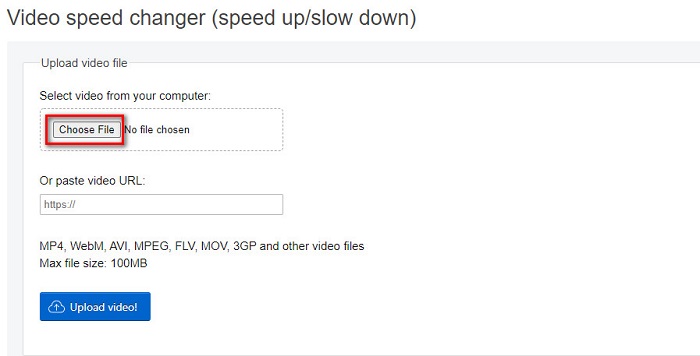
Stap 1. Zoek in je browser naar EzGIF.com. Klik vervolgens op de knop Choose File in de hoofdinterface van de software om je video te uploaden.
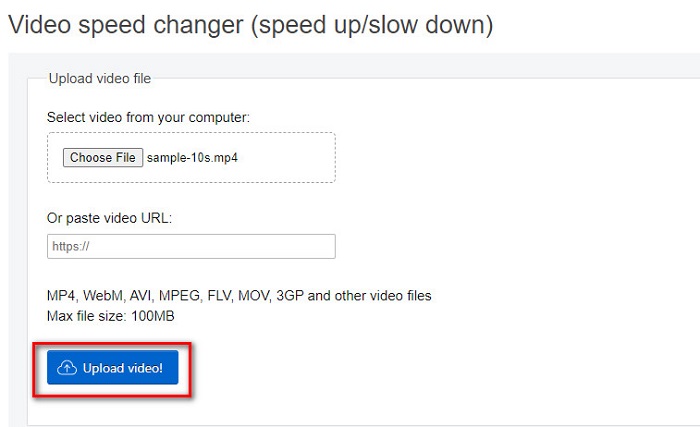
Stap 2. Klik, nadat je je videobestand hebt geüpload, op de knop Upload video.
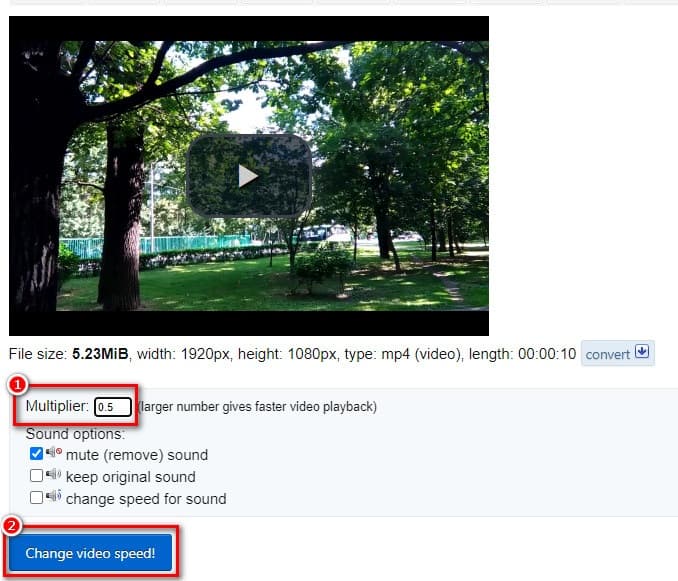
Stap 3. Typ vervolgens bij de multiplier de gewenste afspeelsnelheid voor je video (hoe lager het getal, hoe langzamer de video wordt). Klik daarna op Change Video Speed.
Deel 3. Veelgestelde vragen over het langer maken van een video
Wordt de bestandsgrootte groter als de video langer is?
Ja. Hoe langer je video is, hoe groter de bestandsgrootte. Dus vertraag je video als je een kleine bestandsgrootte wilt hebben.
Kun je een video op TikTok vertragen?
Gelukkig wel. Tiktok heeft een ingebouwde videosnelheidswisselaar. Je kunt een slow-mo video maken op Tiktok en zelfs een video op je camera langzamer maken.
Kun je een video vertragen zonder de kwaliteit te verliezen?
Ja. Hulpprogramma's voor het wijzigen van de videosnelheid kunnen uw videosnelheid vertragen zonder de kwaliteit te verliezen.
Gevolgtrekking
Je vraag over hoe je een video langer maakt op een iPhone en andere apparaten is nu beantwoord. Het is nu aan jou welke methode en tool je gebruikt om de taak uit te voeren. Maar als je de voorkeur geeft aan een video‑snelheidsregelaar die door veel professionele gebruikers wordt gebruikt, download dan FVC Video Converter Ultimate en probeer de beste en indrukwekkende functies ervan uit.
-
 Video versnellen in Premiere Pro en met zijn alternatieven
 Wil je weten hoe je de premiere pro kunt gebruiken om een video te versnellen? Dan bent u in het juiste artikel, want wij zorgen voor stappen en andere betaalbare alternatieven.
-
 2 Moeiteloze manieren om een video op TikTok . te versnellen
 Wil je het geheim weten over hoe je video op TikTok kunt versnellen? Lees dan dit artikel om een idee te krijgen hoe je dit moet doen en wat de andere 2 tools zijn die je kunnen helpen.
-
 Uitstekende tips van 2021: een video sneller maken in iMovie
 Je vriend stelt iMovie voor om je te helpen met je probleem hoe je een video sneller kunt maken met het iOS-besturingssysteem, maar je weet niet wat je moet doen? Lees hier meer over als u meer leest in dit artikel.
