


 Video Converter Ultimate
 Scherm opnemer
 Videoreparatie
 Beveiligde download
Leer alles over wat 3D of driedimensionaal is
Wil je weten wat 3D is? 3D- of driedimensionale films en afbeeldingen worden steeds populairder. Aangezien we in de moderne tijd zijn, is het gemakkelijk om een 3D-film te maken met verschillende tools. Maar eerst moeten we alles over 3D begrijpen: de achtergrond, definitie en hoe je een 3D-video maakt.
In dit artikel gaan we dieper in op 3D en de bijbehorende parameters. Dus als je wilt leren wat 3D is, lees dan dit artikel.

Deel 1. Wat is 3D
3D- of driedimensionale objecten tonen de breedte, hoogte en diepte. Dagelijks zien we 3D-objecten omdat onze fysieke omgeving zelf driedimensionaal is. Door de 3D-waarneming die wij mensen hebben, kunnen we de 3D-objecten waarnemen, ook wel dieptewaarneming genoemd. Als je om je heen kijkt, vormt het netvlies in onze ogen een tweedimensionaal beeld, en onze hersenen verwerken de twee beelden als 3D-beelden. Maar wist je dat? Hebben wij, mensen, hulpmiddelen die we gebruiken voor dieptewaarneming?
Dit zijn de menselijke hulpmiddelen die we gebruiken voor dieptewaarneming:
Stereoscopisch zien - Stereoscopisch zien is een dieptewaarneming door beide ogen. Het is één van de vermogens van de hersenen om 3D‑vormen en ‑beelden te registreren. Bij dit soort zien lijken objecten die dichterbij zijn meer los te staan dan verder weg gelegen objecten.
Parallax - Dit type zicht wordt gemeten aan de hand van de hoeken tussen twee lijnen. Wanneer je je hoofd van links naar rechts beweegt, verplaatsen objecten die dichterbij zijn zich meer dan objecten die verder weg staan.
Grootte‑vertrouwdheid - Als je vertrouwd bent met de grootte van een object, kun je, zelfs als het ver weg is, ongeveer inschatten hoe groot het in beeld zou moeten verschijnen. Op dezelfde manier, als twee objecten in werkelijkheid even groot zijn maar het ene groter lijkt, wordt aangenomen dat dat grotere object dichterbij is.
Accommodatie - Wanneer je je op een dichtbijgelegen object focust, veranderen de lenzen in je ogen fysiek van vorm. Op die manier weet je hoe ver een object weg is. Het is ook de manier waarop het oog de focus op een object behoudt.
Luchtperspectief - Bij luchtperspectief zie je objecten kleiner omdat het gezichtspunt ver weg is. Verafgelegen objecten lijken bovendien minder contrast en kleurverzadiging te hebben.
Er zijn ook verschillende soorten 3D in onze fysieke wereld. 3D wordt ook beschreven als een afbeelding die de illusie geeft van diepte van verschillende afstanden, die vaak wordt gebruikt in computergames, grafische afbeeldingen, virtual reality en films.
Verschillende soorten 3D:
3D-computergrafiek - 3D‑computergrafiek kan 3D‑objecten genereren op een beeldscherm of in een tweedimensionale ruimte. De pixels in 2D‑grafiek hebben verschillende eigenschappen, zoals positie, kleur en helderheid. De 3D‑pixels liggen vervolgens op een Z‑as. Wanneer de pixels met hun diepte worden gecombineerd, resulteert dat in een 3D‑oppervlak, ook wel een textuur genoemd.
3D-films - 3D‑films zijn speelfilms waarin diepte in 3D aanwezig is. Met behulp van een 3D‑bril kunnen we een 3D‑film bekijken. Om dit soort films te maken, gebruiken makers stereoscopisch zicht, wat betekent dat er twee beelden gelijktijdig worden getoond, elk voor één oog.
3D-printen - 3D‑printen staat ook bekend als additieve productie. Het is een proces waarbij een 3D‑object in vaste vorm wordt gemaakt op basis van een digitaal bestand. Met behulp van Computer Aided Design (CAD) kun je een 3D‑object afdrukken vanuit een digitaal model.
Deel 2. Hoe speel je 3D-films af
Nu u de 3D-betekenis kent, kunt u ons laten weten hoe u 3D-films kunt afspelen met de beste softwaretoepassing die u kunt gebruiken.
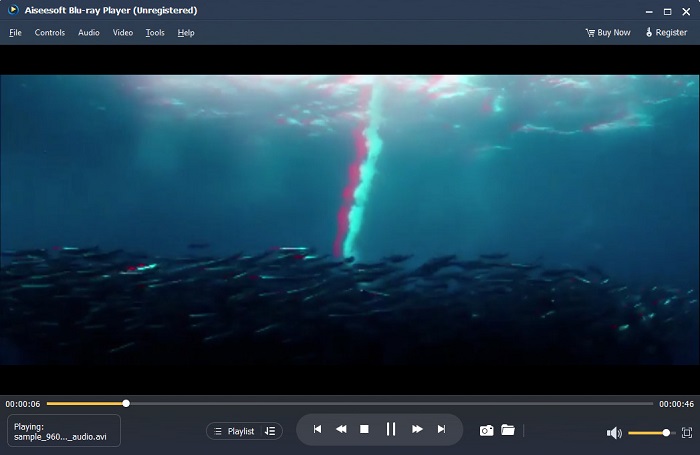
Blu-ray Player is een desktoptoepassing waarmee u elk type video kunt afspelen. Met deze tool kun je ook 3D-films afspelen zonder plug-ins te gebruiken. Bovendien bevelen veel mensen deze mediaspeler aan vanwege de eenvoudige en overzichtelijke gebruikersinterface. Bovendien kan deze krachtige mediaspeler Blu-ray-schijven, Blu-ray-mappen, dvd-/map-/ISO-bestanden afspelen die andere mediaspelers niet ondersteunen. U kunt ook genieten van HD-video's met 100 procent lossless audio en indrukwekkend HD-surroundgeluid. Wat zelfs verbazingwekkend is, is dat je je afspeellijst kunt maken, zodat je geen moeite hebt om de gewenste video's of audio te scheiden.
Een 3D-film afspelen in Blu-ray Player:
Stap 1. Download Blu-ray Player op je apparaat. Volg het installatieproces en start vervolgens de app.
Stap 2. Klik in de hoofdinterface van de software op de knop Bestand openen. De bestanden op je apparaat verschijnen, waar je je 3D‑film selecteert.
Stap 3. Vervolgens begint je video te uploaden. Je kunt nu je speciale 3D‑bril opzetten en genieten van je 3D‑film.
Deel 3. Wat zijn 3D-tv en 3D-brillen
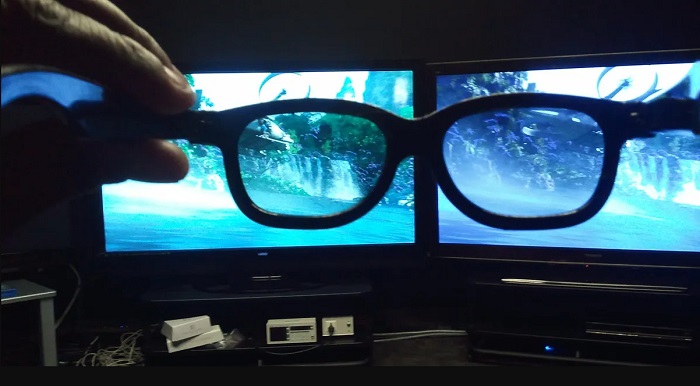
Er zijn twee soorten 3D-tv's: Active-shutter 3D, Active 3D en Passive 3D. Dit deel zal hun verschillen onderscheiden en bepalen welk type 3D-bril moet worden gebruikt bij het kijken naar actieve sluiter of passieve 3D-tv.
Actieve shutter of Actief 3D is een type 3D‑tv dat afwisselend 3D‑beelden van hoge kwaliteit op het scherm weergeeft. Een actieve 3D‑tv toont om en om beelden op het scherm voor het rechter- en linkeroog. De 3D‑bril verduistert de glazen dan afwisselend om het 3D‑effect weer te geven dat je op je tv‑scherm ziet. Hierdoor ziet elk oog het beeld dat voor dat oog bedoeld is. De 3D‑bril die je moet gebruiken bij het kijken op een Active‑shutter 3D‑tv zijn actieve 3D‑brillen. Dit type 3D‑bril heeft een batterij nodig die wordt gebruikt om de glazen in de bril elektronisch te blokkeren en te laten shutteren. Deze brillen zijn voorzien van LCD‑lenzen die gesynchroniseerd worden met de afwisselende frames.
Daarentegen lijkt een Passieve 3D‑tv enigszins op de 3D‑technologie die in bioscopen wordt gebruikt. Dit type 3D‑tv gebruikt speciale filters op het scherm, zodat je 3D kunt zien met gepolariseerde glazen in de bril. Bovendien combineren passieve 3D‑tv’s de twee frames in één beeld, waarbij afwisselend de horizontale lijnen voor het linkeroog en het rechteroog worden gebruikt. De brillen die deze 3D‑tv’s gebruiken zijn passieve 3D‑brillen, die verschillende polarisatie in elk glas hebben. Het ene oog ziet alleen de oneven lijnen, terwijl het andere oog de even lijnen ziet om een 3D‑beeld te produceren. Passieve 3D‑brillen hebben geen batterijen nodig om te functioneren.
Deel 4. 2D versus 3D
2D en 3D zijn werkelijke afmetingen in een computerwerkruimte. 2D of tweedimensionaal zijn platte objecten die de horizontale en verticale afmetingen (de X- en Y-as) gebruiken. Omdat 2D maar twee dimensies heeft, zie je alleen een lijn als je ze opzij draait. Het heeft alleen een hoogte en breedte, maar heeft geen diepte. Terwijl aan de andere kant 3D of driedimensionaal hoogte, breedte en diepte bevat. Driedimensionale beelden hebben het effect nodig van twee ogen die samenwerken om een driedimensionaal waarnemingsvermogen te zien. Als 2D de X- en Y-as gebruikt, voegt 3D de Z-dimensie toe, zodat u de diepte van een object kunt zien.
Als u vraagt wat goed is om te gebruiken, 2D versus 3D, is het antwoord beide. 2D en 3D hebben verschillende voor- en nadelen. U kunt bijvoorbeeld overal op elk apparaat 2D-video's of films bekijken zonder een speciale 3D-bril te dragen. Het 3D-effect dat 3D-films produceren is echter verbazingwekkend en leuker om naar te kijken dan 2D.
Deel 5. Hoe 2D-film naar 3D te converteren?
Als je thuis een geweldige 3D-film of -clip wilt bekijken zonder een 3D-bril, kun je je 2D-film naar 3D converteren met de ultieme video-omzetter. Dus als u uw 2D-film naar een 3D-film wilt converteren, gebruik dan deze geweldige softwaretoepassing.
FVC Video Converter Ultimate is een toepassing die populair is voor video‑conversie. Deze software kan niet alleen bestandsindelingen converteren, maar maakt het ook mogelijk om je 2D‑video om te zetten in een 3D‑video, zoals anaglyph 3D en split‑screen 3D. FVC Video Converter Ultimate is populair bij gebruikers omdat het vrijwel alle bestandsindelingen ondersteunt, zoals MP4, MKV, AVI, FLV, WEBM, MOV, DIVX en meer dan 1000 andere. Het wordt ook geleverd met tal van geavanceerde bewerkingsfuncties, zoals een 3D‑maker, GIF‑maker, video‑watermerkverwijderaar, enzovoort.
Hoe 2D-films naar 3D-films te converteren met FVC Video Converter Ultimate:
Stap 1. Download eerst FVC Video Converter Ultimate door op de knop Downloaden hieronder te klikken.
Gratis downloadVoor Windows 7 of nieuwerVeilige download
Gratis downloadVoor MacOS 10.7 of nieuwerVeilige download
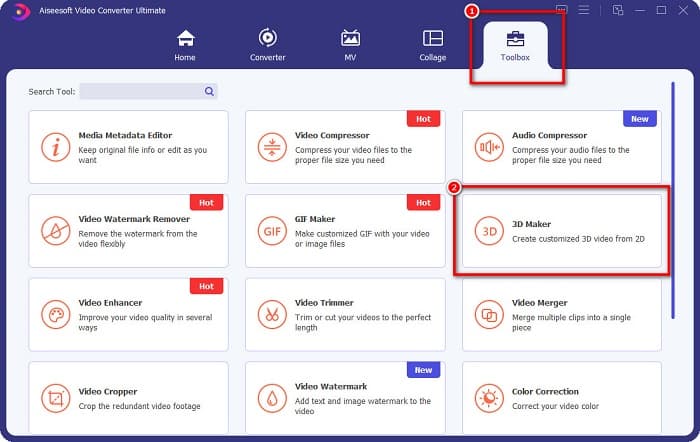
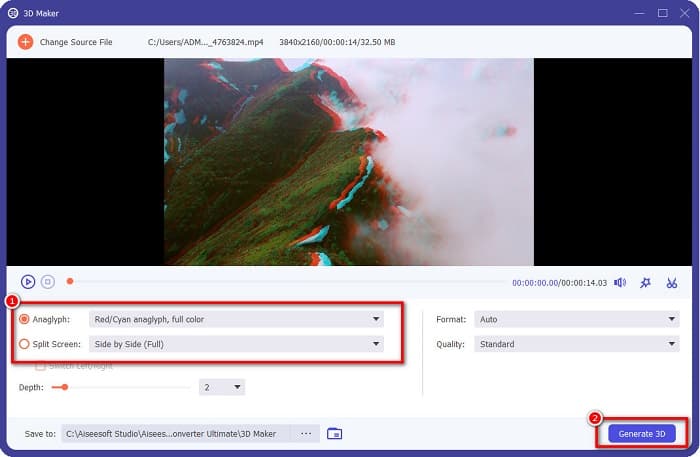
Stap 2. Open de app, ga vervolgens naar het paneel Toolbox en selecteer de 3D Maker.
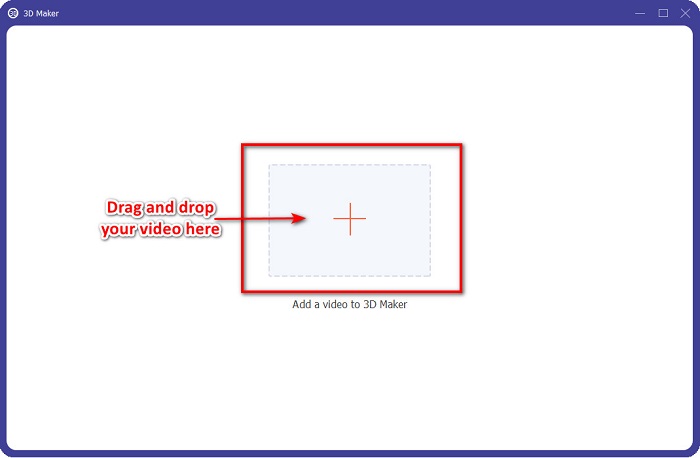
Stap 3. Klik op de knop met het +-teken of sleep en zet neer je 2D‑video in het vak in de volgende interface.
Stap 4. Kies vervolgens tussen Anaglyph 3D of Split Screen 3D. Klik daarna op de knop 3D genereren.
Gerelateerd aan:
Snelste manieren om AVI naar WMV te converteren [Beste converters]
MOV eenvoudig naar WMV converteren met deze geweldige converters
Deel 6. Veelgestelde vragen over wat 3D is
Kun je 3D-video's bekijken op VLC Media Player?
Ja. VLC Media Player ondersteunt alle bestandsindelingen. U kunt ook 3D-films afspelen in de VLC-mediaspeler.
Kun je 3D-video's naar 2D converteren?
FVC Video Converter Ultimate kan 3D-video's naar 2D converteren. Je kunt met deze converter ook het bestandsformaat van je video wijzigen.
Wat wordt meer gebruikt, 2D of 3D?
Tegenwoordig zijn in de filmindustrie 3D-films dominanter dan 2D-films. Vanwege de interessante graphics en realistische animaties zijn 3D-films populairder dan 2D-films.
Gevolgtrekking
3D of driedimensionaal is wijdverbreid bekend in de filmindustrie en vooral op computers. Nu je weet wat 3D is, heb je de basiskennis om er zelf één te maken. Als je eenvoudig een 3D‑video wilt maken, gebruik dan FVC Video Converter Ultimate.
-
 3 manieren om MPG naar 3GP te converteren op Windows en Mac [gratis]
 Als u op zoek bent naar manieren om MPG naar 3GP te converteren, lees dan dit artikel om de beste manieren te weten om MPG naar 3GP te converteren op Windows en Mac.
-
 Top 5 beste gratis MPEG naar DivX-converters voor Windows en Mac
 Converteer uw MPEG-bestand eenvoudig naar een DivX-bestand met behulp van de beste MPEG naar DivX-converters. Lees dit artikel voor meer informatie over hen.
-
 Beste MOV naar DivX gratis te gebruiken converters voor Mac en Windows
 Wij hebben de oplossing voor u als u op zoek bent naar MOV naar DivX gratis converters. Dit artikel presenteert de beste MOV naar DivX-converters voor Mac en Windows.
