


 Video Converter Ultimate
 Scherm opnemer
 Videoreparatie
 Beveiligde download
Hoe het watermerk in SmartDraw te verwijderen met 2 mogelijke manieren
Als je een eenvoudige maar krachtige manier nodig hebt om grafieken, tekeningen en kaarten te maken en deze vervolgens met kwaliteit op ondernemingsniveau te presenteren, gebruik dan SmartDraw. Met SmartDraw kun je je ideeën gebruiken en ze omzetten in werkelijkheid. Is de tool gratis? Je kunt de tool zeven dagen gratis uitproberen; in die periode kun je hem gratis gebruiken, maar er staat wel een watermerk op. Werken met een watermerk op een geëxporteerd bestand kan lastig zijn. Daarom stellen we je in dit blogbericht alleen de beste tool voor die je op de markt kunt vinden en die efficiënt werkt bij het verwijderen van het watermerk. Blijf lezen en bekijk de informatie hieronder om te leren hoe je het watermerk in SmartDraw kunt verwijderen op twee effectieve manieren.

Deel 1. Watermerk in Smart Draw verwijderen door een licentiesleutel te kopen [Officiële versie]
Hoe verwijder ik het watermerk van SmartDraw? Het is de eerste manier waarop we u voorstellen, en wel door de licentiesleutel voor deze tool te kopen. Dit platform biedt u verschillende soorten abonnementen die u ten goede kunt komen. Bovendien kunt u geen toegang van één maand tot deze tool kopen, dus als u van plan bent de licentiesleutel aan te schaffen, wordt u maandelijks gefactureerd, maar het totaal dat u betaalt, is in de jaarlijkse versie. Als u de prestaties van deze tool waardeert en deze wilt kopen, kunt u de stappen volgen die we hieronder toevoegen.
Stappen voor het verwijderen van watermerk in SmartDraw met een licentiesleutel:
Stap 1. Open de officiële website van SmartDraw en zorg ervoor dat je de juiste site bezoekt, zodat je transactie veilig is.
Stap 2. Klik op de website op Buy om de beschikbare abonnementen te bekijken.
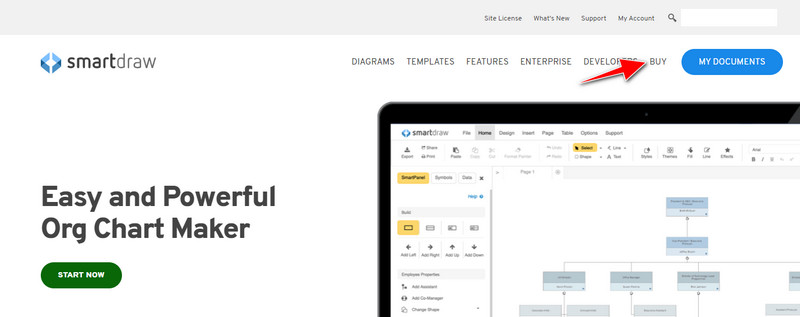
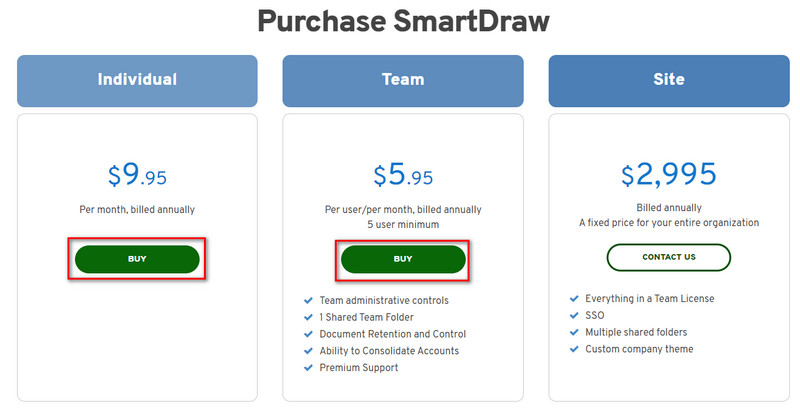
Stap 3. Je kunt SmartDraw aanschaffen als Individual, Team of Site. Klik op Buy Now als je de versie voor Individual of Team gaat kopen.
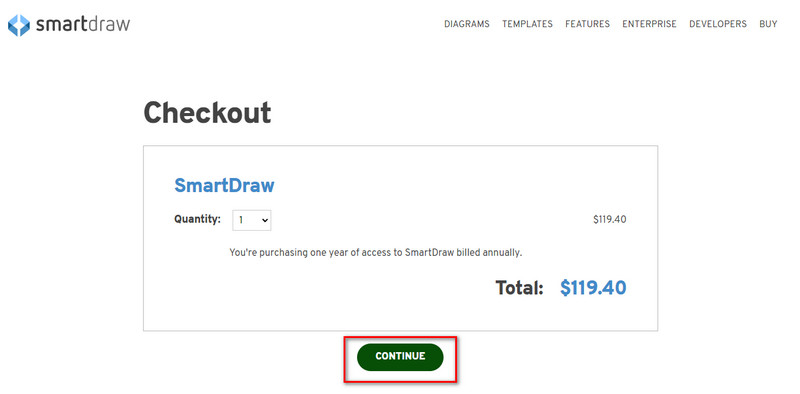
Stap 4. Aan de rechterkant zie je het totaalbedrag voor de tool per jaar; klik op Continue om verder te gaan.
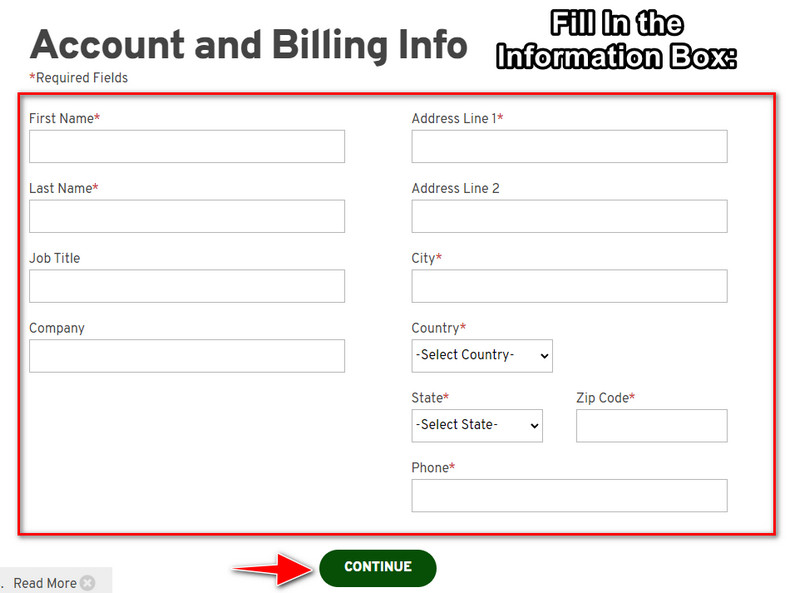
Stap 5. Voeg je account- en facturatiegegevens toe in de vereiste velden en druk daarna op Continue om de licentiesleutel te verkrijgen.
Deel 2. Watermerk in Smart Draw gratis verwijderen met behulp van webservice [geen kosten]
Hoe verwijder je het watermerk uit de SmartDraw-proefversie zonder te kopen? Dan moet je de FVC Free Watermark Remover Online gebruiken. Deze watermark remover is direct klaar voor gebruik. Je hebt geen speciale kennis nodig om het watermerk op je afbeelding te verwijderen, want deze tool is heel eenvoudig te gebruiken. Zelfs als je een expert bent, kun je deze software gebruiken om ongewenste watermerken of objecten op je afbeeldingen te verwijderen. Met behulp van deze watermark remover blijft er geen enkele vlek op je afbeelding achter die hij niet kan verwijderen. Wil je deze software proberen in plaats van de licentiesleutel te kopen? Blijf dan bij deze tutorial hieronder om het watermerk op afbeeldingen effectief te verwijderen.
Stappen voor het gratis verwijderen van het watermerk van SmartDraw op grafiek of diagram:
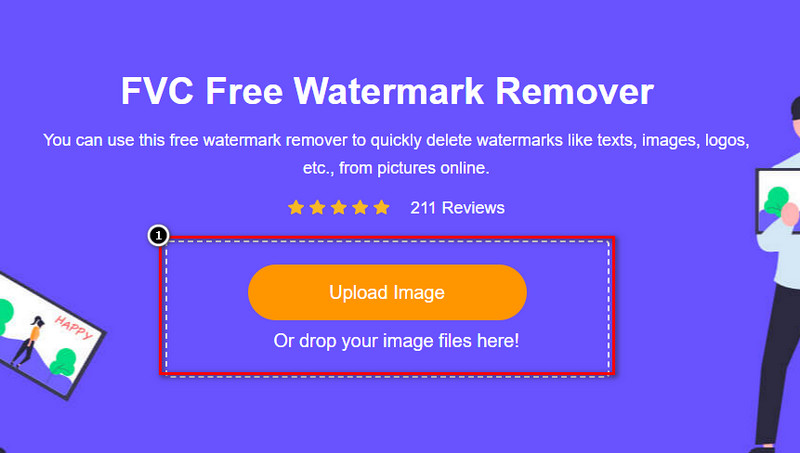
Stap 1. In plaats van in je browser naar de webtool te zoeken, kun je op deze link klikken om hem te openen; er wordt dan een nieuw tabblad in je zoekmachine geopend.
Stap 2. Gebruik je muis om de afbeeldingsgrafiek of het diagram dat je in SmartDraw hebt gemaakt te slepen en neer te zetten, zodat je het kunt uploaden.
Stap 3. Nu de online watermark remover is geopend, kies je de tool waarmee je het watermerk op de afbeelding wilt markeren.
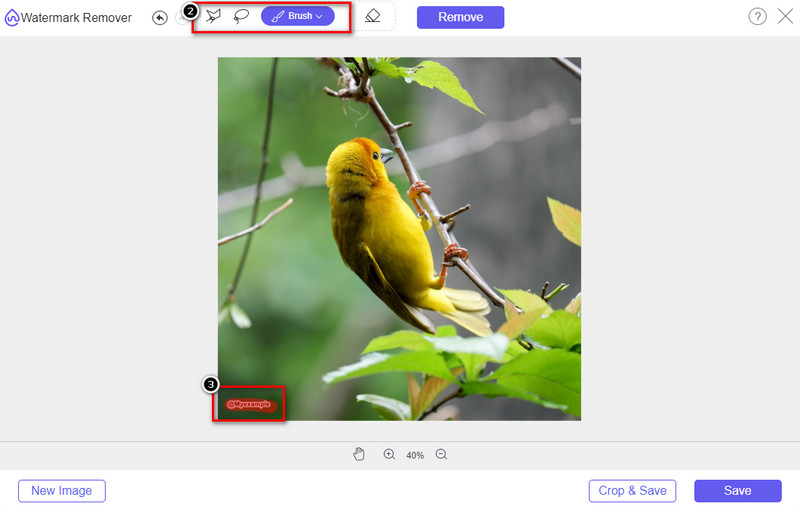
Stap 4. Nadat je het watermerk of logo op je geüploade afbeelding hebt gemarkeerd, druk je op Remove.
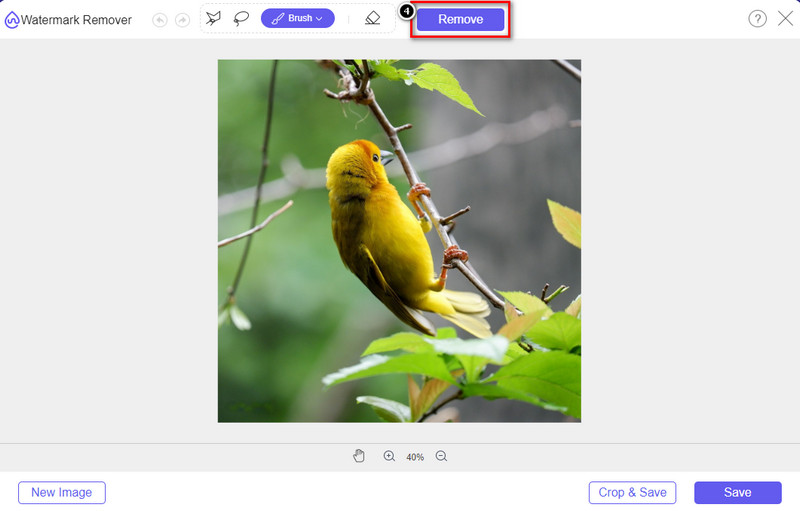
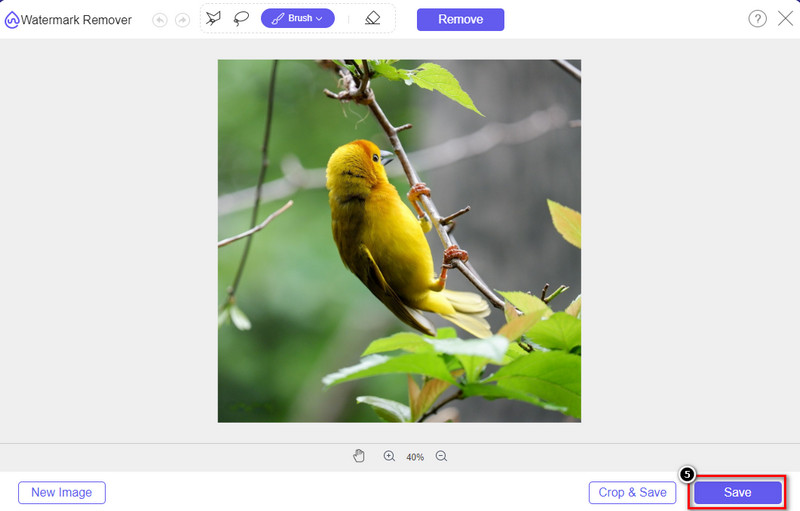
Stap 5. Wacht tot het proces om het watermerk te verwijderen is voltooid en klik vervolgens op Save om de grafiek of het diagram dat je hebt geüpload te downloaden. Er verschijnt een map op je scherm; controleer nu de versie van de grafiek of het diagram dat je hebt gemaakt zonder watermerk.
Voordelen van het gebruik van FVC Free Watermark Remover Online:
◆ Het downloaden van de app is niet nodig omdat deze beschikbaar is op internet.
◆ Ondersteunt een breed scala aan afbeeldingen en kan watermerken effectief verwijderen.
◆ Het is een speciale watermerkverwijderaar die uitvoer van hoge kwaliteit produceert.
◆ Er wordt geen watermerk toegevoegd aan de uiteindelijke uitvoer nadat deze is geëxporteerd.
◆ Geen beperking op hoe vaak te gebruiken en bestandsgrootte.
Deel 3. Aanvullend deel - Een grafiek, grafiek of diagram maken op SmartDraw met gedetailleerde stappen
In het eerdere deel leert u hoe u het SmartDraw-watermerk kunt verwijderen. In dit deel leren we je hoe je een grafiek, grafiek en diagram maakt met behulp van SmartDraw; u kunt de stappen volgen die we hieronder toevoegen om te weten hoe u dit moet doen.
Stap 1. Ga naar de officiële website om een grafiek, chart of diagram te maken.
Stap 2. Nu je de officiële website hebt geopend, klik je op Start Now en log je in op je account.
Stap 3. Kies aan de linkerkant welk type template je wilt gebruiken of maken.
Stap 4. Voeg de informatie toe aan elk onderdeel van het stroomdiagram. Aan de linkerkant van de website zijn extra opties beschikbaar die je kunt gebruiken.
Stap 5. Klik op de knop Export, kies welk bestandsformaat je wilt hebben en klik erop om het proces te starten. Als je de gratis versie gebruikt, wordt er een watermerk toegevoegd; je kunt de stappen uit deel 2 volgen om het watermerk te verwijderen.
Verder lezen:
Hoe verwijder je het B612-watermerk uit je afbeeldingen
Hoe verwijder je gratis het WOW Slider-watermerk
Deel 4. Veelgestelde vragen over het verwijderen van SmartDraw-watermerk
Kan SmartDraw PNG-afbeeldingen exporteren?
Ja, u kunt een transparante grafiek in PNG-indeling hebben. Het zal echter een watermerk toevoegen als u de gratis versie gebruikt. U kunt de officiële versie kopen, zodat er een watermerk op de geëxporteerde afbeelding staat.
Hoeveel kost SmartDraw?
Als u op het punt staat een abonnement op SmartDraw te kopen, kunt u het abonnement kopen vanaf $ 5,95. U kunt de andere prijzen bekijken die het biedt op de officiële website.
Wat is het voordeel van het kopen van de premium versie van SmartDraw?
U kunt controle over teambeheerders, teammappen, premiumondersteuning en afbeeldingen zonder watermerk exporteren voor individuele abonnementen. Voor andere premiumvoordelen die u kunt krijgen, bezoekt u de officiële website en ziet u welke functies en functies u kunt krijgen.
Gevolgtrekking
Nu u weet hoe u SmartDraw zonder watermerk kunt opslaan met de twee manieren waarop we toevoegen. U koopt het of gebruikt een tool om het watermerk op het geëxporteerde bestand te verwijderen. Als u de tool niet wilt kopen, moet u deze gebruiken omdat het de meest efficiënte webtool is om het watermerk te verwijderen. Als je denkt dat dit artikel je heeft geholpen om het probleem op te lossen, dan beoordeel je ons met 5 sterren.
-
 4 beste manieren om het watermerk uit GIF te verwijderen [Online & Offline]
 Wilt u het watermerk van GIF verwijderen? Met de tool in dit artikel leert u de verschillende stijlen met de verschillende watermerkverwijderaars die beschikbaar zijn op uw platform.
-
 5 eenvoudigste manieren om metadata in mediabestanden te verwijderen
 Hoe metagegevens verwijderen? Is het moeilijk om het te doen? Moet ik een gratis tool kopen of gebruiken om tags te verwijderen? Op al deze vragen vindt u in dit artikel een antwoord.
-
 Uitstekende Photobucket Watermark Remover online en offline
 Leer hoe u het Photobucket-watermerk van uw foto's kunt verwijderen met deze geweldige Photobucket-watermerkverwijderaar. Lees dit artikel om de manieren te leren.
