


 Video Converter Ultimate
 Scherm opnemer
 Videoreparatie
 Beveiligde download
Tips en trucs om het Powtoon-watermerk op video's effectief te verwijderen
Heb je ooit de perfecte animatie gemaakt en voegde Powtoon bij het exporteren een watermerk toe? Dit soort situaties komt het vaakst voor als je de gratis versie van de app gebruikt. Heeft het watermerk je video verpest? Maak je geen zorgen meer! Je kunt leren hoe je het Powtoon‑watermerk verwijdert met de verschillende methodes die we hier hebben toegevoegd.

Deel 1. Powtoon-watermerk verwijderen zonder abonnement [Editor's Choice]
FVC Video Converter Ultimate is meer dan een complete oplossing die je op je Windows of Mac kunt downloaden om het Powtoon‑watermerk te verwijderen. Zelfs als je geen ervaring hebt met het verwijderen van een watermerk op video’s die je maakt, kun je het hier toch eenvoudig doen. Handig en snel, dat is wat FVC je wil laten ervaren tijdens het gebruik van deze software, en dat is uitstekend gelukt. Dus als je zelf wilt ervaren hoe je het watermerk verwijdert, kun je de stappen volgen die we hieronder hebben toegevoegd.
Stappen om het Powtoon‑watermerk te verwijderen met FVC Video Converter Ultimate:
Stap 1. Je kunt de meest indrukwekkende videobewerkingssoftware op Windows en Mac krijgen door op de downloadknop hieronder te klikken. Installeer daarna de software, doorloop de korte installatie en start de software.
Gratis downloadVoor Windows 7 of nieuwerVeilige download
Gratis downloadVoor MacOS 10.7 of nieuwerVeilige download
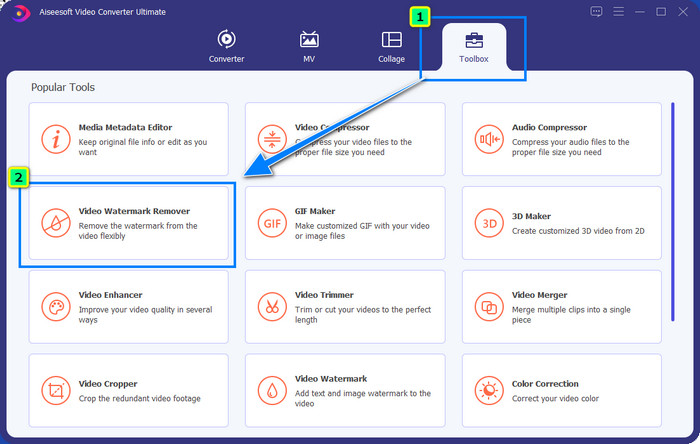
Stap 2. Klik in de Toolbox op Video Watermark Remover om het watermerk te verwijderen dat Powtoon aan je bewerkte video heeft toegevoegd.
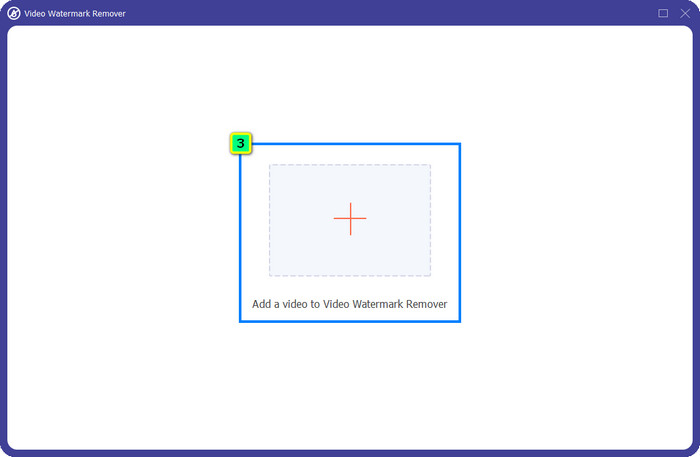
Stap 3. Klik vervolgens op het +-pictogram om de video te uploaden die je wilt bewerken, selecteer het videobestand in de map die wordt geopend en klik op Openen.
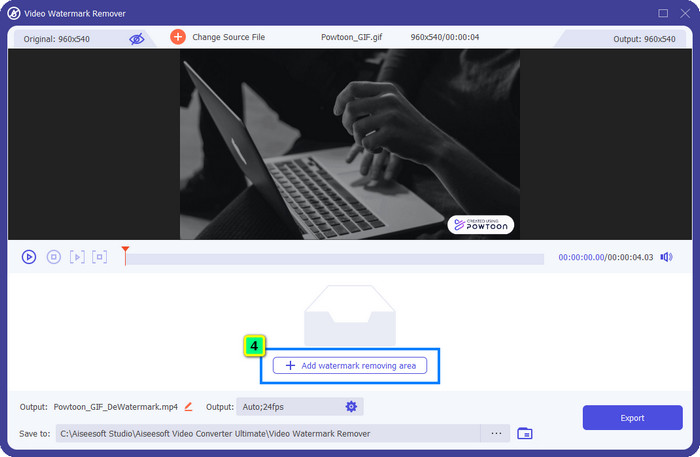
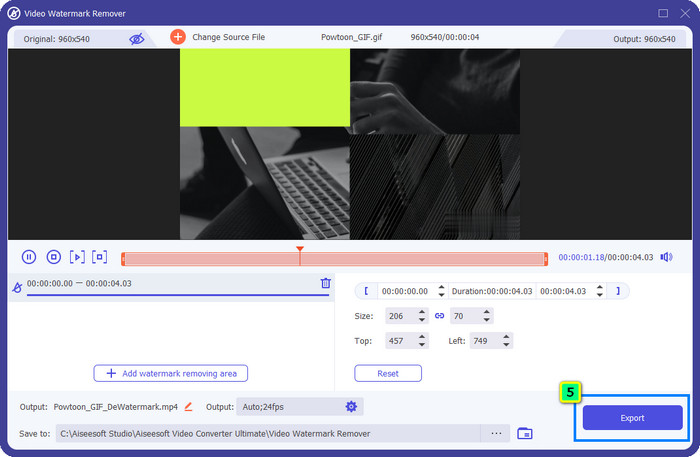
Stap 4. Klik op Add Watermark Removing Area en plaats het selectievakje op het watermerk; je kunt het naar wens aanpassen.
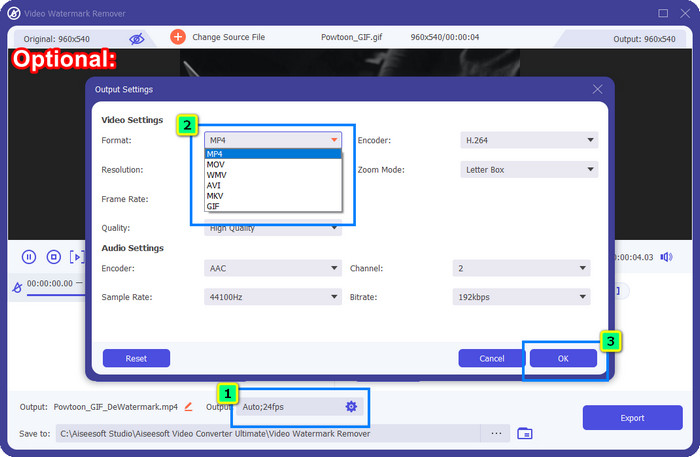
Optioneel: Wil je de uiteindelijke output in een nieuw formaat opslaan? Klik dan bij Output op Format en kies het nieuwe videoformaat dat je wilt. Je kunt andere video‑ en audio‑instellingen aanpassen en op OK klikken om de wijzigingen op te slaan.
Stap 5. Klik op de knop Export om de video te downloaden waarvan je het watermerk hebt verwijderd.
Deel 2. Hoe Powtoon-watermerk te verwijderen met abonnement [Plangebaseerd]
Heeft Powtoon een watermerk? Ja, het voegt een watermerk toe als je de gratis versie gebruikt. Maar als u de Pro of Pro+ aanschaft, kunt u de uiteindelijke uitvoer exporteren zonder het watermerk. Dus als je wilt weten hoe je de software kunt kopen om te genieten van de video die je hebt bewerkt zonder het watermerk, volg dan de volgende stappen.
Stappen voor het kopen van Powtoon Pro en Pro+ Plan:
Stap 1. Ga naar de officiële website van Powtoon en klik op Pricing om de prijzen voor de pro‑versie te bekijken.
Stap 2. Kies het abonnement dat je verkiest, Pro of Pro+, en klik op Get Plan.
Stap 3. Vul de vereiste facturatiegegevens in, ga verder naar de betaalmethode en klik op Make Secure Payment.
Deel 3. Hoe Powtoon Watermark gratis online te verwijderen [Web-Service]
1. Media.io - Watermark Remover
Media.io - Watermark Remover kan het Powtoon‑watermerk gratis verwijderen. De tool is beschikbaar in elke webbrowser, wat betekent dat je deze app niet hoeft te downloaden om hem te gebruiken. Hoewel de watermark remover gratis te gebruiken is, heb je wel een stabiele internetverbinding nodig. Het upload‑ en downloadproces kost meer tijd dan bij de eerste watermark remover die we hier hebben genoemd. Desondanks is deze software een uitstekende keuze voor jou, en als je wilt weten hoe je hem gebruikt, volg je de onderstaande stappen.
Stappen om het Powtoon‑watermerk te verwijderen met Media.io:
Stap 1. Open de webpagina en klik op Choose File om de video toe te voegen waarvan je het watermerk wilt verwijderen. Wacht op het laadproces, want dat kan veel tijd in beslag nemen, afhankelijk van je internetverbinding.
Stap 2. Klik op Add Area en plaats het gebied voor het verwijderen van het watermerk op de plek waar het watermerk staat.
Stap 3. Klik op Export om de bewerkte Powtoon‑video zo eenvoudig op je lokale schijf op te slaan.
2. Kapwing
Kapwing is een andere gespecialiseerde online tool die het watermerk in je video kan verwijderen door deze bij te snijden. Daarnaast biedt het extra bewerkingsfuncties waarmee je een uitstekende video kunt maken, bijna hetzelfde als met Powtoon. In tegenstelling tot andere watermerkoplossingen die we noemen, verandert deze software de afmetingen van de video omdat je het watermerk wegcropt. Als je het niet erg vindt dat de videomaat wordt verkleind, volg dan de stappen hieronder om van het Powtoon‑watermerk af te komen.
Stappen om het Powtoon‑watermerk weg te snijden met Kapwing:
Stap 1. Zoek het programma via je browser en open het.
Stap 2. Klik op Add Media om de video te importeren die je hier wilt bijsnijden.
Stap 3. Nadat je het fragment hebt geplaatst, klik je op Crop om de beeldverhouding aan te passen op basis van je gewenste formaat.
Stap 4. Als je de uiteindelijke output wilt opslaan, klik dan op Done Cropping.
Deel 4. Veelgestelde vragen over het verwijderen van Powtoon-watermerk
Wat is het beste platform om de videoresolutie op Powtoon te verhogen?
Er zijn talloze manieren om de videoresolutie van je Powtoon te verhogen. Toch werken sommige niet zoals je zou verwachten. In plaats van op je geluk te vertrouwen, doen wij het zware werk voor je en hoef jij alleen maar een paar minuten te besteden aan het lezen van dit artikel. Kies welke van de 8 videoconverters voor resolutie het beste bij jouw behoeften past.
Hoe voeg je een watermerk toe aan een video?
De beste manier om een watermerk aan een video toe te voegen is met behulp van software, of het nu tekst, logo, stempel, datum en tijd of iets dergelijks is. Als je wat tijd over hebt, kun je proberen te lezen en te begrijpen hoe je watermerken toevoegt op verschillende platforms, heel eenvoudig.
Waarom is Powtoon duur?
Powtoon werd duur vanwege de animatiebewerking die het biedt die je meestal niet op een andere video-editor kunt hebben, zowel online als offline. Het is ook onderweg, dus u hoeft geen opstartprogramma te installeren om het te gebruiken. Toch is de prijs ervan voor velen niet haalbaar. In plaats van de gratis versie van Powtoon te gebruiken en een watermerk te hebben, probeer het beste alternatief voor video-editor, de FVC Video Converter Ultimate, te gebruiken. Het biedt een groot aantal functies en functies waarvan u zeker kunt genieten.
Gevolgtrekking
Je kunt video’s van Powtoon zonder watermerk opslaan, maar je moet een abonnement kopen om de bewerkte video zonder enig watermerk te bewaren. Vind je het idee van een betaald abonnement niet aantrekkelijk? Probeer dan de online watermark remover die wij voorstellen. Is je internetverbinding traag? Dan raden we je aan om de FVC Video Converter Ultimate te gebruiken om het watermerk snel en professioneel uit de video te verwijderen. In vergelijking met talloze andere programma’s biedt de FVC Video Editor de meest doeltreffende oplossing om alles uit je video te verwijderen wat je niet wilt. Je kunt je video ook verder aanpassen met de functies die deze software biedt.
-
 Eenvoudig watermerk uit PDF verwijderen met eenvoudige stappen
 Verwijder Watermark uit PDF door deze eenvoudige stappen te volgen. Leer hoe u gemakkelijk watermerken uit uw PDF-bestand kunt verwijderen met deze geweldige tools.
-
 Gemakkelijke manieren om watermerk uit afstudeerfoto's te verwijderen
 Wilt u weten hoe u het beste watermerken van afstudeerfoto's kunt verwijderen? Door dit artikel te lezen, weet u hoe u gemakkelijk watermerken op grad-foto's kunt verwijderen.
-
 Watermerk uit video verwijderen met Final Cut Pro [Volledige gids]
 Heb je een probleem met het watermerk op video's? Zei niet meer, want we hebben een tutorial gegeven over het verwijderen van een watermerk uit video met Final Cut Pro.
