


 Video Converter Ultimate
 Scherm opnemer
 Videoreparatie
 Beveiligde download
Niet-uitdagende methoden voor het verwijderen van het iSkysoft-logo van video
iSkysoft is een uitstekende toepassing met veel geweldige functies, waardoor het zich onderscheidt van andere programma’s. Het is een eenvoudige applicatie waarmee je video’s van het ene formaat naar het andere kunt converteren en enkele basisbewerkingen kunt uitvoeren. Het meest vervelende aan deze software is echter dat er een groot iSkysoft-watermerk op je video’s verschijnt nadat je de toepassing hebt gebruikt. Een grote watermark/logo op je video is helemaal niet prettig om naar te kijken. Gelukkig zijn er betrouwbare programma’s waarmee je storende objecten, zoals het iSkysoft-logo/-watermerk, kunt verwijderen. Als je graag de beste methoden wilt weten om het iSkysoft‑logo uit je video te verwijderen, moet je dit artikel lezen.

Deel 1: verwijder het iSkysoft-logo van video op desktop
Het iSkysoft-logo op je scherm is erg irritant, vooral als je naar je favoriete video’s kijkt. Maar je hoeft je geen zorgen meer te maken. Je kunt dat logo verwijderen met Video Converter Ultimate. Deze betrouwbare software kan je op twee eenvoudige manieren helpen om het iSkysoft-logo uit je video’s te verwijderen: met de tool Video Watermark Remover en de tool Video Cropper. Met deze tools kun je het iSkysoft-logo eenvoudig uit je video verwijderen. Als een iSkysoft-logo in de hoek van je video staat, is het aan te raden de tool Video Cropper te gebruiken. Maar als het logo in het midden geplaatst is, kun je de tool Video Watermark Remover gebruiken. Zo kun je je favoriete films of video’s bekijken zonder je te ergeren aan het logo.
Bovendien heeft Video Converter Ultimate, naast het verwijderen van watermerken uit uw video's, meer functies. Het heeft een videoversterker, videofusie, cropper, trimmer, rotator, converter en meer. Bovendien is een van de belangrijkste functies van deze applicatie het converteren van verschillende videobestandsindelingen. Niet-professionele gebruikers kunnen deze applicatie ook gebruiken omdat deze een eenvoudige interface heeft. Als je wilt leren hoe je het iSkysoft-logo uit je video kunt verwijderen, laten we je de twee eenvoudige manieren zien die deze applicatie biedt.
Video Watermark Remover gebruiken
Stap 1: Download eerst Video Converter Ultimate op je desktop om deze uitstekende software te gebruiken. Volg na het downloaden het installatieproces en start de applicatie.
Gratis downloadVoor Windows 7 of nieuwerVeilige download
Gratis downloadVoor MacOS 10.7 of nieuwerVeilige download
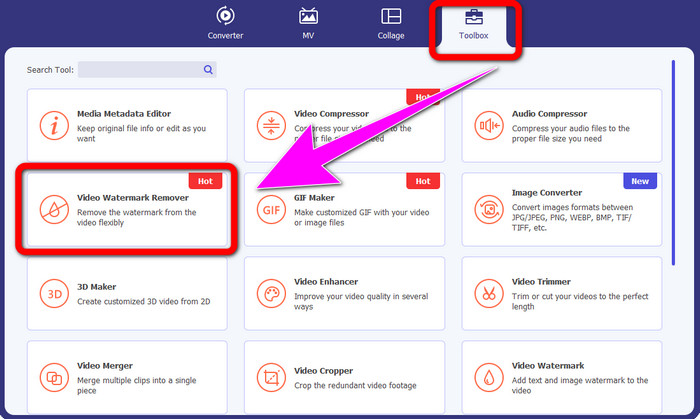
Stap 2: Zodra je de software hebt geopend, ga je naar het paneel Toolbox en kies je de tool Video Watermark Remover. Er verschijnt vervolgens een nieuw venster op je scherm.
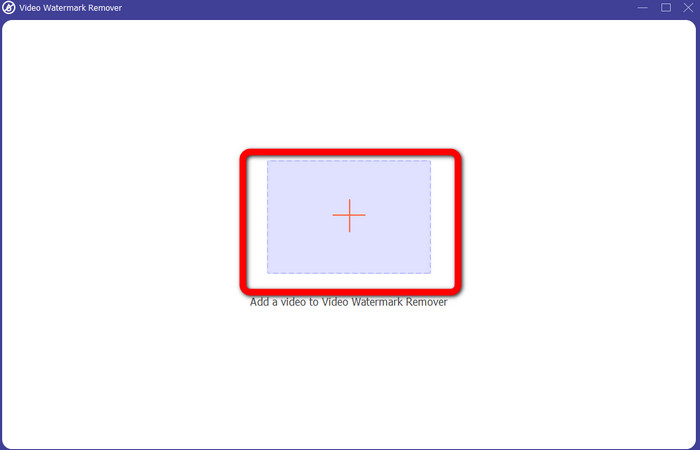
Stap 3: Wanneer je het nieuwe venster ziet, klik je op het pluspictogram en voeg je de video met het iSkysoft-logo toe dat je wilt verwijderen.
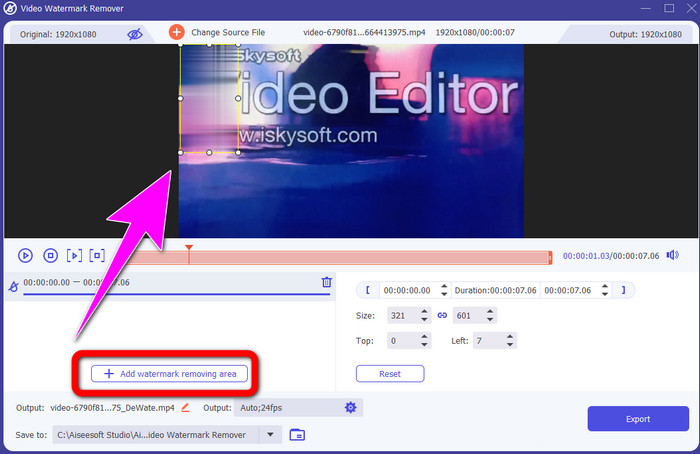
Stap 4: Klik vervolgens op de knop Add Watermark Removing Area. Verschuif het kader over je video en bedek het iSkysoft-logo.
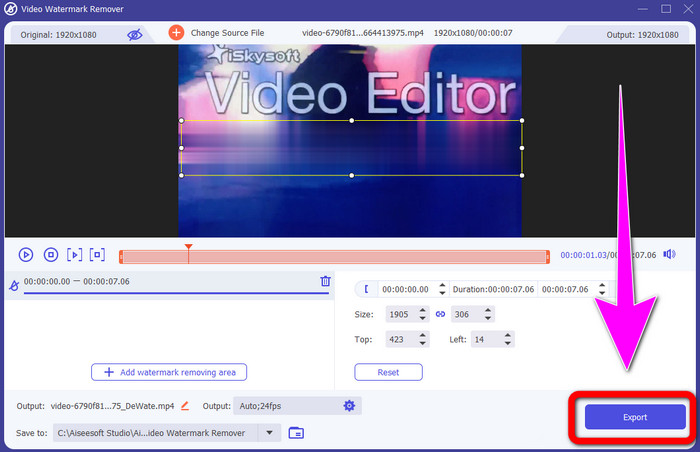
Stap 5: Klik tot slot op de knop Export om je definitieve video op te slaan.
Videobijsnijden gebruiken
In dit deel laten we je zien hoe je het iSkysoft-logo uit je video kunt verwijderen met behulp van de Video Cropper-tool.
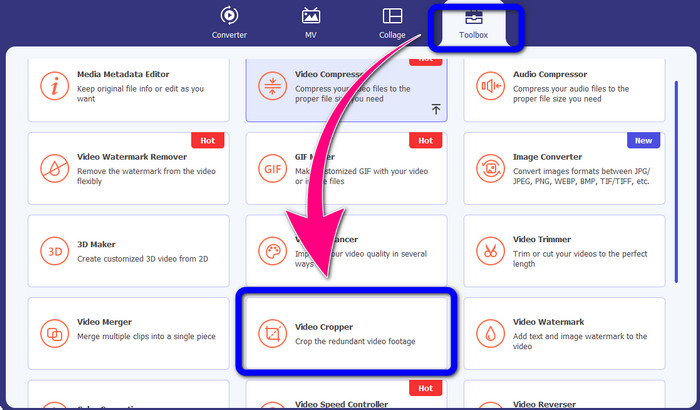
Stap 1: Start de applicatie op je desktop. Klik onder het paneel Toolbox op de tool Video Cropper. Net als bij de andere tool hierboven verschijnt er een nieuw venster op je scherm.
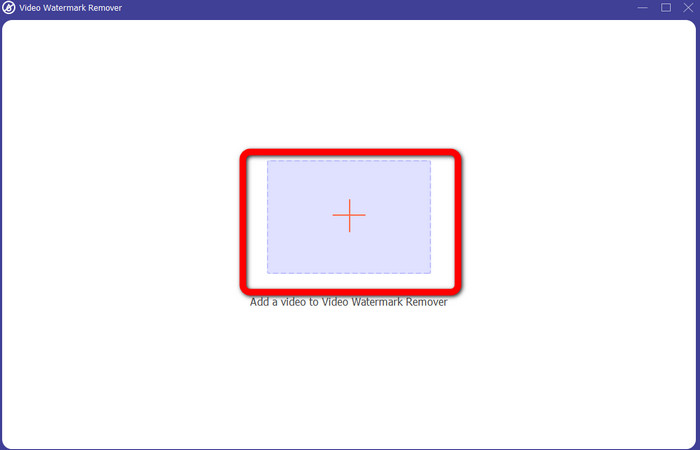
Stap 2: Klik op de knop Plus om je video met het iSkysoft-logo te importeren.
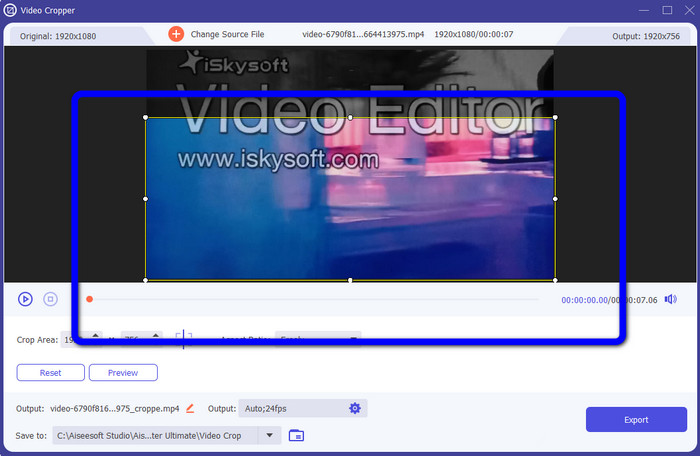
Stap 3: In deze stap kun je de video nu bijsnijden om het iSkysoft-logo uit je video te verwijderen. Gebruik je muis om de randen van je video te verplaatsen.
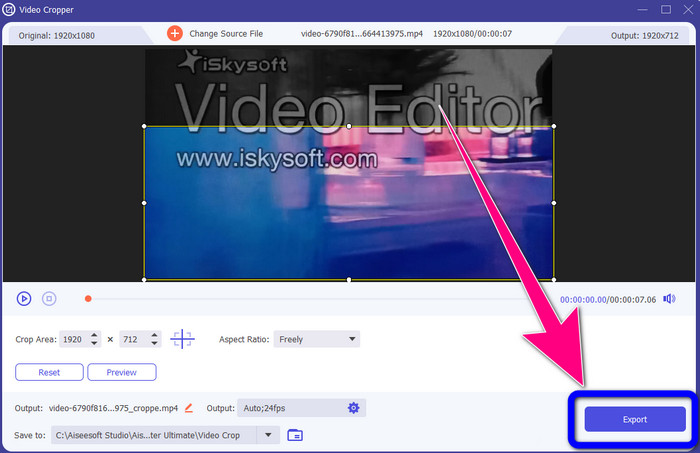
Stap 4: Klik voor de laatste stap op de knop Export en sla je resultaat op je desktop op.
Deel 2: Hoe het iSkysoft-logo van Video Online te verwijderen
HitPaw gebruiken
Je kunt het iSkysoft-logo ook online verwijderen. Een van de beste tools die je kunt gebruiken is HitPaw. Met deze online applicatie kun je het logo eenvoudig uit je video verwijderen. Je kunt het zowel op de desktop als online gebruiken, wat voor iedereen handig is. Bovendien is HitPaw veilig in gebruik. Het zorgt ervoor dat de video’s alleen door jou bewerkt en bekeken kunnen worden. Daarnaast hoef je je geen zorgen te maken over beperkingen van deze software. Er zijn geen limieten voor het aantal logo’s dat je uit je video’s verwijdert. Je hoeft deze applicatie niet te kopen, want hij is gratis. Maar als je het logo of een
onnodige elementen uit je video, moet je nog even wachten. Deze applicatie heeft een langzame verwijderingsprocedure, wat tijdrovend is voor de gebruikers. Het hangt ook af van je internetverbinding. Het zal goed presteren als je een snelle verbinding hebt. Maar als je een trage verbinding hebt, verwacht dan wat vertraging. Volg de eenvoudige stappen hieronder om het iSkysoft-logo uit je video's te verwijderen.
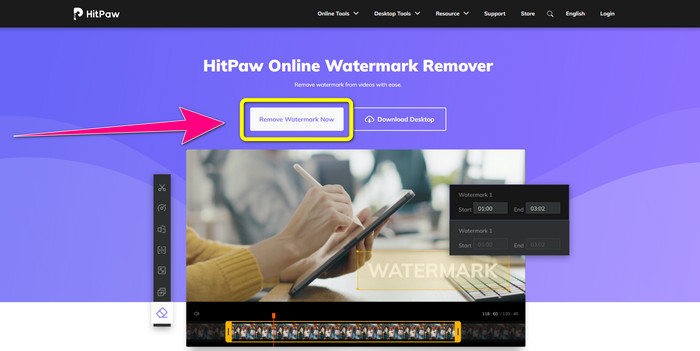
Stap 1: Bezoek de website van HitPaw. Klik op de knop Remove Watermark Now - Choose File om je video met het iSkysoft-logo dat je wilt verwijderen toe te voegen.
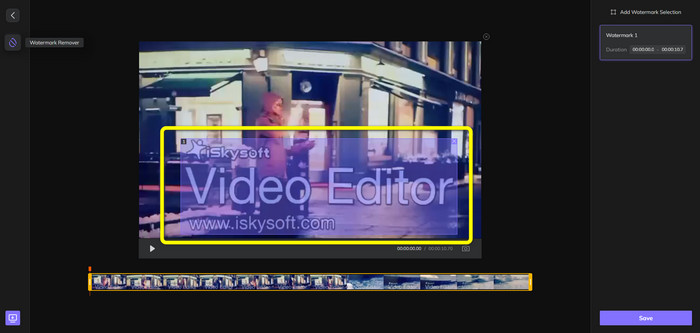
Stap 2: Zodra je je videobestand hebt toegevoegd, verschijnt er een blauw kader op je scherm. Gebruik dit kader om het iSkysoft-logo te bedekken. Je kunt de afmetingen van het kader aanpassen.
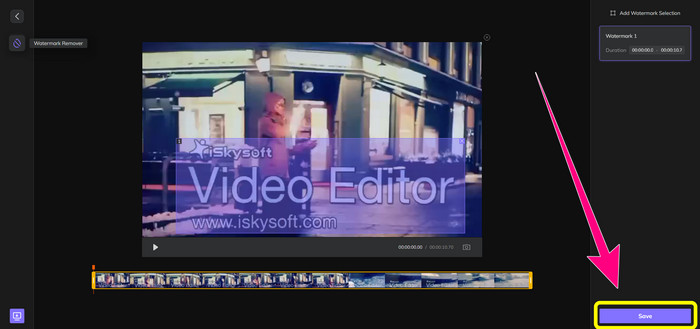
Stap 3: Als je klaar bent met het bedekken van het iSkysoft-logo in je video, klik je op de knop Save. Wacht op het verwijderproces en sla je video op.
Online Video Watermark Remover gebruiken
Een andere online tool die je kunt gebruiken is Video Watermark Remover Online. Met deze applicatie kun je het iSkysoft-logo uit je video’s verwijderen. Het is ook eenvoudige software in het gebruik, ideaal voor niet-professionele gebruikers. Je kunt ook andere storende elementen uit je video’s verwijderen zonder dat de videokwaliteit achteruitgaat. Als je echter de gratis versie gebruikt, zijn er beperkingen bij het verwijderen van logo’s uit je video’s. Je kunt alleen logo’s of watermerken van 5 video’s verwijderen. Je moet een abonnement aanschaffen als je meer video’s wilt verwerken met Video Watermark Remover Online. Ook kun je je resultaat niet in een ander formaat opslaan. Je kunt het alleen in hetzelfde formaat bewaren, wat niet ideaal is. Ten slotte is de bestandverwerking traag. Volg de eenvoudige stappen hieronder om het iSkysoft-logo uit je video’s te verwijderen.
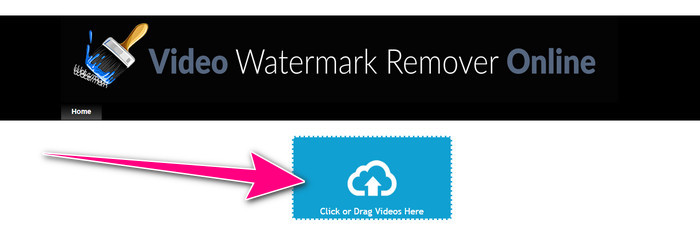
Stap 1: Ga naar de website van Video Watermark Remover Online. Klik op de knop Click or Drag Videos Here om je videobestand met het iSkysoft-logo dat je wilt verwijderen te importeren.
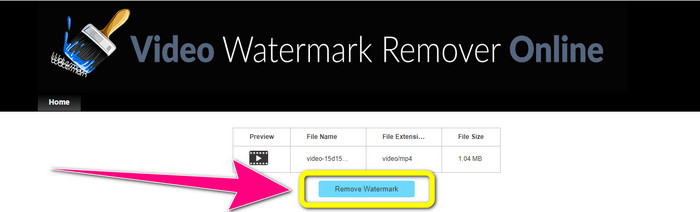
Stap 2: Klik vervolgens op de knop Remove Watermark en wacht tot het verwijderingsproces is voltooid.
Gerelateerd aan:
Snelste manier om een logo uit een video te verwijderen in Adobe Premiere Pro
Hoe verwijder je een logo uit een video met Windows Movie Maker
Deel 3: Veelgestelde vragen over het verwijderen van het iSkysoft-logo
Kun je een logo van een foto verwijderen?
Ja, je kunt FVC Free Watermark Remover gebruiken om het logo snel en eenvoudig uit je afbeelding te wissen.
Is het verwijderen van het watermerk illegaal?
Volgens de Amerikaanse Copyright Act, sectie 1202, is het verwijderen van watermerken zonder toestemming van de eigenaar onwettig.
Hoe verwijder ik het logo gratis?
U kunt de gratis proefversie van Video Converter Ultimate gebruiken om gratis een logo van uw video te verwijderen.
Gevolgtrekking
Dit artikel gaf uitstekende methoden om het iSkysoft-logo uit je video te verwijderen met tools voor zowel desktop als online gebruik. Maar als je op zoek bent naar een uitstekende logoverwijderaar die je kunt gebruiken, dan kun je Video Converter Ultimate downloaden. Deze applicatie biedt een snel verwijderingsproces en is voor alle gebruikers toegankelijk.
-
 8 uitstekende videowatermerkverwijderaars online en offline
 Als u op zoek bent naar de beste gratis software voor het verwijderen van videowatermerken die u kunt gebruiken op uw Windows-, Mac-, iPhone- en Android-telefoons, dan is dit artikel iets voor u
-
 Beste methoden voor het verwijderen van bijtbaar watermerk uit video
 Dit artikel laat je een zeer betrouwbare en fantastische bijtbare watermerkverwijderaar zien. Deze prachtige applicaties helpen u bij het oplossen van dit soort problemen
-
 Eenvoudig te leren procedures om het logo van video te verwijderen
 Ben je op zoek naar de beste en gemakkelijke video-logo-verwijderaar? Dan is dit artikel goed voor je. Maak van de gelegenheid gebruik om meer te weten te komen over het verwijderen van een logo uit een video.
