


 Video Converter Ultimate
 Scherm opnemer
 Videoreparatie
 Beveiligde download
Snelste procedures om VOB naar M4V te converteren op Windows en Mac
Dvd's gebruiken doorgaans het bestandsformaat VOB of Video Object. Dit bestand staat meestal in de VIDEO_TS-map op het hoofdniveau van de dvd. Tegenwoordig circuleren er echter enorm veel mediabestanden op internet. Bovendien komen dvd's steeds minder voor en worden ze door veel apparaten en programma's niet langer breed ondersteund. Als dat de reden is, heb je een formaat nodig dat door veel apparaten en programma's wordt ondersteund, zoals het M4V-bestandsformaat. Je zult blij zijn, want je leert de meest handige methoden om VOB naar M4V te converteren met behulp van online en downloadbare software.

Deel 1: Verschillen tussen VOB en M4V
| VOB | M4V | |
| Voor-en achternaam | Video-object | MPEG-4-video |
| Bestandsextensie | .vob | .m4v |
| Beschrijving | Video, audio, ondertitels, dvd-menu's en andere inhoud zijn allemaal opgenomen in een enkel bestand met behulp van het containerformaat VOB. Het VOB-formaat, gebaseerd op MPEG-2-systeemstreams en kan op veel media-apparaten worden afgespeeld, wordt meestal opgeslagen in de map VIDEO TS in de hoofdmap van de schijf. | Apple heeft het M4V-videocontainerformaat gemaakt, dat wordt gebruikt om audio- en videocontent via iTunes te verspreiden. Behalve de mogelijkheid om DRM-kopieerbeveiliging te gebruiken om het eigendom van tv-afleveringen, films en ander mediamateriaal uit de iTunes Store te beschermen, zijn M4V-bestanden identiek aan MP4-bestanden. |
| Ontwikkeld door | DVD-forum | appel |
| Mime type | video/dvd video/mpeg | video/x-m4v |
| Video codec | MPEG-1 MPEG-2 | H.264 |
| Audiocodec | MP2 AC-3 DTS | AAC Dolby Digitaal |
| Bijbehorende programma's | Mediaspeler klassiek Windows Media Speler VLC Media Speler Potspeler Gom speler | QuickTime-speler iTunes Mediaspeler klassiek K-multimediaspeler MP-speler VLC Media Speler |
Deel 2: Waarom moet u VOB naar M4V converteren?
De belangrijkste reden waarom u VOB naar M4V moet converteren, is dat veel toepassingen het VOB-bestand niet ondersteunen. Wat er ook gebeurt, als je een VOB-video op een Mac hebt, kun je problemen krijgen. Zet het neer in QuickTime om af te spelen of iMovie/FCP om te bewerken. Daarom moet u het.vob-bestand converteren naar een formaat dat Macs ondersteunt, zoals M4V.
Deel 3: VOB converteren naar M4V met Mac
De beste converter die je op een Mac kunt gebruiken om VOB naar M4V te converteren is de FVC Video Converter Ultimate. Deze converter is niet hetzelfde als andere converters die je op internet ziet. De andere converters bieden alleen een normale conversiesnelheid. Maar in deze applicatie ervaar je veel meer interessante functies. Video Converter Ultimate biedt een conversie met ultrasnelheid, die 30x sneller is dan de gemiddelde snelheid. Ook, als je twee of meer bestanden wilt converteren, is deze applicatie perfect voor jou. Hij ondersteunt batchconversie, waarbij je meerdere bestanden kunt uploaden en in één keer kunt converteren. Met deze batchconversie bespaar je veel tijd. Bovendien kun je tijdens het converteren je video nog bewerken. Je kunt je video verbeteren, bewerken en bijsnijden, omdat er meer opties beschikbaar zijn tijdens het conversieproces. Daarnaast kun je je VOB-videobestand verder optimaliseren met deze converter.
Functies
◆ Converteer meer dan 100 videobestandsindelingen, waaronder MP4, VOB, M4V, WMV, MKV, AVI, FLV, MTS, enz.
◆ Biedt Collage Creator met beschikbare sjablonen en filters.
◆ Geschikt voor het maken van een muziekvideo met gratis thema's. Het kan video's en afbeeldingen combineren.
◆ Biedt Toolbox veel bewerkingstools, zoals een videoverbeteraar, trimmer, cropper, enz.
◆ Converteer afbeeldingsbestanden zoals PNG, JPG, BMP, TIFF en meer.
◆ Maak aangepaste 3D-video van 2D.
◆ Hij kan een video vertragen en versnellen van 0,125x tot 8x sneller.
Volg de onderstaande basisprocedures om VOB naar M4V op Mac te converteren met FVC Video Converter Ultimate.
Stap 1: Zoek in je browser naar FVC Video Converter Ultimate. Je kunt ook op de Download-knop hieronder klikken. Kies de Mac-versie. Start daarna de applicatie.
Gratis downloadVoor Windows 7 of nieuwerVeilige download
Gratis downloadVoor MacOS 10.7 of nieuwerVeilige download
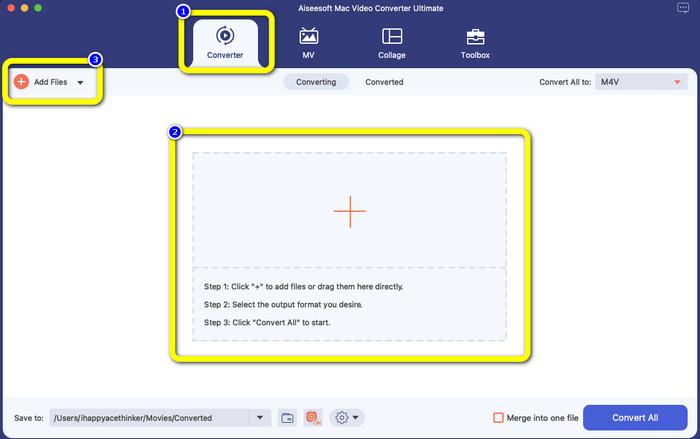
Stap 2: Selecteer het Converter-paneel zodra de interface verschijnt. Klik op het Plus-pictogram of de knop Bestanden toevoegen om je VOB-bestand toe te voegen. Je kunt je videobestand ook rechtstreeks naar het vak slepen.
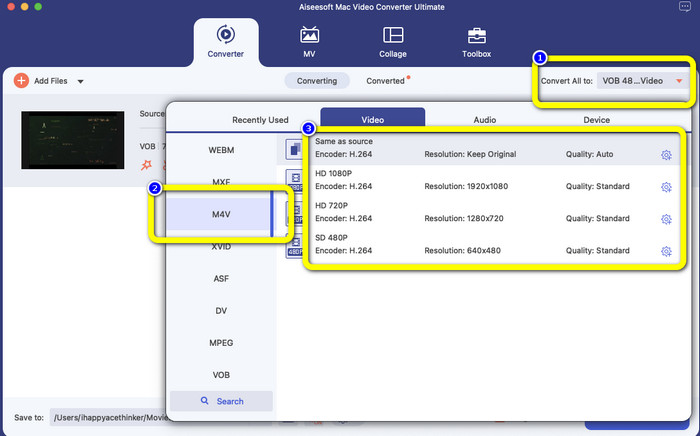
Stap 3: Klik op de knop Alles converteren naar om de formaatopties te bekijken. Selecteer daarna het M4V-bestandsformaat. Je kunt ook de resolutie voor je video kiezen, van 480p tot 1080p, of de oorspronkelijke kwaliteit behouden.
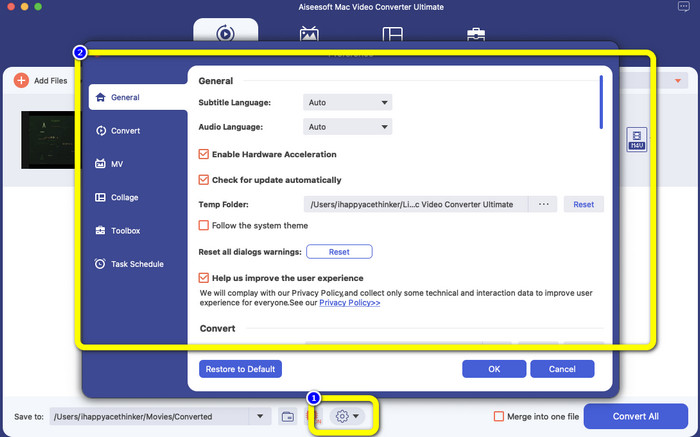
Stap 4: Voordat je converteert, kun je je video bewerken, bijvoorbeeld ondertitels of een audiotaal toevoegen en meer, door op het pictogram Voorkeuren onderaan de interface te klikken.
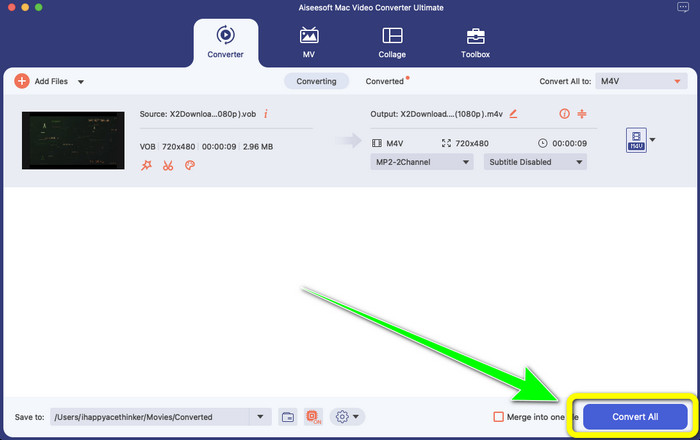
Stap 5: Als je klaar bent met het aanbrengen van wijzigingen in je VOB-video, klik je op de knop Converteren om je VOB-bestand naar het M4V-formaat te converteren. Sla vervolgens je video op je Mac op.
Deel 4: eenvoudige manieren om VOB gratis online naar M4V te converteren
Als je VOB gratis online naar M4V wilt converteren, kun je FreeFileConvert proberen. Deze online converter kan eenvoudig verschillende soorten bestanden omzetten. Er zijn slechts drie stappen nodig om je VOB-videobestand naar M4V te converteren, wat het ideaal maakt voor niet-professionele gebruikers. Bovendien worden alle geconverteerde bestanden na 24 uur van de server verwijderd en zijn ze niet meer beschikbaar. Je kunt je bestand ook zelf verwijderen met de knop Verwijderen nadat een bestand is geconverteerd. Daarnaast is FreeFileConvert niet alleen geschikt voor videoconversie. Je kunt er ook afbeeldingen, documenten, vectoren, audio, archieven, e-books en presentaties mee converteren, wat erg handig is voor gebruikers. Deze online tool heeft echter een traag conversieproces, dus je moet meer tijd uittrekken. Ook is een internetverbinding vereist om hem te gebruiken.
Stap 1: Bezoek de website van FreeFileConvert.
Stap 2: Klik op de knop Bestand kiezen om je VOB-videobestand toe te voegen.
Stap 3: Klik op de knop Bestand converteren om de formaatopties te bekijken en selecteer het M4V-bestandsformaat.
Stap 4: Kies tot slot de knop Converteren. Download de uiteindelijke video na het conversieproces.
Deel 5: Veelgestelde vragen over het converteren van VOB naar M4V
1. Wat is het gebruikelijke bestandsformaat om een VOB-bestand naar te converteren?
Aangezien MP4 een veelgebruikte extensie voor multimediabestanden is en een containerformaat voor het opslaan van video-, audio- en ondertitelgegevens, zou het het beste videoformaat zijn om uw niet-ondersteunde VOB-videobestanden ernaar te converteren. Veel draagbare apparaten, waaronder Apple-producten, ondersteunen het MP4-formaat.
2. Hoe converteer ik een VOB-bestandsformaat zonder kwaliteitsverlies?
U kunt de FVC Video Converter Ultimate gebruiken. Deze offline tool kan meerdere bestanden converteren zonder de videokwaliteit te veranderen.
3. Kunnen VOB-bestanden worden afgespeeld op Androids?
Nee. Video’s op dvd’s worden opgeslagen met behulp van het VOB-containertype (Video Object). VOB-bestanden worden doorgaans niet ondersteund door Android. Je moet je VOB naar MP4 converteren of naar een ander videoformaat dat door Android-apparaten wordt ondersteund als je ze op Android-smartphones of -tablets wilt afspelen.
Gevolgtrekking
Nu heb je de verschillen tussen VOB en M4V leren kennen. Ook laat dit artikel je de eenvoudigste methode zien om VOB naar M4V te converteren. Als je de voorkeur geeft aan een applicatie met een snel conversieproces, kun je FVC Video Converter Ultimate gebruiken. Deze converter kan verschillende bestanden 30x sneller omzetten dan andere converters.
-
 Hoe VOB-bestanden online en gratis te comprimeren [Geen download]
 Bent u op zoek naar methoden om VOB-bestanden te comprimeren? Leer in dit artikel hoe u VOB-bestanden het beste kleiner kunt maken
-
 Concrete gids om gratis lid te worden van M4V-bestanden op Windows en Mac
 Als u op zoek bent naar een oplossing om M4V-videobestanden in één te combineren, mag u deze passage nooit missen. Hier zullen we het hebben over de twee beste methoden om M4V-videobestanden te combineren
-
 Converteer VOB gratis naar 3PG op Windows en Mac [zonder verlies]
 Hoe converteer ik VOB naar 3GP op Windows en Mac? Dit artikel biedt de beste oplossingen om VOB naar 3GP te converteren
