


 Video Converter Ultimate
 Scherm opnemer
 Videoreparatie
 Beveiligde download
Top MP3 naar M4A-converters: snelle en gemakkelijke audioconversie
Ben je niet tevreden wanneer je naar audiobestanden van lage kwaliteit luistert die je favoriete nummers geen recht doen? Het is tijd om je audio‑ervaring te upgraden met de kracht van MP3 naar M4A-conversie! Door je audiobestanden naar M4A te converteren, kun je het ware potentieel van je muziekbibliotheek ontgrendelen en zelf het verschil horen. In dit artikel leiden we je door de voordelen van MP3 naar M4A converteren en geven we je de beste softwareconverters om een soepel conversieproces te garanderen. Maak je klaar om je audio‑ervaring te transformeren en van je muziek te genieten als nooit tevoren.

Deel 1. Beste manieren om MP3 naar M4A te converteren
Hier zijn enkele van de beste audio-omzetters van MP3 naar M4a. Er is een offline manier, een desktop-app, en een andere online tool, een webgebaseerd programma. Bekijk ze voor meer informatie.
1. Video Converter Ultimate
Video Converter Ultimate is flexibele software die een reeks functies biedt voor audio- en videoconversie. Als het gaat om het converteren van MP3 naar M4A, is Video Converter Ultimate een uitstekende keuze, omdat het gebruikers een eenvoudig en rechtlijnig proces biedt om hun audiobestanden te converteren. De tool ondersteunt een breed scala aan audioformaten en zijn geavanceerde audiocodectechnologie zorgt voor een uitvoer van hoge kwaliteit. Of je nu audiobestanden moet converteren voor persoonlijke of professionele doeleinden, Video Converter Ultimate maakt het proces snel, zodat jij je kunt richten op wat het belangrijkst is: genieten van je hoogwaardige audiobestanden.
Stap 1. Download het programma en installeer het
Selecteer om te beginnen een van de knoppen Gratis downloaden en volg vervolgens de instructies op het scherm om het bestand op je computer op te slaan. Start daarna de app en maak jezelf vertrouwd met de intuïtieve bediening.
Gratis DownloadVoor Windows 7 of hogerBeveiligde download
Gratis downloadenVoor macOS 10.7 of laterVeilige download
Stap 2. Voeg audiobestanden toe
Selecteer vervolgens het plusteken in de hoofdinterface en navigeer naar de locatie van het audiobestand dat je wilt converteren. Nadat een bestand is geüpload, verschijnt er een voorbeeld in de gebruikersinterface. Als je MP3 naar M4A in batches wilt converteren, kun je een hele map met bestanden uploaden.
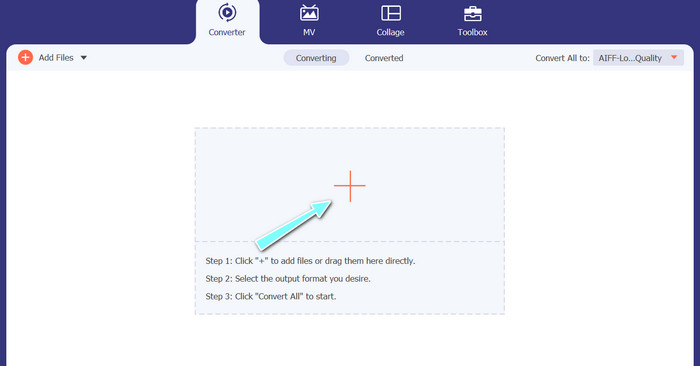
Stap 3. Kies een uitvoerformaat
Kies daarna het uitvoerformaat door op het tabblad Audio in het menu Profiel (rechtsboven in de tool) te klikken. Je kunt naar of van MP3 converteren met behulp van zowel het MP3- als het M4A-formaat.
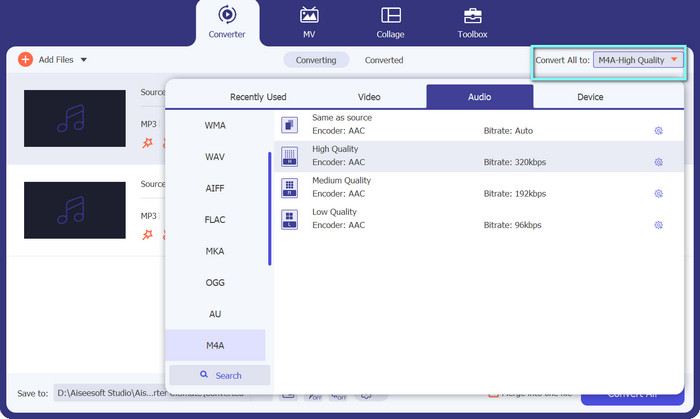
Stap 4. Sla het resultaat op
Kies onderaan het scherm de doelmap. Wanneer je klaar bent om met de conversie te beginnen, klik je op de knop Alles converteren.
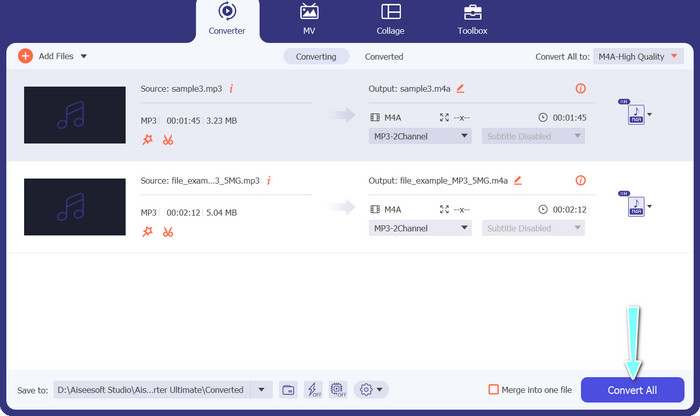
2. Gratis video-omzetter online
Geen ruimte beschikbaar voor nog een programma? Geen zorgen, je kunt ook kiezen voor een online tool om bestanden te converteren zonder een programma te hoeven downloaden. De webapp Free Video Converter Online stelt je in staat rechtstreeks vanuit je browser te converteren. Bovendien ondersteunt hij veel verschillende formaten voor zowel video- als audiobestanden. Je kunt met deze online tool zelfs in bulk converteren. Daarbovenop is het aanpassen van de uitvoer van het audiobestand een ander groot pluspunt van de tool. Kijk hoe deze online MP3 naar M4A‑converter werkt.
Stap 1. Om Free Video Converter Online te gaan gebruiken, open je eerst je favoriete webbrowser en ga je rechtstreeks naar de website.
Stap 2. Selecteer vervolgens het MP3‑bestand dat je naar M4A wilt converteren door op de knop Bestanden toevoegen om te converteren te klikken.
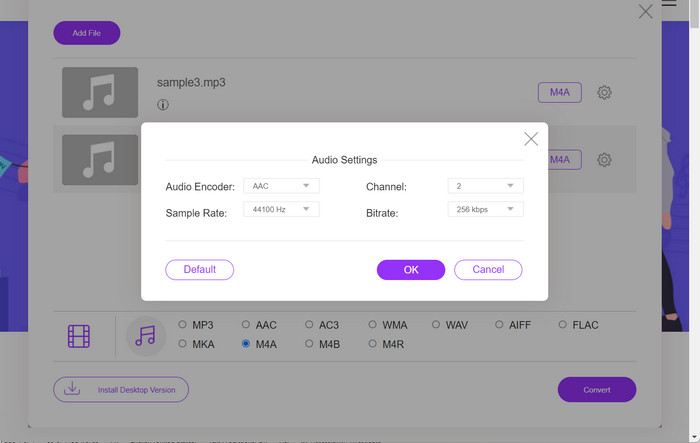
Stap 3. Kies in de optie voor Audio-formaat M4A als gewenst uitvoerbestand. De uitvoerkwaliteit of bitrate van het M4A‑bestand kan eveneens worden aangepast.
Stap 4. Klik op de knop Converteren om het conversieproces te starten. Zo converteer je MP3 naar M4A online.
Deel 2. Converteer MP3 naar M4A op Windows
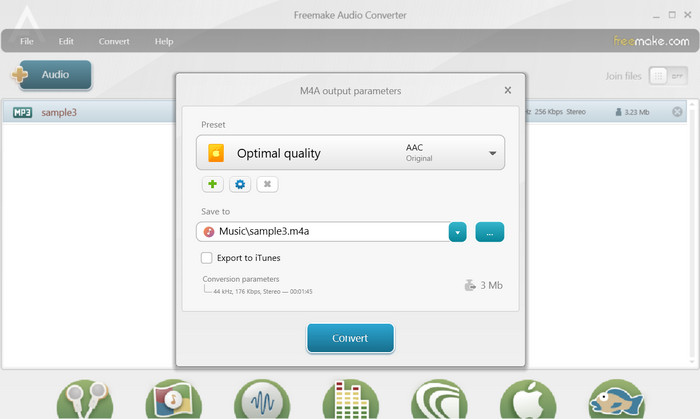
Freemake Audio Converter is een gratis en gebruiksvriendelijk programma waarmee gebruikers audiobestanden naar verschillende formaten kunnen converteren, waaronder M4A, MP3, WAV en meer. Met zijn eenvoudige drag-and-drop-interface kunnen gebruikers eenvoudig hun MP3-bestanden toevoegen en converteren naar M4A zonder ingewikkelde instellingen of configuraties. De tool heeft ook een reeks aanpassingsopties, waardoor gebruikers parameters zoals bitrate en samplefrequentie kunnen aanpassen om de gewenste uitvoerkwaliteit te krijgen. Al met al is het een van de beste MP3 naar M4A-converters die je kunt gebruiken.
Stap 1. Download en installeer Freemake Audio Converter op je Windows‑computer.
Stap 2. Start het programma en klik op de knop +Audio om je MP3‑bestand(en) aan het programma toe te voegen.
Stap 3. Selecteer naar M4A in de lijst met beschikbare formaten onderaan het programmavenster. Gebruik het vervolgkeuzemenu om de gewenste kwaliteitsinstellingen voor je uitvoerbestand te kiezen.
Stap 4. Kies de uitvoermap waarin je het geconverteerde bestand wilt opslaan. Klik ten slotte op de knop Converteren om het conversieproces te starten.
Deel 3. Converteer MP3 naar M4A op Mac
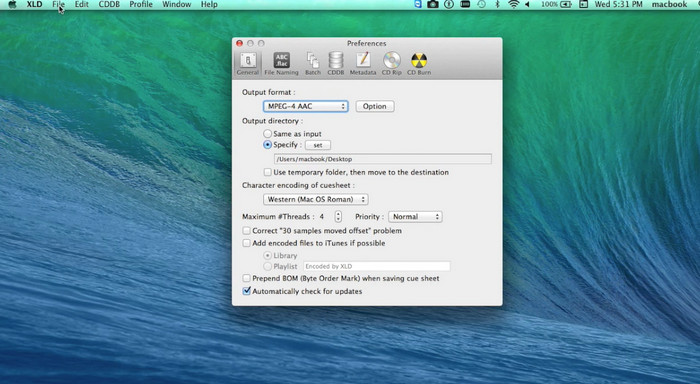
XLD is een gratis en gebruiksvriendelijk programma waarmee Mac-gebruikers audiobestanden naar verschillende formaten kunnen converteren, waaronder M4A, MP3, FLAC en meer. Met zijn eenvoudige drag-and-drop-interface kunnen gebruikers eenvoudig hun MP3-bestanden toevoegen en converteren naar M4A zonder ingewikkelde instellingen of configuraties. XLD biedt ook een reeks aanpassingsopties, waardoor gebruikers parameters zoals bitrate en samplefrequentie kunnen aanpassen om de gewenste uitvoerkwaliteit te bereiken.
Stap 1. Download en installeer XLD op je Mac‑computer.
Stap 2. Start het programma en klik op de knop Openen om je MP3‑bestand(en) aan het programma toe te voegen.
Stap 3. Selecteer M4A in de lijst met beschikbare formaten in de programmavoorkeuren. Je kunt het vervolgkeuzemenu gebruiken om de gewenste kwaliteitsinstellingen voor je uitvoerbestand te kiezen.
Stap 4. Kies vervolgens de uitvoermap waarin je het geconverteerde bestand wilt opslaan. Klik tot slot op de knop Converteren om het conversieproces te starten. Zo converteer je gratis MP3 naar M4A op de Mac.
Deel 4. Converteer MP3 naar M4A op Android
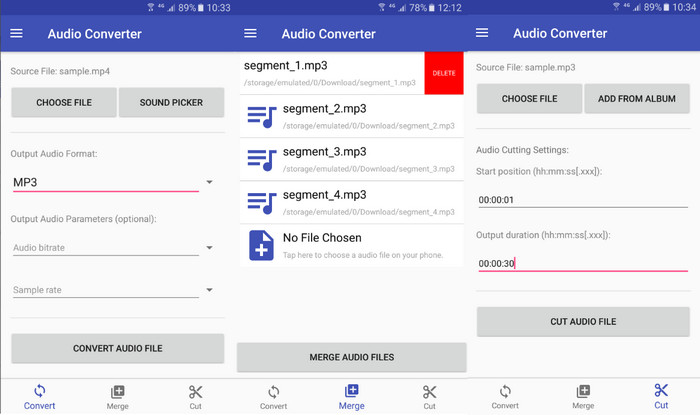
Als het gaat om het converteren van audiobestanden, is de gratis en eenvoudige Android-software Audio Converter van Online-Convert.com moeilijk te verslaan. Gebruikers kunnen eenvoudig hun MP3-bestanden naar de interface van het programma slepen en neerzetten om het conversieproces naar M4A te starten. De uitvoerkwaliteit van een audiobestand kan worden aangepast door instellingen zoals bitrate en sampling rate in Audio Converter te wijzigen. Hier zijn de stappen om MP3 naar M4A op Android te veranderen:
Stap 1. Download en installeer Audio Converter van Online-Convert.com uit de Google Play Store op je Android‑apparaat. Start de app en tik op de knop Audio converteren.
Stap 2. Selecteer vervolgens MP3 als invoerformaat en M4A als uitvoerformaat.
Stap 3. Tik nu op de knop Bestanden selecteren om je MP3‑bestand(en) aan de app toe te voegen. Tik ten slotte op de knop Conversie starten om het conversieproces te beginnen. Zo eenvoudig is het! Nu heb je geleerd hoe je MP3 naar M4A converteert op Android.
Deel 5. Converteer MP3 naar M4A op iOS
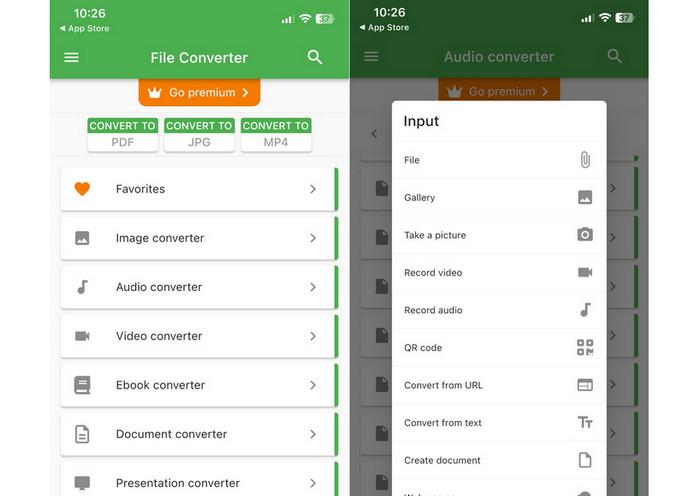
Audiobestanden, zoals MP3, kunnen worden geconverteerd naar het meer draagbare en lossless M4A-formaat met behulp van File Converter Free, een gratis en duidelijke iOS-software. Het ongecompliceerde ontwerp maakt het voor iedereen eenvoudig om MP3-bestanden te laden en ze naar M4A te converteren zonder met instellingen of instellingen te hoeven knoeien.
Stap 1. File Converter Free is te vinden in de App Store en is gratis te downloaden en te gebruiken. Start het programma en tik op het tabblad Audio.
Stap 2. Kies MP3 als invoerformaat en M4A als uitvoerformaat op basis van Apple’s AAC‑formaat. Selecteer de gewenste uitvoerkwaliteit in het vervolgkeuzemenu. Selecteer de knop Bestand toevoegen om een MP3 in het programma te importeren.
Stap 3. Klik op de knop Converteren om het conversieproces te starten.
Deel 6. Veelgestelde vragen over het converteren van MP3 naar M4A
Kan ik MP3 naar M4A converteren met Windows Media Player?
Ja, je kunt MP3 naar M4A converteren met Windows Media Player, maar dat vereist een paar extra stappen, omdat M4A niet standaard wordt ondersteund in Windows Media Player. Of je kunt simpelweg een alternatief voor Windows Media Player gebruiken.
Zal het converteren van MP3 naar M4A resulteren in enig verlies van audiokwaliteit?
Het converteren van MP3 naar M4A kan resulteren in een licht verlies van audiokwaliteit vanwege de verschillen in compressie-algoritmen die door de twee formaten worden gebruikt.
Kan ik M4A terug converteren naar MP3?
Ja, veel audioconversieprogramma’s en ‑tools stellen je in staat om indien nodig M4A naar MP3 te converteren. Houd er echter rekening mee dat herhaaldelijk tussen formaten converteren tot kwaliteitsverlies kan leiden.
Gevolgtrekking
MP3 naar M4A-conversie is een waardevol proces voor iedereen die de kwaliteit en compatibiliteit van zijn audiobestanden wil verbeteren. Door de stappen en tips in deze uitleg te volgen, kun je je MP3‑bestanden eenvoudig naar M4A converteren en genieten van audio van hoge kwaliteit op elk apparaat.
-
 Gratis en online | Hoe MP4 naar M4A op Windows / Mac te converteren
 Hoe converteer ik MP4 online naar M4A? Kan ik de audio uit MP4-bestanden extraheren? Lees dit bericht en je krijgt alle antwoorden over de conversie van MP4 naar M4A.
-
 Beste tools die u kunt gebruiken om MP3- naar M4R-bestanden batchgewijs te converteren
 Op zoek naar een converter die je MP3-bestand batchgewijs kan omzetten naar een M4R-beltoon voor je iPhone of iPad? Lees het artikel door om enkele van de beste te ontdekken die er zijn.
-
 5 MP3-snijders om elke audio gemakkelijk te knippen [2023 bijgewerkt]
 Heb je een MP3-snijder nodig om de audio bij te snijden? Lees in dat geval dit artikel, want we bieden de tools waarop u kunt vertrouwen en die de audio gemakkelijk knippen.
