


 Video Converter Ultimate
 Scherm opnemer
 Videoreparatie
 Beveiligde download
Foutcode 224003 oplossen: alles wat u moet weten
Het minste dat iemand wil ervaren, is dat hij de verschijning van foutcode 224003 op zijn scherm ziet. Het begrijpen van de veelvoorkomende oorzaken van foutcode 224003, zoals netwerkproblemen, browsercompatibiliteit en verouderde software, is van cruciaal belang voor een effectieve probleemoplossing. Het kennen van de juiste hulpmiddelen is noodzakelijk bij het omgaan met een dergelijke kwestie, waarvoor besluitvorming nodig is om ervoor te zorgen dat u het videobestand niet volledig verpest.
Dit artikel gaat stap voor stap in op oplossingen, waarbij elke mogelijke oorzaak wordt behandeld en praktische tips worden gegeven om de fout op te lossen. Aan het einde van deze gids beschik je over de kennis om de complexiteit van foutcode 224003 te doorgronden en een naadloze digitale ervaring te waarborgen. Of je deze fout nu voor het eerst tegenkomt of er herhaaldelijk mee te maken hebt gehad, onze gids is bedoeld om je de middelen te geven om foutcode 224003 in de toekomst te kunnen opsporen, oplossen en voorkomen. Lees vandaag het hele artikel zodat je weet hoe je er bij een volgende keer mee om moet gaan.

Deel 1. Videofoutcode 224003 begrijpen
Foutcode 224003 kan zich in verschillende vormen manifesteren, wat vaak wijst op een storing of probleem binnen het systeem. Gebruikers kunnen deze fout tegenkomen tijdens het gebruik van specifieke applicaties, streamingdiensten of browsers, wat tot aanzienlijk ongemak leidt. Om deze fout effectief aan te pakken en op te lossen, is het van cruciaal belang dat u de mogelijke oorzaken ervan begrijpt, die hieronder worden vermeld.
Veelvoorkomende oorzaken van foutcode 224003
◆ Netwerkproblemen: Een slechte of instabiele internetverbinding kan foutcode 224003 veroorzaken, vooral bij het online streamen van content. Dit is ook de reden voor foutcode 232404.
◆ Browsercompatibiliteit: Bepaalde browsers zijn mogelijk niet volledig compatibel met de toepassing of dienst, wat tot deze fout kan leiden.
◆ Verouderde software: Verouderde software, waaronder browsers en applicaties, kan een factor zijn bij het optreden van deze fout.
◆ Beschadigde cache of cookies: Opgebouwde cache of beschadigde cookies in je browser kunnen de goede werking van de toepassing verstoren, met foutcode 224003 als gevolg.
In welke situaties de foutcode optreedt
◆ Problemen met het streamingplatform: Problemen aan de serverzijde van het streamingplatform, zoals onderhoud, technische storingen of grote drukte, kunnen foutcode 224003 veroorzaken. In zulke gevallen heeft de gebruiker beperkte controle over het oplossen van het probleem en moet hij mogelijk wachten tot het platform het verhelpt.
◆ Hardwareversnelling: Hardwareversnelling in je browserinstellingen kan soms tot compatibiliteitsproblemen leiden met bepaalde videocontent, wat foutcode 224003 tot gevolg kan hebben. Het uitschakelen van hardwareversnelling kan in zulke gevallen een mogelijke oplossing zijn, evenals bij andere problemen met videoweergave zoals video met een groen scherm, vastlopende video’s en meer.
◆ Onverenigbaarheid met het apparaat: Bepaalde apparaten of besturingssystemen zijn mogelijk niet volledig compatibel met de videocontent, waardoor fouten tijdens het afspelen kunnen ontstaan.
◆ Netwerkfirewall of beveiligingssoftware: Bepaalde beveiligingssoftware of firewalls kunnen het streamen van specifieke videocontent blokkeren, waardoor foutcode 224003 wordt weergegeven.
◆ Interferentie door browserextensies: Bepaalde browserextensies of add-ons kunnen de goede werking van online videospelers verstoren, wat tot foutcode 224003 kan leiden.
Het is van cruciaal belang om te begrijpen dat de specifieke omstandigheden die tot foutcode 224003 hebben geleid, kunnen verschillen; daarom kunnen de maatregelen voor probleemoplossing ook verschillen. Het identificeren van de onderliggende reden is afhankelijk van de context waarin de fout optreedt om het probleem op de juiste manier te verhelpen.
Deel 2. Stapsgewijze handleiding voor het oplossen van fout 224003
Aiseesoft-videoreparatie
Fout 224003 kan iedereen op elk moment en bij elk videobestand overkomen, en wanneer deze fout optreedt, kun je een bericht zien zoals: Fout 224003: Het videobestand kan niet worden afgespeeld. Aiseesoft Video Repair is een betrouwbaar hulpmiddel om problemen op te lossen zoals beschadigde of gecorrumpeerde videobestanden, waaronder fout 224003. Het kan video’s repareren in diverse formaten, waaronder MP4, MOV, AVI, WMV, MKV en FLV. Het ondersteunt ook het repareren van video’s die zijn beschadigd door virussen, malware en andere factoren. Volg deze stapsgewijze handleiding om je probleem op te lossen met Aiseesoft Video Repair en je video’s weer in perfecte staat terug te krijgen.
Stappen om fout 224003 op te lossen met Aiseesoft Video Repair:
Stap 1. Bezoek de website van Aiseesoft, download Video Repair en volg de installatie-instructies.
Gratis DownloadVoor Windows 7 of hogerVeilige download
Gratis DownloadVoor macOS 10.7 of hogerVeilige download
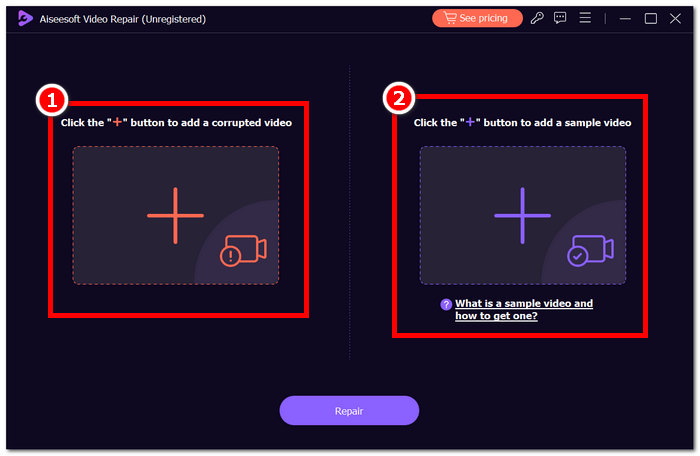
Stap 2. Open Aiseesoft Video Repair en voeg de video toe waarbij foutcode 224003 optreedt via het rode +-symbool. Klik op het paarse +-symbool aan de rechterkant om je voorbeeldvideo toe te voegen.
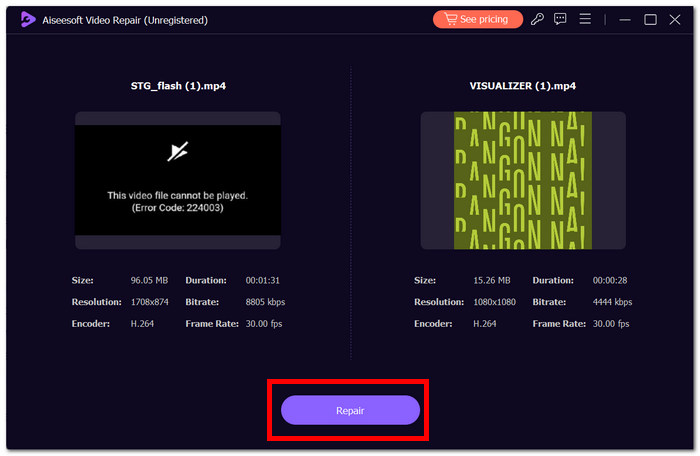
Stap 3. Klik op Repair, en de software zal de video analyseren en repareren.
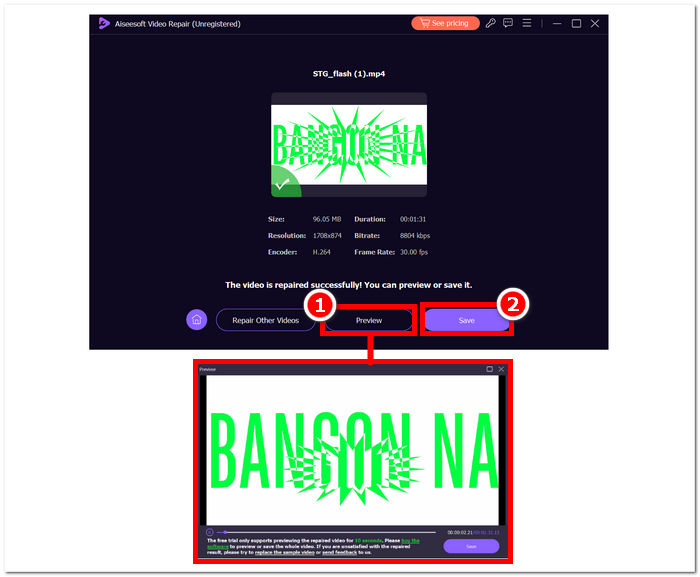
Stap 4. Klik na de reparatie op Preview om het resultaat te controleren. Klik op Save om de gerepareerde video te downloaden en open deze met je mediaspeler om te controleren of fout 224003 is verholpen.
Aanvullende tips:
◆ Bewaar een back-up van het originele videobestand voordat u reparaties uitvoert.
◆ Zorg ervoor dat u de nieuwste versie van Aiseesoft Video Repair gebruikt voor optimale prestaties.
Door deze stapsgewijze instructies nauwgezet te volgen, kunt u Aiseesoft Video Repair efficiënt gebruiken om Fout 224003 aan te pakken en te elimineren, waardoor uw videobestanden weer functioneel en plezierig worden. Vergeet niet om de gerepareerde video op de gewenste locatie op te slaan en ononderbroken te kijken zonder de frustratie van Fout 224003. Als u tijdens het proces tegen problemen aanloopt, raadpleeg dan de documentatie van Aiseesoft Video Repair of zoek hulp bij hun ondersteuningsbronnen voor verdere begeleiding.
Deel 3. Veelgestelde vragen over foutcode 224003
Waarom blijft Firefox videofoutcode 224003 melden?
Firefox-videofout 224003 kan optreden als gevolg van problemen met de netwerkverbinding, verschillen in browserinstellingen of incompatibiliteit met de video-inhoud. Om deze fout op te lossen, moet u eerst de stabiliteit van uw internetverbinding verifiëren, ervoor zorgen dat uw browser up-to-date is en de cache en cookies van uw browser wissen. Bovendien kan het tijdelijk verwijderen van extensies uit uw browser helpen compatibiliteitsconflicten op te sporen en op te lossen, waardoor mogelijk fout 224003 tijdens het afspelen van video wordt geëlimineerd.
Verlaagt het repareren van het videobestand de videokwaliteit?
Het repareren van een videobestand kan worden bereikt zonder dat dit ten koste gaat van de kwaliteit, mits correct uitgevoerd. Dit proces pakt voornamelijk problemen aan zoals corruptie of opmaakfouten in het bestand. Het is van cruciaal belang om te vertrouwen op vertrouwde videoreparatietools en, als voorzorgsmaatregel, een back-up te maken van het originele videobestand voordat u reparatieprocedures start.
Kun je een online videofoutcode oplossen?
Om een online videofoutcode zoals 224003 op te lossen, vernieuwt u de pagina, controleert u uw internetverbinding en werkt u uw browser bij. Als het probleem zich blijft voordoen, kunt u overwegen een andere browser te proberen voor compatibiliteit. Als al het andere niet lukt, neem dan contact op met de ondersteunings- of communityforums van het platform voor hulp bij het oplossen van de fout en het herstellen van een naadloze videoweergave.
Gevolgtrekking
Foutcode 224003 kan erg vervelend zijn, maar met de juiste informatie en probleemoplossingsstappen kun je hem overwinnen. Door mogelijke oorzaken zoals netwerkproblemen, browsercompatibiliteit en verouderde software op te sporen en te verhelpen, kun je deze fout eenvoudig oplossen en weer genieten van een vlekkeloze digitale ervaring. Als je foutcode 224003 opnieuw tegenkomt, raadpleeg dan onze handleiding voor een oplossing stap voor stap. Met deze inzichten behoren je technische frustraties tot het verleden en kun je weer ongestoord van je digitale activiteiten genieten.
-
 Wat is de 0xc10100bf-fout in video en hoe u dit kunt oplossen
 Wordt uw video niet afgespeeld vanwege fout 0xc10100bf en zoekt u naar manieren om dit probleem op te lossen? In dit artikel leest u wat het is en hoe u het kunt oplossen.
-
 Snelle oplossingen om te verhelpen Kan videofout 150 niet afspelen
 Bent u tijdens het kijken naar video's ooit het frustrerende onvermogen tegengekomen om videofout 150 af te spelen? Maak je geen zorgen, want wij vertellen je hoe je het probleem kunt oplossen.
-
 [Gedetailleerde gids] Hoe u Google Drive-video kunt repareren die niet op de computer wordt afgespeeld
 Video's op Google Drive worden niet afgespeeld met de foutmelding 'Er is een probleem opgetreden bij het afspelen van deze video'. Het kan worden veroorzaakt door Google Drive zelf of de Chrome-problemen. Dit artikel introduceert 6 oplossingen in detail.
