


 Video Converter Ultimate
 Scherm opnemer
 Videoreparatie
 Beveiligde download
Een uitgebreide handleiding voor het maken van een beltoon van een spraakmemo
Veel ontwikkelaars hebben echter software gemaakt om beltonen te maken. Dit betekent dat je vrij bent om fragmenten van je favoriete nummers te gebruiken of je stem op te nemen als beltoon. In dit artikel leggen we uit hoe je van een spraakmemo een beltoon maakt. We hopen dat je hiermee het antwoord vindt dat je zoekt.

Deel 1. De beste manier om van een spraakmemo een beltoon te maken
Als je ook op zoek bent naar een volwaardige beltoonmaker, kies dan voor de door FVC geselecteerde Video Converter Ultimate, de marktleider zelfs in de sterk concurrerende wereld van multimediabewerkingssoftware. Verschillende modellen smartphones kunnen verschillende beltoonformaten ondersteunen, maar dit is geen probleem met Video Converter Ultimate. Zoals je uit de naam al kunt opmaken, is de kernfunctie het converteren van bestandsformaten. Dus ongeacht in welk formaat je spraakmemo’s opneemt of downloadt, je kunt ze converteren zodat ze overeenkomen met het formaat dat je telefoon ondersteunt. Je kunt het zelfs gebruiken om rechtstreeks audio uit video’s te halen, wat een breed scala aan mogelijkheden voor beltonen opent. Je kunt ook het volume, de track, de lengte, enzovoort van de doelaudio wijzigen. Met Video Converter Ultimate is het naar wens maken van een beltoon van een spraakmemo niet langer een droom.
Gratis downloadVoor Windows 7 of nieuwerVeilige download
Gratis downloadVoor MacOS 10.7 of nieuwerVeilige download
Hier leggen we u uit hoe u uw opgenomen of gedownloade spraakmemo's kunt bewerken, zodat u ze als beltoon kunt gebruiken.
Stap 1. Download en installeer Video Converter Ultimate op je computer. Start het vervolgens op je bureaublad.
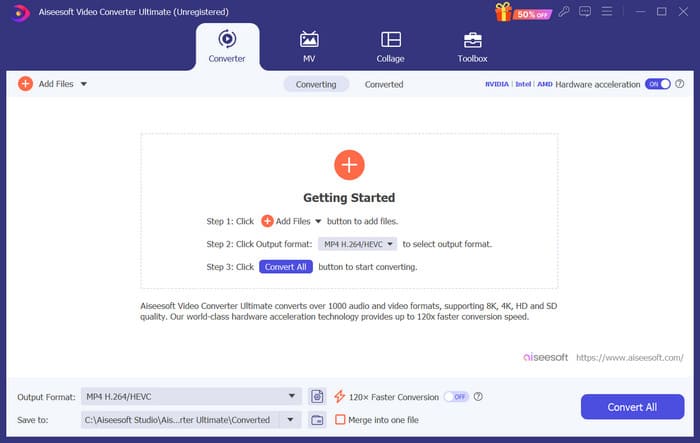
Stap 2. Klik op Bestanden toevoegen om de audio te uploaden die je wilt bewerken.
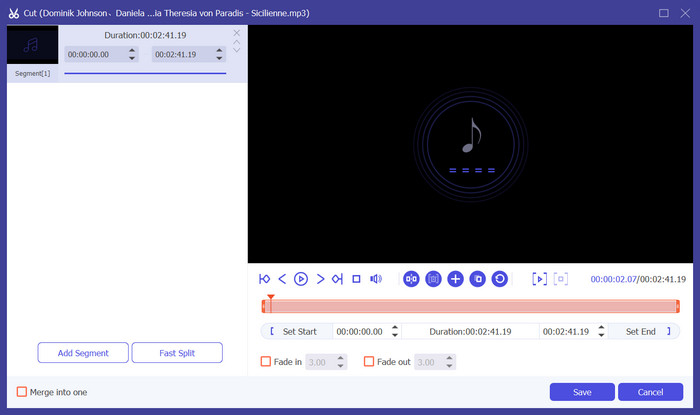
Stap 3. Klik op Knippen om de audio bij te snijden. Je kunt de lengte van het bestand aanpassen. Als je klaar bent met het bijsnijden, klik je op Opslaan.
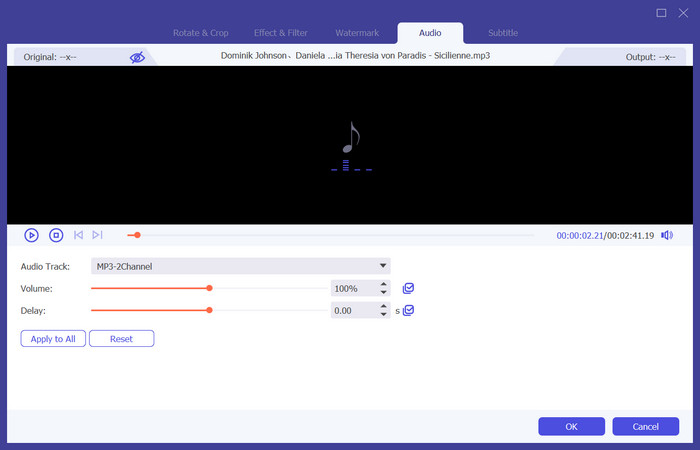
Stap 4. Klik op Bewerken om het volume en het audiokanaal van je spraakmemo’s te wijzigen. In het pop-upvenster kun je de gewenste aanpassingen doen. Wanneer je het bewerken hebt voltooid, klik je op OK.
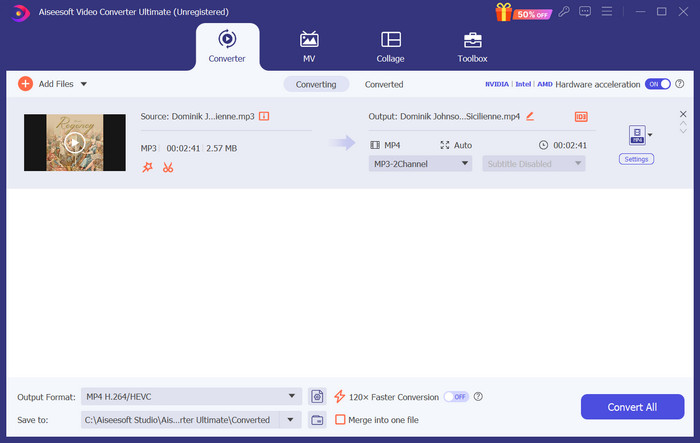
Stap 5. Als je het formaat van je bestand moet wijzigen, open dan het uitklapmenu naast Uitvoerformaat. Hier kun je het uitvoerformaat voor je audio kiezen.
Stap 6. Wanneer je de bewerkte beltoon wilt exporteren, klik je op Alles converteren.
Deel 2. Hoe maak je van een spraakmemo een beltoon op de iPhone
We raden GarageBand aan als u een voice memo-beltoon wilt maken op uw iPhone. Dit is een applicatie die is ontwikkeld door Apple. Gebruikers kunnen het gebruiken om muziek te maken op hun iOS-apparaten. Het heeft veel tools voor muziekproductie, opnemen, bewerken en mixen. GarageBand kan ook worden geïntegreerd met andere Apple-software. Dat betekent dat we eenvoudig projecten kunnen overzetten tussen GarageBand en andere software voor verdere bewerking. Deze app is populair onder professionele gebruikers en beginners vanwege de gebruiksvriendelijke interface, uitgebreide functies en toegankelijkheid. Alle instellingen kunnen op de telefoon worden gedaan zonder de hulp van een ander apparaat.
Dit is wat u moet doen om een spraakmemo om te zetten in een beltoon.
Stap 1. Voordat je je beltonen instelt, moet je in de Spraakmemo-app op je iPhone een spraakmemo selecteren.
Stap 2. Nadat je de gewenste spraakmemo hebt gekozen, tik je op het pictogram met de drie puntjes. Kies Bewaar in Bestanden en tik nogmaals op Bewaar om je handeling te bevestigen.
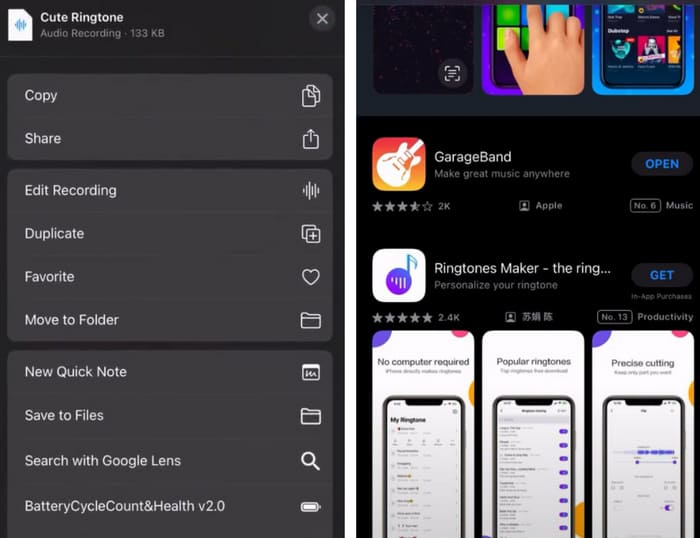
Stap 3. Open GarageBand op je iPhone en tik op Project.
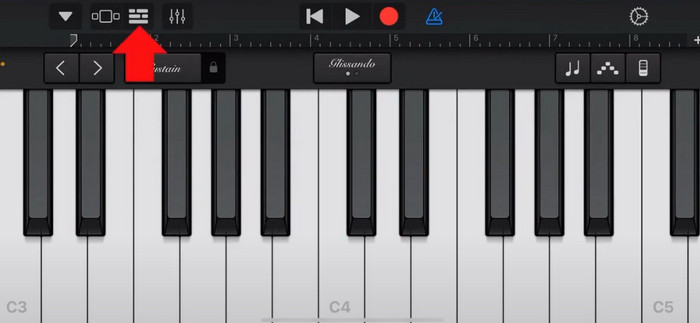
Stap 4. Kies Loop > Bestanden. Tik daarna op Items bladeren vanuit de Bestanden-app om je gewenste spraakmemo te selecteren.
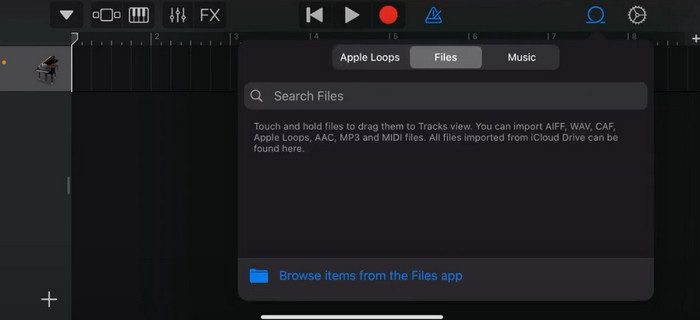
Stap 5. Sleep en zet het bestand neer op de tijdlijn.
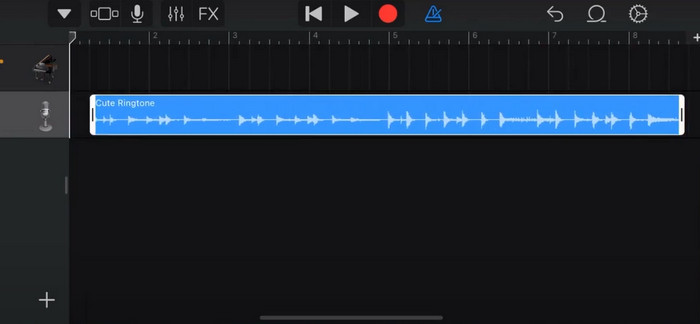
Stap 6. Schakel de metronoom uit en tik op het pijltje naar beneden > Mijn nummers.
Stap 7. Tik op de clip en houd vast, kies vervolgens Delen.
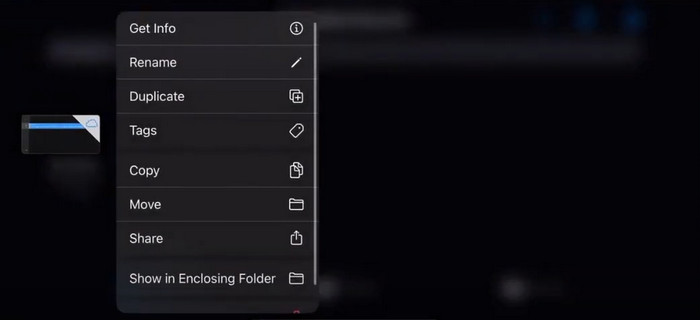
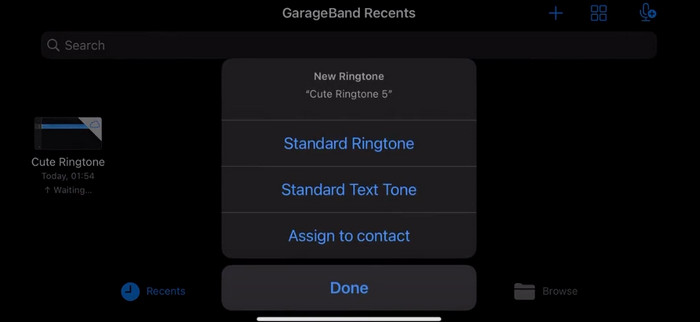
Stap 8. Kies Beltoon uit alle opties en druk op Exporteren. Tik ten slotte op Gebruik geluid als > Standaardbeltoon. Zo heb je met succes een beltoon gemaakt van een spraakmemo.
Deel 3. Hoe maak je van een stemopname een beltoon op Android
Als u een Android-telefoon gebruikt en de opgenomen muziek wilt omzetten in een beltoon, kunt u dit rechtstreeks doen in de app Instellingen van uw telefoon. De procedure is heel eenvoudig en u hoeft hiervoor geen software te downloaden. Als u echter uw opgenomen audio wilt wijzigen, kunt u kiezen voor een professionele audio- en videobewerkingssoftware zoals FVC-picked Video Converter Ultimate.
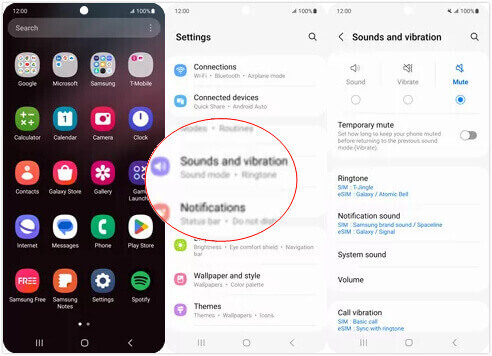
Vervolgens laten we zien hoe je op Android een beltoon van een spraakopname maakt. In dit deel gebruiken we een Samsung-smartphone als voorbeeld. Voordat je begint, moet je ervoor zorgen dat je het opnamebestand hebt opgeslagen in de app Spraakrecorder.
Stap 1. Open Instellingen op je telefoon en kies Geluiden en trillen.
Stap 2. Zorg ervoor dat Geluid is geselecteerd onder de Geluidsmodus. Kies vervolgens het Meldingsgeluid.
Stap 3. Selecteer het muziekopnamebestand dat je hebt gemaakt. Keer ten slotte terug naar het startscherm om de instellingen toe te passen.
Deel 4. Veelgestelde vragen over het maken van een spraakmemo als beltoon
Welk formaat hebben ringtones voor Android?
Beltonen voor Android-apparaten zijn beschikbaar in verschillende audiobestandsformaten, maar de meest ondersteunde formaten zijn MP3, AAC, M4A, OGG en WAV.
Hoe kan ik een spraakmemo als liedje opslaan op mijn iPhone?
Open de Voice Memos-app op je iPhone en zoek de voice memo die je als nummer wilt opslaan. Tik op de voice memo om deze te openen en druk vervolgens op het deelpictogram om de beschikbare deelopties te bekijken. Je kunt ervoor kiezen om de voice memo op te slaan in de app Bestanden. Daarna kun je een muziekapp op je iPhone openen die het importeren van audiobestanden ondersteunt. Apps zoals GarageBand of Music Memos zijn hiervoor geschikt.
Hoe neem ik audio op op Android Samsung?
Om audio op te nemen op een Android Samsung-apparaat gebruik je de ingebouwde Spraakrecorder. Open deze en tik op Opnemen om te beginnen met opnemen. Zodra je klaar bent met opnemen, kun je het audiobestand opslaan en een naam geven zodat je het later gemakkelijk terugvindt.
Gevolgtrekking
In dit artikel beantwoorden we de vraag hoe je van een spraakmemo een beltoon maakt. We bieden je een van de beste tools voor het bewerken van beltonen: FVC Video Converter Ultimate. Methoden om een spraakmemo in een beltoon te veranderen op iPhone- en Android-telefoons worden beschreven. We bieden ook volledige stapsgewijze instructies voor elk onderdeel, voor het geval je ergens tegenaan loopt.
-
 Top 3 oplossingen voor het comprimeren van WAV-bestanden naar een kleiner formaat
 Als u ook op zoek bent naar manieren om de grootte van WAV-audiobestanden te comprimeren, lees dan onze content. We zullen u kennis laten maken met verschillende tools vanuit drie aspecten.
-
 Uitgebreide handleiding voor audiocompressie in 2024 (stap voor stap)
 Moet u audio comprimeren, maar heeft u hulp nodig bij het uitzoeken waar u moet beginnen? In dit bericht presenteren we de beste keuzes om de bestandsgrootte van je tracks te verkleinen.
-
 Effectieve audiocompressoren voor offline en online gebruikers
 Heeft u problemen met grote audiobestanden? Er zijn veel audiobestandscompressoren beschikbaar voor offline en online gebruikers. Bekijk ze hier.
