


 Video Converter Ultimate
 Scherm opnemer
 Videoreparatie
 Beveiligde download
3 gratis manieren om FLV naar MPG te converteren
MPG, standardized by Moving Picture Experts Group, is a common video format that contains MPEG-1 or MPEG-2 video formats, and audio formats. It can be supported by all computer platforms, including Windows and macOS. Do you know how to convert FLV to MPG?

Many video converters offered on the market that can help you convert FLV to MPG with ease. This post will introduce you with 3 great ones from them to change your FLV files to MPG for free.
Deel 1. Hoe FLV gratis naar MPG te converteren?
Free converter will always be your first choice when you want to convert FLV to MPEG. Here at the first part, we like to introduce you with an easy-to-use Free FLV Converter to make the video conversion from FLV to MPG. It highly supports any frequently-used video and audio formats including FLV, MPG, MKV, MP4, MOV, WMV, WAV, AAC, MP3, M4A, FLAC, and more. It enables you to convert FLV to MPG without losing quality.

- Converteer elke FLV naar MPG, MP4, MOV, AVI, MKV, MP3, AAC en meer.
- Bied verschillende thema's aan om het FLV-bestand te bewerken en aan te passen.
- Geavanceerde multi-core CPU's en GPU-versnellingen om FLV snel naar MPG te converteren.
- Ondersteuning iPhone 12/11/XS/XR/X/8/7, iPad Pro, Samsung Galaxy S21, HUAWEI, SONY, LG, enz.
- Converteer een of meer FLV-bestanden zonder enig verlies aan beeld- of geluidskwaliteit.
Gratis downloadenVoor Windows 7 of hogerVeilige download
Gratis downloadenVoor macOS 10.7 of hogerVeilige download
Step 1. This FLV converter allows you to convert FLV to MPG on both Windows 10/8/7 PC and Mac. You can pick a right version based on your system and then free install it on your computer.
Step 2. Open this FLV to MPG converter and then click Add Files to load your FLV file(s).

Step 3. Choose MPEG as the target format from the drop-down list of Output format. You can click the Settings icon next to the output format to custom more profile settings. During this step, you are also able to select a suitable output folder for the converted MPG file.
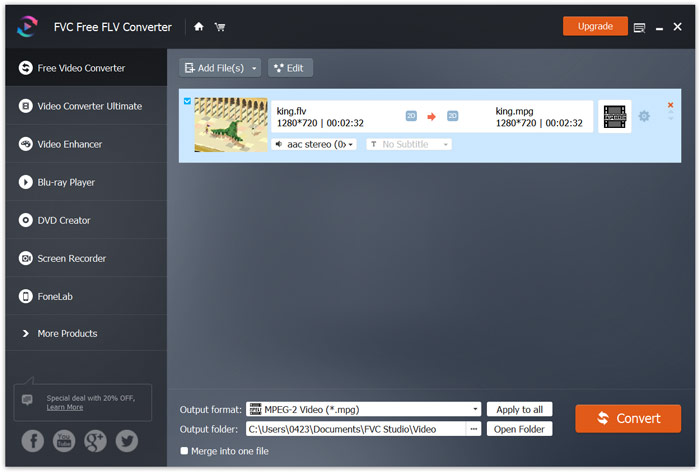
Step 4. As it mentioned above, this free FLV to MPG converter is equipped with a list of editing features. So before the conversion, you can use them to edit your video. After that, you can click on the Convert button to start this free FLV to MPG converting.
Deel 2. Hoe FLV online naar MPG te veranderen?
When you Google how to convert FLV to MPG, you can see many online converters from the top 20 searching results. Here we strongly recommend the popular Free Online Video Converter for you. It is compatible with many popular video and audio formats. It has no sign in requirement and file size limit. You can directly go to this online FLV to MPG converter site and start the conversion.
Step 1. Open your browser like IE, Chrome, Firefox, or Safari, and go to this Online FLV to MPG converter page.
Download de desktopversie om bestanden in batches te converteren.
Step 2. Click the Add Files to Convert and then Download button to quickly install a launcher for the FLV to MPEG conversion. When the launcher is ready, you can browse and load your FLV file through the pop-up window.

Step 3. Now you will be guided to the converter window. Some popular video formats like MP4, MPG, MOV, AVI, FLV, MKV, WMV, and more are listed there. Set MPG as the target format.
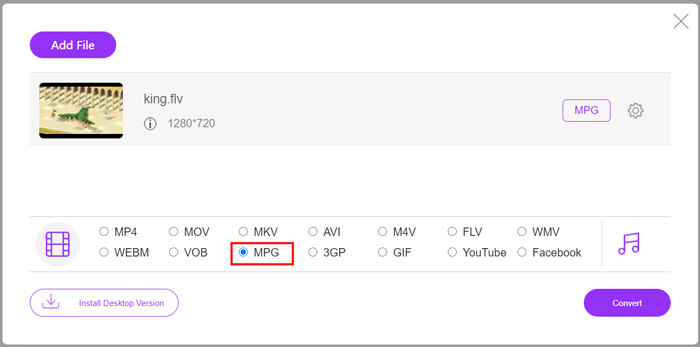
Step 4. For more video and audio settings, you can click the Settings icon next to the output format. Then click Convert button to start the video conversion from FLV to MPG.
Deel 3. Hoe FLV gratis naar MPG te converteren met Aconvert
Aconvert is another popular online video, audio, document, image and PDF converter. As an all-featured file converter, it allows you to change your FLV files to MPG online free. The following guide will show you how to use it.
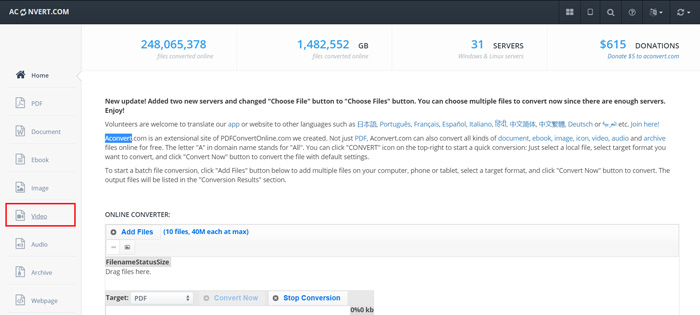
Step 1. Search for and go to the official site of Aconvert. When you get there, click Video on the left panel. Then you will be taken to the Convert video online page.
Step 2. Click the Select File button to browse and upload your FLV file. Then choose MPG as the output format. For more options, you can click Options and select Change size, bitrate or frame rate.
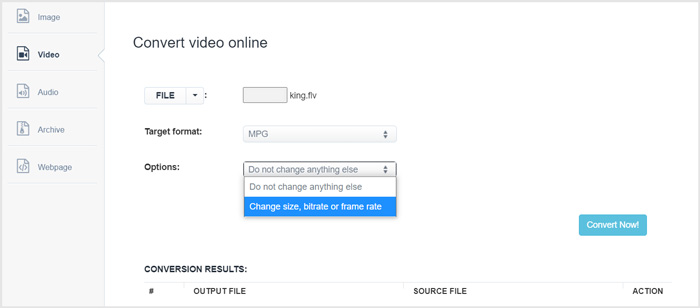
Step 3. Click Convert Now button to start the online FLV to MPG conversion. This online FLV to MPG converter will start uploading and converting your file. Compared to the online video converter above, it will take more time to complete the whole process, be patient.
FLV versus MPG
Adobe Flash Player gebruikte FLV om video-inhoud zoals films en tv-programma's te leveren. Tegenwoordig ontwikkelt Adobe de speler niet langer en raadt gebruikers aan deze om veiligheidsredenen te verwijderen. U kunt de FLV-indeling echter nog steeds gebruiken in veel niet-Adobe/Macromedia-programma's.
MPG, gemaakt door de Moving Picture Experts Group (MPEG), is een veelgebruikt digitaal videoformaat om video-, audio- en metadata-info op te slaan. Het is heel handig bij het maken van films om te delen op internet. Die bestanden in MPG bevatten meestal MPEG-1 of MPEG-2 video/audio compressie.
Deel 4. Veelgestelde vragen over het converteren van FLV naar MPG
Vraag 1. Wat zijn de nadelen van FLV?
Ten eerste is het tijdrovend en duur om flash-inhoud te maken. FLV-bestanden kunnen niet worden herkend door spiders van zoekmachines. Ze worden dus niet toegevoegd aan de optimalisatie van een site. In dat geval heb je langere wachttijden nodig om toegang te krijgen tot een webpagina met flash.
Vraag 2. Kan ik FLV-bestanden afspelen in Windows Media Player?
Ja. Windows Media Player kan FLV-bestanden openen. Maar u moet de CCCP-codec of andere noodzakelijke codecs downloaden en installeren om FLV-bestanden af te spelen.
Vraag 3. Wat is de beste FLV-speler?
VLC Media Player can be the best player for you to play FLV files on either a Windows PC or Mac. Surely there are many other video players offered on the internet that can help you view FLV files. Get more FLV players here.
Gevolgtrekking
We have mainly talked about how to convert FLV to MPG in this post. 3 free video converters are recommended for you to convert your FLV files. If you have any better FLV converting method, please share it in the comment with other readers.
-
 MP4 naar MPEG: Top 4 manieren om MP4 naar MPEG te converteren (gratis)
 Dit bericht is de stapsgewijze handleiding om MP4 naar MPEG te converteren. U kunt de top 4 gratis videoconverters gebruiken om MP4 naar MPEG-1 of MPEG-2 te veranderen zoals u wilt.
-
 Hoe MPEG-4-bestanden online te comprimeren - Geen download, geen watermerk
 Heeft u niet genoeg bestandsopslag om al uw MPEG-4-bestanden te bewaren? Hier zijn enkele oplossingen die u kunnen helpen uw videobestanden kleiner te maken.
-
 Top 4 gratis manieren om FLV-video's naar MP4 op desktop en online te converteren
 Deze gids deelt vier gratis methoden om uw FLV-videobestanden naar MP4-indeling te converteren op Windows 10/8/7 / XP en Mac OS X, zodat u op elk apparaat van de video's kunt genieten.

