


 Video Converter Ultimate
 Scherm opnemer
 Videoreparatie
 Beveiligde download
Een complete gids over het rippen van audio van dvd met 4 assistenten
Koop je nog steeds dvd’s of geniet je van films en muziek op je dvd‑speler thuis? Voor de jeugd van tegenwoordig wordt het dvd‑formaat langzaam onbekend en ver weg. Mensen kijken liever online video’s op streamingplatforms of downloaden afleveringen naar het geheugen van hun apparaat om er op hun gemak van te genieten. Steeds minder mensen gaan nog naar audio‑ en videowinkels. Maar dat betekent niet dat dvd’s niet langer nodig of wijdverspreid zijn. Veel film- en muziekstudio’s kiezen er nog steeds voor hun content van de hoogste kwaliteit op dvd uit te brengen. Ook zijn er nog altijd film- en muziekliefhebbers die dvd’s verzamelen met hoogwaardige video- en audiobestanden. Zoals we allemaal weten, kunnen we de inhoud op een schijf alleen openen met een speciale speler of optische drive. Als we op elk moment en overal van de muziek op de schijf willen genieten, moeten we een professioneel hulpmiddel gebruiken om de audio van de dvd te rippen. Hoe doen we dit dus, en welke tool moeten we kiezen? In dit artikel bieden we je de meest gedetailleerde gids.

Deel 1. Audio van dvd strippen
Als u audio van een dvd wilt rippen, kunt u het beste een professionele video-editor gebruiken om de bestanden van de dvd te exporteren en te converteren naar een digitaal audioformaat. Wij raden aan een professionele videoconverter zoals AnyMP4 DVD Ripper te gebruiken. Deze ondersteunt het converteren van video naar meer dan 500 formaten met een ripsnelheid van 50x, meer dan 1000 formaten, en kan geconverteerde bestanden exporteren met een 30x hogere snelheid. Het kan elke dvd uit verschillende regio's verliesloos rippen, dus u hoeft zich geen zorgen te maken over kwaliteitsverlies. De knoppen en functies van AnyMP4 DVD Ripper zijn in één oogopslag duidelijk en het is zeer handig om geluid te rippen. In dit gedeelte vindt u ook de volledige bedieningsprocedures.
Gratis downloadenVoor Windows 7 of hogerVeilig downloaden
Gratis downloadenVoor macOS 10.7 of hogerVeilig downloaden
Om audio van een DVD te halen/strippen met FVC Video Converter Ultimate, moet u het volgende doen.
Stap 1. Download en installeer eerst de tool op je apparaat en plaats je dvd in het schijfstation.
Gratis downloadenVoor Windows 7 of hogerVeilig downloaden
Gratis downloadenVoor macOS 10.7 of hogerVeilig downloaden
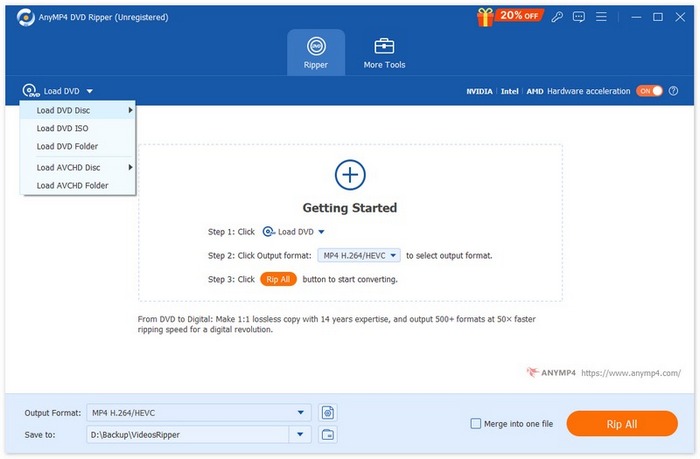
Stap 2. Hij zal je dvd automatisch detecteren en analyseren. Zo niet, dan kun je op de knop “Load DVD” klikken om de dvd handmatig toe te voegen.
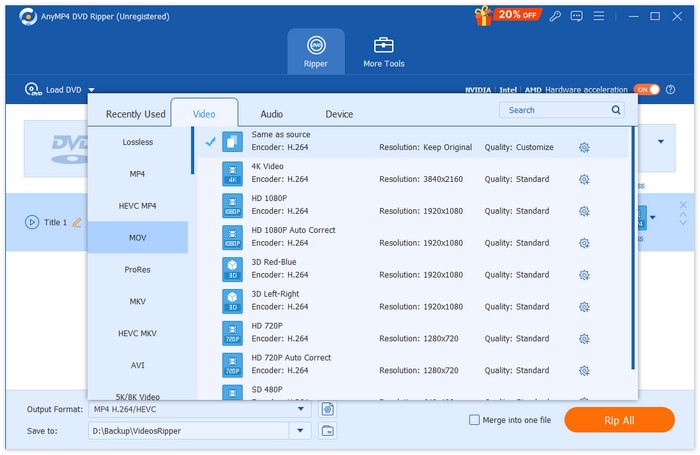
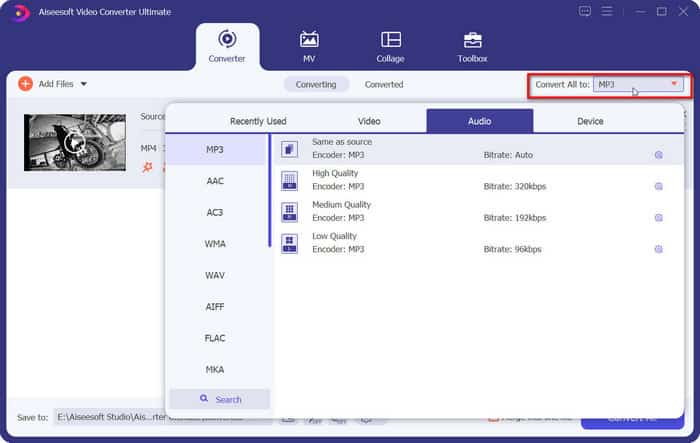
Stap 3. Klik daarna op de knop "Output Format" hieronder en kies een gewenst uitvoeraudioformaat onder het tabblad “Audio”.
Stap 4. Je kunt je audiotrack ook inkorten en samenvoegen volgens je voorkeuren. Als je klaar bent, kun je op de knop “Rip All” klikken om de audiotrack van je dvd te extraheren.
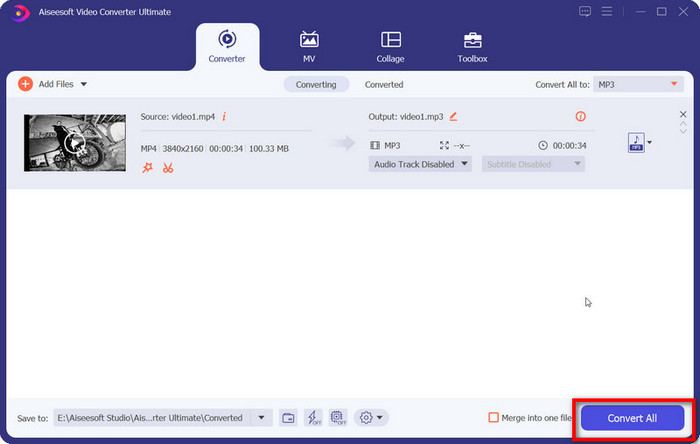
Als je de audio moet bewerken, klik je op Cut of Edit.
Stap 5. Klik ten slotte op Convert All om je audio te exporteren.
Deel 2. Soundtrack van dvd extraheren
Als je gratis software zoekt om muziek van dvd's te rippen, is VLC Media Player precies wat je nodig hebt. De kernfunctie is het afspelen van video's, muziek, enz., maar het is ook compatibel met het dvd-formaat en kan worden gebruikt om de content op dvd's af te spelen. Bovendien stelt deze platformonafhankelijke tool gebruikers in staat om video- of audiobestanden van dvd's te extraheren. De interface bevat ook enkele eenvoudige audiobewerkingstools. VLC Media Player is zeer compatibel, waardoor Windows- en Mac-gebruikers het als ripper kunnen gebruiken.
Dit moet u doen om de soundtrack/muziek van de dvd te halen met VLC Media Player.
Stap 1. Download en installeer de nieuwste versie van VLC Media Player op je computer.
Stap 2. Plaats je dvd in het station van je apparaat.
Stap 3. Start VLC Media Player en klik bovenaan de interface op Media > Convert/Save.
Stap 4. Er wordt een venster Open Media geopend. Ga naar het tabblad Disc.
Stap 5. Vink de optie No disc menus aan en selecteer je dvd onder de sectie Disc device.
Stap 6. Klik onderaan op Convert/Save.
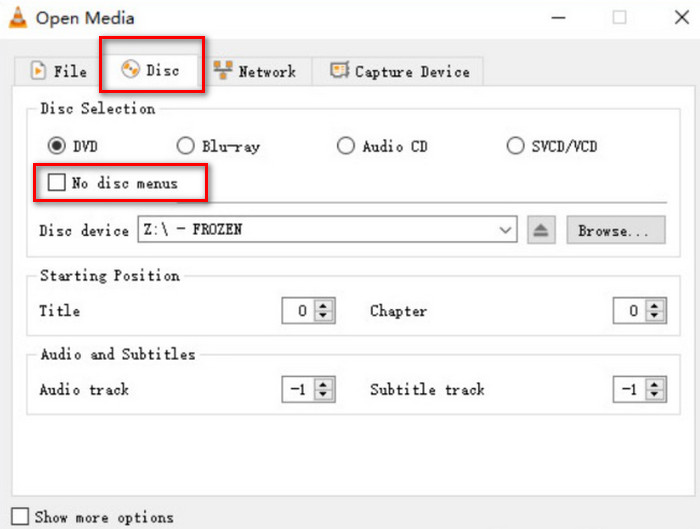
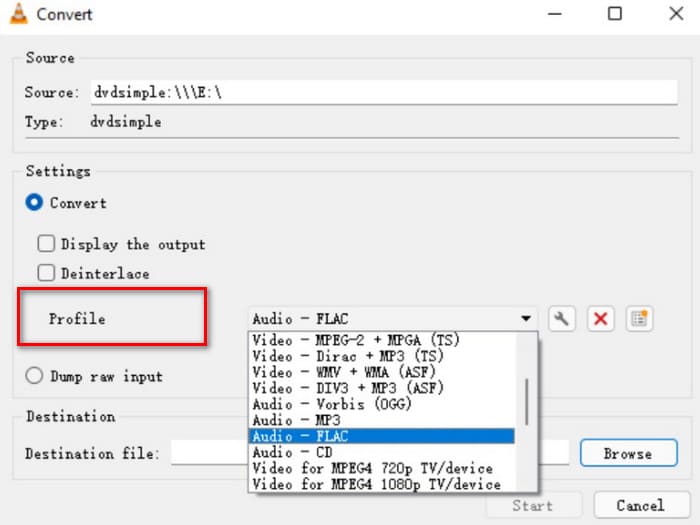
Stap 7. Ga naar het venster Convert en kies Profile. Selecteer een audioformaat voor je geripte bestand en klik daarna op Start.
Deel 3. Liedjes van dvd rippen
We raden een hoogwaardige dvd-ripper genaamd XMedia Recode aan als je een Windows-computer hebt. Deze is ontworpen voor Windows-computers en de service is volledig gratis. Naast het helpen bij het extraheren van lossless audio van dvd's, kun je met dit platform ook verschillende parameters aanpassen, zoals kanalen, bitsnelheid, samplefrequentie, enzovoort. Zo kun je muziek van de beste kwaliteit beluisteren op verschillende apparaten.
Dit is wat u moet doen om audio van een DVD te rippen met XMedia Recode.
Stap 1. Download de gewenste versie van XMedia Recode op de computer.
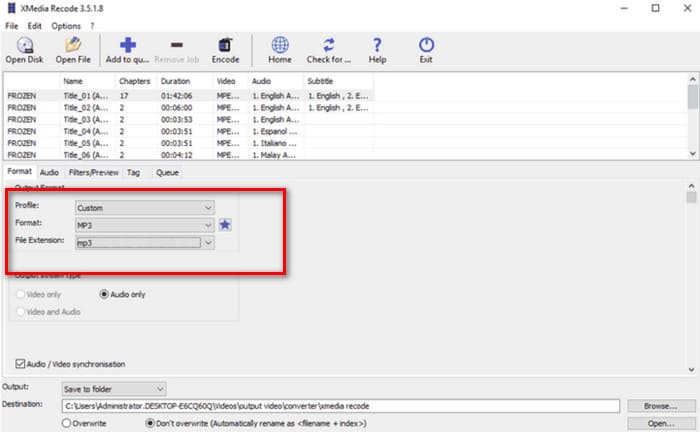
Stap 2. Voer je dvd in en klik op Open disc om hem te laden.
Stap 3. Ga naar het tabblad Format, schakel alleen Audio in en kies een digitaal audioformaat.
Stap 4. Selecteer onder Destination een map om je audio op te slaan. Klik ten slotte op Add to queue > Encode.
Deel 4. Hoe audio van dvd te rippen
Naast VLC Media Player is er nog een uitstekende optie onder de gratis tools: HandBrake. Het is een open‑source audio- en videobewerker waarvan het grootste voordeel de brede compatibiliteit en volledig gratis service is. Je kunt HandBrake gebruiken om bestanden van dvd’s te exporteren en ze te converteren naar verschillende gangbare formaten, zoals MKV en MP4. Je kunt het hele proces aanpassen aan je eigen bedieningsgewoonten, wat het zeer gebruiksvriendelijk maakt. De paginastijl van HandBrake is wat traditioneler, maar het werkt zeer vloeiend.
Als u audio van een DVD wilt afspelen met HandBrake, volgt u de onderstaande handleiding.
Stap 1. Download HandBrake op je computer via de officiële website.
Stap 2. Plaats je dvd in het aangesloten station. HandBrake zal deze automatisch detecteren. Alle bestanden worden op het scherm weergegeven. Je kunt de kanalen, audiocodec enzovoort aanpassen.
Stap 3. Ga naar Summary > Format om een uitvoerformaat te selecteren. Klik op Browse om een opslagpad te kiezen voor je geripte audio.
Stap 4. Klik ten slotte op Start Encode om het proces te starten.

Deel 5. Veelgestelde vragen over het rippen van audio van dvd
Kan ik alleen de audio van een DVD rippen?
Natuurlijk kan dat. Je kunt het bestand eerst rippen en bij het exporteren een audioformaat selecteren. Veel rippers bieden gebruikers ook de mogelijkheid om alleen het te exporteren audiobestand te selecteren.
Wat is de beste software om audio van een dvd te rippen?
De FVC Video Converter Ultimate is in alle opzichten de beste keuze. Hij is niet alleen extreem veelzijdig, maar ook extreem gebruiksvriendelijk.
Is het legaal om audio-dvd's te rippen?
Je kunt de dvd rippen en ervan genieten met een dvd‑speler, en deze handeling is probleemloos. Je mag de inhoud echter niet voor commerciële doeleinden gebruiken.
Gevolgtrekking
In dit artikel introduceren we vier tools met verschillende functies waarmee je succesvol audio van dvd's kunt rippen. Ze zijn allemaal relatief eenvoudig te gebruiken en geschikt voor alle gebruikersgroepen. We hebben ook een complete stapsgewijze handleiding toegevoegd, zodat je ze gemakkelijk kunt volgen. Voor de meest uitgebreide service raden we AnyMP4 DVD Ripper aan.
Gratis downloadenVoor Windows 7 of hogerVeilig downloaden
Gratis downloadenVoor macOS 10.7 of hogerVeilig downloaden
-
 3 methoden om Video_TS naar dvd te branden op Windows en Mac
 Heb je het TS-bestand bij de hand en wil je het op dvd opslaan? Lees dan deze handleiding. We leggen je gedetailleerd uit hoe je Video_TS op dvd brandt op Windows- of Mac-computers.
-
 Hoe u gemakkelijk een watermerk van Wondershare DVD Creator kunt verwijderen
 Dit artikel bevat informatie over het verwijderen van het watermerk van Wondershare DVD Creator. Om alle informatie te krijgen die je nodig hebt, is het een must om dit te lezen.
-
 Diepgaande evaluatie en analyse van My Bloody Valentine 3D
 Ben je op zoek naar een uitgebreide My Bloody Valentine 3D review? Bekijk dit artikel waarin elk aspect van de film wordt ontrafeld.
